Spending time alone can be both a blessing and a curse. In a world that constantly demands social interaction, solitude offers a much-needed escape. However, when solitude stretches beyond a healthy balance, it starts to shape your habits, perceptions, and even the way you engage with the world. The effects of prolonged isolation are subtle at first, but over time, they become deeply ingrained in your daily life.
Psychologists have long debated the impact of solitude on the human mind. While some argue that it fosters creativity and self-awareness, others warn that excessive isolation can lead to social awkwardness and even distort one’s perception of reality. The mind, when left to its own devices for too long, creates narratives that may not always align with the outside world. As a result, habits form—some beneficial, some not—altering the way you dress, communicate, and even perceive other people.
Although spending time alone is often necessary for self-discovery and personal growth, there are inevitable consequences to prolonged solitude. You might find yourself dressing more casually, feeling uneasy in social settings, or even developing a love-hate relationship with humanity. Some of these effects are amusing, while others hint at deeper psychological shifts. Let’s explore the things that inevitably happen when you spend a lot of time alone.
1 – You get lazy about dressing up (or getting dressed at all).
When your daily routine no longer requires stepping outside, your relationship with clothing begins to change. The need to impress others diminishes, and suddenly, wearing sweatpants (or staying in pajamas all day) feels perfectly acceptable. Fashion, once an expression of self-identity, takes a backseat to comfort and convenience. Without external validation, you might wonder why you ever spent so much time coordinating outfits or ironing shirts.
This shift isn’t necessarily a bad thing—psychologists suggest that dressing down can be a sign of confidence in one’s own presence rather than seeking approval from others. However, it can also lead to a slippery slope where self-care gets neglected. As Mark Twain once quipped, “Clothes make the man. Naked people have little or no influence on society.” While extreme, his words highlight the reality that personal presentation shapes both self-perception and how others perceive us.
2 – You start to feel awkward when you do actually have to be social.
After long periods of solitude, social interactions can feel foreign. You might find yourself struggling to maintain eye contact, second-guessing your words, or feeling exhausted after even brief conversations. The once-familiar rhythm of human interaction now feels like a performance where you’re out of practice.
This phenomenon is well-documented in psychology. According to Dr. John Cacioppo, a leading researcher on loneliness, extended isolation can make the brain hypersensitive to social cues, leading to increased anxiety in social situations. The longer you go without practice, the harder it becomes to re-enter the social world seamlessly. What was once effortless now requires a conscious effort, reinforcing the cycle of withdrawal.
3 – You convince yourself that people are the worst and that you don’t really like any of them.
Spending too much time alone can lead to a skewed perspective on human nature. Without regular social interactions to balance your views, negative experiences and past grievances can take center stage. It’s easy to romanticize solitude when the alternative is dealing with people’s flaws, misunderstandings, and conflicts.
Philosopher Jean-Paul Sartre famously said, “Hell is other people.” While this sentiment resonates with anyone who has experienced frustration in relationships, it becomes problematic when isolation turns misanthropy into a personal philosophy. Human connection is essential for mental well-being, and while people can be challenging, they also bring joy, learning, and emotional depth that solitude alone cannot provide.
4 – You start talking to yourself a lot more (and maybe even answering).
It starts innocently enough—a stray comment here and there as you navigate your day. But soon, you find yourself engaging in full-blown conversations, debating ideas, and even laughing at your own jokes. Talking to oneself is actually a common habit, but prolonged isolation can amplify it, making external dialogue feel less necessary.
Cognitive psychologist Dr. Laura Ann Petitto explains that self-talk can serve as a mechanism for problem-solving and self-regulation. However, excessive internal dialogue in isolation can also create an echo chamber where one’s thoughts go unchallenged, reinforcing certain beliefs without external input. What begins as harmless muttering can eventually shape the way you interact with the world.
5 – You spend a lot of time online. Like, a lot.
When human interaction becomes scarce, the internet often steps in to fill the void. Social media, forums, and streaming services become the primary means of connection and entertainment. While online engagement provides a sense of interaction, it lacks the depth and spontaneity of face-to-face communication.
Excessive screen time can also have psychological consequences. Studies have shown that too much digital interaction can lead to increased anxiety and a distorted sense of reality. Dr. Sherry Turkle, author of Alone Together, argues that while technology connects us, it can also create an illusion of companionship that ultimately deepens loneliness.
6 – You get a bit too comfortable with being gross.
Without external accountability, personal hygiene can take a hit. Skipping showers, neglecting grooming, and letting dishes pile up become easier when there’s no one around to notice. While this isn’t true for everyone, isolation often lowers the motivation to maintain daily routines.
This phenomenon is tied to the psychology of external validation. When no one is around to witness our habits, the pressure to conform to social norms decreases. However, as philosopher Aristotle once noted, “We are what we repeatedly do.” Neglecting self-care, even in solitude, can have a lasting impact on self-esteem and overall well-being.
7 – You get bored.
Even the most introverted person eventually runs out of things to do. At first, solitude feels liberating, but without structure, boredom sets in. This can lead to a cycle of mindless scrolling, endless TV marathons, or other passive activities that do little to engage the mind.
Research suggests that boredom can be a double-edged sword. While it can foster creativity and self-reflection, chronic boredom can also lead to feelings of restlessness and dissatisfaction. Psychologist Dr. Sandi Mann describes boredom as “the root of creativity,” but only when channeled productively.
8 – You feel really accomplished for getting through all those books/TV shows/etc.
One of the perks of solitude is the ability to indulge in hobbies without interruption. Books, TV shows, and creative projects become immersive escapes, providing a sense of productivity even when daily life feels monotonous.
Engaging deeply with art, literature, or film can be enriching, but it can also become an avoidance mechanism. Philosopher Seneca warned against mistaking passive consumption for genuine intellectual growth. Balance is key—using solitude to learn and create rather than just consume.
9 – You start feeling a bit lonely.
Even those who cherish solitude eventually experience loneliness. The absence of shared experiences and spontaneous conversation can lead to an underlying sense of emptiness. This isn’t always obvious—it can manifest as irritability, fatigue, or an unexplained longing for connection.
Dr. Vivek Murthy, former U.S. Surgeon General, describes loneliness as an epidemic that affects both physical and mental health. Social bonds are fundamental to human well-being, and prolonged isolation can lead to anxiety, depression, and even a weakened immune system.
10 – You grow comfortable in your own skin.
Despite the challenges of prolonged solitude, one undeniable benefit is self-acceptance. When alone, you’re free from societal pressures, allowing you to explore your thoughts, interests, and emotions without external influence. This period of introspection can lead to greater self-awareness and confidence.
Philosopher Søren Kierkegaard believed that solitude was essential for personal growth, stating, “The crowd is untruth.” While human connection is vital, solitude provides the space to cultivate a strong sense of self—something that, when balanced correctly, can lead to a more fulfilling life.
Conclusion
Spending a lot of time alone changes you in subtle yet profound ways. While it fosters self-reflection and independence, it can also lead to habits that make re-engaging with society challenging. The key is balance—learning to enjoy solitude without becoming trapped in isolation. By being mindful of these inevitable changes, one can navigate solitude in a way that enriches rather than limits life.
Affiliate Disclosure: This blog may contain affiliate links, which means I may earn a small commission if you click on the link and make a purchase. This comes at no additional cost to you. I only recommend products or services that I believe will add value to my readers. Your support helps keep this blog running and allows me to continue providing you with quality content. Thank you for your support!
Affiliate Disclosure: This blog may contain affiliate links, which means I may earn a small commission if you click on the link and make a purchase. This comes at no additional cost to you. I only recommend products or services that I believe will add value to my readers. Your support helps keep this blog running and allows me to continue providing you with quality content. Thank you for your support!
This detailed training material offers a comprehensive exploration of ERP systems and their implementations, guided by an experienced consultant. It examines the fundamentals of ERP software, its evolution, and the various types of systems available. The training emphasizes critical aspects of successful implementations, including planning, business requirements, change management, risk mitigation, and common pitfalls, drawing upon case studies of both successes and failures. Furthermore, it distinguishes program management from project management and highlights strategies for effective phasing and vendor selection. The resource aims to provide a deep understanding for anyone involved in an ERP project, from team members to executives.
ERP Software Training: A Detailed Review
Quiz
What does ERP stand for, and what was the earlier technology from which it evolved? ERP stands for Enterprise Resource Planning. It evolved from an earlier technology called MRP, which stands for Material Resource Planning, initially used by manufacturing organizations to manage their operations.
Describe the difference between Tier 1, Tier 2, and Tier 3 ERP providers. Tier 1 ERP providers are typically large, well-known vendors like SAP, Oracle, and Microsoft, offering broad functionality suitable for large, multinational, and complex organizations. Tier 2 providers offer more niche-focused solutions, often specializing in specific industries like manufacturing (e.g., Infor, Epicor). Tier 3 or industry-niche solutions are smaller, simpler, and cater to very specific industries or functions within an ERP system.
Explain the concept of “Best of Breed” ERP systems and why organizations might choose this approach over a single ERP system. “Best of Breed” ERP systems involve using multiple, specialized software systems for different business functions (e.g., CRM, HCM, Finance) instead of a single, integrated ERP system. Organizations might choose this for a more precise fit with their unique business needs and greater flexibility, even though it can increase technical complexity due to the need for integrations.
According to the source, what is the primary reason why ERP implementations commonly fail? The primary reason ERP implementations commonly fail is not due to the technology itself, which is generally robust and sophisticated, but rather due to the operational and people side of things, such as change management issues and resistance to new processes.
Give two examples of emerging technologies being integrated into ERP systems and briefly describe their application. Two examples are Artificial Intelligence (AI) and Machine Learning (ML). AI is helping automate business processes, while ML analyzes data for patterns and exceptions, such as automating accounts payable and flagging potential issues. Another example is Blockchain, used for tracking materials in industries like pharmaceuticals and food for recall or regulatory purposes.
What are modules in the context of ERP systems, and how do they relate to end-to-end business processes? Modules in ERP systems are functional areas or specific business processes (e.g., Finance, Accounting, Inventory Management) handled by the software. While they are individual components, the value of ERP comes from their integration to support seamless end-to-end business processes that span across multiple modules and the entire organization.
Describe the difference between configuration and customization in ERP implementation. Configuration involves setting up the ERP software using built-in options, such as checking boxes and clicking buttons, to align it with business needs. Customization, on the other hand, involves modifying the source code of the software to meet specific requirements that cannot be achieved through configuration. Customization is generally riskier and more expensive.
What is the significance of defining business requirements in an ERP implementation? Defining business requirements is critical for selecting the right ERP system and for guiding the implementation process to ensure the software meets the organization’s needs. They serve as a benchmark for evaluating technologies, designing processes, and ensuring requirements traceability throughout the project lifecycle, ultimately helping to realize the expected business value.
Briefly explain the “Order to Cash” and “Procure to Pay” end-to-end business processes within an ERP system. “Order to Cash” is the process that starts with a customer order and includes all the steps until the organization collects cash from the customer, involving sales, order management, inventory, manufacturing (if applicable), shipping, invoicing, and payment collection. “Procure to Pay” focuses on the process of acquiring the necessary materials and services to run the business, starting with procurement, placing orders, receiving goods, and ultimately paying the suppliers.
What are some key considerations when determining the phasing strategy for an ERP implementation? Key considerations include the business processes that will deliver the most immediate value, the modular structure of the chosen software, the technical dependencies between different parts of the system, the organization’s risk tolerance, and the need to effectively manage the project scope to avoid overwhelming the implementation team.
Essay Format Questions
Discuss the trade-offs between implementing a single, integrated ERP system versus a “Best of Breed” approach. What factors should an organization consider when deciding which model is most suitable for its needs?
Analyze the critical role of change management in the success of ERP implementations. What are some common pitfalls related to change management, and what strategies can organizations employ to mitigate these risks?
Evaluate the importance of developing a comprehensive business case before embarking on an ERP implementation. What are the key components of a strong business case, and how should it be used throughout the project lifecycle?
Based on the provided case studies of ERP implementation failures, identify the recurring themes and common mistakes that organizations make. What are the most crucial lessons that can be learned from these failures to ensure future success?
Explain the distinction between software project management and program management in the context of an ERP implementation. Why is a broader program management perspective essential for achieving a successful digital transformation?
Glossary of Key Terms
ERP (Enterprise Resource Planning): Software that integrates core business processes, providing a unified system to manage various aspects of an organization, such as finance, HR, manufacturing, and supply chain.
MRP (Material Resource Planning): An earlier form of software primarily used by manufacturing organizations to manage inventory and production planning.
Tier 1 ERP Providers: Large, global ERP vendors (e.g., SAP, Oracle, Microsoft) offering comprehensive solutions for complex organizations.
Tier 2 ERP Providers: ERP vendors offering more focused solutions, often specializing in specific industries or functionalities (e.g., Infor, Epicor in manufacturing).
Tier 3 ERP Providers: Smaller, niche ERP vendors offering simpler solutions for specific industries or functions, potentially not providing full ERP capabilities.
Best of Breed: A strategy of using multiple, specialized software systems for different business functions, rather than a single, integrated ERP.
Modules: Functional areas or specific business process components within an ERP system (e.g., Finance, Sales, Inventory).
End-to-End Business Process: A complete sequence of activities that starts with a trigger and ends with a defined outcome, often spanning across multiple ERP modules and departments (e.g., Order to Cash, Procure to Pay).
Configuration: Setting up the ERP software using its built-in options and parameters to align with business requirements without altering the underlying code.
Customization: Modifying the source code of the ERP software to meet specific business needs that cannot be addressed through configuration.
Integration: Connecting different software systems or modules to enable data sharing and process flow between them.
Business Requirements: Detailed descriptions of what the business needs the technology to do to support its operations and future goals.
Business Case: A document that justifies the investment in an ERP system by outlining the costs, benefits, risks, and expected return on investment.
ROI (Return on Investment): A financial metric used to evaluate the efficiency or profitability of an investment, calculated by dividing the net profit by the total investment.
Total Cost of Ownership (TCO): The comprehensive cost associated with implementing and using an ERP system over its lifecycle, including software costs, implementation services, infrastructure, training, and ongoing maintenance.
Implementation Phasing: Breaking down an ERP implementation into sequential stages or rollouts, often based on modules, business units, or geographical locations, to manage risk and complexity.
Program Management: The overarching management of a portfolio of projects that are related and coordinated to achieve strategic objectives, encompassing more than just the software implementation itself.
Project Management: The application of processes, methods, skills, knowledge, and experience to achieve specific project objectives according to the project acceptance criteria within agreed parameters.
Organizational Change Management (OCM): The process of guiding and supporting individuals and teams through the transition resulting from an ERP implementation, addressing the people side of change.
User Acceptance Testing (UAT): A phase of testing during an ERP implementation where end-users validate that the system meets their needs and works according to the defined business requirements.
ERP Software Training: A Detailed Introduction to ERP Systems and Implementations – Briefing Document
Source: Excerpts from “001-ERP_Software_Training__A_Detai-03-24-2025.pdf” by Eric Kimberling, CEO of Third Stage Consulting.
Date of Training Material: March 24, 2025 (Assumed from filename)
Overview: This briefing document summarizes a comprehensive training course on Enterprise Resource Planning (ERP) systems and their implementations, led by Eric Kimberling. The course aims to provide a deep understanding of ERP software, successful implementation strategies, change management, risks, failure points, and lessons learned from case studies. It targets project team members, consultants, executives, and anyone seeking a thorough understanding of ERP.
Main Themes and Important Ideas/Facts:
1. Introduction to ERP and its Evolution:
ERP stands for Enterprise Resource Planning and is an evolution from Material Resource Planning (MRP) systems, which originated in manufacturing to manage operations, track orders, and plan material needs.
MRP expanded over time to include warehouse management, procurement, financials, accounting, HCM, and CRM, aiming to provide a single, unified system across the organization.
The goal of ERP is to offer “one unified data set,” “a common workflow,” and “one system that provided all the operations and data and transparency into what was happening enterprise-wide.”
2. Types of ERP Systems:
Tier 1 ERP: Major providers like SAP, Oracle, and Microsoft, typically suited for larger, multinational, and more complex organizations, offering a broad range of functionality.
Tier 2 ERP: Niche-focused solutions, often industry-specific (e.g., Epicor and Infor in manufacturing and distribution).
Tier 3/Industry Niche Solutions: Smaller, simpler solutions catering to specific industries or functions, potentially not offering full ERP capabilities.
Single ERP System Model (Ideal): One ERP system to handle all organizational technology needs. However, most organizations have unique needs not fully met by a single system.
Best of Breed ERP Systems (Common Trend): Utilizing multiple specialized systems for different business areas (e.g., CRM, HCM, finance) alongside a core back-office ERP, offering flexibility and a precise fit but increased complexity in integration.
3. The High Failure Rate of ERP Implementations:
A significant statistic suggests that the failure rate of ERP implementations is “above 80%.”
The primary reasons for failure are not typically the technology itself, which is generally “very robust,” but rather “the operational and the people side of things.”
4. Emerging Trends in ERP:
Artificial Intelligence (AI) and Machine Learning (ML): Used for automation (e.g., accounts payable processing, flagging exceptions) and pattern recognition.
Example: ML automating accounts payable and AI flagging potential problems.
Blockchain: Used for enhanced traceability, particularly in industries like pharmaceuticals and food, to track raw materials and production processes.
Example: Tracking every raw material in a pharmaceutical production process for recall purposes.
Internet of Things (IoT): Integration of data from connected devices on the shop floor or other areas to provide real-time visibility within the ERP system.
Example: Manufacturing organizations tracking shop floor data that ties back to the ERP system.
5. How ERP Systems Work (Mechanics and Nomenclature):
Legacy Systems: Organizations implement ERP to replace outdated systems, which can range from old DRP systems and mainframes to “the number one Legacy system in the world… Microsoft Excel.”
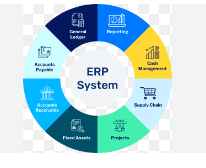
Modules: ERP systems are comprised of functional areas or specific business processes handled as individual but integrated units (e.g., finance, accounting, inventory management, SCM, CRM, HCM). Some modules have sub-modules.
End-to-End Business Processes: Modules are tied together by these processes, providing flow and value across the organization.
Configuration: Personalizing the ERP software to fit specific business needs through settings and choices within each module. Some vendors offer pre-configured best practices for certain industries.
Customization: Modifying the source code of the ERP software, a riskier and more costly option reserved for mandatory business requirements not met by configuration.
Third-Party Integration: Connecting external, specialized software to the core ERP system to address functional gaps. While offering specific capabilities, excessive integration can dilute the value of a single ERP platform.
Testing: Crucial to ensure data flows and processes work correctly across integrated modules and that the system meets business needs. Various types of testing are necessary.
Data Migration: Consolidating, cleaning, and transferring data from legacy systems to the new ERP, including mapping data fields. Often overlooked and requires significant effort.
6. Key ERP Terms and Definitions:
ERP (Enterprise Resource Planning): Technology that ties together an entire business, encompassing various processes from finance to operations.
Order to Cash: An end-to-end business process from receiving a customer order to collecting payment, involving multiple workflows (order capture, inventory, manufacturing, invoicing, payment).
Procure to Pay: An end-to-end business process focused on acquiring necessary materials and paying for them (procurement, receiving, payment).
Modules: Functional components of an ERP system (e.g., General Ledger, Accounts Payable, Inventory Management, Sales and Distribution).
Business Requirements: The needs of the organization that determine how the ERP software will be configured to accommodate those needs.
Configuration: Tailoring the ERP software using built-in settings and options without altering the core code.
Customization: Modifying the underlying source code of the ERP software to meet specific requirements.
Integration: Connecting different modules within the ERP or external third-party systems to ensure data and process flow.
Business Process Reengineering (BPR): Fundamentally rethinking and redesigning business processes to improve efficiency and effectiveness, often done in conjunction with ERP implementation.
Change Management: Managing the human and organizational aspects of the ERP implementation to ensure user adoption and minimize disruption.
User Acceptance Testing (UAT): Testing performed by end-users to validate that the system meets their needs and business requirements.
Total Cost of Ownership (TCO): The comprehensive cost of implementing and operating an ERP system over its lifecycle.
Return on Investment (ROI): The financial benefit derived from the ERP investment compared to its total cost.
7. Single Integrated ERP vs. Best of Breed:
Single ERP Pros: Lower learning curve, easier maintenance and deployment, single source of truth for data, less technical complexity.
Single ERP Cons: May not provide the best functional fit for all specialized needs.
Best of Breed Pros: More likely to find a better technical and functional fit for specific business processes.
Best of Breed Cons: Higher learning curve (multiple systems), more complex to maintain and deploy, potential data silos and integration challenges, higher technical complexity.
Hybrid Model: Combining a core single ERP for vanilla functions with best-of-breed solutions for complex or unique business aspects. Many vendors are moving towards this model through acquisitions.
Integration and Interoperability: Crucial for both best-of-breed and hybrid models to ensure systems can work together effectively.
8. Top 10 ERP Software Vendors (Overview):
A top 10 list is provided based on overall functionality, cost and risk of deployment, and client results, with a heavier weighting on implementation failure rates in the current year’s methodology.
Notable Changes: Sage X3 and Acumatica are no longer in the top 10 due to increased competition.
Top 10 (in order from 10 to 1): 10. Salesforce Platform (Force) 9. Odoo 8. Oracle NetSuite 7. IFS 6. SAP S/4HANA 5. Microsoft Dynamics 365 4. Epicor 3. Infor 2. Oracle ERP Cloud
9. Defining Business Requirements for Successful Implementation:
Business requirements summarize the needs and desired outcomes from the ERP system in the “future state,” not just current processes.
They are crucial for selecting the right system and ensuring the implementation meets expectations.
The process involves workshops with stakeholders to describe current processes, pain points, improvement opportunities, and future needs.
Key Tips: Don’t just rehash current state; prioritize requirements (high, medium, low); use them to drive vendor demos and selection; maintain focus on requirements during design and implementation; use them to design future state business processes; ensure requirements traceability throughout the project lifecycle.
10. Creating a Business Case for ERP Implementation: * A business case justifies the project, defines the total cost of ownership, quantifies expected business benefits, and calculates ROI. * It also serves as a tool for project governance and managing/optimizing business benefits post-implementation. * Total Cost of Ownership (TCO) Components: Software cost (annual recurring for cloud), technology implementation cost (one-time, often underestimated), IT infrastructure costs (hardware, network, often ongoing), internal resource costs (backfilling, project team time), training costs (initial and ongoing), ongoing maintenance and support, program management, internal labor. * Operational Disruption (Risk): Cost associated with potential negative impacts (e.g., inability to ship, cancelled orders). Should be quantified and considered in investment decisions to mitigate risks. * Business Value/Benefits (Examples): Reduced inventory (quantify cash and carrying costs), reduced SG&A costs (overhead, manual rework, potential future headcount savings), increased revenue (from better inventory, sales processes), better information for decision-making (though harder to quantify directly). * ROI Calculation: Compares total costs with projected benefits over time. * Project Governance: Business case helps make objective decisions on scope, customization, and budget changes. * Business Benefits Realization: Used to track actual benefits post-go-live and identify areas for optimization.
11. Phasing ERP Implementation: * Deploying ERP incrementally minimizes risk and allows for momentum building. * Phasing Considerations: * Business Processes: Prioritize processes with the highest potential value or lowest hanging fruit. * Software Modules: Consider how the software is architected and how modules logically fit together. * Geographic Locations/Business Units: Roll out to different parts of the organization sequentially. * Technical Complexity/Risk: Start with less complex or risky areas. * Data Migration: Phasing data migration can reduce risk and effort at any one time. * Organizational Change Readiness: Roll out where the organization is most prepared for change. * Risk Mitigation: Choose a phasing strategy that best mitigates overall project risk. * Scope Management: Reducing initial scope can lead to more successful early phases. * Reconciling Different Perspectives: Qualitative inputs from different lenses need to be balanced to create a cohesive phasing strategy, considering risks and benefits of each option.
12. Program Management vs. Project Management: * Software Project Management: Focused on the technical implementation of the software (configuration, design, testing, go-live), often managed by the system integrator. * Program Management: A broader, overarching framework encompassing multiple workstreams beyond just software deployment to achieve the overall business transformation. * Key Program Management Workstreams: Software project management (potentially multiple), technical aspects (architecture, data, integration), business process improvement, organizational change management, business case and benefits realization. * Importance of a Program Management Office (PMO): To align project plans, ensure project governance and controls (using the business case), manage risks and issues across workstreams, and provide the implementing organization with control and ownership of the entire program.
13. Why ERP Implementations Fail (Top 5 Reasons): 1. Lack of a Clear Definition of Business Objectives and Scope: Without clear goals, the project lacks direction and is prone to scope creep and misalignment. 2. Poor Project Management: Ineffective planning, execution, risk management, and communication lead to delays, budget overruns, and ultimately failure. 3. Insufficient Organizational Change Management: Neglecting the human side of the transformation (user training, communication, buy-in) leads to resistance and poor adoption. 4. Inadequate User Acceptance Testing (UAT): Failing to thoroughly test the system with end-users in real-world scenarios results in post-go-live issues and business disruptions. 5. Lack of a Clear Definition of Success: Without measurable success criteria tied to the business case, it’s impossible to determine if the implementation was worthwhile and to guide decision-making during the project.
14. Top 10 ERP Failures of All Time (Case Studies and Lessons Learned): * Brief summaries of high-profile ERP implementation failures, including: * Haribo (SAP): Supply chain issues, sales drop. Lesson: Ensure thorough testing and understanding of impact on core operations. * Washington Community College (PeopleSoft): Vendor bankruptcy, lawsuits. Lesson: Due diligence on vendor stability. * Hewlett-Packard (ERP): Significant financial losses due to integration issues. Lesson: Manage complexity and integration carefully. * Waste Management (SAP): Alleged misrepresentation of software. Lesson: Thorough vetting of vendor claims and software capabilities. * Hershey’s (SAP): Inability to process orders during peak season due to rushed implementation. Lesson: Realistic timelines and avoid go-lives during critical business periods. * MillerCoors (SAP): Lawsuits against system integrator for damages. Lesson: Clear contracts and accountability. * Revlon (SAP): Plant shutdown, shipping issues, financial losses after go-live. Lesson: Phased roll-out, address organizational integration before ERP. * Nike (ERP Upgrade): Significant write-off and additional investment needed. Lesson: Thorough planning and realistic expectations for upgrades. * National Grid (SAP): Massive cost overruns, operational disruptions (period-end close delay, unpaid invoices). Lesson: Robust testing, process alignment, and experienced implementation partners. * United States Navy (ERP): Billions spent with minimal improvement, scope reduction. Lesson: Clear requirements, strong governance, and realistic scope. * Common Themes in Failures: Poor planning, unrealistic expectations, insufficient testing, lack of change management, inadequate executive involvement, choosing the wrong software or partners.
15. How to Avoid ERP Implementation Failure: * Choose the Right Software: Ensure a good fit for business needs, not just based on vendor bias. * Get the Right Implementation Partner: Select based on experience, industry knowledge, and cultural fit. * Develop a Comprehensive Business Case: Justify the investment and use it for ongoing governance. * Define Clear Business Objectives and Scope: Avoid scope creep and maintain focus. * Invest in Strong Project Management: Proactive planning, risk management, and communication are crucial. * Prioritize Organizational Change Management: Prepare the people and the organization for the new system and processes. * Conduct Thorough User Acceptance Testing (UAT): Validate the system with end-users in realistic scenarios. Consider independent UAT facilitation. * Ensure Executive Leadership Involvement: Buy-in and active participation from executives are essential. * Seek Independent, Technology-Agnostic Support: Guidance from unbiased experts can help navigate challenges and ensure decisions are in the best interest of the business.
Call to Action:
Review the annual Digital Transformation and ERP Report for independent reviews, rankings, and best practices (available via QR code or link).
Read “The Final Countdown” book for a deeper dive into digital strategy and successful ERP implementations (available via QR code or link).
Share the training materials with colleagues and project team members.
This briefing document captures the key information and insights from the provided excerpts, emphasizing the complexities of ERP implementations and the critical factors for success.
Understanding ERP Systems and Implementations
FAQ: Understanding ERP Systems and Implementations
1. What exactly is ERP software and how has it evolved? ERP (Enterprise Resource Planning) software is a technology that integrates and manages core business processes within an organization. It evolved from earlier MRP (Material Resource Planning) systems used primarily by manufacturing companies to track inventory and production needs. Over time, ERP expanded to encompass other crucial business functions like warehouse management, procurement, finance, accounting, HCM (Human Capital Management), and CRM (Customer Relationship Management). The goal of ERP is to provide a unified data set and common workflows across the entire organization, offering transparency and efficiency. Initially, the focus was on a single ERP system to handle all needs, but now, “best of breed” strategies involving multiple specialized systems integrated together are also common.
2. What are the different tiers or types of ERP systems available in the marketplace? The ERP marketplace is often categorized into three tiers. Tier 1 ERP systems, such as SAP, Oracle, and Microsoft Dynamics 365, are typically large-scale solutions designed for multinational and complex organizations requiring a broad range of functionalities. Tier 2 ERP providers offer more niche-focused solutions, often specializing in specific industries like manufacturing (e.g., Epicor, Infor) or distribution. Tier 3 or industry-niche solutions comprise a large number of smaller, simpler systems tailored to very specific industries or functions within a business, sometimes not even providing full ERP capabilities. Additionally, the “best of breed” approach involves selecting multiple specialized systems for different business areas and integrating them.
3. Why do ERP implementations fail so frequently, despite the potential benefits of the technology? Despite the robust and innovative nature of ERP technology, implementations have a high failure rate, often cited above 80%. The primary reasons for these failures are typically not related to the technology itself but rather to the operational and people aspects of the implementation. Common pitfalls include a lack of clear objectives, inadequate change management, insufficient executive support, poor project management, and underestimation of the complexities involved in integrating new systems with existing processes and organizational structures. Ignoring the human element and focusing solely on the technical deployment are significant contributing factors to ERP implementation failure.
4. How do ERP systems work from a technical perspective, and what are some key components? ERP systems are complex, integrated platforms comprised of various modules, each designed to handle specific functional areas or business processes (e.g., Finance, Accounting, Inventory Management, Supply Chain Management, CRM, HCM). These modules are not entirely standalone; they are designed to integrate and share data to support end-to-end business processes like “order to cash” and “procure to pay.” Implementing an ERP system involves configuration, which is tailoring the software’s settings and options to align with business requirements. If configuration is insufficient, customization involves modifying the source code, which is riskier and more costly. Integration is crucial for connecting different modules within the ERP and for linking the ERP with external, third-party systems. Thorough testing, data migration from legacy systems, and user training are also critical components of a successful implementation.
5. What are some of the emerging trends and technologies impacting ERP systems? The ERP landscape is continuously evolving with the integration of advanced technologies. Artificial Intelligence (AI) and Machine Learning (ML) are being used to automate processes (e.g., accounts payable) and identify exceptions. Blockchain technology is gaining traction in industries like pharmaceuticals and food for enhanced supply chain traceability. The Internet of Things (IoT) enables real-time data collection from devices on the shop floor and other areas, providing greater visibility into operations. These trends aim to enhance efficiency, provide deeper insights, and improve decision-making within organizations using ERP systems.
6. What are the key considerations and trade-offs between a single, integrated ERP system and a “best of breed” approach? Choosing between a single ERP system and a “best of breed” strategy involves several trade-offs. A single ERP system offers advantages like a lower learning curve, easier maintenance, a single source of truth for data, and less technical complexity. However, it might not always provide the best functional fit for all unique business needs. A “best of breed” approach, using multiple specialized systems, can offer a better fit for specific functionalities and address unique requirements but introduces higher technical complexity due to the need for integration between different systems, potentially leading to data silos and increased maintenance efforts. A hybrid model, combining a core ERP for standard functions with best-of-breed solutions for complex or niche areas, is also a viable option that seeks to balance these trade-offs.
7. What are some critical first steps for a successful ERP implementation, and why are they important? Two critical first steps for a successful ERP implementation are defining clear business requirements and developing a comprehensive business case. Business requirements detail what the organization needs the technology to do to support its future state. They are crucial for selecting the right system, guiding the implementation process, ensuring requirements traceability, and designing both the technology and future business processes effectively. A business case justifies the project by outlining the total cost of ownership, quantifiable business benefits (e.g., reduced inventory, increased revenue), and expected ROI. It serves as a tool for project governance, helping to manage scope, costs, and ultimately, the realization of business benefits throughout and after the implementation.
8. What are some common reasons for ERP implementation failures highlighted in case studies, and what lessons can be learned? Case studies of ERP implementation failures reveal recurring themes. Unrealistic timelines (Hershey’s), lack of clear business benefits (Waste Management), insufficient change management (many cases), going live at critical business times (Hershey’s, Revlon), poor vendor selection or management (Washington Community College), underestimation of complexity and integration challenges (HP), and lack of strong executive involvement are common contributors to failure. The lessons learned include the importance of choosing the right software and implementation partner, setting realistic expectations, prioritizing change management, conducting thorough testing (especially user acceptance testing), ensuring strong executive leadership and buy-in, and considering independent, technology-agnostic support throughout the transformation.
Understanding Enterprise Resource Planning (ERP) Systems
An ERP (Enterprise Resource Planning) system is a type of software that integrates the core business processes of an organization into a single system. The purpose of an ERP system is to tie together the entire organization, providing a unified data set and a common workflow across different departments. This aims to improve organizational effectiveness and efficiency.
Evolution from MRP: ERP software evolved from an older technology called MRP (Material Resource Planning), which originated in manufacturing organizations. MRP systems were designed to help manage manufacturing operations by tracking customer orders and demand, and by managing the parts and supplies needed to fulfill that demand. They also helped manage the manufacturing shop floor to prioritize orders and maximize throughput. Over time, MRP expanded beyond manufacturing to include areas like warehouse management, procurement, financials, accounting, HCM (Human Capital Management), and CRM (Customer Relationship Management). This evolution led to the development of ERP systems that could integrate all these functions into a single system.
Key Benefits of ERP Systems:
Unified Data Set: ERP systems aim to provide one unified source of truth for data across the organization.
Common Workflow: They establish common workflows across different business functions.
Enterprise-wide Transparency: ERP systems offer visibility into operations and data across the entire enterprise.
Different Tiers of ERP Providers: The ERP marketplace can be broadly categorized into different tiers:
Tier 1: These are the largest ERP systems, such as SAP, Oracle, and Microsoft Dynamics 365. They are typically suited for larger, multinational, and more complex organizations, offering a broad range of functionalities.
Tier 2: These providers offer more niche-focused solutions, sometimes concentrating on specific industries or capabilities. Examples include Epicor and Infor, which are common in the manufacturing space.
Tier 3 (Industry Niche): This segment includes numerous smaller and simpler solutions that cater to specific industries or particular functions within ERP. They might not offer full ERP capabilities.
Single ERP vs. Best-of-Breed:
The traditional approach is to have a single ERP system that handles all of an organization’s technology needs. This offers advantages like a lower learning curve, easier maintenance, a single source of truth for data, and less technical complexity.
However, many organizations have unique needs that a single ERP system cannot fully meet, leading to the rise of best-of-breed ERP systems. This involves using multiple, specialized systems for different business areas (e.g., CRM for sales, HCM for HR) and integrating them with a core ERP system. While offering a more precise fit for specific needs and flexibility, this model can be more complex due to the need for integration between multiple systems and can lead to multiple sources of truth. A hybrid model is also common, where a core ERP system handles standard functions, and best-of-breed solutions are used for complex or unique business aspects.
Failure Rate of ERP Implementations: ERP implementations have a high failure rate, often cited as above 80%. The primary reasons for these failures are usually not the technology itself, which is generally robust, but rather issues related to people and processes. This includes inadequate business process improvement and insufficient organizational change management. Resistance to change is a significant factor.
Critical Success Factors for ERP Implementation: To increase the chances of successful ERP implementation, organizations should focus on:
Finding the right software or technology that best fits their needs through independent assessment.
Ensuring organizational alignment on the company’s future direction.
Shifting attention from solely the technology to the people and process side of things during implementation.
Emerging Trends in ERP: The ERP landscape is evolving with the integration of advanced technologies:
Artificial Intelligence (AI) is being used to automate business processes.
Machine Learning (ML) is used to identify patterns and exceptions, such as in accounts payable processing.
Blockchain technology is being adopted for supply chain transparency and traceability, particularly in industries like pharmaceuticals and food.
The Internet of Things (IoT) allows for real-time data collection from devices on the shop floor, providing greater visibility within manufacturing organizations.
How ERP Systems Work: ERP systems are complex, integrated systems comprising various modules, each handling a specific functional area or business process (e.g., finance, accounting, inventory management, supply chain management, CRM, HCM). These modules are designed to work together, enabling end-to-end business processes.
The implementation of an ERP system involves several key steps:
Configuration: This involves making decisions and setting up the software module by module to align with the organization’s specific needs and business requirements. Some vendors offer preconfigured best practices for certain industries.
Customization: If configuration options are insufficient, organizations might resort to customization, which involves changing the software’s source code. This is riskier and more costly than configuration.
Integration: Ensuring that different modules within the ERP system, and potentially third-party systems, can communicate and exchange data seamlessly is crucial. This often involves using APIs.
Testing: Thoroughly testing the integrated processes and data flows between modules is essential to ensure the system works as intended.
Data Migration: This involves consolidating, cleaning, mapping, and transferring data from old legacy systems (including spreadsheets) to the new ERP system. Organizations often need to prioritize which data to migrate.
Key Terminology: Understanding the specific vocabulary associated with ERP systems is important for effective communication:
ERP (Enterprise Resource Planning): Technology that integrates an entire business.
Order to Cash: An end-to-end business process starting from a customer order and ending with the collection of payment.
Procure to Pay: An end-to-end business process focused on acquiring and paying for the materials needed to run a business.
Modules: Functional areas within an ERP system (e.g., finance, HR, sales).
Business Requirements: The specific needs of an organization that determine how the ERP software will be configured and set up.
Configuration: Personalizing or setting up the ERP software to work in a specific way by checking boxes and flipping switches, without changing the core code.
Customization: Modifying the source code of the ERP software to meet unique business needs.
Integration: Connecting different modules within the ERP system and linking the ERP system with external, third-party systems to ensure data flow and process continuity.
Enterprise Architecture: The blueprint that outlines how different systems and modules within the ERP ecosystem will interact, including data flow and storage.
Data Migration: The process of cleaning, mapping, and moving data from legacy systems to the new ERP system.
This overview provides a foundational understanding of ERP systems as described in the provided source.
ERP Implementation: Stages and Considerations
The ERP implementation process is a complex undertaking that requires careful planning and execution, focusing not just on the technology but also on the people and processes within the organization. The source material provides a detailed overview of what this process entails, highlighting several critical stages.
1. Implementation Planning:
Before diving into the implementation itself, a crucial step is implementation planning. This phase, sometimes referred to as “phase zero,” occurs after the ERP system has been selected but before the actual implementation begins. It involves establishing a blueprint for the project, including defining business processes, determining which modules to deploy and when (project phasing), resourcing the project, and putting a change strategy in place. Investing sufficient time in this upfront planning phase is critical to avoid significant problems and wasted resources later in the project. The source suggests that a lack of thorough upfront planning is a common reason for ERP implementation failure.
2. Business Requirements Definition:
A foundational element of the implementation process, often preceding or heavily influencing the planning phase, is the definition of business requirements. Business requirements summarize the organization’s needs and what it expects to achieve with the new ERP system in its future state, not just how things are done currently. These requirements are gathered through workshops with various stakeholders and functional areas to identify current processes, pain points, opportunities for improvement, and future needs with new technology. These requirements are essential for selecting the right ERP system but also for guiding the implementation and ensuring that the chosen system is configured and potentially customized to meet the organization’s specific needs. Maintaining requirements traceability throughout the project is important to ensure that the implemented system ultimately delivers the expected outcomes.
3. Project Phasing:
Given the complexity of ERP systems, most organizations choose to implement them in phases rather than all at once in a “big bang” approach to minimize risk. The way a project is phased depends on various factors such as organizational priorities, project scope, risk tolerance, budget, and resource allocation. Phasing can be based on business processes (prioritizing processes that will deliver the most immediate value), software modules (considering how the modules logically fit together within the chosen ERP system), or organizational readiness and pain points. Regardless of the phasing strategy, it’s often necessary to create interim solutions or integrations between new and existing systems to ensure continuity during the phased rollout.
4. Configuration and Customization:
Implementing an ERP system involves configuration, which is the process of setting up the software by making choices and adjustments within the software’s built-in capabilities to align with the organization’s business requirements and processes. This typically involves checking boxes and flipping switches to define workflows and functionalities without altering the underlying code. Many ERP vendors offer best practices or preconfigured business processes for certain industries to speed up the configuration process.
In situations where configuration alone cannot meet unique business needs, organizations may opt for customization, which involves changing the software’s source code. Customization is a more complex, costly, and risky undertaking compared to configuration, as it can affect the stability of the software and complicate future upgrades. The source advises customizing only when absolutely necessary for mandatory business requirements that cannot be met through configuration.
5. Integration:
Integration is crucial to ensure that the various modules within the ERP system can communicate with each other and that the ERP system can connect with other necessary third-party systems. ERP systems are built with multiple modules, and while they are part of a single system, they still need to be integrated to ensure seamless data and process flow. Furthermore, most ERP implementations require integration with external systems like CRM, HCM, or industry-specific applications. This integration is often achieved through APIs (Application Programming Interfaces). A well-defined enterprise architecture is essential to provide a blueprint for how different systems and modules will interact, including data flow and storage, ensuring a cohesive technology landscape.
6. Data Migration:
Data migration is the process of transferring data from the organization’s old or “legacy” systems (which can include old ERP systems, mainframes, or even spreadsheets) to the new ERP system. This process involves several steps: consolidating data, cleaning up inaccurate or “dirty” data, mapping data fields from the old system to the new system (as naming conventions might differ), and then physically moving the data. Organizations often need to make trade-offs regarding which historical data to migrate. The source emphasizes that data migration is often underestimated and requires significant time and attention.
7. Testing:
Thorough testing is essential to ensure that the configured and integrated ERP system functions correctly and meets the defined business requirements. This involves testing the data flows and processes between different modules and any integrated third-party systems. Different types of testing are typically conducted throughout the implementation process. Ultimately, user acceptance testing (UAT) is critical, where end-users within the organization validate that the system works as intended and supports their business processes. The source points out that many ERP failures could have been avoided with a stringent and effective user acceptance testing process.
8. Go-Live and Beyond:
The final stage of the initial implementation is the go-live, where the new ERP system is launched and begins to be used by the organization. However, the implementation process doesn’t end at go-live. Organizations need to focus on post-implementation support, user training, and continuous improvement to maximize the value of their ERP investment. The source also highlights the importance of measuring and optimizing business benefits after go-live, often by revisiting the initial business case to identify gaps and areas for further improvement.
Throughout the entire ERP implementation process, the source emphasizes the critical importance of program management to oversee and coordinate the various workstreams (including software project management, technical aspects like architecture and integration, organizational change management, and business process re-engineering). Effective program management ensures that the project stays aligned with the overall business objectives and that the implementing organization maintains control and ownership of the program. Furthermore, a strong focus on organizational change management is highlighted as essential for user adoption and realizing the full benefits of the new ERP system, often being a key differentiator between successful and failed implementations.
Reasons for ERP Implementation Failure
The source explicitly outlines several common reasons why ERP implementations fail. These reasons are often interconnected and can significantly impact the success of an ERP project.
Here are the key reasons for ERP failure discussed in the source:
Unrealistic Expectations: Organizations often have a false sense of hope regarding how quickly they can adapt to new ERP software and realize business value. This can lead to compressed timelines, budget cuts, and insufficient resource allocation, ultimately undermining critical success factors like organizational change management and testing.
Lack of Upfront Implementation Planning: Rushing into the implementation phase without a solid plan and vision for the future state is a significant pitfall. Investing time in an “implementation planning” or “phase zero” to establish a blueprint for business processes, module deployment, resource mobilization, and change strategy is crucial for long-term success and can save significant time and money later.
Absence of Clear Executive Vision and Alignment: If executive leadership does not have a clear and well-articulated vision for what the ERP implementation will achieve for the organization, it creates confusion, chaos, and misdirection. Furthermore, a lack of alignment among the executive team on the project’s goals and benefits can severely hinder the implementation process. The justification for the project needs to go beyond simply replacing an old system and should detail how the ERP will improve customer experience, employee experience, operations, and revenue generation.
Insufficient Focus on Organizational Change Management: Neglecting the “people side of change” is a primary root cause of ERP implementation failure. If employees do not adopt the new processes and tools, the investment in technology will not deliver the expected business value. A lack of effective change management can manifest in various problems throughout the implementation. The source indicates that this is a prevalent theme in ERP failures, even leading to lawsuits.
Lack of a Clear Definition of Success: Organizations often fail to define how they will measure the success of their ERP implementation beyond just being on time and within budget. Without a clear vision of the desired business outcomes, such as ROI and specific business value, the project lacks direction, especially when making numerous decisions about scope, configuration, customization, and integrations. This lack of a “North star” can lead the project aimlessly.
The source also provides examples of high-profile ERP failures, which, while not directly listed as reasons in the “Why ERP Projects Fail” section, often illustrate these underlying causes. For instance, Hershey’s unrealistic timeline and go-live during a peak season highlights a lack of planning and unrealistic expectations. Revlon’s inability to ship products after go-live suggests inadequate testing and a potential lack of focus on business process management and organizational change. The massive overspending and lack of tangible improvements in the US Navy’s ERP project could point to a lack of clear vision, scope creep, and potentially issues with project governance and system integrator selection.
In summary, the source emphasizes that ERP implementation failures are often rooted in a combination of inadequate planning, unrealistic expectations, a lack of clear vision and alignment, insufficient attention to the human aspects of change, and a failure to define and measure success. Addressing these factors proactively is crucial for mitigating risks and increasing the likelihood of a successful ERP implementation.
Top 10 ERP Implementation Failures: Case Studies and Lessons
The source provides a detailed list of top 10 ERP failures, offering insights into common pitfalls to avoid during ERP implementations. Here’s a discussion of these case studies:
Herbo (Gummy Bear Manufacturer): Herbo’s SAP implementation in 2018 led to significant supply chain problems. They couldn’t track inventory or raw materials, resulting in an inability to deliver products to stores on time. This caused a roughly 25% drop in sales shortly after the go-live. This case highlights the risk of inadequate planning and testing in critical operational areas.
Washington Community College: Their PeopleSoft implementation, starting in 2012, was significantly impacted by the bankruptcy of their initial system integrator, Cyber. While a second integrator, HDC, was brought in, they eventually canceled the project and sued the college, alleging internal dysfunctions. This case underscores the importance of selecting a stable and reliable implementation partner and the potential for organizational issues to derail an ERP project.
Hul Packer (Technology and Hardware Company): Hul Packer spent $160 million on their ERP project. However, the damages claimed by the company due to the failure were nearly five times that amount. The CIO at the time attributed the failure to a series of small, individually manageable problems that collectively created a “Perfect Storm.” This illustrates how accumulated minor issues and a lack of comprehensive risk management can lead to major failures.
Waste Management: Waste Management’s SAP implementation also failed, despite an investment of around $100 million. They alleged that SAP misrepresented the software during demos, showing “fake software.” The promised annual benefits of $100-$200 million never materialized. This case emphasizes the critical need for thorough due diligence during software selection and ensuring that the demonstrated capabilities align with the actual product.
Hershey’s: Hershey’s SAP implementation resulted in their inability to process roughly $100 million of orders for key products during a go-live. Key contributing factors included an unrealistically short implementation timeline and the decision to go live during a busy holiday season. This highlights the dangers of unrealistic expectations in project timelines and the critical importance of considering the business impact of the go-live timing.
Miller Kors (Beer Company): Miller Kors initiated an SAP implementation in 2013, investing approximately $100 million. The project resulted in a lawsuit against their system integrator, HCL, for $100 million in damages. While details are limited, this case again underscores the potential for issues with system integrators and the significant financial consequences of ERP failures.
Revlon (Consumer Product Company): Revlon’s failed SAP project was publicly disclosed in a financial filing, causing their stock to drop by about 6.9%. After the go-live of one manufacturing plant, they experienced an inability to ship product, lost customer orders, and a lack of supply chain visibility, effectively paralyzing the plant. They also incurred significant costs for expedited shipments. The simultaneous integration of a recently acquired company, Elizabeth Arden, added further complexity. This case illustrates the severe operational disruptions that can result from a failed implementation and the importance of considering organizational readiness and concurrent major changes.
Nike: Nike spent $400 million to upgrade their ERP systems, which did not go well initially. They had to write off around $100 million and saw their stock price drop by approximately 20%. The company then had to invest another five years and $400 million to get the project back on track. This case highlights the potential for massive financial losses and prolonged recovery periods associated with ERP failures, even for large and established organizations.
National Grid (Utility Company): National Grid’s SAP implementation involved an investment of over a billion dollars and ultimately failed. Post go-live, they spent an additional $100 million in support services, utilized two system integrators (including a lawsuit against Wipro), and incurred $30 million per month in ongoing support costs. Their period-end close process increased from four days to 43 days, and they had approximately 15,000 unpaid supplier invoices. This case exemplifies the potential for enormous financial and operational damage from a failed ERP implementation, even with substantial investment.
United States Navy: The US Navy’s ERP implementation, ongoing since 1998, had already cost over a billion dollars with three major system integrators involved. A GAO report indicated no material improvements to the organization despite this massive expenditure. The project scope was reduced to focus solely on financials, excluding shipyard inventory management, yet significant issues persisted, affecting 90,000 employees. This represents a case of prolonged and extremely costly failure to achieve intended benefits, even with significant resources and scope reduction.
These case studies collectively illustrate several recurring themes that contribute to ERP implementation failures, as also discussed in our previous conversation about the reasons for ERP failure. These include:
Unrealistic timelines and expectations.
Inadequate planning and preparation.
Poor software selection or misrepresentation by vendors.
Issues with the selection and management of system integrators.
Insufficient focus on change management and user adoption.
Lack of thorough testing.
Go-live during critical business periods.
Underestimation of project complexity and resource requirements.
Lack of clear project governance and executive oversight.
Concurrent major organizational changes adding complexity.
By examining these high-profile failures, organizations can learn valuable lessons and take proactive steps to mitigate similar risks in their own ERP implementation journeys.
ERP Implementation Success: Key Tips and Recommendations
The source material provides several key tips and recommendations for ensuring ERP implementation success, primarily by highlighting what leads to failure and then offering corresponding advice in the conclusion. Here’s a discussion of these tips, drawing directly from the source:
Choose the Right Software: It is critical to select the technology that best supports your business needs and avoid biased software selection. This implies a thorough evaluation process, potentially involving independent assessments, as mentioned earlier in the training.
Choose the Right System Integrator: Selecting the appropriate partner or partners for implementation is crucial. The source cautions that even well-known system integrators are not a guarantee of success, as evidenced by their involvement in many of the top 10 failures. This suggests the need for careful due diligence in selecting an integrator whose expertise and approach align with your organization’s needs.
Maintain Ownership of Your Project: Remember that the ERP implementation is your project, not the software vendor’s or the system integrator’s. You need to take responsibility for its success, providing clear direction and making necessary course corrections, including potentially changing integrators if they are not performing adequately.
Implement Independent Risk Mitigation: System integrators may not be the best at identifying and mitigating risks. Therefore, it’s essential to have independent risk assessment and mitigation strategies in place.
Prioritize Avoiding Operational Disruption: Operational disruption is a significant risk and cost factor. Avoid cutting corners on crucial aspects like organizational change management and realistic timelines in an attempt to save money, as the costs of post-go-live disruptions can be far greater.
Focus on Business Process Management (BPM): Define your desired future-state business processes and let that blueprint drive your transformation. Avoid the trap of letting the technology dictate how you run your business. This aligns with the earlier discussion about defining business requirements that look towards the future.
Conduct Thorough User Acceptance Testing (UAT): Ensure comprehensive testing of the product and your business processes. Stress-test the end-to-end solution to identify and resolve issues before go-live. The source notes that many failures could have been avoided with a stringent UAT process. The source even suggests having an independent third party facilitate UAT.
Ensure Executive Leadership Involvement and Buy-in: Executives need to be actively involved, bought into the project, and well-informed about its progress and risks. They should also participate in decision-making processes. The lack of clear executive vision was highlighted as a key reason for failure.
Secure Independent, Technology-Agnostic Support: Engaging independent support throughout the digital transformation can help keep the project on track and ensure that decisions are made in the best interest of your business, rather than the vendor or integrator. Third Stage Consulting, the author’s firm, is presented as an example of such a provider.
Establish Realistic Expectations: Understand the true scope, timeline, and resource requirements of the project. Avoid the false hope of quick value realization and be prepared for the effort involved in adapting to new technology.
Invest in Upfront Implementation Planning: Dedicate sufficient time after software selection but before full implementation to create a solid plan, including defining the project blueprint, business processes, and change strategy.
Develop a Clear Vision for Success: Define what success looks like for your ERP implementation beyond just timelines and budgets. Clearly articulate the desired business outcomes and how the ERP will deliver value to the organization.
Prioritize Organizational Change Management: Focus significant time and effort on the people side of change to ensure user adoption of new processes and tools. A solid and effective change management strategy and plan are crucial.
By adhering to these tips, organizations can significantly increase their chances of a successful ERP implementation and avoid the common pitfalls that lead to failure, as illustrated by the case studies discussed in the source.
ERP Software Training: A Detailed Introduction to ERP Systems and Implementations
The Original Text
Erp implementations are complex undertakings that require a lot of finesse and hard skills what exactly are those hard skills and those soft skills you need to know to make your Erp software implementation successful that’s what we’re going to discuss here in a deep dive training course here today my name is Eric Kimberling I’m the CEO of third stage Consulting we’re an independent Consulting for that helps clients throughout the world with their digital transformation and Erp implementations we help clients with all sorts of Erp implementations ranging from sa and Oracle and Microsoft to potentially lesser known systems like infor epicore Etc and we work with a lot of different software implementations a lot of different project teams a lot of different Industries and what we wanted to do here today is provide a training course that goes deep into understanding what the different Erp systems are in the marketplace what it takes to make those Erp implementations successful how to understand the change management and the risks and failure points of implementations as well as some case studies so that we can understand what not to do as well as what to do during our implementations so this training course is meant to be a deep dive into understanding Erp systems and Erp implementations this is going to be relevant whether you’re a project team member going through an Erp implementation for the first time whether you’re trying to brush up on your skills whether you’re a consultant whether you’re an executive team member trying to figure out what exactly you should know about Erp systems and what understanding you need to have before embarking on an implementation so this is meant to be a deeper dive than a lot of the videos you’ll find on my YouTube channel I encourage you to share this training material in this training video with anyone else on your team that you think might benefit from this and your overall project team and your colleagues as well now for more information if you’re looking for more best practices and more supplementary material to this training course I encourage you to read our annual digital transformation report it’s a report we publish each year that goes through a number of independent reviews and rankings of different ARP systems as well as providing a number of best practices and tips to help organizations be more successful with their implementations you can read and download that paper for free by scanning the QR code in front of you or you can go to the links below and if you want to go even deeper than this white paper that we share with you for free I also encourage you to read my new book called The Final Countdown it’s a book that I published in 2023 that talks about digital strategy Erp projects and how to be successful in those implementations and it is my 25 years of experience with helping clients through their Erp implementations you can read that book by scanning the QR code in front of you or you can just go to the final countdown. now the way we’ve broken up this training session here today is we’ve broken it into a number of different modules and you can see the agenda here in front of you we’re going to start off by talking about Erp software in general this is especially helpful if you haven’t yet chosen an Erp system or if you’re still trying to figure out and narrow down what system or systems might be the best fit for your organization once we’ve done that we’ll dive into implementation implementation planning the implementation itself organizational change basically everything you need to know about how to implement Erp systems effectively and then we’ll get into some case studies we’ll talk about Erp failures and some of the lessons from them as well as successful ones and some of the lessons we can take away from organizations that have been successful in their Erp implementations first it helps to understand what exactly Erp software is so let’s start off by giving a quick highle overview before we dive into specific software vendors and ways to implement the system we’ll start off with this basic foundational understanding to start Erp software or enterprise resource planning software has been around for a long time it’s helped a lot of organizations improve and become more effective and efficient but what exactly is Erp software I’m going to give that answer here today I’ve been in the Erp software space now for over 20 years and whenever I’m talking to family or students or someone who’s not familiar with the Erp space that I’m in people often ask what in the world is Erp and what does that mean I mentioned that Erp stands for enterprise resource planning and Erp is actually an evolution from some older technology that was really originated with a lot of manufacturing organizations and that software was called MRP material resource planning so the origin of MRP came to be when a lot of larger Manufacturing organiz ations were finding that they were struggling with managing their entire manufacturing operations they had trouble tracking customer orders and tracking demand tracking what kind of parts and supplies they would need to purchase to be able to meet and fulfill customer demand so MRP systems were a way to handle that it was a way to manage the tracking of what supplies and raw materials we might need to manufacture for our customers it was a way to manage the manufacturing shop floor so that we could prioritize orders and make sure that we maximized throughput and it was really a way to address the whole movement in the 9s toward lean manufacturing and trying to maximize manufacturing efficiency and in the US a lot of us manufacturers were struggling with manufacturing efficiency and Manufacturing quality and they were being beat by Japanese manufacturing organizations at the time so MRP systems were a way to help organizations of all Origins and all national alties to help them better become more efficient and more effective so over time MRP evolved and morphed into something more than just a manufacturing solution it started to focus on warehouse management and procurement and financials and accounting even HCM or human Capital management or customer relationship Management on the sales side it took the core of MRP and started to expand in other parts of the Enterprise to where organizations were moving towards single systems that could tie together the entire organization provide one unified data set provide a common workflow across the organization and for lack of a better term provide one system that provided all the operations and data and transparency into what was happening enterprise-wide and so that’s the whole evolution of how Erp came to be it really traces its Origins back decades ago when Enterprise technology was first emerging now there are a plethora of Erp software providers in the marketplace the biggest ones the ones that are most commonly used by bigger organizations are companies like sap Oracle is another one Microsoft provides its own Erp solution those are the three biggest ones and a lot of organizations and Industry analysts will refer to those larger Erp systems is the tier one Erp systems those are the ones that are typically better suited for larger organiz organizations multinationals more complex organizations multilocation types of organizations those tier one providers are generally trying to provide a breadth of functionality that can meet the needs of those organizations there’s also tier 2 Erp providers and these are the providers that are more Niche Focus solutions they might focus on one industry might focus on one set of capabilities just to give you a few examples epicore and infor for example or two manufacturing Erp systems that are very common in the manufacturing space but you don’t see them a lot in other Industries you don’t see them for example in a lot of financial services organizations or Professional Services organizations they tend to focus more on manufacturing and distribution and nothing else so that is another example or another segment of the Erp space is that whole tier 2 market and then you have your tier three or industry Niche solutions that are there are probably dozens or hundreds of different Erp solutions that fall into that segment they’re either smaller simpler solutions that can provide capabilities to specific Industries or perhaps certain functions or capabilities within Erp they may not even be providing full Erp capability they may be focusing on just one small segment within Erp and like I said there’s a ton of different options and Solutions in that space so overall if we look at all the different types of Erp systems out there there are easily dozens of if not hundreds of Erp systems that can be used for your organization typically the going in proposition with Erp implementations is that you’re going to have one Erp system that can do everything that you would need technology to do for your organization now that is an ideal situation it’s a perfect world scenario but the reality is is most organizations have unique needs and unique challenges that can’t be met by one single ARP system that’s trying to be everything to everyone so what the single ARP System model has done is it’s created a niche or a void that’s being filled by what we call Best of breed Erp systems and these are systems that are not meant to be one single Erp system that’s going to be everything for everyone within your organization but it might be that you’re focusing on different segments of your business so for example within your sales organization you might have CRM or customer relationship management software within your HR department you might use a separate or a different human Capital management software the special izes in that at workday for example is a good example of a system that provides just HCM capabilities you might have a different system that provides financial and accounting capabilities and you could also in addition to those examples be using a core back office Erp system to tie it all together so best of breed systems is a common Trend that we’re seeing in the market and it’s in some ways more complex because now you have multiple systems that you have to tie together but in other ways it provides more flexib ility it provides more precise fit with what your unique business needs might be and there certainly trade-offs to both the best of breed model as well as the single Erp model but when talking about Erp it’s important to look at the whole picture of what are those spectrum and Continuum of options available to you in the marketplace you’ve probably seen that Erp implementations quite commonly fail in fact many statistics put the failure rate at above 80% of organizations that try to implement DRP whether it’s a tier one system a tier 2 or three system or a single Erp best of breed Erp doesn’t really matter the failure rate is fairly high so the question becomes if the technology is great and there’s so much demand for this technology how could they possibly fail as often as they do and if you check out my channel and some of the other videos on my channel just search the word failure and you’ll find a bunch of videos I’ve created about how to avoid failure why projects fail what some of the common challenges are but in a nutshell the reason Erp implementations typically fail is not because of the technology but it’s because of the operational and the people side of things the technology in general is very robust it’s very sophisticated it’s Innovative it can do a lot of different things that’s usually not the problem although technology can create complications during implementation but the more common challenges and problems with Erp implementations are that we haven’t adequately addressed our business process improvements we haven’t adequately addressed our organizational change management or our people needs so in other words and to put it simply people don’t like to change and because they don’t like to change new technology no matter how great it is is going to be difficult for your organization to adapt to so in its simplest terms people and processes are why Erp implementations fail like I said I encourage you to watch some of the other videos on my YouTube channel that go into that topic in more detail but in general that’s why implementations fail so the question becomes how do we Implement Erp software if most of them fail what can we do differently to implement well and to simplify and to summarize what I’ve also talked about in other videos on my YouTube channel the first thing is to find the right software or technology that’s the best fit for your organization that’s kind of the first step that’s the minimum ante that you need to be able to succeed is to make sure that the software technology you’re implementing is a good fit with what your needs are and make sure you get an independent assessment and View and objective eval valuation of the different options in the marketplace so you can find the best technology for your organization a second critical success factor is to ensure that your organization is aligned on what it wants to be when it grows up a lot of times organizations are trying to implement Erp software at a time of turmoil at a time of misalignment or at a time of strategic misalignment where the organization isn’t on the same page with the direction it’s going it doesn’t have a clear vision and then you try to Overlay new technology on top of that and that’s a recipe for failure so making sure you have clear alignment on your overall organization is very important and again I’ve included some videos below that will help you further dive into that topic and then the implementation itself when we focus on the implementation it’s important not to focus too much on the technology but to shift some of the time resources and attention from technology over to the people in process side of things if we do the people and process side of things very well and we also have alignment and we’ also pick the right software or technology for our organization we have the best chances to succeed but the problem is most organizations fail in one or more of those three critical success factors and like I said I encourage you to download some of the content I’ve included links to below that’ll dive more into what you need to do to be successful for your Erp implementation Erp software had its Origins many years ago with some very simple types of objectives it was trying to accomplish it was just trying to track inventory and orders and activities better within an organization sounds simple enough but over the years it’s evolved into more than that it’s not only trying to tie together an organization provide one common single source of Truth for what’s happening in the organization but it’s also now trying to introduce more Advanced Technologies and capabilities into erps so for example there’s new artificial intelligence that’s helping organizations automate some of their business processes better there’s machine learning that looks for patterns and exceptions to things as simple as accounts payable processing of invoices machine learning for example can automate the accounts payable process and use artificial intelligence to flag the exceptions or the things that look like outliers or the things that look like could be potential problems in your accounts payable invoice processing so that’s just one minute example of how machine learning and artificial intelligence is being used to take Erp to a whole another level you also have blockchain which is being used by many organizations and pharmaceutical and food companies for example they need to track every raw material in part in an entire production process an entire distribution process so that if there’s ever a recall or regulatory problem blockchain can be used to trace problems back to the supplier and that’s a new technology that’s being provided and then finally one other common Trend we’re seeing is Internet of Things if you have an Apple Watch and your Apple watch is tracking your dat daily activity that’s an example of Internet of Things it’s tracking that information it’s storing it in the cloud and what you do with that information and how information like that could tie back to an Enterprise is very important for example a lot of manufacturing organizations will have Internet of Things type devices out on the shop floor that will be tracking data on the shop floor that will then tie back to the Erp system so that you can see complete visibility into what is not only happening within the corporate headquarters but also what’s happening on the shop floor so those are just a few examples of some of the trends that are emerging in the Erp space if managed correctly implemented correctly and leveraged correctly organizations can go to the next level in their respective Journeys but it requires the right Focus the right discipline and also just finding the right technology now that we have this basic understanding this fundamental understanding of Erp systems in general let’s go a little deeper and talk about how Erp systems actually work Erp systems are very complex Integrated Systems with a number of different modules so what I want to do next is more of a whiteboard session to dive into what exactly Erp systems are just to help you visualize and understand Erp systems in general I’m going to talk about sort of the mechanics of how Erp systems work along with some of the nomenclature that you should be aware of and by the way for more information about this you can also check out my you YouTube channel that goes into a lot more detail about what Erp systems are and some of the different terms and definitions you need to know so be sure to check that out and I also wanted to invite you to download a white paper from our website that’s called lessons from 1,000 Erp implementations and it’s a guide to best practices and tips and Lessons Learned for Erp implementations and it’ll help you understand how Erp systems work and how implementations work as well so what I want to do today though is talk about the mechanics of Erp systems and how they work more from a mechanical perspective and that’s what we’ll talk about before we dive into what Erp systems are and how they work it helps to understand what we’re moving from in other words organizations are implementing Erp systems because they’re trying to replace their old Legacy systems so that’s the starting point we have here is you have Legacy systems that organizations are starting with and these Legacy systems might be anything from an old DRP system uh it could be a A system that was deployed 10 or 20 years ago maybe even longer um often times organizations are still using main frames believe it or not if you don’t know what a Mainframe is it’s something that was used mainly in the 60s and 70s and it was a there’re the big servers green screens transaction codes a lot of stuff I don’t need to get into here but it’s a very old outdated type of Technology but a lot of organizations are still using them and the number one Legacy system in the world uh I don’t have any data to back this but it’s based on just qualitative experience but the number one Legacy system in the world is Microsoft Excel so spreadsheets in other words organizations that are running their business on spreadsheets they’ve got people with a lot of tribal knowledge and they’re trying to document that tribal knowledge on their local machines in Microsoft Excel so this is where organizations are starting from is our Legacy systems and that’s the first thing to understand is what is it we’ve got today and then what is it we’re going to move toward in the future and that’s what I’ll get to next now let’s shift gears and talk about what Earp systems really are and the first thing I want to talk about are modules when you think about an Erp system which is what we’re moving to here we’re moving from Legacy over here to Erp systems we’re going to have a number of modules and modules are essentially a functional area or a specific business process that can be handled by the Erp system but it’s not just one big massive system it’s a set of modules almost like a puzzle you’re putting together pieces of a puzzle and each module handles their own part of the business so for example a lot of VP systems might have a finance module so this would be more the the uh reporting and the financial budgeting things like that you might have an accounting module for example that’s a very common one another common one would be Inventory management so this is tracking all of the raw materials and goods and materials you might need to run your run your business organizations also oftentimes have Supply Chain management Tech or uh Supply Chain management modules I should say you might also have CRM which is customer relationship management that’s what your sales team would use to track their Pipeline and potential customers you might have your human Capital Management which is your HR systems this is how you onboard people you track their training their benefits payroll all that good stuff so these are just a few examples I won’t go into all of them every Erp system has its own unique mix of modules but in general they have dozens if not more modules that handle different parts of your business and some of these modules by the way especially Supply Chain management might actually have subm modules within it so for example Supply Chain management might have Logistics as a separate module we might have uh procurement for example um you might have logist I already said Logistics you might have transportation management so those are just just a few examples of subm modules and that’s true for all of these Finance might have AR or I’m sorry accounting might have AR and AP uh Finance might have budgeting reporting Etc so you get the idea here the modules are the ways that Erp systems are built to handle specific functions and in the past or or in some cases there are systems out there that only focus on one or more of these modules but Erp systems one of the benefits of Erp systems is that they can do all these things within one single system but still broken out into individual modules and the key to understanding how these modules all tie together is endtoend business processes so you’re going to have end to end processes that start with the individual transactions within each of these modules But ultimately you need to tie it all together and provide those endtoend processes throughout the entire organization which is part of the value that Erp systems provide so these are the building blocks for an Erp system how how do we start to build it how do we start to deploy it well the first thing we do or one of the first things we do is we configure each of these modules they’re not just out of the box working a certain way there’s certain decisions you need to make to really configure and personalize the software to fit your needs and you’re going to do this module by module typically you’re going to start off at the foundational building block side of things building out the the requirements and the configuration that are needed to get the software to work the way you needed to to fit the needs of the business now some Erp vendors have a certain amount of best practices or preconfigured business processes so for certain industries or certain functions Erp vendors sometimes will have sort of predefined ways of configurating the software for certain instances or certain industries so that’s one way you can sort of speed up this configuration process but it doesn’t change the fact that you have to Define what your business needs are Define what your business requirements are and then figure the software and set it up the way you need to going forward now for some reason you find that the configuration for any one of these modules is not enough it doesn’t give you the option you need to run your business the way you want to then your next option is going to be customization customization is a little bit different because we’re not just checking boxes and clicking buttons to get the software configured a certain way customization entails going into the software and actually changing the source code it’s a risky proposition creates a lot more cost and risk than you might want but sometimes it’s necessary if you can’t get what you need out of the basic configuration the other option is if you find that any one of these modules don’t give you what you need within the cor Erp system you might go out there and find another third party technology to bolt onto or integrate to your Erp system so a good example would be Supply Chain management Supply Chain management oftentimes is such a complex area that some Erp systems can’t do Supply Chain management well you also see it fairly commonly with CRM as well there’s a lot of best of breed providers out there like Salesforce is is the biggest one one Salesforce CRM which provides really robust deep CRM capabilities but it’s a standalone system so you lose the benefit of having a single set of modules that are all tied together you can still do it but it’s just a different way of approaching any deficiencies that the Erp system might have Within These modules so as we are configuring the software using either some of the preconfiguration or configuration we do on our own we now need to figure out how to integrate the system the system isn’t just integrated out of the box it provides the tools to integrate but each of these modules are still somewhat of a standalone system that need to be integrated so we need to make sure that we’re tying together data flows and process flows across these different modules for example if we buy some inventory we need that data the fact that we just bought some inventory we need it to tie back to Finance and Accounting and that data needs to flow back and forth uh same with Supply Chain management um we need to make sure that we’re buying inventory and we understand the impacts on Supply Chain management and of course it all starts with your with your sales and your customers so as customers are placing orders that should affect and influence how we manage Inventory management and that data and those process flows need to tie together through integration between modules now if you have a thirdparty standalone system that you’re going to bolt on let’s just call it third party system down here because I’m creative like that so thirdparty system we’re going to do the same thing we’re gonna tie that third party system back to the core Erp system this is a little bit easier to integrate generally the modules within an Erp system but if we have to we can pull in a third party system that’s unaffiliated with the CRP system and tie it in through integration tools now we have to be careful though because every time we do this we’re diluting the value of a single Erp system a single platform that we can use might be necessary maybe you’re selective about it but you don’t want to get overly excited about doing too much of this because then you start to wonder why do you even have a core RP system if if you’re going to bolt on a bunch of different systems on top of that so you can do it but you just want to make sure you understand some of those trade-offs now the next thing we do once we’ve configured the modules we’ve integrated the modules now we’ve got to test the processes and the data flows between the different modules so again it doesn’t just magically integrate it doesn’t just magically work now we need to make sure that all the decisions we made in this complex set of modules we need to make sure that everything’s flowing the way it should data isn’t getting corrupt or lost along the way make sure the processes and the transaction are working the way they need to to support our business and all of that is done by tying this all together after we’ve done the integration through testing and typically you’ll do different types of testing which I’ve talked about in different videos on my YouTube channel so I encourage you to check that out but I have a whole video that talks about the testing process and the different phases of it how you do that and you can check that out in the link here above but generally what you want to do is make sure that you’re testing across these modules to make sure the processes work the data works and ultimately that people are valid validating within your organization the people within your organization are validating that the system works the way it was intended to be built so once we’ve done a few iterations of that testing process now we’ve got to make sure that we get all this data over here we need to move it all over to the new Erp system so over the years we’ve accumulated and presumably hoarded a bunch of data we’ve got our old the Erp system that have been tracking data for decades or how long you’ve had the system maybe your main frames have been around for even longer you’ve been using Excel spreadsheets all over the place you’ve got different employees that are tracking different sets of data so we need to make sure that we figure out how we’re going to consolidate all this data capture it all clean it and then ultimately map this data to the new technology and when I say map that’s a little bit different than migration so first is to map the data so data fields over here might have different names than data fields over here for example in our old Erp system maybe a work order was actually called a service order but in the new Erp system it’s called work order so we need to make sure that we map those data fields to the right place from the old system to the new system and that’s just one example there’s tons of different examples of ways we need to map data from old system to new and it’s often times a messy process because new technology new capabilities make it harder to track or to to trace and map the data the way it was back 10 20 30 years ago to the way it is today so it’s not a perfect process but it is something we need to do and not only do we need to map the data but we also need to make sure that this data is accurate over years and years of using these old systems people make mistakes or they forget to enter things into the system and this data becomes inaccurate so we need to go back and clean up this data and then once we’ve done that then we can migrate all that data over here and then we can complete the testing process with data in the new system and then ultimately we can go live with that data now organizations typically don’t bring all of their data over they tend to be forced into some trade-offs and priorization decisions around what data they actually need to bring over versus what they can leave behind so that data migration process is very important and it’s actually an area that’s oftentimes overlooked or underestimated in a digital transformation or Erp implementation so you want to make sure you spend lots of time on that so I hope this has giv you a fundamental understanding of how Erp systems work what you can do to understand these different nuances of Erp deployments and for more information and more guidance and best practices I encourage you to download our lessons from 1000 Erp implementations ebook now that we have a general understanding of what Erp systems are and how they work let’s dive into some of the buzzword some of the terms and definitions that are important to understand as you’re entering the world of Erp systems or as you’re embarking on your Erp implementation and these are a few of the most important terms that are critical for you to understand so that you can speak the same language with your peers internally within your organization as well as with your outside Consultants or if you are a consultant it’ll help you speak the same language with your peers as well well so let’s dive into some of the top terms and definitions you need to understand as part of your Erp implementation the first and perhaps the most fundamental term to understand is the term Erp itself what does the word Erp mean well the acronym itself stands for enterprise resource planning which that in and of itself it doesn’t tell you what it means but the term enterprise resource planning is really a way to describe technology that ties together an entire business and the reason the term Erp came to be is because in the past companies would deploy multiple Technologies to do different things throughout an organization so Erp systems were invented to really create a single enterprise-wide technology that could do everything from cash and financial management to inventory management to customer service and Order management warehouse management manufacturing basically anything that an organization needed could be handled by an Erp system so enterprise resource planning is a term that defines and alludes to the fact that it’s a system that ties together an enterprise-wide set of business processes a very common term that builds on the enterprise resource planning term is order to cache and order to Cache is a term that refers to an endtoend business process that ties together multiple workflows and functions throughout a business it all starts with a customer order and ends with collecting cash from the customer and everything in between are the steps that happen along the way so if you think about an order to Cache process typically what happens is customer calls you place the order you capture the order in the system and usually that order will trigger a whole set of Downstream activities that will be managed in the airp system so things like managing inventory or making sure you order the right raw materials to satisfy that customer order making sure that you generate an invoice to ensure that the customer pays once the customer pays you track the money that comes in so there’s a whole host of things that happen from the time the order comes in until you actually collect cash from the customer and by the way this will also include things like warehouse management the manufacturing process the planning process for manufacturing really everything that goes into making your product of service and delivering that product of service to your customer and ultimately collecting cash from your customer similar to order to cash you also have a another endtoend business process called procure to pay and procure to pay is a little bit different from order to cash in that it’s more focused on procuring the materials you need to run your business and ultimately paying for those materials so it’s sort of the opposite of order to cash in that order to cash is focused on fulfilling a customer order whereas procure to pay is more focused on what an organization itself needs to procure and pay for to run its business so if you’re an organization that manufactur facturers widgets you need to acquire raw materials in which case you’re going to procure and place orders for those raw materials you’ll receive the raw materials and ultimately you’ll pay for those raw materials sounds simple enough but there’s a lot of steps in that process and a lot of nuances that organizations go through when they’re going through their procure to pay process and the reason that this is such an important process is because when we look at the endtoend business processes within Erp you have your order to cash and procure to pay which are really your two major endtoend business processes that relate to an Erp system now even though Erp systems are meant to be single Integrated Systems the reality is that the way Erp systems are built are in modules so it’s not just one big massive system it’s one big massive system that’s comprised of a number of different individual modules that ultimately integrate tie together and provide that end to-end visibility and that endtoend processing that P systems provide so every Erp system is a little bit different has different modules different names for the modules but if you think about the functional pieces of a business most functional pieces of a business are going to have a module that relates to that part of the business for example in Finance and Accounting you have your accounting and your general ledger module you might have your financial planning module you have your accounts payable module your accounts receivable module so a lot of different pieces within Finance and Accounting might have different modules or subm modules that provide very specific functionality for a specific part of your business but even though it’s providing specific functionality it’s providing that functionality in a way that can integrate with the other modules to provide a complete integrated endtoend business process flow within that technology other examples of modules outside of Finance and Accounting might be Inventory management sales and distribution customer order processing you might have warehouse management transportation management MRP or production planning in the manufacturing environment these are just a few examples of some of the different modules that Erp software providers provide to their customers the beauty of modern Erp software is that they can provide a lot of flexible different types of business processes even though they have a standard way of working a standard way of functioning within the nuances of how that software Works they can be configured and tailored to meet the needs of different business requirements so business requirements are what the needs are of the organization the needs that determine how we’re going to configure and set up the Erp software to accommodate the needs of the organization and I’m going to come back to this concept of configuration later in this video that’s another term we’ll get to but for the time being it’s important to understand what business requirements are and typically what happens is each function or each department within an organization has its own set of business needs business requirements that it will Define as a way to select and implement the right Erp software in the right way that best aligns with and meets their needs now some organizations might have hundreds or even thousands of business requirements that they Define as part of their business requirements but they’re not all equal there’s going to be those that are very high priority things that you must have within an Erp system and then there’s lower priority ones that are more nice to have in a perfect world you might have these business requirements that are met and you’re going to try and accomplish as many of those business requirements ments as you can within your Erp system but in general the whole business requirements phase of a project begins early in the process typically even before you’ve selected an Erp software and oftentimes you’re defining those business processes in even more detail once you selected the software and it’s time to go implement the software now when implementing Erp software in order to accommodate the business requirements that have been defined by the organization implementing the software it needs to go through a process called configuration and configuration is really a way to really personalize or set up the software in the way you want it to work and every Erp software has a number of configuration tools some more flexible than others that give you more options than others but every airp system out there is going to have a certain amount of configuration you can do and a way to think about configuration is it’s a way to change the software and change the way it works and personalize it to fit your needs but not in a way that compromises or changes the way the software was written so in other words you’re not changing the code of the software necessarily you’re not doing development work you’re checking boxes and flipping switches within the software to ensure that it does the right things and goes through the right workflow to match your business processes and your business requirements so configuration is a mandatory part of any sort of Erp software implementation and it’s a key term to understand as you go through your Erp software initiative now I mentioned that configuration is a way to change change the software and personalize the software without changing the way the code was built but sometimes an organization has such unique needs or is so different from its competitors that it needs to change the Erp software in some way beyond the limitations of what configuration allows you to do in these cases most Erp software will give you the tools to actually customize the software and it may sound like very similar terms customization and configuration but customization is different in that you’re actually going in and you’re changing the code you’re doing development work it’s a lot heavier lift from a technical perspective and you’re actually creating additional risk because now you’re changing the way the software was built and you’re sort of rewriting some of the code that’s been proven and established in working for other organizations now often times it’s a necessary evil it’s something that organizations have to do in order to get the software to work the way it needs to but other times organizations customize when they don’t need to there might be better ways that they could get what they need simply by configuring Which is less risky and less timely and less expensive than customization so you want to make sure that you customize only in must needed situations those mandatory business requirements that simply can’t be met through configuration you might look to customization as a way to tailor the software to fit your needs now I mentioned earlier in this video that Erp software is comprised of a number of modules and subm modules those modules and subm modules are integrated with each other so that you’re still using the same system the same user interface the same set of data and the data is flowing and the processes are flowing throughout those different modules however in order to get these modules to work and to talk to one another you still have to do integration you have to ensure that the hooks or the ties between these different modules are there and that the data is flowing and the processes are flowing the way that they should in addition most Erp software implementations require that you implement that core Erp software with some other thirdparty system that’s unrelated to the Erp system even though Utopia is to have one system that’s used by everyone within the organization to do everything an organization needs typically most Erp software is not going to give you 100% of what you need and it requires that you have some other Standalone systems to support that core Erp software in these cases you need to integrate with those thirdparty systems as well to ensure that the data flows back and forth between your core Erp system and all the modules within it and these thirdparty systems a good example and a common example of thirdparty systems that require integration to the core RP software is going to be in any sort of regulated industry if you think about pharmaceuticals or the food industry there’s strict government compliance regulations that require that you have certain processes in place and that you track information a certain way often times those standards and needs aren’t met by simply having an Erp system in place often times you need a standalone separate system to track whatever information or processes you need but whatever the cause is or whatever the reason is for having these thirdparty systems you want to make sure that you build that integration to ensure that the data is Flowing between the core Erp system and those third party systems and typically this is done through what’s called apis and I won’t get into a bunch of technical details but apis are generally the tool or the technology that’s used to create the hook or the integration points between the multiple systems Enterprise architecture is another important term to understand as it relates to Erp software and it ties back to the previous point I made about integration so when we’re talking about integration we need to have a blueprint or a big picture vision of how different systems and different modules within the ARP system are going to talk to one another so in other words we need to Define where the integration points are how data is going to flow back and forth between those systems and ultimately where the data is going to reside where’s that ultimate single source of truth going to be in terms of where the data resides and that’s a big part of what you define as part of your Enterprise architecture so when you hear the term Enterprise architecture or software or solution architecture those terms are somewhat interchangeable and refer to basically a visualization and a map of how different technology and different modules within Technologies are going to talk to one another where those data points are going to be how the data is going to flow how different transactions will flow and touch between multiple systems and so that’s ultimately what Enterprise architecture and solution architecture means in order for an Erp system to work properly it needs to have data and it needs to have historic data so data you’ve brought over from previous systems that you had in place prior to deploying a new Erp software and so data migration refers to the whole process of cleaning up your data that’s in your old system because often times the data in the old system is corrupt or it’s become dirty and inaccurate over the years so you need to clean up that data and then you need to figure out how those data fields and those data points map to the new system because you might have different naming conventions for different fields and different subjects within the system and then ultimately how you’re going to move that data from the old system to the new one so that whole process I described is really falling under the bucket of data migration and so data migration is the way that we clean and map and move the data from our old Legacy systems to our newer Erp software so these are 10 of the most important terms and definitions you need to know as part of your ARP software implementation one of the tricky things about Erp implementations and Erp software in general is that there’s a lot of different options you have two basic types of Erp systems you have fully integrated single Erp systems which are meant to provide one single user interface one single database one single application that ties together your entire operations the other bucket of Erp systems is more of the best of breed model and this entails choosing multiple systems to handle different parts of your business so for example you might have a core Erp system to handle your financial and accounting needs but then you might have another system that handles your HR needs you might have another system that handles your CRM or customer relationship management you might have an Mees or manufacturing execution system that automates your shop floor so a lot of different systems that do different things in the market and rather than trying to be everything to everyone these Focus modules are more targeted on specific niches or in some cases specific industries that are meant to do Erp better than the traditional Erp systems can so while some may argue that best of breed is not really Erp it really is Erp syst systems can be one single integrated system or it can be modular based or separate vendors for different functions within your business and different organizations have different needs so you’re going to have an answer that might be different than your nextdoor neighbor or another organization in your industry so let’s dive into some of the pros and cons of single integrated Erp versus best of breed Erp so let’s start with the single Erp software model that’s frankly where most organizations start and assume they want to be at least the clients we work with they want a single Erp model so we’ll start here and we’ll talk through some of the pros and cons here so with single Erp one of the biggest advantages is that you have one system and the fathy of one system leads to another set of advantages which is there’s a lower learning curve because you don’t have to teach people how to use multiple systems you’re training them on one system it’s easier to maintain and deploy because you’re focused on one system versus multiple systems for multiple Technologies it also provides a single source of Truth for data so when you think about a single Erp system you have one system that houses all of your data you don’t have to worry about the data flowing between systems and something happening to the data because it’s going in between multiple systems you have one single system that’s handling all of it and that leads to another benefit which is that there’s less technical complexity with one system because you don’t have to tie together multiple systems you don’t have to worry about all the different integration points and some of the architecture issues that come up as a result of having multiple systems so there’s less technical maintenance here and complexity I should say so these are just a few of the advantages and reasons why you might consider one single Erp system now let’s talk about what a best breed model might look like and how it compares to the single Erp System model so far the single Erp software model sounds pretty good when I look at this I think that sounds reasonable it sounds like something I would want if I were a leader within an organization but let’s also look at the best of breed model to see if it is as good as it seems to have a single Erp software model so let’s talk about best of breed and again just as a reminder best of breed means that we’re not looking for one single system to do everything throughout our organization as we are here what we’re doing here is we’re looking for the best Technologies for the different parts of our organization so for example your accounting and finance group might go out and buy a Finance and Accounting system your supply chain managers might go out and find a Supply Chain management system and your sales team might go out and find a separate customer relationship management or Salesforce automation system and so on and so forth so the idea here is rather than finding one technology across the Enterprise we’re finding the best Technologies for different parts of our organization now some of the benefits of besta breed would be that you’re more likely to find the better fit across the organization now when you talk to a software vendor especially the Erp vendors that sell the single Erp software model they’re probably going to tell you that this isn’t true true their software can do everything that best of breed can just as well but you get all these advantages the fact of the matter is that’s not true when you go out and look at Best of breed models you find that there are Technologies out there that can typically handle certain functions better than any one system can and the reason for that is because no single Erp software vendor is going to be able to beat everything to everyone even if they focus on one industry and you’re in that one industry they focus on it’s likely that you have different nuances and different parts of your business that have different needs that are is going to be satisfied fully by the single Erp model the other component of best of breed that can be helpful to understand is that there’s a higher learning curve so whereas with single arp we said there’s a lower learning curve here we’re saying there’s a higher learning curve because you’re having to train people on how to use multiple systems so a higher higher learning curve here one of the potential downsides here is that you could have multiple sources of Truth so in other words we for example if we have a CRM system that’s tracking our sales Pipeline and we’re capturing prospective client information in that CRM now we’re housing customer and prospective customer data in the CRM system but we’ve also got presumably another system for inventory management or for financials where we need that same data the customer related information but it’s not in the other system so now we need to create integration and there’s integration back and forth and there’s more potential for something to break down or become undermined as a result of some of the human interactions between systems so that’s a potential upside or advantage of single ARP and another consideration for best of breed is that this has higher technical complexity so because we have to take multiple systems and tie them together figure out how we’re going to integrate these systems how the data is going to flow and ultimately what the overall landscape is going to look like and we have to maintain that longer term multiple systems that adds to your technical complexity so on the surface when I look at this I think okay if I look at these four categories or these four criteria that I’ve outlined here really the advantages here are largely to single ARP system models I say the advantages here here here and here and then here I would say likely to find a better fit might be favoring best to breed so on the surface I would look at that and say well clearly we we probably want the single Erp model because there’s only one advantage here but there’s three advantages here but here’s the problem and here’s the thing that it comes down to for most clients we work with is that this right here becomes the most important thing and the problem here is this difference between these two models is a lot bigger than just one item on a checklist so in other words a lot of times you’re more likely to find some bigger showstoppers over here because it functionally can’t handle what it is you need it to do so it ends up pushing organizations to want to at least consider more bester breed model now one thing I’ll suggest is that in some cases the fact that people resist this model and want to look at this model that could be a symptom of resistance to change so in other words we don’t want to change we the way we do business today so we’re going to push for more of a best breed model but a lot of times maybe even a majority of the time for a lot of organizations you find that no they really do have needs that are better satisfied here and these are strategic business needs not resistance to change this is actual stuff that we need to do our business well and to be more effective as a business so this becomes the biggest challenge for most organizations that are trying to resolve the debate and where they fall on the Spectrum so how do we figure out which model is best what do we do and is are there any other options than what we have here that’s what I’ll talk about next now as if this tradeoff and this decision wasn’t hard enough there’s actually a third option that a lot of organizations don’t consider and that is a hybrid model so that’s saying that rather than choosing one or the other we’re going to have a core single Erp system that does all the core vanilla type functions within our business and then we’re going to do best of breed for the complex or the unique aspects of our business or our industry so for example a lot of times if you look at an organization like a manufacturing organization a complex engineer to order manufacturing organization let’s say you might have a corer p system that handles all the financials basic Inventory management basic bill of materials and customer information things like that but when it comes to product lifecycle management CAD drawings and Engineering types of processes you might have bolt-ons that would bolt on to the core Erp system and this ends up being a good middle ground for a lot of organizations that are really having trouble deciding between these two and by the way vendors even recognize that this is a very powerful model because a lot of vendors like sap and Oracle for example and even Microsoft they gone out and acquired a lot of best of breed providers because they know that their single core Erp system can’t do everything they need it to do or that their customers need it to do so they go bu these best of breed providers so that they they can say that they have a single Erp system when in reality what they’re doing is they’re providing a hybrid model to their clients so regardless of which model we lean towards whether it’s single Erp best of breed or hybrid one thing that’s very important is integration and operability so when we think about in operability and integration what we’re talking about is how do multiple systems tie together so especially if we’re going down the hybrid path or the best of breed path we need to have a Clear Vision for how systems can tie together and how we can leverage solution architecture and integration to ensure that we tie the systems together but that function is important even in the single Erp model because as I mentioned earlier so many vendors have gone out and acquired best of breed providers as bolt-ons to their system that are technically third-party systems it just happens to be that the vendor owns those multiple systems so interoperability integr is something that’s very important in any sort of digital transformation especially if you’re going down the path of best your breed or hybrid so the question now becomes which of these models is best and as you may have heard me say in a lot of videos it depends it depends on what you’re trying to accomplish as an organization what your priorities are if this is your number one priority right here and you know you need to find the best Technical and functional fit for your business processes and your needs and you know that your business is fairly unique in terms of being in a unique industry or you have a distinct competitive advantage that others in your industry don’t have it’s probably going to push you more toward the best breed model but if you’re a younger organization you don’t have established business processes yet Perhaps you don’t have any complex business processes or needs yet as an organization a single Erp system probably makes more sense and of course you might be somewhere in between if you’re somewhere in between those two extremes on the Spectrum you might find that the hybrid model works best what a lot of our client organizations do especially when they come to us and say hey third stage Consulting can you please help us Define a digital strategy that helps us leverage the best single Erp system we may start with that as a starting goal but then recognize that we only get let’s just say 80% of the way there so which is a reasonable number by the way if we say we have 80% fit here that’s great that means we could probably start here and at the very least maybe do a hybrid we may not necessarily need to go fully down this path but we may find that we need to now figure out what do we do with the other 20% are we going to water down our business processes and let the software dictate how we do the processes that may be an answer depending on what the process and the function is and how important it is strategically to your business or it could be that no we’re going to actually go find in Via a hybrid model some other best of breed options that we can plug into or bolt onto our Erp system so those are the kind of trade-offs and the decision points you need to go through as an organization to determine what the best fit is for your organization so for more information and best practices on how to navigate decisions like this as well as specific software reviews and rankings that we do on an independent basis at third stage Consulting because we’re not affiliated with any software vendors and we don’t sell software we don’t support just one Software System we support them all for more information and best practices to help you with this decision as well as other strategic decisions that you need to make as part of your digital transformation our encourage you to read my digital transformation report an annual report we publish each year that highlights best practices and Lessons Learned From digital Transformations throughout the world as well as independent reviews and rankings of different technology options you might consider both in terms of single Erp systems as well as best of breed and Hybrid models too so I encourage you to download that digital transformation report to give you some starting point ideas on what your short list might be or what your long list might be for some of these different categories here now that we understand how Erp systems work and what some of the nomenclature in terms of definitions are we understand and the pros and cons of best of breed versus single integrated Erp systems now let’s dive into specific software vendors let’s talk about the top 10 vendors in the industry and this is only 10 vendors we’re going to give an overview of here there’s hundreds of software solutions that provide Erp systems in the market so take it with a grain of salt but these are the top 10 in terms of the ones that are most commonly selected by our clients and the ones that are most successful in their deployments however having said that this is a general top 10 list that may or may not apply to you as an organization and you may find it you have a totally different top 10 list based on your specific needs but having said that this is a good introduction to understand some of the major players in the marketplace before we jump into the top 10 list for this year it helps to talk about the methodology we Ed this year compared to past years as
well as what changes happened at a high level to the top 10 list first of all we’ll talk about the changes so in other words what systems are no longer in the top 10 that were in the top 10 last time we did this ranking well there’s two vendors in particular that fell out of the top to 10 that were in the top 10 in the past one is Sage X3 and the other is acumatica not that there’s anything wrong with these products but the Erp software field is becoming very crowded and there’s a lot of movement and advances in the industry and there were just simply other vendors that moved further into the top 10 and knocked those two out so that’s the first thing to not is these two vendors are no longer in our top 10 the other thing to note is our ranking methodology how did we decide who is or isn’t in the top 10 and how did we decide how the top 10 compared to one another well what we do is we look at overall functionality of the software we look at the cost and risk of deploying technology and we look at the results that our own clients get from having Chosen and implemented these different Technologies and the beauty of being completely technology agnostic and 100% unaffiliated with all of these software vendors is that we get a broad view of the marketplace and we understand the good the bad the ugly of all the different software vendors and the outcomes that we see with our clients the one thing I’ll say that is a bit different and has a heavier waiting this year than in years past is the failure rate of implementations we looked very heavily this year at what is the failure rate of these different vendors and that worked against some vendors in this case you’ll see a couple of vendors that fell in the top 10 largely because of their implementation results not so much because their technology or the functions and capabilities so that’s a bit about the methodology so let’s jump into the top 10 list now coming in at number 10 is the force platform and the force platform is actually owned by Salesforce and is created by Salesforce and it’s essentially a platform that allows Salesforce to be more than just a CRM solution which is what it’s known for force allows organizations and third party developers to extend salesforce’s capabilities or change salesforce’s capabilities by creating thirdparty applications and adding additional layers of features and functionality for specific functions Andor industries that allow organizations to have a semi-tailored Solution that’s a broad Erp type of solution last year force was number nine on our list it dropped to number 10 but it’s still a very strong solution and it’s a good alternate for organizations that don’t necessarily want a single application but they want to deploy a platform that gives them a lot of flexibility to tie together different systems and potentially even create their own custom applications to tie together with that Force platform now if you’re looking for more information in a deeper dive into Salesforce and the force platform check out this video right here it’s a review that I did not too long ago of Salesforce and this video will dive into the features and functionality of Salesforce in more detail coming in at number nine is Odo Odo is an open source system that has gained a lot of traction and momentum in the marketplace it was number eight on our list last year it fell slightly just a little bit to number nine mainly because there were two new entrance that moved ahead of ODU in the top 10 but still enough to keep it in the top 10 and the reason ODU is in our top 10 is because it offers a good alternative to smaller and midsize organizations that are looking for a system that gives them flexibility and allows them Simplicity in a sea of really complex Erp systems ODU is also very cost-effective so a lot of smaller midsize organizations that don’t have big budgets are able to afford ODU but the downside risk of ODU is that it may not be big enough or complex enough or robust enough for a larger organization and another downside risk is that Odo as an organization seems to be getting a little ahead of itself trying to go after larger organizations when their software isn’t quite capable of some of the larger more complex needs of organizations but despite those negatives there was enough strengths with Odo to keep it in our top 10 and number nine on the list and if you’re looking for a deeper dive review of Odo and understanding the pros and cons and Strikes of weaknesses check out this video right here it’s an independent review that I did of Odo that talks about what some of those strengths and weaknesses are in a bit more detail coming in at number eight is Oracle netw Suite Oracle netw Suite was number two last year and it dropped a few places to number eight largely because of some of the implementation challenges that we’ve seen amongst their customer base now let me start with the strengths though what the strengths of the product are and why it’s in our top 10 list first of all it’s a Pioneer in the software of service or the cloud space so they have a very mature product that’s been around for a long time unlike many Legacy on premise vendors that are just now making the migration to the cloud the other strength of netw Suite is that it’s it’s designed largely for small and midsize companies so if we were just to look at our smaller clients and NS we would actually be much higher on our list in fact it might be as high as number one on our list if we were to look at our client base right now just among small clients but because we’re looking at companies of all sizes and industries net we doesn’t quite have the capabilities to support larger and even midsize organizations and perhaps the biggest thing holding back net weed in our top 10 list this year is the implementation results that we’re seeing with some of our clients some of our clients have struggled with the relative lack of flexibility of the product combined with the complexity of the product as well and this is largely because of the SAS model when you have a software as a service model that is essentially multi-tenant that limits the flexibility of what you can do with it unlike other Cloud Solutions but all that being said netsuite is a very strong product it’s used by a lot of organizations and if you’re in the smaller midmarket it might be especially appealing to you now one other interesting data point as it relates to Oracle net Suite is it is actually number two on our list of the most most commonly selected systems by our client base so that’s something that’s worth noting as well now if you’re looking for a deeper dive into the strengths of weaknesses and the pros and cons of Oracle netw Suite check out this video right here which is an independent review that I did recently of the pros and cons of the software coming in at number seven this year is ifs and ifs is a unique solution that focuses heavily on construction and field services and some manufacturing and distribution and there a software vendor unlike many others that are not trying to be everything to everyone they know what they’re good at and they tend to stick to their knitting in that regard last year ifs was number five on our list and they are the seventh most selected system amongst the third stage Global client base which is why it’s here in our top 10 again this year some of the strengths of the product include the focus that I talk about and the fact that they’re growing fairly aggressively throughout the world and they’re really putting a lot of effort and time and resources into building out their ecosystem of partners that can sell and implement the solution so those are some of the strengths some of the downside weaknesses are that because this is a general ranking of top 10 systems across all Industries ifs doesn’t fit in all Industries and that’s okay but it’s something that does hold back ifs from being higher in our top 10 list having said that because they do Focus so much on certain industries they tend to have somewhat of a higher implementation success rate as a result of that now if you’re looking for more information about the pros and cons of ifs in more detail check out this video right here it’s an independent review that did of ifs that talks about the strengths and weaknesses of the product in a lot more detail coming in at number six is sap S4 Hana and S4 Hana dropped from number four in last year’s ranking down to number six and it’s also our number four most selected Erp system amongst our Global client base now as for is a very robust product it can do a lot of different things it’s designed and built for the Fortune 500 and the biggest organizations in the world that’s the good news the bad news is that there are some material deficiencies in the product as they continue the transition from on-prem ECC and R3 types of solutions to their Cloud s4a solution another reason that s4a has dropped in our top 10 ranking is because the implementation results have not been as strong as other software vendors there have been a lot of sap implementation failures in recent years and in fact even in our own client base we’ve had a couple clients that have completely canceled their S4 implementations because of material concerns with the product and with the implementation itself so for those reasons although the system is falling in our top 10 ranking it’s still a very strong and very prevalent product in the marketplace and that’s why it’s number six for more information and details and understanding of the pros and cons of the system you can also check out this video which is an independent review of S4 Honda that I did not too long ago coming in at number five is a new entrant into our top 10 and that is epicore and epicore is a vendor that owns a number of different systems that I’m not going to go into in a lot of detail here but they own Vantage and profit 21 and a few other different Erp systems that focus on different Industries some of the industries that epic cor focuses on includes manufacturing distribution and Retail those are three of the industries that we see them most commonly used in fact epicore is the fifth most commonly selected Erp software across our client base which is part of the reason why it’s new to the top 10 another reason why epicore is new to the top 10 is because in years past they actually struggled as an organization they had a lot of troubled implementations they had stripped back on their Professional Services Group they had really cut back on their ecosystem of implementation Partners but in more recent years they’ve really put in place a new leadership team that looks very promising and it’s sort of a All-Star group of Executives that have been in the industry for a long time and the vendor itself and the products themselves seem to be headed in the right direction so for those reasons combined with the results we’re seeing with our client base that’s why epicore is number five on our list now if you want to learn more about the strengths and weaknesses of epicore Vantage which is their Flagship product you can watch my independent review of the software which you can find right here on my YouTube channel coming in at number four is workday and workday has been on our list in the past but it wasn’t in our top 10 list last year the reason it wasn’t in our top 10 list is because some of the missing capabilities in core Erp functionality workday has historically been known as more of a financials and HCM or an HR sort of Technology but in recent years workday has invested heavily in Supply chain management and really expanding the Erp esque capabilities of the product the other reason why workday is new to our top 10 list and made the top 10 this year at such a high level is because more and more organizations are choosing workday they’re gaining a lot of traction in their sales cycle and in the marketplace and their implementations do have troubles just like any software vendor but they seem to be building a positive track record of implementation success so you may have thought of workday as just an HR or just a financial type of system but it’s important to think of workday as a more of a complete Erp system if you’re looking for more information about the pros and cons of workday in more detail check out this video right here which is an independent review of the pros and cons of the solution that I recently published on my YouTube channel coming in at number three is in for cloud Suite which is up from number six last year it’s also the number three most selected system amongst third stages client base and the reason in4 Cloud Suite has moved up is largely because it’s being selected at higher Pace amongst our client base but also because Cloud Suite is starting to finally get some traction and some stability to the cloud site solution for a long time in4 has really struggled with M3 and sight line and some of the other Legacy products and having a clear road map for cloud Suite going forward and having a unified road map for cloud Suite going forward but now we’re starting to see the fruits of the last few years of their investments in Cloud Suite in advancing the product as well having said that there are still still imperfections with the product there’s still some confusion and sort of a mix and match of different solutions that are required to satisfy many clients needs but they’ve come a long way and their product is a lot more complete than some of the other products in the marketplace so for those reasons infor is number three on our list this year and you can learn more about in Cloud Suite in more detail in terms of features and functionality in pros and cons by watching this video right here from my YouTube channel that dives into my independent review of in4 cloud Suite coming in at number two is Oracle Fusion Cloud Erp which is up from number three last year so it moved up one in our ranking and it’s also the sixth most selected software among third stages Global client base now the reason Oracle has moved up in the ranking and the reason it’s so high in our ranking is because it provides a flexible option for large organizations Oracle generally focuses on the big multinational organizations it’s a robust product it can do a lot of different things it has a lot of diversity in its functionality but it’s it’s also flexible more flexible than say an sap S4 Hana which is why it rates higher than sap Oracle also has less of a black eye when it comes to implementation results although there are plenty of implementation challenges and even some failures in the Oracle ecosystem Oracle Fusion Cloud Erp has a lower failure rate than sap in terms of the data we’ve seen the other thing to note with Oracle Fusion Cloud Erp is that it has more of an open architecture that can more easily be integrated with other types of systems and Solutions now if you’re looking for more information on the pros and cons of Oracle Fusion Cloud Erp check out my review right here on my YouTube channel that provides the pros and cons from an independent and Tech agnostic perspective coming in at number one this year which is the same as last year’s number one is Microsoft Dynamics 365 fno and the fno stands for finance and operations the reason it’s number one again this year is largely because Microsoft d365 appeals to such a large customer base they generally focus on midmarket and larger organizations so while sap and Oracle tend to focus on just the big companies and netsuite and ODU and others tend to focus on the smaller companies Microsoft d365 sort of straddles between both they cover the midmarket as well as larger organization so it’s a product that can scale but it it’s also not too much overkill for a smaller midsize company that might want to deploy technology the other reason why Microsoft is number one is because first of all it is the number one most selected software by our client base but also because it is a very flexible solution and it’s also a solution that has a familiar user interface in that Microsoft looking feel it’s also an open architecture that can integrate well with third party Solutions so these are just some of the reasons why it’s number one on our list now if I were to focus on the negatives the things that might hold back Microsoft d365 I would say that the biggest negative is the value added reseller ecosystem they really have no control over their ecosystem there’s a wide variety of discrepancy in the qualities and the strengths and weaknesses of different bars out there so you really have to be careful in choosing the right implementation partner because there’s quite frankly too many of them out there but all that being said that’s enough to land Microsoft d365 at number one on our list and if you’re looking for a more detailed review of the pros and cons of the functionality of the software I encourage you to watch my video right here they dives into my independent review of the software so those are the top 10 systems in our top 10 list but there’s a lot of systems that didn’t make the list that you can make a pretty strong argument should have made the list and in some years past they have made the list some honorable mentions worth noting would be ukg ukg is Ultimate Kronos group it’s the merger between Ultimate Software and Kronos and they’ve provided really a best-of class sort of HR and workforce management sort of solution so if you’re not looking for a complete Erp system but you’re really honing in on HR and workforce management ukg might be a great option another honorable mention goes to paler paler isn’t an Erp system per se which is why it did not make the top 10 list but it’s more of a platform a workflow management solution that can help tie together multiple systems and in fact you can watch my independent review of the pros and cons of the system by watching this video right here another one is service now service now is oftentimes viewed as a pseudo Erp system even though it’s not a full-blown Erp system but it’s oftentimes used for service-based organizations and customer service driven organizations and you can watch my review of that soft software in this video right here and then finally snowflake snowflake is a sort of a business intelligence tool on steroids that takes business intelligence to another level it could be a great alternative to traditional Erp systems but because it’s not a complete Erp system we did not includ it in this year’s ranking but it is an upand cominging technology that you might want to consider and then of course the other honorable mentions would go to Sage X3 and acumatica two very strong solutions that were in the top 10 last year and they fell out of the top 10 mainly because we had two new entrance that move to the top of the list but there are still two strong Solutions worth noting so I hope you found this information useful now that we’ve given this overview of Erp systems and how they work specific vendors in the market now let’s shift gears and talk about how to implement Erp systems one of the first steps that’s critical to a successful Erp implementation is your definition of business requirements and business requirements generally are going to summarize your needs and what you want to get out of the system for your future State and that’s the key word here is future State it’s not necessarily focused just on how you do things today but how you want to do things in the future if you had better Technologies so it’s really important to have these business requirements not only to help you select the right system but also to help make sure that as you implement whatever system you’ve chosen you’ve conducted that requirements traceability to go back and make sure that you’ve actually achieved and accomplished those requirements that you expected to see out of the ARP system so so let’s dive into in this next module business requirements and how it fits into in overall Erp implementation first it helps to understand what exactly business requirements are and as the name suggests it’s a set of descriptions of what you need technology to do to support your business so typically what happens is organizations decide that they need a new technology or set of Technologies or they want to deploy a set of Technologies to improve their business as part of their process one of the first steps is to Define what those business requirements or business needs are you can also view them or consider them in terms of what the business wants are in a perfect world if we could improve our business with new technologies what kind of requirements might we have in that scenario so business requirements are really a combination of the things that are working today that you want to preserve but also looking to the future of in a perfect world with new technologies what kind of business needs and requirements is it that we want to have now these business requirements are useful through the the entire life cycle of any sort of Erp implementation or digital transformation business requirements are a useful tool for helping evaluate and select the right technology but they’re also a useful tool in terms of helping implement the technology the way you need it implemented and that latter part is really important because a lot of organizations focus on business requirements to help pick the Technologies or to select the Technologies but then they lose sight of those business requirements and they don’t do much with it during implementation so what I’ll talk about throughout this video is how business requirements can be defined and how they can be used effectively in your digital transformation or Erp implementation so the way business requirements Gathering typically works is you’ll have a series of workshops with different stakeholders and functional areas within your organization you’ll ask them to describe their current processes to walk through their current processes to talk through the things that are working well and the things that aren’t working well what are the pain points and the opportunities for improvement and then another layer is also looking to the Future in a perfect world of if we had better technology what might that look like and what might those business needs or requirements be so we’re looking at business requirements across the spectrum of what works today all the way through what could work or be possible in the future and typically what we’re doing is we’re describing in a fair amount of detail what we would like the technology to do within our functional area what is it that we like the technology to do to support our business going forward now one word of warning here and one tip is to make sure that you’re not simply rehashing what you already do today and focusing just on the current state the current state is important there’s probably things that you’re doing well that you want to preserve and build on but you don’t want to Simply automate what you’ve always done you want to look to the Future to Define what technology could help with and also look to the ways that technology could potentially improve some of the pain points and opportunities for improvement within your organization now once we’ve defined these business requirements through these workshops we might end up with hundreds of business requirements if you’re a larger more complex Lex organization you might end up with thousands so it really depends on the size and complexity and depth that you’d like to go into one thing I would say is that the deeper you go into the requirements the more likely it is that you might run into analysis paralysis but at the same time you don’t want to be so high level that they’re not helpful in helping you select and Implement software effectively so you want to find that right balance to help you manage the project and using those business requirements as a foundation for the entire digital transformation Journey now once we have our full set of requirements not all business requirements are created equally some of them are extremely important and extremely critical their must haves their showstoppers of who can’t get these business requirements or they’re very strategic to the organization there might be another set of business requirements that are low priorities it’s just more nice to have in a perfect world yes we would like these things to be accomplished and then there’s some that are sort of moderate prioritizations that are a little bit more important the nice to have but they’re not super critical or absolutely critical to the organization so typically you want to prioritize your business requirements in terms of high medium Al low or critical nice to have somewhere in between whatever categorization you want to call it typically having those three layers of business requirements is critical and that prioritization will help make sure that you recognize and navigate the inevitable trade-offs that happen when you’re selecting and deploying technology in other words you’re not going to find a technology that meets all of your business requirements so that helps you ensure that you’re at least meeting the most important ones and maybe most of the moderate ones and maybe a fair amount of the low priority requirements so that prioritization is just as important as the actual definition of the business requirements as well now once we have our business requirements defined and we’ve prioritized them now we can use those business requirements to help us identify evaluate and select potential Technologies to help us with our business so now we can look look at demos from software vendors and we can do it not just in the context of a sales pitch from a sales rep but instead we can do it in the context against the backdrop of what our business needs and requirements are and the great thing about this is it allows you as a potential customer to really drive the demo and the sales process with the sales vendors rather than the other way around it allows you to ensure that you’re looking at and evaluating technology through the lens of your business requirements not necessarily just the cool bells and whistles that the technology vendors can provide now having said that during the demo process while you’re evaluating potential Technologies you may find that you add to your list of business requirements because you see something you really like in the technology you’re seeing and that might inform or help you shape some of your business requirements but in general you should have 80 or 90% of your evaluation requirements already defined early on Now One Word of warning in a potential Pitfall that you want to avoid if you can is that a lot of times organization when they have hundreds or thousands of different business requirements they get caught up in analysis paralysis they get concerned that they can’t find a technology that meets every single one of those business requirements well and that’s to be expected you’re not going to find technology that can meet every single one of your business requirements well unless you go out there and buy a bunch of Point solutions that can handle every single nook and cranny within your organization but the key here is we’re using these requirements to compare different options and we want to pick the best option not the perfect opt option but the best one and those business requirements through the prioritization and the waiting process that I described earlier will help you do that another area that business requirements help with during a digital transformation or Erp implementation is in the software and process design aspect of the transformation in other words those business requirements now not only helped you select the right technology but now those same business requirements should help you implement the technology and design the technology the way you need to and this is a great project governance tool tool it’s a way to keep the project on track and to keep the project focused on the business requirements and the business needs that you know you want to accomplish with this digital transformation now one thing to note here is sometimes organizations will do a high Lev set of business requirements during the evaluation process but when they get into the design and implementation phase of the project they’ll go deeper and they’ll Define those business requirements in more detail some organizations will do those detailed requirements upfront during the evaluation in which case those same requirements can then be used to design and implement the technology but regardless of when you do that and when you get into that additional layer of detail you want to make sure you have those detailed business requirements defined before you start designing business processes and new technologies if you don’t have those business requirements in place and clearly articulated and documented what ends up happening is your software vendor and your implementation partner will more than likely sort of guess as to what they think you need and they’ll build build the software the way they’re comfortable with or with what they know not necessarily in the context of what’s best for your business so business requirements are a great project governance tool and they’re also a great way to give organizations control and ownership of their own implementations so that they’re not being hijacked by the software vendor and the implementation partner and finally it’s important to note that business requirements are not just useful for helping design detailed workflows within technology but just as importantly maybe even more importantly those business requirements should help you design your future State business processes and workflows that may sound like the same thing but they’re not you’ve got your high level business processes and workflows and then you’ve got your more detailed granular transactional workflows within the technology and so rather than just building the technology from the bottom up the business requirements that you’ve defined should help you define the business processes from the Strategic level at the macro level all the way on down to that transactional level of detail so business requirements are a great tool for helping you design not just new technologies but also new business processes as well now finally requirements traceability is something that is often overlooked by implementation teams I mentioned earlier in this video that organizations oftentimes will Define business requirements and evaluate and select technology with those business requirements but they too often ignore those business requirements as the implementation goes on and this is a big mistake because if you lose sight of what it is you’re trying to deploy and what it is you’re trying to get out of your technology chances are you’re not going to realize the ROI that you expect from your investment and your cost is more likely to spiral out of control because you don’t have that governance mechanism in place via your prioritized business requirements that help guide you and provide that sort of North Star to your overall implementation so as you go from design to test to training to go live preparation you want to make sure all along the way you have those requirements in the back of your mind and you’re looking at traceability of those business requirements so that you can not guarantee necessarily that you’re going to achieve 100% of your business requirements but instead that you can make an educated and informed decision and understanding of what requirements you have achieved and which ones you haven’t and then when it comes time to go live and you have that go noo decision you can go back to those business requirements and say what percentage of our business requirements have we accomplished and tested and validated within the new technology and which ones haven’t we and can we live with those risks and those trade-offs what often ends up happening is the high priority requirements you expect that you have a very high percentage of compliance with those high level requirements or high priority requirements with the lower level requirements or the lower priority requirements it might be that you’re not as concerned with achieving or validating all of them and then the mid or the moderate ones might be somewhere in between so the business requirements are a great way to ensure that you have that traceability throughout the entire cycle from evaluation and selection all the way through implementation and go live another important first step in an Erp implementation in addition to defining business requirements is also to create a business case a business case is critical for a couple of reasons one is because it helps you justify the project and ensure that the investment you’re about to make in new Erp Technologies can be justified in other words you want to make sure that the business value is there you want to make sure you have a good understanding of what the real total cost of ownership is you want to make sure you have a real understanding of the quantifiable business benefits you expect to get out of your Erp implementation and ultimately you want to understand what Roi or the cost benefit analysis is return on investment by the way is what Roi stands for so a business case is important to not only justify the project but just as important it’s also an important mechanism to provide project governance throughout a project so as you refer back to your business case you’ll be able to make decisions around should we increase the scope should we add cost to our implementation should we customize the software or not there’s a lot of key decisions that need to be made throughout a project that can only be answered objectively by going back to your business case to see how those decisions might impact your business case and then finally longer term a business case is meant to manage and optimize business benefits so that after you’ve deployed the Technologies now you can go back and measure your actual business benefits and try to figure out why there’s gaps because most organizations if not all organizations are going to fail to realize all their business benefits on day one of a new tech techology deployment it takes them time to get used to the technology and to fully leverage that technology and the business case can be a great way to go back and ensure that you get that business value that you expected to see so with that all being said those three reasons why business cases are so important let’s dive into how to create a business case and this module is more of a whiteboard session unpacking a business case in a bit more detail now there are several different dimensions of a business case the one that most organizations tend to hone in on and understand the best is the cost side of the equation so that’s where we’re going to start is we’re going to talk about first how to create the total cost of ownership as part of our business case now when we’re looking at total cost of ownership there’s several different dimensions I want to unpack here and just show you what these different line items should be within your business case the first is the software cost and this is probably the one that’s the most obvious and the most predictable because you get a proposal from software vendor or vendors and they tell you how much the software is going to cost if if you buy it and for the most part it’s going to be the most predictable part of your overall transformation at least as it relates to the cost side of the equation now typically your software costs are going to be some cost per year so I’m just going to leave a blank because it depends on how many licenses you’re buying which vendor you’re buying from how many licenses or subscriptions you’re buying all those things factor into what the overall cost is so I’m not going to give you a placeholder number here because it’s going to vary so greatly depending on who you are as an organization but there’s some number here that you’re going to have that’s typically going to be a annual cost especially if you’re going down the path of the Cloud technology it’s going to be an annual recurring cost so I’m just going to assume that there’s an annual cost per year and that’s one of the light items we need to figure out now if you’re doing an on- premise implementation which some organizations still do it may not be an annual fee it may just be a onetime upfront Capital cost but then there’s going to be an ongoing maintenance fee that might be quite a bit lower than that so if that’s the case for you you might actually have two line items here one for the initial software cost and then one for the ongoing maintenance but for most organizations in most software vendors they’re going down the path of cloud subscription models which involves an annual recurring cost now the next thing we look at as it relates to the cost side of the equation is the technology implementation and this is where you are talking to your software vendor or your third-party implementor that’s providing technology specific Consulting to help you implement the technology and do the configuration the customization the setup of the software there’s going to be a cost associated with that and that’s typically a one-time cost that might be spread out over one two three years or however long it takes you to deploy the technology but there’s some sort of cost associated with this now this number is a lot less predictable than the software cost when we look at software cost as I mentioned before that’s fairly predictable because it is a finite number of licenses or subscriptions a finite number of modules and functionality that you’re getting and you can predict it a lot easier than implementation cost implementation cost or trickier because it depends on how long it takes depends on how much your internal resources get involved it depends on how competent your technology consultant and provider is so a lot of different considerations here but you do have a cost associated with the Technic implementation what I will say is that in most cases The Proposal that you get from software vendors or technology providers are going to underestimate this cost so typically what we do is We’ll add some sort of buffer here or contingency to allow for the unknowns the things that the software vendor may not be considering we also really dig into the assumptions behind this cost to make sure that they’re realistic if for example we find that there’s assumption that you have 40 full-time people committed to the project and that’s how they came up with their cost estimate but you know you can’t commit 40 full-time people to the project then you need to rework that and figure out what is the real cost if we only provide 20 full-time people or whatever the number may be so you really want to rationalize and poke holes in this number so you can get a realistic number because this is where a lot of organizations get into trouble now a lot of organizations will stop here they get their proposal from their software provider and say this is our total cost of ownership however there’s a lot more costs that are hidden that organizations don’t fully understand or plan for and that’s where they get into trouble again or they run into unrealistic expectations because they didn’t plan for these other costs so I’ll walk through what some of these line items are what is going to be your technical implementation costs that are outside the realm of what the software vendor does so we’ll just call this non-vendor costs so these are still implementation cost cost but they cost associated with a line item that is not going to be addressed by your software vendor or your system integrator your technology provider whatever it is examples might be data migration architecture integration things of that nature where maybe your software vendor is doing some of that work but there’s additional work that needs to be done to for example integrate to your legacy system or to clean up all your dirty data and map it to the new system and migrate it over and do all the testing behind that data often times those are examples of separate line items they’re going to add to the cost of your total cost of ownership so think of this as not just one light item but it could be multiple light items of non-vendor related costs and there’s a cost associated with that you also have organizational change cost if you’re doing this right and you want to be successful in your project you’re going to have some organizational change management costs you’re going to have training and adoption communication organizational design all the things that are required to make your project successful your your software vendor may do some things that really scratch the surface of what needs to be done here but most organizations we work with find that they need additional support and help here and this often times is coming from another third party for example third stage Consulting my company will provide organizational change services as a separate line item for organizations go back through the project now finally another line item that’s commonly included in a total cost of ownership is the overall program management and this is a line item that most organizations forget about and the reason this is so important is because the technology vendor and the implementation provider is typically going to provide a focus on one workstream which is focused on configuring and deploying a certain technology however you’ve got all these other activities and other aspects of a project that include internal resources external resources from the software vendor external resources from other potential thirdparty vendors so you need a program management Li item to consider the fact that there’s cost associated with the program management and so that’s another line item that’s commonly overlooked and then a final one I’ll add here is the internal labor so oftentimes organizations will find that they don’t have people just sitting on the bench doing nothing that they Deploy on internal digital transformation but instead they end up having to backfill those Resources by hiring more people to potentially either support these line items here or to help the internal resources that are supporting the project to help them do their they day jobs while they’re supporting the project so these are the major line items that most organizations need to think about when they’re defining their total cost of ownership which is obviously one of the important inputs to creating a business case now when we go through this exercise of looking at total cost of ownership we’re going to end up with a number here right some sort of number that says the total is going to be whatever this value is and that oftentimes becomes the bottom line number that we focus on as far as the cost benefit of our business case however there’s another piece that is missing that organizations typically don’t think about or consider when they’re going through their digital transformation so I’m going to add another line item over here off on the side because it’s so important and that is operational disruption and another way to think about this is risk what are the risks and the costs associated with operational disruption of things that could potentially go wrong and what is the cost associated with that this is a really important number here because this number can often times be exponentially more than theost of the implementation itself let me give you an example if you’re an organization that has a risk of potentially not being able to ship product or getting cancelled orders or not being able to close the books not being able to run payroll what does that cost to you as an organization and mean if you quantify those costs what if we can’t ship product for 30 days for example what is that what is that net impact to your organization when we quantify that number often times again we find that that number is a lot bigger than this number here and that tells us there’s a lot of risk associated with this project and we need to quantify this number because it could end up being that this risk becomes reality and it ends up becoming a part of the cost of the overall project now ideally we don’t want this number to be material we want this number to be as small as possible we don’t want a big operational disruption but we need to understand the correlation here between these two numbers because it may be that in order to mitigate this risk here which is a much bigger cost and a much bigger risk it may mean that we need to modify these numbers here and invest more in the overall project to make sure that we mitigate the risk over here let me give you a quick example a lot of times organizations will look at organizational change management and they’ll say this isn’t nice to have let’s get rid of that we can cut our cost in our bottom line right here but what we’ve done by doing that is we’ve actually increased the risk here which means this number is going to grow exponentially more because you’ve cut back on the employee Human Side of change and the overall change management side of the equation and now you’ve increase the operational risk so it may be that we decide you know what that’s a terrible idea so we’re not going to do that we’re going to go ahead and invest more in change management knowing that we’ve actually decreased the risk cure so we do need to think about this from the perspective of not just what looks good on paper and the line by line cost associated with the implementation itself but what is the cost of the outcome if we don’t do it right so now that we’ve looked at the total cost of ownership and the cost of operational disruption now we start to think about what is the cost benefit of the value that we expect to get out of our technology deployment so this is where we focus on business value business benefits this is the the fun stuff this is why we’re going through this project this is the stuff we expect to get out of the project when we make the Investments we make over here so some examples of ways we’re going to get business value I’m going to try and avoid the really really high level stuff like reduce costs because that’s too vague I’m going to try and get a little bit more Gran Al than that here so I’ll give you some examples of ways that organizations typically see business value one is to reduce inventory so if we can be better at planning and have a better handle on what inventory we have and better anticipate when we need inventory to be in stock at the right time we can actually decrease our inventory levels which frees up cash and there’s a dollar amount associated with that not only in terms of the investment in inventory itself but the carrying cost associated with that inventory and the handling cost ofo stated with that inventory so we need to quantify everything related to inventory reduction and quantify what that impact might be it could also be that we are going to reduce sgna costs and these are the way to look at this is going to be overhead costs you think about all the manual rework the manual processes we have within our organization the extra people the extra headcount we might have an organization that contributes to managing all these manual processes some of those costs can go away over time so we’ll quantify what those sgna costs are now for some organizations most organizations I’d say that we work with are doing a digital transformation not to reduce headcounts necessarily but to not have to hire as many people in the future as a company continues to grow so there is a cost savings associated with that where you can start to quantify how much am I going to save if we double in size but I don’t necessarily need to double my headcount because now I’m more efficient what is the increased value by decreasing the sgna cost and by the way sgna stands for sales General and administration cost so it’s basically all of your overhead and your sales cost another common business benefit you see with digital transformation is increasing Revenue so by having a better handle on ventory by being able to automate some of our sales processes provide better information to our sales team we are likely to increase Revenue too so we want to understand what is that potential impact on Revenue now there’s another business benefit that’s a little bit harder to quantify but it’s really important to think about it from this perspective and that is what is the benefit and the value of having better information so in other words if we have better access to information we can make better decisions we can predict the future better we’ve got better sense of historic data what does that mean to our organization and how can we quantify that in a way that that demonstrates your points to increase business value and business benefits this was a little tougher it’s really dependent on your organization some of it might be captured up here in your ability to reduce inventory and sgna costs and increase Revenue but there might be additional business benefits you want to look at in terms of how we’re going to increase the visibility of information to make better decisions for our organization and based on that you could start to look at how that affects your overall organization so these are just a few examples of ways that we can quantify potential business value but the key here is to really look at this not at a super high level even though this is fairly high level still we haven’t really gotten into for example if we want to decrease inventory where and how are we going to decrease inventory which warehouse location are we talking about our distribution center do we think we have abilities to decrease inventory levels so we want to be very specific about these different benefits even though I’ve summarized them here at a high level we want to break these up into more granular levels of detail so that we can ultimately measure me and hold people accountable for the business value that we actually achieve and that’s what I’m going to talk about next so often times when we create a business case we use this information here to look at what are the overall costs what are the benefits and then we come up with an Roi calculation we come up with a formula that basically says if we invest say a million dollars here we might get half a million dollars per year for the next 10 years of business value based on these metrics here in which case you would look at that and say okay over 10 years we’re getting $5 million of net benefits for the 1 million dollar investment that’s a pretty good Roi so there is a justification component to this and that’s where most organizations sort to stop with their business case they say either this math makes sense or it doesn’t if it does make sense then typically what happens is they’ll move forward with their digital transformation they’ll make these Investments over here assuming they’re going to get the value here and then they sort of set aside the business case and move into execution mode to go Implement new technology what I’ll say is that that’s only getting you about half the value you should be getting out of your business case because ultimately your business case should be a way to track value throughout the implementation and certainly post implementation too you want to be using that as a way to realize the value that you said you would get out of the project over here so let’s start with project governance first and when we look at project governance there’s going to be inevitably decisions that come up during a project to change these costs for example a common one is when we look at the technical implementation we had an estimate here of some amount based on some assumption those assumptions might change during the implementation and we might find that there is a need or want to potentially customize the software which is going to add to our line item here now a lot of organizations will make an arbitrary decision of yes or no we are aren’t going to customize based on whatever criteria they have what they don’t often do is look at well what does this mean to our business case if increasing the cost right here could potentially help us achieve one or more of these measures over here of business value then maybe it does make sense if we invest $100,000 here to get a million dollars of benefits over here okay maybe it makees sense but if we’re going to invest $100,000 of cost over here additional cost but we can’t justify any additional business value that’s going to be a good project governance control for us to say then that doesn’t make sense let’s not do that so the business cases should be a living document that helps you make decisions around project governance as the project is going through the implementation once you’ve gotten through the implementation you’re actually using new techology you’re using these new processes you put in place now you can go back and actually measure what kind of business value are we actually get and spoiler alert most organizations don’t get the business value they expect right away and that’s okay if we go back and measure it we can start to fine tune and figure out why are we not getting it maybe there’s something wrong we did over here maybe we didn’t implement the way we should have maybe we’re not optimizing the business value here maybe we didn’t invest in enough in process Improvement or organizational change those are all things we need to think about in a way that we can use the business case to optimize business value longer term not just to justify the project up front now that we’ve created business requirements we understand what a business case is now it helps to understand how do we phase a project how do we phase different steps in our process and different steps in our implementation so the good thing with an Erp system is that it’s a fully integrated system where it’s at least a set of technologies that can automate your entire business operations your end to-end business processes however for most organizations you don’t want to deploy all that new technology all at once you want to incrementally phase it so that you’re minimizing risk and you’re giving yourselves time to gain momentum and make sure you’re not spreading yourselves too thin so phasing the project is really important and how you phase your project is going to be dependent on who you are as an organization what your priorities are what your scope is your risk tolerance your budget your resource allocation all that stuff factors into how you’re going to phase an Erp implementation so in this module I want to dive into some of the considerations and things to think about to help you determine the best way to phase your Erp implementation essentially when you’re deploying new tech technology or Technologies you have two different schools of thought on how you deploy that technology one would be that you deploy everything all at once and you flip the switch and on day one you’re using new technologies across the Enterprise across all the different technology platforms that you just implemented the other school of thought would be that you take a more incremental approach and phase the project or phase the Technologies to where you’re not flipping the switch all in day one but instead you might have certain parts of your business or certain modules of the technology that go live at different times in more of a sequential phased approach and a lot of organizations might do somewhat of a hybrid somewhere in between what we’re finding though over time is that most organizations are too risk adverse and they don’t see a lot of value in doing the big bang massive transition all at once so most organizations inevitably end up with a sort of phasing strategy where they say we’re going to incrementally roll out this technology to different parts of our organization or using different modules or different Technologies throughout the overall transformation but then the question becomes well how do we phase it what’s the right way for us to phase the project how many phases should we have how do we phase it do we phase it based on processes based on modules based on Technologies does data consider or factor into it these are all things we have to answer questions to and that’s what I want to talk about here today is now that we understand what implementation phasing is and why it’s so important as a risk mitigation measure now we need to figure out well what is it we need to do to determine what the right phasing strategy is for our organization one of the first ways that you can consider phasing your technology is by looking at business processes and choosing the business processes that are going to add the most value to your organization and focusing on those business processes first in your phasing strategy so if for example Topline Revenue growth is one of the biggest opportunities for improvement within your organization it may be that your digital transformation focuses on automating your sales processes first to help drive that Topline Revenue growth you may set aside other Technologies like financials or inventory management other things that are still going to add value to your overall transformation in your overall business but maybe not as much value as you expect to get from in this example your sales automation so that would be one example you can look at is look at your business processes and identify those areas that are the lowest hanging fruit the most immediate value potential in terms of implementing new technologies and focus on that phasing strategy first now of course we’ve got to reconcile what we think our priorities are in terms of business processes we’ve got to reconcile that with the realities of the Technologies and some of the other considerations we’re going to get to here in this video but that’s one dimension to look at one variable to consider first is what business processes Which business processes are going to deliver the most value most immediately and let’s phase our project accordingly based on that another variable or Dimension to view your phasing strategy from is the software itself and how the software is broken into different modules so depending on what software solution or Solutions you’re deploying you’re going to have different ways that the software is architected and different ways of piecing together different mod modules of that particular technology so that’s one consideration you have to look at is just what is the technology you’re deploying and how would you potentially phase the strategy based on that technology another way to think about this is we have to deploy technology in a way that makes sense in the way the technology fits together for that particular vendor that specific solution so for example it might not be realistic to deploy your financial reporting without also deploying your inventory management as an example because it’s hard to do your financials if you don’t have Automation and good tracking of your inventory management so that’d be a good example of how you may not want to split apart those two modules or those two functions into different phases you might want to actually combine those into one phase however going back to my example earlier about sales automation typically for a lot of software Solutions you can set aside sales automation without necessarily having to have inventory management or your financials put in place so if you’re implementing a new Erp system for example it may be that you deploy these Technologies based on how the module fit together now no matter how you phase the Technologies there’s going to be some sort of trade-off and interim solution or a Band-Aid that you’re going to need to tie together some of these different systems so if you for example just put in a new sales automation module it might be that you have to create an interim integration from that sales automation to your financial so you can track revenue for example and that interim integration will go away eventually if you deploy other modules of that same solution to eventually automate your financials but in the meantime you got to create this interim automation or this interim integration so that’s the sort of consideration you have to look at is yes now we’ve broken up our implementation phasing into smaller incremental pieces but now we’ve created rework that has to be done to ensure that you have integration in the meantime while you’re still rolling out the other types of Technologies so these are all trade-offs pros and cons and risk that we have to manage and work through but the technology limitations and the way the technology is architected is one consideration and one input into the overall phasing strategy another thing we need to look at is the organization itself so when we look inward at us as an organization and where the most pain is organizationally or where the most opportunity for improvement is within the organization we might find that that influences or affects the way we phase the implementation of new technologies for example if we find that the finance department is really Under Pressure it’s highly inefficient a lot of manual processes the data is siloed people within the finance organization have trouble accessing data closing the books every month that sort of thing it may be that that organizational pressure forces you to prioritize financials in this example so you also want to look inward at who you are as an organization your culture where your pain points are what parts of your organization you think might be most willing to accept new technologies might be the most excited about new technologies and use that as a way to prioritize and phase the project it’s a lot easier to have an early stage or an early phase of a project that’s focused on parts of the organization that are excited and in the most need for new technologies because that’ll help you build momentum and then when you get to other
parts of the organization that might not be as excited or might even be adverse to new technologies you’ve already built up some momentum and some quick winds along the way so the organizational considerations are something you need to look at as well as another input into determining what the right phasing strategy is for your organization another consideration to look at as you define your phasing strategy for your implementation is risk management so we as organiz ations and we as Leaders within organizations have to look at how comfortable are we with risk and how much risk are we willing to take and also we have to look at how we going to mitigate whatever risk we do or don’t accept so this influences our phasing strategy because if we’re more risk adverse for example it may be that that’s going to cause us to want to be more incremental it maybe a little slower in our rollout it might mean that we break our project into more phases it might mean that each phase is going to be a little bit longer than a more risk tolerant organization so we have to look at the realities of Who We Are are not necessarily who we want to be in the future but who are we right now and what’s going to be realistic for us as an organization and then we manage the risk accordingly we’ve worked with some clients they’re extremely comfortable with risk they’re high growth fast moving organizations they take on a lot of risk dayto day and they might be more inclined to take more of a big bang or something that’s less phasing and more aggressive in the rollout schedule however most organizations we work with especially larger more mature organizations are just more risk adverse For Better or For Worse that’s not AUST judgement it’s not meant to be a criticism of those organizations that’s the reality of most big organizations is they’re risk adverse and therefore they need to come up with the implementation phasing strategy that reflects who they are and it has to be something that fits them that they can be comfortable with but no matter what you do if you phase the project there are risks associated with more incremental approaches the changes can take longer the implementation itself can take longer you have a lot of interim rework that needs to happen as you integrate Legacy systems that are slowly being phased out so there is is risk associated with it one of the biggest risks too is that change fatigue becomes an issue as the project takes longer if you break it up into too many phases you end up in a situation where the organization itself starts to doubt the project and starts to get tired so you have to look at all these risks on both sides of the equation and really assess your phasing strategies and your phasing options from the perspective of what’s going to help us mitigate the risk the best and what’s going to fit our risk tolerance the best as an organization finally another consideration is managing the scope of the project itself it might be that it’s more appropriate for us to scale back the scope and roll out less Technologies in the name of being more risk tolerant and managing risk more effectively or making sure that we get the most value as we possibly can out of the Technologies we do deploy rather than trying to boil the ocean too often organizations try to bite off more than they can choose they deploy too much technology that never gets used and never adds value to the organization so there’s something to be said for organizations that say we’re actually going to cut back scope and we’re going to try and do it really well and knock it out of the park with what we do deploy so reducing scope managing scope that’s another consideration you need to look at because that ultimately influences how you’re going to phase the project and one of the potential benefits of reducing scope is that you’re also reducing risk now you might also be reducing business value longer term but in the short term you might be reducing risk and reducing cost and for a lot of organizations that’s more important so again you really have to look at who you are as an organization and what’s most important to reflect your priorities and your overall strategic objectives so once we’ve looked at our implementation phasing options and our Alternatives pros and cons of each we’ve looked at it through these different lenses that we’ve talked about now we’ve got to reconcile because a lot of times you find that when you look at phasing through the different lenses that I’ve talked about in this video there’s some conflicts there’s some things that don’t match up in other words it may be that what our business process priorities are don’t necessarily align with how the software can realistically be deployed in which case we’ve got to figure out how are we going to reconcile that and how are we going to sort of create a tiebreaker to figure out what the right answer answer is so we take these qualitative inputs based on these different dimensions and variables that we evaluate the implementation phasing options from and then we ultimately come up with a phasing strategy that makes the most sense for us as an organization now the key here is to really look at the risks and the benefits of every option we consider and we have to recognize that there’s not going to be a silver bullet there’s not a perfect answer here there’s going to be trade-offs there’s going to be risk that remain no matter what strategy we develop so we just have to understand what they are and have a risk mitigation strategy to address those risks as we Define the phasing strategy so these are some of the ways that you can look at and evaluate your implementation phasing options hopefully it’s given you some ideas on how to start to think about your phasing strategy and certainly if you’d like to learn more and discuss some ideas on how to phase your project I’d be happy to brainstorm ideas with you I’ve included my contact information below if you’d like to reach out for informal conversation to discuss how you might phase your upcoming project now as we continue to unpack the concept of how to implement Erp systems and we talk about how to plan for an Erp implementation it’s important to understand the difference between program management and project management a lot of time organizations are focused on the technical project management of Erp systems per se but they’re not necessarily focused on the broader scope of what needs to happen to lead to a true digital or business transformation in other words we’re not just deploying technology we’re deploying process changes organizational changes we’re deploying new data models we’re deploying new architectures new integration points a lot of different things are happening outside the realm of deploying new software so instead of just looking at software project management we have to look at the context of the broader program management for the entire Erp implementation or digital transformation and so in this whiteboard module that I’m going to dive into next this is where I unpack and explain what a program is and how you could think about your Erp project a little bit differently in terms of a program rather than a project so to start I want to talk about project management and that’s the thing that I think most of us can get grounded in and really understand when it comes to digital transformation so I’m not just going to call this project management though to clarify and be more specific I’m going to call this software project management and I’ll discuss here in a moment why that is such an important differentiator so software project management is essentially what most of us think about and most of us focus on when we hire a system integrator for example or a software vendor that’s going to manage the software implementation so this is where we get into things like the technical configuration this is where we get into the overall design even before you get to the config you have the design of the software you’ll have the the technical testing of the software and then ultimately you’re going to have the go live of the software this is obviously not an allinclusive uh project plan but I want to call out these tasks that are commonly included within a software vendor system integrator’s proposal as the project management now I don’t want to be dismissive of the concept of software project management but the reason I called this out and separated it is because it’s one piece of an overall program I’ll talk in a few minutes about what those of other components are but it’s really important to understand that when you hire a system integrator and a software vendor they’re really the Project Lead for a technical workstream so project management is important here but the project management is typically focused on deploying technology and as we’ll talk about there’s a lot of other pieces of a transformation that are just as if not more important than this and if all we do is focus on this then what we’re doing is we’re underestimating the amount of effort the amount of resources the amount of tasks and deliverables that need to happen within a transformation and we’re neglecting all the things over here that I haven’t gone to yet that are even more important to ensure that we’re successful so to start we want to understand what the technical project management is but next we’re going to talk talk about what some of the other components and work streams are within program management so as we slowly start to unpack what program management is I’m going to start by just saying we’re going to have an overarching pmo typically you want to have an an overall Enterprise program that’s going to manage the entire program so now what I want to do is talk about how this all ties together now certainly within your overall pmo and even if you don’t have an internal pmo by the way this is something that you want to make sure you establish is make sure you establish a program management office that can manage the overall program including your software vendor and system integrator resources here so the software vendor software project management reports up to the pmo typically and then that BS the question of well what else is there why do we have a whole pmo just to manage this well the reason is because of a lot more than just this first of all I’ll say that software project management may be multiple workstreams so you may end up finding that you’re not just deploying one technology you’re deploying a best of breed model or you’re deploying a core back office Erp system but then you’ve got some third party boltons on top of that so if you are deploying multiple Technologies you want to make sure that you recognize and identify that there’s different threads different software threads that have their own plans that ultimately need to be integrated up to the overall program so that’s the first thing you may have multiple Technical and software work streams depending on what it is you’re deploying now secondly even if you’re just deploying one system but especially if you’re deploying multiple systems you’re going to have a segment for call it the technical aspects that are not software specific and specifically what I mean by this is overall system architecture data and integration so it’s really that overarching thread that ties together multiple Technologies and even within one technology it ties together the different modules within this technology in any third party boltons Z might have on top of that that’s really the architecture piece so architecture we’re talking about solution architecture how do these systems tie together not only the new systems you’re deploying but in the interim while you’re deploying new technologies chances are fairly high that you’re going to want or need some sort of interim integration points to your third party systems or your legacy systems that you have now a lot of those systems if not all of those systems may go away eventually but as you’re going through the transformation most organizations need to have that interim integration built and so you need to have an over all solution architecture that defines how this is all going to tie together the different Technologies the different modules within the same Technologies how does it all tie together you you also have your data and analytics we’ll call it so this is where we get into Data migration data mapping data cleansing which is really just taking your old Legacy data making sure you clean it up map it to the new system or systems and then ultimately Define what kind of analytics you want to get out of those new system or systems so again it does touch this part over here with project management but typically this is out of scope with a software project manager and a software focused workstream and then the other piece within this is the overall integration and this is becoming an increasingly important function and an underrated function with indigital transformation on the technical side because even with the same software vendors a lot of these software vendors have thirdparty systems that they’ve acquired that still have to be integrated with the core Erp or the core Enterprise technology so integration is very important especially if you’re deploying a best debris model or you’re using business intelligence and data analytics tools on top of a core Enterprise technology so this is another workstream and this is a summary of some of the activities within the workstream that’s not software specific but it’s very technical in nature it needs to integrate with the overall pmo and overall program plan to augment what’s being done here on the software project management side of things so the next project within an overall program that needs to be managed within a successful digital transformation is organizational change management and this is anything to do with the people side of change and this also goes well beyond training and Communications now typically when you hire a software vendor and system integrator they’ll tell you that we we are going to help you manage the change we’re going to do change management we’re going to do that in the form of Technical Training in fact that’s a concept I didn’t mention before but here’s where you would say or where a vendor would say we’re going to do Technical Training to teach people how to use our system to perform transactions that’s an important part of change management but it’s one microcosm one subset of an overarching change management plan an overarching change management plan should look at things like change Readiness what kind of organization is it that you are today what kind of culture do you have today what are you trying to become and what does that mean in terms of the potential organizational pitfalls that might come along along with that and the potential sources of resistance that might come along with that another important work stream within change management is change impact so this is where you look at where we are today in our current state where we’re going in our future State and how different work groups and departments and individuals within an organization are affected by that because ultimately we can’t do this tech training on its own without having done this change impact we need this change impact to be successful in our training so that we can get the changes out on the table and help educate people on what the changes will be well before we get to the tech training so that by the time we get to technology training now we’re starting to reinforce what we’ve already communicated and worked through with our employee base now it’s more a matter of just showing us how to do it within the new system too often software vendors and system integrators jump straight to this and it creates a ton of resistance and a ton of backlash within the organization because the organization isn’t ready for all the massive changes they come with new technologies today that statement by the the way is more true the older your technology is and the more of a leap you’re making in terms of upgrading your Technologies and then a final work stream I’ll focus on today although this is not every single work stream within change management that I’m talking about but some of the highlights another one is the organizational design so as we’re defining the change impacts we’re typically doing that in conjunction with business process improvements and as we’re defining what the improvements are we’re identifying how people’s jobs are impacted and we’re also defining how the new organization is going to look what are the roles and responsibilities I’m actually going to call that out as a a separate or a call out here roles and responsibilities in this new organizational future State and again we need to understand this as an organization our people need to understand this so that a they aren’t alarmed by some of the changes that are coming as part of the transformation but B so we can get more business value out of the transformation and this massive investment we’re about to make in new technology so organizational design design roles and responsibilities is another important thread within change management now for more information on what a complete change management program looks like I’ve included a link to a video right here that you can click on that dives into more specifically what change management is I have a number of other videos beyond that one video that talks about what some of the methodologies are some of the tool sets the deliverables you should focus on I’m not going to dive into all that here today but check out those videos on my YouTube channel for more information about what makes an effective change management program and for even more information I encourage you to download our guide to organizational change management it’s a report that I wrote or a white paper that I wrote that unpacks change management as a whole and talks about all the different work streams and threads within change management and it gives you a roadmap for how to deploy a change management program so I encourage you to download that guide to organizational change management in the links in the description field below so we’ve talked about software project management talked about architecture data and integration change management now last but not least is business process re-engineering so this is the whole business business process thread of how we’re going to change our business processes and what those processes are going to look like in the future and a lot of times people think well we don’t need to do this because we’re already doing it over here when we deploy new software there’s some truth that this is going to drive to some degree what your business processes will look like but if you don’t have sort of a top- Down vision of what you want your processes to be regardless of what technology you’re deploying then this is going to become a very less work stream that’s going to get out of control go over budget take a lot more time than it should because you don’t have Clarity on what you want your business processes to be today’s modern Erp systems are more flexible than ever and even the simplest workflows that you would think would be standard vanilla off the shelf out of the box type of Technologies are not so there’s a lot of different decisions that need to be made and if you don’t have Clarity on what you want your processes to be which is why this is so important this workstream quickly gets out of control this work stream is impacted you have a lot of problems here from our human adoption perspective this becomes difficult as well because now you don’t have Clarity on how you’re going to integrate and leverage different Technologies to improve your business processes so this is a core fundamental aspect of an effective digital transformation and here’s where you define your current state processes you don’t want to spend a ton of time here but you do need to understand where you are today partly because part of what you do today in most organizations there’s value in there A lot of times Executives and organizations as a whole think let’s not worry about this because this is our future State over here let’s focus on the future state fair enough you want to focus on the future state but you do need to understand where you’re starting from because there’s a lot of value and a lot of core competencies you’ve built over decades if not longer that you want to preserve and then of course there’s improvements you want to make there’s pain points there’s deficiencies in your current business processes that you want to focus on improving you want to prioritize what those things are where the real business value is what the business case justification will be all that is an important part of defining the current state which then leads us to Future State and this is exactly what it sounds like this is us defining what our future State processes are so that now we can bridge the gap between current state and future state to do our change impact now we’ve got Clarity on how we’re going to deploy technology here and here and it starts to pull together the entire transformation in that way and then of course I mentioned a moment ago you’ve got your business case and this is where you you quantify what the ROI is what kind of business value you expect to get out of the transformation where you’re going to get the business value and ultimately you use this as a tool to manage to business benefits realization as you go through the transformation and even after the transformation now the reason this is so important is not only because you need to have Clarity for business processes to help drive and enable some of these other work streams but because it also gives you a lot of clarity and it gives you project governance and controls as it relates to pmo or the program management office and that’s what I’m going to talk about next so now we’ve talked about the different pieces of an overall program we’ve talked about how software project management is different than some of these other work streams and why these other work streams are so important but now you’ve got a lot of different work streams that need to be tied together that’s where program management comes into play and again this box is intentionally different than this box you might have an SI or a system integrator software vendor resource that is your technical project manager they would fill this role here but you still need someone up here that’s providing the overall program management that now ties together all these different pieces and so there’s a few different components of program management here one is making sure that we’ve got the project plans aligned across these different workstreams you’ve got a software vendor here that’s going to come together with their proposal or their timeline of what they think the technical implementation looks like you might have multiple software vendors doing the same thing if you have multiple systems you’re deploying you’ve got this piece which is the architecture data migration integration which is going to augment what’s done here and that’s going to determine what the overall full plan looks like as well as the full duration and timeline change management of course is its own animal it’s its own strategy that needs to be integrated with the overall transformation and then of course business process Improvement and by the way the things that are most likely to slow down a project and create disruption and cause a project to take longer than expected are these three right here I don’t want to say that this is rare that you have delays or budget overruns here but when it does happen it’s typically because there’s issues over here that are affecting this piece here so that’s even more reason why you need a solid program management office to manage the entire program program management office is also important in terms of ensuring that we have project governance and controls in place so I mentioned before how the business case is an important project governance tool because it gives us Clarity and Direction when we have a need to Pivot or make decisions on what the project scope is going to be or where we might cut scope or add to scope someone has a customization request someone wants to buy another module ual for technology if we don’t have this business case in Roi in place as sort of our guiding North Star for the transformation we’re going to be making these decisions based on gut feel and emotion but here with this in place now we can make tangible business decisions on the rest of the project any changes that come along with the rest of the project we can use this business case as a project governance tool to manage that entire thing so essentially what the program management office is is a way to tie together the entire operations or the entire set of work streams in the different projects within the overall program and it’s also a way to incorporate project governance with a project Charter the overall program plan the business case the overall vision and strategy for the project the resourcing plan all that stuff is really important from a program management perspective and perhaps more importantly and most importantly is that by having this program management in place this enables you the implementing organization not the system integrator not the software vendor but you the implementing organization you now have control and ownership of the overall program and you should this is your organization you’re deploying technology to improve your business and you need that that ownership and buy in and support and control of the overall program so what does this all mean to your digital transformation well first of all it means you want to open up your mind to look Beyond software project management and like I said at the beginning of this video more often than not software vendors and system integrators and value added resellers propose a plan plan that focuses right here but your transformation typically will entail all this other stuff including the program management so you want to make sure you have a full program plan that integrates all these pieces you also want to make sure you’ve got project governance in place and program governance in place and that you ultimately staff this in a way that allows you to have ownership of the overall program and perhaps most importantly the reason program management is so important and why this is so important to you as an organization is it allows you to focus on the things over here that are more important to success than the technical implementation this is important don’t get me wrong but this stuff is ultimately more important especially these two right here if we do this stuff really well and this really well then chances are pretty high that this the software project management and the architecture data and integration work streams are going to come together better than if you hadn’t focused on those things now that we understand how to plan for and execute on an Erp implementation it’s also helpful to understand why Erp projects fail Erp impl ation failure rates are extremely high a lot of estimates put it at 80% or higher of Erp implementations failing and that number hasn’t really changed and it definitely has not gotten better in the last 25 years that I’ve been doing this so the question becomes why why do Erp implementations fail are we doomed for failure or is there something we can do about it and I would argue there’s something we can do about it and that’s what we’re going to talk about next is really unpacking the root causes of why Erp implementations fail so that ultimately you can identify those risks and mitigate those risks as you go through your project so that you’re not surprised by it you’re not blindsided by these risks hopefully you can learn from others mistakes to ensure that you are doing the things that need to be done to make your project successful and to avoid failure the first common reason why Erp implementations fail is because organizations have unrealistic expectations to begin with and the reason this is so powerful is because as fast as technology is changing and as much as technology can do today it creates this false sense of hope that we as an organization can quickly adapt to this software and we can quickly realize business value from different technologies that are out there and don’t get me wrong Erp software today can deliver dramatic value to most organizations the problem is most organizations don’t realize how difficult it is to get from where you are today to where you could be with new technology and so as a result what ends up happening is not only do you have unrealistic expectations of how quick you might get to that business value but when you realize that a project is going to take longer than you expect it’s going to cost more than expected and require more resources than expected what ends up happening then is that organizations end up scaling back and throttling back on some of the key critical success factors that are critical to make their project successful for example let’s just say we have an organization that thinks they can go through their Erp implementation in 18 months but 18 months was never realistic it was always going to take this organization say 24 or 30 months to go through their implementation what ends up happening is when the organization gets part way through that project maybe halfway through or two-thirds of the way through they start to realize that they have compressed a timeline that’s just not at all realistic so they have one of two choices they can either delay the project and spend a lot more time and money than they expected which oftentimes is not possible with Boards of directors and other Executives holding the project team accountable or they can scale back on Project activities and just try to force fit the Erp implementation into a shorter duration when they do the latter what ends up happening is they end up cutting things that are absolutely critical to success they end up cutting things like organizational change management or they’ll cut a couple of iterations of user acceptance testing they might spend a little bit less time on requirements Gathering up front if they understand early on that they’re behind the eightball on the timeline so these are just a few examples of how organizations end up making a bunch of bad decisions later in a project because they had unrealistic expectations to begin with so one of the biggest things you can do to ensure you avoid this Pitfall is to ensure that you have realistic expectations and do so by taking software vendor and system integrator and implementation partner proposals on a time frame in a budget take those with a grain of salt and make sure you add your own dose of reality from an objective perspective to ensure that you have the appropriate amount of time budget and resources dedicated to the project the next common mistake that organizations make that lead them to failure is that they don’t spend enough time and effort upfront in the implementation planning process and this is a fascinating organizational Dynamic that I’ve seen time and time again throughout my career what ends up happening is you get an organization that is committed to a digital transformation and an Erp implementation they go through an evaluation process and they select the software that they are convinced will be the right answer for them going forward and it probably is it probably is the right answer or a really good answer going forward and it’s at that point in the project that momentum and excitement for the project is the highest it’s never going to be that high again so the team ends up rushing into the implementation because they’re excited they want to get started they want to start building stuff they want to see and touch and feel the technology and that’s all good stuff you absolutely need to do that but the problem with that is that when you jump too quickly into the implementation phase without having a really solid plan and a really solid vision of what it is you want to be when you grow up as an organization you’re going to spend a lot of time and money later on spinning your wheels trying to figure out what it is you want to be when you grow up when you’re in the middle of an implementation so the key here is to make sure you dedicate time in your project it’s sort of a phase zero an implementation planning phase that’s after the selection phase of the project but it’s before you get into the implementation and taking that time to really establish a blueprint for the project a blueprint for your business processes and what the organization is going to look like which modules you’re going to deploy and when how you’re going to Resource the project mobilizing the resources getting your change strategy in place all that stuff the more time you spend doing that upfront you’re going to to save exponentially more time and money later on so it’s critical that you spend time defining this implementation phase and to learn more about what this implementation phase should look like I encourage you to check out this video right here this video for my YouTube channel dives into the implementation planning and implementation Readiness phase of the project in a lot more detail and if you watch that video it’ll describe some of the different activities you should be focused on to avoid this common Pitfall another common reason why Erp implementations fail is because Executives don’t have a Clear Vision or they haven’t articulated a Clear Vision of what it is this Erp implementation is going to be to the organization another common Dynamic within this is that executive teams themselves oftentimes aren’t aligned on what that vision is and so when you have an executive team that doesn’t have alignment amongst themselves Andor they haven’t clearly defined and articulated to the organization what this Erp implementation means to the organization going forward that’s going to create a lot of problems confusion chaos and misdirection as it relates to the Erp implementation now a lot of times Executives will say well we’re going to go through this Erp implementation because we have to our software vendor is forcing us off our old Legacy system and now we need to move to a migration to a newer software or it could be that our old system is old it’s broken we can’t scale as a company and therefore we need new technologies and tools to help us grow those are good starting points but that cannot be the basis and the foundation for the entire justification for why you’re going through the project you need to have and articulate a clearer vision of what the Erp implementation is going to do for the organization for example is it going to help us improve our customer experience if so how is it going to improve the employee experience if so how what are some of the details of how that will look is it going to help us improve our operations help us be more efficient Help Us sell more and generate more Revenue whatever the business benefits are you want to not only Define what are and what the value is to the organization but get into more detail and granularity of what that operating model and that organizational model is going to be in that future State it’s not enough to say we’re just going to deploy sap or Oracle or Microsoft or whatever it is you need to go beyond that and clearly articulate what the vision for the project is and the more time and effort you spend defining this vision and the more effective you are at defining that Vision the more Tailwinds you’ll have supporting you you and the project team going through the Erp implementation so one of the biggest things you can do to avoid ARP implementation failure is to ensure that before you get started on your implementation that you have that clear alignment and vision from the executive team one of the most common root causes for Erp implementation failure is a lack of focus on organizational change management or if there’s a focus on organizational change management it just isn’t effective this is one of the root causes that can lead to a lot of other symptoms Within in Erp implementation and simply put if you don’t address the people side of change you don’t ensure that your people are fully adopting new processes and new tools you’re just going to end up with a bunch of shelfware or investments in technology that is not delivering business value and that has to lead you to the question of why are we doing this project in the first place if we’re not getting the business value that we could and should be getting from it so the key here is to not get too caught up in the technology pieces and components of your Erp implementation but instead to focus more time and effort on the organizational change management piece because the better job you do on organizational change management the more likely it is you are to be successful and when we look at Erp implementation failures particularly as it relates to lawsuits that we’ve been hired to testify in in court we find that the number one most common theme and pattern among those failures is a lack of organizational change management the organization did not focus for whatever reason enough on organiz ational change they didn’t address the people aspects of change and they focused too much time and effort on the technology sides of change so one of the biggest things you can do is ensure that you have a solid and effective change management strategy and plan before starting your Erp implementation now for more advice and tips on how to create that organizational change strategy and plan I encourage you to check out my playlist which you can find right here it’s a YouTube playlist that has all of my YouTube videos that talk about organizational change management so check out this link right here that’ll give you a playlist that you can go through and watch some more videos that describe how to go about the change management process now the fifth and final reason I’ll talk about today of why Erp implementations fail is because the organization doesn’t have a clear definition of success how will we define success of our Erp implementation for some organizations it could be that we’re going to come in on time and on budget and that alone is a tricky proposition and most organizations fail at even that most basic fundamental definition of success but beyond that most organizations don’t have a good vision of what it is they want to get out of the Erp implementation after they’ve gone through it in other words what is our business case what’s the ROI where are we going to get the business value where are the dollars and cents going to come from those are all things that need to be defined clearly on not only so that we can ensure that we maximize the business value post implementation but just as importantly so that we have clear direction as we’re going through the implementation itself in other words having that Clear Vision vision of success can serve as a sort of a guard rail for the project and a North star that guides Us in the right direction as we’re going through the implementation every Erp implementation requires hundreds if not thousands of decisions about how your business is going to run how it’s going to look what sorts of Technologies you will or will not deploy whether or not you’re going to configure the software or customize the software or integrate it to other thirdparty systems a lot of different decisions that materially affect the scope and the cost and the risk of the project and if don’t have that Clear Vision for what it is Success looks like for the project and what you want your organization to look like on the other side then you’re headed aimlessly into the darkness of digital transformation or inp implementation so these are five of the most common reasons why Erp implementations fail now that we understand why Erp implementations fail let’s dive into some case studies and talk about why high-profile Erp implementations have failed in recent years and this is a top 10 list we compiled not too long ago that dives into some of the highest profile best known names in the industry that have struggled in their Erp implementations and the reason these are such good case studies is because it gives us some examples and understanding of things we should not do in our Erp implementations these are the mistakes that we should avoid and so it helps to look at what other companies and specific case studies have done in their implementations that have led them to failure so that we can avoid those same things so with that being said let’s dive into the next module which gets into the top 10 Erp failures of all time coming in number 10 is herbo they’re the company that make gummy bears maybe number 10 on our list it’s actually number one on my kids list because they love gummy bears and they weren’t happy to learn that gummy bears were largely unavailable for a period of time in 2018 after their sap implementation and the general gist in summary of what happened here is they spent hundreds of millions of dollars trying to implement sap in 2018 they finally sort of implemented sap and immediately they ran into supply chain problems they couldn’t track where their inventory was they couldn’t track raw materials they couldn’t get the inventory to stores in time and as a result their sales dropped roughly 25% shortly after the transformation so these problems are enough to land herbo at number 10 on our list coming in in number nine is Washington Community College this company or this organization tried to implement people soft in 2012 or beginning in 2012 and they hired cyber to help implement the product and the tricky part in the unfortunate part of this project is that cyber filed for bankruptcy and went out of business at the time of the implementation and the college was left holding the bag and holding the end result which wasn’t pretty so once cyber went out of business they were acquired by a company called HDC who resumed the project but they eventually canceled the project and keep in mind this is HTC the vendor canceled the project not the college the vendor canceled the project and sued the college for $13 million saying that the reason that the project failed is because they had internal dysfunctions that couldn’t be overcome so this is a very rare situation where the failure was probably the result of both parties but in this case the system integrator was actually the one to sue the college but in either case the college spent a lot of time and money and now is dealing with a lawsuit in an implementation that’s delivering little business value to the college and to its student coming in in number eight is hilet Packer the technology and hardware company now H Packer spent 160 million on their Erp project the project cost $160 million but the damages to the company that they claim were caused as a result of the failed implementation were nearly five times that amount so they spent 160 million expecting to get a certain Roi but in this case they actually lost five times that amount which isn’t the type of Roi that most of us are looking for when we go to implement new technology and one of the interesting quotes from the CIO of HP at that time he said we had a series of small problems none of which it individually would have been too much to handle but together they created The Perfect Storm and that pretty well sums up what happens with a lot of these failures and that certainly was enough to land hul Packer to number eight on her list coming in at number seven is Waste Management another company that tried to implement sap to no avail and waste management spent around $100 million according to public records on their sap implementation and It ultimately failed sap had promised that Waste Management would get annual benefits somewhere in the neighborhood of 100 to $200 million per year but those business benefits never materialized and resulted in a failure on the part of Waste Management one of the key challenges that Waste Management alleges that they had with this project was that sap misre represented the software that was being offered to them and they said that they were being demoed fake software so the demos weren’t the real software that sap really had available according to public records and and quotes from people from Waste Management so that was one of the interesting allegations is that when Waste Management sued sap they alleged that sap didn’t demo properly the the real software that they’re actually going to be getting coming in at number six in our list is Hershey’s hershe she’s tried to implement sap they spent quite a bit of money on their implementation and what they found at the time of their go live is that they were incapable of processing roughly a hundred million dollar of orders for Hershey’s kisses and Jolly Ranchers and again this is another one that may only be number six on our list but it’s definitely in my kids top three because they love candy so some of the problems that Hershey’s ran into is that they try to implement the product the sap product in an unreasonably short short period of time and in fact just from the outside looking in it looks and sounds like it was never going to happen and those unrealistic expectations caused the first Domino to fall which led to a lot of other problems later on throughout the implementation and finally one of the biggest mistakes if not the biggest mistakes that Hershey’s made along with their their implementation Partners is that they decided to go live during a busy holiday season when chocolate is most readily bought by customers and so this was a case where the implementation planning wasn’t very well thought out or if it was thought out the risks were were not well mitigated and it’s just a good reminder that we need to think long and hard about when we go live how it affects our day-to-day business as a way to ensure that we don’t run into operational disruptions coming and number five on our list is Miller Kors the beer company and they also struggled with their Earp implementation they started their sap implementation in 2013 and spent roughly $100 million on the project and as a result of the implementation they’re suing their system integrator which was HCL in this case the indian-based firm and they’re suing for hundred million in Damages trying to recover the damages that were resulting from this sap implementation now the really interesting thing about this to add insult to injury is that hcl’s response publicly to the law suit was a bit flippant uh their response was it’s just one client we have several other reference clients available for every one client that has something bad to say about us so I wasn’t involved in this project I don’t know the inside details but it sounds a bit like there’s there’s some finger pointing going on there but either way it’s something that could have been avoided and we’ll talk more at the end of this video on how to avoid some of those failures but that’s enough to land Miller cors uh within our top 10 number four is Revlon the consumer product company they had an sap project recently and the interesting thing about this is they announced it in a financial filing that’s how the news of the failure broke to the markets and the markets didn’t respond well their stock dropped about 6.9% the day after that filing and the announcement that their sap project had failed now just a little background on this and this is really interesting if you go read the financial filing and the SEC filing they actually outline in a fair amount of detail what happened with this sap implementation so it’s really interesting to go read uh because they’re basically explaining what happened and why it had the effect did on the business but in a nutshell to paraphrase some of what they said in that filing is that they first went live with one of their manufacturing plants in North Carolina and the minute they went live they weren’t able to ship product they lost customer orders they lost visibility to their supply chain and it essentially brought that plant to its knees and it wasn’t able to to manufacture distribute or sell products anymore at least in the short term after the go live and the other interesting thing is because of some of those challenges they had to exped shipments so as they were tracking customer orders and as customers were complaining about late orders they were spending a lot of money Expediting shipments for their customers another interesting aspect and another contributing factor to this failure is that at the time they were implementing sap they had just recently acquired the company Elizabeth Arden and they were trying to figure out how they were going to integrate that company into the core Revlon operations at the same time they’re trying to implement sap so here they are trying to implement a new technology at the same time they’re just trying to figure out how to fit together all of their operations and it created somewhat of a moving Target it sounds like in terms of how that transformation was going to go so when we talk about Erp successes or failures one of the big indicators is Roi what kind of return on investment did we get for the time and cost and money that we put into the implementation in the case of revline it wasn’t so great there’s a negative Roi in the form of lost sales lost customer uh value or lost customer service uh there is a intangible number that they didn’t quantify but they said that there was a material effect on the executive’s time and the amount of time they had to spend trying to recover this and deal with all the problems that resulted from that implementation so I don’t know how you quantify that but that sounds like it’s pretty significant there’s also an increase in capital cost increase in operating expenditures they couldn’t pay their vendors uh they couldn’t uh file their regulatory requirements and Regulatory reports to the to the state and federal regul ERS they had expedite shipments and they lost sales so a lot of problems in that implementation number three on our list is Nike the well-known consumer product company that many of you may buy from and the company spent $400 million to upgrade their Erp systems recently and that didn’t go so well obviously or they wouldn’t be on the list but some of the business damages that resulted from the implementation were that the company had to take a loss of around $100 million or they rode off $100 million of that implementation the stock price dropped by around 20% according to one outlet that we we reviewed and preparing for this and the company had to invest another five years and another $400 million to get the project on track and to make the project successful now from what we understand again outside looking in and and what we see in the public forums is it sounds like the the project is back on track and they’re getting value out of their Erp system but the big question is did they need to spend that much money was it worth the heartache could they have done it better and they could they have optimized the way that they went through the transformation coming in number two is National Grid the large utility company in the US National Grid invested over a billion dollars on their sap implementation and yes I said a billion not a million or any other number but1 billion dollars plus on their sap implementation and it failed the reason we can say with certainty to that failed were some of the results that they also publicly announced and that was widely reported in the media as result of their go live some of the metrics that came out of the company as a result were that uh for example the company had to spend aund million in services to support the implementation after the fact so after they went live they spent another $100 million just supporting and stabilizing the system as it was rolled out they also had two system integrators they had Whi proo involved and actually they filed a lawsuit against whpr Pro and you can find in on my YouTube channel a whole video that talks just about the National Grid versus wiipro lawsuit but they had wiipro whom they sued and they also ended up bringing in ernston young a second system integrator and a second expensive integrator to help support the implementation because it wasn’t going well with whpr Pro by the end of the project the company was spending about $30 million a month just supporting the project and trying to get the product up and running and to get through the implementation which for any siiz company is just a ridiculous amount of money to be spending on trying to implement new technology in addition some of the the end results of their operations after go live their their whole process for the period end closed used to take four days before they rolled out the new Erp system it took 43 days after they went live so definitely a negative Roi there after spending all that money and then finally their post go live accounts payable processes resulted in about 15,000 unpaid supplier invoices that they just couldn’t process and they couldn’t pay so they had a lot of suppliers and vendors that weren’t very happy with them at the time coming in number one on our list is the United States Navy that is the military branch within the US military that spent over a billion dollars on their Erp implementation since 1998 in fact I think this project is still going on from what I understand but at the time of the most recent data that was available they had already spent over a billion dollars on their ARP project and they had three big system integrators helping them they had IBM they had deoe they had EDS I think is no longer a business but they had those three companies helping them and according to a ga GAO report which is a regulatory company that that looks at accountability and oversight for the government they put out a report saying that there was still no material improvements to the organization as a result of this billion dollar project and the other interesting thing is that they had reduced the scope of the project to not be covering the entire supply chain and financials but just to focus on the financial component of their business so in other words they cut from their scope the whole Shipyard Inventory management piece of it and despite cutting the scope significantly they still spent over a billion dollars and still had trouble uh with the project which by the way also affected 90,000 employees so there 90,000 employees that were stuck trying to deal with this this new system that apparently didn’t deliver a lot of value to the organization and like I said they are still implementing the product and this is the reason why the US Navy’s Erp implementation comes into number one on our list so what gives why did these projects fail and more importantly what can we do to avoid this type of disaster or more likely how can we avoid a more moderate failure that we’re not going to read about in the news but still becomes painful for our organization how can we navigate those pitfalls and what is it we can do to avoid this type of failure well first is to choose the right software make sure you’ve got the right technology supporting your business and that you’re not choosing software and implementing software in bias way the second thing is to choose the right system integrator make sure you have the right partner or Partners helping you implement just because it’s a big name or a well-known name system integrator doesn’t mean that you’re immune to failure or that you won’t get fired or that your project won’t fail and if you look at the top 10 list here from today you’ll notice that there’s a lot of big name system integrators and well-respected system integrators that were involved in those failures and some cases they’re involved in litigation as a result another thing to do is to remember that you are in charge of your project this is your project it’s not the software vendors it’s not your system integrators and you need to do what you need to do to make this project successful if your system integrator isn’t working out course correct either give them clear Direction on what you expect from them or fire them if you need to bring in additional help whatever it is you need and also make sure that you’re the one mitigating risks and identifying risks system integrators generally aren’t a very good at mitigating risks and identifying where the risks are because they’re the the fox guarding the henh house so to speak so you need to have independent risk mitigation as part of this whole concept of making sure that you’re in charge and you do what you need to do to make the project successful the other thing to remember is that operational disruption is your biggest risk and potentially your biggest cost for the implementation to often companies will cut corners and step over dollars to pick up pennies and what they’ll do is they’ll underinvested things like organizational change management they’ll try to unreasonably compress the timeline and they’ll cut the budget budget and they’ll do this all in the name of saving money and thinking that they’re increasing Roi but what they aren’t looking at is what’s going to happen on the other side when they go live and this materially affects their business generally the companies that have operational disruptions find that that money lost and spent after go live is a lot more damaging than the money they could have spent to get it right in the first place early on in the implementation another tip is to focus on business Process Management Define what you want your business processes and your operation to look like Define your business blueprint and let that drive your transformation don’t fall into the Trap of deferring to the technology and assuming the technology is going to allow you or help you figure out how to run your business you need to determine how your business processes need to look that will help you define how your technology can best support your business along those same lines we should also be focused on user acceptance testing make sure that we thoroughly test the product and thoroughly test our business processes and really stress test the overall solution and the End to End Business processes each of these failures shouldn’t have happened and they wouldn’t have happened if they had a stringent and effective user acceptance testing process that would have identified these problems before they go live and it affects their business so it gets back to the concept of you owning this you running this as a business user acceptance testing is no exception is something that could have been avoided had the companies been through the process and been effective in the Reser acceptance testing so that’s something that we recommend that you have an independent third party someone outside the system integrator help navigate and help facilitate uh in your process the next thing is executive leadership make sure that your executives are involved they’re bought in they roll up their sleeves and help make some of the decisions that need to be made as part of the transformation and that they are well informed of what’s happening in the project and aware of the risks that’s a big problem that we see with Executives is they don’t necessarily know what the risks are partly because they’re not being involved enough as they should be but also partly because the project team either doesn’t know or isn’t sharing what some of the real risks are and some of those real decisions that need to be made and some of those decision trade-offs that need to be made as well and then finally make sure you have independent technology agnostic support to help you through the digital transformation that’s one of the best things you can do to ensure that you keep your project on track you don’t have the fox guarding The Henhouse and that you’re doing what’s best for you as a business not necessarily what’s best for your software vendor or system integrator companies like our team at third stage is one such example that can help you through that transformation so I hope this training course is provided you a deeper understanding of Erp systems how to plan for an implementation how to actually execute an implementation and ultimately how to avoid failure along with some of the case studies we’ve discussed here today if you’re looking for more information and more of a deep dive understanding and a takeaway from this training course I encourage you to read two pieces of content that we made available to you one is is our annual digital transformation and Erp report which is a report we publish each year and it covers a number of independent reviews and rankings of different Erp systems as well as some tips and lessons to make your Erp implementation more successful you can find that and read that paper for free by scanning the QR code in front of you or you can go to the links below I also encourage you to read my new book called The Final Countdown it’s a book that talks about Erp implementations digital Transformations how to be successful how to plan for a successful implementation and it takes a lot of the concepts we’ve talked about here in this training and goes even deeper in that book so I encourage you to read that you can buy the book by scanning the QR code in front of you or you can simply go to the final countdown. so I hope you found this information useful and I hope you found this training course useful again if you wouldn’t mind sharing this with your colleagues with your project team members anyone else that you think might benefit from this training I encourage you to do that so I hope you found this useful and hope you have a great day
Affiliate Disclosure: This blog may contain affiliate links, which means I may earn a small commission if you click on the link and make a purchase. This comes at no additional cost to you. I only recommend products or services that I believe will add value to my readers. Your support helps keep this blog running and allows me to continue providing you with quality content. Thank you for your support!
This text is a translation and commentary on the first Surah of the Quran, Al-Fatiha. The author explains the meaning and significance of each verse, referencing various Islamic scholars and traditions. He discusses the importance of seeking guidance from God, emphasizing the inherent capacity for recognizing the divine within humanity. The commentary also explores the philosophical underpinnings of the Surah, linking its verses to themes of prayer, the Day of Judgment, and the path to righteousness. Finally, the author provides practical guidance on the recitation of Al-Fatiha during prayer.
Surah Fatiha: A Comprehensive Study
Source Material Review: Surah Fatiha
Quiz
Instructions: Answer the following questions in 2-3 sentences each.
According to the text, what are some of the different names given to Surah Fatiha and why is it considered such an important Surah?
What is the disagreement regarding the inclusion of “Bismillah” as the first verse of Surah Fatiha, and what are the differing opinions from various scholars?
Why is the recitation of Surah Fatiha considered essential during Namaz, according to the text?
What are the different opinions regarding whether a person should recite Surah Fatiha when praying behind an Imam, and who holds these opinions?
According to the text, what is the Quran’s philosophy regarding the basic guidance present within every human being?
What are the three main problems in a human’s life, as discussed in the text, that require Allah’s guidance?
In the context of Surah Fatiha, explain the meaning of “Rahman” and “Rahim” and how they relate to the mercy of Allah.
Explain the meaning of “Alhamdulillah Rabbil Aalameen” as presented in the text, and differentiate between “Hamad” and “Shukra”.
How does the text describe the different stages of supplication or prayer within Surah Fatiha, specifically regarding the phrase “Iya Ka Na’budu wa Iya Ka Nasta’een”?
What is the meaning of the phrase “Sirat al-Mustaqeem” and who are the people mentioned as being on this path in Surah Fatiha?
Answer Key
Some names for Surah Fatiha include Suratul Fa, Kafiya, Afiya, Ummal Quran, and Asas ul Quran. It is considered the “opening” Surah of the Quran, revealed to the Prophet Muhammad in its entirety, making it a foundational text for Muslims.
There is a debate about whether “Bismillah” is the first verse of Surah Fatiha. Imam Abu Hanifa considered it to be a symbol and not a verse, unlike Imam Shafi who believed it is part of the Surah’s seven verses. This difference affects whether the recitation of Bismillah is done loudly or silently in prayer.
The text explains that a hadith declares Surah Fatiha as Salah, meaning prayer. Reciting it is obligatory as the prayer is considered incomplete without it, making its recitation an essential component of Namaz.
There are three main opinions: Hanafi scholars say it’s not recited if praying with an Imam in “free qaat” prayer. Imam Shafi states it’s required in every circumstance. Imam Malik says it is recited silently in the silent prayer, but during loud recitations, the prayer should focus on listening.
The Quran’s philosophy is that basic guidance is within every human heart, and that Quran and the books of Allah activate that consciousness. A person who has pure nature and intelligence can, by themselves, recognize a creator and an afterlife with consequences.
Three major problems are: the proper respect between men and women; the balance of freedom for people and rules or laws; and the distribution of capital and labor to avoid inequality. It is suggested that humans cannot solve these issues on their own, and must therefore rely on divine guidance.
“Rahman” is described as the enthusiasm of Allah’s mercy, a stormy condition, while “Rahim” is described as the medicine of Allah’s mercy, a peaceful state. They both come from the essence of mercy, but have distinct states of application.
“Alhamdulillah Rabbil Aalameen” translates to “all praise and thanks are due to Allah, the Lord of all the worlds.” “Hamad” is both praise and gratitude, while “Shukra” is more specific to thankfulness for a favor received. Therefore, the first is more general, while the second is more particular.
The text describes the movement from praising Allah to a personal and specific act of worship. By saying, “Iya Ka Na’budu wa Iya Ka Nasta’een,” a believer is expressing that they only worship Allah and only seek help from him, surrendering their will and destiny to Him.
“Sirat al-Mustaqeem” means “the straight path.” Those who are on this path include the Ambiya (Prophets), Shohada (Martyrs), and righteous common Muslims, all of whom have been blessed and guided by Allah.
Essay Questions
Instructions: Answer the following questions in essay format, drawing on the source material for support.
Analyze the speaker’s personal reflections on his ability to teach and interpret the Quran, considering the challenges he faces and the importance he places on this role.
Explain how the speaker uses the analogy of a scale to illustrate the structure and meaning of Surah Fatiha and the relationship between Allah and his servant in prayer.
Discuss the different opinions surrounding the recitation of Surah Fatiha during Namaz, and analyze the speaker’s preferred position, considering his reasoning for it.
Explore the speaker’s interpretation of the connection between the human being’s inner guidance and the external guidance from Allah, focusing on the necessity of prayer and seeking a clear, straight path.
Critically examine the speaker’s analysis of the concepts of “misguidance” and “deviation” within the context of Surah Fatiha, and discuss his examples of those who have strayed from the straight path.
Glossary of Key Terms
Surah Fatiha: The first chapter of the Quran, considered a foundational prayer.
Namaz/Salah: The Islamic prayer, a pillar of Islam.
Daura Tarjuma Quran: A session of reciting and translating the Quran.
Surah: A chapter in the Quran.
Huzoor: A term of respect for the Prophet Muhammad.
Nuzool: The revelation of the Quran.
Ayat: A verse in the Quran.
Hadith: A record of the traditions or sayings of the Prophet Muhammad.
Ulubari: Refers to those who are well-versed in the hadith.
Juz: A part or section of the Quran.
Jahari Rakat: A prayer performed aloud by the Imam.
Siri Rakat: A prayer performed silently by the Imam.
Mukt/Free: A person who is praying behind an Imam.
Salim-ul-Fitrat: A person with a pure, undisturbed nature.
Salim-ul-Akal: A person with sound intelligence.
Iman Billah: Faith in Allah.
Iman Bill: Faith in the divine laws of Allah.
Sirat Mustaqeem: The straight path.
Bismillah Rahman Rahim: The opening phrase of the Quran, “In the name of Allah, the Most Gracious, the Most Merciful.”
Alhamdulillah Rabbil Aalameen: “All praise is due to Allah, Lord of the Worlds.”
Hamad: Praise with gratitude.
Shukra: Thankfulness for a favor received.
Rahman: One of the names of Allah, denoting His boundless mercy.
Rahim: Another name of Allah, denoting His specific and compassionate mercy.
Yamal Qayam: The Day of Judgment.
Iya Ka Na’budu wa Iya Ka Nasta’een: “You alone we worship, and You alone we ask for help.”
Munam: Those who have been blessed or rewarded.
Ambiya Kiram: Respected prophets.
Shohada: Martyrs.
Gulu: Exaggeration in love or devotion that leads to deviation.
Masnoon: A practice in Islam based on the actions of the Prophet Muhammad.
Surah Fatiha: A Divine Guide
Okay, here is a briefing document summarizing the key themes and ideas from the provided text, with quotes included:
Briefing Document: Analysis of Excerpted Text
Introduction:
This document analyzes an excerpt from a transcribed speech or religious discourse, likely a lecture on the Quran, specifically focusing on Surah Fatiha, the first chapter of the Quran. The speaker provides a detailed commentary, delving into the meaning of the verses, their significance, and the theological and philosophical implications. The speech is presented in a conversational, almost pedagogical tone, often directly addressing the audience. The language frequently incorporates Arabic terms and references to Islamic tradition, suggesting a knowledgeable and religiously-oriented audience.
Key Themes & Ideas:
Importance of Surah Fatiha:
The speech emphasizes the central role of Surah Fatiha in Islam, identifying it as the “Tahi Surat of Quran Hakeem” – the opening Surah of the Quran. It’s noted that “This is the complete Surah which was revealed to Huzoor” (referring to the Prophet Muhammad).
Several names of the Surah are mentioned, highlighting its importance and unique place in Islamic belief: “Suratul Fa… Kafiya Afiya Umal Quran Asas ul Quran.”
The recitation of Surah Fatiha in prayer (Namaz/Salah) is crucial, described as “Salah” itself. The speaker quotes a Hadith stating, “… one who does not recite Sir Fatiha, there is no prayer for him.”
Detailed Exegesis of the Surah:
Bismillah: The phrase “Bismillah Rahman Rahim” is analyzed. “Rahman and Rahim are two names which come out of the essence of mercy… in Rahman is the enthusiasm of the mercy of Allah Ta’ala, stormy condition and in Rahim, the medicine of mercy of Allah Ta’ala.”
Alhamdulillah: The speaker clarifies the meaning of “Alhamdulillah Rabbil Aalameen,” explaining that “Hamad is Masaavi, praise plus Shukra” and that it goes beyond a simple thank you, encompassing both praise for God’s attributes and gratitude for His blessings.
Malik Yowm-id-deen: The phrase “Master of every day” emphasizes God’s authority over all and the concept of a Day of Judgment: “…on which day it will be decided who will earn what.”
Iyyaaka Na’budu wa Iyyaaka Nasta’een: The speaker highlights the shift from praising God to personal declaration: “We worship only You and will worship only You and we ask and will ask for help only from You.” He explains the grammar to demonstrate that the order is significant “the content of Hashar was born” implying a focus and exclusive devotion.
Ih’dinas-Siraatal-Mustaqeem: The need for divine guidance is emphasized, and the speaker explains that we request this because we as humans are flawed. The path to divine guidance is defined as the “Sirat Mustaqeem”- the straight path. The need for guidance is tied to complex moral issues such as interpersonal relationships, societal norms, capital and labor.
Human Nature and Guidance:
The speaker argues that “the basic guidance is present in the heart of every human being,” which he describes as “Salim-ul-Fitrat” and “Salim-ul- Akal” (undisturbed nature and sound intellect). The concept of fitra is mentioned “Kulo Maalu, every child is born on the basis of Islam,”
However, he also believes that human beings need divine guidance in addition to this innate wisdom: “O Lord, now please give me the guidance… My wisdom can stumble in this.”
The role of the Quran and the Prophets is to awaken the inherent consciousness and guide people.
Misguidance and Deviations:
The speech warns against the dangers of straying from the “Sirat Mustaqeem,” likening it to a small deviation that can have severe consequences. “The word is because this is what happens, there is a small path from the straight path, which has a few directions at a slight angle, but when you keep walking, the further you move on that path, the more you will move away from Sirat Mustaqeem.”
He also discusses those who have received guidance but turn away from it due to “mischievous self,” using the example of the Jews who, despite having a lineage of prophets, rejected guidance, including the Prophet Muhammad.
The concept of “Gulu” or excess in love or devotion is also touched upon when referencing how Christians came to believe in Jesus as the son of God. This idea is used to show how a good intention can lead to misguidance, the example being the “love for the Prophet [that] should remain within a limit. If Gulu does it then it is obvious that after that it will lead to misguidance”.
A distinction is made between those who intentionally turn from guidance and those who are misled: “…that it is one thing to recognize the bad destiny after knowing the truth or to leave it or to argue about it and it is another thing to get trapped in some emotion in some mistake and lose sight of the right.”
The Hadith Qudsi on Surah Fatiha:
The speaker references a Hadith Qudsi, where God says, “I swear Salaat bani wa banad,” stating that God has divided the prayer in half between himself and his servant.
This Hadith highlights the connection between God and His servants during prayer. “When the person says Alhamdulillah Rabbil Alameen Allah says, my servant The black man has been merciful to us.” “Aa Aiya Ka Nadya, about this when the man says Ja Ka Yaa Nadya Kala Tala Ha Ma Bani Wa It is between me and my servant” In this tradition it is explained that the first three verses are purely praise of God, the fourth is a pact between God and his servant, and the last three are for the guidance of the servant.
This Hadith is presented as clarifying “the meaning of this Surah very well.”
Emphasis on Divine Revelation:
The lecture emphasizes that humans cannot discover the correct path on their own and therefore rely on divine guidance, “The philosophy of the Quran is that the basic guidance is present in the heart of every human being, but potentially it is The Quran Majeed or the books of Allah that are revealed activates the dormant consciousness within” This idea of inherent knowledge needing divine assistance is used to tie together the need for both human reason and divine guidance.
Conclusion:
The excerpt from the text provides a detailed analysis of Surah Fatiha, emphasizing its importance in Islamic faith and the daily life of a Muslim. The speaker combines scriptural interpretation, theological reflections, and practical guidance, all delivered with the goal of increasing the audience’s understanding and devotion. The lecture shows that the Surah is not just a ritualistic recitation, but a powerful message for human beings to recognize God, seek His guidance, and live according to His will. It demonstrates the profound interrelationship between humans and Allah in the act of prayer, and the continuous need to seek guidance from the divine in all aspects of life.
Understanding Surah Fatiha and Divine Guidance
FAQ: Key Themes and Ideas from the Provided Text
1. What is the significance of Surah Fatiha, and why is it considered the “opening” of the Quran?
Surah Fatiha is highly significant as it’s the first complete Surah revealed to the Prophet Muhammad. It’s considered the opening of the Quran (“Tahi Surat of Quran Hakeem”), like a key to understanding the rest of the holy book. It holds numerous names, including Suratul Fa, Kafiya, Afiya, Ummul Quran, and Asas ul Quran. It is also a necessary part of prayer, with the Hadith stating “La Sala Mal Fa Kitab” – there is no prayer without the recitation of Surah Fatiha. Its first verse “Bismillah Rahman Rahim,” though debated in its inclusion as a verse of Fatiha, is always present as a symbol of beginning with God.
2. What are the different opinions on reciting Surah Fatiha during prayer, particularly when following an Imam?
There are varying opinions on whether to recite Surah Fatiha when following an Imam in prayer. The Hanafi view is that if the Imam is reciting aloud, the followers do not recite Fatiha. Imam Shafi, however, believes that it must be recited by all, regardless. Imam Malik suggests that it should be read in silent prayers, while in loud prayers, the followers should listen attentively to the Imam’s recitation. The text favors the view of Imam Malik, seeing it as the most valid way to avoid confusion.
3. How does the text describe the inherent guidance within human beings, and how does the Quran interact with it?
The text posits that every human being possesses innate guidance, a dormant consciousness waiting to be activated. This is based on the Hadith stating, ‘Kulo Maalu,’ that every child is born on the basis of Islam. The Quran, as the revealed word of God, awakens this dormant consciousness. Salim-ul-Fitrat-Insan (a human with undisturbed nature) and Salim-ul- Akal- Insan (a human with sound intelligence) can, without specific prophetic guidance, arrive at the understanding that there is a single Creator and that there is life after this one.
4. What does the concept of “Sirat Mustaqeem” mean, and how does Surah Fatiha guide one towards it?
Sirat Mustaqeem translates to the straight path. It is a central theme of Surah Fatiha, with the prayer “Guide us to the straight path.” The text emphasizes that even a slight deviation from this straight path can lead one astray. The Surah also leads to a stage where a person asks God for further guidance, since their own wisdom is not perfect, and it is crucial to follow God’s guidance to remain on the correct path and not be misled by temptation or ego.
5. How does the text explain the names “Rahman” and “Rahim” within the phrase “Bismillah Rahman Rahim?”
Rahman and Rahim both derive from the essence of mercy. Rahman denotes the enthusiastic and powerful mercy of God, described as being in a “stormy condition.” In contrast, Rahim represents the constant and gentle medicine of God’s mercy, likened to the peaceful flow of a river. The text emphasizes that both these forms of mercy exist simultaneously, though human perception can only grasp one at a time.
6. What is the significance of “Alhamdulillah Rabbil Aalameen” and how does it relate to “Hamad” and “Shukra”?
“Alhamdulillah Rabbil Aalameen” translates to “All praise and thanks are due to Allah, the Lord of all the worlds”. The text explains that Hamad means praise combined with thankfulness, and that Shukra is gratitude based on receiving a benefit, whether or not someone is benefiting. It stresses that praise of God includes both His inherent beauty and the immeasurable blessings He bestows. This verse encompasses both these aspects, giving praise for all of God’s beautiful qualities and gratitude for His blessings as the Lord of all worlds, meaning the master of life, the One who provides for and nurtures all of existence.
7. How does the text explain the verse “Iya Ka Na Budu Wa Iya Kanta Na Stain”?
“Iya Ka Na Budu Wa Iya Kanta Na Stain” is translated as “We worship only You, and we ask for help only from You.” The text highlights the grammatical structure where the object of the verb comes first, emphasizing exclusivity. This verse represents a promise, an agreement to worship God alone and to seek help from Him alone. It’s described as a major pledge, indicating complete surrender and dependence on God. It acknowledges that one has reached the point of asking for guidance through God’s grace.
8. According to the text, what are the three key issues for which humanity needs guidance from Allah alone, and what is the importance of “steadfast guidance”?
The text identifies three crucial issues where humans require guidance from God: (1) how to balance respect and authority between men and women, as humans are inherently biased; (2) the balance between freedom and order in society, as people want liberty, but not to the extent that social order breaks down, which humans can’t judge properly; and (3) determining the just share of capital and labor in production. Humans are incapable of fairly determining these things. The text emphasizes that “steadfast guidance” is needed at every step and is a continuous process, not a one-time event, and those who follow God’s path will have their guidance increased, and that by maintaining this guidance and being steadfast in it, a person can avoid being led astray.
A Commentary on Surah Fatiha
Okay, here is a timeline and cast of characters based on the provided text.
Timeline of Events
This text is not a historical account in the traditional sense, but rather a detailed commentary on the Surah Fatiha from the Quran. Therefore, the timeline is primarily about the progression of thought and the unfolding of the speaker’s analysis.
Past (Referenced): 68 years prior to the speech, the speaker mentions experiencing different types of residences and receiving advice not to take on a large responsibility. This serves as a personal note about his age and life experience prior to the talk.
Present:The speaker begins the current year’s Namaz Taraweeh with Daura Tarjuma Quran.
He reflects on his age and diminished mental sharpness.
He begins the discourse by reciting Surah Fatiha.
The speaker gives a detailed linguistic and theological analysis of the Surah Fatiha including its various names and meanings.
He examines the different opinions about reciting Surah Fatiha during prayer and the roles of Imam and Mukt.
He discusses the philosophical aspects of the Quran and its innate guidance within humans.
The speaker explores the concept of divine guidance and how it fits with the human experience of choice and decision-making.
The speaker offers further commentary on aspects of prayer and the significance of verses from the Surah, including the meanings of Rahman and Raheem.
He elucidates the importance of the promise made to worship God alone, and the need for guidance.
He analyses the concept of “Sirat al-Mustaqeem” (the straight path).
He addresses various pitfalls and deviations along the path of faith, including misguidance stemming from human error or passion.
He touches on the concept of the Day of Judgment.
The speaker ends the analysis of Surah Fatiha by connecting the Surah to a hadith Qudsi to explain the relationship between Allah and his servant during prayer.
He relates the analysis of this Surah to the concepts of prayer and the experience of the Divine.
Cast of Characters
The Speaker: An elder individual, most likely a religious scholar or Imam, who is delivering a lecture or sermon on the Surah Fatiha during the Namaz Taraweeh. He reflects on his aging mind but expresses pride in his role in the community. While his name is not explicitly mentioned in the provided excerpt, his detailed analysis and personal reflections are central to the entire text. He shows familiarity with varied Islamic scholarship.
Allah: The central figure in the text, although not a character in the usual sense. He is the God in Islam and the subject of praise, worship, and the source of guidance. The speaker spends a considerable amount of time describing his qualities and how they are represented in the Surah Fatiha.
Huzoor (The Prophet Muhammad): A figure revered by the speaker. The Quran was revealed to him and his guidance is central to the religious discussion in the text.
Imam Shafi Rahmatullah: A prominent Islamic scholar and founder of the Shafi’i school of jurisprudence. His opinions on reciting Surah Fatiha in prayer are cited in the text.
Imam Abu Hanif Ralla: A highly respected scholar and founder of the Hanafi school of jurisprudence. His views on the verse Bismillah and its relationship to Surah Fatiha is discussed.
Imam Malik Rahmatullah: Founder of the Maliki school of jurisprudence. His opinion regarding the recitation of Surah Fatiha is also referenced in the text.
Hazrat Luqman (Agha Sir Luqman): A wise figure, referenced as reflecting the philosophy of the Quran. His wisdom and knowledge are held as an ideal.
Hazrat Sulaiman al-Salam (Solomon): A prophet whose letter to Malka Saba (Queen of Sheba) is mentioned as the only other place the verse “Bismillah Rahman Rahim” is part of a text.
Malka Saba (Queen of Sheba): A historical figure whose interaction with Prophet Solomon is alluded to in a Quranic context.
Hazrat Abu Huraira Raz Allah Taala: A companion of the Prophet Muhammad and a prominent narrator of hadith, whose hadith is used in the discussion of Surah Fatiha.
Qari Abdul Basit Abdul Samad: A famous reciter of the Quran, whose style of recitation is mentioned in the context of the speaker’s analysis of Surah Fatiha.
Moses and Aaron: Prophets from the Jewish tradition, who are mentioned to illustrate the continued line of prophets within the context of a discussion on the Jewish faith and the turning away from guidance.
Isa (Jesus): A prophet in Islam (and Christianity). The discussion of his followers is part of an exploration of deviation from the right path and gulu.
Yaya: Identified in the text as a prophet and related to the story of Moses, Aaron and Isa to also illustrate the continued line of prophets in relation to a discussion on guidance.
Followers of Hazrat Masih al-Salam (Christians): Referenced in the discussion of deviations from the right path, specifically with regards to Gulu.
The Jews: Referenced in the discussion of those who turned away from guidance after they received it.
Nasa: A Christian whose faith in Masih is mentioned as an example of following one’s heart despite the evidence of guidance.
Summary
The text is a religious discourse centered on the Surah Fatiha. The speaker analyzes the Surah from various angles, including linguistic, jurisprudential, and philosophical perspectives. The timeline is structured around his presentation. The “cast” features mainly historical and religious figures whose teachings and actions are used to underscore the main themes of the lecture.
Surah Fatiha: A Comprehensive Study
Surah Fatiha is a significant chapter in the Quran, with several names and interpretations discussed in the sources [1, 2].
Names and Significance
It is known by many names, including Suratul Fa, Kafiya, Afiya, Umal Quran, and Asas ul Quran [2].
Surah Fatiha is considered the opening Surah of the Quran [1].
It is believed to be the first complete Surah revealed to the Prophet Muhammad [1].
It is considered the Tahi Surat of the Quran, meaning the “opening key” [1].
It has been declared as Salah in Hadith, which makes it a necessary part of Namaz (prayer) [2].
Verses and Interpretations
The Surah consists of seven verses, though there are differing views on the inclusion of “Bismillah” as a verse [2].
Some scholars, like Imam Shafi, consider the “Bismillah” to be part of Surah Fatiha, while others, like Imam Abu Hanifa, do not [2].
The verses are seen as a dialogue between Allah and his servant [3].
The first three verses are considered to be praise of Allah, while the last three verses are considered to be for the servant of Allah [3].
The verse “Iya Ka Na Budu Wa Iya Ka Nasta’in” is seen as a promise to worship only Allah and seek help only from Him [3, 4].
Recitation in Prayer
It is considered obligatory to recite Surah Fatiha in Namaz [2].
There are differing opinions on whether it should be recited by those praying behind an Imam [2].
Some, like Imam Shafi, believe it should be recited in all situations, whether the Imam is reciting loudly or silently [5].
Others, following Hanafi, believe that if you are praying behind the Imam you do not recite Surah Fatiha in any Rakat [5].
Imam Malik’s view is that it should be recited in silent prayers, but during loud prayers, one should listen attentively to the Imam’s recitation [5].
The word “Amen” at the end of Surah Fatiha is also a topic of discussion, with some saying that it should be said out loud when the Imam is leading a loud prayer [6].
Themes and Teachings
The Surah emphasizes the oneness of God and His role as the creator and master of the universe [5].
It highlights the importance of seeking guidance from Allah [4].
It speaks to the concept of the day of judgment and the consequences of one’s actions [7].
The Surah emphasizes the need to remain on the straight path (Sirat Mustaqeem) and avoid deviation [8].
It uses the terms “Rahman” and “Rahim” to describe the mercy of Allah [9].
It is believed that all humans are born with an innate guidance, but that the Quran helps to activate that guidance [5, 8].
The Surah also makes the connection that guidance from Allah is not always direct, but can come through the wisdom and philosophy of the Quran [10].
Relationship to Other Religions
The word “Amen” is found in Judaism and Christianity, suggesting a close relationship between the languages [6].
Hadith Qudsi
A Hadith Qudsi clarifies the meaning of the Surah, stating that Allah has divided Namaz in half between Himself and his servant [3, 6].
The first part of the Surah is for Allah, and the second is for the servant of Allah who is asking for guidance [3].
These points highlight the significance of Surah Fatiha in Islamic faith and practice, emphasizing its role as a prayer, a guide, and a reminder of the relationship between God and humanity.
Understanding Surah Fatiha and Core Quranic Concepts
The sources discuss several aspects of Quranic verses, particularly focusing on Surah Fatiha and its significance [1-3].
Surah Fatiha
Surah Fatiha is considered the first complete Surah revealed to the Prophet Muhammad [1]. It is also considered the Tahi Surat (opening Surah) of the Quran [1].
The Surah consists of seven verses, though there are differing views on whether “Bismillah” is included as a verse [2]. Some scholars include “Bismillah” as the first verse, while others do not, which impacts how the remaining verses are counted [2].
The verses are viewed as a dialogue between Allah and his servant [4]. The first three verses are considered to be praise of Allah, while the last three verses are considered to be for the servant of Allah [4].
The verses that praise Allah include: “Alhamdulillah Rabbil Aalameen”, “Ar Rahman Rahim”, and “Malik Yaumiddin” [4].
The verses that relate to the servant of Allah include: “Iya Ka Na’budu Wa Iya Ka Nasta’in”, “Ihdinas Sirat Al-Mustaqeem”, and “Sirat Al-Lazina An’amta Alayhim Ghayril Maghdubi Alayhim Walad-Dallin” [4].
“Iya Ka Na’budu Wa Iya Ka Nasta’in” is a crucial verse where believers promise to worship only Allah and seek help only from Him [4, 5].
The Surah emphasizes the need to follow the “Sirat Mustaqeem” (straight path), and it asks for guidance to stay on this path [5-7].
The recitation of Surah Fatiha in prayer (Namaz) is considered obligatory [2].
The Surah uses the names “Rahman” and “Rahim” to describe the mercy of Allah [7].
The Surah is also known by many other names, such as Suratul Fa, Kafiya, Afiya, Umal Quran and Asas ul Quran [2].
Other Verses and Concepts
There is a mention of a verse from the letter of Hazrat Sulaiman (Solomon) to Malka Saba (Queen of Sheba), which is: “In min Suleiman Hu Bismillah Rahman Rahim”. This verse is an example of the inclusion of “Bismillah” within a Quranic verse [2].
The concept of “Hamad”, which is a combination of praise and thankfulness to Allah, is emphasized in the source [7].
There is a discussion of the importance of guidance, and the idea that Allah’s guidance can be a step-by-step process [8].
The sources suggest that humans are born with an innate understanding of God and a sense of morality, which can be activated by the Quran [3, 6].
There is reference to verses about the day of judgment and the resurrection, highlighting the consequences of one’s actions [3, 5, 9].
The sources also mention that the people of Paradise will express their gratitude to Allah in their final destination with the words: “Al Hamdulilla Hana Ma Kuna”, praising God who guided them [10].
The Quran provides guidance and a clear path, but it also leaves room for interpretation, as evidenced by the different opinions on the recitation of Surah Fatiha and the inclusion of “Bismillah” [2, 3, 11].
The source explains the Quranic concept that emotions can sometimes lead people away from the correct path [12].
The Hadith Qudsi states that Allah divided the prayer in half between Him and His servant [4, 11].
These points demonstrate how the sources explore specific verses and general concepts within the Quran, offering insights into their meaning, significance, and practical application.
Islamic Guidance: Fitra, Quran, and Divine Assistance
Islamic guidance, as discussed in the sources, is a multifaceted concept that encompasses both innate human understanding and divine revelation, particularly through the Quran [1]. The sources emphasize the importance of seeking and following this guidance in all aspects of life [2].
Innate Guidance (Fitrat)
The sources suggest that every human being is born with an innate sense of Islam, a “fitrat,” which provides a basic understanding of right and wrong [1, 3]. This innate guidance includes the recognition that there is a creator of the universe and that there is a life after this one [1].
This innate understanding is described as a potential that needs to be activated, and the Quran and other divine books serve to awaken this dormant consciousness [1].
A person who has a pure nature (Salim-ul-Fitrat) and sound intelligence (Salim-ul-Akal) can reach certain conclusions about the existence of God and the afterlife, even without explicit religious teachings [1].
Guidance Through the Quran
The Quran is presented as a source of guidance that is meant to reinforce the innate understanding of humans [1, 3]. It provides step-by-step instructions for living a righteous life and avoiding deviation from the straight path [2, 4].
Surah Fatiha is a prime example of this, as it is not only a prayer but also a guide, with believers asking for continued guidance on the straight path (Sirat Mustaqeem) [2, 5].
The concept of “Sirat Mustaqeem” (the straight path) is central to Islamic guidance. It represents the correct way of life that Muslims are encouraged to follow [6].
Guidance from Allah is not always direct, but can come through the wisdom and philosophy of the Quran [2].
The Quran is believed to provide a balance between individual freedom and divine law [4].
The Quran addresses essential aspects of human existence, such as the rights and authority between men and women, and the fair distribution of resources [4].
Seeking Guidance
The sources emphasize the importance of constantly seeking guidance from Allah through prayer [3, 5].
The sources highlight that even after a person has reached a level of understanding about God’s existence and the afterlife, they must still pray for guidance, as human wisdom is limited [3].
The need for guidance is not just about understanding basic principles but also about making correct decisions in daily life [4].
The sources make the distinction that guidance is not just about knowing what is right, but also about taking the right path, and avoiding getting caught in emotion or mistakes that would take one away from the path [7].
Those who follow guidance are described as being on a path that leads them closer to Allah, and their guidance increases with every step [2].
The sources suggest that even those who have recognized the truth and received guidance can still stray due to arrogance or other negative traits, demonstrating a continued need for guidance [7, 8].
Guidance is needed at every step of life, both in terms of big decisions and small, daily choices [2].
Divine Assistance
The sources state that Allah is the ultimate source of guidance, and believers must rely on Him for help in staying on the correct path [2, 3, 5].
The verses of Surah Fatiha are described as a form of dialogue between Allah and his servant, where the servant seeks guidance from Allah [9].
The Hadith Qudsi mentioned in the sources describes how Allah has divided prayer between Himself and His servant, which shows how the servant can seek divine assistance [9].
The sources also state that divine guidance can come in different forms, like step-by-step instructions, and that God can show the right path at any time [2].
Consequences of Guidance and Misguidance
The sources mention that there are consequences for both following and rejecting divine guidance [2, 10].
Those who follow the guidance will ultimately enter paradise [8].
Those who reject guidance due to arrogance, jealousy, or other reasons are described as misguided [7, 8].
The example of the Jews, who were given guidance but rejected it, is used to illustrate the consequences of turning away from the truth [8].
In summary, the sources present Islamic guidance as a combination of innate human awareness, divine revelation, and constant seeking of help from Allah. It is a path that requires both intellectual understanding and continuous effort to stay on the straight path.
Divine Mercy in Islam
Divine mercy, as portrayed in the sources, is a central concept in Islam, characterized by two key attributes of Allah: Rahman and Rahim [1]. These names, both derived from the essence of mercy, are used to describe different aspects of Allah’s compassion [1].
Rahman
This attribute embodies the enthusiasm and intensity of Allah’s mercy [1]. It suggests a powerful and overwhelming display of divine compassion [1].
The source uses the analogy of a storm in the ocean to describe this attribute, highlighting the forceful and encompassing nature of this mercy [1].
Rahim
This attribute signifies the medicinal aspect of Allah’s mercy [1]. It indicates a gentle and healing form of compassion, like a calm river [1].
The source contrasts this with the stormy aspect of Rahman, showing that both qualities of mercy exist simultaneously [1].
Interconnectedness
The terms Rahman and Rahim are used together in the phrase “Bismillah Rahman Rahim,” highlighting that both attributes are constantly present [1].
This combination suggests that Allah’s mercy is both powerful and gentle, encompassing all aspects of compassion [1].
The sources state that these two attributes are always present at all times [1].
There is no word between the two names, signifying that the two attributes are interconnected and harmonious [1].
Manifestation of Mercy
The sources emphasize that Allah’s mercy is boundless and beyond human comprehension [1, 2].
The blessings and favors bestowed upon humanity are seen as manifestations of Allah’s mercy [1, 2].
The act of providing guidance to humanity is seen as an act of mercy [3, 4].
The Quran is also understood to be a source of mercy from Allah [5].
The mercy of Allah extends to both those who are on the right path and those who are seeking it [6].
The need to constantly seek guidance from Allah, even after understanding basic principles, demonstrates the need for his mercy [3, 4].
The Hadith Qudsi, which explains the meaning of Surah Fatiha, reveals the merciful nature of Allah, dividing the prayer between Himself and His servant [7, 8].
Human Response to Mercy
The concept of “Hamad,” which combines praise and thankfulness, is how believers should respond to Allah’s mercy [1].
The sources emphasize that while we cannot fully praise Allah as He deserves, we can acknowledge his favors and blessings [2].
The sources also state that a believer’s surrender to Allah in worship is also in response to Allah’s mercy [9].
Believers are encouraged to reflect on Allah’s attributes of Rahman and Rahim to strengthen their relationship with Him [2].
The awareness of divine mercy should inspire believers to seek guidance from Allah and strive to live righteously [4].
Balance
The understanding of Allah’s mercy, both the stormy and calm aspects, helps in comprehending the nuances of His divine nature [1].
The sources contrast the concept of divine mercy with the potential for human error and misguidance, indicating that divine mercy is necessary to stay on the right path [6].
The source makes clear that emotions and love should remain within limits and should not lead to misguidance, which is an important contrast to the boundless nature of divine mercy [6].
In summary, the sources present divine mercy as a fundamental aspect of Allah, expressed through the attributes of Rahman and Rahim. This mercy is not only a source of blessings and favors but also a constant presence that guides and supports believers on their spiritual journey [1, 2]. The emphasis on both the intensity and gentleness of divine mercy demonstrates the comprehensive and compassionate nature of Allah [1].
The Day of Judgment in Islamic Belief
The sources discuss the Day of Judgement as a significant event in Islamic belief, emphasizing its importance in understanding the consequences of one’s actions and the ultimate accountability to God [1-3].
Key Concepts
Accountability: The Day of Judgement is presented as a time when every individual will be held accountable for their deeds in this life [2, 3]. This accountability is a central theme in the sources, stressing that one’s actions have consequences.
Divine Justice: The sources state that the Day of Judgement is the day when it will be decided who will receive what reward [2]. It is a day of reckoning, where the balance of good and bad deeds will be weighed. This concept of justice is integral to the Islamic worldview presented in the sources [2].
Resurrection: The sources mention that on the Day of Judgement, after death, all humans will be brought back to life [2]. The resurrection is a crucial step for the final judgement and is a belief emphasized in the sources.
Master of the Day of Judgement: Allah is described as the master of the Day of Judgement [2]. The sources emphasize that Allah has ultimate authority on this day.
Divine Authority: The sources state that on the Day of Judgement, the authority will belong to Al-Wahid Kahar, which means “the One, the Subduer”. This highlights the absolute power and control of Allah over the events of this day [3].
Relationship to Human Actions
The sources suggest that the belief in the Day of Judgement should influence how people live their lives [2]. The awareness of this day is meant to encourage believers to act righteously, understanding that they will be judged.
The sources highlight that the actions of this life will have their consequences in the next life, with the Day of Judgement being the culmination of this [1, 2].
The sources also suggest that it is important to live life keeping the Day of Judgement in mind, seeking to purify one’s heart and mind in preparation for the reckoning [3].
Surah Fatiha and the Day of Judgement
The sources make clear that in Surah Fatiha, the verse “Malik Yaumiddin” (“Master of the Day of Judgment”) emphasizes Allah’s sovereignty over the Day of Judgement [2, 3].
The recitation of Surah Fatiha is presented as a promise to worship Allah and seek help only from Him, with the Day of Judgement as the ultimate day of accountability [3].
Significance
The Day of Judgement is an important part of the guidance that is present in the Quran and a foundational aspect of Islamic teachings discussed in the sources [1, 2].
The sources indicate that the belief in the Day of Judgement is linked to the idea of divine justice, where every person will receive what they deserve based on their actions [2].
The Day of Judgement serves as a motivation for believers to live a life of obedience to God, with the understanding that their actions will ultimately be judged [2, 4].
In summary, the sources present the Day of Judgement as a crucial aspect of Islamic belief, characterized by divine justice, accountability, and resurrection. The belief in this day is designed to encourage believers to live a life in accordance with divine guidance. The sources also highlight that the understanding of the Day of Judgement is integral to the messages of the Quran and that it is a central concept in the Surah Fatiha.
Affiliate Disclosure: This blog may contain affiliate links, which means I may earn a small commission if you click on the link and make a purchase. This comes at no additional cost to you. I only recommend products or services that I believe will add value to my readers. Your support helps keep this blog running and allows me to continue providing you with quality content. Thank you for your support!
Al Riyadh newspaper on Thursday, April 3, 2025, covers a range of topics. A primary focus is on Saudi Arabia’s internal affairs, including Crown Prince Mohammed bin Salman’s directives aimed at balancing the real estate sector and initiatives celebrating Eid al-Fitr across various regions with community events and charitable drives. The publication also reports on regional issues, such as Israel’s actions in Gaza and the West Bank, condemnation from Saudi Arabia, and Lebanese-Saudi efforts to restore trust. Internationally, the paper examines the potential impact of US trade policies on tourism and the stabilization of oil prices amid geopolitical tensions and production adjustments. Furthermore, it details Saudi Arabia’s development of “The Footsteps of the Prophet” trail in Medina, aiming to enrich religious tourism. Finally, updates on local Eid festivities and the temporary free parking initiative in central Buraydah are provided.
Study Guide: Analysis of “20731.pdf”
This study guide is designed to help you review the key information and concepts presented in the provided excerpts from the Arabic newspaper “Al Riyadh” (issue 20731, dated Thursday, April 3, 2025).
I. Quiz
Answer the following questions in 2-3 sentences each.
According to the article, what is the main goal of the Crown Prince’s directives regarding the real estate sector in Riyadh?
What did the Lebanese President Michel Aoun emphasize regarding relations with Arab countries, particularly Saudi Arabia?
According to the analysis by Dr. Khaled Ramadan, what is a significant threat to American tourism in 2025 and why?
What military action did Israel announce expanding in Gaza, according to the news report?
What did the Houthi group report regarding an American airstrike in the Al Hudaydah governorate of Yemen?
What initiative did the Saudi administration of the Eastern Province Health Cluster launch, and what is its purpose?
What temporary decision did the Al-Qassim region’s municipality make regarding parking in central Buraidah, and what was the rationale behind it?
What is the “Prophet’s Migration Trail” project in Medina, and what is its significance according to the article?
What caused the stabilization of oil prices near their highest level in over a month, as mentioned in the economic news?
According to the “Jenaayat Al-Layali Al-Arabiyyah” (The Crime of the Arabian Nights) article, what is one of the negative ways the “Arabian Nights” has been historically viewed in the West?
رئيسة وزراء الدنمارك تتعهد بدعم جرينلاند في مواجهة ضغوط ترامب
II. Answer Key to Quiz
The main goal of the Crown Prince’s directives regarding the real estate sector in Riyadh is to regulate land prices and address the concerns of citizens, ultimately aiming to increase Saudi families’ homeownership in line with Vision 2030’s objectives for improved quality of life and social stability.
Lebanese President Michel Aoun emphasized the importance of Lebanon taking necessary measures to restore trust with Arab countries, especially Saudi Arabia, highlighting the Arab world as an economic lifeline for Lebanon and discussing efforts to lift export bans.
A significant threat to American tourism in 2025 is the expansion of the trade war, stemming from the re-election of Trump and subsequent changes in international relations and potential new tariffs, which are expected to decrease international travel to the United States.
Israel announced the expansion of its military operation in Gaza, with the intention of gaining control over wider areas of the sector, bordering Israeli security zones, amidst ongoing air and ground attacks.
The Houthi group reported that an American airstrike targeted a water institution in the Al Hudaydah governorate, resulting in casualties and damage to the building, claiming the victims were civilian workers.
The Saudi administration of the Eastern Province Health Cluster launched the “Eidna Antum” (Our Eid is You) initiative to bring joy to orphans and patients in hospitals and health centers during Eid al-Fitr by distributing gifts and organizing festive events.
The Al-Qassim region’s municipality decided to temporarily make parking in central Buraidah free, replacing the investor in managing the parking, aiming to stimulate commercial and economic activity, especially during Ramadan and Eid al-Fitr.
The “Prophet’s Migration Trail” project in Medina is a development project that traces the historical route of the Prophet Muhammad’s migration, encompassing 41 historical landmarks over 470 kilometers between Mecca and Medina, aiming to enrich the religious and cultural experience of visitors.
The stabilization of oil prices near their highest level was influenced by concerns over escalating geopolitical tensions, particularly President Trump’s threats against Iran, and uncertainty surrounding talks between Russia and Ukraine regarding oil production.
According to the article, the “Arabian Nights” has been historically viewed in the West as perpetuating negative stereotypes of Arabs, including associating them with backwardness, the desert, terrorism, and deceitfulness, and was even used to justify colonial expansion.
III. Essay Format Questions
Consider the following questions for essay format responses. Each question encourages a more in-depth analysis of the provided source material.
Analyze the interconnectedness of domestic policy (real estate regulation in Saudi Arabia), regional relations (Lebanon and Arab states), and international events (US trade policy and tourism) as presented in the news excerpts. How do these seemingly disparate issues relate to broader socio-economic and political landscapes?
Discuss the various conflicts and tensions highlighted in the excerpts, including the Israeli-Palestinian conflict in Gaza, the situation in Yemen, and the potential for escalation in the Russia-Ukraine war. What are the stated causes and potential consequences of these conflicts as depicted in the news?
Evaluate the significance of cultural and social initiatives reported in the excerpts, such as the “Eidna Antum” initiative and the “Prophet’s Migration Trail” project, within the context of Saudi Arabia’s Vision 2030. How do these projects contribute to the broader goals of the vision?
Critically assess the analysis of American tourism in the face of potential trade wars and shifting international perceptions. What are the key factors contributing to the predicted decline, and what are the potential economic ramifications for the United States?
Explore the arguments presented in the article “Jenaayat Al-Layali Al-Arabiyyah” regarding the historical and cultural impact of the “Arabian Nights” in the West. How does the author frame the legacy of this work, and what are the implications of this perspective?
IV. Glossary of Key Terms
ولي العهد (Wali al-‘Ahd): Crown Prince. The designated successor to the throne.
رؤية السعودية 2030 (Ru’yah al-Sa’udiyyah 2030): Saudi Vision 2030. A strategic framework launched to reduce Saudi Arabia’s dependence on oil, diversify its economy, and develop public service sectors such as health, education, infrastructure, recreation, and tourism.
التضخم (Al-Tadakhum): Inflation. A general increase in prices and fall in the purchasing value of money.
الإقليمي والدولي (Al-Iqlimi wal-Duwali): Regional and International. Relating to the immediate surrounding area and the broader global context.
التسوية والاستغلال (Al-Taswiyah wal-Isti’ghlal): Manipulation and Exploitation. Actions taken unfairly for one’s own benefit.
عيد الفطر (Eid al-Fitr): The Festival of Breaking the Fast. A religious holiday celebrated by Muslims worldwide that marks the end of the month-long dawn-to-sunset fasting of Ramadan.
التراث السعودي والهوية الوطنية (Al-Turath al-Sa’udi wal-Hawiyyah al-Wataniyyah): Saudi Heritage and National Identity. The cultural legacy and sense of belonging to the Saudi nation.
الحوثيين (Al-Huthiyyin): The Houthis. A Zaidi Shia Muslim political and military movement that emerged in Yemen.
الرئيس الأميركي (Al-Ra’is al-Amriki): The American President. The head of state and government of the United States.
الرسوم الجمركية (Al-Rusum al-Jamrukiyya): Customs Duties/Tariffs. Taxes imposed on goods when transported across international borders.
الناتج المحلي الإجمالي (Al- الناتج المحلي الإجمالي): Gross Domestic Product (GDP). The total monetary or market value of all the finished goods and services produced within a country’s borders in a specific time period.
جائحة كوفيد-19 (Ja’ihat Covid-19): The Covid-19 Pandemic. The global outbreak of coronavirus disease 2019.
الاحتياطي الفيدرالي (Al-Ihtiyati al-Federali): The Federal Reserve. The central banking system of the United States.
سندات الخزانة الأميركية (Sanadat al-Khizanah al-Amrikiyyah): U.S. Treasury Bonds. Debt securities issued by the U.S. Department of the Treasury to finance the federal government’s spending.
المستوطنين (Al-Mustawtinin): Settlers. Often used in the context of the Israeli-Palestinian conflict to refer to Israeli civilians living in settlements in the West Bank and other occupied territories.
الأونروا (Al-Unrwa): UNRWA (United Nations Relief and Works Agency for Palestine Refugees in the Near East). A UN agency that supports Palestinian refugees.
الضفة الغربية (Al-Diffah al-Gharbiyyah): The West Bank. A landlocked territory near the Mediterranean coast of Western Asia, the bulk of which is under Israeli occupation.
الكومنولث (Al-Kumanwilth): The Commonwealth. A political association of 56 member states, the vast majority of which are former territories of the British Empire.
منظمة التعاون الإسلامي (Munazzamat al-Ta’awun al-Islami): The Organization of Islamic Cooperation (OIC). An international organization founded in 1969 consisting of 57 member states, with a collective voice of the Muslim world.
وكالة التنمية الأميركية الدولية (Wakalat al-Tanmiyah al-Amrikiyyah al-Duwaliyyah): USAID (United States Agency for International Development). An independent agency of the U.S. federal government that is primarily responsible for administering civilian foreign aid and development assistance.
دييغو غارسيا (Diego Garcia): A strategically important atoll in the central Indian Ocean, part of the British Indian Ocean Territory, which hosts a major U.S. military facility.
أوبك+ (OPEC+): A group of oil-producing countries comprising the 13 OPEC members and several non-OPEC countries, including Russia.
الذهب الفوري (Al-Dhahab al-Fawri): Spot Gold. The price of gold for immediate delivery.
الأونصة (Al-Awnsah): Ounce. A unit of weight.
موسم جدة (Mawsim Jeddah): Jeddah Season. An annual arts, culture, and entertainment festival held in Jeddah, Saudi Arabia.
مجمع الملك سلمان العالمي للغة العربية (Mujamma’ al-Malik Salman al-‘Alami lil-Lughah al-‘Arabiyyah): The King Salman Global Academy for the Arabic Language. A Saudi academy dedicated to promoting and developing the Arabic language.
هيئة التراث (Hay’at al-Turath): The Heritage Commission. A Saudi government entity responsible for preserving and promoting the Kingdom’s cultural heritage.
بنو قادس (Banu Qadis): Qadisiyah (referring to the Al-Qadsiah FC football club).
ديربي (Dirbi): Derby. A sports match between two rival teams from the same city or region.
روشن (Roshen): Referring to the Roshn Saudi League, the top-level football league in Saudi Arabia, named after its sponsor.
قمة نيوم (Qimmat Neom): The Neom Summit (referring to a football match involving Neom FC).
وهم الثراء السريع (Wahm al-Thara’ al-Sari’): The Illusion of Quick Wealth. The belief that one can become rich quickly with little effort, often through unconventional or high-risk means.
التحيز التأكيدي (Al-Tahayyuz al-Ta’kidi): Confirmation Bias. The tendency to favor information that confirms existing beliefs or hypotheses.
وهم السيطرة (Wahm al-Saytarah): Illusion of Control. The tendency for people to overestimate their ability to control events, especially chance events.
الليالي العربية (Al-Layali al-‘Arabiyyah): The Arabian Nights/One Thousand and One Nights. A collection of West Asian and North African folk tales compiled in Arabic during the Islamic Golden Age.
الاستشراق (Al-Istishraq): Orientalism. The study of Near and Far Eastern societies and cultures, languages, and peoples by Western scholars; often associated with prejudiced and stereotypical views.
Global Affairs: Saudi Arabia, Lebanon, US Tourism, Gaza, USAID
Q1: What are the main objectives of the Saudi Vision 2030 regarding the real estate sector, as indicated by the Crown Prince’s directives?
The directives of the Crown Prince aim to regulate and balance the real estate sector, particularly in Riyadh, by controlling rising land prices. This is a key part of the broader Saudi Vision 2030 goals, which prioritize enabling citizens, building a vibrant society, fostering a prosperous economy, and establishing an ambitious nation. The focus is on making homeownership more accessible to Saudi families and improving their quality of life and social stability.
Q2: How is Lebanon attempting to restore confidence with Arab nations, particularly Saudi Arabia, concerning its exports?
Lebanon is undertaking necessary measures to rebuild trust with Arab countries, with Saudi Arabia being a primary focus. President Aoun emphasized efforts to fundamentally address the issue of declining Lebanese exports, especially fruits and vegetables. He noted that discussions during his visit to Saudi Arabia regarding lifting the ban on Lebanese exports received a positive response. Lebanon is stressing the importance of implementing procedures that facilitate this and restore confidence, recognizing the Arab world, especially Saudi Arabia, as an economic lifeline.
ترمب يوقع على أمر تنفيذي لفرض رسوم جمركية أميركية مضادة «في العالم أجمع»
Q3: What potential threats does the expansion of trade wars pose to the American tourism industry, according to the analysis provided?
The expansion of trade wars, particularly due to the re-election of Trump and subsequent shifts in international attitudes, poses significant threats to American tourism. There is an anticipated decrease in inbound travel to the United States, potentially leading to a $18 billion annual drop in tourism spending in 2025. This decline is linked to a less welcoming international perception, exacerbated by rhetoric and policies viewed as hostile to foreigners and immigrants. Increased tariffs and trade tensions are also causing travelers from key markets like Canada to cancel trips and seek alternative destinations, jeopardizing jobs within the American hospitality sector.
Q4: What is the current situation in Gaza, as reported in the provided text?
The situation in Gaza is dire, marked by an escalation of Israeli military operations, including the expansion of ground operations and air strikes targeting various parts of the Strip. This has led to numerous Palestinian casualties and injuries. Basic necessities are severely lacking, with bakeries in southern Gaza closing due to fuel and supply shortages, raising fears of a new phase of famine. International bodies are condemning the Israeli campaign of starvation against civilians. Since the renewed offensive, over a thousand Palestinians have been killed, many of whom are children, and thousands more have been injured.
Q5: What initiatives were undertaken in Saudi Arabia to celebrate Eid al-Fitr in 2025, as highlighted in the text?
Several initiatives were launched across Saudi Arabia to celebrate Eid al-Fitr in 2025. In the Eastern Province, the “Our Eid is You” initiative by the Saudi Health Administration aimed to bring joy to orphans, the elderly, and patients in hospitals through visits, gifts, and various festive activities. In the Qassim region, celebrations included traditional food, heritage games at “Khadra’a Buraidah,” and efforts by the Buraidah municipality to beautify parks and squares. The Tabuk desert witnessed traditional Bedouin customs, emphasizing community and solidarity. The Jeddah Governorate also organized two-day Eid festivities featuring artistic installations and celebratory lighting.
Q6: What was the temporary initiative regarding parking fees in central Buraidah, and what was the rationale behind it?
The Buraidah Municipality temporarily suspended parking fees in central Buraidah. This decision aimed to boost commercial activity and alleviate financial burdens on shoppers and merchants during Ramadan and in anticipation of the Eid al-Fitr rush. The municipality emphasized that this step was part of ongoing efforts to improve services and enhance the experience of parking users according to the highest standards, while also reorganizing and developing the parking project.
Q7: What is the “Steps on the Prophet’s Path and the Experience of the Prophetic Migration” project, and what are its objectives?
The “Steps on the Prophet’s Path and the Experience of the Prophetic Migration” project focuses on developing the region of Medina and the governorates under its jurisdiction by highlighting the historical route of the Prophet Muhammad’s migration. The project aims to enrich the experience of Hajj and Umrah pilgrims by developing and activating numerous historical and cultural sites along the 470-kilometer route between Mecca and Medina. It includes 41 historical landmarks, five sites related to the migration story, and the “Museum of the Migration Region.” The project is expected to accommodate 12,000 visitors daily with various facilities, offering a unique opportunity to trace the Prophet’s journey and reflect on the profound spiritual impact of the Hijra.
Q8: What are the key concerns and potential consequences of the United States Agency for International Development (USAID) restructuring, as mentioned in the text?
The restructuring of USAID involves a significant reduction in its workforce, including locally employed foreign nationals, American diplomats, and civil service staff, as part of an effort to align its operations with the “America First” policy. This move is raising concerns about the agency’s ability to continue its humanitarian aid and development programs effectively in over 60 countries. There are fears that the elimination of a substantial portion of its workforce will hinder its capacity to address global challenges and provide necessary assistance, particularly in regions like Ukraine, the West Bank, and Gaza.
توجيهات ولي العهد تعزز التوازن في القطاع العقاري
Crown Prince’s Directives: Balancing Saudi Real Estate
Your query asks to discuss the directives of the Crown Prince. Based on the sources, the directives of the Crown Prince, specifically those related to the real estate sector, are aimed at enhancing balance within the sector.
The sources emphasize the wisdom and deep-rooted governance of Crown Prince Mohammed bin Salman behind these decisions. These directives are described as embodying courage and an enlightened will to address issues decisively at their core.
Several reasons and the philosophical underpinnings for these directives are highlighted:
They are seen as a wise philosophy that rebalances the relationship between supply and demand in the market.
These directives aim to curb monopolies and exploitative practices, opening the way for more rational and sound planning.
The importance of these directives is evident in the statements of ministers and their impact on alleviating the suffering of Saudi families and improving their quality of life.
It is anticipated that these directives will contribute to redirecting spending towards more diverse and productive sectors, thereby boosting consumption rates and growth in various areas.
The expected positive outcomes and the government’s approach to ensuring the success of these directives include:
Working towards reducing the gap between supply and demand in the real estate market.
Efforts to promote balance in the real estate sector, ensuring stability for investors and developers, and achieving the Kingdom’s economic and developmental goals.
The government is committed to the ongoing implementation of comprehensive financial reforms for the real estate sector, enhancing citizens’ ability to own their homes and supporting a balanced and sustainable real estate sector.
The Real Estate General Authority’s CEO stated that the authority will work on implementing studied mechanisms aligned with the reality of the Saudi market to achieve balance among all parties and enhance the stability of the real estate market.
In Riyadh, the directives of the leadership aim to enhance the balance between supply and demand in the real estate sector.
The documentation of the rental relationship will extend beyond legal aspects to include pricing controls aimed at limiting price disputes, renewal procedures, and related regulations.
The government is not only issuing decisions but also monitoring and activating its tools to address any attempts to manipulate this regulatory step and undermine the vision set by the state.
Furthermore, the official spokesperson for the Real Estate General Authority cautioned against exploiting the new regulations that the real estate market, particularly in Riyadh, is witnessing.
Saudi Real Estate Reform: Balancing Growth and Stability
Based on the sources, the real estate sector in the Kingdom is undergoing significant attention and reform, particularly guided by the directives of the Crown Prince aimed at enhancing balance within the sector.
The government’s focus is on creating a balanced and sustainable real estate sector. This involves several key efforts:
Addressing the imbalance between supply and demand in the real estate market. The Crown Prince’s directives are specifically intended to rebalance the market, moving away from monopolies and exploitative practices towards more rational planning.
Implementing comprehensive financial reforms for the real estate sector to enhance citizens’ ability to own homes.
Ensuring stability for investors and developers in the real estate market.
Achieving the Kingdom’s economic and developmental goals through a thriving real estate sector.
The Real Estate General Authority plays a crucial role in executing these directives. The CEO emphasized that the authority will implement studied mechanisms aligned with the reality of the Saudi market to achieve balance among all stakeholders and enhance market stability. In Riyadh, the leadership’s directives are specifically focused on enhancing the balance between supply and demand in the real estate sector.
Furthermore, the documentation of rental relationships is being expanded beyond mere legal aspects to include pricing controls aimed at limiting price disputes, as well as regulations for renewal procedures.
Minister Al-Jadaan highlighted that these steps are part of broader government efforts to promote balance in the real estate sector, ensuring market sustainability and stability for investors and developers. He also affirmed the government’s commitment to ongoing comprehensive financial reforms to build a balanced and sustainable real estate sector that supports citizens’ ability to own homes.
However, the official spokesperson for the Real Estate General Authority cautioned against attempts to manipulate the new regulations being implemented in the real estate market, especially in Riyadh, to undermine the state’s vision. The government is actively monitoring and activating its tools to prevent such exploitation.
The expected positive outcomes of these directives include alleviating the suffering of Saudi families, improving their quality of life, and potentially redirecting their spending towards more diverse and productive sectors, which could boost consumption and growth in various areas.
In summary, the discussion around the real estate sector in the sources centers on the government’s active intervention, guided by the Crown Prince’s directives, to establish a more balanced, sustainable, and equitable market that benefits both citizens and the national economy, while also emphasizing the need for vigilance against any attempts to undermine these efforts.
Saudi Housing Ownership: Reforms and Objectives
Based on the sources and our conversation history, the discussion around housing ownership is a key aspect of the reforms and directives concerning the real estate sector in the Kingdom.
The sources indicate a strong emphasis on enhancing the ability of Saudi citizens to own their homes. This goal is directly supported by the comprehensive financial reforms that the government is continuously implementing for the real estate sector.
The directives of the Crown Prince are central to this effort, aiming to create a balanced and sustainable real estate sector. By addressing the imbalance between supply and demand in the market and curbing monopolies and exploitative practices, these directives are expected to contribute to a more accessible housing market for citizens.
Minister Al-Jadaan specifically affirmed the government’s ongoing implementation of comprehensive financial reforms to bolster the capacity of citizens to own their homes. Similarly, the Real Estate General Authority is working on implementing studied mechanisms aligned with the reality of the Saudi market to achieve balance among all parties and enhance the stability of the real estate market, which indirectly supports the goal of increased housing ownership by creating a more stable and predictable environment.
The anticipated positive outcomes of these initiatives are expected to extend to alleviating the suffering of Saudi families and improving their quality of life, which includes facilitating home ownership. Furthermore, by redirecting spending towards more diverse and productive sectors, the reforms may indirectly support housing ownership by fostering overall economic growth and stability.
In summary, the sources highlight that increasing housing ownership for Saudi citizens is a primary objective of the government’s reforms in the real estate sector. These reforms, guided by the Crown Prince’s directives, encompass financial measures and efforts to create a more balanced and sustainable market, ultimately aiming to make homeownership more attainable for a larger segment of the population.
Kingdom Economic Development Initiatives and Dynamics
Based on the sources and our conversation history, the discussion around economic development encompasses several key themes, including real estate reforms, tourism, oil market dynamics, government initiatives, and broader economic principles.
The real estate sector reforms, driven by the Crown Prince’s directives, are explicitly linked to the Kingdom’s economic and developmental goals. These reforms aim to redirect spending towards more diverse and productive sectors, thereby boosting consumption rates and growth in various areas. The focus on creating a stable environment for investors and developers in the real estate market is also intended to contribute to overall economic growth. Furthermore, enhancing citizens’ ability to own homes can have long-term positive effects on economic stability and individual well-being, which are integral to national development.
The sources also touch upon the potential economic impacts of changes in tourism. A report mentioned the expectation of a decrease in travel to the United States, potentially affecting tourism revenue. Conversely, government initiatives like the development of the “Pilgrim’s Journey on His Steps” project in Medina aim to enrich visitors’ experiences and deepen their understanding of Islamic history, which could boost tourism revenue and contribute to economic diversification. The “Jeddah Season” is also highlighted as a major cultural event aimed at enriching the entertainment experience, likely with the goal of attracting more visitors and stimulating the local economy.
The oil market remains a significant factor in the Kingdom’s economic landscape. The sources discuss the stability of oil, but also highlight the potential for disruption due to geopolitical tensions, particularly involving Russia and Ukraine, as well as threats of tariffs from the United States on major oil importers like Russia and China. Fluctuations in oil prices and supply can have substantial effects on the national revenue and broader economic planning.
Several government initiatives beyond real estate and tourism are mentioned, which contribute to economic development in various ways. These include:
A program to enhance food safety in Riyadh, which contributes to public health and consumer confidence, potentially impacting related industries.
Support for local crafts and productive families, aiming to preserve heritage and empower local businesses.
The King Salman Global Academy for the Arabic Language launching a program in Spain to promote Arabic language education, which can foster international cooperation and potentially create economic opportunities in related fields.
أسعار النفط تهبط دولارين بعد فرض رسوم جمركية أمريكية جديدة
The discussion around free parking in Buraidah provides a localized example of government intervention with direct economic consequences, both positive (revitalizing commercial activity) and negative (potential loss of investment revenue and challenges with implementation). This illustrates the complexities of economic policy and the need for careful consideration of various factors.
Finally, an article on “The Illusion of Quick Wealth” offers broader economic insights, emphasizing the importance of rational thinking, understanding risks, and focusing on sustainable wealth building through consistent savings, education, and long-term investments. This perspective underscores the principles that should guide individual financial decisions and, by extension, contribute to a more stable and resilient economy.
In summary, the sources point to a multi-faceted approach to economic development in the Kingdom, involving significant reforms in key sectors like real estate, initiatives to boost tourism and cultural engagement, careful navigation of the global oil market, support for local industries and public well-being, and an emphasis on sound economic principles for long-term prosperity. The directives of the Crown Prince appear to be a central driving force behind many of these strategic economic initiatives.
Enhancing Quality of Life in the Kingdom
Based on the sources and our conversation history, the discussion around quality of life encompasses several key areas, including housing, social well-being, health, and economic stability.
The real estate sector reforms are explicitly aimed at improving the quality of life for Saudi families. The directives of the Crown Prince are intended to alleviate the suffering of Saudi families by creating a more balanced and sustainable housing market, ultimately making homeownership more attainable [2, and our prior discussion on housing ownership]. This improved access to suitable housing is a fundamental aspect of a higher quality of life. Furthermore, the expectation that these reforms will redirect citizens’ spending towards more diverse and productive sectors suggests a potential for increased access to a wider range of goods and services, contributing to an enhanced quality of life.
The sources highlight various social and cultural initiatives that contribute to the well-being and enjoyment of life. The “Eidna Antum” initiative aims to bring joy to orphans and social welfare centers during Eid Al-Fitr, directly improving their quality of life during this festive period. Similarly, the celebrations of Eid Al-Fitr across different regions, including Qawara, Asyah in Buraidah, Tabuk, Aseer, the Northern Borders, and the Saudi Consulate in Los Angeles, indicate a focus on fostering community spirit and providing celebratory environments for citizens, residents, and visitors, all of which contribute to social well-being. Events like “Layali Al-Eid” in Jeddah and the diverse programs in “Eid Al-Basta” in Abha further emphasize the efforts to enhance the festive atmosphere and provide engaging activities for people of all ages. The “Jeddah Season”, with its diverse cultural and artistic events, also contributes to the quality of life by providing entertainment and cultural enrichment. The “Pilgrim’s Journey on His Steps” project in Medina aims to enrich the experiences of visitors, which can be seen as enhancing their spiritual and personal well-being.
Health and safety are also important aspects of quality of life addressed in the sources. The program to enhance food safety in Riyadh directly contributes to public health and well-being by aiming to ensure the quality and safety of food and water products.
Economic factors play a significant role in quality of life. The discussion on free parking in central Buraidah suggests an effort to revitalize commercial activity, which could make daily life more convenient for residents by improving access to shops and services. The article on “The Illusion of Quick Wealth” indirectly relates to long-term quality of life by emphasizing the importance of financial stability and sustainable wealth building over risky ventures that could lead to financial hardship. As we discussed previously, a stable and thriving economy contributes to the overall well-being of the population.
It is also important to note that the sources touch upon international issues such as the situation in Palestine and Lebanon. While these events occur outside the Kingdom, they can impact the broader sense of global well-being and security, which can indirectly affect the perceived quality of life.
In summary, the sources indicate that enhancing the quality of life for citizens and residents is a significant focus in the Kingdom. This is being addressed through real estate reforms aimed at improving housing affordability and quality, various social and cultural initiatives that foster community spirit and provide entertainment, efforts to ensure public health and safety, and attention to economic stability and development.
Main Headings
توجيهات ولي العهد تعزز التوازن في القطاع العقاري The Crown Prince’s directives enhance balance in the real estate sector.
المملكة تدين اقتحام وزير الأمن القومي الإسرائيلي للمسجد الأقصى The Kingdom condemns the Israeli Minister of National Security’s storming of Al-Aqsa Mosque.
ضبط البوصلة . عبدالله الحسني Compass adjustment. Abdullah Al-Hasani
عون: العالم العربي وعلى رأسه السعودية رئة لبنان اقتصادياً Aoun: The Arab world, led by Saudi Arabia, is Lebanon’s economic lung.
توسع الحرب التجارية يهدد السياحة الأميركية The expansion of the trade war threatens American tourism.
اليمن: سبعة قتلى وجرحى في قصف أميركي Yemen: Seven killed and wounded in US bombing
إسرائيل توسع عدوانها على غزة Israel expands its aggression on Gaza
Affiliate Disclosure: This blog may contain affiliate links, which means I may earn a small commission if you click on the link and make a purchase. This comes at no additional cost to you. I only recommend products or services that I believe will add value to my readers. Your support helps keep this blog running and allows me to continue providing you with quality content. Thank you for your support!
These excerpts extensively discuss software testing, covering its fundamental principles, the systematic software testing life cycle (STLC), and various testing types and levels. It differentiates between functional and non-functional testing, exploring specific methodologies like black box, white box, and gray box techniques. Furthermore, the text examines test automation, its benefits, implementation steps, tool selection, and comparison with manual testing, including guidance on when automation is most and least appropriate, alongside discussions on agile testing, API testing, regression testing, and the creation of effective test plans and test cases, concluding with a section on common interview questions in software test automation.
Software Testing Study Guide
Quiz
What is the primary purpose of acceptance testing? Acceptance testing aims to evaluate the software system’s compliance with business requirements and determine if it is acceptable for delivery to end-users or stakeholders. This level of testing is often performed by management, sales, customer support, and even the end-users themselves.
Differentiate between load testing and stress testing. Load testing evaluates a system’s behavior under increasing expected workload to monitor response time and stability. Stress testing, on the other hand, assesses the system’s behavior at or beyond its anticipated workload limits to determine its breaking point and resilience.
Explain the concept of regression testing. Regression testing is performed after code changes, such as adding new features or fixing bugs, to ensure that these modifications have not negatively impacted existing functionalities or introduced new defects. It verifies that the software still works according to its specifications.
Describe the V-model of software development and testing. The V-model is a sequential development approach where each development phase is associated with a corresponding testing phase. For example, requirements gathering is linked to acceptance testing, high-level design to system testing, detailed design to integration testing, and coding to unit testing, emphasizing parallel verification and validation.
What is equivalence partitioning in black box testing? Equivalence partitioning is a black box testing technique that divides the input data of a software into groups (equivalence classes) such that all members of each group are expected to be processed in the same way. This allows testers to select one representative value from each class to test, reducing the total number of test cases.
Explain the main principle behind boundary value analysis. Boundary value analysis is a black box testing technique that focuses on testing the values at the edges or boundaries of input domains, as well as values just inside and outside these boundaries. The principle is that errors are more likely to occur at these boundary points rather than within the center of the input range.
What is statement coverage in white box testing? Statement coverage, also known as line coverage, is a white box testing technique that aims to ensure that every executable statement in the source code has been executed at least once during testing. It helps identify parts of the code that have not been tested.
Contrast statement coverage and decision (branch) coverage. While statement coverage ensures every line of code is executed, decision coverage (or branch coverage) goes further by ensuring that every possible outcome (true or false) of each decision point (e.g., if statements, loops) in the code is tested at least once. Decision coverage includes statement coverage.
What is the purpose of a test plan? A test plan is a document that outlines the strategy, scope, objectives, schedule, and resources required for testing a software product. It defines what will be tested, how it will be tested, who will do the testing, and when the testing activities will occur.
Describe the objectives of sanity testing. Sanity testing is a quick, initial evaluation performed after a new software build or code changes to determine if the changes are stable and rational enough for further, more rigorous testing. Its objectives include verifying the newly added functionalities, evaluating the correctness of bug fixes, and ensuring that the changes haven’t negatively impacted existing features.
Quiz Answer Key
Acceptance testing primarily aims to evaluate the software system’s compliance with business requirements and determine if it is acceptable for delivery. It is often performed by stakeholders like management, sales, customer support, and end-users.
Load testing assesses system performance under expected workloads, focusing on response times and stability. Stress testing evaluates system behavior at or beyond anticipated limits to find breaking points and assess resilience under extreme conditions.
Regression testing is performed after code modifications to ensure that new features or bug fixes have not introduced new defects or negatively affected existing functionalities, confirming the software still meets specifications.
The V-model is a software development lifecycle model where each development phase has a corresponding testing phase performed in parallel, emphasizing verification at each stage of development.
Equivalence partitioning is a black box technique that divides input data into groups (classes) that are expected to be processed similarly, allowing testers to choose one representative value per class for testing.
Boundary value analysis is based on the principle that errors are more likely to occur at the boundaries of input domains, so it focuses on testing values at and around these limits.
Statement coverage (line coverage) is a white box technique that ensures each executable statement in the source code is executed at least once during testing.
Statement coverage ensures every line of code is run, while decision coverage ensures that all possible outcomes of each decision point (branches) in the code are tested, thus providing more comprehensive testing than statement coverage.
A test plan defines the strategy, scope, objectives, schedule, and resources for software testing, outlining what, how, who, and when testing activities will take place.
Sanity testing aims to quickly evaluate the stability and rationality of a new software build or changes to decide if it’s suitable for further rigorous testing by verifying new features, bug fixes, and the impact on existing functionalities.
Essay Format Questions
Discuss the importance of both functional and non-functional testing in ensuring the quality of a software product. Provide examples of different types of each testing category and explain how they contribute to a reliable and user-friendly application.
Compare and contrast different black box testing techniques such as equivalence partitioning, boundary value analysis, and use case testing. Explain the scenarios in which each technique would be most effective and highlight their individual strengths and limitations in identifying software defects.
Analyze the relationship between software development lifecycle models (such as the Waterfall model and the V-model) and the integration of testing activities. Discuss how different models emphasize testing at various stages and the potential benefits and drawbacks of these approaches in ensuring software quality.
Evaluate the significance of performance testing in modern software development, especially for web and mobile applications. Discuss the various types of performance testing (load, stress, endurance, spike) and explain how each helps in identifying and mitigating potential performance bottlenecks and ensuring a positive user experience.
Critically assess the role of automation in software testing. Discuss the advantages and challenges of implementing test automation, considering different types of testing (e.g., unit, regression, performance). Provide examples of tools and frameworks used for test automation and analyze their impact on the efficiency and effectiveness of the testing process.
Glossary of Key Terms
Acceptance Testing: A level of software testing conducted to determine if a system satisfies its acceptance criteria and is acceptable for delivery to the end-users.
Alpha Testing: Acceptance testing performed by a specialized team of testers within the development environment.
Beta Testing: Acceptance testing performed by real end-users in their own environment.
Black Box Testing: A testing approach where the internal structure or code of the software is not known to the tester. Testing is based on inputs and outputs.
Boundary Value Analysis (BVA): A black box testing technique focused on testing values at the edges of input domains.
Decision Coverage (Branch Coverage): A white box testing technique that ensures every possible outcome of each decision point in the code is tested.
Endurance Testing: A type of performance testing conducted to evaluate a system’s behavior under a significant workload for an extended period.
Equivalence Partitioning (EP): A black box testing technique that divides input data into groups that are expected to be processed in the same way.
Functional Testing: Testing that focuses on the functions and features of the software, verifying that they operate as expected based on requirements.
Integration Testing: Testing that verifies the interaction and communication between different modules or components of a software system.
Load Testing: A type of performance testing conducted to evaluate the behavior of a system under increasing workload.
Non-Functional Testing: Testing that focuses on aspects of the software other than its functionality, such as performance, reliability, and security.
Performance Testing: Testing conducted to evaluate the response time, stability, scalability, and resource utilization of a software system under various workloads.
Regression Testing: Testing performed after code changes to ensure that existing functionalities have not been adversely affected.
Reliability Testing: Testing conducted to determine the probability of failure-free software operation for a specified period under stated conditions.
Sanity Testing: A brief initial test to determine if a new software build is stable enough for further rigorous testing.
Smoke Testing: A preliminary testing performed after a software build to verify that the critical functionalities are working.
Spike Testing: A type of performance testing conducted to evaluate a system’s behavior when the load is suddenly and substantially increased.
Statement Coverage (Line Coverage): A white box testing technique that ensures every executable statement in the source code has been executed at least once.
Stress Testing: A type of performance testing conducted to evaluate the behavior of a system at or beyond the limits of its anticipated workload.
Test Case: A specific set of conditions under which a tester will determine whether a software application, system, or one of its features is working as it was originally designed to do.
Test Plan: A document outlining the objectives, scope, approach, schedule, and resources for a testing effort.
Unit Testing: Testing of individual software components or modules in isolation.
Use Case Testing: A black box testing technique where test cases are designed based on the various ways users can interact with the system.
V-Model: A software development lifecycle model that emphasizes the relationship between each development phase and a corresponding testing phase.
White Box Testing: A testing approach where the tester has knowledge of the internal structure or code of the software. Testing involves examining the code and its logic.
Software Testing: Concepts and Techniques
## Briefing Document: Software Testing Concepts and Techniques
This briefing document summarizes the main themes and important ideas presented in the provided sources related to software testing. It covers various types of testing, testing techniques, testing methodologies, test planning, test case writing, and popular testing tools and frameworks.
**1. Fundamentals of Software Testing**
* **Purpose:** The primary goal of software testing is to ensure the software application performs well under expected workloads, identify defects before deployment, and validate that the system meets specified requirements and is acceptable for delivery.
* As stated in “01.pdf”, “The purpose of this test is to evaluate the systems compliance with the business requirements and assess whether it is acceptable for delivery.”
* **Importance:** Reliable software is crucial across various sectors, including manufacturing, healthcare, defense, and finance, building confidence in business systems.
* “therefore the question is that how reliable the software application is this question is very very important because the Reliable Software is of great use and the organization working on it can feel the confidence in their business systems.”
**2. Types of Software Testing**
The sources broadly categorize testing into functional and non-functional testing.
**2.1 Functional Testing:** Focuses on what the system does.
* **Unit Testing:** Performed by developers to test individual code units for correct behavior. Code coverage (line, path, method) is a key aspect.
* “unit testing is usually performed by a developer who writes different code units that could be related or unrelated to achieve a particular functionality.”
* **Sanity Testing:** A quick evaluation after a build to ensure major functionalities are working and the build is stable enough for further testing. It’s a surface-level check.
* “sanity testing aims at checking whether the developer has put some same thoughts while building the software product or not… to determine whether it is eligible for further rounds of testing or not.”
* **Smoke Testing (Build Verification Testing):** Done after each build release to ensure build stability.
* “testing that is done after each build is released to test in order to ensure build stability is known as the smoke testing.”
* **Regression Testing:** Ensures new code changes (enhancements, bug fixes) do not negatively impact existing functionality.
* “testing performed to ensure that adding new code enhancements fixing of bugs is not breaking the the existing functionality or causing any instability…”
* **Integration Testing:** Verifies the coherent working of multiple functional modules when combined. Different approaches include top-down (using stubs for missing lower-level modules) and bottom-up (using drivers for missing higher-level modules).
* “validation of such scenarios is called integration testing”
* Regarding top-down: “what you do you employ or deploy stops instead of these origal module since they’re not developed yet these TBS simulate the activity of M2 M3 and M4.”
* Regarding bottom-up: “here the bottom level units are tested first and upper level units are tested then step by step after that.”
* **Acceptance Testing:** Determines if the system is acceptable for delivery and meets business requirements. Often performed by management, sales, customer support, end-users, and customers. Types include User Acceptance Testing (UAT), Business Acceptance Testing, Contract Acceptance Testing, Operational Acceptance Testing (OAT – non-functional aspects like recovery, compatibility), Alpha Testing (internal specialized testers), and Beta Testing (real end-users in their environment).
* “acceptance testing is a level of software testing where a system is tested for acceptability the purpose of this test is to evaluate the systems compliance with the business requirements and assess whether it is acceptable for delivery.”
* **Positive Testing:** Testing with valid inputs to ensure the system behaves as expected.
* **Negative Testing:** Testing with invalid inputs to verify error handling and system robustness.
**2.2 Non-Functional Testing:** Focuses on how well the system performs.
* **Documentation Testing:** Evaluates the quality and accuracy of software documentation (test plans, test cases, requirements). Focus areas include instructions, examples, messages, and samples.
* “documentation testing helps to estimate testing efforts required and test coverage now software documentation includes test plan test cases and requirements section”
* **Installation Testing:** Checks if the software is successfully installed and works as expected after installation.
* “installation testing checks if the software application is successful fully installed and it is working as expected after installation.”
* **Performance Testing:** Assesses the system’s performance under various conditions. Types include:
* **Load Testing:** Evaluates behavior under increasing workload.
* “conducted to evaluate the behavior of a system at increasing workload”
* **Stress Testing:** Evaluates behavior at or beyond anticipated workload limits.
* “conducted to evaluate the behavior of a system at or beyond the limits of its anticipated workload”
* **Endurance Testing:** Evaluates behavior under a significant continuous workload.
* “conducted to evaluate the behavior of a system when a significant workload is given continuously”
* **Spike Testing:** Evaluates behavior when the load is suddenly and substantially increased.
* “conducted to evaluate the behavior of a system when the load is suddenly and substantially increased”
* Tips for performance testing include establishing a production-like test environment, isolating the test environment, researching and choosing appropriate tools, conducting multiple tests, and being aware of test environment changes.
* **Reliability Testing:** Assures the product is fault-free and reliable for its intended purpose over a specific period. Types include feature tests, regression tests, and load tests (for reliability under load).
* “assures that the product is fault-free and is reliable for its intended purpose it is about exercising an application so that failures are discovered before the system deployed.”
* **Security Testing:** Ensures data and resources are protected from unauthorized access.
* “helps in determining that its data and resources are protected from possible Intruders”
**3. Software Development and Testing Models**
* **V-Model:** An extension of the waterfall model where each development phase is associated with a corresponding testing phase. Emphasizes verification and validation in parallel. Phases include requirement (acceptance testing), high-level design (system testing), detailed design (integration testing), coding (unit testing). Advantages include simplicity, ease of understanding, suitability for small projects, and cost-effectiveness. Disadvantages include inflexibility to changes, testing often squeezed at the end, and lack of inherent defect elimination.
* “each testing phase is associated with a phase of development cycle”
* “requirement phase is associated with acceptance testing… high level design phase which relates to system testing… detailed design phase which is in parall to integration testing… coding stage begins where you have another necessary phase that’s nothing but un testing”
* **Incremental Model:** Views the development process as a series of cycles or builds, with each increment adding specific functionality. Each increment includes design, development, testing, and implementation. Considered a “multi-waterfall” model.
* “you can consider the incremental model as a multi- waterfall model of software testing the whole incremental process here is divided into various numbers of cycles each of them is further divided into smaller modules”
**4. Black Box Testing Techniques:** Testing without knowledge of the internal code structure.
* **Equivalence Partitioning:** Divides input data into classes where all members are expected to be processed similarly. Test cases are designed to cover one value from each valid and invalid partition, reducing the number of test cases.
* “you divide the number of input values into possible test cases… you pick up a value and perform a test case or execute the test case since rest of the values come in the same category whatever the result you get for the particular value which you take can be applied to that other values as well”
* **Boundary Value Analysis:** Focuses on testing values at the boundaries of input domains, as errors often occur at these points (maximum, minimum, just inside/outside boundaries). Includes positive and negative testing.
* “test cases are designed to include values at the boundaries if the input is within the boundary value it’s considered positive testing if the input is outside the boundary value it’s considered negative testing.”
* **Decision Table Based Technique:** Uses tabular representation of conditions (inputs) and actions (outputs) to identify all possible input combinations and their expected outcomes. Also known as the cause-effect table technique. Useful for functionalities with multiple input dependencies.
* “a decision table basically is a tabular representation of different possible conditions versus test actions you can think of conditions as inputs while actions can be considered as outputs.”
* **State Transition Diagram:** Analyzes the application’s behavior for different input conditions in a sequence, especially for finite state systems where the output for the same input can vary based on the system’s history. Involves creating a state transition diagram, a state table, and designing test cases from them.
* “the tester analyzes the behavior of an application on the test for different input conditions in a sequence… you can use this technique when your system is giving out different output for same input depending on what has happened in the earlier state.”
* **Use Case Testing:** Derives test cases from use cases, which define user interactions with the system. Focuses on user actions and the system’s responses.
* “a use case is basically a tool for defining the required user interaction it depends on user actions and the response of the system to those user actions.”
**5. White Box Testing Techniques:** Testing with knowledge of the internal code structure.
* **Statement Coverage (Line Coverage):** Ensures every statement in the source code is executed at least once.
* “every statement in the source code is executed at least once so each line of the code is tested…”
* **Decision Coverage (Branch Coverage):** Ensures every branch from all decision points in the code is traversed at least once (both true and false outcomes). More comprehensive than statement coverage.
* “test cases are designed so that each branch from all decision points are traversed at least once”
* **Condition Coverage (Predicate Coverage):** Ensures all individual Boolean expressions within decision points are evaluated to both true and false.
* “ensures whether all individual Boolean Expressions have been covered and evaluated it to both true and false”
* **Multiple Condition Coverage:** Tests every possible combination of true and false values for all conditions within a decision. If there are ‘n’ conditions, 2^n test cases are required.
* “every possible combination of true or false for the conditions related to a decision has to be tested”
**6. Experience-Based Testing Techniques:** Rely on the tester’s knowledge, skills, and experience.
* Mentioned as drawing logically from experience, background, and skills in testing. Testers use strategy, documentation plans, and gained experience.
**7. Writing Test Cases**
* **Preparation:** Check for existing test cases, understand characteristics of a good test case (accuracy, traceability, repeatability, reusability, independence), consider different scenarios from the customer’s perspective, and allocate sufficient writing time.
* “consider if your test case already exists before writing a new test case… know the characteristics of a good test case… consider the different scenarios… give yourself sufficient writing time”
* **Tool Selection:** Various tools are available, with Excel spreadsheets recommended for basic manual test cases.
* **Common Mistakes to Avoid:** Combining multiple test conditions into a single test step, which can lead to unclear failure points and hinder flow. Modular test design is recommended.
* “what if one of the condition fails we have to mark the entire test is failed right… tests need to have a flow here which you cannot actually see so the solution is to write modular test”
* **Basic Structure:** Typically includes a Test Plan Identifier, Test Objective, Test Object, Test Item, Test Condition, Test Case details (test data, preconditions, expected results), and Test Suit.
**8. Test Planning**
* Involves analyzing the product, developing a test strategy, defining objectives, estimating resources, creating a schedule, and determining test deliverables.
* “you analyze the product after that you develop a test strategy decide on the type of testing that you want to do then Define your objective… estimate the amount of resources… do think about shedule and estimation write that as a point in your test plan and lastly determine the test deliverables”
* **IEEE 829 Standard:** Provides a standard format for test plan documentation to ensure all necessary requirements are met. Includes sections like Test Plan Identifier, Introduction, Test Items, Features to be Tested, Features Not to be Tested, Approach, Item Pass/Fail Criteria, Suspension Criteria, Test Deliverables, Testing Tasks, Environmental Needs, Roles and Responsibilities, Staffing Needs, Schedule, Risks, and Approvals.
**9. Regression Testing Specifics**
* Performed when new features or functionalities are added, or existing ones are modified, to ensure no new defects are introduced and existing functionalities remain stable.
* A **Traceability Matrix** is used to link requirements, test cases, and defects, aiding in understanding the impact of changes and ensuring adequate test coverage. Can be unidirectional (requirements to test cases) or bidirectional (linking defects back to test cases and requirements).
* Highlights the importance of tracking the relationship between features and potential dependencies.
**10. Performance Testing Tools**
* **Apache JMeter:** An open-source Java-based load testing tool for analyzing and measuring the performance of various services. Advantages include being open-source, platform independence, user-friendly GUI, easy element addition, XML-based test plans, support for various protocols (HTTP, FTP, JDBC, SOAP, JMS, FTP), comprehensive documentation, recording capabilities (HTTP/HTTPS), and report generation. Key elements include Thread Group, Samplers (HTTP Request, FTP Request, JDBC Request, etc.), Listeners (View Results Tree, View Results in Table, Graph Results), and Configuration Elements (CSV Data Set Config, HTTP Cookie Manager, HTTP Request Defaults, Login Config Element).
* “Apache J meter is a Java open source software that is used as a load testing tool for analyzing and measuring the performance of a variety of services.”
* Key elements are described in detail with their functions.
* **LoadRunner:** A comprehensive performance testing tool.
* **WebLOAD:** An enterprise-grade load testing and performance analysis tool.
* **NeoLoad:** A performance testing tool for web and mobile applications.
* **Silk Performer:** A performance and load testing tool for enterprise-class applications.
* **Tsung:** An open-source multi-protocol distributed load testing tool.
* **Gatling:** An open-source load and performance testing framework based on Scala, Akka, and Netty.
* **k6:** An open-source, developer-centric performance testing tool built for the modern web.
* **Locust:** An open-source load testing tool written in Python.
* **AppLoader:** Compatible with various Citrix environments and other applications, offering scriptless test scenario creation and automatic script generation.
* **SmartMeter.io:** An alternative to JMeter, aiming to fix its drawbacks, offering easy scriptless test creation with advanced editing, strong reporting, and CI/CD integration.
**11. Unit Testing Frameworks**
* **JUnit (Java):** An open-source unit testing framework for Java, crucial for Test-Driven Development (TDD). Promotes “test first, code later.” Features include annotations (@Test, @Before, @After, @BeforeClass, @AfterClass, @Ignore), assert statements (assertEquals, assertTrue, assertFalse, assertNotNull, assertNull, assertSame, assertNotSame, assertArrayEquals), test fixtures (setup and teardown methods), test suites (grouping test cases), and test runners. Supports exception testing using the `expected` parameter in the `@Test` annotation and parameterized tests.
* “junit is an open-source unit testing framework for a test driven development environment we call it tdd it supports the core concept of first testing then coding”
* Annotations and assert statements are explained with examples.
* **TestNG (Java):** Another popular testing framework for Java, offering more advanced features than JUnit. (Mentioned in the context of JUnit vs. TestNG and TestNG annotations).
* **NUnit (.NET):** A unit testing framework belonging to the xUnit family, written entirely in C#.
**12. Sanity Testing Deep Dive**
* A quick evaluation of software quality after a release to determine if it’s stable enough for further testing. Focuses on new functionalities and bug fixes to ensure they work as intended and haven’t negatively impacted existing features.
* **Objectives:** Verify new functionalities, evaluate accuracy of new features/changes, ensure introduced changes don’t affect existing functionalities, and assess logical implementation by developers.
* **Process:** Identify new/modified functionalities, evaluate their intended behavior, and test related parameters to ensure no adverse impact on existing features.
* **Key Points:** Performed on relatively stable builds, doesn’t require extensive documentation or scripting, focuses on limited functionalities, usually done by testers, is a narrow and deep type of regression testing, and acts as a gatekeeper for further testing.
* **Advantages:** Speedy evaluation, narrow focus saves time, saves testers’ effort by identifying unstable builds early, identifies deployment and compilation issues, requires less documentation, and provides a quick state of the product for planning.
This briefing document provides a comprehensive overview of the software testing concepts and techniques discussed in the provided sources. It highlights the different types of testing, methodologies, tools, and frameworks crucial for ensuring software quality.
Software Testing Concepts and Techniques FAQ
FAQ on Software Testing Concepts and Techniques
1. What is Acceptance Testing and what are its different types?
Acceptance testing is a level of software testing conducted to determine if a system meets the business requirements and is acceptable for delivery. Its purpose is to evaluate the system’s compliance from a business perspective. The different types include:
User Acceptance Testing (UAT): Assesses if the product works correctly for the intended users and their usage scenarios.
Business Acceptance Testing (BAT): Determines if the product meets the business goals and purposes.
Contract Acceptance Testing: Verifies if the product meets the criteria specified in a contract, often performed after the product goes live.
Operational Acceptance Testing (OAT): Evaluates the operational readiness of the product, including non-functional aspects like recovery, compatibility, maintainability, and reliability.
Alpha Testing: Conducted in the development or testing environment by a specialized internal team (alpha testers).
Beta Testing: Performed by real end-users (beta testers) in their own environment.
2. What is Performance Testing and what are its key types?
Performance testing is conducted to evaluate the behavior of a software application under expected or extreme workloads, focusing on aspects like speed, scalability, and stability. The key types include:
Load Testing: Evaluates the system’s behavior under increasing workload.
Stress Testing: Assesses the system’s behavior at or beyond its anticipated workload limits.
Endurance Testing: Evaluates the system’s behavior under a significant workload continuously over a long period.
Spike Testing: Assesses the system’s behavior when the load is suddenly and substantially increased.
3. What is Reliability Testing and why is it important?
Reliability testing ensures that a software product is fault-free and can perform its intended purpose without failure for a specified period. It aims to discover failures before deployment. Types include feature tests, regression tests, and load tests (in the context of reliability). It is crucial because software applications are used in critical sectors, and their reliability instills confidence in business systems.
4. Can you explain the V-model of software testing and its phases?
The V-model is a software development lifecycle model where each development phase is associated with a corresponding testing phase, emphasizing the parallel nature of verification and validation. The typical phases include:
Requirement Phase: Associated with Acceptance Testing, ensuring the system meets user needs.
High-Level Design Phase: Related to System Testing, evaluating compliance of the integrated system with specified requirements.
Detailed Design Phase: In parallel with Integration Testing, checking interactions between different system components.
Coding Phase: Corresponds to Unit Testing, ensuring individual parts and components behave correctly.
The model proceeds up the ‘V’ with testing phases validating the outputs of the corresponding development phases.
5. What are Equivalence Partitioning and Boundary Value Analysis in testing?
These are black-box testing techniques used to design effective test cases:
Equivalence Partitioning: Divides the input data into groups (partitions) where all values within a partition are expected to produce the same behavior. Test cases are then designed by picking one value from each partition, reducing the total number of test cases.
Boundary Value Analysis: Focuses on testing the boundary values of input domains, based on the observation that errors often occur at these limits. Test cases include values at the exact boundaries, just below, and just above the boundaries.
6. What is Sanity Testing and how does it differ from Smoke Testing?
Sanity Testing: A quick evaluation of the quality of a newly released software build to determine if it’s stable enough for further rigorous testing. It focuses on testing the main functionalities and newly introduced changes or bug fixes to ensure they are working as expected and haven’t negatively impacted existing features. It’s often narrow and deep, focusing on specific areas.
Smoke Testing: A high-level, superficial test performed on a new build to ensure that the most critical functionalities are working. It aims to quickly identify major issues that would prevent further testing. It’s often broad and shallow, covering end-to-end workflows.
Key Differences: Sanity testing is usually performed on relatively stable builds with specific changes, often after a smoke test. It doesn’t typically require detailed test scripts and is conducted by testers. Smoke testing is done on every new build to check basic stability and might involve some scripting.
7. What are Top-Down and Bottom-Up approaches in Integration Testing?
These are strategies for integrating and testing software modules:
Top-Down Approach: Testing begins with the high-level modules and progressively integrates lower-level modules. If lower-level modules are not yet ready, ‘stubs’ (simulated modules) are used to mimic their functionality. Advantages include early testing of critical modules and a more consistent testing environment. Disadvantages include the need for many stubs and the lower-level modules being tested inadequately until later.
Bottom-Up Approach: Testing starts with the lowest-level modules and integrates towards higher-level modules. ‘Drivers’ (programs that call the lower-level modules) are used to simulate the behavior of higher-level components. Advantages include thorough testing of lower-level modules. A major disadvantage is that the basic functionality of the software is tested last.
8. What is Unit Testing and why is it an important practice in software development?
Unit testing involves testing individual units or components of a software application in isolation to ensure they function correctly. A unit can be a function, method, or class. It is typically performed by developers. Unit testing is crucial because:
It helps identify and fix bugs early in the development cycle, making debugging easier and cheaper.
It improves the quality and reliability of the code.
It facilitates code refactoring by providing confidence that changes haven’t introduced new issues.
It serves as living documentation for how individual parts of the software are intended to work.
It contributes to more robust and maintainable software.
Principles of Software Testing
The basic principles of software testing play a significant role for a software tester while testing a project. Here are the principles discussed in the sources:
Software testing can help in detecting bugs. Testing any software or an application can help in revealing some defects that may or may not be detected by developers during development. However, testing alone cannot confirm that a product is bug-free or error-free. Therefore, it is essential to devise test cases to find as many defects and errors as possible.
Exhaustive testing is impossible. It is not feasible to test all combinations of data inputs, scenarios, and preconditions within an application. For example, a single application screen with ten input fields and three possible values would require a vast number of test scenarios. Instead of trying to cover all possibilities, it is better to focus on potentially more significant test cases.
Testing should be performed as early as possible. The cost of an error increases exponentially throughout the stages of the software testing life cycle. Starting testing as early as possible helps in resolving detected issues before they have a greater impact later on.
Defect clustering. Approximately 80% of all errors are usually found in only 20% of the system modules. If a defect is found in a particular module, there is a higher chance of finding other defects in the same area. Therefore, it makes sense to test that area of the product more thoroughly.
Testing is context dependent. Different applications should be tested differently depending on their purpose or the industry. For instance, safety might be the primary concern for a FinTech product, while usability and speed might be more emphasized for a corporate website. The type of testing performed should align with the specific situation and requirements.
Error-free or bug-free software is just a myth. The complete absence of errors in a product does not necessarily mean that the testing was successful. Even if a product is polished and functional, if it is not useful or does not meet user expectations, it will not be adopted.
Software Testing Life Cycle and Methods
The software testing life cycle (STLC) involves a sequence of steps executed in a definite sequence to organize the software testing process. It is a systematic and planned way of conducting testing. According to the source, the STLC comprises six phases:
Requirement Analysis: In this initial stage, the testing or QA team determines what needs to be tested. This includes understanding both functional and non-functional requirements. Functional testing evaluates how the software functions, while non-functional testing covers aspects like performance and security.
Test Planning: This phase involves planning how the testing will be conducted. This includes deciding on resources (cost, personnel, time), setting deadlines, and outlining the entire test process. A test plan document is created, which encompasses the plan from the beginning to the end.
Test Case Development: Here, step-by-step procedures for test execution are written out, including expected results, actual results, and whether the test passed or failed. Developing comprehensive test cases is a crucial part of the STLC.
Environment Setup: Before actual testing begins, the test environment needs to be set up. This involves configuring the necessary software and hardware for the testing teams to execute test cases comfortably, including hardware, software, and network configurations.
Test Execution: This is the phase where the test analysis team executes the test scripts based on the chosen strategy and compares the expected and actual results. When test execution begins, the test analysis starts executing the test scripts based on the strategy selected for the project.
Test Cycle Closure: This final phase involves a meeting of the testing team to evaluate the complete testing cycle based on factors like test coverage, quality, cost, and time. The team analyzes test result reports to identify areas for improvement and discusses the overall testing life cycle.
The source also mentions that software testing is broadly classified into static testing and dynamic testing. Static testing involves checking the source code and software project documents to identify and prevent defects early in the STLC without executing the software. This can be done through inspections, audits, and technical reviews. Once initial preparations are complete, the team proceeds with dynamic testing, where the software is tested during execution. Dynamic testing can be further categorized by methods (Black Box, White Box, Gray Box, Ad Hoc), levels (Unit, Integration, System, Acceptance), and types (Functional, Non-functional).
Software Testing Methods: Dynamic Techniques
Based on the sources, dynamic testing involves testing software during its execution. The source “01.pdf” elaborates on different software testing methods that fall under dynamic testing. These methods describe the ways in which tests are conducted in reality and include the following:
Black Box Testing: This method focuses on the inputs and the expected outputs of the software application without knowing how it works internally or how the inputs are processed. The purpose of Black Box testing is to check the functionality of the software and ensure it works correctly and meets user demands. Testers perform testing without much knowledge of the product’s internal structure. Techniques under Black Box testing include:
Equivalence Partitioning: Input values are divided into partitions or classes based on the similarity of their outcomes. Instead of testing every possible input, a value from each class is used. This helps identify valid and invalid equivalence classes, saving time and effort.
Boundary Value Analysis (BVA): This technique focuses on testing the boundary conditions of the input domain. It involves testing values at the edges, just above, and just below the defined boundaries, as behavior changes often occur at these points.
Decision Table Based Technique: This method uses a tabular representation of different possible conditions versus test actions (inputs vs. outputs). It helps testers identify all combinations of input values, especially when there are many, and the corresponding outputs. It is also known as the cause-effect table technique.
State Transition Diagram: This approach analyzes the behavior of an application for different input conditions in a sequence. It is applicable when the system gives a different output for the same input depending on its prior state (finite state systems). It involves creating a state transition diagram, a state table, and then designing test cases from these.
Use Case Testing: This technique uses use cases to define required user interactions based on user actions and the system’s response. It is a functional testing approach that doesn’t require programming skills and involves identifying scenarios, defining test cases and conditions, and determining test data for each scenario.
White Box Testing: Unlike Black Box testing, this method requires profound knowledge of the software’s code as it involves testing the structural parts of the application. Generally, developers who are directly involved in writing the code are responsible for this type of testing. The main purposes of White Box testing are to enhance security, verify the basic flow of input/output, and improve the design and usability of the product. Techniques under White Box testing include:
Statement Coverage: This aims to ensure that every executable statement in the code has been executed at least once.
Decision Coverage (Branch Coverage): This method checks both possibilities (true and false) for each decision point or branch in the code to ensure no branch leads to abnormal behavior. It is more powerful than statement coverage.
Condition Coverage (Predicate Coverage): This focuses on Boolean expressions and ensures that all individual Boolean expressions within a decision have been evaluated to both true and false.
Multiple Condition Coverage: This is an extension of condition coverage where every possible combination of true or false for the conditions related to a decision has to be tested. If there are ‘n’ conditions, 2n test cases might be required.
Gray Box Testing: This method is a combination of both Black Box and White Box testing. An experienced tester using this method has partial knowledge of the internal application structure and can design test cases based on this knowledge while still maintaining a Black Box perspective.
Ad Hoc Testing: This is an informal testing method performed without any planning or documentation. Tests are conducted informally and randomly, without formal expected results. The tester improvises the steps and executes them without prior design. There is no documentation, test design, test case, or planning involved in Ad Hoc testing. Examples of techniques under Ad Hoc testing include pay testing, monkey testing, and buddy testing.
Software Testing Levels: Unit, Integration, System, Acceptance
Based on the source “01.pdf”, there are four main levels of software testing: unit testing, integration testing, system testing, and acceptance testing. These levels progress from testing individual components to testing the entire system as a whole. Let’s look at each of these levels in more detail:
Unit Testing: This is the micro level of testing. It involves testing individual modules or a piece of code to ensure that each part, or unit, is working properly. A unit can be a specific piece of functionality, a program, or a particular procedure within an application. Unit testing helps to verify internal design, internal logic, internal parts, as well as error handling. Typically, unit testing is performed by software developers themselves or their peers. In some rare cases, independent software testers might also perform it.
Integration Testing: This level of testing is performed after unit testing. It tests how the units work together when individual modules are combined and tested as a group. While each unit might work well on its own, integration testing determines how they perform together and ensures that the application runs very efficiently. It also identifies interface issues between modules. The source mentions a few techniques used in integration testing, including the big bang technique, top-down approach, and bottom-up approach. We further discussed the top-down approach and bottom-up approach in a later part of the source. The top-down approach starts with high-level modules and uses stubs for lower-level ones, while the bottom-up approach tests lower-level units first and then progresses to higher-level units. A sandwich or hybrid approach, combining top-down and bottom-up, is also mentioned.
System Testing: As the name suggests, all the components of the software are tested as a whole in this level. The purpose is to ensure that the overall product meets the specified requirements. System testing is particularly important because it verifies the technical, functional, and the business requirements of the software. It is typically performed by independent testers after integration testing and before acceptance testing. System testing often involves a combination of automation testing as well as manual testing techniques.
Acceptance Testing: This is the final level of testing and is also sometimes referred to as user acceptance testing (UAT). It determines whether or not the software is ready to be released to the market. Since requirements can change throughout the development process, it’s crucial for the user to verify that the business needs are met before the software is released for commercial use. The source indicates that management, sales, or customer support often performs this kind of testing, and sometimes even the customers and end-users. Different types of acceptance testing mentioned include user acceptance testing, business acceptance testing, contract acceptance testing, operational acceptance testing, alpha testing, and beta testing.
Each of these levels of testing has a particular purpose and provides value to the software testing life cycle. Some levels, like unit testing, are their own type of testing, while others, like integration testing, have various categories or approaches within them.
Software Testing Types: Functional and Non-Functional Approaches
Based on the source “01.pdf”, software testing types are the approaches and techniques applied at a given level of testing to address the requirements in the most sufficient manner. The purpose of testing and the tools or strategies used can change depending on the requirements. Broadly, software testing types are divided into functional testing and non-functional testing.
Functional Testing: This type of testing focuses on verifying that each function of the software application operates in conformance with the requirement specification. It mainly involves black box testing and is not concerned with the source code. Each functionality is tested by providing appropriate input, verifying the output, and comparing the actual results with the expected results. Under functional testing, the source lists several types:
Unit Testing: As discussed earlier, this is a level of software testing where individual units or components of a software are tested. The purpose is to validate that each unit performs as designed. It is typically performed by developers.
Integration Testing: This level involves testing where individual units are combined and tested as a group. It verifies that the communication and interaction between different modules work correctly.
System Testing: Here, a complete and integrated software is tested. The purpose is to evaluate the system’s compliance with the specified requirements. It is performed after integration testing and before acceptance testing.
Interface Testing: This type verifies that communication between different software systems or components is done correctly. It checks if all supported hardware or software has been tested and if the integration between components like servers and databases is functioning as expected.
Regression Testing: This testing is performed to ensure that adding new code, enhancements, or fixing bugs does not break the existing functionality and that the software still works according to the specifications. It is carried out every time changes are made to the code to fix defects.
User Acceptance Testing (UAT): This is a level of software testing where a system is tested for acceptability. The purpose is to evaluate the system’s compliance with the business requirements and assess whether it is acceptable for delivery. It helps handle real-world scenarios according to specifications.
Smoke Testing: This is testing done to ensure that the most critical functionalities of the application are working correctly. It is often done after each build is released to ensure build stability and is a high-level test performed on the initial software build.
Sanity Testing: This testing is done to ensure that all the major and vital functionalities of the application or system are working correctly. It is generally done after smoke testing and after a build has passed smoke testing and gone through some level of further testing or bug fixes.
Non-Functional Testing: This type of testing determines the performance of the system to measure, validate, or verify quality attributes of the system. Under non-functional testing, the source lists several types:
Documentation Testing: This helps to estimate testing efforts required and test coverage. It involves checking test plans, test cases, and requirements sections for accuracy and completeness.
Installation Testing: This type of quality assurance work focuses on what customers will need to do to install and set up the new software successfully. It involves testing full, partial, and upgrade installations, as well as uninstallation processes.
Performance Testing: This includes load testing, stress testing, endurance testing, and spike testing. It is conducted to evaluate the behavior of a system under different workload conditions. Load testing evaluates behavior at increasing workloads, stress testing at or beyond anticipated limits, endurance testing under continuous significant workload, and spike testing under sudden and substantial load increases.
Reliability Testing: This assures that the product is fault-free and is reliable for its intended purpose. It involves exercising an application to discover failures before deployment.
Security Testing: This type aims to strengthen the security of the application, not just in terms of data and information but also affecting the whole functionality of the system. It focuses on areas like network security, client security, access to the application, and data protection.
The choice of which testing types to perform depends on the requirements of the testing and the specific needs of the project. The source emphasizes that testers determine the right testing for the apps.
Test Automation engineer Full course in 10 hours [2025] | Testing Course For Beginners | Edureka
The Original Text
hello everyone and welcome to this comprehensive full course on automation testing as software applications grow in complexity ensuring their quality becomes crucial so this is where the test automation Engineers play a vital role they design automated testing Frameworks write efficient test scripts and ensure that the software meets the highest standards of performance and functionality so in this course we will walk you through the essential Concepts skills and tools required to become a proficient test automation engineer whether you are a beginner or looking to enhance your testing skills this course will provide you with the knowledge you need now let’s outline the agenda for this automation testing full course we will start by exploring how to become a test automation engineer where we will understand the key skills qualifications and career path to excel as a test automation engineer next we will cover what software testing is where we will learn the fundamentals of software testing its purpose and its role in ensuring product quality then we will move on to the types of software testing where we will explore different types of testing including manual and automated approaches followed by software testing methodologies where we will understand methodologies like agile waterfall and devops for efficient testing strategies after that we will discuss software testing Tools in this we will discover popular testing tools like selenium junit and J meter along with their use cases moving forward we will discuss how to write a test case where we will learn the structure of effective test cases to ensure comprehensive coverage then we will cover what is a test plan where we will understand the purpose of a test plan its components and how to create one effectively next we will explore functional testing here we will explore functional testing principles to verify that the software behaves as expected followed by functional testing versus non-functional testing here we will understand the differences and when to apply each type of testing next we will dive into advanced testing Concepts like what is API testing where we will learn how to validate apis using tools like Postman and dressed ass short after that we will discuss what agile testing is discover how agile testing fits within Agile development methodologies next we will explore what is unit testing where we will learn the importance of unit test and how Frameworks like G units are used then we will move on to what is regression testing where we will explore regression testing strategies to ensure that the code changes do not break existing functionality next we will discuss automation testing here we will understand the principles of automation testing and how it enhances the testing process next the test automation framework using selenium where we will build a structured framework using selenium to automate web applications effectively and finally we will wrap up this course with test automation interview questions to prepare for the frequently Asked interview questions to boost your confidence in your job interview but before we jump into the course content please like share and subscribe to our YouTube channel and hit the Bell icon to stay updated on the latest tech content from edureka edureka’s automation testing course is designed to help you improve and streamline your test automation strategies with a strong focus on real world applications this program ensures comprehensive automation for web-based applications using selenium and devops practices the curriculum includes handsome training in software testing selenium API automation with rest Azure devops integration Java and performance testing with jmeter also edor Rea selenium certification training is designed to help you become a certified automation tester this program covers working with various web element locating strategies and managing your automation environment using supported plugins so enroll in this selum course to gain hands-on experience with widely used automation Frameworks like data driven keyword driven hybrid and bdd so check out the course Link in the description box below with that said let’s get started with our first topic which is how to become a test automation engineer what is software testing so software testing is basically a process of evaluating the functionality of a software application to find any software bugs so it checks whether the developed software met the specified requirements and identifies any defect in the software in order to produce a quality product it is also stated as the process of verifying and validating a software product so it checks whether the software product meets the business and Technical requirements that guided its design and development it works as per the requirement and can be implemented with the same characteristics so now that you know what is software testing let’s see who is a testing automation engineer so the role of the test automation engineer is to design build test and deploy effective test automation Solutions now to fulfill this role the automation engineer applies appropriate automation Technologies to meet the short and long-term goals of the testing organization so now what does automation engineer actually do an automation engineer basically utilizes technology to improve streamline and automate a manufacturing process they are responsible for planning implementation and monitoring of such technology so now let’s move ahead and have a look at the road map that will lead you to become a successful test automation engineer so first of all in order to become an automation engineer you need to have a bachelor’s degree you will likely need to earn a bachelor’s of engineering degree related to to the field in which you want to work for example if you want to become a software Testing Engineer you will need a bachelor’s degree in software engineering now to work in this field you must be comfortable working closely with other professionals you also need mathematics and science and also a little bit of computers and electronics now next up we will need to know about the basic principles of software testing such as finding the presence of any sort of defects how to determine the risk without exhaustive testing early testing defect clustering and how to make a product fulfill business requirements without any error now if you are new to the testing industry one needs to have knowledge of programming languages such as C C++ Java SQL python HTML now along with this if you also have a master’s degree in computer science machine learning statistics or any such certifications related to automation testing it is just an added Advantage now some of the best certifications for a test automation engineer are cast that is the certified associate in software testing csde that is the certified software test engineer and there are many more such certifications so now let’s move ahead and have a look at the job roles for a test automation engineer now some of the most common job profiles include test automation performance tester test analyst and QA engineer so let’s have a look at some of these statistics provided by LinkedIn on these top profiles so here you can see the graph for the top companies in test Automation and some of the big names are Accenture cognizant IB M TCS and enosis now the top skills that are required to become a test automation engineer include the knowledge of testing agile methodologies SQL test planning and also you need to be well acquainted with manual testing now apart from these you need to be well acquainted with programming languages like Python goang and JavaScript you also need to be well vered with AWS microservices Docker and selenium now these skills will basically help you move to a higher position as a test automation engineer and also add up to your appraisal okay now talking about appraisals in hike Ed Rea has released a small video just a few hours back on hike and Appraisal during this season of the year which is essentially the appraisal season so do check out our latest video named upna hike AA I’ll leave the link in the live chat and also also in the description box hope you guys will enjoy it now moving on next up is the performance tester profile so some of the top companies for this job role are IBM Accenture TCS cognizant and Cap Gemini now some of the top industries for performance tester are the IT services computer software telecommunications Financial Services as well as banking now United States is considered to be the best preferred location for a performance tester followed by India UK Canada and Australia now some of the must have skills to become a performance tester include the knowledge of selenium cucumber Java API APM jira Python and also you must be profound with automation tools so next we will talk about the test Analyst job profile now for this particular role Bangalore is one of the top most preferred locations after us UK and Australia and similarly companies like Accenture cognizant TCS are one of the top recruiters now talking about some of these skills you must be well versed with SQL jira uat tdd Confluence and some of the scripting languages like python JavaScript also you would need some of the automation tools so now that you know about the different job profiles let’s have a look look at the roles and responsibilities of a testing automation engineer now in case of software testing every company defines its own level of hierarchy roles and responsibilities but on a broader level if you take a look You’ll Always Find two levels in a software testing team the first one is the test lead or manager now a test lead is responsible for defining the testing activities for subordinates testers or test engineers all responsibilities of test planning to check if the team has all the necessary resources to execute the testing activities to check if testing is going hand inhand with the software development in All Phases and also prepare the status report of testing activities he is also responsible for required interactions with customers and updating project manager regularly about the progress of testing activities next up we have the the test Engineers or the QA testers now they are responsible to read all the documents and understand what needs to be tested now based on the information procured in the above step decide how it is to be tested and inform the test lead about what all resources will be required for software testing then develop test cases and prioritize testing activities then we finally execute all the test case and Report defects Define severity and priority for each defect and Carry Out regression testing every time when changes are made to the code to fix defects now how a software application shapes up during the development process entirely depends on how the software engineering team organizes work and implements various methodologies now test automation Engineers can save you from the world full of codes Enterprises completely agree with the statement and this is the reason why you see a lot of job opportunity ities in automation testing industry so here I’m going to explain in detail the seven most important steps to becoming a test automation engineer it will also help you if you are planning to switch your career to automated testing now the first one is manual testing now while I understand that companies are moving towards codeless automated testing tools to reach an expert level and to keep up with the competition of automation test engineers in the industry it is highly important to focus on manual testing Concepts initially now manual testing is basically a process of finding out the defects or bugs in a software program in this method the tester plays an important role of end user and verifies that all the features of the application are working correctly now this makes a point very clear that automation testing is for experienced manual testers the next skill is the programming skills now it is very important to possess excellent technical programming skills now most newcomers ask that if they need programming skills for automated testing now most of the people who come up with the idea of Shifting to automated testing wish to skip the coding part either they don’t have programming knowledge or they hate coding however that one needs to be very proficient with manual testing skills to become a great automation Testing Engineer for a long lasting career in the software testing industry and if you’re new to the testing industry you need the following programming languages such as C C++ Java SQL python PE XML HTML and CSS now there are also a few technical skills a manual tester should Master to become a brilliant automation Testing Engineer such as the test architecture test design performance testing configuration management manual testing agility and interaction communication between the teams troubleshooting agile devops and continuous de delivery now the combination of all the above mentioned skills can help you transit to automated testing easily and smoothly now next up is understand the application now the common application details that every automation tester needs to take care of are which programming languages have been used while developing the application on what platform is the application built which databases are involved are there any web services or apis connected to different parts of the system and how and many more such questions now these are just few points and it may vary based on the complexity of the applications so make sure you’re completely thorough with the application that you are going to test via automation testing now next up we have the automation testing tools now when learning to become a smart automation Testing Engineer if we don’t talk about the test automation tools and we are doing an injustice to the industry a major part of the companies have already started using automation testing tools now the main reason behind using them is their benefits to the Enterprises some of the famous testing tools are selenium testing whz ranx sahi water and test complete now next up is the atlc methodology now atlc stands for automation testing life cycle now the way we follow the life cycle of software development and testing same is the way for automation testing as well to understand and follow the atlc one needs to have experience of the following such as the decision making in automated testing then the test automation tools automation testing process then test planning design and development test script execution and management and finally review and assessment of test programs now for each test automation requirements a test automation engineer follows the life cycle and to be a successful automation test engineer you need to understand the atlc methodology and executed in your each test automation project now moving on the next one is the test automation strategy so once you are through with the atlc methodology and the automated testing tools you are are well prepared to create your test automation strategy for your clients or employer now to become a great automation test engineer you would be the right person to initiate with preparing the test automation strategy finalizing the tools overall cost and Roi calculation now automation strategy creation is considered to be a very crucial part as you would need to Define and develop the path that will help you to reduce the manual testing hours and offer Justice on the ROI of the clients now let’s move on to the final skill which is the testing Trends now for this you have to stay updated with the testing strengths and this is the most important part of this industry the most trending best practices tools techniques tips and tricks will help you and your team to achieve the success in optimizing your test automation strategies and methodology now this generation is moving towards automation everywhere however there has been a lot of debate around test automation tools replacing the manual testers but remember the creators of test automation tools are the testers like you so to become a smart automation Testing Engineer and to be successful in this industry you would need to really work hard with passion and dedication so once you have mastered these skill skills you are now on your way to become a successful software test automation engineer now let’s see some of the topmost companies that are hiring for a test automation engineer now these companies are Accenture IBM cognizant enosis TCS and kep Gemini so do keep an eye for an opportunity and utilize your skills to grab the offer software is a highly complex thing it depends on code that is written and maintained by others and in different location that may be across the globe cutting across entirely different programming languages techniques servers networks and many other things bugs therefore are an unfortunate reality for every software product and there are a lot of risks involved in software by risk I just mean anything that can potentially cause a loss of something of value this can include functional issues or it can be scalability issues reliability issues security issues or performance issues or any other thing unfortunately sometimes these issues manifest into software disasters and have caused millions of dollars in waste and sometimes even led to casualities for example Starbucks coffee shop was forced to give away free drinks just because of register malfunction a F35 military aircraft was unable to detect the targets correctly because of a radar failure a high voltage power line in Northern Ohio it brushed against some overgrown trees and it was shut down normally the problem would have tripped on alarm in control room but due to software issues the alarm system failed and that day there was like power cut for about 24 hours in the entire city similarly in 1985 Canada’s theak 25 radiation therapy machine it malfunctioned due to some software buck and it delivered lethal radiation to patients like leaving three people dead and critically enjoying many others while I can keep going software failures happen every day you’ve probably experienced a software failure in the past week or even days as simple as an app glitch on your smartphone to serious ones like cancelled flights or crashing infrastructure systems and many others software bugs have become so common to everyone’s lives that it would be easy to simply just roll our eyes and say hey here we go again but what if software professionals do that how do companies make sure that disasters won’t happen well software testing software testing helps to find bugs well if I have to Define software testing it is quality analysis of software code to understand if the software performs as expected or not and to learn about ways in which it can be improved suppose you entered a baking contest and you’re planning to make cookies chances are you will first make a small batch of cookies to test how good your recipe is and if everything tastes well and fine as you expected it to be well depending on the feedback you receive about the taste and other qualities of the cookie you would then modify your recipe and proceed for further cooking software testing is somewhat similar in that sense well after a programmer or a team of programmers write a software program there are Information Technology professionals known as testers who would then test the software to see if there are any areas where the software crashes or does not yield the results as expected that’s what software testing is all about well the main objective of software testing include to verify and validate the completeness of the software product to check if the software product meets the business and Technical requirements to identify technical bugs and to ensure that the software product is glitch free in the end or before it’s released to Market and lastly to generate high quality test cases and issue correct problem reports well I’m sure at this point you’re clear of what software testing is right but why do you think we need software testing what benefits does it offer to any of us first of all it gives confident in the quality of the final product for the organization producing the software product it saves a lot of time effort and money for the organizations that are developing and selling the product because once the product is tested they can be sure that there are no Faults that would prove fatal to them or the company later on it even offers business optimization it confirms that an application is able to operate well and fine in all required conditions and on all different kind of operating systems or web browsers correctly and properly well this enhances user experience and customer satisfaction lastly obviously all this factors contribute to money so they bring profit to organization in simple terms in order to make sure that the release software is safe and its functioning as expected the concept of software testing was introduced its Paramount important because software bugs errors defects can potentially lead to expensive or dangerous consequences in the software program like the few of them which I mentioned earlier in the session so the software testing is an exceptionally imaginative and an intellectual task for testers to perform testing of software or application consist of some principles that play a significant role for a software tester while testing the project what I mean is there are certain set of principles that every tester should be aware of when they’re performing software testing so what are the basic principles of software testing let’s discuss that first of all software testing can help in detecting bucks that’s the basic of it right testing any software or an application can help in revealing a few or some defects that may or may not be detected by developers when they develop the product however testing of software alone cannot confirm that you developed product or software is bug free or error free hence it’s essential to device test cases and find out as many defects and errors as possible so the first point or the principle here is software testing can help in detecting bux if you have proper test cases and test scenarios the next principle is that exhaustive testing is impossible well there’s no way to test all combination of data inputs scenarios and precond conditions within an application for example if a single application screen contains about 10 input Fields with three possible values this means if you have to cover all the combinations then you would have to create about 5949 I guess test scenarios well that doesn’t look good and it’s just for one app screen imagine you having 50 plus such screens while in order not to spend weeks creating millions of such less possible scenarios it’s better to focus on potentially more significant test cases the third principle is you should perform testing as early as possible the cost of an error grows exponentially throughout the stages of software testing life cycle therefore it is important to start testing the software as soon as possible so that all the detected issues are resolved and they do not affect you later on next up we have defect lustering well according to a certain principle Approximately 80% of all errors are usually found in only 20% of the system modules therefore if a defect is found in a particular module of the software program the chances are that there might be other defects as well that is why it makes sense to test that area of the product more thoroughly and testing is context dependent depending on the purpose or the industry different application should be tested differently right while safety could be primary importance for a fine tech product it is less important for a corporate website well the latter as in the corporate website in turn puts an emphasis on usability and speed so according to your situation and requirements you should choose what type of testing you want to perform and lastly error free or bug free software is just a myth the complete absence of errors in your product does not necessarily mean that your testing was successful no matter how much time you have spent polishing your code or improving the functionality of your product if it’s not useful or it does not meet the user expectations it won’t be adapted by the target audience or it can’t be released to Market it’s as simple as that so these are certain basic principles of software testing well along with the principles we discussed just now you might have to consider some additional sources to note other principles in addition to the basic ones with that said the next topic that we going to discuss here is very important Concept in software testing which is software testing life cycle so what exactly is software testing life cycle organizing a software testing process can be quite challenging just like how developing a software involves a sequence of steps testing also involves steps that can be executed in a definite sequence this manner of executing testing in a systematic and plann way is what we call a software testing life cycle or stlc basically it comprises of six phases which include requirement analysis test planning test case development environment setup test execution and test cycle closure well I’m not going deep in here but let’s just discuss what each of this phase mean in software testing life cycle so the very first step in software testing life cycle is requirement analysis in this stage the testing or the QA team decides what needs to be tested there are two kinds of testing mainly functional and non-functional we’ll talk more about that later on functional testing includes test to evaluate how the software is functioning and non-functional testing includes features that are behind the scenes such as performance security and all that Concepts so the team here considered both functional as well as non-functional requirements into consideration well after a decision is made as to what aspects of testing need to be completed the next stage is planning how the test will actually be conducted this includes deciding the resources in terms of cost the number of personel that should be assigned to the testing phase the number of hours it should take the deadlines by which the result should be delivered and many other things basically you’re planning the entire test process in this step and there’s something called a test plan document which involves your entire plan from the first step to the last step if you want to know more about what test plan is and how do you write a test plan its pattern and parameters involved in that well there is a video called how to generate or create a test plan in Eder software testing playlist so please do refer to that so the second step is basically planning everything as to how to perform when to perform and all that next up we have test case development one of the important stages of software testing life cycle is developing the test cases this includes writing out a step-by-step procedure on how test should be executed the expected results the actual results and if the test was a pass or a fail and again if you want to know more about test cases and how to write a best test case well you could refer to how to write a test case video in Eda YouTube playist so coming back test case development is a really important concept and you have to consider many different things here when you’re actually generating a test case the fourth step is environment setup so before the actual testing can be started the test environment has to be set up a testing environment is a setup of software and hardware for testing teams to execute test cases in comfortable manner it supports test execution with Hardware software and network configurations next is nothing but test execution the next phase is the process of executing the code and comparing the expected and the actual results when test execution Begins the test analysis starts executing the test scripts based on the strategy which you have selected for your project lastly it’s test cycle closure it involves calling out the testing team members for meeting and evaluating complete cycle criteria based on test coverage quality cost time and many other Concepts so basically here you’re analyzing the test result reports and seeing how you can make them better or how you can improve them or discussing the results organizing and basically discussing the entire testing life cycle is the last step which is test cycle closure so these are the six most important phases of a software testing life cycle well when you are setting up testing environment there are certain things that you should be aware of first thing is that software testing is broadly classified into two categories static testing and dynamic testing static testing initially checks the source code and software project documents to catch and prevent detects early in the software testing life cycle it’s also called non-exhaustive technique and verification testing it could be performed as inspections andal and Technical reviews or it could be reviews during walkthrough meetings that you organize with team members and all that so basically it’s an informal form of testing but as soon as the primary preparations are finished the team proceeds with Dynamic testing where software is tested during execution Dynamic testing can be described by different methods levels and types of underlying quality analist activities let’s have a closer look at the segment of dynamic testing process so first up we have something called software testing methods software testing methods are nothing but the ways the tests are conducted in real they include Black Box testing white box testing gray box testing and hadock testing so black Bo testing I’m sure you might have heard of it before it gets its name because a QA engineer here focuses on the inputs and the expected outputs without knowing how the application actually works internally and how these inputs are being processed the purpose of this blackbox testing is to check the functionality of the software and making sure that it works correctly and it’s meeting user demands next up white box testing unlike blackbox testing this method requires profound knowledge of the code as it involves testing of some of the structural part of the application therefore generally the developers here are directly involved in writing code are responsible for this type of testing the main purpose here is to enhance security the basic flow of input output throughout the application and to improve the design and the usability of the product well obviously there’s a combination of both blackbox and white box testing that’s what we call a gray box testing it involves testing of both functional and structural part of application so you using this method an experienced tester has partial knowledge of internal application structure and based on this knowledge she can design test cases while still pursuing the blackbox perspective apart from this we also have something called ad hoc testing this is an informal testing method as it’s performed without any planning or documentation conducting tests informally and randomly without any formal expected results the tester improves the steps and without even knowing executes them here so basically in ad hoc testing there’s no documentation no test design no test case no planning so each of these methods that we discussed just now I mean the white box blackbox and ad hoc testing we have multiple techniques coming under these categories for example under white box you have statement coverage decision coverage condition coverage and multiple condition coverage for blackbox testing you have decision tables use case testing State transition diagram bva which is nothing but boundary value analysis equivalent balance partition and under ad hoc testing we have pay testing monkey testing body testing and much more if you want to know more about any of these techniques you can refer to the software testing methodologies and techniques video or blog in AA playlist so next up we have software testing levels a piece of software is more than a several lines of code it is usually a multi-layer complex system incorporating dozens of separate functional components and third party Integrations therefore efficient software testing should go far beyond just finding errors in the source code there are four main levels of software testing unit testing integration testing system testing and acceptance testing let’s briefly check out what each of these levels are so the first level of unit testing is the micro level of testing it involves testing individual modules or a piece of code to make sure each part or I can say unit is working properly here when I say unit it can be a specific piece of functionality or a program or a particular procedure within an application or it can be anything it depends on what the tester considered a unitest unit testing helps verify internal design internal logic internal parts as well as error handling so after unit testing integration testing is performed this level tests how the units work together individual modules are combined and tested as a group it’s one thing if every unit of your software project is working well on the own but how do you think they’ll perform together well integration testing helps you determine that and ensures that your application runs very efficiently it identifies interface issues between modules well there are few techniques that can be used here we have big Bank technique top down approach bottom up approach and many other things to know more you can refer to the integration testing video and the software testing Edo playlist the next level of testing is system testing as name implies all the components of software are tested as a whole in order to ensure that the overall product meets the requirements specified system testing is particularly important because it verifies the technical functional and the business requirements of the software final level of testing is acceptance testing or sometimes it’s referred to as user acceptance testing or uat it determines whether or not the software is ready to be released to the market let’s face it guides requirement keeps changing throughout the development process right and it’s important that user verifies the business needs are met before the software is released into market for commercial use so that’s what uat or user acceptance testing the fourth one is all about so each level of testing has a particular purpose and it provides value to the software testing life cycle some levels are on their own type of testing for example unit testing but some have certain categories under them like integration testing like we discussed has big bang approach top down approach bottom up approach and like that lastly we have software testing types so basically these types are approaches and the techniques that are applied at given level like we discussed the different level using an appropriate method to address the requirements in most sufficient manner well like I said earlier the purpose of testing and the testing tool or the strategy that you use every time keeps changing depending on the requirements right and that we call different types of software testing there are a variety of software testing types and each of them Ser different purpose so broadly it’s divided into functional testing and non-functional testing under functional we have unit testing integration testing system testing interface testing smoke sanity testing and many others coming to non-functional testing we have performance testing security reliability and many other things so each of these testing types that you can see on the screen have their own purpose and the import importance based on the requirements of your testing you should choose the one which suits your category today’s world of technology is completely dominated by machines and their behavior is controlled by the software powering it so how do we know that the machines will behave exactly the way we want them to every time now the answer to all these questions lie in software testing so now let’s see see the different types of testing so quality assurance or software testing is crucial because it identifies errors bugs from a system at the beginning by considering the problems in the base helps to turn Improvement in the quality of product and brings confidence in it now by beginning means where it comes feasible and able to resolve the existing bugs now functional testing and nonfunctional testing are the two kinds of testing that are performed by by the QA or the software tester so the types of software testing are basically the key role where the tester determines the right testing for the apps so here we have two main types of software testing such as the functional testing and non-functional testing now under functional testing we have unit testing integration testing system interface regression and user acceptance testing and under non-functional testing we have documentation installation performance reliability and security testing also performance testing can be divided into load stress endurance and Spike testing so now let’s move ahead and have a look at all of these types of testing in details so the functional testing focuses on manual as well as automation testing a functional testing is a bunch of various types to execute the perfect product now the first one is the unit testing under functional testing so unit testing is basically a level of software testing where individual units or components of a software are tested now the purpose is to validate each unit of the software performs as designed now a unit is the smallest testable part of any software it usually has one or a few inputs and usually just a single output now who performs this unit testing it is normally performed by the software developers themselves or their peers now in rare cases it may also be performed by independent software testers now let’s have a look at the unit testing task so first we have the unit test plan under which we prepare review rework and form the Baseline next up we have the unit test cases or scripts where again we prepare review rework and check the Baseline of the scripts and finally we have the unit test step where we perform our final task now let’s have a look at some of the benefits of unit testing now unit testing increases confidence in changing or maintaining code so if good unit tests are written and if they are run every time any code is changed we will be able to promptly catch any defects introduced due to the change next up codes are more reusable in order to make unit testing possible codes need to be modular now this means that codes are easier to reuse also the development is faster now if you if you do not have unit testing in place you write your code and perform that fuzzy developer test but if you have unit testing in place you write the test write the code and run the test now writing tests takes time but the time is compensated by the less amount of time it takes to run the tests you need not fire up the GUI and provide all those inputs now the cost of fixing a defect detected during unit testing is lesser in comparison to that of defects detected at higher levels so compare the cost of a defect detected during acceptance testing or when the software is live next up debugging is very easy so when a test fails only the latest changes need to be debugged so with testing at higher levels changes made over the span of several days or weeks or months need to be scanned also codes are more reliable here now moving on the next type is the integration testing so integration testing is a level of software testing where individual units are combined and tested as a group so the purpose of this level of testing is to expose faults in the interaction between integrated units test drivers and test stubs are used to assist an integration testing so who performs integration testing for this the developers themselves or some independent testers perform this sort of testing integration testing also involves a task plan such as the integration test plan where we prepare review rework and form the Baseline also we have integration test cases or scripts under which we prepare review rework and form the Baseline and finally again we perform the integration test now let’s have a look at some of the approaches of integration testing the first one is the Big Bang now Big Bang is an approach to integration testing where all or most of the units are combined together and tested at one goal now this approach is taken when the test testing team receives the entire software in a bundle so what is the difference between Big Bang integration testing and system testing well the former tests only the interactions between the units while the later tests the entire system next up we have the top down now this is an approach to integration testing where top level units are tested first and lower level units are tested step by step after that this approach is taken when top down development approach is followed the test tubs are needed to simulate lower level units which may not be available during the initial phases next up we have the bottom up now this is an approach to integration testing where bottom level units are tested first and upper level units step by step after that now this approach is taken when bottom up development approach is followed the final one is the sandwich or the hybrid now this is an approach to integration testing which is a combination of top down and bottom up approaches next up we have the system testing system testing is a level of software testing where a complete and integrated software is tested now the purpose of this test is to evaluate these systems compliance with the specified requirements system testing is the third level of software testing performed after integration testing and before the acceptance testing so basically the independent testers perform the system testing now again the system testing also has certain tasks such as the system test plan where we prepare review rework and form the Baseline and next up we have the system test cases where we prepare review rework and form the Baseline as well and then finally perform the system test now let’s have a look at an analogy of system testing now during the process of manufacturing a ballpoint pen the cap the body the tail the ink cartridge and the ball Point are produced separately and unit tested separately so when two or more units are ready they are assembled and integration testing is performed now when the complete pen is integrated the system testing is performed so this was all about the system testing now let’s move on and have a look at the interface testing now it basically verifies that communication between the systems are done correctly if all supported Hardware or software has been tested now when an application or a software or a website is developed then there are s several components of it those components can be server database Etc now the connection which integrates and facilitates the communication between these components is termed as an interface so there are three phases of interface testing in an interface life cycle first we have the configuration and development so when the interface is configured and once the development starts the configurations need to be verified as per the requirement next up is the validation so when when the development is completed the interface needs to be validated and verified now this can be done as a part of unit testing also finally we have the maintenance now once the whole software is ready deployed and working then the interface needs to be monitored for its performance and any new issues introduced due to the changes made or detering performance now let’s see why do we have to perform interface testing so it is required to check if the server execution is proper now error handling is done properly and appropriate error messages are shown for queries made by the application or software it is also used to check the result when a connection to the server is reset and also to check the security aspect when the components communicate within themselves interface testing is also done to check the impact of network failure on the communication between the components now let’s have a look at few steps that ensure interface testing is successful first one is Define your requirement now before creating the interface tests it is essential to understand the application hence try to find answers to questions like what is the purpose of the interface or what is the workflow of the system or application now defining all such answers will help you to understand the requirement next up is the expected output now we know and understand the requirement very well it is the time to finalize the output that we will be expecting from the tests not just a pass or fail it can some data call to another API Etc third one is start small so with interface testing we can’t directly move on with creating big test cases creating small test cases or calls is relatively simple at least in small functions create small test code and verify if the output is as expected or not next try automating now writing codes for testing and interface can be boring you will not only be spending time in writing the code but along with this you will will also have to spend time to understand the format style the coding language used for development and then as an icing on the cake you will have to make sure that your code isn’t creating a problem to the app or system code finally Define the start and stop points now before starting the execution of a test we always decide the start and the stop point of the test as well as decide how the entire testing process will start and end next up we have the regression testing now regression testing is a crucial stage for the product and very useful for the developers to identify the stability of the product with the changing requirements now let’s have a look at some of the techniques of regression testing first one is retest all now as the name itself suggests the entire test cases in the test suit are re-executed to ensure that there are no bugs that have occurred because of a change in the code next up we have the regression test selection now in this method test cases are selected from the test suit to be re-executed not the entire suit is re-executed here next up we have the test case prioritization test cases with high priority are executed first then the ones with medium and low priority finally we have the hybrid technique now this is a combination of regression test selection and test case prioritization now how do we select the regression test suit for most of the bugs found in the production environment occur because of the changes did or bugs fixed at the 11 are that is the changes done at a later stage so let’s have a look at the test plan template first we have the document history now it consists of a record of the first draft and all the updated ones next we have the references column that keeps a track of all the reference documents used or required for the project while creating a test plan next up we have the regression test plan that consists of all the introduction and details that are involved in the testing now the final one in functional testing is the acceptance testing now acceptance testing is a level of software testing where a system is tested for acceptability the purpose of this test is to evaluate the systems compliance with the business requirements and assess whether it is acceptable for delivery so basically the management sales or the customer support performs these kind of testing also the customers and the end users of the software can do the following acceptance testing also has a task plan such as as the acceptance test plan where we prepare review rework and form the Baseline and then we have the acceptance test cases or checklist where we again prepare review rework and form the Baseline and finally perform the acceptance testing now let’s have a look at some of the types of acceptance testing first one is the user acceptance testing now this is used to assess whether the product is working for the user correctly for the usage next up we have the business acceptance testing now this is required to assess whether the product meets the business goals and purposes or not next we have the contract acceptance testing now this is a contract which specifies that once the product goes live within a predetermined period the acceptance test must be performed and it should pass all the acceptance use cases then we have the operational acceptance testing now this is to assess the operational Readiness of the product and is a non-functional testing it mainly includes testing of recovery compatibility maintainability technical support Port availability reliability failover localization Etc then we have the Alpha Testing now this is to assess the product in the development or testing environment by a specialized testers team usually called the alpha testers and finally we have the beta testing now this is to assess the product by exposing it to the real end users usually called the beta testers or beta users in their environment now these were some of the functional testing now let’s move on and have a look at some of the non-functional testing types now there are a bunch of software testing types which differentiate the job work for the qway while testing the apps it is a testing to determine the performance of the system to measure the measure validate or verify quality attribute of the system the first one is the documentation testing now documentation testing helps to estimate testing efforts required and test coverage now software documentation includes test plan test cases and requirements section so there are four main focus areas when testing documentation that is instructions examples messages and samples so if Specific Instructions are provided for certain activities it’s likely we will have test scenarios defined for those same activities similarly step-by-step examples may be provided to explain GUI screen inputs clarify Syntax for commands or other interfaces show expected outputs or illustrate other important points now when we hit a problem for example an error message we should verify that the documentation for the message is correct now finally samples are sometimes documented for such things as initialization or tuning parameter input files now next up we have the installation testing so installation testing is a type of quality assurance work in the software industry that converges on what customers will need to do to install and set up the new software successfully now the testing process may involve full partial or upgrades install or uninstalled processes now let’s have a look at some of the installation testing tips first we need to install the full version of application now in case if you are upgrading the application or previously installed a basic version now installing the full version on same path then system should allow you to install full version application without any error next we have the automate testing efforts the flowchart will help you to create the automated scripts using the flowchart you can easily make out the automated script for installation testing now after execution every test case use of the disk image to be installing on dedicated machine which will save some time next up we have the required disk space check in installation now this is the most critical scenario in the installation testing now the disk space checking is done using automated and manual testing method so you can verify calculated dis space Space by installer is correct or Not by using manually or automated tools now on different file system format the disk space may vary like on NTFS FAT32 and fat16 Etc next we have the use of distributor testing environment now to executing test cases effectively you can use distributor testing environment which will save your cost and time next we have the automate the check off files installed after installation so you can use the automated script to check that all the required files are installed successfully or not then we have the confirm for registry changes after installation so here you have to check for registry changes after the installation of your software then we have the negative testing and installation testing now this intensely tried to break the installation process to check the behavior of application under such conditions finally we have the uninstallation testing now you should also check for the uninstall testing to check whether the user is able to uninstall the application without any error and removing all folders and files related to installation next up we have the performance testing now the performance testing includes load testing stress endurance and Spike testing now here the software tester team provides performance testing on Amazing projects now let’s have a look at the types of performance testing so we have load testing which is a type of performance testing conducted to evaluate the behavior of a system at increasing workload then we have the stress testing which is a type of performance testing conducted to evaluate the behavior of a system at or beyond the limits of its anticipated workload then we have the endurance testing which is a type of performance testing conducted to evaluate the behavior of a system when a significant workload is given continuously finally we have the spike testing which is a type of performance testing conducted to evaluate the behavior of a system when the load is suddenly and substantially increased now let’s have a look at some of the tips for performance testing so first we have to establish a test environment as close to the production environment as possible then we have to isolate the test environment even from the QA or u8 environment though there is no perfect tool for performance Testing Research and decide on the tool that best fits your purpose also do not rely on the results of just one test you should conduct multiple tests to arrive at an average number be wary of any changes to the test environment from one test to the other next up we have the reliability testing now reliability testing assures that the product is fault-free and is reliable for its intended purpose it is about exercising an application so that failures are discovered before the system deployed now let’s have a look at some of the types of reliability testing first we have the feature test now in this each function in the software should be executed at least once and the interaction between two or more functions should be reduced also each function should undergo proper execution or functional test next we have the regression test so whenever any new functionality is added or old functionalities are removed in an application it under goes a regression test to make sure with introduction of new functionality no new bugs are introduced then we have the load test now load test is done to test whether the application is supporting the required load without getting break down now in order to find the breako of an application the load is gradually increased until the application gets hung now let’s have a look at some of the importance of reliability testing as we know software applications are in use in almost every sector of manufacturing Healthcare Defense government telecommunication Etc therefore the question is that how reliable the software application is this question is very very important because the Reliable Software is of great use and the organization working on it can feel the confidence in their business systems now the test cases should be designed covering all the required functionality of the software application and these test cases should be executed for sufficient amount of time to get a rough estimate of how long the software can execute fine without failure now the test case execution sequence to run the overall functionality of the software application should match the real production operational plan of the application now moving on let’s have a look at the final type of non-functional testing the next type is the security testing now the security word itself defines that something has to relate with technique to strengthen the security it’s not about securing data and information it can affect the whole functionality of the system so there are basically four main focus areas that are to be considered in security testing that is the network security which involves looking for vulnerabilities in the network infrastructure then we have client security which ensures that the client cannot be manipulated and the server code and ITS Technologies are robust enough to fend off any intrusion now let’s have a look at some of the security testing techniques first one is access to application so whether it is a desktop application or a website access security is implemented by roles and Rights Management it is often done implicitly while covering functionality then we have the data protection now there are three aspects of data security first one is that a user can view or utilize only the data which he is supposed to use the second aspect of data protection is related to how that data is stored in the database and the last one is an extension of the second aspect proper security measures must be adopted when the flow of sensitive or business critical data occurs next up we have the Brute Force attack Now The Brute Force attack is mostly done by some software tools the concept is that by using a valid user ID the software attempts to guess the associated password by trying to log in again and again then we have the SQL injection and xss So conceptually speaking the theme of both these hacking attempts is similar so for all input fields of the website field length should be defined small enough to restrict input of any script then we have the service access points so when there is a large number of the target audience the access points should be open enough to facilitate all users users accommodating enough to fulfill all users requests and secure enough to cope with any security trial next up we have the session management so you can test for session expiry after particular idle time session termination after maximum lifetime session termination after log out check for session cookie scope Etc then we have the error handling so the error codes are returned with a detailed message these messages should not contain any critical information that can be used for hacking purpose finally we have the specific risky functionalities now mainly the two risky functionalities are payments and file uploads these functionalities should be tested very well so these were the different types of software testing that are involved in our everyday life so when I say testing methodology I mean combinations of principles ideas methods and Concepts that help you during the testing process testing methodologies are simply strategies and approaches used to test a particular product to make sure that it fits the purpose so as software applications get more and more complex and get intervened with many different platforms and devices it’s more important than ever to have a robust testing methodology because a methodology it manages user requirements test cases bugs all in single integrated test environment it offers full traceability throughout the testing life cycle it acts as a complete testing solution that includes management requirements test case designs release management and many other things it provides a complete picture of software product and its health issues or you can say status it leverages current technology Investments and many other automated testing Solutions and offers best testing experience that is why when you start with testing you need to have a proper suitable testing methodology guys nowadays there are dozens of software testing methodologies each with their own starting points duration of execution and methods that are used in each step the more well-known among those are we have waterfall model we have V model agile model spiral model you have something called rup that’s rational unified process and rad model that’s nothing but rapid application development model extreme programming and many others choosing the proper one can be a harsh experience that’s why you should know what each model mean what they has to offer what are the disadvantages where they’re applicable where they’re not applicable and they’re advantages so in this session we going to discuss each of these models in brief but before we proceed any further I want to let you know guys one thing people often combine software development models with software testing models because the development of the software and the testing most of of the time are done in parallel not exactly parallel but as soon as the software is developed it’s sent to testing so when they mean software testing methodologies they’re almost same as software development models itself don’t confuse anyway let’s get started with our first model which is waterfall model I’m sure you have heard of waterfall model right it’s one of the most popular model in software engineering well the waterfall model is one of the oldest models developed by vinston Roy in 1970 it’s also known as linear sequential life cycle model the traditional waterfall testing approach it represents multiple stages in a sequential manner that flows progressively downward just like a waterfall hence the name waterfall model it means that you can move to the next phase of the development or testing only after you have completed the previous phase successfully so once a phase of development is completed you can proceed to next phase and there’s no turning back as in once you start with the design phase you cannot go back to the
requirement phase this approach is useful when requirements are well known you’re sure about the technology and you have understood the technology and all the resources with required expertise are available and they are at hand in such cases this model is highly useful as you can see it has like five phases first you begin with requirement phase that’s nothing but capture and analyze all the requirements and make sure whether they are testable or not then you have system design you create and document designs based on the requirements which you collected in the previous phase you define the hardware and the software requirements as well next up we have implementation you create robust code for components as per design and then integrate them and obviously next we have verification that’s nothing but testing integrated components they form a whole system here you make sure if the system is working as per the requirements you also keep track and Report the testing process you also make sure that the system is stable with zero bucks and it passes all the test criteria and environment setup is perfect so basically in this step you’re making sure that your product is perfect and lastly you have system maintenance you make sure if the application is working efficiently as for the requirement within the suitable environment in a case a defect is found then that should be fixed and deployed or updated and later on so that’s all about waterfall model talking about advantages and disadvantages the main advantage of waterfall model is that it allows for departmentalization and managerial control apart from that it’s very easy to understand and easy to manage because it’s easy to understand it allows for easy testing in analysis it says significant amount of time talking about disadvantages the disadvantage of waterfall model is that it does not allow for much revision so once an application is in the testing phase it’s very difficult to go back and change something like I said earlier because of that it’s shorten flexibility it lacks the visibility of the current progress as in you cannot see what’s happening right away and the most important thing is changes in the business requirements or new additions in functionality require changing all the previous steps lastly the end product is available only at the end of the cycle so these are some disadvantages next up we have V model so V model is basically an extension of waterfall model where the process execution takes place in a sequential manner but in vshape which is clearly visible on the screen as you can see there’s an image so as you can see in the image below there exist a directly Associated testing phase in each phase of development cycle as you can see the requirement analysis is associated with operational testing and acceptance testing then you have i l design which is associated with integration testing similarly detailed specification is associated with unit testing so basically using this V model you can perform stacked testing verification and review that helps to prevent possible defects in the later stages well you can say that this model is basically divided into three phases we have verification phase next up is the coding phase and validation phase and verification phase and validation phase are done in parallel or you can say each testing phase is associated with a phase of development cycle so guys the phases of V model are changeable but usually they include the following phases as you can see requirement phase is associated with acceptance testing its main purpose is to evaluate if the system is ready for the final usage then you have high level design phase which relates to system testing and includes evaluation of compliance of specified requirements to the integrated system and next up we have detailed design phase which is in parall to integration testing that checks the interactions between different system components after that the coding stage begins where you have another necessary phase that’s nothing but un testing it’s important to make sure that the behavior of individual parts and the components of your software is correct and it meets the requirement so basically in coding this pH it contains actual coding in the development life cycle so programming languages should be chosen based on your requirements talking about advantages and disadvantages of these model like I said it’s just an extension of waterfall model so the advantages and disadvantages are almost similar apart from that it’s simple to use easy to understand it’s good good for small projects and it’s highly cost effective when compared to Waterfall model and there’s no overlapping between the faces because as you can see the enter process is sequential talking about disadvantages just like waterfall model no inherent ability to respond to changes you have to change all the steps and testing is usually squeezed in the end and the absence of Clear Solutions that eliminate the software defects that’s one of the most important disadvantages of V model and it’s not suitable for large and and complex projects that’s it about the V model let’s move on to next model which is incremental model well everything is said in the name itself you can consider the incremental model as a multi- waterfall model of software testing the whole incremental process here is divided into various numbers of cycles each of them is further divided into smaller modules each iterations add a specific functionality of the software so an increment here actually includes three Cycles software designing and development testing and implementation as you can see in the diagram I have build one which includes all the three faces then I have build two a functionality has been added in the build one and then we’ move on to the build to and add another functionality that way you develop a product in incremental process another good thing with this model is that simultaneous development of different product versions is possible for example the first first version can pass the testing phase while the second one passes the development phase the third version in turn can pass the designing phase at the same time so simultaneously you can develop different product versions well you can continue this until your product is perfectly develop well it all says in the name itself right incremental model as you go on in every build you add a new functionality and at a single point of time you can have multiple builds or multiple versions being developed the advantage is that it’s more flexible and it’s cheaper when you have change of requirements also the software testing process here is more effective since it’s easier to test and debug if you’re using smaller iterations but the disadvantage is that it’s costlier when compared to Waterfall model that’s all about the incremental model it’s simple next up we have agile model agile as you guys know has become one of the most popular software development methodology in recent years in parallel it’s also known as software testing methodology so majority of firms use agile techniques in some capacity or other for software development and testing projects so with agile developers build software incrementally well you can say it’s a type of incremental software testing technique so they break the project down into small segments of user functionality which we call stories prioritize them and then continuously deliver them in two week Cycles called Sprints the testing methodology is also incremental each small release is Thoroughly tested to ensure quality as you can see I have increment one I have request phas after that it’s tested it’s coded and designed so you can see that increment is a small release it’s tested perfectly for each and every defect and the quality is ensured and then we move on to the next increment and we have the same process being done again but we add further more functionalities to the previous iteration so basically this entire process of iteration allows testers to work in parallel with the rest of the project team throughout the process and fix the flaws and errors immediately after they occur so the main goal of this approach is that they have to deliver a new software feature fast and that to with the best quality so it focuses on responding to the change rather than extensive planning like in waterfall model waterfall model is all about planning one phase after other and not going back again but here if you have a requirements change you interact with the other team or the other increment and make the changes as soon as possible and release the product in small Cycles so that’s the profit of agile model next up we have advantages so as you can see it has a lot of advantages to offer it’s an Adaptive approach that responds easily to the changes unlike waterfall model since flaws and defects are easily found and corrected the quality of the product will also be improved and it’ll be best it allows for the direct communication between the testers and other people involved in the testing process or the software development process it’s highly suitable for the large and long-term projects because you can release the product in small iteration so that’s what makes it more suitable for large and long-term projects it promotes Teamwork because it allows for direct communication which directly affects the teamwork it’s easy to manage because we are handling the small release Cycles in every iteration and lastly it requires minimum requirements or resources you can say talking about disadvantages it’s highly dependent on customer feedback so every small iteration you release it to Market you wait for the customer feedback and based on that you develop the next iteration obviously there are bugs in addition to that you also take the customer feedback as well so it’s highly dependent on Clear customer requirements up front and there’s this maintainability risk involved it’s difficult to predict time and effortful large projects it lacks documentation efficiency it’s not suitable for compx project and there are chances of getting off track as the outcome of AG stage is not that clear next we have spiral model spiral model is similar to incremental model with more emphasis placed on risk analysis so basically here the importance is given to risk analysis the spiral model has four phases you have planning risk analysis engineering and execution and evaluation a software project repeatedly passes through these faces in iterations which we we call spirals here so once the first cycle is completed the second cycle starts software testing starts from planning and it lasts until the evaluation phase so the main advantages of this spiral methodology is that immediate test feedback that’s ready at the third stage of each cycle since the feedback is available in every Sprint or spiral in this model it helps to guarantee the quality of the product just like your agile model however it’s important to keep in mind that the model can be pretty costly one and it’s not suitable for small projects so the thing that you have to remember is that the main emphasis here is on risk analysis and since you get the customer feedback in the third phase the quality of the product is really high so we already discussed the advantages the first one is this lower amount of risk due to high risk analysis and obviously it ensures rapid development of the product the quality of the product is really high because every time in every spiral at the third phase you get a feedback it offers strong documentation control a requirement changes can be easily accommodated at a later date because this is an incremental model just like AEL model requirement changes can be easily accommodated talking about disadvantages it can be costly to use when compared to other models it’s not suitable for small projects you have large number of intermediate stages because you have different multiple spirals right it requires a lot of technical expertise it’s highly dependent on risk analysis phase I think I just said that so that’s all about spiral model so the last Model that we’ll be discussing in this session is rad model or you can say rapid application development this rapid application development model is also a form of incremental model where components are developed in parallel so with r the focus is mainly on building a prototype that looks and acts like a final product in this approach a prototype is created by assembling the different components of the software product that have been developed in par so once you create the Prototype which is nothing but the components assembled it is used to gather feedback from the customer so this rad model spiral model and ajile model are different forms of incremental model and as you can see in rad model it’s divided into five phases or it includes five faces we have business modeling the first phase it identifies White information flow between various business channels then we have data modeling information gathered from previous phase is used to define data objects then you have process modeling data objects which you got in the data modeling step are then converted to get business objective in the third phase then you have application generation various automation tools are used in this tab to process the models to actual source code and lastly we have testing and turnover new components and all the connecting interfaces are tested and the object or the cycle or the product is released to Market so as you can see the entire process goes on for about 60 to 90 days this rad model is recommended when the product is required to be delivered within a short period of 2 to 3 months and there’s a high availability of skill resources talking about advantages it reduces development and testing cycle time it’s not that expensive and obviously since it’s an incremental model it enhances the customer feedback due to customer involvement throughout the cycle talking about disadvantages it requires highly skilled resources if you have highly skilled resources and if you have two to three months of time and you have a product to develop then Brad model is highly suitable and what are the other disadvantages well it requires a system that can be modularized as in divide and it’s hard to use with Legacy systems so this brings us to the end of software testing methodologies discussion each of these models employ a different testing methodology to test the quality and the security of software in different ways and different stages so choosing one among them can be quite complex and I hope that what you’ve learned today will help you choose a proper methodology according to your requirements so guys that’s all about software testing methodologies let’s get started with our next topic as you guys already know the main purpose of software testing is to deliver an Optimum quality product at faster pce to help tester achieve that there are multitude of software testing techniques each with its own strength and weakness but what exactly is a software technique what do I mean when I say a technique software testing technique refers to the procedure or a way to test the software under test by comparing the actual and the expected results a good software testing technique helps tester to design test case in such a way that minimal steps of test cases are involved so the two key points with software testing techniques is that you need to have minimal test cases but they should be able to capture maximum functionalities of the software so with testing techniques you can develop smarter test cases reduce the number of steps required in test cases so guys in this session we will be discussing some of the popular techniques and I’ve divided these techniques into different categories so basically when it comes to software testing techniques they’re divided into three main categories that would be white box testing blackbox testing and experience-based testing so we’re going to discuss each of these techniques which come on the different categories in brief let’s begin with blackbox testing so what is blackbox testing blackbox testing is also known as specification based testing here the testers analyze the functionality of the software or the application without knowing much about the internal structure or the design of the product so the main purpose of this method is to check the functionality of system as a whole to make sure that it works properly and it meets user demands well the key point that you have to remember is that the testers perform testing without knowing much about the product there are a lot of testing techniques that come under blackbox testing let’s discuss each of them in brief so guys first in the list we have equivalence partitioning in equivalence partitioning input values to the system or the application which is under test are divided into different partitions or groups or classes based on its similarity in their outcome so instead of using each and every input value you can use a value from each class or partition which covers all the possible scenario to execute the test cases so that way you can easily identify valid as well as invalid equivalence classes you don’t have to perform testing for each and every possible input value that would be really hectic so this equivalence partitioning makes tting lot easier and it saves a lot of time and effort on your part well let’s try to understand what equivalence testing is with a simple example let’s say I have a test scenario where I have to test input conditions accepting numbers from 1 to 10 and 20 to 30 so how do I write test cases how many test cases should I involve should I check every number from 0 to 10 and then 20 to 30 and then in between and all that that would be really hectic so what do I do I’ve divided the number of input values into five possible test cases I have taken values before one that’s from any number of values to zero that’s just before one which should obviously come under invalid class because we want to test the values which come under 1 to 10 and 20 to 30 and next up we have valid values that’s the values which come under 1 to 10 then obviously the values between 10 to 20 those are also invalid because we don’t want to test those values as in we don’t want those values after that we have values from 20 to 30 which come under valid class lastly the values from 30 want to Beyond instead of picking each and every input value from these five divided classes you pick up a value and perform a test case or execute the test case since rest of the values come in the same category whatever the result you get for the particular value which you take can be applied to that other values as well for example for a range between 11 to 19 I’m taking a value of 15 so I apply 15 I get a results now I don’t have to apply the same thing for 16 18 19 and all because I’m sure they all belong under the same category which is 11 to 19 so the result would be same as 15 that way we can reduce the number of input values that we have to test and save lot of time and effort I hope you have understood it right let’s move on to next type then that’s nothing with boundary value analysis well you can say boundary value analysis is next part of equivalence partitioning it’s a Well observed truth that greater number of Errors usually occur at the boundaries rather than in the center of the input domain for a test it seems logical right you can find more errors at the boundary rather than the values which are at the center so when I say boundary it means the value near the limit where the behavior of the system usually changes so in this boundary value analysis technique test cases are designed to include values at the boundaries if the input is within the boundary value it’s considered positive testing if the input is outside the boundary value it’s considered negative testing so it includes maximum minimum inside or outside edge typical values as in the values which come in the center and error values so here’s a simple example to understand let’s consider a testing scenario here you have to test input conditions accepting numbers from 1 to 10 so using boundary value analysis we can Define three classes of test cases here that would be input boundary values as an exact boundary values which is nothing but one and 10 we want to test all the conditions accepting numbers from 1 to 10 so what are boundaries exact out boundaries 1 and 10 then you have values just below the extreme edges of input domain that’s before one which is nothing but zero and before 10 which is nothing but 9 then you have values just above the extreme edge of input domain that’s the value after one which is nothing but two and the value after 10 that’s nothing but 11 so what are the boundary values that you can consider to test here 0 1 and 2 and 9 10 and 11 so instead of considering all the input values you can consider the boundary values because it’s at the boundaries where the behavior of the system usually changes and then perform testing so that’s nothing but boundary value analysis next up we have decision table based technique a decision table basically is a tabular representation of different possible conditions versus test actions you can think of conditions as inputs while actions can be considered as outputs so in this technique we deal with different combinations of input values this helps tester identify all the input values if he or she has overlooked any because of that very reason it’s also known as cause effect table technique as well so the first task here is to identify functionalities where the output depends on a combination of inputs if there are large input set of combinations then you can divide them into smaller subsets which are helpful for managing a decision table and for every function you need to create a table list down all type of combination of inputs and respective outputs let’s consider a simple example suppose a submit button should be enabled if the user has entered all the required Fields so the test scenario here is that a submit button must and should be enabled only if the user has entered all the required Fields And when I say required fields that it be name email and message as you can see I have eight rules here or eight possible combination of inputs the user has given name and email but he has not given message that would be a rule for then the output would definitely come under negative case right submit Buton will not be enabled suppose if the user is not given anything that’s name email message isn’t given anything so obviously the submit button can’t be enabled nothing happens when you click on the submit button but suppose let’s say user has given a valid name valid email and a valid message then when you click on the submit button something happens that’s nothing but action so that way we consider different possible combination of inputs we draw draw table and we point out what’s the possible output for that particular combination of input next up we have state transition diagram well in this approach the tester analyzes the behavior of an application on the test for different input conditions in a sequence so you can provide positive as well as negative values to check how the application responds here you can apply this technique when an application or the system gives a different output for same input depending on what has happened in the earlier state so the concept here is you can use this technique when your system is giving out different input but for the same input and why do you call such a system you call that system as a finite State system you can follow three simple steps to perform this testing first of all you go ahead and create a state transition diagram which as you can see is there on the screen then you build the state table to review the state transition diagram that can cause errors lastly you design test cases from the state table which you have created in the step step two and the state transition diagram which you have created in the step one if you guys are not familiar with what a state transition diagram is let’s go ahead and check out an example let’s say you have to book a room you have initiated a booking but right now if the room is available the room count will be decremented by one and the room is assigned to you user moves in but let’s say the room is not available your name will be added to the waiting list and from the waiting list when Once the rooms become empty you’ll be assigned a room if there’s a room which is available if not if you or a user givs up then he’ll be removed from the waiting list that’s it the process ends there when you request a room for the same input the input is what you requesting for a room we have two different outputs one the room is available you’re getting a room and the room count is decremented two room is not available and you’re put on the waiting list so for the same input we have multiple output that’s what we call a finite State system now once after confirming the room the customer want to cancel the room booking so what he does he cancels and after that the room count is incremented if there are anyone who is in the waiting list they’re assigned with this canceled room and suppose if the user has moved in and he’s done with it and he’s reached the agreement date and he vacates the room the room count will be incremented and it will be archived and into added to the available room list that’s how everything happens in a sequence so guys this state transition technique is really unique approach for testing highly complex applications which would increase test execution productivity without compromising on the test coverage the last type under blackbox technique is use case testing so first of all a use case is basically a tool for defining the required user interaction it depends on user actions and the response of the system to those user actions this technique is completely functional testing approach as in there’s no programming skill required here unlike other techniques you can follow simple three steps to perform use case testing first of all you need to identify all the possible scenarios from a use case for each scenario you define a test case and a condition for that test case to be executed and lastly for each scenario you need to determine the test data for the test for example you can see a ATM system here so that’s an use case diagram which is representing a typical ATM system functionality and use cases that you can consider the first thing is you have operator who is responsible for starting the system and shutting down the system on responsible time then you have a customer so when a customer comes to ATM and he starts with whatever he’s doing in the ATM that’s when a session begins he’s either withdrawing the money depositing the money transferring the money or inquiring about the balance and sometimes it’s quite possible that when he’s performing all that he might enter an invalid pen that is also an use case which you can add to your use case diagram and the transaction obviously has to happen from the bank so that is also a part of use case diagram as you can see there’s no programming here in wall you just imagine the scenario and you create a use case diagram so this use case diagram is also one of the most popular blackbox testing techniques next up we have white box testing techniques so white box testing is also known as structure based testing unlike blackbox testing this method requires a profound knowledge of code as it includes testing of some structural part of the application so the main purpose of this white box techniques is to enhance Security check the flow of input and output through the application to improve design and usability just like blackbox we have lot of techniques that come under white box testing let’s discuss each of them in detail so you have something called statement coverage or line coverage in this technique every statement in the source code is executed at least once so each line of the code is tested which helps in pointing faulty code in case of a flowchart every node is to be traversed and tested at least once so basically this entire statement coverage or line coverage is based on the assumption that the more the code covered the better is the testing of functionality however the problem here is that with these Technique we cannot actually find the false condition in the source code so for example you have a certain set of code where it takes the value A and B and they added in the value is put to see if the C is greater than 100 then print it’s done so in statement or line coverage what are you doing you’re checking exactly that you’re not going to check what happens if C is less than 100 so what do you do if you have a case where A and B are in such a way that when added the value is less than 100 so this is where the next type of testing technique comes in that’s nothing but decision coverage or Branch coverage in this technique test cases are designed so that each branch from all decision points are traversed at least once so if you consider the previous example which we did earlier if C is greater than 100 is the decision point if C is greater than 100 print it’s done that’s what we checked in the statement coverage or line coverage but we didn’t check what happens if C is less than 100 so at that particular decision point you have two ways that are being traversed so in decision coverage or Branch coverage you check both the possibilities if C is greater than 100 print it’s done else print it’s spending so basically this method is helpful to invalidate all the branches in the code to make sure that no Branch leads to any abnormal behavior and obviously decision coverage includes much more than line coverage so it’s highly powerful than statement coverage or you can say aign coverage and next up we have something called condition coverage or predicate coverage condition coverage is basically for Boolean Expressions it ensures whether all individual Boolean Expressions have been covered and evaluated it to both true and false so I have a simple code here which reads X and Y value comp comp pass them checks if the value is zero and if either one of them is zero it prints zero so basically we have two conditions here x is equal to 0 and Y is equal to0 now these test condition get true or false as their values so one possible test case or one possible example that we can consider here is it should have two test cases in test case one let’s consider x0 Y is some random value but not zero in that case it’ll print zero right the program because X is zero similarly in test case 2 you put some value to X but consider y as zero so again it prints zero so in first test condition X is evaluated to True Y is evaluated to false in the second condition X is evaluated to false and Y is evaluated to two so basically you’re checking every individual Boolean expression has covered and evaluated to both true or false now a little bit extension of condition coverage is that multiple condition coverage unlike condition coverage in multiple condition coverage every possible combination of true or false for the conditions related to a decision has to be tested if we consider the same example which we did for the condition coverage I will have four test cases here in first test case I have both X and Y is Zer in the second test case I have X is equal to 0 in the third test case I have y is equal to 0 and in the four test case I have both of them evaluating to false that both of them are not zero so these are the four possible test cases that I can write right so all possible test cases I’ll consider in multiple condition coverage hence four test cases required for two individual conditions similarly if there are end conditions then 2 to the^ nend test cases would be required just for your information so that’s all about white box techniques next up we have experience-based testing as the name indicates these techniques are logically drawn from experience in designing test cases and test conditions there based on the experience background and skills of a person in the field of testing so basically here the tester makes use of proper strategy and documentation plan along with the gained experience now let’s discuss some techniques that come under experience-based technique well there are about four to five but in this session we’ll discuss the most important ones which is nothing but exploratory testing and error guessing so first up we have exploratory testing this technique is all about Discovery investigation and learning here the tester constantly studies analyzes the product and accordingly applies a skills traits and experience to develop test strategy and test cases to perform necessary testing so the keywords that you remember here are he studies analyzes the product and according to skills traits and experience he perform the testing it’s a very suitable technique when testing team has inadequate number of specifications requirements and severely limited time error guessing well it’s a simple technique of guessing and and detecting potential defects bugs and errors that are most likely to occur in software product so in error guessing no specific rules are applied there no uh rules and conditions as to tester should do this or that it takes advantage of tester skills intuition traits and expertise to find defects that might not be identified when other blackbox techniques are used so this technique totally depends on testers experience again the more experienc the testers the more errors he can identify well another way to actually perform ER guessing is that to regularly create defect and failure list this list can be further used to design test cases and Counterattack the box so guys with error guessing we’ve come to the end of the session so that’s all about software testing techniques each one of them serves best for the specific type of problems in the software if we use one more than others our test coverage will suffer guys so remember to choose the most suitable technique for your projects not the most popular one to conclude in this session we have learned about different testing methodologies and techniques there disadvantages advantages well there’s no such thing as one suitable methodology for all project types the choice of testing methodology or a technique actually depends on the type of project that you’re working on customer requirements schedule and many other factors so the same goes for the techniques as well so Choose Wisely so let’s discuss more about the benefits of software testing tools so first of all tools offer higher test coverage using tools to perform testing offers testers achieve higher coverage with greater process consistency and relevant repetition you can automate the repeated task with these tools and write test cases that cover maximum scenarios so basically software testing tools increase the test coverage and obviously they save time and and resources used in manual testing you have to spend lot of time and effort and money the main objective of any company as I said in the beginning is to achieve best product with less effort time and money testing tools are very helpful in that manner they automate the repetitive task decrease the weight to newans increase the speed and efficiency of testing this way they save lot of time and other resources thirdly they offer support for multiple platforms testing often involves performing same kind of test on multiple applications on different platforms and believe me when I say there are multiple platforms and doing that without help of any tools is too much work and just waste of time software testing tools are made in such a way that using a single tool you can check the functionality of your software or application on multiple Platforms in reasonable amount of time so this support for multiple platforms and next up we have bug-free releases software testing tools relieve the stress that occur before every release release and they earn kudos for buck free releases and next you have easy finding and fixing defects tools help find defects in early stages of development and fix them very easily in the beginning itself not only the beginning stages even later tools speed up your testing process they make it easy for testers to find defects find and fix defects of engineering and before they found by end users that’s what these testing tools offer and lastly they help in Faster release of software patches and new applications with fewer end user issu so to tell in one sentence software testing tools make testing more interesting more fun and less stressful for the team of software testers moving on to next part let’s see what are the characteristics of a good testing tool or the features that a good testing tool must and should have first of all any software testing tool should be easy to use if tool makes a life complex then what is the point of using it right so it should be easy to use used and maintained secondly it should be compatible with multiple platforms and technology that you are using idly a tool should support all and most of the applications and platforms that you use in your organization for your project and just because customers aren’t running your product on Mac today doesn’t mean they won’t be in future so a tool that supports a variety of different operating system configurations is great asset so tools should have operating system compatibility and plat platform compatibility it should include features for implementing checkpoints to verify values databases or key functionality of your application a good tool should support record and Playback test creation as well as manual creation for your automation test well apart from that a good testing tool should have a good debugging facility additionally the tool should provide detailed failure logs so that any script error can be easily identified and fixed without lot of time it should offer robust object identification object and image testing abilities and object identification it should also support testing of a database and finally the most important thing the cost a tool should do everything you need it to do without being a slow drain on your testing budget a good testing tool should always be worthy of your pay so these are certain features that a good testing tool should always have so before you go ahead and select any software testing tool make sure all these features are checklist so now that you know the features the next question obviously would be how do you select a proper tool that suits your requirement don’t worry I’ve got it covered for you guys a testing tool helps a product to be Market ready and climb up in the charts in terms of meeting user expectations there are many criteria to consider while selecting the automation tool or software testing tool in general let’s take a look at simple yet efficient approach to select the right automation tool or software testing tool for a testing project so the first step is to understand your project requirements thoroughly next is to consider your existing tool or the current tool which you’re using as Benchmark then you evaluate the shortlisted tool based on certain key points and finally you use some sort of Matrix to filter out a proper tool among the shortlisted tools so now that we have listed down the steps let’s go through each step in deep so the first step is always to understand your project requirements thoroughly firstly you need to clearly understand whether your current software testing project needs manual or automated testing while neither of these options are technically better or worse when compared to each other the size the budget and the time allowance of a project will certainly be the factors that affect which method will work best for you so get a deep understanding of your project requirements such as project type well it’s based on web or desktop or mobile scope of the project and the existing team strength on code language before you actually start the testing process you should know what precisely does one need to automate and what amount of test cases need Automation and which does not so basically the first step is you should have a thorough knowledge of your project requirements next step is to consider your existing tool as Benchmark you will never know if the tool is best or not unless you have some other tool to compare it with right well you can go ahead and experiment with all the tools but it’s cly timec consuming so consider the current tool of the the one which you’re using right now as a benchmark to evaluate and determine the best automation tool that’s suitable for your project for example let’s say selenium test automation tool is my current tool I’ll consider it as a benchmark the advantages and drawbacks of this tool or selenium web driver framework need to be understood before you actually go ahead and take next step for example like say selenium is free open source tool which is available to test web applications and websites it provides record playback tool to produce and record playback test scripts as well it provides language support for lot of languages like cop Ruby Java Python and not GS but it lacks proper Customer Support Services or documentation browser compatibility is also another challenge with this tool this way you should know all about the current tool that you’re using Pros as well as cons so once you have compared all the tools with your current tool make a list of selected tools and then the tools in the shortlisted list need to be Valu ated on other criterias or you can say vital parameters like is the tool easy to use and maintain does it support multiple application types well there may be desktop web and mobile or web service based application to test so the tools should support all these application types moving on it should support multiple test environments and platforms it should offer better scalability and access to other resources as well the test automation tool should be extendable enough to meet the increasing or decreasing demands later on and for testers it should offer easy authoring of test I mean a testing tool must let you create test very quickly and efficiently it should support integration with other kind of tools like continuous integration tools it should also offer proper logging of results features a software testing tool should keep a log of all the test activity and provide a detailed report for each activity a testing tool should provide users the facility to export test results to share it among team members other features are like like it should offer support for other features and functionalities it should also provide mechanism for comparing the test results and many more so these are few scenarios or you can say criterias or the V parameters where you can evaluate tool on after using your current tool as Benchmark and shortlisting a list of tools you can further short list or remove other kind of tools based on these vital parameters so once you have a list of tools shortlisted using the three steps that we just talked about the next step is to leverage a matrix technique for analysis and choose the best tool among the shortlisted ones for example you have something called pug Matrix p is how you spell it it demonstrates the pros and cons of various tools using parameters which are vital for the project so Guys these are four simple steps that you can follow to select a suitable testing tool for your project let me quickly summarize what we’ve learned the first step is to properly understand the requirement of your testing project the next step is to use a current tool or the one which you’re using right now as the Benchmark to evaluate rest of the tools compare all the tools that you have with your current tool list out pros and cons as well after that from the list of shortlisted tools evaluate them more on other features like we discussed if the tool is easy to maintain or does it support different platforms does it offer logging facility and many other features and based on those vital parameters you short list your tools again and after these three steps from the remaining Tools in your list create a matrix and find out the best one which is suitable for your project well this is not a fixed procedure or anything it’s one sort of procedure there are others as well you can Google them and learn more about it so now that we know how to select a proper tool let’s take a look at different type of software tools which are available in market so guys there are many testing tools available that are useful in several places while testing software product these tools can be categorized as static testing tools and dynamic testing tools so static testing tools test the software without actually executing it rather they’re concerned with analyzing the code or documentation for syntax checking consistency Etc static testing can be manual or even automated with the use of static analysis tools static analysis tools they examine or the test the source code of program highlight the statements with wrong syntax undefined symbols or variables or if there are any uninitialized variables and so on they also check for Flaws in the logic flow of the program apart from that they do not interfere with the execution of program so basically the software testing tools test the software without actually executing it next up we have Dynamic testing tools so as a name indicates these tools interact with the software while execution and help the testers by providing useful information about the program at different levels this information may include number of times a particular statement is executed or if or not all the branches of decision Point have been exercised the minimum and maximum values of variables and so on so basically these tools interact with the software while execution well that’s one way of categorizing software testing tools we also can categorize them as open- Source tools vendor tools and in-house tools so what are these first of all open- Source tools these are free to ous Frameworks and applications engineers build the tools and have source code available for free on the internet for other people to refer to for example you have selenium jmeter and AP so basically open source tools are nothing but free tools which are available online that you can use and you can get source code as well and as for the advantages of these open source tools there’s no license cost obviously they’re free we can modify the source code if you want and most of the time all open source tools support all popular operating and browser environments and as for the disadvantages obviously there is no reliable technical support as in you don’t know who you can contact if there is any error or anything new features may not work properly and very less documentation for you to get started with the tool these are advantages and disadvantages of Open Source tools open source tools are nothing with free tools which are available along with the source code on internet for you to use and next up we have vendor tools vendor tools are basically developed by companies that come with license to use and often they cost money and a lot because they’re Dev by an outside Source technical support is often available for use for customers and the popular examples of vendor tools we have V Runner silk test qtp and rational robot and many other tools as for the advantages like I said earlier vendor provides technical support if you raise any issue or complaint new features will work properly because these tools are developed by some company so vendors update test tools frequently they provide sufficient documentation that’s help manual as for the disadvantages since these are licensed tools they’re costly and this tools support some popular operating systems and browser environments but that’s it they don’t usually support all platforms and lastly we have something called in-house tools and in-house tool is a tool that a company builds for their own use rather than purchasing vendor tools or using open- Source tools for example Microsoft develop so many test tool for their internal use then you have IBM which has developed so many test tool for their internal use and same goes with Oracle Corporation as well so basically in-house tools are something that companies develop for their own use rather than purchasing the vender tools or using the free open source tools available on internet so yeah this is one way of categorizing software testing tools open source vendor and in-house tools we can also categorize tools based on their purpose like we have agile testing tools automation testing Tools Mobile testing Tools load testing and test management tools you also have something called user testing tools but let’s just discuss these five types today so there are tons of software testing tools available these days under each of these categories it’s really hard to keep track of 100 plus software testing tools out there so if you want to know more about any of the tool you can actually refer to articles out there which actually list out the popular tools we have one by Dua as well which is named as software testing tools as for today’s session let’s discuss selection of popular and well-known software testing Tools in various C categories so the first type that we discussing is agile testing tools actually the introduction of agile tools has Revolution the realm of software testing the software testing tools not just simplify the process but they also increase the testing credibility companies are adopting agile software development methodology such as crom extreme programming or XP for their projects so agile has become popular these days but agile testing comes with many challenges it requires experimenting and and trying new ideas anyway few popular agile testing tools include jira I’m sure you’ve heard of it it’s a popular agile testing as well as project management tool which is developed by atashian a software company that develop products for project managers software developers Etc this tool can be used for tracking defects planning creating reports and managing all agile software development projects it’s supports an agile methodology like scrum Canan and many others and next is soap I it is an agile testing tool and is most advanced rest and service oriented architecture developed by smart beer soap UI is basically used for functional testing of web services which include web service development and invoking of web services and many other web service related functionalities it’s a free and open source tool we did discuss what open source tools are right so the source code is available for you to edit so using this tool you can create and execute functional test regression test and load test it allows you to create test cases using drag and drop interface as well so apart from these both you also have other tools like test Trail jmeter practi test and many others if you want to know more about them you can refer to the blog bya on list of software testing tools so next category is automation testing tools as I said earlier automation testing these days is must for most software project to ensure the functionality of key features it also helps team efficiently run a large number of tests in short period of time while on the screen you can see a few tools that help software teams build and execute automated test we have something called HP unified functional testing or ufd it’s formerly known as HP Quick Test professional or qtp is an automated functional graphical user interface testing tool which allows the automation of user actions on a client-based computer application it offers cool features like object recognition error handling mechanism and and automated documentation as well it also uses a scripting language to manipulate the object and controls of application which are under test and I’m sure you’ve heard of selenium right the moment you type software testing anywhere the first thing that pops out is selenium it’s a popular testing framework to perform web application testing across various browsers and platforms like Windows Mac and Linux with selenium you can come up with very powerful browser centered automation testing scripts and these scripts are most of the time a aailable across different environments it is also compatible with several programming languages like C python Ruby net and automation testing Frameworks as well you have another testing tool or automation testing tool spelled w a r and it is pronounced as water it’s an open- Source testing tool made up of Ruby libraries to automate web application testing it’s loaded with Ruby libraries it also supports applications scripted in other languages as well you can link it with databases export your XML files read files spreadsheets and synchronized code AS reusable libraries it is a very lightweight open source tool apart from these three you also have ranorex rational functional tester tosa and many others next up we have mobile testing tools mobile applications have become more and more important for businesses and I’m sure you agree with that so testing teams need to adapt and get ready to verify and evaluate mobile apps as part of their projects there are various tools and online resources to help testers build their test for mobile devices record and run automated user interface and unit test on these mobile applications some of the popular tools that you might have heard of include appm Studio APM C test eggplant test complete and kobiton so guys APM is the most popular mobile testing tool and we have a separate video for APM and APM studio in the Eda software testing playlist you can go ahead and refer to that video if you want to know more about these tools we also have load testing tools the use for websites web applications and application programming interface or apis has become more and more critical in recent times it’s important to design and build them efficiently so that they can handle a huge number of requests that are coming from users so to actually test and verify the performance of these Services under load developers can perform load and stress test using different kind of load testing tools for example you have jmeter VA or WAP load ninja web load smart meter song and many others and lastly we have test management tools software development teams can benefit by test case management tools they can use web page management tools to manage their projects testing resources recording test results and generate report to help optimize all their texting activities so basically everything regarding test like creating test cases and analyzing the results of the test cases creating some statistics based on the analyze results for all these purposes they can use managed or test management tools so there are various test management tools which are available for different needs and the most popular ones include Zer qry Q test test Lodge test Trail test link and many others out there the primary objective of any software project is to get a high quality product while reducing the cost and the time required for completing the project and to do that companies most of the time need to test their software before it actually goes out the door software testing over time has evolved as an important domain in computer science software testing basically is the process of executing the software or in any kind of application to find out if there are any bugs or errors in it before software actually goes public programmers spend hovers trying to iron out every little bug that in an application or software they check for any mistakes or problem in the design and the functionality of the software until then the product won’t be available for commercial use in the market finding out bugs can be a lot of fun and it’s not only for testers but it’s also for everyone who wants their application to be bug free today’s tester has a very high demand in it Market while according to recent reports companies contribute about 25% budget to software test and by 2025 it might be around 33% so you get the point right the demand for testers is really high well that’s out of way now let me ask you guys a question is documentation really necessary in software testing what do you think yes it is documentation plays a very important role in software testing either it can be manual testing or automation testing here’s an example to convince your people well a company let’s call it ABC had delivered a project and the project had unnown issue that delivered this project to one of its client let’s say a very angry client and they found out the issue at client side which became a very bad situation for the company and as usual all the blame was put on on quality analyst of the company the issue was something regarding the compatibility of one website well when this issue was taken to higher authorities they showed the client a written proof of not receiving any requirement asking to check the compatibility of the website so the issue was resolved very peacefully in a way documented requirements save the company from getting suit and that’s how documentation comes handy now if you are asked to write a test case would you know what to do or what that is what would a test script or a test scenario be the first step is learning what these terms are each of this term implies a different level of detail and documentation and is used for different purpose once a tester knows what each of these terms mean they can figure out how to use them to describe the testing that they’re doing on a daily basis so let’s get started then the story actually begins with most detailed way to document testing which is the test script it is a line by line description of all the actions and the data needed to perform a test a script typically has steps that try to fully describe how to use the program like which button to press or in which order to carry out a particular action in the program as such sometimes they also include specific results that are expected for each step for example an example step might be click the x button and for that step example result would be the window closes so that’s what test script is it’s detailed way of documenting what you’re actually doing during or after of before the testing the second most detailed way of documenting testing work is to use test cases test cases describe a specific idea that is to be tested without the detailed steps which are actually specified in test scripts for example a test case might say test that discount codes can be applied on top of a sale price this doesn’t mention how to apply the code or whether there are multiple ways to apply the code will the tester use a link to apply a discount or enter a code or have a customer service app that apply the discount it doesn’t matter test cases give flexibility to the tester to decide exactly how they want to complete the test and apart from test script and test cases we have least detailed type of documentation which is test scenario a test scenario is a description of an objective a user might face when using the program an example might be test that user can successfully log out by closing the program just based on that light description tester might choose to close the program through the menu option kill it through the task manager turn the computer off or see what happens when the program runs out of memory and crashes since test scenarios offer little information on how to complete the testing they offer the maximum amount of flexibility to the tester who is responsible for testing so guys while these are three ways of documenting what you’re actually during before or after testing apart from these there are other types of documentation but as for today’s session we are going to concentrate on test cases the primary goal of a test case is to ensure whether different features within an application are working as expected under the given conditions or not it helps validate a software is free of defects and if it is working as per the expectations of end users the activity of writing test cases help you to think through the details and ensures you’re approaching the test from as as many angles as you possibly can so basically test cases ensure good test coverage which is really a key functionality when it comes to testing it improves the quality of the software and decreases the maintenance and software support cost it allows the testers to Think Through different ways of validating features as in as a tester you’ll have the option to think from different angles and in test cases you can write test cases for negative test data as well which is often overlooked most of the time and these test cases are reusable for future anyone can reference them and execute the test and they also help you to verify that the software meets the end user requirements and the end user or a customer is really happy about your product or an application so Guys these are few reasons why test cases are extremely useful in software testing test cases are powerful artifacts that are beneficial to Future teammates as well as a good source of Truth for how a system and particular feature should work however before we deep dive into the lessons for writing topnotch test cases let us have a basic idea on the terminologies associated with them so the primary ingredients of a test case are an ID description bunch of inputs few actionable steps as well as expected and actual results let’s learn what each of these terms mean first you have test case name the first step for writing an effective test case is giving it a name or a title that is self-explanatory as a best practice it’s good to name the test case along the same lines as the modules that you’re actually testing for example suppose you’re testing a login page title can be something like login page if the tool you’re using doesn’t already do this it might make sense to include a unique identifier instead of a long title so what I’m saying is that instead of using a test case name you can actually use an ID for the test case as well and make sure the ID is unique for each test case but if you are using a title or a name it should be self-explanatory so one look at the title name any person who is looking at it should get to know what you’re
actually testing on so moving on to next parameter it is test case description the description should tell the tester what they’re going to test sometimes this session might also include other information such as test environment test data preconditions as assumptions and all that a description should be easy to read and immediately communicate the high level goal of the test it should not be lengthy right so if it’s actually very lengthy nobody’s going to look at it it should be in such a way that it should be very small and one look at it the reader will know what it is actually about so crisp that’s the word I’m looking for so the next parameter is preconditions you should include any assumptions that apply to the test or any kind of preconditions that must met prior to the test being executed well this information can include which page the user should start the test on dependencies on the test environment and any special setup requirements that must be done before you actually start the test this information also helps testers keep the test steps short and concise for instance in our logout example the assumptions and prerequisite can be the user is logged in and already has a valid yahoo.com email address along with the password and as for the Assumption it could be the user is trying to access yahoo.com on a supported web browser so anything that you want to actually mention before you actually start testing you can do it in this preconditions the next one is actually the test case steps the test steps should include the necessary data and information on how to execute the test this is perhaps the most important part of a test case it is important to keep the steps clear and brief without giving any essential details in case the step is difficult to navigate having relevant artifacts like screenshots or some sort of commments can be very helpful and next comes test data testing for every data permutation and combination is really challenging and literally impossible hence it becomes important to select a data set that gives you sufficient coverage so select a data set that specified not just the positive scenarios but negative as well so this way you cover all around possibilities then you have expected result the expected result tells the tester what they should experience as a result of test steps it helps the tester determine if the test case passed or failed then comes the actual result actual result column in the test case specifies how the application actually behaved while test cases were being executed if the actual and expected results are the same it means that your test case was successful and to show if your test case was successful or not you can actually add one more parameter like status of the test case well I haven’t shown it here but you can go ahead and add it and finally you have something called commands any useful information such as screenshots that tester can provide to developers or some sort of instructions can be included in this comment part so guys this is the typical format the testers follow when the wrer test case along with these elements testers can include additional parameters like test case priority type of test case like is it a positive test case or a negative test case or or if you have lot of bugs you can actually assign an ID separate for each bug so we have another parameter like bug ID and all so this is not a fixed format it depends on the tester but basically every test case usually includes these parameters plus additional sum so now that you know about the basic format or how to represent a test case let’s go ahead and look at different techniques that you can use to write the test cases a good test case design technique is really crucial to improving the quality of the software testing process it helps to improve the overall quality and effectiveness of the release software or an application the test case design techniques are broadly classified into three major categories which are specification based or blackbox test then you have structure based and finally you have something called experience-based so let’s look at each of them in more detail specification based or blackbox test case design techniques are usually used to design test cases in a systematic manner they use external description of the software such as technical specifications design details client’s requirement and more to derive the test cases with the assistance of these test case design techniques testers are able to develop test cases that save time and allow full test coverage and under specification based or blackbox techniques you have five more types let’s look at them later moving on to our next major category it’s structure based or white box techniques the structure based designs test cases based on internal structure of the software program and code here developers going to minute details of the developed code and test them one by one it’s further divided into five categories again and finally the last major category is experienced based techniques these techniques are highly dependent on testers experience to understand the most important areas of software they’re usually based on the skills knowledge and the expertise of people involved in the testing phase so these are the three major categories moving further let’s look at different techniques which come under the categories that we just discussed first under specification based or blackbox test we have five types like I said earlier the first one is something called bound value analysis or abbreviation is bva this technique catches any input errors that might interrupt with the proper functionality of the program then you have equivalence partitioning or EP in this technique the test input data is partition into number of classes having an equal in number of data so the data is distributed equally the test cases are then designed for each class or partition that are made this actually helps you to reduce the number of test cases es and then you have decision table testing here test cases are designed on the basis of decision tables that are formulated during different combination of inputs and then you have state transition diagram as the name actually indicates testers use State transition diagram to write and filter out the test cases finally you have something called use case testing in this technique the test cases are designed to execute different business scenarios and end user functionalities moving on to our next major type white box or specification based here again we have five types the first one is statement coverage this technique involves execution of all the executable statements in the source code at least once then there is decision coverage well this is also known as Branch coverage it is a testing method in which each one of the possible branches from each decision point is executed at least once to ensure all reach code is executed then you have condition coverage condition testing is also known as predictive coverage testing each Boolean expression is predicted as true or false here all the testing outcomes are at least tested once this type of testing involves 100% coverage of the code and then you have multiple condition testing the purpose of multiple condition testing is basically to test the different combination of conditions to get 100% coverage which I mentioned in the previous step which is condition coverage and finally we have something called path coverage in this technique the source code of a program is used to find every executable path this helps to find out all the faults within a particular code moving on to our next major type it’s experience-based we have something called error guessing in this technique the testers anticipate the errors based on their experience availability of data and their skill and knowledge of product failure so that’s why it’s called error guessing and then we have something called exploratory testing this technique is used to test the application without any formal documentation in this the test design and the test execution are performed concurrently so Guys these are some major popular techniques that you can use to write a test case so the successful application of any of these test case design techniques will render test cases that ensure the success of software testing so guys test cases are very important for any project because they are the first step in any testing cycle and if anything actually goes wrong at this step it might impact As you move forward in your software testing life cycle knowing how to write good test cases is extremely important it doesn’t take too much of your effort and time to write effective test scripts As Long as You Follow certain guidelines let’s take a look at few guidelines of best practices that you need to follow while writing test cases first of all you need to consider test cases based on risk and priority prioritize which test cases to write based on the project timeline and the risk factors of your application for example a highrisk feature that is scheduled for delivery in 6 week might be of higher priority than a feature or a lowrisk feature which is due to be released the next week well there’s no given formula on how to decide on the priority here you will get to know with experience moving on make sure you don’t forget about the 8020 rule the 20% of your test should cover 80% of your application even writing a short scenario can uncover a significant part of your box so this is basically the principle which is used behind sanity and smoke test actually then start with the good enough test cases what I mean by that is writing test is never done in one swoop many times it’s better to write test cases that are good enough at the present but be sure to revise them in future if needed in the most most important thing is your test cases should be crisp test suits should be defined so that they take between 45 and 90 minutes to run while still covering a significant area of system in one swoop so when choosing what test to write focus on how they can be outsourced make sure your test cases can be completed by others if necessary next classify test cases based on business scenario and functionality this will allow you to look at the system from different angles the logic here is that you need to know what test to write and when to actually write it differentiating will also help organize your test in the test Library so you and your team can actually choose what test cases need to be run based on the need of your testing and another important thing put yourself in the shoes of customer it is often a common scenario like we discussed one in the beginning of the session that an angry customer would knock up at customer support explaining that software is not delivering an intended feature up according to his expectations so while writing test scenarios keep end users requirement in the back of your mind because ultimately the product or the software designed is actually for the customer right so that’s important put yourself in the shoes of customer think like a customer and actively use a test case management tool test case management tools are deemed necessary for managing a stable release cycle they help to develop a level of transparency where everyone knows about who is working on what they can also be used for tracking deadlines related to Buck fix and a lot more in order to write effective test cases it is important that you learn the Practical use of your respective test case management tool guys there are a lot of test case management tools in the market you can choose the one according to your requirements and actually be sure what you’re actually using the tool for and finally monitor all the test cases so when working as a remote software tester or if there are too many software testers who are working on a similar project then it’s common for two software testers to bump on two similar test case therefore monitor all the test cases which are written by you and make sure to note them if they are unique or if they’re common also remember to remove the irrelevant and the duplicate test cases well I can keep going on but there are way too many guidelines that I can actually cover in this session the ones that we learned just now should be good enough for you guys to actually get started in writing test cases so do check out for more as you progress now let’s see if your common problems that you come across in test case writing process the first thing is composite step so what is a composite step here’s an example let’s say you’re giving directions from point A to point B when you say something like go to XYZ place and then to ABC it doesn’t make much sense right that’s a composite step instead of that you can say turn left from here and go one mile and then turn right on the road number 11 to arrive at Place XY Z that makes more sense here’s an actual testing example so as you can see that’s the wrong way of writing your test case I have five steps here the first step is to log into website then actually to go to realtime test session select the configurations and the step four is hit start button to run the test and perform testing of your website on respective configuration and step five is to terminate the test session now which do you think of these steps is a composite step if your answer is four you’re absolutely right you’ll get to know why let me show you the right way of writing it instead of just saying hit start button to run the test and perform testing of your website based on the respective configuration you can just elaborate it for example let’s say let’s start from the step four hit start button to run the test scroll from the top to bottom of the web page check all the icons and paddings are supported or not check resolution display and then turn need the session well in the wrong way of writing we’ve actually skipped all these important steps so what I’m trying to say here is that test cases should always be self-explanatory it is important to write the test cases as granular as possible so guys be granula while writing down the steps for execution so break them down instead of making it complex and representing them in the single sentence another frequent mistake that you might make is including multiple conditions in one test case once again let’s learn from example on the screen you can actually see set of steps which are included in a single test for a login function let’s check them out so the first step is to enter valid details and click submit leave username field empt and click submit leave password field mty and click submit choose an already logged in username or password and click submit so basically I have included all the four step in one step now you might be thinking what’s WR with that it’s saving a lot of documentation and what I can do in four step is actually I’m doing in one step isn’t that great well not quite here are the reasons as to why so what if one of the condition fails we have to mark the entire test is failed right if you mark the entire case failed it means all the four conditions are not working which really isn’t the case it’s because just the first case is not working but you’re marking failed for all the four conditions that doesn’t make sense tests need to have a flow here which you cannot actually see so the solution is to write modular test so Guys these are the common mistake that you might make when you’re actually started writing test cases so please do keep this in mind when writing test cases so that you can avoid them so guys that’s all with the theory part let’s go ahead and write a test case now but before that here are the simple steps to get you started with first thing is to prepare to write a test case first of all consider if your test case already exists before writing a new test case for your module find out if there are any already existing test cases that test the same component if you do find anything as such consider updating the test case rather than writing a new one next know the characteristics of a good test case being aware of what constitutes a good test case will help you write a better and a strong test case while you might ask what characteristics here are a few first of all you have something called accuracy the test clearly articulates the the purpose then you have something called tracing the test is capable of being traced to requirements then you have repetition test can be used to test as many times as necessary reusability the test can be reused if necessary and then you have Independence every test case you write should be able to be performed in any order without depending on any other test case these are few characteristics that a good test case should have so make sure your test case Falls somewhat under these categories and the next step is to consider the different scenarios before you actually start writing concentrate on what could happen with the product when being used by customer think from the shoes of customer think about this carefully and design your test accordingly and finally give yourself sufficient writing time because scenarios and cases form the base for your future test cases and testing you need to give yourself enough time to write a quality test as well as time to have procedure thoroughly reviewed so don’t write the test es in hurry like I said the best guideline when you’re actually writing a test case is to write a good enough test case start with small and make it perfect as you progress so these are just prep before you actually start writing a test and now that You’ have started writing a test what you actually need to do is select a tool for the writing a test case there are a lot of tools out there Excel spreadsheets are highly recommended for writing basic test cases and for manual testing as well apart from that you have other tools such as test link web test test ofia and many others so according to your requirements choose the tool whichever you feel comfortable with and make sure you know the functionality of the tool and next step is to write a test case with a choosen tool well we did discuss the template of the test case earlier right so include all those parameters and write a well- defined test case so once you’ve written a test case the next step is to write a basic test case statement for example you have few parameters like verify what is being actually tested using what tool you’re using the tag name dialogue then you have withd what are the conditions under which you’re actually testing for and then two what is being actually fed as an input to the test what is being written and what is the expected result and all that so once you finished testing it’s like a final note on what you actually have written your test case or a basic test statement for your test case and finally review the written test case your job isn’t quite over once you’ve actually written the test case you still need to review everything that has been written and evaluate that all steps are clear and comprehensible and that the expected results match with those steps so I hope the steps were clear enough right and I guess now you’re good to go you can actually start along with me or you can actually see what I’m doing right now and after that you can go ahead and write a test case of your own so let’s go ahead and write a test case for banking website so guys as for this session in this demo I will be using Excel sheets to write my test case you can actually go ahead and use any other kind of test case management tool for your purpose so before you actually get started with the test case there are some basic details that you should mention it’s not a compulsory thing but it’s good to have a basic description about what you’re actually going to do so let’s say the project name project name then module name as in the module which I’m going to test the T case is written by written date executed or reviewed by and similarly executed date date and so the project name would be Bank website testing then you have module name which can be login because we’re checking the login functionality first it’s written by let’s give my name date some date some month and some year executed by some XY Z person and then again some date some month and some Year we’re good to go now let’s just mention the parameters which should be test case title or it can be ID if you want next should be test case description then test steps prec conditions if I have any test data expected result so I’m just going to add these for now if according to your requirement you can go ahead and add all things as well actual result and let’s add something called status to see if the test case was successful or not and finally comment here we go we are checking on login functionality so I’m giving the name as login functionality which is verify functionality with valid username and password let me align it okay and as for the test steps which should be navigate to login page enter username enter password click login prec conditions nothing for navigation here I’m saying it should be valid username similarly valid password now the test data let’s give username as some random data and as for the password again so what should be the expected result for navigate to login page you should be able to see the login dialogue box credentials can be entered or you can say same thing credentials can be entered if or not actually trying to enter when you’re trying to enter if the data is actually getting inserted or not then here for the click login you can say user logged logged in since we are using valid username and password let’s just write the actual result for each of these steps let’s say we have successfully navigator to login page so let’s just write as expected it means we are able to navigate to the login page then credentials can be entered again as expected what I’m trying to represent here by writing as expected is that it’s as expected to my expected results and user loged in since you are entering Valley details it’s successful login or let’s say user successfully now the status is pass which is from all my four steps so I’m going to do this pass I do not have any comments that’s it guys we’ve successfully written a test casage let’s write another one for the invalid details so again the name is same let me just copy this and paste it that’s better with invalid username and password the rest of the steps are same in valid username I have removed the U if you can see here then the password is going to be valid so I’m going to put that here same as for this you should be able to see the login page that should be successful credentials can be entered as in you’re able to enter the details and use a logged in this three should be same as expected because you’re able to navigate you’re able to enter in the details but as for here user login unsuccessful so that will be pass which is going to be same for rest of the three steps but this step is a fail so guys as for login these are two cases that I’ve written here we can go ahead and write for multiple possibilities like invalid username invalid password valid username invalid password or if your navigation to the login page is not happening like that for different combination you can actually test cases suppose let’s say you have logged in successfully let’s write a test case to upload photo in your profile so the name should be upload photo functionality here we go what should be the description upload a phototo as logged in user sounds good when I say logged in user I meant valid user now I want to add another extra field here let’s say preconditions or pre- steps actually I need to insert a column yep here we go and I’m going to make it as preep what is a preep the pre-step here is login with correct data login with valid data that’s the action I actually want to perform that’s why I’ve written in the step as for the preconditions I can say login details should be valid now the test steps I have three first one is Click the upload let’s say click the upload photo link or photo button link is more better then upload a photo as an add the photo and then you have click on the upload button so precondition I’ve already added that’s login details it should be valid I do not have any test data or anything let’s go for the expected result what I’m expecting to happen here is upload a photo page should open that’s what I’m expecting to happen and as for here when I upload a photo image should be selected image to add should be selected image to be uploaded should be selected now the next thing is click on upload button photo should be successfully uploaded so photo uploaded correctly properly or correctly anything now what are the actual results I’m expecting it’s the test case here is upload photo as a logged in user as in successful user so as expected if the navigation Works proper if I click on that photo upload link if it goes proper then as expected similarly and here’s the same as well so this will be passed because my test has passed successfully then Pass and Pass well this was for a logged in user if you do the same for the logged for the invalid user credential you wouldn’t have anything in the pre-step here so upload photo as a invalid user for all these actions upload a photo page if it navigates properly that should be a pass upload a photo if you actually have any photo that you’re uploading that would be a pass but when you click on the upload button it does work properly but before actually this happens you are logging in or you’re using this as a invalid user so here your test tape actually fails here itself before itself because you’re not a valid user so this way you can actually write the test cases according to your requirements so guys based on the things that we have learned today go ahead and write a sample test case according to your requirement there are a lot of sample templates on Google that you can search for and verify to actually Master writing test cases so what is a test plan the overall software testing process also has many other formal procedures fees but the plan is actually where we begin or where a testing company actually begins like any project when you have a plan in place chances are it will go very smoother so a test plan and software testing is the document that outlines the what then how who and more of a testing project well in general it includes the objective and the scope of test that are to be run it contains guidelines for testing process such as approach testing task environment needs needs tools requirements schedule constraint and many other things so test planning is the first thing that should happen in the software testing life cycle it’s very important because it summarizes the testing process the plan is basically broken down into manageable pieces so that we know how to deal with each aspect of that process and it’s a record of our objectives as in the tester’s objective so the tester can look back and see how he actually did the testing and where he has to change did he follow according to the plan and all that so a test plan essentially contains the details of what the scope of testing is what the test items are what the test items test or pass criteria will do and what is the need to set up the entire test environment and many other things well now that I’ve talked so much about what a test plan is like I said it contains all the details before you actually start testing you might be probably wondering why is it necessary to invest all this time and effort to create a test plan how about just jumping off to testing and getting the work started while hold on you might need to rethink testing is an important process in software development like cycle which controls and determins the quality of your deliverables so if you want to deliver a bug free product at its plan timeline you need a good test plan to make it happen well here are some reasons to convince you why test plan is really beneficial before you actually start testing so first of all it serves as a framework and a guide to ensure your testing project is successful and it will help you control risk as well the very Act of writing helps us think through things in a way we might actually not consider normally not just in software testing it’s the case even when you plan anything in your life right so yeah the test plan contains details of testing scope which prevents testing team from putting any efforts in testing out of scope functionalities with test plan you can have rough estimate of time and effort which is needed to complete the software project it clearly defines roles and responsibilities of every team member so every individual in the testing team knows what he is required to do and what is expected to do also it provides schedule for testing activities hence it provides you a baseline schedule to control and track your team’s testing process but one thing guys as changes to the test plan are made the test plan document should be updated to reflect the the new decisions that you have actually made so test plan is not some a fixed document or something it keeps changing according to the requirements and the test process that you follow it also outlines the resource requirements and equipment needed which are essential to carry out the basic testing process so it guidelines the testers thinking it acts as a source of proof If you need to refer to anything in future just like the example which we discussed in the beginning of the company ABC like the CL had an issue but then the client didn’t specify the requirement when he was listing out his requirements the company had proof so somehow they were saved from getting sued so basically it’s a proof which you might refer to or which you can refer to in future so apart from that it encourages better communication the test planning and the plan itself it serves as a vehicle for communication with the other project team members such as testers peers managers and other stakeholders it also helps people outside the test scene such as developers business managers customers understand the details of testing so that’s how important a test plan is in this way it serves as a guide book for entire testing process even though we are aware of the benefits of having a test plan we also know that testers may choose not to write one arguing for reasons like it takes a lot of time so even though we are aware of the benefits of having a test plan we also know that some testers may choose not to write one for multiple reasons like it takes a lot of time and effort to prepare a very lengthy and detailed test plan changing Management in the test plan can be challenging for dynamic projects and that plan often has written information and many of reasons so what happens when one doesn’t have a test plan let’s check out first of all it creates a misunderstanding about roles and responsibilities when there are no clearly defined roles and responsibilities it could lead to important task of testing being left undone or to an un NE effort for example when two testers work on the same task so basically both of the testers are think that they have to test the product but they’re testing the same feature of the product and it’s just waste of time so there’s a misunderstanding about roles and responsibilities secondly the test team does not have clear test objectives for example the test team is unaware of the different types of testing that should be done on a system as well as the reasons for doing the different types of test without clear objective for running tests there’s an increase likelihood that critical and essential system characteristics will not be adequately or properly tested well again it’s a huge loss for the company and testers without a test plan doesn’t know when the process actually ends because the exit criteria has not been specified the testing team does not know when the software testing process actually ends this is essential as in the test team should know when the process ends because it helps to finish the task within the stipulated deadline without compromising the quality functional ity and efficiency of the software so basically without a proper test plan the test team or any tester doesn’t know when the software testing process actually ends and what are the proper timeline schedule and all that and lastly testing scope is not defined this is important since the client have false expectations regarding the amount of testing work that has to be done and the test items that are out of scope which should not be tested so due to these reasons you need to understand that writing a test plan or developing one is really important task before you actually begin with testing as you can clearly see writing a test plan is more advantages than disadvantages well there are different types of test plans let’s check what they are so basically first you have a Master Test plan it’s a single highle test plan for entire product or the software project that you’re working on and you unifies or it’s a combination of all the test plans as you can see the word Master right in the name so basically it’s a combination of the my new test plan which you create along the process of testing then you have something called level specific test plan I might have discussed in previous session that the software testing has different levels especially four important levels like unit testing integration testing acceptance testing and system testing well not in the same order but anyway so you can write a separate test plan for each of these levels and when you do that that’s what we call a level specific test plan and then comes type specific test plan as you already know there are multiple types of software testing basically having a single test plan for different type makes it complex I mean it doesn’t put out the benefits of test plan actually so to make the entire process easier you create separate plan for different types of testing that you’re employing while you’re testing the product so that we call a type specific test plan this type specific and level specific combined we call all of them together as Master Test plan so I hope you understand the distinction between different test plans right moving on you already know that making a test plan is really important task of test management process so how do you go ahead and write a test plan is that a procedure or a standard procedure at that let’s check it out so basically to write a proper test plan there are six simple steps that you can follow first step is to analyze the test product so can you test a product without any information about it well no right so you must learn a product thly and you need to understand the product more deeply before even testing it so the first step towards creating a test plan is to analyze the products its features functionalities so that you gain deeper understanding of the product further explore the business requirements and what the client wants to achieve from the end product understand the users use cases to develop the availability of testing the product from users’s point of view so basically at the end it’s user who you’re are trying to impress or satisfy the requirement so you need to have proper understanding of the product the user requirements and expectations of the product so how can you actually analyze a product in a systematic way the first thing is you can go ahead and interview your client designer developers of the software product because it’s who they start preparing the product from the scratch so they’ll know more about the product than you do so go ahead and ask them about each and every minute detail review the product and the entire project once you get them don’t avoid the important details go through all the details secondly you perform a product walkth through that’s nothing but just use the product as if you are the user and see if it’s as end user if it satisfies your requirements or not so that’s how you analyze the product moving on the second step is to develop a test strategy once you have analyzed the product you’re ready to develop the test strategy for different test levels so your test strategy can be composed of several testing techniques keeping in mind test cases and business requirements you can decide on which type of technique that you want to use for example if you’re building a website which has thousands of online users you will include load testing in your test plan similarly if you’re working in an e-commerce website which includes online transactions you will emphasize more on security and penetration testing so depending on your requirement or actually the user requirements you decide on the different technique or the strategy that you want to use when you’re testing well under this step we do have multiple steps which is to define the scope identify the testing type document the risk and the issues that you might come across and how to face the risk and all that and lastly create the the test Logistics let’s not make it more Theory based I hope you’ve understood the Second Step let’s move on to next step which is to Define objectives so basically a good test plan clearly defines the testing scope and its boundaries so as you guys know the objective of testing is to find as many software defects or bugs as possible ensure that software and test is bug free before you release it to Market so you need to define a test objective to do that you can just follow two steps which is to list all the software features it can be anything functional performance graphical user interface security many other things which you might have to test secondly after listing all the requirement features Define the Target or the goal of the test based on the features that you have listed down make a list of features which has to be tested which need not be tested this will make your test plan specific and more useful so like I said one of the benefits of test plan is you can avoid your time spending or testing the features which needs to be tested and avoid out of scope functionalities and along with that you might also have to specify the list of deliver BS as output of your testing process you might need to explicitly Define if any testing techniques such as security testing for example is out of scope for your product or if you need it or if you don’t need it all such things come under defining test objectives moving on to next step we have something called resource planning obviously when you’re testing you need a lot of resources tools people and all that so resource plan is a detailed summary of all types of resources required to complete a project task it could be human like I said all your equipment materials needed to complete testing project it’s an important factor of test planning because it helps in determining the number of resources it could be employment equipment anything to be used for the project therefore the test manager can make the current schedule and estimation for that particular project while I’m not going to list down all the roles and responsibilities or the people involved in all that but uh to understand the step it’s nothing it’s just planning about the resources which you might require when you’re actually testing the next step is schedule and estimation so with the knowledge of testing strategy and scope in hand you’re able to develop schedule for testing so divide the work into testing activities and estimate the required effort you can also estimate the required resources for each task so make a table it’s simple right in one column you can have the list of testing activities in second column you can have the members who are responsible for performing those activities and then you might actually include the schedule as well as in when this task has to be completed by when is the deadline and all that you can also include another column which says what resources are required to complete the task so that way you can control the progress or of your testing process so to create the project schedule the test manager needs several types of inputs like we discussed about deadline estimation risk and many other details so a good test plan clearly list Downs to roles and responsibility of testing team as well as the team manager as well so basically the table which you’ve created which you should create will tell everyone what to do when to do and what are the risk that might they might come across and all that and last step is to determine test deliverables so test deliverables is basically a list of all the documents tools and other components that has to be developed and maintained in support of the testing effort there are different test deliverables at each phase of software development like cycle so basically you can divide entire software testing into three parts before testing during testing and after testing testing and during this three phases of testing you do have different test deliverables for example before testing you might need something regarding test plan document test case document test design specifications this all before you actually even begin testing then during testing you need something like test scripts test cases simulators test data Matrix error logs execution lcks and many other things similarly after testing you might need to create reports defect reports release notes issues regarding the risk that you have faced and how did you overcome and all that so these are nothing but test deliverables well these are the six simple steps that you should follow but lastly your test plan is incomplete without anticipated risk mitigation techniques and risk responses well there are several types of risk in software testing such as schedule budget expertise knowledge so you need to list down the risk for your project along with the risk responses and the mitigation techniques to lessen their intensity so that’s how we write a test plan guys it’s easy right you analyze the product after that you develop a test strategy decide on the type of testing that you want to do then Define your objective as in why do you actually want to test then estimate the amount of resources that you might have to require or that you might require by performing testing then do think about shedule and estimation write that as a point in your test plan and lastly determine the test deliverables well it sounds easy but what do you actually include in a plan different people may come up with different section to be included in testing plan but who will decide what is the right format well you can go for a toly standard test plan template to assure that your test plan meets all the necessary requirements while anybody just can’t go and write test plan according to their requirements right it messes up so there’s a standard format which is created by it that you can write or you can use to write your test plan now if you’re wondering what an it is it’s an international institute that defines standards and template documents which are globally recognized so you can use the standard template to write your test plan it has defined i e 829 standard for system and software documentation 829 it specifies the format of set of documents that are required in each stage of software testing so let’s briefly discuss what are the things that you should include in your template I won’t make it much Theory based I’m just going to mention the parameter and what does it actually have to include so let’s start so the first parameter is test plan identifier so as a name actually suggest it’s it uniquely identifies the test plan it identifies a project and it may include version information as well it also contains information of test plan type the types that we discussed earlier Master Test plan test level specific test plan and testing type specific test plan so that’s all basically a one look at test plan identifier you need to know what testing is done what are you going to test and all that then an introduction it contains the summary of entire test plan it sets the objective scope goals and many other things of test plan it also contains resources budget constraints it will also specify any constraints and limitations of a particular test plan coming up next is test items it’s a software item that is application which is under test this parameter lists the test items such as software products and their versions and all that and next you have features to be listed in this section all the features and functionalities which need to be tested are listed in very detail it should also contain references to requirement specification documents that contains details of features which need to be tested so basically it contains all the features and the links to the features which need to be tested obviously since we have features to be tested we also have a parameter which says features not to be tested it basically lists the characteristics or the products or the features of the product that need not be tested or you can say out of scope it also contains the reasons as to why these featur should not be tested and then you have something called approach in this section approach for testing will be defined it contains details of how testing will be performed it contains information of of the sources of test data inputs outputs testing techniques and priorities it will Define the guideline for requirement analysis develop scenarios derive acceptance criteria construct and execute test tases and many other things and then you have something called item pass or fail as you can see in straightforward it describes a success criteria for evaluating your test results basically it documents whether a software item has passed or failed the test and based on what you should decide if it has passed or failed the test then you have something called suspension criteria it will describe any criteria that may result in suspending the testing activities and subsequently the requirements to resume the testing process then you have test deliverables we did discuss the different things that you might require during three stages of testing that’s before testing during testing and after testing and all that then you have testing task in the session testing tasks are defined it also describes the dependencies between any task resources required and and estimated completion time for these task testing task may actually include creating test scenarios or creating test cases creating test scripts executing these test cases and scripts reporting bugs creating issue logs and many other things basically the tasks that you want to perform while testing are all come under this testing task then you have environmental needs so this section describes the requirements for test environment it includes Hardware software or any other environment requirement for testing So the plan should identify which testing equipment is already present what needs to be newly brought and all that moving on we have something called roles and responsibilities obviously when you’re performing testing you have a lot of people in your team so you need to define the roles and responsibility of each person involved that’s what you do in this parameter then you have staffing needs it basically describes the training needs of the staff for carrying out the plan testing activities successfully well if they need they can be further trained on before moving on or before putting them onto next level of testing then you have something called schedule so you provide a summary of the schedule specify key test Milestones or you provide a link to the detailed schedule and all that the schedule is created by assigning dates to the testing activities you can prepare a detailed table like we discussed earlier and then obviously the risk risk play a very important role you have different risk regarding security bugs and many other fields so you list out risk and how to mitigate them and what how does that risk actually affect your testing and all the details here and finally you have approval this section basically contains the signature of approval from your stakeholders that your test plan is perfect and you can proceed to testing so I hope it wasn’t very difficult to understand right it’s straight forward you can actually understand by just looking at the names of the parameters really straightforward so please do go through it again if you found that the theory part was more the slide should help you out here so that’s it guys with this we have reached the end of the session we discussed the details of the test plan and what to include in a test plan basically a test plan is a guide book for testing process and it’s vital to keep testing process on right track so basically you can use a test plan as a mechanism to seek answers to drive information exchange and consensus and to prepare yourself for further runs of testing make it valuable for you and your stakeholders make your test plan work for you and not against you so the main aim of the test plan is to make testing much more easy easier for you so what is functional testing now this particular testing is defined as a type of testing which verifies that each function of the software application operates in conformance with the requirement specification now this testing mainly involves the blackbox testing and it is not concerned about the source code of the application now each and every functional of the system is tested by providing appropriate input verifying the output and comparing the actual results with the expected results now let’s have a look at some of the advantages of functional testing that makes it more preferable so this testing reproduces or is a replica of what the actual system is that is it is basically a replica of what the product is in the live environment now testing is focused on the specifications as per the customer usage that is system specifications operating system browsers Etc also it does not work on any if and buts or any assumptions about the structure of the system so basically there are no assumptions for this testing next up this testing also ensures to deliver a highquality product which meets the customer requirement and makes sure that the customer is satisfied with the end results it also ensures to deliver a bug-free product which has all the functionalities working as per the customer requirement finally the risk-based testing is also done to decrease the chances of any kind of risk in the product so now that we have seen all the advantages of functional testing let’s move ahead and have a look at the different steps involved in this functional testing now the very first step involved is to determine the functionality of the product that needs to be tested and it includes test the main functionalities error condition and messages usability testing that is whether the product is user friendly or not now the next step is to create the input data for the functionality to be tested as per the requirement specification later from the requirement specification the output is determined for the functionality under test this is the step three here now in the step four the prepared test cases are executed and finally the actual output that is the output after executing the test case and expected output are compared to find whether the functionality is working as expected or not now functional testing has many categories and these can be used based on the scenario so let’s have a look at some of the most prominent types of functional testing first up we have the unit testing now unit testing is usually performed by a developer who writes different code units that could be related or unrelated to achieve a particular functionality this usually entails writing unit tests which would call the methods in each unit and validate those when the required parameters are passed and its return value is as expected now code coverage is an important part of unit testing where the test cases need to exist to cover the line coverage code path coverage and the method coverage next up we have the sanity testing now testing that is done to ensure that all the major and vital functionalities of the application or system are working correctly now this is generally done after a smoke test so what is smoke testing now the testing that is done after each build is released to test in order to ensure build stability is known as the smoke testing it is also called as build verification testing then we have the regression tests now testing performed to ensure that adding new code enhancements fixing of bugs is not breaking the the existing functionality or causing any instability and still works according to the specifications is known as the regression test now regression tests may not be as extensive as the actual functional tests but it should ensure just the amount of coverage to certify that the functionality is stable next up is the integration tests now when the system relies on multiple functional modules that might individually work perfectly but have to work coherently when clubbed together to achieve an endtoend scenario validation of such scenarios is called integration testing and the final one is the usability testing now the product is exposed to the actual customer in a production like an environment and they test the product the users’s comfort is derived from this and the feedback is taken this is similar to that of user acceptance testing so these were some of the important types of functional testing now moving on let’s have a look at the different functional testing techniques so basically we have two main techniques that are known as the positive testing and negative testing now in positive testing we have the end user based or the system tests now the system under test may have many components which when coupled together achieve the user scenario then we have the decision based tests now the decision based tests are centered around the ideology of the possible outcomes of the system when a particular condition is met and the alternate flow tests are basically run to validate all the possible ways that exist other than the main flow to accomplish a function now in negative testing we have the equivalence test now in equivalence partitioning the test data are segregated into various partitions called the equivalence data classes now data in each partition must behave in the same way therefore only one condition needs to be tested then we have the boundary value tests now the boundary tests imply data limits to the application and validate how it behaves therefore if the inputs are supplied beyond the boundary values then it is considered to be a negative testing so a minimum of six characters for the user sets the boundary limit then we have the ad hoc tests now when most of the bugs are uncovered through the above techniques ad hoc tests are a great way to uncover any discrepancies that are not observed earlier now these are performed with the mindset of breaking the system and see if it responds gracefully so these were the different techniques involved in functional testing now let’s move on and have a look at the various tools that are used for this particular testing now you can explore the best tool based on your project requirements almost every highlevel company is working on Automation in today’s world so just being a manual tester will affect one’s career for sure so you need to know something called automation to boost your skill and get shortlisted for some good companies so now is the right time to know more about the need for functional testing tools but which tools we should opt is really a confusing one so let’s have a look at some of the top most functional testing tools so first we have the ranor studio now this one is a commercial Windows GUI test automation tool that supports functional UI testing on desktop web and mobile applications it is used by over 4,000 companies worldwide now ranar studio is easy for beginners with a codeless click and go interface and helpful wizards but powerful for automation experts with a full IDE next up we have selenium now selenium is an open source functional testing tool and one can download and use it without any cost it is supported by the Apache 2.0 license it is a web application testing product and it accepts many languages to write its test scripts and the languages can be C Java Pearl PHP python Etc it can be deployed on Windows Mac OS and Linux now this one is also one of the most preferable tools for functional testing now moving on next up we have the test IO now for this make sure that your web apps websites and mobile apps work Everywhere by running functional tests on real devices real browsers and under real world conditions now running functional tests with test IO lets you call upon on the skill and insight of thousands of testing professionals to improve the quality of your websites and mobile apps over 200 customer obsessed organizations rely on the power and flexibility of test IO to ship highquality software faster next up is the teler now this is one of the most simple and userfriendly testing tools in the market it provides functional exploratory performance as well as load testing Solutions though it’s not not free its subscription to download the complete tool along with its license is available at a reasonable amount now it comes with Visual Studio plug-in hence in order to bring the best out of this tool one must know the visual script finally we have the cui test now cui test is a Microsoft tool to use this tool the user shall need visual studio 2013 virtual machine which is also a Microsoft product Now by using the cui test tool one can complete completely automate tests for validating the functionality and the behavior of the application now before considering this tool one must check for the latest cost of the cui test tool and vsts licenses cost with Microsoft now out of all these tools selenium is one of the most preferred tools when it comes to functional testing so let’s have a look what makes it the most preferable one so let’s talk about some of the advantages of selenium so SEL ium is basically an open-source tool which is used for automating the test cases carried out on web browsers or the web applications that are being tested using any web browser so it’s an open- Source tool which supports cross browsing and automates web applications so now let’s see why do we need selenium IDE for automation testing now selenium is basically an open source and also there is no licensing cost involved which is a major advantage over other testing tools now the other major reasons behind selenium’s ever growing popularity are about their test cases OS platform and browser support so the test scripts can be written in any of these programming languages such as Java python C PHP Ruby PE and net and the tests can be carried out in any of these OS such as the windows Mac or Linux also the tests can be carried out using any browser that is the Modzilla Firefox Internet Explorer Google Chrome Safari or Opera so now that you know what is functional testing and also you have learned about the best tool that is used for performing functional testing let’s have a look at a small example that will help you understand how we are performing this functional testing with the help of selenium so now let’s have a look at the example so here we will be performing functional testing with the help of selenium so let’s take the example of our edira block page so now if I want to click this particular element let’s see how I can do this with the help of selenium so now this can be done with the help of locators so first let’s see what are locators in selenium now the locator can be termed as an address that identifies a web element uniquely within the web page now locators are basically the HTML properties of a web element which tells selenium about the web element it needs to perform the action on selenium uses locators to interact with the web elements on the web page now there is a diverse range of web elements like the text box ID radio button Etc and identifying these elements has always been a very tricky subject and thus it requires an accurate and effective approach thereby we can say that more effective the locator is more stable will be the automation script essentially every selenium command requires locators to find the web elements thus to identify these web elements accurately and precisely we have different types of locators namely the ID name link text CSS selector partial link text and xath so now in this particular case I’m using the link text to connect to the particular link so here we will be clicking on the interview questions and select on inspect now here we will get to see a link text named as the interview questions so here I’ll copy this and use the link text locator to locate the element now before that let me first tell you what is link text now all the hyperlinks on a web page can be identified using link text now the Links on a web page can be determined with the help of anchor tag now the anchor tag is used to create the hyperlinks on a web page and the text between the opening and closing of anchor Texs constitutes the link text so let’s switch back and see how we are going to do it now this is the example that we are going to use for our test so first of all I have created a class named example and after that I have set the property where I have used the Chrome driver and next up I have used the system. set property in order to launch my Chrome driver here so now this is the path where I have saved my Chrome driver now Chrome driver is very important when you are using Google Chrome next here I have added another object for Chrome driver and next up I have used driver. manage. window. maximize in order to maximize the window and next up there is delete all cookies where I have deleted all the previous cookies that existed and next up I have specified an implicitly wait time as 30 seconds where the page would wait for 30 seconds until it is loaded and next up I have used the driver doget in order to navigate to our edura block page now using the driver doind element by link text locator I’m trying to click on to the interview questions link now let’s run this code and check the output so now here you can see that the Chrome driver launched the Google Chrome and navigated to our edira page as soon as it entered the Eda blog page it went to the interview questions link and here you can see the output so basically whatever we would have done manually has been done with the help of the automated tools it navigated through our Blog Page and also went inside the interview questions link all by itself so this is how functional testing takes place with the help of selenium let’s understand the parameters based on which we’ll compare these two types of
testing so we’ll compare them based on these particular parameters starting from their objective we’ll discuss on how these two testing types differ based on their objective and then we’ll move on to their area of focus or where exactly the testing is done and once we’re done with this we’ll talk about their ease of use stating how easy is it to run a case in functional and non-functional testing after that we’ll talk about their functionality where we’ll understand their main features and finally we’ll compare them based on their execution process process so let’s start comparing them based on their objectives first functional testing is carried out to verify or validate the software actions like the login functions and so on whereas the non-functional testing helps in verifying or validating the performance of the software that is how the system performs under a given situation or condition so these are the objectives of functional and non-functional testing now let’s move on to understand that area of focus functional testing mainly concentrates on the user requirements that is what are the functionalities that takes place in the process and so on whereas the non-functional testing mainly concentrates on the user expectations that is how the system interacts with the user how the system is built and how you can customize your functionalities so the functional testing basically provides the answers to the what functions here whereas the nonfunction testing provides answers to how functions here okay so this is about their area of focus now let’s understand their ease of use functional testing finds it easy to execute the blackbox testing by blackbox testing I mean the internal structure or the implementation process is not known to the user so the functional testing supports this kind of execution whereas the non-functional testing finds it easy to execute the white box test cases in whitebox testing the internal structure or the implementation process is known to the user that is the user can actually see the process that takes place in the system okay so this is about their ease of testing so now let’s move on to understand the functionalities functional testing helps in describing what the system should do whereas the non-functional testing describes how the system should work okay so I think you’ve already understood what this means like I’ve mentioned earlier functional testing provides answer to all what functions in the system whereas the non-functional testing provides answer to all the how functions in the system so this is about their functionality now let’s move on to understand their execution process functional testing is executed before the non-functional testing I think you guys have figured out how the execution process takes place right functional testing helps in defining the test case okay so this is the reason why the execution of the functional testing happens before the execution of the non-functional testing whereas the non-functional testing execution takes place only after functional testing that is only if the test cases are defined you can proceed further and test them according to your wish so now that you’ve got an idea of how functional testing and non-functional testing work let’s take a look at their types software testing is brought Broly classified into two major types that is functional testing and nonfunctional testing let’s start the discussion by understanding the different types of functional testing functional testing comprises of the unit test unit test is basically the first phase of testing that is you can prepare the test cases review them rework on them if there are any errors and create a baseline for the test cases this particular type helps in testing the units of the test case so this is about unit testing say if you don’t want to test the system unitwise and you want to integrate the entire process and then test how would you do that we will use integration testing where the integration testing is the level of software testing where the individual units are combined and tested as a group so this is about integration testing now if you want to test the entire system on a whole and not integrate the process and then test How would you do that we will use system testing system testing is actually a series of different tests whose sole purpose is to exercise the computer-based system okay so this helps in testing the system on a whole now say if you want to run the test scripts on another system how would you do that we will use interface testing interface testing verifies whether the communication between two different software systems are done correctly okay so this is about interface testing now say if you want to change a particular piece of code or if you want to add a few more commands to the test cases how would you do that we will use regression testing regression testing is a test to confirm that the recent program or code change has not adversely affected the existing features that’s what you want right you need to have a test scripts which doesn’t change even if there are modifications okay okay so this is about regression testing so now let’s try to understand the last phase of functional testing that is user acceptance testing user acceptance testing helps in handling the real world scenarios according to the specifications so this is about the different types of functional testing now let’s move on to understand the different types of non-functional testing let’s start by understanding the first type that is the documentation testing documentation testing helps in estimating the testing effort required the test coverage and how to track the requirement so these are the particular features of documentation testing now once the documentation process is done say if you want to install any particular software to your system and what if there is a bug in it how would you test it we are going to use a type of non-functional testing called installation testing installation testing checks if the software application is successful fully installed and it is working as expected after installation so this helps in simplifying the test cases during installation now say if you want to check the performance of a system how would you do that we will use performance testing performance testing is basically considered as the heart of testing let’s understand what is performance testing performance testing is used to ensure that the software application will perform well under under any expected workload that is the main objective of testing right to check if the system performs well under any workload like I mentioned performance testing is the heart of software testing so now let’s try to understand the different types of performance testing we’ll start with understanding the first type load testing load testing is used to monitor the response time and staying power of any application when the system is performing well under heavy load okay so this is about load testing now let’s understand what is stress testing stress testing is used to determine or validate an application’s behavior when it is pushed beyond the normal or Peak load conditions so stress testing is used under these conditions now what is endurance testing endurance testing involves testing a system with the expected amount of load over a long period of time to find the behavior of the system now what is Spike testing spike testing is carried out to validate the performance characteristics when the system under test is subjected to workload models and load volumes so this is about the different types of performance testing now let’s move on to understand another type of non-functional testing that is reliability testing reliability testing checks whether the software can perform a failure-free op operation for a specific period of time it also assures that the product is fault-free and is reliable for its intended purpose so this is about reliability testing now let’s try to understand the last phase of non-functional testing that is security testing security testing helps in determining that its data and resources are protected from possible Intruders that’s the whole point of testing right security is the key to Software testing so this is about the different types of functional and non-functional testing now let’s try to take a look at their use case let’s understand the use case of functional testing functional testing helps in checking the login functionalities say for example if you want to log into a particular web page and you want to sign into an account you’ll be asked to fill a few details like your name your mail ID create a new password and so on so these particular Fields can be checked using functional testing so this is one of the use case of functional testing now let’s understand the use case of non-functional testing non-functional testing helps in customizing the test cases according to the user requirements say for example after logging into a web page you want the particular page to load for a few seconds and then pop up so this kind of customization can be done using non-functional testing and say if you want to add a wait command and want to wait for a few seconds in the dashboard you can do that using non-functional testing so what is the first thought that comes to your mind when you hear the word sanity testing if you make a guess by its name then as the name implies sanity testing aims at checking whether the developer has put some same thoughts while building the software product or not that’s quite clear close to actual meaning of Sanity testing sanity testing is a software testing technique which does a quick evaluation of quality of the software relis to determine whether it is eligible for further rounds of testing or not so sanity testing is usually performed after receiving a fairly stable software build and sometimes the software build might have minor changes in code or functionality and it is sent for sanity testing to check if the books have been properly fixed so what exactly is the intention of Performing sanity test let’s discuss the objectives first thing is to verify and validate the veracity of newly added functionalities and features secondly to evaluate the accuracy of new features and changes if they are added and thirdly to ensure that introduced changes doesn’t affect other existing functionalities of the product lastly test rational thinking and logical implementation of the developers that’s the core and basic purpose of Sanity testing so basically sanity testing is surface level testing which helps in deciding if the software built is good enough to pass it to next level of testing or not well that’s clear right so here’s a basic representation of Sanity testing as you guys can see I have three builds here and I want to send these table builds for sanity testing and once they are sent to sanity testing sanity testing is performed on there to see if any new features or changes are made if yes then if they have affected the existing features in any way and if there are any bugs were they fixed and all that are checked or performed under sanity test and the bills if they pass the sanity test then they’re sent for further rounds of testing else they’re rejected or you can say they’re added to the rejected build list it’s simple right that’s all the isas about sanity testing well it’s very simple and basic form of testing that’s performed before any product is sent for further rounds of testing so to make it more presentable and simple here’s an example let’s say the build which are just subjected to sanity test is a new feature which is added by Gmail that’s nothing but Auto acknowledgement feature what does this Auto acknowledgement feature do it sends a written email that the email which you tried to send is delivered successfully now this is a new feature and it’s fairly developed so we already have a built that’s stable sanity testing is performed to see if this new new feature that’s Auto acknowledgement feature is working properly or not and because of this feature if any other features are affected if not it means that it has successfully passed the sanity testing and the auto acknowledgement feature is sent for further L of testing it’s as simple as that so to summarize sanity testing is performed when a new product or functionality or change is implemented to see whether the software product is working correctly or not it determines if thorough testing of software product shall be carried out or not so if sanity testing fails rigorous testing is not necessary to be conducted well that’s well and good but how do you perform sanity testing is there a specific procedure that you need to follow well unlike other types of software testing sanity testing does not come with handful of techniques you do not need to script the test cases for sanity testing because you want to perform very quick and Speedy testing so what I want to say here is is that sanity testing is a very speedy and quick process of testing the application as it does not involve the scripting of test cases so guys the thing that you need to remember here is the main purpose of Performing sanity testing like I have been saying from the beginning of the session is to verify if the newly added changes and functionalities have affected the existing functionalities are they working properly or there any software bucks so that’s the main purpose now how how do you perform sanity testing it’s quite simple well just three steps the first step is to identify the newly added functionalities and features along with the modification or changes introduced in the code when you’re fixing bucks or you can say bug fixation process so the first step is to identify all the bugs new features or any changes made to the code second step is to evaluate these identified features and changes to ensure that they’re working as intended and they’re properly working and that’s what we call evaluation and the last step is testing that is we consider and test all the related parameters Associated functionalities and elements of the above evaluated features and changes to ensure that the related features are working properly as well what I mean to say is that the new changes or the functionalities or the bugs which were introduced did not affect the existing features that’s what you do in testing so very simple right just the three steps first you identify if there are any new changes to the features and functionalities then you evaluate them and then you test if they are affecting the existing features in any other way if all these three steps goes well then the build can be subjected to more thorough and stous texting so if all these three steps go well then the build has successfully passed the sanity testing and it can be sent for further rounds of regress testing so that’s how you perform a sanity testing imagine ing the following scenario you have several modules in your application you have a user registration form in module X that allows user to enter data and submit it the client has now requested to add preview my profile button in the user registration form which enables the user to preview his profile before he actually submits the details you got my point right you have an application multiple modules and you have a module called X now the client is requested for additional feature called preview my profile before he actually submits his profile or the details so now the development team has implemented the request according to the client’s requirement the release in your hands and the build is sent to you so the release is in your hands that is testing team and you want to perform sanity testing so first you will ask the development team or the manager what’s the new feature that’s been added to the release then you’ll get to know that preview my profile is the feature that’s been added and according to that the code has been modified so then you go through the code you test that particular feature which has been added and check if it’s working properly or not that’s what we call evaluating so once you check that the preview my profile feature is working or not then you come to testing feature there you see if on adding that if it has affected the submit button in any way if it has it means that the software build has not passed sanity test else it means that the software product or the software change which is being made to the build has worked properly and it can pass to further rounds of testing simple right so by now you might have figured out certain key points of Sanity testing if not don’t worry I’ve got them covered first of all sanity testing is carried out on relatively stable builds secondly it doesn’t require any documentation like I have been saying and obviously it’s performed without any scripts unlike smoke test in which is performed from end to end sanity testing is just performed on limited functionalities which we will discuss about later while discussing the differences between smoke testing and Sanity testing and usually it’s performed by the testers not the developers so the developers are not involved here well if I have to Define sanity testing in simple terms it’s a narrow and deep type of regression testing and yet it’s performed in limited functionalities not from end to end lastly it acts as a gatekeeper as an it helps the testers to decide if the software build is worthy enough or stable enough to be sent for the further rounds of testing so these are some important features if have to summarize it doesn’t require documentation less scripting carried out on relatively stable builds limited functionalities are covered in this testing usually performed by testers it’s a very narrow and deep type of regression testing and it helps decide if the software build is to be passed for next level of testing or not so these are some basic features of Sanity testing so what would you consider would happen if sanity testing is not performed so when a new release comes in the tester would put entire effort in preparing test cases and executing them and all that the testing team would thoroughly test each test case each functionality of the application and its user friendliness as well well do you see any problem in here no right but there is a problem the scenario sounds good only as long as new and old functionalities are working well and fine what if the changes and the newer code have messed up your previous functionalities what if the newer release is crashing down at every other action do you still consider it’s wise to undergo such aist through the full testing cycle no right this is where sanity testing comes in it’s really important phase of testing so what are the advantages of Sanity testing first of all it offers you Speedy valuation it offers speed sanity testing has a very narrow Focus for functionalities or areas to be tested like I said it’s not end to endend testing it’s performed on limited functionalities so you don’t need to script the test cases before carrying out sanity testing rather you can say it’s very unplanned or intuitive approach to perform sanity testing next it saves a lot of time and effort on testers part sanity testing it determines whether the application should be further tested or not like I said it acts as a gatekeeper this saves testers time if the release is in a very poor condition to meet the rigorous rounds of testing also testers do not need to report the issues or lock down them anywhere this saves a lot of reporting time as well secondly sanity test identifies deployment and compilation issues as well suppose a tester May phas inaccurate user interface if the developers do not check all the resource files in the compilation sanity testing also identifies deployment and compilation issues a tester May face inaccurate user interface if if the developer did not use all the resource file in the compilation also developers may not specify some important features to make them visible for testers a sanity check detects any such problem and it offers a quick solution for well functioning release and obviously like we discussed earlier it does not involve any documentation while you can say very less documentation so that’s one more Merit and the other one is sanity testing gives you a quick state of product which can help you plan your next Next Step accordingly so if sanity test fails you might plan your development team or you can tell your development team to postpone the next task and fix the found out issue on other hand if sanity test is passed you might ask your team to go ahead with the next release and spend less time on fixing bucks so that’s how it is lastly compared to other types of testing sanity testing is usually coste effective well guys now you know how important sanity testing is right with this we have almost reach the end of the session last topic of today’s session is how smoke testing and Sanity testing differ from each other smoke testing and Sanity testing are two very different practices but people still get confused because the distinction between them is somewhat subtle so let’s discuss few key differences between them so the first difference is the software build here we already discussed what software build is well if you’re not sure the term build is the process by by which source code is converted to a standalone form that can run on any system the smoke tests are executed on initial build of software product whereas sanity tests are performed over the builds which have passed the smoke test and gone through rigorous testing cycle or you can say regression testing cycle what I mean to say here is smoke testing is usually performed on very initial builds whereas sanity testing is executed on slightly stable builds than they are and smoke tesed moving on to motive of testing smoke testing makes sure that the core functionalities of your program are working absolutely fine so the motive of smoke testing is to measure the stability of newly created build so that you can move on to the next round of rigorous testing whereas sanity testing is to check if the new functionalities or the Bucks have been fixed properly without going any deeper so the objective here or in the sanity testing is to verify the rationality and the originality of code functionalities to proceed with further rounds of testing talking about competent tested throughout the session I’ve been telling that smoke testing is performed from end to end whereas sanity testing is a narrow testing which is performed only on limited functionalities or you can say certain components of software where it’s required next St is documentation usually smoke testing is documented and well scripted compared to sanity testing whereas sanity testing is not that documented and it’s usually not scripted at all test coverage smoke testing is shallow and wide approach to include all the major functionalities without getting into detail well it may be seen as a general type of testing covering all basic functionalities but sanity testing is a narrow and deep approach involving detailed testing of functionalities and features it’s more focused on certain features rather than from end to end and lastly performed by smoke testing is usually performed by developers as well as testers because it’s usually performed on initial bills and initial bills are passed on from developers to testers and it’s quite possible that sometimes developers themselves perform the smoke testing before sending it to testers but when it comes to sanity testing it’s usually done in between the development of software product as not on initial bills so it’s usually executed by the testers well that’s it guys with this we have come to the end of the session so let’s wrap up the discussion and quickly take a recap of what we have discussed so far while we did discuss what sanity testing is it is a tool to tell whether your software release meets the Merit to go to further rounds of testing or it’s too flawed to be tested it’s performed when a new functionality change request or buff fix is implemented in the code its scope is narrow and it’s focused on only functionalities that have been implemented or impacted by the change and lastly many people confused between sanity testing and smoke testing so we did discuss the key differences between them so before jumping straight into smoke testing let’s just first understand what a software build actually is when you are developing a simple software program that consists of a few lines of source code it’s easy to compile and execute the code but this is not the real situation in companies a typical software program or application usually has hundreds or even thousands of source code lines create an executable program for huge code is quite complicated and timec consuming process as you guys know so in such cases you need a build to generate the executable program the term build is the process by which source code is converted to a standalone form that can be run anywhere on any system well it’s not just the matter of compiling the individual components of an application but the linking them together as well so you will need to tell the individual components which you have compiled where to find the things they require or depend on to run properly and this complete process is what we call software build and software engineering so in simple terms you can consider build as a particular model of an application or a software that’s still in testing phase this build is further put on the test environment and it’s handed over to QA team for testing purpose each time a developer fixes anything in the code or if he writes a new code for different functionality it goes through same process again so there are number of development builds planned in any given project but it is always a risk that bill does not work properly on the environment because of number of issues like configuration issues code issues regression issues and environmental issues so a initial build after it’s developed by the development team is subjected to basic testing before it’s sent to other levels of testing this basic testing is what we call Smoke testing so smoke testing is a highlevel test performed on initial software build to make sure that the critical functionalities of the software or the application that you’re testing on is working properly it is executed before any detailed functional or regression test are executed on that particular software build so the process of smoke testing targets all key features and it’s often considered a cost effective approach because you’re just checking the basic functionalities and you do not have to spend much effort time and cost on that so if key features aren working or major bugs haven’t been fixed there’s no reason to waste time on further rounds of testing right so smoke test should be scripted this ensures that you’re touching all the major components of the software and no key features or the core functionalities are missed by you and most of the time all the high quality smoke tests share common characteristics and area of coverage like it involves clicking or navigating through many or sometimes all screens of an application testing the key functionality such as signup forms adding to the shopping cards exporting files moving data and rest of other things verifying correct layout of the graphical user interface and visual correctness so all these are the basic features which we check during any smoke test but it’s optional that even after checking these features you can add on other features to check on according to your requirements but the question here is how important are these smoke tests let’s consider a simple example to understand smoke test test suppose if you’re given a Gmail application to test what are the important functions there log into Gmail compose mail and sent correct yeah so for instance if there’s an error in sending an email does it make sense for you to test sent mail drafts folders and other features no right which means you are rejecting the build without further testing or without testing other functionalities that’s because your basic functionality or the core functionality of your application is not working properly that’s what smoke testing is all about of course thoroughly testing your application is really important for uring the good quality but performing a suit of smoke test is even more important since it’s sensible to get answer to preliminary questions like can the application that you’re testing will be successful without any error does the login process function correctly what happens when you click on the primary buttons or the menus so A major benefit of running a smoke test is that it provides quick feedback back within a matter of few minutes and as a tester you do not have to wait for house to get the results as you can see I have like about three Builds on the screen and I want to check the functionality of my last build so I have subjected it to smoke test if all the functionalities are working well as in if it passes the smoke test it’ll be passed on to next rounds of testing if it doesn’t the build is either rejected or it’s subjected for further development to remove the errors or the bugs that we have found so that’s why what smoke testing is all about guys have you ever wondered why the name smoke testing since smoke testing came into existence there are lot of theories and studies associated with the nomenclature however out of all this only two of them seem appropriate one theory is that according to Wikipedia the term smoke testing likely originated in the plumbing industry plumbers would use smoke to test for leaks and cracks in the pipe systems sometime later the term was applied to testing of electronic things as well another theory states that the term smoke testing is originated from Hardware testing where a device when first switched on is tested for the smoke or the fire from its components like power up a device and if you see a smoke then well that’s bad right so these are like the two most popular theories about a smoke testing but today the concept of smoke testing is widely used in software development while actual smoke may not be involved the same principles are applied in Smoke testing software as well but to get a better insight into this process it’s important for us to understand various features of smoke testing so let’s go ahead and check them out first of all smoke testing is often referred to as build verification testing so next time you hear someone telling build verification testing it’s nothing but smoke testing it’s known as build verification testing or build acceptance testing where the build is verified by testing the important features of the application and declaring it as good good for further detailed testing it delivers quick and decisive answers on the viability of the particular build that you’re testing on smoke testing is an integral part of the software development life cycle which ensures that the critical functionality of an application are working well and fine this you already know because that’s the main definition or the concept or the objective of smoke testing as smoke testing decides the path of the build for further testing process it’s often referred to as intake test so with the help of automation test developers can check build immediately whenever there’s a new build ready for deployment smoke testing can be done manually or it can be automated usually it’s the testing team begins manually and then later on they automate the entire process it also works as a gatekeeper to accept or reject the bill based on its stability to undergo through further rigorous and in-depth testing activities so you can say it’s called build verification test or build acceptance testing it en Jaws critical functionalities are working fine it can be referred to as intake test because it decides on the next level of testing it often refers to as gatekeeper as well smoke testing as you guys know a subset of regression testing but it’s not a substitute for regression testing and it’s applicable to different levels of software testing like integration testing system testing and acceptance testing as well finally it’s a nonexhaustive testing with very limited number of test cases you don’t do testing here very deeply you you just check the basic functionalities and usually smoke testing is performed with positive scenarios and with valid data and the entire process is usually documented for referring later on so these are the basic features well in conclusion you can think of smoke testing as a normal health check on the build of an application so guys now that we aware of what smoke testing is and its key features let’s go ahead and answer some important questions about smoke testing well the first question is when is the right time to perform smoke testing or when do we do smoke testing first of all smoke testing is done whenever the new functionalities of the software are developed and integrated with existing build that’s developed in qat it ensures that all critical functionalities are working correctly or not it is done in a development environment on the code to ensure the correctness of the application or the build before releasing it to qat after the build is relate to QA environment smoke test is performed by QA Engineers or QA lead so whenever there’s a new build QA team determines the major functionality in the application to perform smoke testing this actually answers our second question as well which is who performs smoke testing like I said it’s done by development team before build is released to QA team it’s done by QA team before subjecting the build to further rigorous testing so smoke testing basically is performed either by developers or testers or both sometimes moving moving on to our next question why to do smoke testing what are the benefits or advantages of Performing smoke testing smoke testing offers various advantages to team of testers and allows them to effectively evaluate various aspects of the software so let’s check out what those benefits are first of all it helps you in finding the bugs and defects in the early stages of testing itself you can uncover and fix as many as 80% of the bugs that discovers simply by configuring or executing a simple smoke test so with smoke test you might be covering only 20% or less than that of your test cases and yet you can catch up to 80% or more of the buck secondly it minimizes the integration risk and help in finding the shoes that get introduced whenever you integrate the components of the unit testing smoke testing can be carried out in small time it can be executed within few minutes for every particular build smoke testing also improves SA effectiveness of the QA team instead of spending and wasting test Cycles by attempting to run a large test suit when there are issues QA team can simply opt for smoke testing smoke testing also reduces the manual intervention because you can easily automate the entire process and the test cases are not many here it helps in verifying the issues fixed in the previous build are not affecting the major functionality of the application currently this way it improves the quality of the system that you’re testing on as well and lastly very limited number of test cases are needed to perform smoke testing and it also offers the advantage of getting faster feedbacks as it’s frequently run very quickly so these are the advantages let’s list out first of all you can find defects and bug in the early stage of testing integration risks are reduced when the components are combined there’s no need for manual intervention you can opt for automation it improves the effectiveness of your QA team it saves a lot of time and effort on testers part it improves the quality of the system as a whole and the most important thing is very limited number of test cases are needed to perform smoke testing of entire application so smoke test take your code build it run it and verify a thing or two they will not verify that your software is 100% functional or not in a production app they will act as a quick bailout if the smoke test fails then the whole build is failed and the entire process is so quick that you do not have to waste a lot of amount of time here so my point is that for a simple applic ation smoke test is often all you need next question is how do you actually perform smoke testing well it’s quite simple and it’s very similar to other testing process so the common first step for companies who want to build a suit of smoke test is that they start with manual testing builds are deployed by the development team and are then sent to QA team or testing team for further rounds of testing or you can say smoke testing now once the qat team receives the build according to the requirement they’ll start designing the test cases to expose all errors before this build is released to Market so once you have the test case you read and create a test suit a smoke test suit combines a number of smoke tests into small suits of test so that when application is ready to deliver to pre-production environments developers will know in matter of minutes whether the latest build is worth sending it to next level of testing or not so to be efficient and purpose-built a smoke test suit should contain easily manageable number of test cases well the recommended number of test cases is generally 20 on the low side and around 50 on the high side any less than this and you’re probably not covering enough amount of test cases and any more than this you’re probably trying to cover too much ground at a single point of time so you should always concentrate on sizing your smoke test suit that’s very important step once you have suit of smoke test defined you’re going to want to think about automation right automation can improve the quality and it can be efficient and it reduces lot of effort and time on tester part the many reasons for automating your smoke testing like I said just now but the best reason is that your test will run faster more consistently and the written results automatically there are number of automation Frameworks available in Market that you can prefer to to perform smoke testing so once you have your suit created and an automation framework selected you will want to think about a couple of key areas in order to keep your test running and healthy and what are those you need to keep track of test creation and maintenance you need to execute smoke testing on daily basis you need to access a penality on any developer whose contribution fails to pass you should consider continuous integration made possible with such as Jenkins and circle CI lastly execute the test cases and clean up the entire setup cleanup might include stopping a server deleting files or emptying the database tables this can also be done before the initial setup because so when you start testing the entire environment is clean and it’s like a clean slate where you can begin testing so these are General steps that you can follow to perform smoke testing well these are the general steps that you need to follow but let’s consider a simple example to understand how is smoke testing performed in real world so assume that you’re working on an e-commerce site when a new build is released for testing as a software QA tester you have to make sure whether the core functionalities are working or not so you try to access the Ecom site and add an item into your car to place an order that’s a major flow in most of the e-commerce sites you agree with me right what’s the major flow you log in you add the item to your card you purchase it and sign out if this flow works you can say that the build is PASS testing you can move on to next level of testing like functional testing and regression testing so here’s an example you have a build which is being released by the development team it’s being sent to you or the QA team so you create a set of test cases and and combine them and place them in a test suit you execute the smoke test what are the smoke tests that you’re going to execute on first if you are able to access the homepage or not after that you access the menu links are you able to access the menu links or not you check that part after that you add the item to the card and check if the functionality is working the main functionality is after adding the items to the card you need to purchase them so that’s what we checking basically in Smoke testing so you’re checking the checkout and the place order functionality if this functionality is pass the test you move on to next level of testing otherwise the build is rejected and it sent back to development team to make changes so it’s as simple as that moving on there’s another term that you should know about like sanity testing it’s often misunderstood with smoke testing the sanity testing is done on a software build after it is gone through smoke testing and other levels of testing sanity testing is done to enjoy that the bugs are fixed and there are no persisting problems with the application so that’s the major difference motive of smoke testing is to measure the stability of newly created builds so that you can move on to next round of regress testing whereas sanity testing is done to check either new functionality or the bugs that have been fixed properly without going any deeper so the objective of Sanity testing is to verify the rationality and the originality of core functionalities it might sound complicated the simple thing is that whenever you start on in initial bills you go with smoke testing after your initial builds are smoke tested and after they’ve gone through other levels of testing you perform sanity testing that’s the most basic difference so in smoke test you verify the critical functionality or the core functionality in sanity test you verify new functionality and check out if there are any errors so guys with this we have almost covered all important Concepts which are related to smoke testing now let’s check out the best practices that you should follow when you’re performing smoke testing first of all conduct smoke test during the early stage of project record all your smoke test it’s a very good practice and it’ll provide you reliable data later on smoke test cases should be short and very precise like less than 6 Minute at most the intention with smoke testing is to catch those bugs that block the development progress during the initial stage of a project your goal should be to get the developer to resume the development as quickly as possible without having to wait for the complex and drawn out test phases so at Max you can go up to 60 minut well it’s not a fixed time limit but that’s what is suggested to be effective automate whenever possible tests will run faster more consistently and they’ll written results automatically maintain a test case repository chances are 90% of your team are working on projects that bring new features or transform an established project or the making changes constantly so it’s always suggested to maintain a test case repository to keep track of all the test cases don’t just stop with smoke testing it’s just a first level of test testing move forward with other rigorous testing if the build has passed the smoke test and once again remember that you just have to use smoke test to test the basic functionalities so don’t go testing very deep now talking about tools many tools are available in the market to perform smoke testing in an automated way actually top tools include selenium and Phantom JS but the question here is which tool is best out of these two well both of them have their pros and cons let’s take a look coming to selenium I’m sure you might have heard of it it’s an open source automation tool and the JavaScript run automated testing Frameworks that enables you to run tests across different platforms so the most commonly used browsers with selenium are Chrome Firefox Safari and Internet Explorer selenium it does have a downside when compared to Phantom GS it needs a userfriendly graphical desktop for running the test making the entire process of testing literally slow however you can leverage the full potential of selenium when you set up virtual machines for various operating system and connect them all together what developers love about selenium is that its capability to use Bindings that allow them to run test on common programming languages like Java which is a native language of selenium JavaScript python Ruby and C so basically all these languages are supported and you can use any of them to perform tests on selenium coming to phantomjs it’s an incredibly powerful tool for testing as it supports several web standards and this makes it suitable option for automation and integration with CI tools Phantom JS gives you the advantage of capturing screenshots being a headless version of webkit it works as a windowless command line browser so it’s without graphical user interface portion and it’s mainly because of this fact that the entire process of testing is very much easier and faster on phantomjs phantomjs works as a single version of webkit so that’s the main disadvantage of phantom GS so I hope this has cleared the differ between both these tools and again when it comes to choosing out of them it’s up to your requirements so go ahead and think properly and choose one that suits your requirements that brings us to the end of the theory part now let’s check out how to write smoke test in the demo part we won’t be performing any kind of smoke test here we’ll be learning how to write smoke test cases so that you can send your application or part of your software to next level of testing while I’m using Excel sheet to write down test cases here so guys here we are in this demo we’ll learn how to write simple smoke test cases and for that purpose I’ll be using Excel you can use any other tools to write test cases so uh let’s give a proper name to this sheet let’s say smoke test cases before we begin the most important thing to remember is that speed is better than thoroughness when it comes to smoke testing so don’t worry about trying to get everything 100% right the first time you can always improve later on just think about the things you would normally do in your application and make a list where each line is a separate test for example let’s say if you’re browsing through an e-commerce site you found an item that you like and you’ve added the item to the card and after that you’ve logged out now let’s try to write a smoke test for this particular scenario before we actually get started with the test cases let’s go ahead like I said earlier and create a test plan where each line should indicate a separate test so let me give a project name and the name would be smoke test application or e-commerce site okay so if you want to test on e-commerce site what are the basic functionalities that you want to check according to the scenario which I said earlier the first thing would be the login functionality right and the next thing would be the cart functionality as in are you able to add the item to the cart or not I’m just skipping the purchase option here because the test cases get very complicated and I’m sure you guys know how to write test cases if you do not there’s another video in the dura software testing playlist you can go ahead and refer to that the video is out to write test cases in software testing it’s explained with an example in a very proper way so if you want to know how to write test cases you can refer to that coming back to today’s demo what are the functionalities we were discussing the login functionality card functionality and obviously the last thing is sign out so these are the three things that we want to check and now we’re going to write the test cases for these three functionalities so every test case has few components and you can add on more components according to your requirements but as for today’s let me add few components here let’s say about six of them the very basic so the first thing is test ID then the test scenario then the description part the test steps expected results actual results and the status so let me explain you each of these properties give me a second okay so the test ID because you have lot of test cases you need to assign an ID to keep track of them the scenario is very simple explain in very detailed way what you’re going to test on description is a oneline description it should be very brief and up to point one look at it any tester anyone who’s looking at it should understand what you’re testing on then these are the test steps as in what you’re testing on the steps that you follow these are the expected results that the results that you’re expecting actual it is nothing with the actual result which you’re getting after performing test and status is if or not expected and actual results meet or not based on that the status will be either pass or fail so let’s start with the first test case what we want to check here the first case is login and description would be test the login functionality of the application as simple as that it should be very short and up to point in this case application is nothing but the e-commerce site which we’re testing on and what would be the test steps the first step would be to launch the application or e-commerce site and the Second Step would be to navigate to the login page before we proceed guys I need to remind you these are just sample test cases for a particular scenario you can write any number of of test cases according to your imagination and what you can think is relevant for example when we go for login functionality I can go ahead and write a test case for registration as well because to become a user first you need to register right but I’m skipping that part here just so we won’t take a lot of time for you to understand the concept but you can go ahead and add the test case as well so what would you do the next thing after you navigate to the login page obviously enter the username then enter the password and the last step would be to click on login button so what would be the results that you’re expecting login successful and let’s say the actual results that you’ve got after performing the test case is as expected so the status definitely be pass because the expected results and the actual results are nothing but same moving on to Second functionality which is cart functionality we want to see if we can add the item to the card successfully that’s what we’re going to check so what are the steps involved the first step that you would do is select the item right The Next Step would be to add the item to the card or you can say click on add to card option or button and what would be the expected result item added successfully to the cart and suppose item is not getting added so you have tested the functionality but the item is not getting added to the card so what would be the status definitely fail this particular component has failed so the third component would be to check the sign out check out the sign out functionality it’s very simple right first thing is you navigate to settings well again it depends on the application sometimes you have log out option directly on the screen but sometimes you need to go to settings and check for the S out option and what is the result that you’re expecting that should happen when you actually do that the user should be able to log out and let’s say user is able to log out and based on that what would be the status it’s pass so that’s it guys we have written test cases for a simple scenario of an e-commerce site as you can actually see these are very simple set of test cases that you can easily pass to a manual team and you do not have to give them a lengthy explanation on what to test as well because it’s very clear that all they have to test is login functionality and if the item is being added to card properly or not and after adding the item if the user is able to log out properly or not so your test cases should be in such way that they shouldn’t be complicated and whenever a QA team takes a look at that they should understand what they’re actually going to check but again these are the basic functionalities you can use include any number of test cases for the functionalities but the main purpose of smoke testing is to check the core functionalities so when you pass these test cases to manual team they should be able to easily understand even if you are going to automate or take the trouble of writing selenium code you should handle these steps very easily now after you’ve got a solid fast automated smoke test suit in a place a good Evolution would be to integrate your full suit of test into CI tool or a continuous integration tool this continuous integration tool or CI tool can automatically initiate your test suit it will communicate you with the alerts and it finalizes the reports concerning the results of all the tests now if all these three critical components after being tested or smoke tested by the QA Team B fine it means that the build is stable enough to proceed with detailed testing so that’s all about smoke testing guys very simple right well there are mainly four stages of testing that need to be completed before a program or an application can be cleared for use namely we have unit testing integration testing system testing and acceptance testing the first level of testing unit testing is the micro level of testing it involves testing individual modules or units to make sure the working properly a unit here can be anything it can be a functionality a program a particular procedure of a function within an application it can be anything unit testing helps verify internal design internal logic internal paths as well as error handling after unit testing we have integration testing integration testing is done after unit testing this level tests how the units work together individual modules are combined and tested as a group it’s one thing if units work well on their own but how do they perform together when combined integration testing helps you determine that and ensures your application runs efficiently it identifies interface issues between modules well there are different techniques that can be used for implementing integration testing we will discuss more about them later since the topic of today’s discussion is integration testing the next level of testing is system testing as the name implies all the components of the software are tested as a whole in order to ensure that overall product meets the requirements which are specified so basically system testing is particularly important because it verifies the technical functional and business requirements of a software or an application well there are dozens of types of software testing like you have usability testing regression testing functional testing and many more if you guys want to know more about these testings you can refer to Eda software testing YouTube playlist We do have videos on different type of software testing there and do subscribe the DEA Channel if you like them getting on with our today’s topic the system testing is usually done by testing team and it includes a combination of automation testing as well as manual testing techniques as well and the final level of testing is acceptance testing or basically we call it uat which is user acceptance testing it determines whether or not the software product is ready to be released to Market well let’s face it guys requirements keep changing throughout the development process right so it’s important that the Tester verifies the business needs are met before the software is released into production so are the functionality or the functional requirements met or the performance requirements met or not well these are the questions that you ask in this level of testing so uat is the final say as to whether the application is ready for the use in real life or not so basically each level of testings that is unit testing or it could be integration testing system testing acceptance testing each have their purpose and they provide value to software development life cycle cycle so the most basic type of testing is unit testing or component testing the main goal of unit testing is to segregate it isolates the smallest piece of the testable software from the remainder of the code and determines if or not it behaves exactly as you expect generally we refer to those small pieces of software as unit but the problem is although each software module or unit is tested defects still exist for various reasons let’s check few of them out for example a module in general is usually designed by an individual software developer whose understanding and programming logic May differ from other programmers and sometimes programmers are highly skilled and very creative they won’t read all the design specs or approach coding features the same way like others do while this can lead to disconnects and glitches when their modules must talk to each other so there’s a clash between different modules developed by different developers secondly unit test work with internal module communication s using software STS that simulate the rest of the systems well these stbs are make do walkarounds and when the systems module have to communicate features like data formatting error trapping Hardware interfaces and thirdparty service interfaces tend to have unforeseen issues that were not observable at the unit level testing that’s another problem while at the time of module development there are wide chances of change in requirements by clients right because user requirements keep changing these new requ requirements may not be unit tested and hence we have to perform integration testing similarly you might have external hardware interface issues as well inadequate exceptional handling could also be a problem so even after performing unit testing even after testing each module specifically you do come across these problems so as a solution to this we perform integration testing so keep in mind no matter how efficient each unit is running if these units aren properly integrated it will affect the functionality of the total software program to avoid all these issues integration testing is introduced as a level of software testing integration testing is done to test the modules or components when integrated to verify that they work as you expected that is to test the modules which are working fine individually does not have any issues when integrated so the meaning of integration testing is quite straightforward integrate or combine the unit test in module 1 by one and then test the behavior as a combin mind unit that’s what integration test means so we normally do integration testing after unit testing as you guys already know it once all the individual units are created and tested we start combining those unit tested modules and start doing the integration testing so once again the main function or goal of integration testing is to test the interfaces between these modules not the modules but the connection or the communication or the interface between these modules that’s the aim of integration testing let’s learn more about integration testing integration testing basically makes sure that integrated modules and components work properly integration testing can be started once the modules to be tested are ready well it does not require the other modules to be completed for testing to be done and how is it possible we’ll check that out later and integration testing also helps detect the errors which are related to interface between the modules like I said earlier it is also helpful when there are frequent requirement changes it’s very common for a developer to deploy changes without unit testing sometimes so integration testing can help when the modules need to interact with apis or some sort of third party tools you can test the modules to find out if the third party tool accepts the modules data or not integration testing typically covers large volume of your system than a single test so it’s more efficient and lastly writing both unit and integration test increases the test coverage at fastest speed and it improves the reliability of your software well these are the advantages of using integration testing here I have a simple diagram for you to understand what integration testing is as you can see I have four levels of testing We Begin from down we have unit test integration test n to end is nothing but system testing then UI test that’s nothing but acceptance testing as you can see in the diagram we have the red coded part which is a small unit or a module it’s tested then it’s combined with other unit and these both are encoded as you can see in the green part so that’s integration testing you’re combining two modules and you’re checking out the interface or the communication or the interaction between these modules that’s integration testing as Next Level obviously you have system tests that you combine multiple modules and check them as a whole and lastly you have acceptance test before the product or application is released to Market so it’s as simple as that so before we proceed any further here’s one more question who performs integration testing well software Engineers or developers usually perform integration testing however there are instances when the company employs indep dependent testers to do it for them so guys there are different approaches to perform integration testing but before that you should note that integration testing does not happen at the end of the cycle rather it’s conducted simultaneously with the development so in most of the times all the modules are not actually available to test so the challenging thing here is how do you test something which does not exist for that we have concept called stops and drivers so sometimes we might face a situation where some of the functionalities are still under development so the functionalities which are under development will be replaced with some dummy programs these dummy programs are named as stops and drivers let’s check what they are so here I’m considering a single application and this application has two components component one which is login page let’s say module a and we have module B which is admin page as you can see login page is dependent on admin page now suppose if you have to test login page developers have developed the login page and they have sent it to the testing team to test the problem here is that admin page is not yet developed so what do you do instead of the actual admin page you create an dummy admin page which has same functionality of the original one but not all the core
functionalities and then since login page is dependent on dummy page you check the functionality of the login page in linking with admin page so without waiting for another module to be developed you finish the test it here the dummy admin page is what we call stop or a called program next coming to drivers it’s just reverse of stops let’s say you have to test the admin page it’s ready it’s developed it’s been sent to testing team for testing but the problem is login page is not yet developed what you do just like you created D admin page here you create a dummy login page which is dependent on admin page so this dummy login page is what we call a driver it’s called a calling program so now you know the difference between stops and drivers right stops is a call program and drivers is a calling program so now that you’re aware of these Concepts which is tops and drivers let’s get started with different approaches to integration testing so basically there are three types to begin with we have top down approach the top- down approach starts by testing the topmost modules and gradually moving down to the lowest set of modules one by one and then we have bottomup approach which is exactly opposite of that of top down so in bottom up approach starts with testing the lowest units of application and Gra gradually moving up one by one and then we have something called Big Bang testing this big bang testing involves testing the entire set of integrated modules or components together simultaneously since everything is integrated together and being tested at once this approach makes it difficult to identify the root cause of problems we will discuss more about advantages and disadvantages later on let’s explore each of these techniques in detail so let’s begin with topown approach first so like I said earlier top down approach testing takes place from top to down following the control flow of software system or architecture so high level modules are tested first and then low-level modules and finally integrating the lowlevel modules to a high level to ensure the system is working as it’s intended to but it’s quite possible that like we discussed earlier when we are testing the higher level modules lower level modules might have not been developed yet so what do you do in such cases you deploy stops like we discussed stops are dummy modules that simulate the functionality of a module by accepting the parameters received by the module and giving an acceptable results basically it acts as a dummy missing module generally stops have hardcoded input and output that helps in testing the other modules integrated with it so for you guys to understand top down approach in a better way I have an example here I have seven modules module M1 is dependent on M2 M3 and M4 similarly M3 depends on M5 and M4 depends on m6 and M s now while performing top- down approach we begin with a granular module the first one which is module M so you want to test module M as you perform unit testing it’s working well and fine before you even start with integration testing all these modules undergo unit testing so they’re well and fine now that we start integration testing the module M1 depends on M2 M3 and M4 we want to check module M1 but M2 M3 and M4 are not get ready what you do you employ or deploy stops instead of these origal module since they’re not developed yet these TBS simulate the activity of M2 M3 and M4 similarly when you’re testing M3 it depends on M5 and if M5 is not ready yet you again use a stub here same goes for the next level of testing which is M4 which depends on m6 and M7 easy to understand right with the help of an example so that what stops are these are called programs and one more thing simple applications may require stops which would simply written the count control to their Superior modules or higher level modules more complex situation demands that sub stimulate a full range of responses like parameter passing and many other features these stops may be individually created by tester or they can be provided by software testing harness which is a sort of software specifically designed to provide a testing environment so in top- down approach if the dependent modules are not ready yet we use a concept called stops well just like any approach this approach has advantages and disadvantages as well the tested product here is extremely consistent because integration testing is performed in an environment which is mostly similar to real world environment secondly the stops in top- down approach can be written in lesser time compared to drivers because these stops are simpler to author here fall localization is also very much easy in top- down approach the critical modules are tested in priority which further helps tester in finding major design flaws early in the stage of testing detect major flaws is done very early in the process coming to disadvantages as you can see if the modules are not developed or ready yet they requires several stops modules at lower level of software are tested inadequately when compared to other modules in the most popular disadvantage that you have to remember is that the basic functionality of the software and top- down approach is tested at the end of the cycle that can be a problem sometimes that’s all with top- down approach let’s go with next approach which is bottom up approach while it’s complete opposite of top down here the bottom level units are tested first and upper level units are tested then step by step after that so here testing takes place from the bottom of the control flow to upwards again it’s possible that the higher level modules might not have been developed by the time lower level modules are tested just like we use tops in top down approach we use something called drivers here these drivers are calling programs they simulate the functionality of higher level modules in in order to test lower level modules let’s consider the similar example which we did earlier as you can see I have seven modules M1 M2 M3 M4 M5 and m6 and M7 M1 dependent on M2 M3 and M4 and M3 on M5 M4 and m6 and M7 now each of these modules are unit tested so that’s well and fine so we begin here from the lower level so we start with M5 m6 and M7 but as you can see M3 and M4 are not developed yet so what you do you replace this M3 and M4 by drivers and and then you test M5 m6 and M7 same goes for M3 and M4 if m1 is not ready yet and same goes for M2 because M1 is dependent on M2 and if m1 is not ready we create a driver which simulates the functionality of module M1 here just like stops the driver can have different functionalities the driver would be responsible for invoking the module under test it could be responsible for passing the test data or it might be responsible for receiving the output data and similarly just like stops the driving function here can be provided through a testing harness or may be created by tester as a program so that’s the choice that the tester have to make here coming to advantages in this approach development and testing can be done together so the product of the application here will be efficient and it will be according to customer specifications the time requirement here is comparatively less and tester conditions are much easier to create here coming to disadvantages just like top- down approach the bottom up approach also provides poor support for early release of limited functionality and the need for drivers because we use drivers right if the modules are not developed it complicates the test management sometimes high level logic and data flow are tested late during the test process and even the key interface defects are found later on than earlier stage so these are the disadvantages and then after that we have another approach called Big Bang approach once all the modules are ready after testing individually this approach of integration testing combines them at once and perform testing that’s what Big Bang testing is so instead of just starting from top or down it just combines all the units or modules once they are ready and performs testing at once though Big Bang approach seems to be advantageous when we construct independent modules concurrently this approach is quite challenging and risky because when you combine all the modules and test them at once and if there are any errors it’s difficult to find out what is the reason for errors since all the modules are combined and tested at once I’m going to take similar example here there’s nothing to explain it’s pretty straightforward all the modules are unit tested then you wait until all the modules are developed you don’t use any stabs or drivers here once all the modules are developed you combine them and test them as a unit as a combined unit as a whole so that’s what Big Bang testing is and we have advantages and disadvantages talking about advantages you can see all the components are tested at once so it saves a lot of time because we don’t use any stops and drivers and all so it saves a lot of time and this process is convenient for smaller systems because there’ll be less number of modules to combine or act on coming to disadvantages you’ll have to wait for each of this module to be developed right before you start testing so a lot of time is wasted or delay there’s a lot of delay before you actually start Big Bang approach and since there are a lot of modules which are combined and tested at once it’s difficult to trace the cause of failures if there are any and sometimes it’s quite possible that when there are so many modules few interface links between some modules might be missing and you will not even notice that and as you can see no module is prioritized which sometimes might be problematic critical modules need to be prioritized sometimes so these are the disadvantages so to overcome the limitations and exploit the advantages of each of these top- down bottom up and big bang approach we have something called sandwich integration approach or it’s also known as hybrid testing approach well as the name suggest it is a mixture of two approaches like top- down approach as well as bottom up approach in this approach the system is viewed as three layers consisting of the main target layer in the middle another layer above the target layer and the last layer below the target layer so three layers as you can see M2 M3 M4 are the middle layer the target layer M5 M6 M7 are the layer below that and M1 a layer above Target layer so the top down approach is used in the topmost layer that’s layer one and bottom up approach is used in the lower most layer which is layer three it might sound a little complicated but sandwich approach is very useful for for large Enterprises and huge projects that further have several sub projects and sometimes when development teams follow a spiral model the module itself is as large a system then you can use sandwich testing the resources that are required here are immense and big team perform both top down as well as bottom up method at once or sometimes one after the other so basically here you use the advantages of both top down as well as bottom up well obviously this process as it looks complicated it has a lot of disadvantage ages since both top down and bottom up are executed at the same time or one after the other the cost of testing is literally High it cannot be used for smallest systems because the interdependency between the modules is quite complicated it also makes sense that when individual system is as good as complicated system then sandwich integration is best and obviously you’re using different approaches here so the development team or the testing team should have different skills to ensure that the testing is done in a proper way so these are the disadvantages moving on to next topic let’s see how you actually perform integration testing well it’s highly similar to any of the testing process just like unit testing or any other testing so the first thing you do is choose the module or the component which you have to test and you also select the strategy that you want to employ out of the strategies which we just discussed and before you actually proceed you have to make sure that each of these module which you have selected is unit tested already then you deploy the choosen modules of the components together and you make the initial fixes that are required to get started with with integration testing then you perform functional testing and test all use cases for the components choosen similarly you perform structural testing and test the component choosen after you’ve done all the testing you record the results of the above testing activities you repeat the above step until the complete system is fully tested as in you combine two module test them and again everything is proper you combine with with third module and do the same thing again and again so to summarize very simple first you should prepare a test plan then you design test case test scenarios test scripts according to your plan execute the test cases followed by reporting of defects now track and retest defects as soon as they arise and then you follow the entire process again and again until your entire system is tested so that’s how you perform integration testing simple right moving on to the next part of the session I’m sure you guys have understood what integration testing is by now but anyway let’s go ahead and try to understand it in much better way with help of an example so as you can see I have three more modes here a login page a mailbox and a delete email page so like I said earlier integration testing majorly focuses on interfaces and the flow of information between these software modules so priority here is given to the integrated links in of the unit functions that are tested in advance so you do not have to focus on testing the login page as it’s done already in the unit testing you should focus on its interface link with the mail box page similarly check the interface link of mail mail box with the delete email module so let’s go ahead and take a look at the test cases so the first test case objective here is to test the interface link between the login page module and the mailbox page module so the description you enter the login details and you click on the login Button as soon as you do that you should be taken to the mail page if that’s happened it means that the interface link between your login page as well as mail page is working properly similarly we have second test case to check the interface link between mailbox and delete email module so what do you do you go to mailbox check the email that you want to delete and click on delete option as soon as you do that it’s quite straightforward that email should be deleted that’s not what we’re checking what we’re checking here is that the deleted email should appear in the trash folder so that’s the interface between the mailbox and the delete interface page so integration testing like I said earlier is all about the interfaces between modules not about the functionality of individual mod mod so guys like any other testing integration testing also has challenges that you might come across for example integration testing means two or more systems are integrated to ensure that system is working properly so not only the integration links are to be tested but exhaustive testing related to environment should also be performed it ensures that all the integrated system components are working properly there are different paths and permutations to apply for testing the Integrated Systems so basically test data management becomes difficult because you have multiple test cases and different paths and permutations that you have to follow to perform integration testing it’s tough managing integration testing sometimes because you have various factors that you should consider like database platforms environments Etc similarly whenever a new system is integrated with the Legacy system it needs a lot of testing efforts and changes same goes when you’re combining one Legacy system with other Legacy systems in such cases you have to develop test cases which test the entire unit functionality or combined unit functionality so developing test conditions and test cases also becomes quite challenging and lastly when you’re integrating two systems developed by two different companies it’s a big challenge for programmers no one is sure how one system will affect the working of another system so to minimize this impact several considerations should be kept in mind to make integration more successful while we cannot avoid all this but you can follow certain practices to at least make the effect of these challenges a little lesser on your testing first of all you need to check if the testing strategy that you’ve applied is suitable one for your requirement that is for your application requirement or software requirement or not and based on the test strategy that you’ve chosen and if you’re sure it’s right you prepare the test data and test plan accordingly after that you need to focus on the architecture design of an application and identify the critical modules these critical modules should be tested on priority and then you get the interface designed for the application from the architecture team and generate test plans to verify interfaces in detail so the main concept or goal of integration testing is to check the interface link between modules right so you need to have the basic understanding of the interface architecture each of these interfaces like database external hardware or any other software application should be tested and should be understood in detail test data plays a critical role in any integration testing so you have to take into consideration that as well so keep mock data handy before the execution of test cases so do not decide on the test data while executing test cas cases itself because as you know the user requirements keep changing and according to that you might have to change the data that you want to test on apart from these I have few things which I put up on the screen as you can see you need to identify each module check how data is communicated understand the user requirements create multiple test conditions according to those requirements and focus of one condition at a time so these are certain things that you can follow to make integration testing much more simpler and less complex so guys that’s all about it integration testing its types examples strategies practice challenges we have discussed everything have tried to explain what integration testing is with an example for better understanding of the concept so integration testing is an important part of testing cycle that makes it easy to find defects when two or more units are integrated so that’s all about integration testing API have been around since 1960s so if there aren’t a New Concept why are there such a Hot Topic lately why why do you think so because without apis the digital experiences that we expect everyday as consumers wouldn’t be possible apis are doing everything from driving information Rich marketing campaigns to connecting mobile apps to streamlining internal operations well here’s a brief introduction to what apis are and what they can do to understand apis better let’s consider a simple example imagine you’re sitting at a table in restaurant with a menu of choices to order from the kitchen here is part of the system that will prepare your order what is missing here is that the critical link to communicate your order to the kitchen and deliver your food back to your table that’s where the waiter or an API comes in the waiter is the messenger or an API that takes your request or order to the kitchen or the system and tells them what to do then the waiter delivers the response back to you well in this case it is the food while put it in that way it’s easy to understand API just like a waiter is a messenger between you and your application with that being said let’s take a look at real world example of an API let’s see how we are using apis in our daily life let’s say you are searching for a hotel room from an online travel booking site using the site’s online form you select the city you want to stay in fill in the checkin and check out dates number of guests number of rooms and other information then you click the search button so what’s going on between you entering your information and the application displaying you the choices apis that’s what so as you know the traveling site Aggregates information from many different hotels so when you click search option the site then interact with each hotel’s API which delivers the result for variable rooms that are available according to your choice this can all happen within seconds because an API which acts like a messenger and runs back and forth between your application database and devices now you understand what I meant when I was comparing API with a waiter so it’s basically a messenger API is an acroni for application programming interface which is a software intermediatory that allows two applications to talk to each other without any glitches so every time you use an app like Facebook to send an instant message or to chat with your friend whenever you check weather on your phone you’re using an API so why use an API what are the main reasons first of all it offers effortless integration it allows customers to access data server or any other application in very stable and secure way secondly mobile phones and devices embedded with sensors fit perfectly with the service based structure of API so as you know cloud computing is already in Rise apis are mainly needed for both the initial migration and integration with other systems in the cloud and next API offer flexibility they allows you to quickly leverage and use your desired services on mobile and web and the IT Market is rising so everyone wants their product to be best which depends on how intuitive and usable their API is and lastly the youth success of apis if any company has employed or deployed API and has been successful using that then other companies also want to do as well so because of these reasons API is very popular these days as you know software is exactly not perfect every time so guys now you know why is this so much hype about apis API are what gives value to your application it’s what makes makes our phone smart and it’s what streamlines business processes so if API doesn’t work efficiently and effectively it will never be adopted regardless if it is free or not also if an API breaks because errors weren’t detected there’s a threat of not only breaking a single application but an entire chine of business processes hinged with it so the solution to test apis before they’re put to use here are the most common reasons as to why you should test your apis before putting them to use First of all you want to be sure that they’re doing what they’re supposed to do you want to make sure the apis are handling the maximum load or the amount of load that’s being assigned to them and you want to find all the way users can mess things up when they’re using the applications that are linked with API you also want to make sure your API work across different devices browsers and operating systems and lastly if you don’t test your API it can be costly for you later on so these are the simple reasons as to why you should test your apis before putting them to use so basically the entire process of testing these apis is what you call Api testing it’s a type of software testing that involves testing your application programming interface or apis as a part of integration testing to see if to meet expectations for functionality reliability performance and security so as you can see I’m stressing on four words here so basically in API testing you check if apis meet expectations for functionality reliability performance and security most basic level API testing is intended to reveal bucks inconsistency or derivations or deviations from the expected behavior of an API and obviously the next question that follows after knowing what API testing is where do you perform API testing since apis lack a graphical user interface API testing is usually performed at the message layer and can validate application logic very quickly and effectively there instead of putting it that way let me make it more simple to you guys commonly applications have three separate layers or tires you can say first comes is presentation layer or user interface then you have business layer application user interface or you can say for business logic processing and then you have database layer for modeling and manipulating your data so application programming interface testing is performed at the most critical layer which is the business layer where business logic processing is carried out and all the transactions between user interface and the database happen so basically in API testing our main focus will be on business logic layer of the software architecture and I have to tell you guys API testing like graphical user interface testing won’t concentrate on the look and feel of the applications so it’s entirely different from graphical user interface testing and API testing also requires less maintenance and effort when compared to GUI testing which makes it perfect choice for agile and devop teams so making sure that API offers complete functionality allows for the easy future expansion of the application if you want to do so later on in the future so that’s what API testing is all about so now that you know what API testing is and where you perform API testing how do you actually go ahead and proceed or perform API testing well it’s a five-step process first step is documenting the API testing requirements like what is the purpose of API what is the workflow of your application what are the Integrations supported by the API here or in your application what are the features and functions of the API that you have included in your application documenting all these API testing requirements is the first thing you need to do this will help you in planning API test throughout the testing process so the first step is just preparing a plan next step is setting up test environment according to your plan so You’ set up testing environment with the required set of parameters on the API this involves configuring the database and the server for the application’s requirements so so once the setup is done it’s good to make an API call right away to make sure nothing is broken before we move forward with any kind of testing so the next step is to combine your application data with your API test to ensure that API is functioning as it is expected to under different or basic conditions or you can say different input configurations and then you need to organize yourself around the API test for that you need to start asking questions like who is the target audience here who is your API customer what aspects are you testing what problems are we testing for what are your priorities to test what could potentially happen in such circumstances now after performing the test when you should consider a test as a pass or a fail what other apis could this API interact with and so on like that many different questions so after you have created these testing boundaries and requirements you need to decide what you want to test on your API for while we will look into what kind of API we can perform in the next part of the session so I leave that step blank for a while which is our fourth step deciding on what to test API for and finally once you have decided the next step obviously is to create test cases around that requirements and execute them a basic guideline is to identify the most common parameters and conditions that an end developer will use when calling the apis and based on that you should create your test cases and execute the test and I’m sure the last step is the common step you document your test results and give it for review so let’s just summarize what are the steps the first step is preparing a documentation or a plan on what you’re doing or you’re trying to do then according to the plan you set up your test environment then you combine your application data with your API test to make sure that your API is working perfectly under different input configurations and then decide on what kind of API test you want to perform and lastly create the test cases based on your requirements and execute the test and create the test result report so it’s the that easy so one of the most important step while performing API test is to decide on what kind of test you want to perform for that you should be aware of different types of API testing as you can see there are multiple types of API testing first you have functionality testing the basic testing so you perform functional test to check if the API works and does exactly what it is supposed to do functional testing includes testing of a particular functions in the code base so that’s what functional testing is it’s all in the name then you have reliability testing basically here you’re checking if API can be consistently connected to whenever you want and lead to consistent results always and then you have load testing well load testing you can say is a test which is obsessed with reality here you ask yourself you test your API on different scenarios like does this code of my API work in theory will this code work with 1K request 10K request and 100K request so basically you’re trying to check if API can handle the load load testing is basically performed to ensure that the performance under both normal and at Peak conditions is normal for an API you have different scenarios on the that for example you have Baseline scenario it test the API against textbook values regular traffic that API expects in an ordinary usage then you have theoretical maximum traffic that is to make sure during the full load periods the solutions respond to the request properly then you have overload test to test the maximum capacity according to the theory maybe then add 10 to % more to the peak traffic so this way you have different kind of load testing and then you have end to end testing or UI and ux testing it involves testing user interface for the API and other integral Parts interface here naturally can be graphical user interface or GUI or it can rely on the command line end points as well and then you have interoperability testing and compliance testing this type of testing applies to soap apis it ensures that the predefined standards of your your API is met and then comes security testing security testing penetration testing and first testing are the three separate elements of security auditing process they are used to ensure that the API implementation is secure from external threats that’s the common point for all security penetration and first testing so besides enclosing with penetration and first testing security testing also includes additional steps like validation of encryption methodologies and of design of the access control for the API and then comes penetration testing it’s considered the second step in the security auditing process in this testing type users with limited API knowledge will try to attack to access the Threat Vector from outside perspective well it’s all about functions resources processes or sometimes it can be an entire API from the outside perspective and then comes first testing is another step in the whole audit process in this testing type of vast amount of random data which you usually refer to as noise of first will be input in into the system with the aim that they want to forcefully crash the system and see what happens this way when there’s an actual threat from the outside they can react back to it very quickly that’s what first testing is all about so basically first testing will help the API in terms of limit to prepare for the worst case scenarios with that said these are the most frequently performed API tests so by performing this test what are you trying to test for and what will you find so basically by performing all this tests you’re checking for duplicate or missing functionality or improper messaging multi-threaded issues or performance issues or it could be about incompatible heror handling or it could be about reliability issues so basically by performing all this different kind of API tests you are trying to find these kind of bucks since API testing is gaining popularity we have many tools available for performing the same here are some of the top API testing tools that you can use for rest and soap web service testing for example you have Postman you have Caton Studio well we’ll be using one of these which is Caton Studio to see how to create API test then you have soap UI then you have tosa parasoft assertable well these are very few basically I just listed the most popular ones apart from these there are many other tools outside while you can choose any one of them according to your requirements and comfort now let’s discuss benefits and challenges that you might face while performing API testing so as we discussed API testing is an important activity that testing team should focus on it offers a number of advantages over other kinds of testing for example first of all it’s language independent data here is exchanged via an XML or Json format so any language can be used for automation independent from the languages used to develop the application XML and Json are typically structured data so the verification is literally very fast and stable in these XML and Json also have built-in libraries to support comparing dat data in different data formats so the first reason is it’s language independent then it’s graphical user interface independent or GUI independent we can perform API testing within the application prior to GUI testing and this early testing will help you get feedback sooner and so that you can improve the team’s productivity core functionality can be tested to expose small errors and to valuate team strength or your application built strength then it offers improved test coverage most API services have specifications allowing us to create automated test with High coverage including functional testing and non-functional testing as well and nowadays there are multiple techniques which are available using which you can find API test cases that could not be automated so this way you can improve the test coverage by using either manual API testing or automated API testing and another most important benefit of API testing is it reduces testing cost API testing helps us to reduce the testing cost with API testing we can find find minor bucks like I said before graphical user testing these minor bugs will become bigger during graphical user interface testing so finding this buck in the early stage itself is a very good process and will be beneficial and lastly API testing is a step for faster release it’s common that executing a UI regression test takes about 8 to 10 hours while the same scenario with API testing takes only 1 to 2 hours you see the difference there right the flakiness of API testing is also lower than that of UI testing all these allows to release are built faster with API testing so these are certain benefits that you get out of Performing API testing before putting your API to use it’s language independent so basically you can use any language irrespective of the language the application is developed on it’s graphically user independent you can find out the books in early stage because of that the testing costs are also released I mean reduced and obviously it offers improved test coverage and faster release as well well that’s about the benefits but again like any other testing process there are certain things that you will come across or you will feel difficult when you’re performing just in API testing as well the point of not having graphical user interface can be a benefit as well as a challenge we discussed why is a benefit now let’s see why it’s a challenge API are primar intended for computer to computer communication like I said they’re like a messenger between two applications computer doesn’t need an a user interface this is a challenge if you’re a tester who is used to testing applications designed for end users with a graphical interface where you can click drag and in general manipulate an application or data visuality so basically if you are familiar with all those graphical user interface features it might be difficult to jump into API testing and then you have synchronous and synchronous dependencies so often apis rely on other apis or other backend systems to function properly so if any of these steps of systems are out of place all the assertions connected to it will fail so this way when your API is connected to other apis or any back inance like synchronous and asynchronous dependencies are there then it might pose a problem and during API testing it’s difficult to test data management so basically API testing verifies the business logic of an application layer which often has millions of permutation and use cases so it can be difficult to propagate scenarios that sufficiently test your API boundaries and then there is a problem of request and response response as stated before apis work on a request and response relationship soap and rest apis have different standards for the request and response calls that you will have to be familiar with before you actually start performing API testing and that task can be a difficult soap based API use XML as a communication protocol that means as a tester you must be able to read understand create and update XML documents with rest Based Services the request can be much simpler for the most part it only involves sending in url to the service thing here is you need to have certain technical knowledge before you actually jump into API testing that’s very necessary and lastly there’s no documentation and there are a lot of time constraints in API testing the API developed will hardly have any documentation without the proper documentation it is difficult for the test designer to understand the purpose of these calls parameter types the possible valid and invalid values the written values the calls it makes to other functions and usage scenarios to avoid that like a certain earlier the first step of your API testing should be documentation thorough testing of API is almost timec consuming it requires a learning overhead and resources to develop tools and design tests that will suit your requirement so these are certain challenges that you might come across while performing API testing so guys that’s all with the theory part I hope at this point of time you’re aware of what API is and why do you need to test your apis before you put them to use and how to perform API testing like I said there are different tools which you can use to perform API tests like you have Postman Caton studio parasoft assertable and many others now that we aware of the theory part let’s go ahead and use a tool called Caton Studio to see how to create API test cases and how to perform test on API so guys in today’s session or demo we’ll be using a tool called catlon studio so basically catlon studio is a robust and comprehensive automation tool for testing apis web and mobile testing I already have it downloaded and installed on my PC all you have to do is search for catalon studio and you can just go for the first link that you find so this Caton Studio provides easy deployment by including all Frameworks Alm Integrations and plugins in one package it has a unique feature which is combining UI and API web services for multiple environments and another thing is that it’s a free tool and apart from that catalon studio also offers pay support services for small teams businesses and Enterprises as you can see the most benefits of using catalon Studio are listed here simple deployment it’s easy to use interface and like I said it has a full feature package and it has active community of about people from different 160 countries across YouTube channels GitHub repositories uty courses so if you face any problems or if you have anything to contribute you can go ahead and discuss your queries there so the things that we might are interested today or we would be interested today about Caton Studios that it supports both soap and rest requests soap and rest are two different kind of apis it also supports data driven approach and it supports cicd integration apart from this it has many other cool features that you can go ahead and research on so I like I said earlier I already have it installed if you do not you please go ahead and click on this download button a zip file will be installed on your computer or downloaded on your computer you can unzip it and install the application well guys I am using this tool for no particular reason there are many other tools which might suit your requirement and you’re free to go ahead and use any of these so let’s proceed with the demo part now so guys if you have installed catalon Studio perfectly then this is the homepage where you will land on so as you can see this page is basically what is known as catalon help or you can say the documentation part here you have tutorials on how to use different features of this application then you have different FAQs and different plugins that you can add like I said earlier you can use catalon to perform test on web us interface API mobile testing and scripting as well but as for today’s demo we are interested only with API so you have getting started as in the tutorials here you have the sample projects that you can go ahead and start with if you’re not familiar with the tool then you have the folder that shows the recent project that you might have done so as you can see I’ve done a sample demo so it’s showing a sample demo here but if you have missed the page all you have to do is go for help here and you have catalon help here you can click on that and you’ll land on this page again so let me close the tab so if you have gone for API the page we land on is this page you can see the test cases object repository you have test suit data files checkpoints different keywords and you have test listeners reports and other features or other plugins we won’t be using all these today for few so the first thing you need to do is go ahead and create a project you can see the plus symbol or the new symbol click on that and go ahead and create a folder let’s say testing API and okay so the first thing here is we need to have an API to perform test on right for that you can go ahead and search for sample apis that are available on the net before that we’ll create a folder in object repository where you actually store your apis so go for new create a folder let’s say API testing and okay under this you can go ahead and create web service request user details it’s a restful API for now since we don’t have URL let’s just leave it blank and click okay so as you can see it’s ready here but the only thing that we need here is an API a sample API to perform tests on for that we have a Google all you have to do is I’m going to search for sample apis so like I said guys there are different apis rest API op API but for today we’ll be checking out how to perform test on rest API so I’m basically going for the first link that’s here you can go ahead and use any of these fake online rest apis or the sample rest API available online so as you can see I have different kinds of apis here I have get I have post put then I have delete patch post and all that so let’s go ahead and take one list users and all you have to do is copy this link in and paste it in a new folder and copy the request contrl C so as you can see here is our API but it’s in a different format all you have to do is copy this URL go back to catalon studio and place it here and click on this test request button and it’s asking if I want to save the changes and okay so request has been sent and we’re waiting for the output let’s see so here it is so as you can see the status of this response is 200 okay it has taken so and so time and the size is about 1 KB you have different formats of representing your API request here for now it is in Json format you can opt for XML or HTML or JavaScript and all that so let me get back to Jason and you have something called pretty format as you can see it’s better to understand and easy to figure out you have something called raw format which we saw when we just copied the URL right this is the raw format going back you have preview and that’s how it’s supposed to look in the preview and all that so any of these you can choose according your comfort so right now we have created a folder under object repository called API testing and we have a get API or the get command this is the URL we have pasted it here so now that our API is ready for testing the next thing is to go ahead and create test cases so guys I’ve directly started doing all that stuff here but you have an option to go and start with the sample project where the sample test cases and the sample API will be provided to you in the Caton Studio go ahead and explore the Caton Studio application you’ll find it so now that we are done with our object repository as in we have our API let’s go ahead and create few test cases so the good practice to follow is always a create a folder and create test cases under that so that your test Cas is not jumbled or placed here and there so let’s create a folder let’s give it a user detail verification details verification and okay now under that new and and create a test case verification let’s say a details verification tags are really important because right now I have only one test case so it’s very easy to search but when you’re doing an actual project of performing an API testing you’ll have multiple thousands of test cases like I said earlier when we were discussing the challenges that you come across when you’re performing API testing so you’ll have multiple test cases for multiple scenarios so it’s better to add TX so that whenever you want to search a particular test case case and if you just type the tag related to it you’ll be easily able to find where the test case is details and okay so here we go as soon as you create a test case you land on this page where you can add your service for there’s a option where it says add web service keyword then you have just add option this is for the web service keyboard because we are doing a simple project or a sample project on web service testing here or API testing but you can go ahead and do it for mobile testing cucumber keywords or cust keyword if you create one you can add different kind of decision- making statements and all that that’s way too complicated for this video so let’s go ahead with our demo so anytime you’re performing an API test on web services the first thing you need to do is send a request you have that here as well so click on this add web request the first thing that pops out is send request and the object repository or the API which we’re performing test on or for the API request to get all you have to do is copy drag and drop it here or you just double click on the folder and will take your a page where you have list of apis and you can choose on the one you want and you need to assign a name to the output which you get for the object so let’s just say response let’s say result one so yeah we have added our first command and let me save it so what I want to check for here let’s go back to the view I want to check if the status code is 200 or not in while testing so what I’ll do is I’ll add the web ser service command there but before that you have different status values here you can just click on this and it’ll take you to a page where you’ll be shown with what each respond code means for as for now we have something called 200 okay similarly you have different things like 100 one not1 2001 and all that what does it say for now it’s 200 and then you have 2 not2 which says the request is accepted then you have 2 not6 for the partial content then you have 3 not3 for C other then you have to use proxy 35 like that multiple every request has an status associated with it right so if you want no more you can just double click on that you’ll be taken to that page so where was I getting back to what to test Let’s test if the status code is 200 or not let’s go back to our test case and I’m going to add a new web service you have a drop- down command here you can just click on that and what I want to check I want to check verify response status code click on that so input to test you need to give the input right so you can double click on that and it’s the response object which a variable what did we give it’s result so type that here and obviously the value which you want to test it for let’s say 200 and okay that’s done let’s add one more command let’s say for now I know that this request supposed to be 200 status but what if I don’t know the status I just know the range of it then I want to check if the status of my request lies within the range you have that option as well you can go on ADD web service again and you have something says verified response status code in range again you can just go ahead and add the input here so again guys if you are new to web service keywords or this API testing and if you have no idea what keywords choose what do you want to test for and all that you have an option which says keywords browser and there you have different kind of options to browse or you can say documentation you can actually go for official documentation in the Caton Studio website but you also can do that here you have buil commands for web UI keywords you have mobile keywords you have cucumber keywords you have web service keyboard so the thing which is related to the demo which you’re doing right now is web service keywords so you have different options for element number request test and your lead let’s say for request you have we just use the send request so when you click on that dialog box pops up which says what exactly does that keyword do it sends an HTTP request to web server that’s what the send request does and what if an error pops out it throws an exception so what are the parameters that you need to mention for that keyword and all that there’s something called send request and verify as well it sends an HTTP request to web server and verifies the response it does the both we’ll check that out later and then we have something for number basically or equal to greater than less than and all that you can go ahead and check that then you have element features which you want to check we’ll do that right now in the demo part you have an option to check verify element property value let’s see what that is so if I scroll SC down it says verify that there’s an element with expected property value appear in the return data from a web service call basically you’re checking if the particular value which you have given in the input is there or not for that particular element using this element keyword you have text verify element text verify element count then you have verify element Response Code which we just did and verify Response Code range that we using so if you’re not familiar with the keywords you can go ahead and use these I mean refer to that or in the documentation getting back to our Command we have three options here the first one is basically the object variable which you’ve assigned so it’s a variable and what is that it’s result it’s a number I want to check if it’s between 100 and let’s say 150 and 2011 and okay so let’s get back to our request format and see what else we can do as you can see under this data I have three elements I have one which is related to id4 and one id5 and id6 so basically I have three elements for this data so I want to check if for the id4 the first name is Eve or not so what do I do go for the detail verification and click on ADD web service keyword here verify element property value and as you can see we have three inputs that we are supposed to provide obviously the first one is the variable name which you’ve given it’s result next is locator locator is something which is basically telling the application or the Caton Studio application that please go there to that particular location and that’s the element value that I want to check on it’s like a path so what do you do for that let’s just click for okay for that you can find something called Json Pathfinder you have a chrome plug-in as well that you can add to your plugins or you can just use an online Json Pathfinder I’m just using the first one I found so what you have to do is here enter your Json and the editor select the item to view its path and replace x with the number or the name of your variable so that’s what I’m going to do user details this is my Json input so I’m going to copy the entire thing and paste it over here so as you can see the details are shown in the third page I mean the next part of the screen so as you can see under data I have three elements what I want to check is if the first name is z or not so click on that you can see a locator here in the path variable so copy that go back to the Caton Studio in the string I’m going to paste it here and next is obviously again the string that I want to check for right now I’m giving the right value which is e right so again the string if and click on okay so guess this is enough for now let’s go ahead and check the test is running all you have to do is Click On The Run button here so guys this is what you say the manual format as in you’re manually entering using different drag and drop options and all that you have something called Script format as well you can go for that as you can see this is a script format let me just minimize this so these are the commands that we just added first of all we sent a request for the web server then we added a command to check if the response code is 200 or not then we had did the same thing to find out the range of it as an if it lies within the range and to check the property value now so guys what I’m trying to tell here is that you can either use the manual format of it or the script format of it if you are most familiar with the script go ahead and use that so again let’s go back to manual and now I want to check if the test is performing well or not all you to do is click on this run button and to view the output you can just go for this log viewer as you can see on the screen the test is being performed the output for every step or the every keyword that we’ve added will be shown here it says the first step is a success as in the request is being sent a status code is 200 and status code range is 200 which lies between 150 and do not1 but then there’s a failure with the last one which says enable to verify element property value root cause null pointer exception cannot get property data in the null object give me a minute guys I’ll figure out the error so guys so what do you think the error is let me check the user details again okay the first name is a but it’s in capital so as you can see that is why the test has failed now let me edit the string value here and see if it works capital E and click on okay let’s save it and try to run the test now I’m going to go for the log viewer for the full thing so again the test conducted again it’s wrong so it’s not the problem so sorry about that guys the error was that here in the Json path I had another variable which is x. data the copy thing I mean there was an extra letter in the Json path which I pasted here so I did paste the currect part right now it says the zero or the first element of data and the first name that I want to check is Eve or not so after doing that I did and then if I click on run button so here we go the log viewer so as you can see all the four steps are correct by mistake I’ve shown you the the result of giving the wrom input as well so that way you can make sure your API testing is working well by giving different options for different web service keywords here while we have checked few let’s go ahead and add one more so as you can see in the user details I have three elements under the data elements as you can see the one with ID one with ID 5 and one with id6 so I want to go ahead and add one more command add keyword uh I want to check the elements count here it checks the number of elements present well again the variable is result so I’m going to enter that and again I need adjacent path and let’s say I want to check if it’s two it should basically give me eror because there are three elements so let’s go ahead with the negative case and okay so data and I’m going to copy this so as you can see the error which I did earlier was I copy the X as well I don’t need to do that I just copy data from data whatever it is so when and I say first name I just have to copy from this data to the first name right now I just want the path of this so that’s just data we can just type it here so data and enter well it should show us an error but how about we give positive case anyway we’re testing so going to save it so what do we do before that I’m going to show you another thing let’s make it negative case let’s say if and okay now after saving if I run the test so it’s basically checking for the every step the request is being sent the next step is to check for the response code that’s done Response Code range that’s also done but since the fourth keyword which is to check the element property value since we have a negative case the program stop executing there I didn’t it didn’t go beyond that but after that we do have another keyword for which it has to check to so for that we have different properties to go ahead and change how this keyword has to behave okay right click on that you have something called change failure handling here so you have different option which says you have to stop on failure or continue on failure let’s say we have given continue of failure so it will stop I mean it will execute the step even if it’s there error it shows an error and go to the next part of it let me save it and if you click on run again let’s go for the log viewer here we go guys it didn’t stop there it went for the next step as well and since that was also a negative case it shown that there’s an an error it says it’s not equal with the actual property value Eve and there’s one more error right and you click on that particular step it says expected limit count two which is not equal to the actual count three so that’s the error that’s how you perform tests on API apart from this if I click on the objective or the API request here which is get request basically you have different options here as well to check out you have something called authorization if you are actually providing some email ID and all that you have a resen your testing for the login page and all you have authorization right now we do not have any authorization you have multiple authorization options as well basic or one not 0 to0 and all that then you have something called HTTP header right now we do not have an HTTP header if you do you can add it here same goes for the htb body but the important thing here is something called verification so as you can see there are already some Snippets here or the test skips which are already written for this for which response is received you have get a variable response body contains string then you have convert to Json is equal to a string or not status code so if I click on that you can see a command being added let me hide this and let me expand this for you as you can see when I clicked on that this was added assert that the entire thing to verify if the status code is 200 or not and to assert that it’s equal to 200 similarly let’s check out on the snippet I clicked on Json value check let’s see what does that have to add so it says the verify element property value is so and so but right now the actual data is not put here it says the random data let’s say I want to check if the ID is six all you have to do is place the cursor on the option that you want to check on and press control K you can see command or the verification command being added to it you can see a fly command property value so it says verify element property value data two as in the for second element if the ID is six or not so that’s another way of adding verification Snippets once you’ve added all you have to do is click on this test request and do you want to save changes okay so the request has been sent again now you can go for something called verification log here so guys as you can see when I plac the cursor on id6 and pressed control K the command has been added to my script which is verify element property value if the ID is six or not for the second element now that I’ve added it I want to check if the verification is passing what have to do is test click not just click on the Run button click on that and say test request and verify if you do that again a request will be sent and you have something called verification log here as you can see when you see that it says the result has been passed so that’s another way of doing it now let’s go back to details verification and after send request let me add one more command I want to send request and verify for the same thing Result One and click then let me make all this right I want to give the right data Eve and I’m going to make it three so now if I run everything should be green because we have given the right data right so I’ve clicked on the log viewer let maximize the screen so as you can see the first is to supposed to send the request it’s walk and verify the status code is 200 yes there is one send request and verify so it’ll verify the verifications which you just added that also work then you have status code range 200 lies between 150 and 200 m one so it worked then the property value for Eve and result data is three so as you can see everything is passed properly so guys that’s as easy it is to perform testing using Caton Studio well what I’ve done is really basic because since we’re learning the basics here so we have just performed testing only for the get request so like I showed you guys earlier here we have different kind of request here we have post request patch request but when you go for the Post you have two things you have response and request here so you have an HTTP body as well that you will have to add well obviously this is your Json format API request but this is the body where you have to add I did show you here in the user details you have something called HTTP body so when you are trying to test
for post or p and all that you’ll have two things you’ll have to paste this thing in the body part and then proceed with your testing then same goes for the get for the get we do not have any body so that’s it so guys that’s all about it and one more thing this is for the rest API you also have something called soap API for that as well you have an option to go ahead and perform test so guys that’s about it we did see how to use catlon Studio to perform API test like I said it’s a very basic testing which we did earlier you can go ahead and use the catalon Studio for Performing soap test and add your test cases to test studio so that you can view your reports and all that so what is this agile testing now agile testing is basically a software testing process that follows the principles of agile software development now agile is basically an iterative development methodology where requirements evolv through collaboration between the customer and self-organizing teams and agile aligns development with the customer need it is not sequential but a continuous process now this methodology is also called release or delivery driven approach since it gives a better prediction on the workable products in short duration of time so let’s move on and have a look at the different principles of agile testing now the first one is that testing is continuous now the agile team tests continuously because it is the only way to ensure continuous progress of the product then we have the continuous feedback as well so agile testing provides feedback on an ongoing basis and this is how your product meets the business needs and also satisfies the customer requirements then we have the tests performed by the whole team now in a traditional software development life cycle only the test team is responsible for testing but in agile testing the developers and the business analysts also test the application next up is the decreased time of feedback response now the business team is basically involved in each iteration in agile testing and continuous feedback shortens the time of feedback response then we have the simplified and clean code so all the defects which are raised by the agile team are fixed within the same iteration and it also helps in keeping the code clean and simplified next is less documentation now agile teams use a reusable checklist the team focuses on the test instead of the incidental details and finally we have the test driven now in agile methods testing is performed at the time of implementation whereas in the traditional process the testing is performed after implementation so these were some of the principles that are followed while performing agile testing on any software now let’s move on and have a look at the different advantages of of agile testing so the first benefit is that it saves time and money now with the help of agile testing you get to know about the problems in your software in the earlier stages and this saves a lot of time and money as well next up is the documentation so agile testing basically reduces a lot of documentation involved in the process then we have the flexibility and adaptability so agile testing is basically flexible and highly adapted able to changes so you would not face any trouble if there are any changes that are to be made in the software during the process it also provides a way for receiving regular feedback from the end user so the more amount of feedback that you receive the easier it becomes to solve the problems and also meet the requirements of the user easily and finally there’s better determination of issues through daily meetings so there are daily meetings happening for the agile testing that lets you know about the whole process and also the Improvement that is happening so these were some of the advantages now let’s have a look at the different testing methods for agile testing now there are various agile testing methods so first we have the behavior driven development then the acceptance test driven development and finally there’s the exploratory testing so the first one is the behavior driven development now the behavior driven development improves communication amongst project stakeholders so that all members correctly understand each feature before the development process starts now there is continuous example based communication between the developers testers and business analysts now these examples are called scenarios which are written in a special format the scenarios hold information on how a given feature should behave in different situations with different input parameters these are called executable specifications as it comprises of both specification and inputs to the automated tests next up we have the acceptance test driven development that is the atdd now the atdd focuses on involving team members with different perspectives such as the customer developer and tester so the Three Amigos meetings are held to formulate acceptance tests incorporating perspectives of the customer development and testing so the customer is focused on the problem that is to be solved the develop ment is focused on how the problem will be solved whereas the testing is focused on what could go wrong the acceptance tests are a representation of the user’s point of view and it describes how the system will function it also helps to verify that the system functions as it is supposed to in some instances acceptance tests are automated now moving on the final one is the exploratory testing now in this type of testing the test design and test execution phase go hand inand so the exploratory testing emphasizes working software over comprehensive documentation the individuals and interactions are more important than the process and tools so the customer collaboration holds greater value than contract negotiation exploit testing is more adaptable to changes as well now in this testers identify the functionality of an application by exploring the application so the testers try to learn the application and design and execute the test plans according to their findings so the process goes like this first you learn then you design a test and then execute that particular test and then finally you analyze the test results so these were some of the agile testing methods that you need to know about now moving on next up let’s have a look at the life cycle of agile testing so the life cycle of agile testing consists of five different phases so first we have the impact assessment then Agility Test planning then daily scrums then agility review meeting and finally release the Readiness so in the first phase we gathered the input from the stakeholders and users and this will act as feedback for the next deployment cycle the next phase is the test plan Meetup now here all the stakeholders come together to plan the schedule of testing process meeting frequency and deliverables the third phase is the daily standup meetings now this includes the the everyday standup morning meeting to catch up on the status of testing and set the goals for whole day next up is the agility review meeting so weekly review meetings with stakeholders meet to review and assess the progress against milestones and finally the last stage is the approval meetings for deployment so at this stage you review the features that have been developed or implemented and are ready to go live or not so this is the life cycle that is followed in the process of agile testing in case of any particular software so now that you know what is agile testing and also the different advantages and how it actually works let’s have a look at the test plan for agile testing and also the quadrants so first let’s talk about the agile test plan now in agile testing the test plan is written as well as updated for every release so the test plan in agile includes the scope of the testing then the consolidating new functionalities that are to be tested then we have types of testing or various levels of testing and next up we have performance and load testing that needs to be performed on your software next we have the consideration of infrastructure and then we have mitigation or the risk plans where you have to know about the risks that might occur during the testing then we have the different planning of resources and finally deliverables and Milestones because you need to deliver your product as soon as possible in in order to meet the requirements of your customer so this is the plan that you must follow while performing agile testing on your software and also in order to deliver an error-free software now talking about the agile testing quadrants these basically separate the whole process in four quadrants and help to understand how agile testing is actually performed now for the first quadrant that is the agile Quadrant One the internal code quality is the main focus in this quadrant it consists of test cases which are technologically driven and are implemented to support them so it basically includes the unit tests and the component tests so here we have the various unit tests and component tests and also this is the automated quadrant now the agile quadrant 2 contains test cases that are business-driven and are implemented to support the team now this quadrant focuses on the requirements the kind of test performed in this phase is the testing of examples of possible scenarios and workflows testing of user experience such as the prototypes and also pair testing this can be automated and manual as well now the agile quadrant 3 provides feedback to quadrants one and two the test cases can be used as the basis to perform automation testing now in this quadrant many rounds of iteration reviews are carried out which builds confidence in the product so the kind of testing done in this quadrant is basically the usability testing exploratory testing pair testing with customers collaborative and also user acceptance testing now moving on to the final quadrant the fourth quadrant basically concentrates on the nonfunctional requirements such as the performance security stability Etc now with the help of this quadrant the application is made to deliver the non-functional qualities and the expected value now in this quadrant the kind of testing done is the non-functional test such as the stress and performance testing then we have the security testing with respect to authentication hacking and also infrastructure data migration scalability and load testing so now that you know why we need to perform agile testing in our everyday life let’s move on and have a look at the big companies that actually use agile testing for their software so let’s have a look at some of the big names so there are Cisco Sky Phillips Vista Print JP Morgan Chase IBM and many more such companies that use agile testing as one of their methodologies now sky might be a household name famous for its satellite TV broadband and telephone services but the media provider is almost making a name for itself in software development so the company which has launched products to combat the likes of Apple’s TV box has been placing aile methodologies and open source at the center of the software development approach not just that Phillips has also adopted the agile principles now after numerous changes to management structure The Firm introduced several agile coaches that went to deploy scrum principles such as scrum boards and breaking down teams into smaller ones as a result of changes like this teams could react to situations quicker bureaucracy was removed and it was ultimately easier for these smaller teams to take responsibility for their respective products not just that Vista Print is also the goto marketing company for small businesses now the company performed some analysis of their existing waterfall methodology and found that teams were taking more than 60 days to move from the ideation phase to product delivery now the 60-day cycle only amounted to 40 hours of actual work the company looked further into why this was the case it transpired that unclear decisions and long creativ times were to blame all of which resulted in feedback loops that’s when they moved to the agile testing this is also the case for JB Morgan Chase now a few years ago the baking giant overhauled their business processes to help improve product development and simultaneously slashed the cost of training as part of a high-profile it initiative now agile methodologies were a key part of that particular initiative so the most basic type of testing is unit or component testing the goal of unit testing is basically to segregate each part of the program and test those part individually to check if they’re working properly or not so it isolates the smallest piece of testable software from the remainder of the code and determines if it behaves exactly as you expected and according to your requirements or not generally those small pieces of software that have been telling before are usually referred to as unit so this unit can be almost anything you want it to be it can be a line of code it can be a method or a class or some sort of program or a part of application program anything but smaller the unit test it’s always better smaller test give you much more granular view of how your code is performing at basic level there is also the Practical aspect that when you test very small units your test can run very fast like a thousand test and second fast that fast while here’s simple example to help you understand what a unit can be or how unit testing is so consider the simple code well I have a simple function or method here the function as you can see the main function it’s performing division operation it’s accepting two parameters A and B and it’s wring the value that you get after dividing a by B and next comes the testing function as you can see the testing function is written in Ruby well the language doesn’t matter the language whichever you’re comfortable with you can use that anyway as you can see I have two variables A and B and I’m assigning values 6 and two and in the assert equal function I’m calling the divider function and I also have the first parameter which is the value which I’m expecting that the division function should give it to me so the value which I’m expecting is three and I’m passing the function and parameters to that function so after dividing a by B which is 6 by 2 I get the answer three and assert equal functions tells me that three and three the expected answer and the actual answer I got are the same so my function is working prop properly while this is a positive case you can also do that with the negative case as in you can just change the three expected value to four and see if the assert equal function returns to you the actual answer it says that your test fails it means that the expected answer and the obtained answer not the same so that’s how you perform a testing on small unit which is a part of your entire program so here the small unit is division function so like I said a unit can be almost anything you want it to be it can be a line of code or it can be a method or it can be a class so this is very basic example but I’m sure it gives you an idea of unit testing right so guys unit testing is usually performed at the earlier stages of development process like I said earlier and many cases it is executed by the developers themselves before handing the software over to testing te one of the biggest benefits of this testing is that it can run every time a piece of code is changed so that way you can resolve if there are any errors very quickly and since you’re dividing your code into modules here you can reuse your code and testing becomes much easier and efficient and your product is well wors in the market now to understand unit testing better let’s go ahead and see a simple algorithm so you start writing your test so you add your test to the test suit then you run the unit test if the test passes then you add one more test or add it to the next level of testing in case your test fails what you do you make the necessary changes and you run unit test again and after you run your test again if it fails then you make changes again and you repeat the cycle until the code which you’ve written is perfectly working and it’s wring the value that you’re expecting or the results that meets your requirement and suppose after making changes if your test passes then you can add it to the test Swit and move it on to the next level of testing so once you sure that all your tests are working properly it means your test suit is perfect and your product is working properly you can stop unit testing and perform next level of testing very simple right this type of basic testing offers lot of advantages guys unit testing provides numerous benefits including finding software bugs facilitating change simplifying integration providing a source of documentation and many others so let’s take a look at them right now in more detail so here are the benefits of using unit testing in software development cycle so first of all it makes coding process process more agile when you add more and more features to software you sometimes need to change old design and code I’m sure you agree with that however changing already tested code is both risky and extremely costly if we have unit test in place then we can proceed for refracting very confidently because we know that each part of a code is working properly so code completeness is very important in software testing especially agile process so running unit test can demonstrate code complete Nets so unit testing makes Code Practice more agile and very simple secondly unit testing improves the quality of your code it identifies every defect that may have come up before the code is sent further for further testing so writing test before actually coding makes you think harder about the problem it exposes the edge cases and makes you write better code also the code that you’ve written is since divided into modules it becomes reusable this means that codes are easier to reuse when you perform unit testing unit testing also helps find software bugs early since unit testing is usually carried out by developers who test individual code before integration issues can be found very early and can be resolved easily without impacting other pieces of code so that advantage of detecting any errors in software early in the day is that by doing so the team minimizes software risk and avoid spending too much money in time unit testing also facilitates changes and it simplifies integration it allows program programmers to refactor code and upgrade system libraries at later date and make sure that the module still is working properly unit testing helps with maintaining and changing the code it reduces the defects in your newly development or the newly developed module of your code it reduces box when changing the existing functionality as well unit testing actually verifies the accuracy of each unit afterward the units are integrated into an application by testing parts of the application via unit testing so basically it makes integration much more better it provides documentation to developers so code documentation is basically drag and it shows mostly how little code documentation gets written unit testing can make the documentation burden a little easier by encouraging better coding practices and also leaving behind the piece of code that describe what your program is actually going to achieve unit testing also makes debugging easier and quicker it helps simplify the debugging process if a test fails then only the latest changes made in the code need to be deared it’s easy right it helps create better software designs writing the test first forces you to Think Through Your Design and what it must accomplish before you actually write the code this not only keeps you focused it also makes you create better designs so that way you’re sure that the code you write will perform the right thing at the right time and lastly it reduces testing costs since the Bucks are found early unit testing helps reduce the cost of buck fixes so just imagine the cost of buck found during the later stages of development you will have to modify the entire code of your project that sounds really tiring and waste of money so performing unit test saves you a lot of money and effort on your part so Guys these are few benefits of regression testing I’m sure there are others as well make sure you research on it and learn more about them so there we go guys I hope you convinced as to why you should use unit testing so we have covered the basics of unit testing if you have any queries regarding what we have discussed till now please do post them in the comment section and we’ll get back to you as soon as possible so moving on let’s do a simple demo on how to write unit test but before diving into the main part of this tutorial and writing unit test let’s quickly discuss the properties of a good unit test unit testing principles demand a good test is easy to write it’s easily reliable it’s readable and fast earned efficient so easy to write developers typically write lot of unit test to cover different cases and aspects of application Behavior so it should be easy to code all those test routines without much effort it should be readable the intent of unit test should be clear a good unit test tells a story about some behavioral aspect of your application so it should be easy to understand which scenario is being tested and if the test fails it should be easy to detect the bug without actually going through the entire program that’s how easily readable your unit test should be so with a good unit test we can fix a bug without actually debugging the code then it should be reliable your unit test should fail only if there’s a bug in the system under the test well the thing is programmers often run into an issue when the tests fail even when no books are introduced so good unit test should be reproducible and independent from external factors lastly you write your unit test so that you can repeatedly run them and check that no books have been introduced if your unit test is slow it will affect the final product one slow test won’t make a significant difference but add 1,000 more and we surely stuck waiting for a while slow unit test may also indicate that either the system under the test or the test itself interacts with external system making it environment dependent which is not a good thing in unit testing so that’s it guys there are no secrets to writing unit test so let’s go ahead and write one so guys before we actually start with the simple demo there’s certain things which you should know first of all to perform this demo you need IDE it could be your eclipse or intellig anything that you’re comfortable with and you need a unit testing platform or you can say framework in here in this demo I’m using a framework a popular framework for Java called test ngng there’s another one called junit you also have different Frameworks for different languages that you can use we’ll discuss about the unit testing Frameworks later but as for in this demo as you should know I’m using Eclipse ID and I’m using test NG for my unit testing framework so that’s all you should know and regarding how you should install test NG there are different ways you can install it using Maven the easiest way in Eclipse is you can actually install it using Eclipse Marketplace while you you have help command here you can see the menu you can go for Eclipse Marketplace here and click for test ngy and just click on install after you’ve done that to make sure it’s installed properly all you have to do is go for Show view here and click on other and on the Java make sure that you have test ngy installed here if it’s showing test NG here it means that installation has been done properly so that’s all guys I’ve already written program but it’s a very easy program as you can see I have a math function first of all and it has one method which adds two numbers so it’s returning in value and I have first parameter and the second parameter and I’m adding and I’m returning the value to my testing function so this is my basic function and I have a test function which is conducting the test here so as you can see I’m using annotations here and importing this pick is to perform test since I’m using test ngy I need to import these details so I’m using annotations which is at test this is called what we call annotations and I’m using a method called assert equals so I’m importing that as well so again this class contains a single method which is adding two numbers I have two variables here one is expected and actual expected is the one which you want the method to return to and the actual is the one which actually the method returns to you so as you can see the expected value I’m giving it as let’s say four and as for the actual value I’m using a math add function which I’ve created here as you can see I have ADD function here and I’m sending two parameters which is two and two so if I go back to function since I’m calling this function the parameters here will be first is also 2 second is also two so 2 + 2 it should written four and here I have a method assert equals this is the actual value which I’m getting from the math function and this is the expected value which I’ve given it four and since both are four the test should result success let’s go ahead and check it it’s as easy as that guys so this is one unit of your entire program you can keep adding units in this way so first we’re checking if this unit is working properly for that let me run the test as you can see it says this test has passed and the test run one failure zero skip zero it works right let’s go ahead and check another F values let’s say Let me give it as -4 and -2 + 2 that should be let me just give it as -3 so -2 + – 3 should be Min -5 now if I call S equals function the expected value is min -4 and and the actual value is minus 5 so the test should written failure let’s go ahead and check it so here as you can see it’s giving a long message it says this test is failed because expected value is minus 4 but the actual Valu is found to be minus 5 and as you can see in the default test one test was run you have one failure and zero skips that’s it guys and now let’s make it a little more bigger as and let’s add one more function in the math function I I have a multiply function here so let me go ahead and add it so I’m not negating or I’m not commenting that function let it be there it’s going to give us result for both the functions here so this multiplier function again it’s taking two parameters one is multiplican and one is multiplier it’s multiplying them and returning the answer to us let’s go to math Java test here I don’t have a test annotation for that right so let’s go ahead and write one so public void multiply two numbers return some any name of your function could be according to your wish and here I go so final int expected let’s give it four let’s keep it simple for a while and then we’ll make it complicated Final End actual so multiplic and let’s give it as two and the multiplier Also let’s give it as two assert equals actual and expected okay let me save it so obviously the add function it should result a failure and multiply it should WR the correct value so let’s go ahead and test it so as you can see two tester performed one failure so let’s go ahead and see it says multiply two numbers has successfully passed but add has failed because expected value is minus 4 but it was was found to be Min – 5 so that’s how you write unit test let’s make it Min -4 and check if it’s working for the negative numbers as well as you can see it’s showing two failures here both are multiply function and add functions have failed so guys it’s as easy as that first I wrote a unit test for add function so that’s add function is a unit you can call it a unit a part of your program and I’ve checked and tested since the method is working properly I’m going one step ahead and added one more unit which is a multiply function even it’s working properly then you go ahead and add one more part of or one more unit to your function or the program of your application so guys that’s how you write simple unit test as you can see the tests were very simple and these are very basic level tests you can go ahead and make explore and make them complicated so I’m not going to do the divide function the purpose of this demo was for you to understand how simple it can be and how your unit test should be not very complicated there should be very easy to understand one look at it the person who is looking at your cach should understand and what your code is actually performing so there you go guys that’s how you write your unit test let’s get back to the theory part so I hope you have understood what we did in the demo let’s move forward and check out the most popular or the best unit testing Frameworks to automate unit tests so the unit testing framework for cop is nunit nunit is a unit testing framework that belongs to xunit family and it’s written entirely in cop now as for Java you have many the most popular ones are junit and test ngng junit is basically a open open source unit testing framework for a test driven development environment we call it tdd it supports the core concept of first testing then coding this framework is specifically designed for Java programming language in this data is first tested and then it is inserted in the piece of code so it provides the simplest approach for writing code very swiftly and easily it also offers annotation for test method identification as withed in the demo part we use test ngy and I’ve showed you how to use annotations and an assert equal functions moving on a unit testing framework for C and C++ is munit it’s an open- Source unit testing framework which is designed for software application which is written in C or C++ well it’s used by both developers and testers for software applications which are written again in C and C++ so next we have unit testing Frameworks for JavaScript as you guys know JavaScript is the language of web which is the reason there are large number of test automation Frameworks that support jav JavaScript so here’s one of the most popular unit test in framework for JavaScript which called HTML units it is an open-source unit testing framework that supports JavaScript and it provides graphical user interface features like forms links tables Etc it offers an open- Source Java Library which contains graphical user interface less browser for Java programs it also supports cookie submit methods like get post and proxy server it is used for testing applications that are used within Frameworks like junit and test ngy so Guys these are not the only ones which are there in the market there are many other popular Frameworks but these are the top unit testing Frameworks which support different languages as we discuss for cop it’s n unit for Java you have junit and test ngng for C and C++ you have munit for JavaScript you have HTML unit junit test engine and many of others so if you want to know more about them you can go ahead and research on them so what is regression testing a regression test is a syst systemwide test that’s intended to ensure that a small change in one part of the system does not break existing functionality elsewhere in the system it’s important because without regression testing it’s quite possible to introduce intended fixes into a system that could create more problems than the solve so let me give you a simple real world example you take your car to a mechanic to get the air conditioning fixed and when you get it back the air conditioning is working properly but the gas tank sensor is no longer working if regression test is an unintended change then regression testing is the process of unting for those changes put simply regression testing is all about making sure old bugs don’t come back to haunt you let’s take a look at technical example that illustrates what can happen when regression testing is not used so one day the manager of accounts receivable department at vain Industries uncovered a bug in company’s Financial system it turns out that the module responsible for reporting overdue invoices was not listing all the overdue invoices the bug was assigned to a developer to make the fix the developer followed company policy and unit tested the new code the unit test proof beyond a shadow of doubt that fix worked as intended developer did a good job the fix was released into production so far so good a week passes then a strange Behavior occurs when the accounting department tries to run the company month and profit and loss statement whenever the system tries to issue an aging report the system times out so what is aging report now a aging report separates and sums invoice amounts according to age like 30 days pass due 60 days pass due 90 days pass due Etc so what happened was when they were trying to issue an aging report the system timed out without its month and profit and late statement the company doesn’t know if it’s making money or losing money the the accounting department is really upset about it the accounting manager contacts the software development manager to report the issue and seek remedy as soon as possible so tech leads and quality analyst manager brought in to find out the issue turns out that the new code which was encapsulated in the function was only tested for small database when the same was applied for production data which is usually very large the code didn’t work as expected so what you have to notice here is that if the fix had been incorporated into into systemwide regression test that used a copy of data running in production the chances are very good that issued have been resolved before the released to production or discovered actually that’s how important regression testing is well that was a little technical right here’s a simple one this is just the testing of a simple e-commerce website and here we’re checking the functionality of payment options so first of all there was only one payment option let’s say credit card so item has been added into card you use the one payment option which is available then make the payment and everything is working properly when tested now the company wants to add one more payment option let’s say PayPal so now the company checks if the option of using PayPal is working properly or not so again the item is added to card the payment is made through the new option which is added and everything is working again now what company does is it goes ahead and test for the previous payment option again then they find out that the previous payment option is is not working properly so what happened here the new payment option which is Paypal has affected the old one which is credit card so what they do they perform regression testing so what they have done here is they’ve checking if the new payment option has affected the old one in any way if so the Bucks are identified and resolved that’s what regression testing is all about so basically this regression testing is not just done at the beginning it’s done throughout the testing phase and that we call regression testing cycle let me show it to you guys here it is so as you can see the one on the left side is the regression cycle so you incorporate your Cod into the Bild and schedule the testes you find a bug resolve it and write your regression test again based on those bugs and the fixed issues and run those regression test and the cycle goes on until you get a perfect product and then you release your product into the market so that’s what we call a regression cycle and on the right side you have a graph which represents what regression testing is basically let’s say you have version one of your any software product and this is the feature one which you have enabled during the version one and that was released after 20 days of its development and then you have version two or release 2 you have added new feature F2 it’s working properly so you go ahead and check if F2 has affected F1 in any way that’s what regression testing is all about and your second release is released after 40 days similarly it goes on next version you add new feature you check out if the other features or the previous features are dependent on it if there are any errors because of the new feature if no then you release your product so that’s what regression testing is so I hope after so much explanation you guys are clear with what regression testing is right yes let’s carry on there well the basic aim behind conducting regression testing is to identify bucks that might have got developed due to changes introduced conducting this test benefits a member phase such as regression testing increases our chances of detecting bugs caused by changes to any software or application these changes can be anything it could be just updates or patch fixes or defect fixes or anything during unit and integration testing regression testing can help catch defects early and thus they reduce the cost to resolve them so basically it’s cost effective it also helps in researching unwanted side effects that might have been occurred due to new operating environment it enjoys better performance software and why is that because using regression testing we can identify bugs and errors in the early stage itself because of that the performance your product is literally High it makes sure that the issues which are already fixed do not occur again that’s one of the best thing about regression testing most importantly regression testing verifies the code changes do not introduce any old effects improve the quality of deployed software this way it en ures the correctness of the program and as a result the best version of your product is released to Market so to summarize it reduces the amount that you have to pay on your testing by reducing the amount of bugs and making sure that the old bugs don’t written it gives you the best product or the quality of product is improved when regression testing is performed and you can actually catch the box or any kind of issues in the early stages itself so these are some benefits of regression testing however in real world designing and Main maintaining a near infinite set of regression test is not actually feasible so it is important to determine when to perform regression testing and when not to regression tests are frequently executed throughout the software testing life cycle at each different level it can be unit testing level integration testing level system testing level or acceptance any level however it is recommended to perform regression testing on the occurrence of following events let’s discuss what they are first of all when new function ities are added idly you should perform regression testing after making any changes to the code for example a website has a login functionality which allows users to do login only with the email now you add a new feature like Facebook login so you need to check the entire login functionality of the Facebook just like the simple e-commerce website payment option which we discussed earlier we need to make sure that the new payment option or in this case the new login feature hasn’t affected the old login functionality then you apply regression testing when there is change requirement or usually you call it CR in the market for example whenever you log in there’s this option which pops out right do you want the system to remember the password I’m sure you’ve seen that so remember password should be removed from loging page which was available earlier that’s change requirement it was available earlier but you want to remove it that’s when you can apply regression testing to see if the removal of thing is affected the website that you’re using in any way and then you can apply regression testing when and there is defect fix that’s straightforward you already know that imagine login button is not working in login page and a tester reports a bug stating that the login button is actually broken so once the bug is fixed by the developers tester test it to make sure whether the login button is working as per expected results or not simultaneously tester test another functionalities which are related to login button like registration or any other features which are directly related to login functionality and then you can apply regression testing when there’s performance issue fix for example when there’s modification of code based on your needs and requirements you’ve made some changes to the code and since then the loading homepage takes 5 Seconds you want to reduce the load time to 2 seconds and you have done it but you want to see if this has affected the functionality of your website in any other way you can also apply regression testing when there’s an environment change for example when you’ve updated the database from MySQL to Oracle all the features which are dependent on your database should be tested and lastly you can apply regression testing when there’s a patch fix although meant to fix problems poorly designed patches can some sometimes introduce new problems like they can break the functionality or disable a device so in such cases you need to perform regression testing to see if fixing a patch has actually been a profit for you or loss so Guys these are some test cases or you can say situations or scenarios where you can apply regression testing and that would be beneficial for you so guys often regression testing is done through several phases of testing it is for this very reason that there are several types of regression testing out there let’s check out what they are to begin with we have unit testing so immediately after coding changes are made for a single unit a tester usually the developer who is responsible for the code reruns all the previously passed unit tests so test driven development which we call it tdd and in continuous development environments autom unit tests are built into the code making unit regression testing very efficient when compared to other types of testing that’s what unit testing is then you have Progressive testing so Progressive testing Works efficiently when there are changes done in software or application specifications as well as new test cases are designed that’s when you use progression testing and it be more helpful for you as well then there is selective testing in selective testing testers use a subset of current test cases to down the cost and the effort so in this strategy a test unit must be rerun if and only if the program entities example functionalities variables Etc it covers have been changed so basically only things like functionalities variables which are under the unit test are changed only then you should perform testing on that unit test the challenge is basically to identify the dependencies between the test case and the program entities it covers so basically as the name indicates you do not perform test in all units you just select few out of those which might have affected you to change and then test those units that’s what you call Selective testing and then you have reset all testing reset all testing is very time-taking because in this testing we reuse all the test this strategy is not much useful when you have small modifications or small kind of changes which are done to your code in the application you can straight away point out right you have made a very small change and you are trying to retest everything because of it small change it’s literally costly and it takes a lot of effort and time on your part during small modifications or changes to your code in your application it’s not effective retest all strategy involves testing of all aspects of a particular application as well as reusing all test cases even where the changes have not been made so that’s one of the most costliest type of testing when compared to others lastly we have something called complete testing don’t confuse it with retest all testing sometimes people off can refer to is both of them as the same thing but anyway complete regression testing is very useful when multiple changes have been made in the existing code performing this testing is highly valuable to identify unexpected bugs actually so once the testing is completed the final system can be made available to the user so guys it is important to make sure the type of regression testing that needs to be conducted so you should choose the one which suits your requirement properly and how you choose or which one you choose totally depends on other factors such as recurrent defs criticality of the features Etc but what remains on the priority is ensuring that the software delivers the best functionality and proves to be beneficial addition to your company or industry so guys now that we have established what regression testing means let’s go ahead and check out how regression testing is actually performed so every time the software under goes a change and the new version update or release comes up the developer carries out these steps as a part of regression testing process the first thing it does is developer execute unit level regression test to validate the code that they have modified along with any new test that you have written to cover new or the change functionality basically whatever the changes they made to check if the changes are working properly or not so that’s the first step we did learn what unit level regression test are earlier right so any code changes made for a single unit a tester or basically the developer who’s responsible for the code reins all the previously passed units as well so that’s what unit level regression is once that is done the changed code is merged and integrated to create a new build of application under test after that smoke test are performed these smoke tests are executed for Assurance that the build which you have created in the previous step is good before any additional testing is performed these tests may be automated and can be executed automatically by continuous integration services such as denkin Hudson’s and bamboo so once the build is perfect sanity testing confirms that new functionality works as expected and known defects are resolved before any other conducting or regor integration testing is actually performed so why do you perform this integration testing to verify that the interaction between the units of application with each other and with the backend services such as databases is working properly or not for that you perform integration testing the next step is to schedule your regression test so depending on the size and the scope of the released code either a partial or a full regression test may take place defects are reported back to the development team and many require additional rounds of regression testing to confirm the resolution so lastly based on the reports that you’ve written you analyze and figure out what taste cases should be added for the next checking process as well and you create a report on that so that’s how you perform a regression testing so like you’ve seen it’s similar to any other testing it’s just that you check the function fun ality of your developed software Whenever there is an update or some new release so basically on introduction of new feature you check out if the previous features are working or not so remember guys regression testing is not just performed in the beginning so basically it’s carried out throughout the testing process whenever a new feature is added and we discuss when to perform regression testing earlier right so whenever one of such cases occur we perform regression testing during the entire testing phase so basically what you’re doing here you select the test for regression choose a proper tool and automate the regression test verify your application with checkpoints manage regression test or update when required you schedule the test integrate the build and analyze the result so that’s as simple as that if that was a little theoretical and if you’ve not understood here is a pictorial representation of it so first of all whenever we make some changes to the code for any reasons like adding new functionality optimization Etc our program when execut fails in the previously designed test suit for obvious reasons so after the failure the source code is debugged in order to identify the bugs in the program after identification of bugs in the source code appropriate modifications are made then the appropriate test cases are selected from the already existing test suit which covers all the modified and affected parts of the source code so we can add new test cases if required in the end regression testing is performed using the selected test cases so selecting test cases is very important effective regression test can be done by selecting the following test cases test cases which have frequent effects test cases which verify core functionality of the product that you’re checking the complex test cases integration test cases you have functionalities which are frequently used so those are the first ones that you should check out then you have test cases which cover the module where the changes have been made those are obvious then test cases which frequently fail for no reason then you have boundary value test cases so these are certain test cases where you can apply regression testing or you can actually select these test cases for regression testing so when you’re trying to short list the test cases for regression testing these are some points that you should consider so regression testing simply confirms that modified software hasn’t unintentionally changed and it’s typically performed using any combination of following techniques so basically what I’m trying to say here is that there are three techniques that you can apply for regression testing so the first type we have is retest all this method of regression testing simply retest the entire softare suit from top to bottom in many cases the majority of these tests are performed by automated tools and certain times automation is not necessary at all moreover purely using automation ignores the benefits of human testers and any change for exploratory testing so this retest all type of technique is an expensive method as it requires more time and resources when compared to other techniques while it’s all there in the name itself right retesting the next is selective test cases again from the name itself you can guess what that is rather than a full retest process this method allows the team to choose a representative selection of test that will approximate a full testing of test suit the primary advantages to this practice is that it requires far less time and effort when compared to retest all method so these kind of regression testing is usually performed by human testers such as quality analyst team or development teams who will typically have better insights into the working of test cases and their unexpected behaviors and lastly we have test case prioritization this is one of the popular technique the goal here is to prioritize a limited set of test cases such that more potentially impactful tests are executed ahead of all less critical wants so try to prioritize test cases which should impact both current and future builds of your software that way you’re not wasting your time money and effort apart from from these three we have another one called hybrid hybrid technique is literally a combination of regression test selection and test case prioritization so rather than selecting the entire test suit select only test cases which are executed or re-executed depending on their priority so what are the different techniques we have retesting where you perform testing on the entire test cases that there are then you have selective test cases based on certain criteria you select the few test cases then you have prioritization you select the more impactful test cases compared to less critical ones and lastly the hybrid which is combination of selective and prioritization so these are various ways of implementing regression testing guys now that we know what regression testing is its types and its techniques let’s go ahead and do a demo on how to create a regression testing plan for that I’ll be using an Excel sheet so guys here we are in this demo our main goal is to actually learn how to create a regression testing plan it’s a very simple example so with this example I’m sure you’ll be able to get started on how to perform regression testing so first thing there are certain terms that you should know about as for this regression testing plan we’ll be using an e-commerce website to test on or to create a plan actually so let’s take MRA here we go okay what do I want to see so we go I’m choosing wall lamps and lights anything just an basic example to check on let’s perform or create a regression testing plan for the sort option here you can see right the sort here when you click on that you have different options like sort the elements based on what’s new popularity better discount price high to low price low to high and faster delivery so we’ll be creating a regression testing plan on that let’s go back to Excel sheet like I said earlier there are certain words or terms that you should be aware of the first thing let me just write the headings first let let me increase the size then we have what they mean and then comes our example okay let me increase the size of this one as well okay first terminology is test objective so what does a test objective mean it’s basically what you’re trying to do here in this you’re trying to test a functionality of your feature that’s what your objective the goal or the objective of of creating this plan that’s what we call test objective so you can say what you are planning to do so what would be the example here we trying to check the functionality of a feature here trying to check a check the functionality the next term is test object so what do you mean by test object it’s basically the component which you perfect test on but performing test on so component to be tested so what’s the component that we’re trying to test here the sort component so that’s our test object so I’m going to say sort feature so we’re done with test object and test objective we have something called test item next so what’s in test item test item is the subset of your test object or the item that you’re performing test on so this is the object that you’re performing test on which is sort like I said under sort we have multiple options so these are nothing but test items here so let’s say let’s perform a test on this price high to low so let me write it as sub set of test object so what are the item that we checking here on price from high to low the next thing is test condition so under test items like I said it’s a a subset right you can have any number of items or subsets for an object for example like we said here we have what’s new popularity and also let’s say if I want to select two options or two objects or items that I want to check here which is price high to low and price low to high I can add both of them here high to low comma low to high so the test condition is the one thing which you’re testing of these items so let’s say we want to check the Sorting feature by price is high to low so you get the point right basically the condition on which you’re performing testing and then you have test case test case are just parameters that you can relate to when you’re actually performing testings for example um you have test data that you’re checking on then you have preconditions if you do have any or you can say assumptions and then you have expected results actual results of test and all that so guys if you want to know more about test cases there’s separate video by Eda on test case it’s in the software testing YouTube playlist go ahead and refer to that so yeah I don’t have to give you an example right so I’m just leaving it blank and lastly you have test suit test s is nothing but a combination or collection of test results that come under test suit so I can write it as set of test cases so these are certain terms which you should be aware of of when performing a testing or writing a test case or when you’re creating a regression testing plan or anything so the first thing is test objective is your goal or thing what you want to do for example here we trying to check the functionality of a feature then you have something called object or the feature on which you’re performing test on soft feature under soft object you have multiple options those come under your test item and the test condition is based on what condition you’re trying to check your test object under which a test item comes so basically we trying to test out the sort feature based on price and high to low so in test condition you have three things you have your test objects which is sorting buy the item which is price and an item which is high to low and then you have test cases these are like certain parameters which are associated when you’re performing a test like test data preconditions if you have any expected results actual results or any other commands status and all that comes under your test cases and lastly you have something called set of test suit which is set of test cases which come under the same C category you can say so what are we trying to test here testing project name let’s give it a name which is mintra release one let’s say so for this first release one let’s write something called tracebility Matrix this traceability Matrix basically helps you keep track of how you performing testing on and what and what are the results so here we have traceability Matrix let’s say for releasee one LC release one traceability Matrix the first one is feature or you can just call it test item then you have requirement ID then the test site and then comes the test cases so we go let’s write the first element here so that would be this is the website that we’re testing for and what are we testing the sort feature that’s the object and the item is price price and what is that we testing for let’s take high to low first then requirement are some number you can give so we’re testing sort featur so let me give SF and 077 test suit 20 then the test case ID that would be mintra sort price which comes under the requirement SF 077 and the test case ID would be test C 1 let me give the this cap test case 01 so yeah just like that I can create multiple test cases 2 three so here we go we’re done with the first traceability Matrix the first element similarly you can write one more for low to high as well I’m not going to write it it’s the same so this is how you write a traceability matrix for the release one so let’s say you have performed testing by considering the filter option which is high to low and the testing work properly without any errors and these are the test cases which you have checked for high to low and everything is working properly and for now it’s good now we’ll move on and perform testing for another feature let’s say under item actually we did perform for high to low now let’s go for better discount you can see the better discount option here right so I’m going to perform test for that or write a test plan for that so it’s the same thing again so testing release this is example as well it’s the same so I’m trying to still check the functionality of the feature so my objective is same and what is the feature that I’m trying to check on sort feature it again it’s the same and what is the thing I’m trying to check on it’s not price now it’s discount better discount and you do not have any multiple options here so it’s just better discount so there we go again we have test cases multiple test cases under that and multiple test shes under that so let’s write a traceability Matrix for that as well SF 076 and test suit 32 that would be sort discount and the test a requirement ID which is SF 076 in this case and then comes the test case ID 01 just like that but here I have four test cases so that’s how you write your traceability Matrix till now you still dealing with the normal testing process let’s move on to regression testing now what happens is when I tried to test on this feature it’s working properly then when I tried discount option it’s working properly but after I added this discount option when I tried to check for price again I want the Sorting being done from high to low but based on discounts then this option which is high to low is not working properly so again here I have a testing release which is still due I’m just going to drag it from here let me increase the size of this I’m still in two it’s just that after introducing the new feature or the new functionality the previous functionality stopped working or have got an error so it’s still example for what is regression testing what are we trying to do here trying to check the functionality but we performing regression testing so that’s our objective so what’s the feature that’s sought again we’re still checking out the S feature what is the thing that it’s not working price high to low and low to high so I’m sure you understanding right this is my only feature which was there in the S consider I tested it it’s working properly this also is working properly the second one which is based on discount but I’m trying to when combine this and see how the high to low is working based on the discount the high to low thing is not working that’s when I want to perform regression testing and check out what the test cases which are not working and what are the bucks so that’s how how I perform for that I’ll be writing another traceability Matrix this would be for the release 2 this is again for the release 2 itself but for the regression testing here we go the first thing that happened was the defect that we found so the first option would be or the parameter would be defect ID and let’s say the defect was some number 245e so what was the test case on which the E defect occurred that was menra s discount so performing the test suit give it a number let’s say test suit 34 so the requirement ID next mintra sort when we try to combine the price and discount we got that eror so that’s it minra sort price discount and the requirement ID something we should give right let’s say sf0 or 98 so then comes the test item or the feature now you might be a little confused because the format which I’ve used in the first and the one which I’ve used now is totally different and it seems a little weird let me go through it again so here you have something called regression test cases and regulation test suit so basically Guys these Matrix we call it a bidirectional traceability matrix so the first one let me just go through it again the
first one we have your item on which we’re sorting the requirement ID the test suit which the test case belong to and these are the test cases which come in the test test suit now what we did is We performed testing for both the features and when we Tred to check if combining these features or the functionality of high to low is working after the discount feature is added it’s not working we getting an error or a defect and that effect as a ID that defect ID we representing here so but when did we get that here so what is the test case that we did test for here when we tried to sort first based on the dries and then apply the discount the thing is not working so that’s the test case ID and which test case does this test case ID belong to this particular test suit and what is the requirement of this particular test case sort based on price and then on discount and this is the requirement ID so what is the item or the basically the feature or the object that we’re checking here on sort so from the defect we’re tracing back and coming back to a feature which we’re testing on you got my point right here we started with our feature or item and then we traced back to test case but here we started with the defect and then we came back to a feature so defect which is the test case ID that we’re checking on the suit which test case belongs to and what is the requirement of the test case and then the item on which it’s being tested so this is bir directional traceability Matrix well this is just a small part of you can say millionth small part of what you can perform in testing it’s a very simple example like that you can perform multiple traceability matrices multiple releases and in One release only multiple test so basically what I’m trying to say here is that this point this item is dependent on other features like the discount option is dependent on high to low and low to high so whenever you trying to make any changes to Discount option your high to low or low to high options are not working or either they’re working or not working from that you can tell these two things or the two items are related to each other or dependent on each other for that you have or you can add another parameter called dependent features so what are the features which are dependent on our discount it’s price high to low similarly mintra sort price and what are the test cases which are dependent on this defect ID the test case that also you can represent here maybe this test case is not dependent on it and this test case is dependent so what you can do is I’m going to copy it and paste it here so this is the one test case which is dependent on the discount thing so that’s how you write to traceability Matrix I hope the thing is clear for you guys so we just started with the basing testing as in one feature everything work well we have certain test cases under test suit and proper then you have another feature which is better discount based on that you perform test it’s working well now you try to arrange everything from high to low and then apply discount then you’re getting in defect based on that defect we created a traceability matrix we traced it back to our feature which is sort and the sort feature is our other features are dependent are interrelated to each other so that’s how they’re affecting each other so for that we need to perform testing from the beginning again check out what are the errors and find out the defects and fix them so that’s what regression testing is all about guys so any changes that um added or made it could be adding new feature updating the existing feature you should check if it’s affecting the already existing functionality of your application or software that’s what regression testing is all about so that’s all with the demo let’s move on to the next part so regression testing is easy to Define and understand but baffling when it comes to performing regression testing of a software product one reason is the dynamic nature of software product it keeps changing you need to understand the challenges well before you can craft a strategy for these challenges so let’s have a look at common challenges of regression testing so the first thing regression testing is often considered as a drain of resources and Man part to test again and again something which has already been developed tested and deployed at early stages so when testers are told to perform regression testing they’re tempted to perform exhaustive testing of the software product quality assurance manager needs to make sure or he needs to devise an intelligent methodology for regression testing to Ure that every he required test case has been executed within the limited span of time and the amount of money that he is assigned with so basically the first challenge that you’ll encounter is its time consuming and expensive so as a QA analyst or manager you need to devise an intelligent methodology for regression testing next is it’s complex and challenging as new features and changes are implemented in software product more test cases are added to regression test suit as the product functionalities expand testers are overwhelmed by the regression test cases and they fall victim to lose track of test cases and when they lose track of the test cases they Overlook the important test cases as well right so regression testing is a complex process this can be prevented by regularly monitoring the regression test suit and deleting the obsolete test cases it is also important to avoid any duplication of test cases as they lack to unnecessary effort and frustration for testers lastly it’s the communicating business value in regression testing is usually tough regression testing as you know ensures existing product featur are still in working order communicating the value of regression testing to non-technical leaders of your company within your business can be a difficult task executors most of the time want to see the product move forward making a considerable investment in regression testing to ensure existing functionality is working can be a hard task so these are certain challenges that you’ll come across when you’re performing regression testing so regardless of the method of implementation that we discussed earlier that is retest all select and prioritization there are hand handful of General best practices that you can follow while implementing regression testing that way you can overcome the challenges which we discussed earlier so the first thing is you need to maintain a schedule choose a schedule of testing you can maintain throughout the software development life cycle so testing is never placed on back burner secondly use a test management tool in order to properly keep track of all the tests that are being performed on a regular basis and have the records of their performance over time it’s better to use a simple kind of test management tool that does all the task for you instead of you spending long amount of time and efforts on keeping track of all these test cases you can break down and categorize your test tests are often considered to be easy to understand and evaluate if they’re broken down into smaller pieces it’s not just with testing anyway right if the thing is huge and complex it’s difficult to understand but if it’s broken down into pieces and then you try to understand it’s easy so try to refactor your test cases as often as necessary then categorize them such that the categories of smaller test can be prior ized over the others so this makes sorting and execution much easier in future for you you can also consider customer risk not also you must and should consider customer risk basically the product is made for customer right so When developing and prioritizing regression test keep track about considering the effects the test cases will have on the customer or the business as a whole so try to design such test cases that they cover as many test cases as possible and lastly evaluate test prioritization so when using any any form of prioritization to order your regression test try to find a sensible way to order them such way you know what you’re actually doing don’t mess it up so well these are certain things that you can follow to achieve better regression testing results so failure to perform effective regression testing can cause a lot of needless suffering it might happen that everything required in the new Sprint is working fine but the previously implemented features and functionalities got messed up if this happens the client would not appreciate you for the new functionality he would become angry irritated and can be real trouble to handle so guys regression testing is really important testing is broadly classified as manual testing and automated testing so manual testing it’s pretty self-explanatory right testing of a web application is done manually by Human Action that’s what we call manual testing this means that someone actually goes on a device to valuate new numerous components including design functionality and performance of software so they click through multiple elements or units of web application without any support from Tool or script thorough testing is crucial to the success of a software product if your software doesn’t work properly chances are strong that most people won’t buy it or even use it at least not for long even if they buy it but testing to find defects or some sort of bucks is very timec consuming expensive often repetitive and sub objective to human error if you’re using manual testing so this is where automation testing comes into picture automation testing well it’s automated the buzzword automation focuses on replacing manual human activity with systems or devices that enhance efficiency of software test automation or usually referred as automation testing uses different kind of tools scripts and software to perform test cases by repeating predefined actions so by automating your software testing activities you will definitely get a comparative Edge in the market so let me give you some examples Amazon is testing delivery drones that pick up Warehouse orders sorted by robots Google is testing self-driving cars Starbucks is testing cashier free stores dedicated to mobile ordering and payment Facebook is testing a brain computer interface that may one day translate thoughts into digital text fascinating right there are mundane versions of AO aut technology behind all this testing software automation testing companies use automation technology to create the software responsible for the products and services causing all this hype about automation testing when you actually begin testing one of the primary decisions that you’ll have to make is if to choose manual testing or automated testing while neither of these options are technically better or worse when compared to each other factors like size budget time allowance of the project will certainly be Factor factors that affect which method will work best in the situation so you should be aware of distinct differences between manual testing and automated testing so here we go the first difference obviously the definition which we discussed earlier in manual testing test cases are executed by human tester and software whereas automation testing uses different kind of automation tools and scripts to execute test cases so let’s get started with other factors the first is reliability for a testing phase where duration is very long there are high chances of an undetected error when testing is performed manually every time a small defect is fixed the entire application needs to be tested to ensure that any other breakage is not occurring well the process is tiring and boring so testers often miss out critical defects while performing repeated testing it’s a common human behavior right therefore the accuracy and reliability of manual testing is very low automated testing on other hand is more Reliable Tools or the scripts that you use form the automated test if the script is properly written there is no chance of missing a defect when the test is executed over and over again and obviously it’s not boring as well for the machine right when it comes to reliability automated testing is highly reliable then comes the time required to perform the testing manual testing is obviously time consuming it takes up Human Resources but when it comes to automated testing it’s executed by software tools and different kind of scripts so it is significantly faster when compared to manual testing next we have when to use which kind of testing manual testing is suitable when the test cases are run once or twice therefore there’s no frequent repetition of test cases in manual testing so to name manual testing is suitable for exploratory or usability and ad hoc testing automated testing is suitable when the test cases need to be run repeatedly for a long duration of time automation testing is suited for regression testing performance testing low testing or highly repeatable functional test cases and next we have performance and batch testing which is not possible in manual testing you can batch multiple test scripts in automated testing performance tests like load testing stress testing spike testing Etc have to be tested by an automation tool compulsorily in software testing process then we have investment cost the cost of manual testing is usually dependent upon the human resourc deployed in the testing during the initial stages of testing the initial investment in manual testing is comparatively lower but the written of investment is very low when compared to automation testing when I say return of investment I mean the money that you own as a revenue at the end of the software testing or after selling the product is actually low when compared to automation testing in long run that is but the cost of automated testing is dependent upon testing tools deployed for performing the test but the initial investment in automation testing is usually higher though the WR of investment is better in long run so when it comes to investment cause initial investment manual testing is much preferable but if you want to perform testing for longer run then automation testing is much preferable as the last criteria we have human element manual testing allows human observation right so you’re getting exact kind of feedback a person would give you and that can be invaluable being able to predict what your users will or won’t like thinks that a computer can’t give feedback on ahead of time can influence your design and make it much better from the bottom up it improves the customer experience but when it comes to automated testing as there is no human observation involved there is no guarantee of positive customer experience so when it comes to human element manual testing is much better because you get to have a experience since the humans are the ones who are checking the software so Guys these are some differences that you should be aware of between manual testing and automation testing so to summarize what you’ve learned till now automation testing is lot of advantages over manual testing first of all it saves a lot of time and money it improves test accuracy it increases the test coverage as in you can perform test repetitively on different kind of devices complex tests and boring tasks are made very easy and comfortable it increases efficiency and team morale you no longer have to do the boring and repetitive task there’ll be no human errors obviously it reduces maintenance cost of testing it increases speed of executing tests and many more advantages so in short while manual testing is effective in projects with multiple operating environments and Hardware configurations automation testing is absolutely essential today to successfully deliver large scale products that need execution of repetitive and complex test cases but it’s impossible to automate all testing so it is important to determine what test cases should be automated first so guys let’s go ahead and take a look at use cases where automation testing have to be applied because like I said you can’t apply automation everywhere first of all as you guys know repetitive task of primary candidates for automation take an e-commerce site for an example it may be testing entering in user credentials multiple times consider the task that you hate doing not only are the stars boring to you but they’re often the ones where mistakes are made very commonly so automate them and do something more fun next capturing and sharing results is obviously a critical part to a successful test strategy rather than manually exporting your data crunching the numbers and making Petty graphs invest in a tool or automation strategy that will do this for you thereby you can save time and a lot of effort on your part and obviously test that require multiple data set sets rather than manually typing in information into forms or Fields automate this process to read an information from a data source and automatically type into the respective forms this way you’ll have better handle on your data variability and it also decreases the chances of making mistakes repetitively again and suppose if you’re waiting for an onscreen response it can be automated so you do not have to waste time staring at a screen and watching for a response right you have other better things to do put that time to better use and use automated controls like wait until in your program code then you have non-functional testing a good example of automating non-functional testing types is automating load testing think about having to see if your application can handle a load of 10,000 users automate this testing so you do not have to worry about manually spinning up 10,000 users hitting your application all at once test that run on several different Hardware or software platforms and configurations so as the number of device users interact with increases automating your setup or tearing down your setup environment will continue to be critical additionally these are scripts that you will use over and over again in multiple testing Frameworks right it’s better to automate than to do them manually so basically the cas is where you have to automate is when you have repetitive and boring task or if you have to capture some results and share the results or if you have to repetitively enter the data task as in data entry task or some sort of timing or screening responsiveness and especially in load testing or and suppose if you want to set up or tail down your environment setup then you can use automation so guys it’s always better to know when to use or when to apply Automation and software testing so guys success in test automation process requires careful planning and design work start out by creating an automative plan this allows you to identify the initial set of test twit to automate and serve as a guide for future test as well there are a lot of helpful tools to write automation script before using those tools it’s better to identify the process which can be used to automate the testing or the procedure that you have to follow to start automation so as next part of session we’ll discuss the steps that you need to follow when you’re performing automation testing so like I said earlier success in test automation requires care for planning and design work so start out by creating an automation plan first of all you should Define your goal for automated testing and determine which type of test to automate once you’re sure of what kind of test are you performing you need to select the tool so the first step here is test tool selection there are several kinds of testing tools available however choosing the right tool keeping in mind the nature of test involed is very important for your automation to be successful so whether it’s a code driven testing process or graphical user interface based testing you must sell the appropriate tool to automate the testing so the first step is selecting the proper tool required for automation of your application or testing next comes defining scope of automation as in you need to select which test cases to automate here you can follow certain pointers like the features that are important for business scenarios which have large amount of data or those which has common functionalities across different platforms and applications technical feasibility the extent to which business components areused the complexity of test cases Etc so by keeping these pointers in mind you can Define the scope of Automation and the third step is planning design and development after determining your goal and which type of test to automate you should decide what actions your automated test will perform planning design and development develop test cases don’t just create test steps that test various aspects of application Behavior at one time it becomes overwhelming large complex automated test are difficult to edit and debug as well so it’ll be a problem for you later on so it is best to divide your test into several logical smaller tests so once you’ve developed your test cases or you have written your test scripts next step is to develop test suits test suits are developed to ensure that the automated test which you have written run one after the other without any manual intervention this is done by creating a test suit that has multiple test cases a library and command line tool that runs the best suit so guys the next step is test execution once you’re done with writing your scripts and placing them in suitable test suits the next step is to start executing them automation scripts are executed during this test execution phase so execution can be performed using automation tool directly or through the test management tool which will invoke the automation tool which you have chosen to get the most out of your automated testing testing should be started as early as possible and as often as needed as well the earlier testers get involved in the life cycle of the project the better and more you test the more bucks you can find right so yeah your scripts are executed in this phase once executed The Next Step obviously is to create report formats so that individual test Logs with details of action performed during test are recorded properly for references so you define the type of test report format to be created screenshots messages Etc so all such things you include in your report as new functionalities are added to system under test with success Cycles automation scripts need to be added reviewed and maintained for each release cycle right so maintenance becomes necessary to improve the effectiveness of automation scripts so what I mean here is that you do not entirely finish a product and start testing suppose if you have found some bug you add additional features and again start your testing from the beginning so maintenance plays a very important role and it becomes necessary step to improve the effectiveness of your automation scripts so you need to follow these steps steps when performing automation testing to get the best results and efficient results next comes the automation tools there are several Innovative automation testing tools but before we discuss that we need to understand there are different kind of approaches to automation the first one is we have code driven approach this approach uses testing Frameworks like xunit framework Etc the focus here is mainly on test gate execution to find out if various sections of code are performing as per our expectations under different condition or not so code driven testing approach is a popular method used in agile software development then we have graphical user interface applications that have guis or graphical user interface may be tested using this approach it allows the testers to record user actions and analyze them any number of times so this is one way of going at automation for example if you want to test a website you can use automated testing tools like selenium that provides a record and Playback tool for authoring tests with without any knowledge on test scripting language so you do not basically have to know the scripting language here you do have record and Playback tool using which you can start executing your test test cases can be written in any number of programming languages like cop you have Java Pearl python Ruby and many other options so the next approach is using automation framework so basically a test automation framework is set of guidelines which are used to produce beneficial results of automation testing activity this framework brings together fun function libraries test data sources object details and other usable modules it lays down the general rules of Automation and it simplifies the effort required to bring the efficient results and lower your maintenance cost as well so basically you can say you’re setting down a set of rules that you need to follow while performing your automation testing let’s consider example suppose if there is any change in a test case then only that particular test case File needs to be updated without having to make any change to the driver or the startup script so now you have multiple approaches when it comes to Frameworks Frameworks could be linear scripting framework recording and replaying test scripts in sequential or you can say a linear fashion you have data driven framework a constant source of test criteria specifies the test scripts which you have to run here then you have keyword driven framework here the tables on a spreadsheet actually specify the action of our test scripts that need to be performed based on the library of functions for an assigned keyword then you have modular testing framework modules of an application under test are divided and then tested with individual test scripts and then they can be combined for larger test scripts then you have IB testing framework obviously it’s a combination of Frameworks to leverage the strengths of each of the ones which we discussed earlier when you’ve decided to perform automation testing you can opt for any of these approaches you can go for code driven testing you can also go for graphical user interface if you’re testing graphical user interface then you can go for framework approach and you have multiple framework options here as well like linear which performs testing in a linear fashion then you have data driven keyword driven modular testing and hybrid testing which is a combinations of all the other framework types so yeah guys basically there are ways you can Implement automation while software testing so now moving on to test automation tools selecting an automated testing tool is essential for test automation well there are lot of automated testing Tools in market and it is important to choose the automated testing tool that best suits your requirement so basically when you’re trying to test or select an automation tool please do follow the key points which I’ll mention now first of all check if the tool is compatible with platforms and the different kind of technology that you’re using ask yourself do you need support for mobile automation testing or different other kinds of testing are you testing net cop or other applications if yes and then on what operating systems so next flexibility of the testers also plays a very important role that is what kind of skills your tester have also plays a very important role for example can your QA Department write automated test scripts or is there a need for keyword testing thirdly does the automated testing tool support record and Playback test creation as well as manual creation of automated tests so basically you need to consider these sort of questions or situations before you go ahead and select the tool you can also look if the tool includes features for implementing checkpoints to verify values databases or key functionality of your application you need to create automated tests that are reusable maintainable resistant to changes in the application UI right so ask yourself will my automated test break if my UI changes so based on that choose a tool make sure that the application is stable enough to automate the early development cycle unless or otherwise it is a agile environment it not be a good idea and finally the cost and the effort that you need to put in is also a very valuable concept that you should consider when you’re choosing an automation tool for your testing well these are certain categories or scenarios or key points that you should take care of when you’re actually choosing an automation tool now to name few popular automation testing tools we have selenium selenium is a popular testing framework to perform web application testing across multiple browsers and platforms like Windows Mac Linux then we have water w a TI basically it’s pronounced as water is an open-source testing tool made up of Ruby libraries to automate web application testing then you have something called ranorex it is in flexible all-in-one gii testing tool so using ranorex you can execute automated test flawlessly throughout all environments and browsers and devices then you have APM it’s a mobile testing tool it is an open-source mobile test automation software obviously it’s free and supported by a high active community of developers and experts so apart from this you also have Zyer tosa for N2 testing than HP or unified functional testing which was formerly known as HP Quick Test professional or qtp and I can just keep going there are plenty of automation testing tools so tool selection is one of the biggest challenges that need to be tackled before you actually start with your automation so first identify the requirements explore various tools get to know them and their capabilities set the expectations from the tool and go for a proof of concept so that’s how you choose a tool of your choice so guys in some situations automation testing is very important but as much it is comfortable that much it is risky too so if you decide to do automation testing then think of following scenarios first starting cost for an automation is very high automation tool purchasing cost training and maintenance of test script all these costs are very high because of this reason some companies are worried to take decision to automate their work secondly automation is not 100% automation testing cannot be 100% and don’t think of that there are areas like user interface documentation installation compatibility and Recovery where testing should be done manually you can’t do all this using tools you need to have a person involved in this and another risk that you might encounter is when you have unrealistic expectations from the automation testing tool so like I said earlier know the requirement study different kind of tools get to know their capabilities and choose the tool and then comes the incompatibility of automation testing tools with the test environment and other software testing Tools in test environment then you have vendor issues like inability to provide technical support inability to update the automation testing tools with changes in software testing platform and all that and one more point do not automate unfixed user interface be careful before automating user interface if user interface is changing always cost associated with script maintenance will be very high so basic user interface automation is is enough in such cases by mentioning all these points what I wanted to tell you is automation is not possible every time and these are some cases where you might have to start looking twice before you actually Implement automation here so guys there’s no Silver Bullet for testing during the development process despite the wide variety of techniques and tools we cannot rely on a single approach automated and manual testing each have their strength and weaknesses what we want to stress here is that no matter how great autom tests are you cannot automate everything manual tests play important role in software development as well and they come handy when you cannot automate the process so guys we have reached the end of the session and by now I’m sure you know what automation testing is and benefits of using automation testing when to uses and which test cases need to be automated and how different it is from manual testing so make sure to consider all these points when you go ahead with automation next time now performance testing is basically defined as a type of software testing to ensure software applications will perform well under their expected workload Now features and functionality supported by a software system is not the only concern a software application’s performance like its response time reliability resource usage and scalability do matter now the goal of performance testing is not to find bugs but to eliminate performance bottlenecks now performance testing is done to provide stakeholders with information about the application regarding speed stability and scalability now more importantly performance testing uncovers what needs to be improved before the product goes to the market without performance testing software is likely to suffer from issues such as running slow while several users use it simultaneously now the main focus of performance testing is checking a software programs speed so basically it determines whether the application responds quickly then the scalability it determines maximum user load the software application can handle then we have the stability now this determines if the application is stable under varying loads so performance testing will basically determine whether their software meets speed scalability and stability requirements under expected workloads applications sent to Market with poor performance metric tricks due to non-existence or poor performance testing are likely to gain a bad reputation and fail to meet expected sales goals now let’s move on and have a look at the different advantages of performance testing so the first one is validate the fundamental features of the software now having a solid software Foundation is a key principle of generating software success measuring performance of basic software functions allows Business Leaders to make key decisions around the setup of the software now Apple and Samsung are two great examples of nailing the fundamentals of their software with a strong software Foundation they have been able to plan their business strategy and make key decisions about how their devices will operate next up we have measure the speed accuracy and stability of software now measuring performance speed accuracy and stability is a vital aspect of software performance testing it allows you to monitor The crucial component of your software under durus and can give you Vital Information on how the software will be able to handle scalability next performance testing allows you to keep your users happy now your first impression to prospective customers is absolutely crucial research has shown that nearly half of users expect web and mobile based applications to load within 2 seconds now this is a small time frame to make a good impression before users will switch off that time is likely to decrease further as connection speed and network capacity increases now measuring application performance allows you to observe how your customers are responding to your software the advantage is that you can pinpoint critical issues before your customers the next Advantage is it identifies discrepancies and resolves issues so measuring performance provides a buffer for developers before release any issues are likely to be magnified once they are released now performance testing allows any issues to be ironed out it is important that performance testing is monitored across business sectors now Business Leaders must have open communication Channels with it to ensure that the performance of the software can match the business strategy now the final Advantage is improve optimization and load capability now another benefit of performance testing is the ability to improve optimization and load capacity measuring performance can help your organization deal with volume so your software can cope when you hit high levels of users so whether your organization can manage scalability is one of the most important unknowns that must be answered as early as possible now the benefits of performance testing your software are far reaching for your organization measuring performance can help you understand the speed stability and accuracy of your software now let’s have a look at the different types of performance testing so first we have the load testing now this testing checks the applications ability to perform under anticipated user loads the objective is to identify performance bottlenecks before the software application goes live then we have the endurance testing now this is done to make sure that the software can handle the expected load over a long period of time next up is the volume testing now under volume testing large number of data is populated in a database and the overall software systems behavior is monitored the objective is to check software applications performance under varying database volumes next is the scalability testing now the objective of scalability testing is to determine the software application Effectiveness in scaling up to support and increase in user load so it basically helps plan capacity addition to your Software System then we have the spike testing now this tests the software’s reaction to sudden large spikes in the load generated by users and finally we have the stress testing now this involves testing an application under extreme workloads to see how it handles high traffic or data processing the objective is to identify the breaking point of an application now there are various performance testing tools available in the market some of the top most performance testing tools include the Apache J meter load view load Runner Web load neoload the grinder load ninja Blaze meter load complete and a lot more now there is no best tool in the market you need to find the best tool for your performance project goals so don’t SLO to choose the right tool get smart and consider factors like your desired protocol support license cost customer or client preference of flow tool cost involved Hardware or software requirements and Tool vendor support in order to decide on your performance testing tool so let’s have a look at the top 10 performance testing tools first we have load ninja now load ninja by smartbear allows you to quickly create scriptless sophisticated load tests reduce testing Time by 50% replace load emulators with Ral browsers and get actionable browser based metrics all at ninj speed now you can easily capture client side interactions debug in real time and identify performance problems immediately Lo ninja empowers teams to increase inre their test coverage without sacrificing quality by removing the tedious efforts of dynamic correlation script translation and script scrubbing with load ninja Engineers testers and product teams that can focus more on building apps that scale and less on building load testing scripts now some of the features of load ninja are scriptless load test creation and Playback with insta play recorder real browser load test execution at scale vu debugger debug tests in real time and the Vu inspector manage virtual user activity in real time it’s hosted on the cloud so no Sero machine and upkeep is required there’s sophisticated browser based metrics with analytics and Reporting features also some of the protocols include the HTTP https the sap GUI web websocket Java based protocol the Google web toolkit and the Oracle forms now next up we have the Apache jmeter now jmeter is an open-source tool that can be used for performance and load testing for analyzing and measuring the performance of a variety of services now this tool is mainly used for web and web service applications so let’s have a look at some of the features of Apache jmeter now this tool doesn’t demand state-of-the-art infrastructure for load testing and supports multiple load injectors managed by a single controller it’s highly portable and supports 100% all the Java based apps there’s less crypting efforts as compared to other tools because of its userfriendly GUI here simple charts and graphs are sufficient for analyzing key load related statistics and resource usage monitors it also supports integrated realtime Tomcat collectors for monitoring some of the protocols include the HTTP https web services such as XML s soap ET Etc Java based protocols FTP on third we have the web load now web load is an Enterprise scale load testing tool which features a comprehensive IDE load generation console and a sophisticated analytics dashboard the web load has built in flexibility allowing the QA and devops team to create complex load testing scenarios thanks to Native javascripting it supports hundreds of Technologies from web protocols to Enterprise applications to to network and server Technologies some of the features of web load are flexible test scenario creation it supports every major web technology there’s powerful correlation engine automatic bottleneck detection generate load on premise or in the cloud native JavaScript scripting and there are many more such as the UI visards to enhance the script supports many Technologies and also easy to reach customer support and some of the protocols are the HTTP HTT GPS XML Enterprise applications Network Technology and server Technologies next up we have the load UI Pro now load UI Pro by smartbear allows you to quickly create scriptless sophisticated load tests distribute them on cloud using load agents and monitor performance of your servers as you increase load on them now you can access detailed reports and quickly automate your load tests on genkins bamboo TFS and other automation Frameworks now if you’re using soap UI already you can convert the test cases into load tests with just three clicks all without writing a single line of script some of the features include scriptless load test creation preconfigured load test templates like Spike Baseline stress smoke drag and drop load tests on distribution agents on cloud there’s sophisticated analytics and Status features for reporting quick conversion of fun functional tests from soap UI as load tests and some of the protocols supported are the HTTP rest soap Json JMS Swagger RL IOD dos there’s API blueprint Json schema XML schema mqtt and many more now next up is the load view now with load view by Doom monitor you can show actual performance of your applications under load just as your users experience it now load view utilizes real browser based load testing for websites web applications and apis it easily creates multi-step scripts that simulate users interacting with your website or application using the everystep web recorder or even manually edit the script using your own C code now some of the features are the cloud-based load testing in real browsers it quickly and easily builds test scripts without touching a line of code the test compatibility on 40 plus desktop or mobile browsers and devices also 13 plus worldwide Cloud locations using Amazon web services and Google Cloud platform it also identifies bottlenecks and ensures scalability performance metrics and reports that can be shared with various internal stakeholders for capacity planning now some of the protocols include the flash silver light Java HTML 5 PHP Ruby and many more now on number six we have the neoload now neoload is an Innovative performance testing platform designed to automate test design maintenance and Analysis for agile and devop steams neoload integrates with continuous delivery pipelines to support performance testing across the life cycle from component to the full systemwide load tests some of the features include the automated test design enabling 10 times faster test creation and update than traditional Solutions integration with CI servers for autom test runtime collaboration that is shared test scripts and reports at real time and after test completion through an on premise web interface also hybrid on premise and Cloud load generation from over 70 Global localizations the protocols supported are the HTTP https s soap rest Flex push and Ajax push next up we have the load Runner now this is an Enterprise performing testing version of load Runner and a platform enabled both Global standardization and formation performance Coe so it is basically a software testing tool from micr Focus which is used to test applications measuring system behavior and performance under load some of the features include it lowers the cost of distributed load testing scale from single projects to a full scale testing center of excellence that consolidates Hardware standardizes best practices and leverages Global testing resources it Al reduces the risk of deploying systems that do not meet performance requirements through the use of effective Enterprise load testing it also lowers hardware and software costs by accurately predicting system capacity it pinpoints the root cause of application performance problems quickly and accurately effective tool utilization tracking is also available now the browser based access to global test resources and optimal usage of load generator Farm is also present now in this case all Protocols are supported by the load Runner this is just another added advantage of this tool next up we have the silk performer now silk performer tool is an Enterprise class load and stress testing tool and has the ability to test multiple application environments with the thousands of concurrent users it also supports the widest range of protocols now there are good features in silk performer such as it requires minimum Hardware resources for virtual user simulation it simulates modifiable virtual users supports integrated server monitoring and customer friendly licensing the correlation and parameterization is also userfriendly there’s no license requirement for controllers or individual protocols it also handles low test and project approach not just that it also generates reports with tables and graphs supports six models of workloads provides agent Health control service Diagnostics and many more the protocols supported by this include the HTTP HTML https flash email FTP TCP IP ldap XML s soapnet and many more now on number nine we have the app loader tool Now app loader is a load testing solution designed for business applications it allows you to test any application by reproducing the same user experience from all your access points Thin fat clients and web portals now some of the features of apploader are it allows you to test the entire business flow including all third-party apps without adding plugins or writing a single line of code now the app loader replicates the users interactions with your application and gives you valuable metrics about the end users’s experience including screenshots of failures now scripts are created automatically when you use your application and can be easily edited without coding they can then be seamlessly applied to regression testing and application monitoring modules available now let’s have a look at the protocols Now app loader is compatible with all versions of Citrix Zen apppp and Zen desktop cloud based in hybrid infrastructures EHR systems as well as custom applications now last but not the least on number 10 we have the smartmeter.io now smartmeter.io is an alternative to meter and aims to fix its drawbacks it allows for easy scriptless test scenario creation using the so-called recorder yet lets you make advanced edits of the test it also excels in test reporting and makes use of functions such as automatic test criteria evaluation test runs comparison and Trend analysis it fully supports Ci or CD integration it is also available for Windows Mac OS and Linux now some of the features include scriptless test scenario creation comprehensive reporting with automatic evaluation and test runs comparison GUI test run with realtime results state-of-the-art response body extractor Ci or CD ready now the protocol supported include the HTTP jdbc ldap s soap JMS and FTP so these were some of the performance testing tools that I have listed in my top 10 list list do let me know if you know about any other tool that would serve the purpose now what is a j meter so the Apache J meter is a Java open source software that is used as a load testing tool for analyzing and measuring the performance of a variety of services now usually we tend to follow the trends in testing and forget to pay importance to verifying whether the product meets expected or required performance now unfortunately we figure out this Pitfall Post delivery of the product nowadays performance is an inevitable Factor especially for web and mobile applications as the user strength is very huge for each application even if it is not to be expected all the time now in order to cope up with such situations of load we need a handy tool and that’s exactly where the Apache J meter comes into play now before we get to know more about the J meter tool we first need to understand what is performance testing now it is very important to verify whether the product meets expected or required performance now performance testing is defined as a type of software testing to ensure software applications that will perform well under their expected workload now it focuses on certain fact factors of a software program such as the speed scalability and stability now performance testing is checking whether the application under test satisfies required benchmarks on both load and stress now load testing is testing to see whether the system or application under test is able to handle the required number of concurrent user accesses on web server without any failure and the stress testing is testing to see how the web web server copes up with high load and limited resources that is under constrained conditions here we just determine what the maximum load is that the web server can handle now performance testing has much significance in real time particularly from a point of view of customer satisfaction and Roi now we have come across several performance testing Tools in our testing experience and have found HP load Runner open SDA load impact and many more popular ones but J meter is one of the much preferred one among testers worldwide now let’s have a look at the advantages that makes jmeter the most preferable one jmeter is open- source and built in Java platform it is highly extensible and platform independent also it is very user friendly now jmeter has a comprehensive GUI which helps to create test plan and configure the elements now adding elements is easy on J meter just right click on the tree scenario and add what you need to do now the newest version allows user to change look and feel G meter supports scripting but it is not necessary because you can run a complete load test without knowing a bit of code jmeter stores its test plans in XML format it means you can generate a test plan using a text editor next Advantage is the support now basically it is designed for performance testing but also supports other non-functional tests such as stress testing distributed testing web service testing by creating test plans also it provides supports for protocols such as the HTTP jdbc s oap JMS and FTP now jmeter has wide range of users so there is open-source Community there to help others next up is the comprehensive documentation now this is one of the most important things to be highlighted because of its robust documentation user can have a clear idea on each and every step starting from scratch including installation and configuration of the test settings and generating final report the next Advantage is the recording now J meter allows user to record HTTP or https to create test plan using recording facility now we use proxy server that allows J meter to watch and record your actions while while you browse your web application with your normal browser and the final one is reporting now jmeter supports dashboard report generation a host of reports are generated through jmeter which helps the user to understand performance test execution results so now that you know what is J meter and what are the advantages let’s begin with the installation process now before installing jmeter you must ensure that you already have Java installed in your system so in order to check if Java is already there in your system you can just open the command prompt and check for the Java version so here you can see I already have the Java version 10.0.2 installed here so now we are all set to download the jmeter so now in order to install jmeter we go to the official website that is the J meter. apache.org now here you have the binaries so you can download any of of these tgp or zip file from the Apache jmeter website now jmeter is pure Java desktop application and it requires a fully compliant jvm 6 or higher so you first have to check if you have the Java SE development kit installed or not and here you can see that the latest version of jmeter available is the 5.1 so you can download any of these binaries now installation of jmeter is extremely easy and simple so you can can simply unzip the zip or the tower file into the directory where you want the J meter to be installed there is no tedious installation screen to deal with now once the download is complete you can go into your downloads and find that the Apache Jer file is already there and inside bin you will get to see all these files of jmeter now if you are using Windows you just have to run the file the jmeter dobat to start the J meter in the GUI mode so I have already installed the J meter in my system and I’ve also created a shortcut in the desktop so let’s open this and show you how it actually looks now you can see that our Apache G meter is getting started so this is exactly how it looks so this is our final Apache J meter GUI Now using this we can perform the testing for any website or any software program now before starting any performance testing let’s discuss some of the important elements that are present in the J meter now there are four important elements that are the thread group Samplers listeners and configurations now first we create a test plan so it is a container which describes what to and how to test here you can see how it looks like just how I have shown you that how the GUI of the Apache J meter exactly looks like now a complete test plan consists of one or more elements such as the thread groups logic controllers sample generating controllers Etc it describes the behavior of the element now once we configure the element we just save it then we run the test plan and analyze the test result from various graphical formats such as tree table and graph now it is quite difficult for humans to execute performance testing manually so it is inevitable that we depend on a performance testing tool to do the job when we go for simply the best solution in all aspects of software development why not in the matter of performance testing too now jmeter is the final words in this department to be used for ensuring quality deliveries in time so the first element is the thread group now thread groups is a collection of threads each thread represents one user using the application under test basically each thread simulates one real user request to the server and the controls for a thread group allow you to set the number of threads for each group for example if you set the number of threads as 100 jmeter will create and simulate 100 user requests to the server under test the next element is the Samplers now as we know already that J meter supports testing HTTP FTP jdbc and many other protocols we know that thread groups simulate user request request to the server but how does a thread group know which type of request it needs to make the answer is samplers the user request could be FTP request HTTP request jdbc request Etc now for the FTP request let imagine that you want to perform test on the FTP server now you can use an FTP request sampler in jmeter to do this task this controller lets you send an FTP download file or upload file request to an FTP server now the HTTP request lets you send an HTTP or https request to a web server jmeter sends an HTTP request to Google website and retrieve HTML files or image from this website next is the jdbc request now this sampler lets you execute database performance testing it basically sends a jdbc request to a database and then we have the BSF sampler now this sampler allows you to write a sampler using a BSF scripting language the access log sampler allows you to read access logs and generate HTTP requests the log could be image HTML CSS Etc then we have the SMTP sampler now if you want to test a male server you can use the SMTP sampler this sampler is used to send email messages using the SMTP protocol now moving on the next element is the listeners now listeners show the results of the test execution they can show results in a different format such as a tree table graph or log file now the graph result listeners display the server response times on a graph view result three show results of the user request in basic HTML format and the table result shows summary of a test result in table form at and the log shows summary of a test results in the text file now the final important element is the configuration element now it basically sets up default and variables for later use by the Samplers now for the CSV data set config suppose you want to test a website for 100 users signing in with different credentials you do not need to record the script 100 times you can parameterize the script to enter different login credentials this login information could be stored in a text file now jmeter has an element that allows you to read different parameters from that text file it is the CSV data set config which is used to read lines from a file and split them into variables then we have the HTTP cookie manager now HTTP cookie manager has the same feature as a web browser now if you have an HTTP request and the response contains a cookie the cookie manager automatically stores that cookie and will use it for all future requests to that particular website we also have the HTTP request default now this element lets you set default values that your HTTP request controllers use for example you’re sending 100 HTTP requests to the server google.com you would have to manually enter server name equal to google.com for all these 100 requests instead you could add a single HTTP request defaults with the server name or IP field that is equal to google.com then we have the login config element the login config element lets you add or override username and password settings in Samplers for example if you want to simulate one user login to website facebook.com with user and password you can use the login config element to add this user and password setting in a user request so this is all about the different elements of J meter now we will see how all of these elements work actually so all we have to do is run the jmeter dobat and then finally we will get our jmeter tool running here now this is based on a Java application so you need not worry about the operating system because it’ll be working the same in all the operating systems so this is our home window and you can see two sections here the left side frame will consist of all the elements of J meter and the right side of the frame will consist of the configurations that we are going to change so here we can see the configuration of the test plan window now test plan is basically like a container that will contain all your test plans that you’ll need to perform so any kind of graph results Samplers listeners anything will come under the test plan so let’s just give it a name as Eda so here I’ve changed the name and as soon as you click here you can see the name here is also changed to edure Rea now when I right click here and go to add so you can see a lot of elements that we can add here so one of the most important ones is the threads so we have discussed about the thread group so we know that the thread group is basically a collection of threads and each thread represents one user using the application under test so here first we will be adding one thread group now let’s rename this thread group as users so here we have action to be taken after a sampler error so what it basically means is that it’s asking what should the thread do if there’s an error that has occurred while performing the test so here we have options like we can continue with our test or start next thread Loop stop thread or stop the test so here we will be continuing with our test even if there’s an sampler error now thread properties is one of of the most important part here we have number of threads ramper period in seconds and the loop count like if you want to count it forever or for some particular number of Loops so as of now all the values are one so we have one thread one ramper period and one Loop count now let’s go back and add a sampler now so we already know that J meter supports testing HTTP FTP and all that and the sampler is another important element of the J meter so here let’s add another HTTP request so the HTTP request will let you send an HTTP or https request to a web server so we will be running a web application here so I’ll be renaming this one as homepage so here we are giving the server of the website that we are going to perform the testing on so let me take the edura blog website so this is our Eda blog page on which I’m going to perform the testing so let me copy the URL here so in the server name or IP I’m going to paste the URL but you have to remember here we are not going to use the https colon and the forward slash so we would just be using the www. ed. goblog also this last slash also indicates the path so here we won’t be writing this path the path will be specified in this section so here we have used the server name that is the
ua. go/ blog and we have specified our path here so for the root page I’m just giving a forward slash here so now our HTTP request is ready so we are going to perform our testing on this particular page that is our Eda Blog Page and the path is also set now how do we get to know that what is the result of this testing now in order to view the result we have to add a few more testing elements so here we will be adding another element that is the listener and inside listener we have view results tree we have view results in table so we can select any of these as in how we want our result to be viewed so we can view it in a graph in tree or a table so here first I’ll be selecting view results in table so here the result would be shown in the form of a table whenever I perform the testing the result will be up here in the the form of a table so we just have to go inside the listeners because it shows the results of the test execution and add the particular view we want so I have selected view results in table so now once we have done this in order to run this test first we have to save it so I’m saving it in the desktop in the folder named as jmeter and I’m naming it as edura test plan and saving it so you must always save it if you want to reuse your test plan okay so now that it’s all done let’s finally run this and see how the performance testing work so here we’ll be starting our test so you can see that the test is going on here it shows the seconds that are taking so this is the report that has been generated so we have just performed one sample one thread because in our thread group section we have given just one thread one ramper period and one Loop count so here you can see the result so we have one sample you can see the start time at what time we have started the test and then we have users 101 that is the thread name because we have just one thread and one user and we have our label as homepage because we have named it as homepage and it shows the sample time that has been taken so we have a sample time in milliseconds that is 4467 you can also see the status as green which means it’s performing well and then here we have a bytes sent bytes latency and the connection time so you can see the connection time that is the server request took 398 milliseconds so now this was just a very basic test that we have performed we have just taken one thread and we have shown the result in the form of a table so now let’s see what else we can do using our jmeter so now let’s go back to the users and let’s increase the number of threads and see how it changes our values so here I’ll be using number of threads as five let’s increase our Loop count as well let the loop count be three here so now we have five threads that is five users and one ramper period and loop count as three now let’s go back to our homepage and we have the same website in our server and the path is also specified now let’s go back here and before that if you want to clear your previous results then all you can do is just clear the history and see it’s gone so now again first let’s just save it and see what happens now that we have increased the number of threads and users so let’s run this so now you can see that we have five threads and three Loops so you can see that we have used a one of one one of two one of three one of four and one of five so what happens basically here is we have five users that is five threads and we have our Loop count as three so all the five threads will be inside the loop count three so you can see all of these have been executed three times all the five threads so here also you can see the status is green it’s performing well the testing is all fine and we have the status as green and we have our bytes sent bytes the latency and the connection time as well so now let’s see how we can view our results in some other view so let’s go to add and listener and inside this we also have view results Tre and we also have graph so let’s go for view results Tre and run the test again because we have the same values and let’s see how it works in the tree so here you can see that in just a tree format it shows you that our homepage status has been performed these many times and it’s performing well because the status here is green now let’s check out how a graph will work so for this we have to select the graph results so you can see that here we have graphs to display as our data will be shown the average median deviation and the throughput so now let’s run this and see how it works so you can see that here the number of samples are increasing and our latest sample throughput time everything is increasing and here you can see the graph so we had five threads and we had three Loops so we had total number of s Les as 15 so the graph doesn’t show a huge deviation but in our table we can see a proper result where you can see all the bytes send bytes latency connected time values clearly and also get to know about the status so you can always view your result in a table tree graph or a log format so now you have already learned about the thread group The listeners the Samplers let’s see how the configuration element works so this is how basically a j meter works now you know all the important elements that you can use inside the J meter that is you have the thread group first you have the test plan where you get to configure your elements then inside that you have your thread group listeners Samplers and how you want to view your result you can view it in t table tree graph or in the form of a log now you know what is a thread group and how you can change change the number of threads and the loop counts and how it affects your testing also you can go inside that and create your HTTP request and also view your result in the way you want it to so now this was just the beginning and this was the very basic of how you can perform your test plan but these are the most important things that you need to keep in mind before performing any testing on any web page or any website so I hope now you have understood how it actually works so from the installation process to find performing your first test plan this is how jmeter will help you what is junit junit is an open-source unit testing framework for Java it is important in development of test driven Frameworks and is also considered as an instance of xunit architecture as the name suggests it is used for testing a small chunk of code or a unit now you might ask a question what is junit junit is used to verify a small chunk of Code by creating a path function or a method the term unit existed even before the objectoriented era was created it is basically a natural abstraction of an object oriented system that is the Java class or object J unit basically promotes the idea of test first quote later so this is about G junit now let’s take a quick look at the advantages of junit junit is one of the best testing Frameworks that can be selected for an efficient testing process more application developer ideas include junit it also provides an awt and swing based graphical test reporting mechanism it also provides a text based command line the open-source Community has extended junit by implementing a junit Enterprise Edition test framework that enables it to test within the application service container junit is widely adopted by many organizations around the world for performing unit testing in Java programming language junit has also become a benchmark for testing in Java and is supported by almost all the IDS so this is about what is junit and what are its advantages now let’s move ahead and take a look at the features of junit junit tests allows you to write codes faster which increases quality it is elegantly simple as it is less complex and takes less time to test an application it provides annotations to identify the test methods it provides test Runners for running the tests these tests can be run automatically on junit and they will check with their own results and provide immediate feedback the test cases can be run automatically on junit and they check their own results by providing immediate feedback there is really no need to manually comb through a report of the test results okay so this is one of the major features of junit junit tests can also be organized into test tudes containing all the test cases this also helps in showing test progress in a bar that is green if the test is running smoothly and it turns red when the test case fails okay so these are some of the major notable features of junit now let’s move ahead and take a look at the junit framework junit is a regression testing framework which is used to implement unit testing in Java to accelerate programming speed and increase the quality of code this framework also allows quick and easy generation of test data and test cases now let’s discuss the major features of this junit test framework they are namely test test fixtures test suits test Runners and junit classes now let’s get to know them in detail a fixture is a fixed state of a set of objects which is used as a baseline for running the test cases the major purpose of a test fixture is to ensure that there is a well-known and fixed environment in which the tests are run so that the results are repeatable there are basically two methods under this test fixture they are namely setup method and tear down method setup method is run before the test invocation The annotation at before is used in this case and in this case we use The annotation at after let’s understand test fixtures with an example in case you write a code without annotations the code is not readable it is not easy to maintain and when the test suit is complex the code might contain some logical errors so these are the issu ues that you’ll be facing if you don’t use annotations while testing an application but when you compare the same code using junit the code is far more readable and maintainable and the code structure is way too simple and easy to understand okay so this is how test fixtures play a major role in testing an application using junit now let’s move ahead and understand test suits if you want to execute multiple test cases in a specific order it can be done by combining all the test cases in a single origin this origin is called the test suits a test suit bundles a few unit test cases and then runs them together to run the test suit you need to annotate a class using this annotations that is at run with at suit classes or at suit. suit classes okay so these are the annotations that you have to do when you want to test a suit now let’s talk about a test Runner the test Runner is used for executing the test cases junit provides a tool for the execution of the test cases junit core class is used in order to execute the tests another important method called run classes is provided by junit runner. junit core which is used to run one or several test cases the return type of this method is the result object that is used to access information about the test cases you can get this result object in the following link so this is about the test Runner now let’s talk about junit classes junit classes are used to in writing and testing junits some of the important classes are assert test case test result okay now let’s talk about assert it contains a set of assert methods we’ll discuss what are these assert methods in a coming section test case it contains the test case that defines the fixture to run multiple test cases test result it contains methods in order to collect the result of executing a test case Okay so this is everything you need to know about the junit framework now let’s move ahead to our next topic and understand how to set up junit on your system like I mentioned earlier junit framework is used to test Java based application so before installing junit you need to configure and verify Java development kit that is jdk in your system so the first thing you need to do is have the Java libraries in your system if you don’t have the Java libraries follow these steps to complete your Java installation go to the Java downloads page and click on the option for Java platform that is jdk in the next page do select the accept license agreement radio button accept it and click the download link against matching system configuration now to cross check the installation just run the following command in the command prompt it should display the installed version of java in your system as I already have Java installed in my system I’m just going to verify if it exists or not so I’m going to go to command prompt type Java space hyphen version so the version that I have in my system is 1.8 you can also download any version of your your choice the latest version is 12 and this command can vary from One OS to another for Windows we use this command that is Java hyphen version for Linux you use dollar Java hyphen version for Mac you just have to click on till day dollars Java version okay you can run the installer once the download is completed and do follow this correct instructions so first go to system and go to advaned system settings yeah so it pops up environment variables here just click on the environment variables and click on new and add this command so I’ve already added the command here so the specific location of this junit will be stored in my C drive and the variable name that I’m going to provide is juniore home this is a must when you’re working on junit click on okay and do note you need to add the class path accordingly so I’ll again click on new so the variable value will be percentage class path provided by the percentage as well that is a closing thing and junit home and Slash the junit that you’re working on that is version 4 okay and the variable name would be class path click on Okay click on okay and click on okay so this is how you set up junit on your system that is just like how you set up Java on your system for the first time now once you understood how to set up junit on your system we need an IDE in order to perform the actions I’ll be considering working on the eclipse ID because it is userfriendly and all the available jar files can be easily downloaded in eclipse and preferably if you’re working on Java projects I would recommend you to use Eclipse ID if you’re new to junit and you don’t know how to set up eclipse on your system I’ll be putting up link in the description below just click on it and understand how to install eclipse on your system as I already have Eclipse ID here I’m just going to open it yeah so this is the eclipse workspace now in order to work on junit first thing you need is create a new project so I’m going to go to new and go to project and I’m going to name this junit project and click on finish yeah you can see that a folder is being created under which the Java libraries site and a source field where we’ll write our code okay so the next thing you need to do after you create a project is to add the libraries that is junit libraries so I’m going to right click on my project go to build path and go to configure build path here you have to add the external junit jar files that you have to download so I already have the junit jar file so I’m going to just go to add external jars I’m going to search for junit yeah so I’m just going to add this and then I’m going to add a library that is junit library to my program how do you get this thing one way which you can get this is you can go to the eclipse Market space and search for junit you can install an external plugin from there okay click on next and click on finish you can see that junit library is added here so I’m just going to click on apply and close yeah so the junit jar files are added to your system so these are the following steps you need to follow in order to set up junit on your system now that you’ve understood how to set up junit on your system let’s move ahead and learn how to write a simple junit program so in order to write a simple program I’m going to right click on the source field go to new and create a new package I’m going to name this as code or edura and click on finish I’m going to be writing my entire program under this package so I’m going to create a new class in order to write it I’m going to name it as junit class and click on finish yeah you can see that a class of the name provided that is junit class is created here and the first thing I’m going to do after creating the class is ADD The annotation test and then I’m going to be creating a new method here that is public void setup under which I’m going to print a string a string I’m going to be considering as Str Str and I’ll print this is my first gunit program okay and then I’m going to be using the assert method in order to compare if the two sentences are equal or not so assert equals and I’m going to be writing the exact same thing that is this is my first junit program comma specify the string so first I’ll be importing the packages it is okay this assert equals yeah once this is imported I’m just going to run this so I’ll just click on run here and you can verify that junit was set up in 0er seconds okay so this is how you verify if your junit program is successfully installed in your system or your project or not now next up I’ll create another class to execute this test so I’m going to right click on my project and go to new class I’m going to name this as demo class add the main function and finish here I’m going to be writing the corresponding code in order to access the junit class okay so first I’ll create the result and create an object of result that is equal to junit core do run classes where I’ll be storing in the form of a result you can already find it just click on this and the class name is the previous name of the class that is the junit class okay I hope you’re clear with this It’ll ask us to import yeah so you have three options here for import check which one is suitable we’re using junit Runner so I’ll be importing the junit runner packages so here as well let’s see what it throws an error here okay it is asking us to create a new class or interface okay let me see what m take I’ve done here yeah so the name is j unit and I’ve used uppercase for u j unit is case sensitive and class okay and I’m going to be checking for a condition for failure creating an object of the same failure and check the result of get failures okay so it Returns the results in the form of a list okay so I’ll just import this failure packages yeah done and I’m going to be writing the corresponding code inside this so I’m going to consider printing it first system.out.print Len in this I’m going to be printing failure dot two string okay so this basically helps in printing the results which are failed and after this I’m going to print another statement that is system do out. println where I’m going to be writing result is equal to and specify the result location that is result dot was successful okay so this prints the test case which was successful now let’s try running this program save it and run yeah so it prints the result is true now how is the result true it checks for the condition for failure the result is get failures and if this condition satisfies it is going to print the failure string that is the failed string in case if it is true it prints this particular command that is result is equal to so this is how you test an application or test a program using junit now that you’ve learned how to write a simple junit program let’s understand the testng annotations junit framework is built on annotations an annotation is a special form of syntactic metadata that can be added to a Java source code for better code readability these annotations provide the information regarding the methods that are going to be run before and after the test methods the methods that are run before and after all the methods are completed the methods or classes that will be ignored during the test execution okay so these are the following list of annotations that we have that is test before after before class after class and ignore okay now let’s understand them in detail annotations start with the letter at okay so this test annotation tells junit that the public void method can be run as a test case now let’s talk about before this helps in annotating a public void method with annotation before which causes the method to be run before each test method okay so this method is called before you execute any test case what about after if you allocate external resources in a before method you need to release them after the test Rons so one way to do that is annotate the method with at after which causes that method to be run after the execution of the test method talking about before class this method helps in annotating a public static void meain with at before class which causes it to be run once before any of the test methods in the classes are run talking about after class this will perform the method after all the test cases are run this is used to perform cleanup activities as well talking about the ignore annotation this annotation is used to ignore the test that will not be executed this is also used in order to skip the test cases okay so these are the annotations that you need to be perfect when you’re working with junit now let’s move ahead and understand what are the assert statements that are available in junit assert is a method which is used in determining pass or fail status of a test case in junit all the assertion are in the assert class so this class basically provides a set of assertion methods which are useful for writing the test cases do note that only failed assertions are recorded so there are different methods under this assert command we have eight assert statements in total let’s take a look at them one by one the first method is void assert equals which is of the form Boolean expected and Boolean actual so this basically checks if the two Primitives or objects are equal okay next we have void assert true which takes in the condition Boolean true or false so this basically checks whether the condition is true next we have assert false which also takes in the Boolean condition and it checks whether the condition is false next we have assert not null which checks whether an object isn’t null void assert null which checks whether an object is null okay to note that not null is used to check whether an object isn’t null to check whether an object is null you use assert null okay which takes in the object next up we have assert same which Compares two of the references so this assert same method tests if two object references point to the same object assert not same checks whether the two object references do not point to the same object or not last we have assert array equal so this is similar to assert equals just that you’ll check two arrays instead of two object okay so this assert array equals method will test whether two arrays are equal to each other or not let’s take a quick look at the example for this so I’ll create another class under this package assert click on finish yeah under this I’m going to be writing the corresponding commands the first thing I’ll do is create an annotation of test and add public void test assertion yeah under which I’m going to test the data so the first one will be of the form string s Str equals so I’m going to create a new string new string and give this a text I’m going to be giving edu Raa or edu yeah this is fine going to provide another string and name it St r one so that you can differentiate the two strings I’m going to create another string give this as the same edu now once you’ve provided the input for the first two strings let’s consider the next strings so the next string which I would like to write would be so I’m going to instantiate the string command to null okay and then I’m going to create another string and instantiate it to the value that is specified here that is edu okay so two of them have the same values but one string would be considered as null I’m going to create another string sdr4 even this will be at you and the next thing I’ll do is provide two integer numbers in order to create an array so I’m going to be writing int value is equal to five I’m going to be giving it as five next I’ll give another value value one or two going to be naming it of one six after you input the values which is of the form integer I’m going to be creating an array of the form string so string array and I’m going to create an object of this that is expected array is equal to in the FL braces I’m going to be writing 1 comma 2 comma 3 okay so this is the expected array which I want to compare it with and the result array would be the same okay so I’m just going to copy this thing and paste it over here okay so that the expected array and the result array are the same now let’s check if the two objects are equal so I’m going to be using the assert method in this case so I’m going to write assert equals string and string one yeah and it throws up an error it says create a method let me just fix this first import the test ngng libraries yeah and assert equals it’ll State and static import gunit methods done and once you’ve done checking if the two objects are equal let’s check for another another condition for the true condition so check for true and I’m going to be writing assert true and I’m going to be providing value less than value one so this basically checks whether the condition is true or not so I’m going to import the static true and after you’ve done checking for the true condition let’s try to check the false condition as well check for false that is assert false and I’m going to provide the same condition that is value less than value one I’ll import this as well now once you’re done checking if the condition is true or false and also if it is equal or not let’s check for the null condition check for null so assert not null will have the first string now let’s check if it is null so assert null going to be taking the second string which I’ve mentioned here as null you can see that I’ve declared this as null so I’m going to be considering writing string two and import this as well so once you’ve done this let’s also check if two object references point to the same object Okay so we’ve already come across this assert statement that is assert same so I’m going to write a comment here let is check if the reference is to the same object okay and I’m going to write assert same and I’m going to be comparing string three and string 4 I’m going to import the assert same packages done so now let’s try to run this program so it says the assertion took place in20 seconds okay now let’s try writing the main function in order to run this so I’m going to create a new class and call it main class include the public static void mean and finish I’m going to be writing the code here so now I’ve called this class as main class and I’m going to be writing result create an object of the same is equal to junit core dot class that is the name of the class that we want to search for that is run classes so the name of the class that we had before was assert assert class so assert do class done so we need to import the result packages do note that you import junit Runner packages and after this I’m going to be considering the same for Loop here for the condition failure create an object of it that is failure is the result of get failures which returns it in the form of a list I’m going to be importing the failure function going to create this and print failure dot two string so this helps in printing the failed string or I’m going to be printing the result dot was successful so this will print the test case which was successfully executed okay save this and run this program so the output of this is the test assertion do assert is null okay now let’s take a look at our assert program here when we’ve provided this particular command it says assert null string to so this condition is true so it’ll be printing null now let’s run this program it says test assertions cod. urea do assert is null and the result is false so it is printing that the test case has failed so or else it would have printed that the test result was successful and it would have printed that the result is true now let’s take a look at our assert program so we’ve provided the first and the second string to be equal so first thing it checks for equal command is string and string one so this basically checks between the two strings that is string and string one if they are equal or not they’re equal you can see that it is equal and it also checks for assert true function where we’ve provided two values and checks if the condition is true so the value is five five is less than six so it is true for false value is less than value one so this does not print false because value is less than value one that is five is less than six so this is true okay so this will not print false now talking about not null string we’ provided the value of the string which has the string Ed this is not null so this will return true talking about assert null it has a value of string two which we’ve provided to be null so even this will return true at the same time we’re going to be comparing the same function that has assert same between the two strings three and four wherein they possess the same string which is edu now talking about the main class you can see that there is sprinting false okay so that means your test case has failed so let’s analyze how you can solve this problem let’s go to our assert function and take off all these static equals method okay the import methods that we’ve had which is of the form static let’s take all of them out and import the package which says junit assert this is actually way too simple because you have all the assert statement commands inside this so I’m going to just import this done and then add a few commands here so I’ll be writing another command to check if it is not same or not so assert not same string one that is string comma string one so this basically checks if string and string one are same or not next we have to check the array so assert array equals so we were basically checking for the arrays here so the name we provided here was expected array and the result array so the expected array would be expected array and the result array okay so this is done so I’m just going to save this and run my main class now you’ll see if the result is true or false it says false again now it is printing false again this is because that a condition that I specified here for false is not true true okay so this says value is less than value one which means it is true so we have to provide a condition which says it is not true so it is greater than value one that is 5 greater than six will throw up an error which says false now let’s save it and run the main function it will print true so this is how assert statements in junit works now let’s move ahead and understand what are the exceptions that occur during the execution of of a program junit provides an option of tracing the exceptions that occur in the code you can test whether the code throws the desired exception or not and the expected parameter is used along with the test annotation okay so while testing for an exception you need to ensure that the exception class that you’re providing in that optional parameter of the test annotation is the same this is because you are expecting an exception from the method that you’re testing otherwise the junit test would fail okay for example at test expected illegal argument exception. class so this is an exception so by using the expected parameter you can specify the exception name that your test May through so you will get this illegal argument exception which will be thrown by the test case if a developer tries to use an argument which is not permitted okay so this is one of the notable exceptions that occur during the execution of a process in junit now let’s take a look at the parameterized test in junit junit 4 has introduced a new feature called parameterized test this test allows the developer to run the same test over and over again using different values so you have a few steps in order to create the parameterized steps let’s take a look at how it is done so you need to First annotate the test with run withd this mainly specifies that it is a parameterized test then create a public static method annotated with parameters that returns a collection of objects in the form of an array as test data set moving ahead create a public Constructor that takes in what is equivalent to one row of the test data create an instance variable for each and every column of test data and also create your test cases using the instance variable as the source of the test data okay so that’s it about parameterized test now let’s take a look at the final topic that is junit versus test NG test NG and junit both are well-known terminologies when you talk about software testing Frameworks testng is almost similar to junit except for certain functionalities so I’ll be comparing junit and test NG based on their features so the major features I’ll be considering to compare junit and test NG are the suit test annotation support ignore test execution before all the test cases in a suit dependency test and parameterized tests so let’s compare them based on the suit test J unit and test in G both consists of the suit test that is The annotation suit okay and it also possesses The annotation support through both junit and test NG ignore test in the case of junit is specified using the command at ignore whereas in test NG you use a command called at test enable false okay so in testing you’ll specify if the enable is true or false okay now talking about the execution before and after all the test cases in the suit junit does not execute before and after the suit whereas test NG provides commands like before suit after suit before test and after test talking about the dependency test junit does not support dependency test whereas using test ngng you can perform dependency test now talking about the parameterized test parameterized test in junit can be done using The annotation run withd and parameter whereas in test ngng the parameterized tests can be carried out using The annotation data provider okay so this is everything you need to know about junit if you are a beginner automation is everything everywhere Amazon is testing delivery drones that pick up Warehouse or dis sorted by robots Google is testing self-driving cars starbu is testing cash of free stores dedicated to mobile ordering and payment and Facebook is testing a brain computer interface that may one day translate your thoughts into digital text fascinating right but why are these companies so hyped hyped up about automating the software testing process proc that’s because test automation offers lot of benefits manual testing can be mundane error prone timec consuming and even boring but test automation enables testers to focus more on challenging and rewarding work and in turn increases the accuracy of the results test automation saves lot of time and effort it even offers better test coverage and increased the test coverage leads to testing more features and a higher quality of application so it provides cross cross browser and cross device testing as well test automation makes it possible to execute test cases during off peak cars and to distribute them in parallel across multiple physical or virtual servers it also reduces business expenses I do agree that initial ADV investment may be higher but r return of investment or Roi as we refer to it is also high in longer run also test automation reduces manual intervention and since you’re using automation tools less number of people will be required for a project and they can be utiliz for other projects so Guys these are some advantages of using test automation automation testing is absolutely essential today to successfully deliver large scale products that need execu of repetitive and complex test cases that sound good but it is impossible to automate all testing so it is important to determine which test cases should be automated first when it comes to figuring out where to start automating there are some top candidates that will help you recognize the maximum return on investment so these are some test cases guys firstly repetitive task of primary candidates not only are those TSS boring to you but they are often the ones where you actually make mistakes because when you do a toss repeatedly we as humans often make mistakes automate them and do something more fun capturing and sharing results is a critical part to successful test strategy so rather than manually exporting your data crunching numbers and making complex graphs invest in a tool or automation strategy that will do this task for you you can can also automate test that require multiple data sets and instead of waiting for onc screen response automate the task that way you do not have to waste time staring at the screen and waiting for a response another case where you can automate is lad testing well think about having to see if your application can handle uh a load of 10,000 users automate this testing so that you do not have to worry about manually spinning up 10,000 users your application all at the same time you can also automate test cases that run on several different Hardware or software platforms and configurations because testing software with multiple configurations on different platforms manually takes lot of time and effort on your part so Guys these are some cases where you can actually apply test automation now once the decision has been made to use test automation the next issue is how are we actually going to do this what’s the plan one of the most common mistakes with automation testing is going for immediate benefits and forgetting about the bigger picture many teams abandon their automation efforts after a Sprint or two and go back to manual testing now why do you think that happens most of the time most of these companies use automation just because others are using it they’re not sure of the right way to implement the test automation they do not have the right automated testing methods in place they do not know when to implement test Automation and when not to they’re not aware of the right set of tools that meet their requirements so what I’m trying to say here is that success in test automation requires careful planning and design work to achieve high quality software within a short period of time is one of the objectives of every software company and I’m sure you guys know that to achieve that they either can save few days of planning and instant spend weeks testing or programming or they can spend a little time developing a proper test automation strategy to keep PA to keep Pace with the market so to build a cost effective automation testing strategy with a result oriented approach is always a key to success in automation tesed well you can build a good test automation strategy once you understand automation test life cycle so let’s explore that automation test life cycle has following phases the first one is automation feasibility analysis so basically in this step you check the feasibility of automation as in you short list the test cases which you want to automate you select the right tool that fits your requirement and all that next step is test TR strategy in test strategy you select the test automation framework while you have multiple options to choose from here like you have linear test automation framework you have data driven framework you have keyword driven framework modular framework and hybrid as well if you guys want to know more about these test automation Frameworks you can actually refer to the previous live session in the playlist listed below in the description well let’s moving on in this pH you can create a test place test plan and test automation suit in your test management tool so the next step is environment setup in this phase you set up the testing environment and acquire the required hardware and software tools to execute the automated test cases that’s pretty simple and the next step is script development in this phase you start creating the automation test scripts according to your requirements but make sure that your scripts are usable well structured and well documented this will help you in long term if you’re automated obviously the next step would be case execution in this phase you execute your test cases and finally we have result generation and Analysis this is the last phase of test automation life cycle in this phase you analyze the output of test cases and share the reports with stakeholders so now now that we are aware of the automation test life test life cycle let’s have a look at the building block of test automation strategy it consists of eight items for you to consider as you head out on your automation journey and those would be scope of automation test automation approach automation test environment risk analysis execution plan review and failure analysis automation maturity model so let’s explore each of them a little deeper oh guys before you start I just wanted to say that these blocks are not listed in any particular order okay let’s get started now so the first thing is scope of automation defining a project scope for an automation perspective includes outlining timelines milestones for each Sprint in the pro project so the two most important things that you do here in the scope of automation is shortly ing the test cases which you want to automate and selecting the right test automation tool guys you can’t automate everything so you should be smart about your priorities if you’re focusing on high return of investment one of the best model that can help you with that task is Mike cohan’s test automation period pyramid using this you can decide which test cases to automate the pyramid shows that in general you should try to push test down to the lowest level possible unit test or UI test sorry unit test are the quick to write they have the highest return return of investment and should ideally form the backbone of your automation testing Strate strategy developers can write unit test to check the smallest pieces of their code and find bucks on their own after unit test we have regression test it should be our next priority as the WR investment after each successful build next you need to check functionality and other quality characteristics such as accessibility and security across large piece of application with functional testing so what I mean is that after unit testing and regression testing it’s functional testing then comes user interface test although pretty common automating at graphical user interface level is highly impractical that’s because user interace requirements keep changing which makes automation more complex and user interface tests are expensive they require heavy maintenance and the written High number of false positive or you can say negative cases so these are how you short list the test cases so no matter how skilled you are in automation how many selenium commands you know or what testing Frameworks you use some simply cannot be automated like user interface test they have everchanging requirements and they’re difficult to automate so automation there is not suggested similarly when you have exhaustive document even then automation is not suggested and suppose if you have test that you’re going to execute only once why do you need automation when you can do that using manual testing in short amount of time and without much effort and you also have tests which are based on visual perception you have anti- automation features like capture I’m sure you’ve come across it and you also have ad hoc and explanatory testing where you can Chuck system based on your based on your knowledge of its internal workings and experience so manual touch is definitely needed there so automation is not possible in ad hog and exploratory testing so this is how you short list cases that you want to automate so once you’ve decided on which test cases to automate and which not next step is to collect the appropriate testing tools that suit requirement selecting the right tool is the key factor that guarantees the success of your test automation strategy you need to select one out of several test automation tools that are available in the market well that can be a difficult task because there are lot of and tons of tons of automation tools in the market so in order to select the tool that fits best for your project first you need to understand your project requirements thoroughly and then you need to identify the testing scenarios that you want to automate based on these two you need to short list your tools that support your Project’s requirement then you need to identify your budget for the automation tool once you have once you have an idea of the budget you can further short list the tools based on your budget after that you can short list tools based on certain parameters like licensing cost of tool maintenance cost training and support tool extens ibility tool performance and stability so you can follow these three simple tests before you actually select a proper automation tool there are plenty of cost effective tools available in the market for automating different kind of applications like Windows application web application websites mobile web applications native mobile applications and many more and some of the popular automation tools that you can use to automate any kind of application are selenium then you have Microsoft coded UI framework then you have HP qtp and many others so that’s the first block moving on to next one it is test automation approach when choosing a test automation approach guys there are three areas which you have to consider process technology and rules well we already discussed about process and technology in the previous block which is how to actually short your short list your test cases and how to select a tool and all that but anyway let’s go through it again so first process test automation roll out must be a welldefined and structured process so make sure to cover the following in your plan like when during the Sprint should automate test cases to be de developed as in when you actually should develop your automated test cases during what time what are the features which are ready for automated testing which features should be tested manually who who take cares of the maintenance how do you analyze results so all these questions you need to include in your plan so after process its technology identify the applications which you have to automate figure out which technology they’re based on and whether or not your test automation platform supports those Technologies then you have rules here you define the roles for Automation in the test automation team as in your test automation team make sure that all members know who is responsible for which part of automation project guys all members of a test team including domain specialist technical testers and test management they play very important role in making test automation actually work for example you have automation lead or engineer he’s responsible for coordinating and managing all activities regarding Automation in the process project and it want and when it comes to test case you have test case designer one who designs the test case and reviewer once the test case designer designs them to have a second look we have reviewer so this way you have different rules so remember remember that success with automation is dependent on a team’s Collective knowledge adopt a test automation platform that all testers can work with so that automation becomes a natural part of daily work of all your team members other thing that you should that you can focus here are reusability of automation scripts your test automation strategy must and should include the reusability of test scripts this will help you reduce scripting development efforts there are many general functionalities which are common in applications you come across them especially if you’re a company who is taking projects which is related to a single domain for example let’s say if your company developed web applications you can create a process to reuse testing scripts for login and validation test cases so instead of writing same test cases again and again you can store them in a file and reuse them again then you should make sure to include manual testing automation testing isn’t a replacement for manual testing it’s just an extension of manual testing so no matter how great automated tests are you cannot automate everything we even discuss some cases where you can actually not automate right so manual test play very important role in software development and they come in handy whenever you cannot automate the process so don’t try to automate everything and the next point is we have something called Release Control in any release pipeline regardless of its complexity and maturity there’s a point where a team should decide whether to release a build or not part of this decision making can be automated while other parts still require human touch in any case make sure that the results from the test automation are part of the release decision so final decision regarding release will often be based on a combination of algorithm results and manual inspection moving on to next one we have something called risk analysis risk analysis as you guys know is an essential part of project planning in general but it is important to consider this specifically in automation as well so you can create a risk plan with parameters like description which describes what’s the risk all about then you have risk level or sever severity what will happen if the risk becomes reality how hard will it hit the project then you have something called probability what is the likeliness that it can occur then you have mitigation what can be done to minimize the risk and then you have cost estimate in the end which what is the cost of mitig ating the risk what is the cost of not doing it well these are just basic parameters you can consider several more let’s consider a simple example as you can see the first risk it says we do not have enough trained resources to create test Automation and what will that lead to this will lead to lower test coverage as more manual regression testing must be performed before release this in turn might delay the release so what will happen if the TK becomes reality how hard will it hit the project very high and what’s the probability that this risk might turn into reality well it’s medium and what do you do if it has actually occur you can contract Partners or you can contract training providers alternatively you can educate the workers in your office so that they can handle more load and what about the estimate cost it says TBD it means time based decision similarly next risk it says test servers will not be able to keep up with the load from the automated regression test which will lead to high number of false failures in the reporting and what’s the risk level medium and the probability is medium and what you could do you can contact operations and make sure that the servers are configured to cope with expected load now what about the cost it’s about $10,000 so this way you can create a risk document but one more important thing is that risk plan is a dynamic document as in it keeps changing it’s not fixed so risk will be added and removed to the list as the project evolves we are oh so next one in the test is test automation environment setting up your test environment is another building blog of test automation strategy guys you can establish your automation testing environment by following certain steps first of all first by identifying the requirements of test environment then by acquiring the required tools with their licenses and you can also consider the data which is part of test cases like where do you have to store the data which belongs to test case should the data be masked or not masked do we need to have backup for the data what sorry guys what happens to the data after testing what should be done with it so you can ask these questions you can consider the test data requirements as well test automation is a deterministic game known inputs will produce predictable outputs this means that stable and predictable test environment is a prerequisite for successful test automation after that we have execution and management of test cases your test automation strategy should also Define the process of execution and management of test cases an execution plan actually outlines two things which is the day-to-day task that you do and the procedures which are related to automation there are certain practices that you can follow when you’re writing test scripts and when you’re executing them for example first of all pick the test cases which you want to automate like I told you in the first step after that before you add any automated test cases to your regression suit run and verify them multiple times to ensure that the run as expected next you need to define a set of best practices that make test cases resistance to changes in system which is being automated so your test cases should be written in such a way that even when the requirements of your system which you’re automation automating is changing they shouldn’t be affected next you can actually run your test in parallel this means that use pipeline orchestrator like Jenkins TFS bamboo many other things or a scheduling tool to execute test cases in parallel this way feedback from the test is sent to developers at very fast rate so guys you can never test too much and the combination of test automation reliable test cases and scheduled or controlled execution will always give you a positive effect at the end of your automation one more thing after executing a test case assign a status either pass or fail with it in automated testing this status is assigned to the test cases automatically according to your success criteria if it’s a fail you have to perform failure analysis which is actually our next step failure analysis and Reporting results so having a plan for how to actually analyze the fail test cases and how to resolve them is a critical part of test automation strategy often time taken to notify the failure analyze it and resolve it is much longer than you actually anticipate so having a well-defined process for this can save a lot of time and frustration in development team so what you can do is you can outline how different errors should be handled and by whom for example let’s say you have some issues related to environment the test environment you can rise a ticket with devop team and suppose if you have a bug with automation scripts you can create a task for testing team similarly if you have a bug in the application which on which you’re performing automation or you’re testing you can actually flag a bug for development team this way you can outline different errors who should handle and how they they should so once your error handling is done next thing all the things that you’ve done till now including the methods that you adopted to implement automation test results pros and cons of the test automation strategy that you have used here should be captured and documented for future reference then you need to continuously improve your test automation strategy by learning from those lessons so the last thing is to revamp your test automation strategy you can’t directly develop a perfect test automation strategy very first time you make it perfect by improving it every time you find a fault with it automation maturity model is a way you can use to revamp automation test strategy automation maturity model is divided into multiple phases for example you have something called initial phase so guys basically before explaining the phases all you do in this revamp is you actually go through everything that you did in your previous strategy and find the errors and replace them as in resolve them so where were we initial phase here prerequisites of automation should be completed then you have something called manage phase automation is achieved without any Central infrastructure in this phase as in there’s no dependency then you have defined phase Central automated process across the application life cycle should be built here then you have something called measured phase your collected and analyzed metrics of automated process should be compared against your business goals here and finally you have optimized pH here things like self-service automation or learning about automation by looking at the analysis results which we call self- learning using analytics and self remediation should be addressed here or actually addressed in this phas so using automation maturity model you can revamp your test automation strategy until you find it fit for your organization so guys this way you find a strategy that’s best for you it’s very much necessary to come up with an intelligent test automation strategy to fully enjoy the benefits of automation testing and achieve the desired level of success a successful test automation strategy can lead to big things it’s true a successful testing strategy and framework can positively impact your business and organization in number of ways first of all it provides you more comprehensive testing the most complex test automation task are completed easily when you have a strategy and your products become more robust as a result it also promotes the ReUse of critical components by reusing the critical components it increases employee productivity since the time they would have spent on manual test is saved by the ReUse of components so what I’m trying to say is instead of them manually doing each thing again and again they can use the reusability scripts they can invest their time into other critical areas of their work and business it also reduces maintenance cost you can change and update your testing methodologies more easily because you have taken time to plan and Design Your solution your employees adopt these changes quickly and very easily and they have very less maintenance work to do do when it comes to automated test solution it also creates the testing standard for your organization your strategy will become the standard that’s used across your organization because it’s complete and robust and finally if your strategy is based on result oriented approach it will give quick confidence about your product to stakeholders as well so Guys these are some key benefits of developing a test automation strategy I hope the above strategies help you as you head out on your automation Journey let’s see how to build the data driven framework using selenium so now you might be wondering why selenium right demand for web development and testing is literally huge as of January 2019 there were over 1.3 billion websites on internet serving and 3.8 plus billion internet uses worldwide so as a result the tooling Market is now more competitive than ever but so far no one has out shown the selenium in terms of popularity and adoption so when it comes to selenium the biggest sweet spot of selenium is that it’s open source in other words it’s completely free to download and use it provides an API called Web driver which enables testers to craft their test in many programming languages which includes Java cop python uh Ruby and many other languages besides web browsers you can also automate mobile devices like Android and iOS VI APM as well so that’s why I’ve chosen selenium in this demo moving forward let’s take a look at General steps that you need to follow when you create an automation framework using selenium so first of all you need to choose a programming language in selenium world you have wide range of programming languages that you can choose from like I said earlier you have Java C Ruby Python and many others in my opinion Java is a choice because it’s widely adopted and it’s crossplatform so in this demo we’ll be using Java no doubt so once you’re done choosing your programming language next you have to choose a test framework now you might be wondering why do you need a test framework right a test framework or a unit test framework helps you to Mark a class or a method as part of testing using annotations you can execute tests in parallel you can generate logs you can perform the session verification and all that so once you’re done choosing your program language and selecting a unit test framework you need to design the framework as architecture so make sure you come up with the sustainable maintainable and scalable architecture so now based on your architecture you start building your test modules so next choose a reporting mechanism reading the test results will be difficult if you do not have a good reporting mechanism let’s say when you receive a test failure how do you invest the fail test quickly to determine whether it’s what kind of error it is if it is aut bug or it’s an intentional functional change or the automation mistake or whatever it is how do you figure out for that you can use a reporting mechanism well the framework unit test framework like test NG does offer you a reporting mechanism but the results are not in human readable format as and you want understand it for that you can use some third party error reporting mechanism and last step is if you need if you can if you want to you can integrate your framework with other tools as well for example you have test Trail it’s a test case management system that proves useful when your project has large number of tests apart from that you also have J integration and many others so yeah these are the basic steps that you follow when you’re creating a framework so guys I forgot to tell you a point it’s that when you are choosing a unit test framework in this demo we’ll be using a framework called test NG it’s similar to gunit but it’s much more powerful than that especially in terms of testing integrated classes it eliminates most of the limitations of folder framework and gives testers the ab to write more flexible and Powerful test so let’s quickly go through the steps again first you need to choose a programming language of your choice then you need to choose a unit test framework after that you design your framework architecture based on that you start executing your scripts and creating them after that you need to choose a reporting mechanism so that you will find out the errors and the reason for those errors much easy Le and lastly if you want you can integrate your framework with other tools as well so guys
let’s let’s get started with our demo there for that I need to open my Eclipse before that I want you to ex install some extra jar files for example let’s say since we’re using selenium here you’ll have to install selenium jar files and there’s something called Apache POI well I’ll let you know what is that for later so go ahead and download selenium jar files and Apache POI let’s say selenium download sorry about the spelling mistake guyses you can go for downloads here and you can download the version here and you can also download this one as in the language for which you want to use selenium so yeah after that you need to install something else as well Apache poi here there’s link which says download release artifacts under that you have the latest table release click on that it’ll take you for the binary distribution and Source distribution go ahead and download the zip file and if you’re using Mac and all you can download the TD file as well so once you’ve downloaded all the files unzip them extract them and store all the jar files in separate folder well I have stored them here in my C folder I have a folder called selenium and I have all my executable jar files here so we ready to start a demo so the first step you need to do is download selenium jar files as well as Apache POI don’t worry about Apache POI for now okay then let me open my Eclipse it’s on my desktop here it is sorry about the delay guys give me a minute it should load up launch so sorry about the delay guys anyway here we are on our Eclipse well on my Eclipse so I have a project which is named as framework demo so before we actually get in like I said we have installed our selenium jar files as well as a Pache POI let me tell you what a Pache POI is for so guys basically a just a web driver doesn’t directly support reading of excile files or any kind of external data files for that you need to use some sort of third party device or a program called Apache POI so we can use Apache POI for Reading Writing any Microsoft document into your program here so we’ve already downloaded the jar files I’ve stored them in a separate file called selenium under my C folder all you have to do is go for your source file click right click on it and there’s an option called build path here well I’ve already added the libraries to my project for you guys to do you can go ahead for this build path and you have an option called configure build path click on that so once the dialog Bo box opens you have something called libraries here go for that and click on ADD external jss and go ahead and add the all the J files which you’ve just downloaded and stored it in the folder well I have done it already so I’m not doing it again and click on open and once they’re add it it’s cool you guys are ready to go but before that you need to install test NG plugin as well it’s available in the eclipse Marketplace all you have to do is go for help here and you have Eclipse Marketplace okay it’s taking time to load well I’ve already installed so let me not waste time here all you have to do is go for Eclipse Market play once it’s loaded in the search tab you can search for test NG and as soon as it’s done it’ll show you the plug-in click on that and click on install it should be done once you’ve done that all you have to do is go for Windows here and show View and you can go for others okay Marketplace is open since it’s open let me just show you show you guys okay sorry about that guys here we go and under Java you should have testng installed so if you have installed plugin properly you will see test NG here that’s all about it cancel okay all you have to do is type test NG and click on okay so anyway guys all you have to do is find that in the search tab you’ll find it and click on install button I’m not going to waste time here okay here we are okay here it is test NG for Eclipse you can just click on install it’s already says install because I already installed it okay back to a program I’ve set up everything here because it takes time to write the code right so I didn’t I do not want you guys to wait for this so I’ve already written I’ll explain you the program don’t worry about it and under the source I have a package called jka and under that I have two classes which is my main function and another class called read Excel file so basically main function what it does is it checks the login functionality of a flight booking application so that’s my main testing function and we have another file called read Excel file and I’ve written this file so that it can read the data from the external source and as for the external source that I am using in this demo it’s an Excel sheet I have Excel sheet called login credentials I have that stored in my selenium folder it should be in selenium folder let me open the file here it goes I have a file called credentials and I have two fields in that one is username and one is password as you can see I have username and password and four entries so getting back to Eclipse two functions one is my main function which chunks the functionality of a flight booking application another one which reads the data from an external file so we’re good to go let’s start exploring the functions here let’s start with the main function first of all I’ve imported a lot of packages here as in different libraries here I have Chrome driver I have annotations which is after method data provider and test so guys first of all annotations are very easy to understand annotations in testng are basically lines of code that can control how the method below them will be executed so to use those annotations you need to import the libraries attached to them so I have used three kind of annotations here one is after method data provider and test so yeah the library that’s related to annotations is this one apart from that I also have something called assert as as we progress through we’ll get to know what that is and then there’s Chrome driver so let’s get started this is my main class the main function the name of my class is main function and here I have a chrome driver object I’ve created an object called driver of type chope driver as you can see I’ve divided as and I’ve created it globally because I do not want it to include in the annotations because all the functions which are written under this annotations will apply to that Chrome driver as well so I do not want that so I’ve written it globally outside my annotations anyway then I have an annotation which says at test and data provider is the name of the method is equal to test data let’s move on to next part of the code which is demo project so under this annotation like I said earlier an annotation is line of code that can control how the method below it work works so the My Method here is demo project so basically to this method I’m providing a username password and login to keep checking and how am I doing that I’m using a command called find element so driver do find element by name username and the sand Keys is the username where it accepts the input then you have same for the password and login as well for login we do not accept anything because it’s just a click button right so I have a function which says click apart from that I’m also giving a link to the website in which I have to check the login functionality that’s the flight booking website if you want I can open it and show it to you guys let me copy it here we go to the browser and paste so while it’s loading let’s just get back to our Eclipse as in the program apart from giving the link and find element we I also have used something called set property here as in I’m telling the program to automatically open the web browser for that I am using a chrome driver here so that’s all about it now here under annotation I have something called Data provider is equal to test data what I actually mean by that is here I’m giving username password and login from where does is all this data coming from from I’m saying extract the data from the method data provider so obviously I should have another method which is called Data provider right here we go I have another annotation which says data provider and the name is test data here under this annotation I have an object called config which is of type read Excel file read Excel file is nothing but another class or another file which I have created to read external data so like going back to that function this is where Apache POI comes into picture like I said web driver directly cannot read from the external data for that I’ll be using an Apache POI libraries one is workbook and another one is sheet so in this read Excel file class I have a method well it’s not a method it’s a Constructor because it St starts with the same name as that of method right so yeah it’s a Constructor and the Constructor I’m giving a link to my Excel part for this for you guys to understand this let’s just go back so here we go we calling the config method as in the config object of type read Excel file dot Excel file right so here I’m giving the link as in the path where I’ve stored my credentials or the external data file so whenever you call this object the control goes here as an object of type read Excel file is created so Excel path is the input which is taken here as you can see this is the input which I am calling the object with so this will be stored in the Excel path and a new sheet will be created as in the new sheet will be accessed so getting back I have some other functions here sort of farther functions before that let’s go back here as you can see I’ve have placed my entire code in a try catch exception block well if and everything works well it shouldn’t throw an exception well if it does then it’s caught here and the error is handed so these are just this is just the basic before we actually start with the main function in this read Excel file so the main function here is one is to get the string data as in the get data and the one is to get the row count now you might be wondering why do you need row count here we have automated the test and we want the application login functionality to be checked for different values for multiple values right so we need for how many login and the details or the username password pair do we want the application to be checked the number of times you want to check your application for that we need a function called get basically what it is doing is that it’s taking the index of a sheet here as an input for example if I take you back to the sheet it says here sheet one right so one is the index of the sheet so that’s taking the index of that sheet it goes to that sheet and there it’s calling WB which we just defined in the upper part web page this WB already knows the path of where the sheet is so using that using the get sheet at it’ll receive the sheet and it will get the last last rows number suppose for example in this sheet I have four rows so the last number should be three because if you remember the index starts from zero right so the value of row becomes three but again three is not right value because there are four rows for us to understand so I’m adding one more to the row so it becomes four now the value of row becomes four basically what I’m Shing is go go to the sheet and count the number of values or the number of username and password pays that are so we have counted and the row value is now four now here other method is get data so basically what we’re doing in this get data is going back to our main function here I have a demo project method which is taking data from this data provider and that data provider is calling for a get function as you can see here it’s calling the get data function here so I’m creat creating an object called credentials which has countable number of rows but two columns as you can see we have two columns which is log in username and password but the number of rows actually depends on how much data there is as for here we have four rows so I hope now we understand why we actually counted the number of rows here right so here we called the rows and we have called the row count method which will be four so this will be four and two so I’ve created an object of type array here which we have two values so it’s two dimensional array so now to get the data I’m calling get data method and I’m passing three parameters as you can see the first one is going back to the method the first is a sheet number then you have the row and the column so as soon as this method gets the parameter which is sheet number row and column first of all using sheet number it goes to that particular sheet using WB and once it is gone to that sheet it goes to that particular row particular column and gets the value and stores that value in the data and I’m returning this data back to the method which called this method which will be in my main function so the value is which is extracted by this method or which is written by this method is stored in this credential similarly here again so this way we fetching data and once the data is stored I’m saying written credentials which will go back to this demo project because in annotations I have said extract data from this method which is data provider so from data provider all the data which we just extracted will go here and will be assigned in the username password once data is extracted it’ll be clicked on login so I hope you’ve understood right I hope it’s not confusing let me just summarize quickly so if you have not understood you will understand it at least this time so basically I have a chrome driver which is defined outside because I do not want it to be included in the annotations which have different different other functions so the first method I have is demo project here I’m defining a set property as in I’m saying open the browser by default here and I’m giving the link as to which application needs to be checked and I am giving two inputs which is username and password and click on login I also have a method which checks if the login was successful or not if it’s uh how am I doing that I’m using assert function here it checks if the title is fly in the flight merury doors if after logging in if it’s the title if it finds it means that a login was successful otherwise it’ll just print you invalid credentials so I have another annotation called after method this is basically executed after all the methods in this program are executed so basically in the end it quits or it ends the program and then I have a method called Data provider as you can see in the annotations I have a data provider do how do you how does the data goes in to this demo project from this data provider method in data provider method I have an object config which is of type read Excel file which is another file of mine where I’ve created a class called read Excel file under that I have a function which is placed in between try and catch exception where it takes to the Excel path now getting back to main function we need to extract the input and put it in the username password here for that I’m counting number of rows because I have to repeat the testing of application for different inputs for that I need to know how many inputs are actually there so for that I’ve called a get row count here that method basically what it does it takes the sheet index it goes to that particular sheet and it gets the last rows number once it does that I’m adding one more because in human language the index doesn’t start from zero it starts from one after that I’m rning the value which literally goes back here in rows so the row value in this demo will be four and four will be stored here now based on that I’m creating another object of type array two dimensional array and then I’m calling get data method to fetch the details one for the password and one for the username how am I doing that I’m calling a get data method where I’m passing parameters sheet number row and the column here we go once the function is called it goes to that particular sheet number by using the path which is stored in WB after that it goes to that particular row particular column and stores the value and returns back the value which will be stored here similarly here so this way login ID or the username and the password are fetched then I’m returning this credential back to My Demo project using username and password your strings which will be stored in this username and password and the application will be checked for that particular value so guys I hope you’ve understood the functionality of the program right now let’s just run and check if it’s working so I’m going to click on this run function here run Button as you can see it has started running so basically as you can see I have four values in my Excel Shield right so it will check if the application is logging in properly or not for all the four values so it has checked for the first value it says login successful because I created an account for that credentials and it’s checking for the next which is company and the password is also company it’s going to take a while so guys it the login was successful the second value as well and it’s checking for the third value which is admin it says it didn’t work so it’s going for the next value here we go again it’s entering the username and the password and again the login was unsuccessful because the two users in my Excel sheet are not registered users so it it’s days the test was run four times and two times it filed because only two were the actual registered users and it skipped zero values so that’s how you do it guys so now you know how to actually create a data driven framework using selenium go ahead and explore for other functionalities try to create hybrid framework which is combination of keyword or any other mixture of any other Frameworks I have categorized interview questions into basic intermediate and advanced level so let’s begin with the basic questions so here goes our first question what do you mean by term automation testing well we’ve already discussed this anyway automation focuses on replacing manual human activity with systems or devices that enhance the efficiency of a work the process of using special software tools or some sort of scripts to per perform testing tasks such as entering data or it could be executing the test steps or comparing the results with the expected results is known as automation testing so basically in automation testing you’re trying to replace the human who is performing the testing moving on to our next question what are different types of automation testing guys automation testing is basically divided into four to five categories but the most popular ones are unit test graphical user interface test and functional test so unit test these are usually done at the development phase and they help reduce the buck in the initial stage of development of software itself then we have graphical user interface test these tests are usually done at testing level and these tests are mainly written to focus if the test interface or the interface of an application or the software that you’re testing on is working properly under certain conditions or not then we have functional test just like graphical us user interface test these are also done at testing level this simulate the functional scenarios to test if the application works properly or not for the provided input at different conditions so basically here we are checking the functionality of an application or software or any item that you’re performing testing on apart from these three we also have something called Web Service testing web service testing is testing of web services and its protocols like s soap protocol dress protocol and all that so automation testing is divided into about four to five categories but the most important ones are unit test graphical user interface test and functional test so guys now moving on to our third question what is an automated test script an automated test script is basically a short program which is actually written in some sort of programming language to perform a set of instructions on the software or the application that you’re testing on so when you run this program it gives the test results at has pass or fail depending on if the application is working as per your expectations or not so basically whatever test you want to perform on the application of the software you’re writing it as a program or in form of program in the test script and that’s what we call automated test script next question what are good coding practices that you should follow while writing test cases for automation so guys before you actually go ahead and write code for your testing you need to follow certain coding standards for examp example you need to use commments at regular Paces you need to maintain separate file if you have functions that you want to reuse and there are certain coding conventions that you have to follow like colon and all that and most importantly you should regularly run your scripts to make sure that you do not make any error or there no box in the code that you’ve written so these are certain coding practices that you need to follow when you’re writing code for your automation this way you’ll be sure that if you get an error it’s not because of your code it’ll be because of the bugs which are in the application next question guys this is most frequently Asked question every interview every test automation interview this is a must or definite question guys which is what is a test automation framework a test automation framework is a set of guidelines used to produce beneficial results of automation testing activity so basically in simple terms it’s set of guidelines or rules that every test of follows universally the framework brings together function libraries test data sources object details and other usable modules functions and methods so once you’ve adopted any kind of test framework you can even extend the framework for example the guidelines which are set in any framework would be rules for writing test cases coding guidelines for creating test handlers or it could be input test data templates or object repository management log configuration test result and Reporting usage all of these are the guidelines which are wristed in any framework so make sure you get to know more about automation framework before you attend any testing interview next question why use automated Frameworks what are the benefits that they offer first of all guys they established a universal standard for testers to achieve the specific goals of automated tests they maintain consistency of testing so basically these are the rules which are followed by every tester all around the world this way they maintain consistency of testing you are also provided with commonly used methods this way it improves the efficiency of automated task in framework and even with the limited knowledge of how the test case is set up a tester can easily depend on the framework to refer to simple statements and implement the test cases you can easily reuse the test scripts for future purposes so with a proper framework the code is easier to maintain and often reusable so technically automation framework when designed and implemented correctly they deliver frequent and stable automated test code so basically in simple terms this automation Frameworks make the life of a tester much more easier guys one more question about automation framework what are different types of automation Frameworks that are available right now so first we have linear scripting framework linear scripting framework is basic level test automation framework which is basically in the form of record and Playback in a linear fashion this framework is is also known as record and Playback framework this type of framework is used to test Smalls size applications in this type creation and execution of test script are done individually for every test case so this is the basic level test automation framework then there is data driven framework data driven test automation framework is focused on separating your test scripts that you’ve written from the test data that you want to test on so it allows us to create test automation scripts by passing different set of data types the test data set is kept in external files or resources such as Excel sheets or it could be access tables or SQL database or XML files Etc then you have keyword driven framework this keyword driven framework is also known as table driven or action word based testing in keyword driven testing we use a table format to Define some sort of keyword or action word for each method that you could execute in your code now based on the keywords or action words which which are specified in the Excel sheet test scripting is done and tests are executed by using this framework since we are using keyword and action words programmer need not know much about the scripting language here then we have modular testing framework here tester divides the application into multiple modules and creates test scripts individually for each module these individual test scripts which are written for each module are then combined to make larger test scripts by using a master script this master script is used to invoke the individual modules to run end to endend test scenarios so basically you divide applications into multiple modules then for each module you write down a test case and then combine this test case according to your requirements using a Master Test script and the last one is hybrid testing framework hybrid test automation framework is literally a combination of two or more Frameworks that we just discussed it attempts to leverage the strength and benefit of other framework for particular test environment it can manage apart from these you also have others but these five are the most popular ones next question what are prerequisites to start automation testing so guys before you actually start automation you need to be aware of certain things for example you should make sure that the build for your framework is stable you should make sure to filter the test cases which you need to automate as in you should be sure as to which test cases you want to automate and which not you need to separate the functions which you will use repeatedly and if you have certain functions which you want to use repeatedly make sure you’re storing in separate files make sure you have your application modules in such a way that their requirements do not change frequently in such cases automation becomes difficult and the most important one make sure you have skilled and experienced resources this makes your automation much more easier so these are certain points that you should keep in mind before you actually start automation moving on to next question what are the factors that determine the effectiveness of automation testing there are certain key factors which help you decide if your automation was successful or not first of all obviously the amount of time saved then you have the number of defects or bucks found after automation the test coverage as in literally one test covers how much data or how many cases like that then you have maintenance time that you’ve spent on maintaining the automation software then the installment cost the amount of money that you spent before actually starting your automation then the test case reability as an easier test cases us able or the just not reusable as such and lastly the quality of the software that you’re actually performing test on this determine if your automation was successful or not and here we go the most common question what are the main differences between automation testing and manual testing so when you begin testing one of the primary decisions that you’ll have to make is when you’re going to test manually or use automated testing so you have to be aware of distinct differences between manual testing and automation testing the first point is obviously reliability for a testing phase which is very long let’s say it’s very long there are high chances of an undetected error when testing is performed manually so when you perform testing manually you have to do test repeatedly again and again the task becomes boring and it’s quite possible that you might Overlook some arrows so in such cases reliability is really less whereas in automated testing you use different kind of tools and scripting to perform the test and find the Box so there’s no chance of making any errors so the reliability in automation testing is literally high and again in manual testing it’s humans who are performing the testing and obviously humans are a little slower when compared to machines right so the processing time is more in manual testing while compare to automation testing and the important point is you cannot use manual testing and automation testing everywhere there are certain cases where manual testing is suitable and there are certain cases where automation testing is suitable for example manual testing is suitable for onetime task or exploratory or usability and had hog testing whereas automated testing is suited if you want to perform test repeatedly for long run or for regression testing or performance testing Etc apart from that initial investment cost in manual testing is low but the written of investment as in the amount you get as written after you perform your automation is also less than manual testing but when it comes to automation testing initial investment cost is high and the RM of invest m is also high in longer run so these are some basic differences between automation testing and manual testing let’s move on to our next question so is it possible to achieve 100% automation 100% automation is definitely not possible guys there are certain test cases that cannot easily be automated for example checking the background color of an window or a deog box well why would you do that right it’s a very simple task why do you need to automate or use machines here to perform the task right it’s a waste of time and effort just like that while we were discussing the differences we also discuss certain cases where you actually cannot use automation testing so 100% automation is definitely not possible next question what are some conditions where we cannot consider automation testing so just before discussing this question we discussed a question where I said 100% automation is not a possible thing it means that there are certain cases where you cannot apply automation so what are those so if you have a situation where the requirements of your software or an application keeps changing in such cases automation becomes difficult because every time requirement change you need to change your test scripts as well right so it becomes difficult in such cases it’s suggested not to use automation testing similarly if you have exhaustive documentation or if you have a requirement where you can apply only continuous integration or continuous delivery concept then it’s slightly difficult to apply automation testing the another case is when you have onetime test cases as in you need to test these test cases only once so what is the point of using automation because it doesn’t require much effort to test a test case only once right in such cases manual testing is much more preferred apart from that we also have ad hoc testing exploratory testing and user interface testing so don’t worry about them for now we’ll discuss what those three are as we progress there’s another question based on that so for off I’m just going to list them and leave them like that here we go our next question how many text cases can you actually automate in a day guys it totally depends on test case scenario complexity and the design and the length so generally speaking given the standard complexity of test cases it’s usually possible to automate a minimum of six test cases in a single day well this is for me so when I perform testing I realize that I could test six test cases in a day depending on their complexity but again it depends on you it depends on individual if you are asked this question you just have to talk based on your experience and the next question what are some Modern applications of automation testing so guys like I said in the beginning automation is literally everywhere every company is implementing Automation in one or the other way for example Amazon is testing delivery drones that pick up Warehouse orders which are sorted by robots whereas Google is testing self-driving cars then you have Starbucks which is testing Casher free stores dedicated to mobile ordering and payment and Facebook is the in a brain computer interface that may one day translate your thoughts into digital text well these are some mundane versions of automation technology apart from this there are other innovative ideas that are coming up regarding automation fascinating right so let’s move on to our next question is documentation actually necessary in automation testing because documentation plays a critical role in test automation so whatever the practices that you follow while automation should be documented so that that they are repeatable as in you can refer to them later on if they are documented somewhere like specifications designs configuration code changes automation plan test cases bug reports user manuals all should be documented so that later on you have somewhere where you can refer to if you have forgotten or if you have made any mistake this way documentation plays a very important role in automation testing so here goes one more tricky question that you might be asked guys can automation testing replace manual testing well according to me automation testing isn’t a replacement for manual testing it’s just a continuation of manual testing so no matter how great automated tests are you cannot automate everything right we even discussed the cases where you cannot apply automation manual test play important role in software development and come in handy whenever you cannot automated test cases automated and manual testing each of them have their strength and weaknesses manual testing helps us understand the entire problem and explore other angles of test with more flexibility when compared to automation but automation testing helps save time in long run by accomplishing a large number of surface level test in very short period of time so what I want to stress here is that automation testing is actually not replacing manual testing moving on to a next question what are some popular automation testing tools that are used worldwide so in the definition itself we have automation testing is process where it uses assistance of tools and script to perform testing so obviously there are whole lot of tools that can be used in automation for different purposes some of the most popular ones include selenium it’s a popular testing framework to perform web application testing across multiple browsers and platforms like Windows Mac Linux you name it then you have water which is pronounced as water it’s an open- Source testing tool made up of Ruby libraries to automate web application testing while don’t get confused with the spelling it’s w a t r but still it’s pronounced as water then you have ranorex it is flexible all-in-one GUI testing tool which you can execute automated test flawlessly throughout all environments and devices then you also have APM it’s an open-source mobile testing automation software it’s free and it supported highly active community of developers and experts well these are just this scrape or I can say very few of the tools which I’ve listed here there are multiple other tools that are popular for different purposes our next question when should you prefer manual testing over automation testing well earlier we discussed when you cannot use automation testing now let’s discuss when can you actually prefer manual testing over automation testing first of all when you have short-term projects even the automated tests are aimed at saving lot of time and resources it still takes lot of time and resources to design and maintain an automation test case or any such automation so in some cases such as building a small promotional website it can be much more efficient to rely on manual testing rather than automation testing it saves a lot of effort and time on your part other one is user testing this is an area in which you need to measure how userfriendly efficient and convenient the software or the product is for your end users so basically here you’re representing an end user well it’s not possible by machines right human observation is the most important factor so manual approach is much preferable in that such cases then you have ad hoc testing in this scenario there’s no specific approach it’s totally unplanned method of testing where the understanding in the inside of the tester is the important factor so again manual testing is much more preferable in ad hoc testing apart from that we also have exploratory test this type of testing requires test as knowledge experience analytical logical skills creativity and intuition and all that which is definitely not POS by machine so yeah even here manual testing is preferred so we are done with the first set of questions which are the basic questions that you might come across in the interviews now let’s move on to next level of questions which I call it intermediate level here we go so when is automation testing usful which test cases to automate so guys like I said earlier it’s impossible to automate all testing so it’s important to determine which test cases should you actually automate when it comes to figuring out where to start automation there are some top candidates like first of all repetitive task are primary candidates for automation because if you’re implementing manual testing here it takes a lot of time and and the task becomes boring because when you do the same task again and again it definitely becomes boring and you will make mistakes so in repetitive task automation is much better then you have certain cases where you might have to capture results and share it with other people so rather than manually exporting your data crunching the numbers and making such pretty complex graphs you can invest in a tool or automation strategy that will do this task for you you can also use Automation in the tasks that require multiple data sets so rather than manually typing an information into forms or Fields or automate this process to read an information from a data source and automatically type into the respective forms this way your time is saved then you have certain cases where you have to screen the response as in how the interface is performing or such cases you do not have to just sit and stare at the screen as in how the interface is behaving you can just automate and look for the Box later another example where you can apply automation is your non-functional testing types for example load testing suppose let’s say you’re testing a software and you are testing it for some 10 cases then manually it’s preferable but suppose if you have to test for 10,000 cases then it’s better you use Automation and you can also use automations for the test cases that run on several different Hardware or software platforms and configurations so Guys these are certain test cases that you should consider for automation another important question guys how do you actually Implement Automation and what would be the steps that you you need to follow first of all you should Define your goal for automation testing and Define which types of test cases are you going to automate so once you’re sure of what kind of test are you actually performing you need to select the right appropriate tool according to your requirements next you define the scope of automation as in you decide which test cases to automate which not to automate separate repetitive functions and all that so after determining your goal defining the scope of Automation and selecting the type of tool according to your requirements you should start planning designing and development as in you should start writing your test scripts so you create your test scripts and develop test suits to hold your test scripts next step is execution you can execute the tests that you have written using an automation tool directly or through test management tool which will in turn evoke the automation tool so this way you can execute the test cases which you have written the other important thing is once you have done with your autom the case doesn’t end there as you keep adding new features to your application or software automation scripts also need to be added reviewed and maintained for each rele cycle so maintenance also plays a very important role it becomes necessary to improve the effectiveness of your automation scripts so these are the basic steps that you follow while implementing automation so you need to know why you’re actually performing automation then you select the right tool then you decide on which test cases to actually automate based on all this requirement tools and which test cases you need to develop a test script once your script is ready you need to execute the test scripts note down the results and as soon as your application keeps changing you can keep updating your automation scripts as well so these are the steps that you follow so guys here’s another important question what are different approaches that you can take to test automation you have something called code driven approach here the focus is mainly on test case execution to find out if various sections of the code that you’ve written are performing as per EXP expectations under different conditions or not so basically here you’re checking if the application or the code that you’ve written to test the application is performing right or not under different conditions then you have graphical user interface testing or GUI testing as we call it so applications that have graphical user interface may be tested using this approach it allows the testers to record user actions and analyze them any number of times for example let’s say you want to test a website you can use framework like selenium that provides you with a record and Playback tool using which you can authorize your test without having any knowledge of scripting language so test cases here and graphical testing can be written in number of programming languages like cop Java Pearl Python and many others and then you have test automation framework we already discussed this but anyway framework is set of guidelines which are used to produce beneficial results of automated testing activity the framework brings together function libraries test data sources object details and other reusable modules basically it sets up a universal standard that all testers can actually follow moving on to next question what are the points that are covered in the planning phase of automation so earlier we discussed different set of steps that you need to follow while performing automation right and there’s one phase called planning phase and the points that you have to keep track of in this phase include deciding on the right automation tool deciding if you want to actually use automation framework as the approach to automation or not defining the scope of your automation configuring your test environment details developing test cases developing test suits and identifying test deliverables so all these are the points that you should consider in the planning phase of automation the next question how to decide the tool that one should use for automation testing in their projects so guys the first step in automation testing is to select a proper tool that suits your requirements but how do you actually go ahead and select a tool based on what criteria first you need to understand your project requirements thoroughly and then you need to identify the testing scenarios that you actually want to automate based on these requirements you make a list of tools once youve made the list for each tool identify the budget and select the tools which are within your budget after that compare the tools which are remaining in the list using some criteria like is it easy to develop and maintain the script for that tool or not does it work on platforms like web mobile desktop and other platforms is it based on on your project requirements does the tool have a test reporting functionality how many different testing types can this tool support how many other languages does the tool support So once you’ve compared different tools based on these criterias select the tool which is within your budget and supports your project requirements and gives you more Advantage based on your key requirements so that’s how actually you select a tool which suits your requirement guys now what are the primary features of a good automation tool first thing you need to consider is if or not the tool is easy to use because if you choose a tool which is difficult to use then there’s no point in using automation automation is implemented to make our task much easy so that we don’t spend much effort on our part right so you need to select tool which is easy to use and understand and you need to check if the tool is compatible with platforms and technology that you’re using it should also include features like implementing checkpoints to verify values databases or key functionalities of your application at definite points and also check if the tool does have a record and Playback support apart from these it can also check if the tool has good debugging facility robust object identification object and image testing and all that one more point you can also see if the tool that you’re using supports automation framework or not so these are certain features that very good automation tool has moving on to next question on what basis you can map the success of automation so on what basis can you actually decide if the automation is successful or not we did discuss few points earlier but let me just repeat them the main points are the defect detection ratio or you can say the number of defects that you have found out after your automation second the amount of time that you’ve taken to execute the Automation and finally the amount of reduction in the labor cost these are the three key points or strategies or criterias that you should consider while evaluating the success of your automation now what are the scripting standards that you should follow while performing automation testing just like you have certain coding standards that you should follow there are something called scripting standard that you should follow while writing your scripts for example you need to maintain uniformity naming convention commenting the functionality whenever and wherever it’s necessary adequate indentation indentation is really very important concept it changes the meaning of your code entirely if you’ve done it in the wrong way robust eror handling an ability to recover use of Frameworks and all this what are the differences between open- Source tools vendor tools and in-house Tools in automation testing very simple guys open-source tools are free to use Frameworks and applications engineers build these tools and have the source code available for free on the internet for other Engineers to use so such tools we call them open source tools then we have vendor tools these are developed by companies that come with licens to use so they cost money very often and because they’re developed by an outside Source technically techical support is often available if you have employed the tool better examples for vendor tools include V Runner silk test rational robot QA director qtp rpt and many others and as for in-house tool it is a tool that a company builds for their own use rather than purchasing vendor tools or using open- Source tools a company builds a tool for its own purpose those tools we called inhouse tools so open source tools are free and available on internet you can go ahead and use the source code as for when tools you need to have license to use and you often have to pay a lot of money then you have in-house tools where companies build those tools for themselves for their use moving on to next question what are the advantages of using an automation framework so here we go guys another important question about automation Frameworks so what are the advantages of using framework first of all they save you a lot of time you can reuse the code any number of times and they offer you maximum test case coverage automation framework they come with a proper recovery scenario and debugging facilities and obviously minimal manual intervention as well and they also provide you with easy reporting features as in once you’re done with automation you can easily create reports and share it with other people in your company so these are some advantages of using automation framework next question what are the important modules of test automation framework every test automation framework has some important modules for example you have test assertion tool this tool will provide assert statements for testing the expected values in application which is under test an example for test assertion tool you have test NG junit and many others then you have something called Data setup so whenever you’ve written a test script the test script works on some sort of data right and you need to actually take the data or you need to have a source of data so each test case needs to take the user data either from the database or from a file or embedded in a test script to manage all this we have a module called Data setup then comes build management tool using this tool you can actually manage how to build your framework according to your requirement this way you can easily write your test scripts and manage them then you have continuous integration tool or cicd tool these tools are required for integrating and deploying the changes which are done in framework at every iteration then you have reporting tool a reporting tool is required to generate readable report after the test cases are executed this way you get better view of the steps results and the failures of your Automation and lastly we have something called logging tool the logging tool and framework actually helps in better debugging of error and bugs so if you have the log of whatever You’ have done throughout the course of your automation it’ll be easier for you to find out the bugs and debug them here comes our next question what are some popular automation testing Frameworks available so let me list out few popular framework testing Frameworks well to name the most important ones I have Apache gter selenium apum Google or gray apart from this you also have test ngy cucumber water Robo framework and many others make sure you go ahead and refer to other list on internet so that you will remember many names as possible so guys what I’m meant to say is there are other popular Frameworks as well apart from the just ones which I just listed now moving on to our next question what do you think are the use cases where implementing automation is actually not suggested well we already discussed this but let’s go a little deeper one of the key testing principles is that 100% test automation is definitely not possible we discuss this as well so manual testing is still necessary let’s see which test cases cannot be automated or I could say would take too much effort to actually automate we did discuss about test cases which you need to execute only once when you have exhaustive level of documentation and all that apart from this I listed out three other cases if you remember which is ad hoc exploratory and user interface testing let me explain these three concepts to you guys so first of all you have ad hoc testing here testing is done without actual preparation and you do not have any written test cases so during ad hoc testing a specialist randomly tests the functionality of system basically his goal or his aim is to be creative and break the system and discover floss which might be not possible when you’re actually using a machine I mean in case of Auto automation so in such cases it’s better to use manual testing rather than automation testing then we have something called exploratory testing during exploratory testing a specialist or a tester tests a product like an Explorer as in he relays on his personal experience after getting the full picture of products functionality he designs test cases which he seems right so in exploratory testing you have to rely on your personal experience and design test cases so it’s definitely not suggested you to use automation testing here then comes user interface testing one problem with user interfaces is that the requirements for user interface keep changing well like I said earlier it’s not suggested to use automation when the user requirements keep changing because you might have to change your automation script again and again which will be a hard task so although we could automate basically everything manual testing still provides an effective and quality check of bugs and and disadvantages of using automation testing well after listening so much about automation testing I’m sure you guys can list it out so automation test they simplify the test case execution they save lot of time and money on you part they improve the accuracy and reliability of your software test they increase the amount of test coverage also the speed of test execution as well they reduce the maintenance cost and they give you high return of invest in case of long run talking about disadvantages maintaining developing test cases is a little difficult initial investment is high you need to have skilled resources this way they can actually make proper use of the automation tool that you’re implementing your environment setup is a little complex while automation debugging test scrips is also an issue sometimes so these are certain advantages and the disadvantages of using automation testing so guys here we’re done with the intermediate level questions and then we have advanced level questions when when I say advaned doesn’t mean they have very long answer or something like that it’s just that they’re a little tricky and you need to have proper knowledge to answer these questions or in-depth knowledge to answer these questions so let’s continue so the first question in advanced level is is automation testing a black box testing or a white box testing before I go ahead and answer this question let me explain you what blackbox testing is and white box testing is first about blackbox testing here in blackbox testing internal structure design implementation of any software product or an application or user interface that you’re testing on the user will not know any of these details prior to testing in blackbox testing but when it comes to white box testing details like structure design implementation and all this the user will know about so basically blackbox testing you are actually performing test without any prior knowledge whereas in white box testing you do have certain idea of what actually you’re performing tests on so now is automation testing a blackbox or a white box testing guys automation testing is mostly a blackbox testing as we just program the steps that a manual tester usually does without any prior knowledge of application but sometimes automated test scripts need access to database details as well which are used in the application in that case it again becomes a white box testing so automation testing can be both blackbox or white box depending on the scenarios in which automation is actually performed moving on to our next question What are the attributes of a good test automation framework a test automation framework which is considered to be good should be modular as in it should be adaptable to change tester should be able to modify the script as per the requirements next it should be reusable suppose if you have any methods or functions which you want to reuse make sure you put them in a separate file so that you can access them later and your framework should support this feature next important feature is it should be consistent the suit that you’re developing for your framework should be written in a consistent format by following all the coding practices and the scripting practices which we discussed earlier then obviously independent the test script should be written in such a way that they are independent of each other so in case of one test fails it should not hold back the remaining test cases then you have a loging feature as in your automation framework should have a login and Reporting feature like I said earlier logging feature helps you to find the bugs in the earlier stage itself and easily debug those bus for example let’s say if the script fails at any point of time having the log file will help you detect the location along with the type of error that you’re actually encountering here similarly it should also have a reporting feature it’s good to have a reporting feature so once the scripting is done we can have the results and reports sent via email lastly it should also support integration automation framework should be such a way that it’s easy to integrate with other applications like cicd so these are some features that a good test automation framework must and should have moving on to next question what are test automation framework development challenges obviously while developing a framework you will come across certain challenges first of all setting the scope of automation might be a difficult task that is you need to know properly which test cases to actually automate and where to use automation framework if or not you should use your automation framework for such test cases so deciding on that part is a little difficult then identifying the requirements of your test case is also a difficult part because since your application or software keeps changing you need to be aware of your requirements lastly selecting the tool there are plethora of tools out there so choosing a tool out of them which suits your requirement will be difficult so in such cases you can follow the rules which we discussed earlier or the steps to select a proper appropriate tool which suits your requirement moving on to next question what is datadriven testing if you remember this is a type of automation framework which we discussed so major use of automation testing is to simplify the testing process which involves complex and huge data sets by documenting the same details as in data driven test is used when you have large or huge amount of data sets that you have to deal with while testing so in data driven testing framework the test data includes input files output files and the result field and these fields are included in files like CSV Excel sheets XML files Etc so once you have all the test data in these files these files are fed to an automation tool for execution which in turn compares the expected and the actual data then it documents the result of each test data into the resulting field in those files so that’s what data driving testing is all about as you can see you have a data file and you have an expected output which is compared to actual output but before that you have test data and all your input and all that that’s fed into your driver script or the automation script which you write and the script is implemented on your application this way you get the results and then you compare the expected output with your actual output this is how data Dent testing is done next question what is test ngy let’s list out some of its prominent features so guys if you remember while listing out some of the most important test Frameworks I listed test NG as well so basically test NG is an open- Source automation testing framework where NG actually means Next Generation it is inspired by another kind of framework called junit and N unit it is designed to be better than junit actually especially when it comes to testing with integrated classes the creator of test ngy is Cedric Bo test ngy gives the developer the ability to write test more flexibly and more powerfully and some of the most prominent features of test ngy include it supports annotations annotations play a very important role it also supports Java and oops Concepts it supports testing integrated classes for example by default you do not have to create a new test class instance for every test method that you use it also has flexible runtime configuration it introduces a concept called test groups so once you have compiled your test you can just ask test NG to run your front end test or fast or slow or database test based on the way you have listed them it also supports dependent test methods P testing load testing and partial failure apart from this it offers plug-in API and supports multi-threading as well cool right has lot of features so what are the features or the advantages test NG has over junit first of all the most important feature is annotation annotation and test NG are very easier to understand they are just lines of code that can control how the method below them will be executed for example as you can see I have a image there on the screen you can see I have two annotations here first one is with priority zero and next one is Priority One so basically using these annotations and priorities I’m saying that execute this method before you actually go ahead and execute other method apart from annotations other features include test groups can be grouped very easily like I said you can just go ahead and ask test NG to run your frontend test fast or slow or database test based on the way you have listed them and it supports pilot testing which is not there in junit moving on to next question in what conditions we cannot use automation testing for aile method guys the titans of Information Technology like Google Amazon Facebook the develop software at very rapid phase so to meet the demand for their products and services they mostly use agile practices test automation is fundamental part of a Gile but there are certain times where automation testing in a Gile is useless for example when you have exhaustive level of documentation when the requirements of your application of the
software you’re testing keeps changing in such cases automation is definitely not suggested also if you have onetime task and exploratory test edge cases automation should not be implemented so these are certain cases where automation testing becomes useless in agile methods our next question what are some best practices that you should follow while automation testing so guys to actually get maximum return of investment you need to keep track of certain points while actually performing automation testing for example the scope of automation needs to be determined in detail before the start of automation so this way you actually know what you’re actually automating and what you’re expecting from the automation next off you should select the appropriate tool that meets your requirement a tool must not be selected solely based on its popularity you need to select this only because it fits your requirement you need to decide if you want to use framework in your automation or not so apart from selecting framework tool and defining the scope of automation you need to follow certain scripting standards standards have to be followed while writing the scripts for automation we discuss them earlier the standards like regularly including commands proper indentation adequate exceptional handing Etc next you need to check if the automation that you performed is successful or not to check that you can use criteria like the number of defects found the number of time taken to actually perform the Automation and the time required for automation testing for each and every release cycle customer satisfaction index productivity Improvement all the features you can consider so these are certain points that you should keep in mind when you actually performing automation so the last question what are the risk associated in automation testing so guys just like manual testing automation testing also involves risk first of all you need to ask yourself if or not you have skilled resources automation testing demands Resources with some proper knowledge about programming so if the people that you’re actually automating or writing test script doesn’t have any knowledge of programming then definitely there will be some sort of error in your test cases right so you need to make sure that you have skilled resources when you’re actually starting your Automation and you should also ask yourself are the resources which you wired capable to adapt easily to new technologies or not and the second risk is the initial cost for automation is literally High because you have to buy a lot of tools and lot of other things so make sure that the amount of money you spend compensates the testing results and it’s suggested not to use automation if you are using it for user interface because like I said earlier when you are testing an user interface the requirements keep changing and it’s difficult to keep updating your automation scripts based on the changes so if your UI is not fixed do not use Automation and next make sure that the application you’re testing is stable enough else you might encount a lot of Errors while automation testing and it will take a lot of time and effort to debug those errors and lastly stop automating the test which run only once because it does not worth the time and the effort on your part because you’re running those tests only for once so what is the point of applying automation here so avoid automating such test modules so these are certain risk which you might encounter when you performing Automation and with this we come to an end with this automation testing full course if you enjoyed listening to this full course please be kind enough to like it and you can comment on any of your doubts and queries we will reply to them ear the earliest do look up for more videos and playlist And subscribe to the edas YouTube channel to learn more thank you for watching and happy learning.
Affiliate Disclosure: This blog may contain affiliate links, which means I may earn a small commission if you click on the link and make a purchase. This comes at no additional cost to you. I only recommend products or services that I believe will add value to my readers. Your support helps keep this blog running and allows me to continue providing you with quality content. Thank you for your support!
“Learn TCP/IP in a Weekend” introduces the fundamental TCP/IP model and compares it to the OSI model, emphasizing data encapsulation and fragmentation. It explains the four layers of TCP/IP, their functions, associated protocols like TCP and IP, and concepts such as protocol binding and MTU black holes. The course further covers essential TCP/IP protocols like UDP, ARP, RARP, ICMP, and IGMP, detailing their roles in network communication. Additionally, it explains IP addressing, subnetting, and the distinction between IPv4 and IPv6, including addressing schemes, classes, reserved addresses, and subnet masks. Finally, the material examines common TCP/IP tools and commands for network diagnostics and configuration, along with principles of remote access and security using IPSec.
Network Fundamentals Study Guide
Quiz
Explain the process of IP fragmentation. When does it occur, and how does the receiving end handle it? IP fragmentation occurs when a transmitting device sends a datagram larger than the MTU of a network device along the path. The transmitting internet layer divides the datagram into smaller fragments. The receiving end’s internet layer then reassembles these fragments based on information in the header, such as the “more fragments” bit.
Describe what a black hole router is and why it poses a problem for network communication. A black hole router is a router that receives a datagram larger than its MTU and should send an ICMP “destination unreachable” message back, but this message is blocked (often by a firewall). As a result, the sender never receives notification of the problem, and the data is lost without explanation, disappearing as if into a black hole.
What is the purpose of the MAC address, and how is it structured? The MAC (Media Access Control) address is a 48-bit hexadecimal universally unique identifier that serves as the physical address of a network interface card (NIC). It’s structured into two main parts: the first part is the OUI (Organizational Unique Identifier), which identifies the manufacturer, and the second part is specific to that individual device.
Outline the key components of an Ethernet frame and their functions. An Ethernet frame includes the preamble (synchronization), the start of frame delimiter (indicates the beginning of data), the destination MAC address (recipient’s physical address), and the source MAC address (sender’s physical address). These components ensure proper delivery and identification of the data on a local network.
Explain the primary functions of ARP (Address Resolution Protocol) and RARP (Reverse Address Resolution Protocol). ARP is used to resolve an IP address to its corresponding MAC address on a local network, enabling communication between devices. RARP performs the opposite function, mapping a MAC address to its assigned IP address, though it is less commonly used today.
What is the role of ICMP (Internet Control Message Protocol) in networking? Provide an example of its use. ICMP is a protocol used to send messages related to the status of a system and for diagnostic or testing purposes, rather than for sending regular data. An example of its use is the ping utility, which uses ICMP echo requests and replies to determine the connectivity status of a target system.
Differentiate between TCP (Transmission Control Protocol) and UDP (User Datagram Protocol). TCP is a connection-oriented protocol that provides reliable, ordered, and error-checked delivery of data through mechanisms like acknowledgements and retransmissions. UDP is a connectionless protocol that offers faster, less overhead communication but does not guarantee delivery or order.
Describe the three main port ranges defined by the IANA (Internet Assigned Numbers Authority). The three main port ranges are: well-known ports (1-1023), which are assigned to common services; registered ports (1024-49151), which can be registered by applications; and dynamic or private ports (49152-65535), which are used for temporary connections and unregistered services.
Explain the purpose of a subnet mask and how it helps in network segmentation. A subnet mask is a 32-bit binary number that separates the network portion of an IP address from the host portion. By defining which bits belong to the network and which belong to the host, it enables the creation of subnets, which are smaller logical divisions within a larger network, improving organization and efficiency.
What is a default gateway, and why is it necessary for a device to communicate with hosts on different networks? A default gateway is the IP address of a router on the local network that a device sends traffic to when the destination IP address is outside of its own network. It acts as a forwarding point, allowing devices on one network to communicate with devices on other networks by routing traffic appropriately.
Essay Format Questions
Discuss the evolution from IPv4 to IPv6, highlighting the key limitations of IPv4 that necessitated the development of IPv6 and the primary advantages offered by the newer protocol.
Compare and contrast the TCP/IP model with the OSI model, explaining the layers in each model and how they correspond to one another in terms of network functionality.
Analyze the importance of network security protocols such as IPSec in maintaining data confidentiality, integrity, and availability in modern network environments.
Describe the role of dynamic IP addressing using DHCP in network administration, including the benefits and potential challenges compared to static IP addressing.
Evaluate the significance of various TCP/IP tools and commands (e.g., ping, traceroute, nslookup) in network troubleshooting, diagnostics, and security analysis.
Glossary of Key Terms
Datagram: A basic unit of data transfer in a packet-switched network, particularly in connectionless protocols like IP and UDP.
MTU (Maximum Transmission Unit): The largest size (in bytes) of a protocol data unit that can be transmitted in a single network layer transaction.
Fragmentation: The process of dividing a large datagram into smaller pieces (fragments) to accommodate the MTU limitations of network devices along the transmission path.
Reassembly: The process at the receiving end of reconstructing the original datagram from its fragmented pieces.
Flag Bits (DF and MF): Fields within the IP header used during fragmentation. The DF (Don’t Fragment) bit indicates whether fragmentation is allowed, and the MF (More Fragments) bit indicates if there are more fragments to follow.
Black Hole Router: A router that drops datagrams that are too large without sending an ICMP “destination unreachable” message back to the source, typically due to a blocked ICMP response.
ICMP (Internet Control Message Protocol): A network layer protocol used for error reporting and diagnostic functions, such as the ping utility.
Network Interface Layer (TCP/IP): The lowest layer in the TCP/IP model, responsible for the physical transmission of data across the network medium; corresponds to the Physical and Data Link layers of the OSI model.
Frame: A data unit at the Data Link layer of the OSI model (and conceptually at the Network Interface Layer of TCP/IP), containing header and trailer information along with the payload (data).
MAC Address (Media Access Control Address): A unique 48-bit hexadecimal identifier assigned to a network interface card for communication on a local network.
OUI (Organizational Unique Identifier): The first 24 bits of a MAC address, identifying the manufacturer of the network interface.
Preamble: A 7-byte (56-bit) sequence at the beginning of an Ethernet frame used for synchronization between the sending and receiving devices.
Start of Frame Delimiter (SFD): A 1-byte (8-bit) field in an Ethernet frame that signals the beginning of the actual data transmission.
TCP (Transmission Control Protocol): A connection-oriented, reliable transport layer protocol that provides ordered and error-checked delivery of data.
IP (Internet Protocol): A network layer protocol responsible for addressing and routing packets across a network.
UDP (User Datagram Protocol): A connectionless, unreliable transport layer protocol that offers faster communication with less overhead than TCP.
ARP (Address Resolution Protocol): A protocol used to map IP addresses to their corresponding MAC addresses on a local network.
RARP (Reverse Address Resolution Protocol): A protocol used (less commonly today) to map MAC addresses to IP addresses.
IGMP (Internet Group Management Protocol): A protocol used by hosts and routers to manage membership in multicast groups.
Multicast: A method of sending data to a group of interested recipients simultaneously.
Unicast: A method of sending data from one sender to a single receiver.
Binary: A base-2 number system using only the digits 0 and 1.
Decimal: A base-10 number system using the digits 0 through 9.
Octet: An 8-bit unit of data, commonly used in IP addressing.
Port (Networking): A logical endpoint for communication in computer networking, identifying a specific process or application.
IANA (Internet Assigned Numbers Authority): The organization responsible for the global coordination of IP addresses, domain names, and protocol parameters, including port numbers.
Well-Known Ports: Port numbers ranging from 0 to 1023, reserved for common network services and protocols.
Registered Ports: Port numbers ranging from 1024 to 49151, which can be registered by applications.
Dynamic/Private Ports: Port numbers ranging from 49152 to 65535, used for temporary or private connections.
FTP (File Transfer Protocol): A standard network protocol used for the transfer of computer files between a client and server on a computer network.
NTP (Network Time Protocol): A protocol used to synchronize the clocks of computer systems over a network.
SMTP (Simple Mail Transfer Protocol): A protocol used for sending email between mail servers.
POP3 (Post Office Protocol version 3): An application layer protocol used by email clients to retrieve email from a mail server.
IMAP (Internet Message Access Protocol): An application layer protocol used by email clients to access email on a mail server.
NNTP (Network News Transfer Protocol): An application layer protocol used for transporting Usenet news articles.
HTTP (Hypertext Transfer Protocol): The foundation of data communication for the World Wide Web.
HTTPS (Hypertext Transfer Protocol Secure): A secure version of HTTP that uses encryption (SSL/TLS) for secure communication.
RDP (Remote Desktop Protocol): A proprietary protocol developed by Microsoft which provides a user with a graphical interface to connect to another computer over a network connection.
DNS (Domain Name System): A hierarchical and decentralized naming system for computers, services, or other resources connected to the Internet or a private network, translating domain names to IP addresses.
FQDN (Fully Qualified Domain Name): A complete domain name that uniquely identifies a host on the Internet.
WINS (Windows Internet Naming Service): A Microsoft service for NetBIOS name resolution on a network.
NetBIOS (Network Basic Input/Output System): A networking protocol that provides services related to the transport and session layers of the OSI model.
IPv4 (Internet Protocol version 4): The fourth version of the Internet Protocol, using 32-bit addresses.
Octet (in IP addressing): One of the four 8-bit sections of an IPv4 address, typically written in decimal form separated by dots.
Subnetting: The practice of dividing a network into smaller subnetworks (subnets) to improve network organization and efficiency.
Subnet Mask: A 32-bit number that distinguishes the network portion of an IP address from the host portion, used in IP configuration to define the subnet.
Network ID: The portion of an IP address that identifies the network to which the host belongs.
Host ID: The portion of an IP address that identifies a specific device (host) within a network.
ANDing (Bitwise AND): A logical operation used in subnetting to determine the network address by comparing the IP address and the subnet mask in binary form.
Classful IP Addressing: An older system of IP addressing that divided IP addresses into five classes (A, B, C, D, E) with predefined network and host portions.
Classless IP Addressing (CIDR – Classless Inter-Domain Routing): A more flexible IP addressing system that allows for variable-length subnet masks (VLSM), indicated by a slash followed by the number of network bits (e.g., /24).
Reserved IP Addresses: IP addresses that are not intended for public use and have special purposes (e.g., loopback address 127.0.0.1).
Private IP Addresses: Ranges of IP addresses defined for use within private networks, not routable on the public internet (e.g., 192.168.x.x).
Public IP Addresses: IP addresses that are routable on the public internet and are typically assigned by an ISP.
Loopback Address: An IP address (127.0.0.1 for IPv4, ::1 for IPv6) used for testing the network stack on a local machine.
Broadcast Address: An IP address within a network segment that is used to send messages to all devices in that segment (e.g., the last address in a subnet).
Default Gateway: The IP address of a router that serves as an access point to other networks, typically the internet.
VLSM (Variable Length Subnet Mask): A subnetting technique that allows different subnets within the same network to have different subnet masks, enabling more efficient use of IP addresses.
CIDR (Classless Inter-Domain Routing): An IP addressing scheme that replaces the older classful addressing architecture, using VLSM and representing networks by an IP address and a prefix length (e.g., 192.168.1.0/24).
Supernetting: The process of combining multiple smaller network segments into a larger network segment, often using CIDR notation with a shorter prefix length.
IPv6 (Internet Protocol version 6): The latest version of the Internet Protocol, using 128-bit addresses, intended to address the limitations of IPv4.
Hexadecimal: A base-16 number system using the digits 0-9 and the letters A-F.
IPv6 Address Format: Consists of eight groups of four hexadecimal digits, separated by colons.
IPv6 Address Compression: Rules for shortening IPv6 addresses by omitting leading zeros and replacing consecutive zero groups with a double colon (::).
Global Unicast Address (IPv6): A publicly routable IPv6 address, similar to public IPv4 addresses.
Unique Local Address (IPv6): An IPv6 address intended for private networks, not globally routable.
Link-Local Address (IPv6): An IPv6 address that is only valid within a single network link, often starting with FE80.
Multicast Address (IPv6): An IPv6 address that identifies a group of interfaces, used for one-to-many communication.
Anycast Address (IPv6): An IPv6 address that identifies a set of interfaces (typically belonging to different nodes), with packets addressed to an anycast address being routed to the nearest interface in the set.
EUI-64 (Extended Unique Identifier-64): A method for automatically configuring IPv6 interface IDs based on the 48-bit MAC address, with a 64-bit format.
Neighbor Discovery Protocol (NDP): A protocol used by IPv6 nodes to discover other nodes on the same link, determine their link-layer addresses, find available routers, and perform address autoconfiguration.
Router Solicitation (RS): An NDP message sent by a host to request routers to send router advertisements immediately.
Router Advertisement (RA): An NDP message sent by routers to advertise their presence, link parameters, and IPv6 prefixes.
Neighbor Solicitation (NS): An NDP message sent by a node to determine the link-layer address of a neighbor or to verify that a neighbor is still reachable.
Neighbor Advertisement (NA): An NDP message sent by a node in response to a neighbor solicitation or to announce a change in its link-layer address.
DAD (Duplicate Address Detection): A process in IPv6 used to ensure that a newly configured unicast address is unique on the link.
DHCPv6 (Dynamic Host Configuration Protocol for IPv6): A network protocol used by IPv6 hosts to obtain configuration information such as IPv6 addresses, DNS server addresses, and other configuration parameters from a DHCPv6 server.
Tunneling (Networking): A technique that allows network packets to be encapsulated within packets of another protocol, often used to transmit IPv6 traffic over an IPv4 network.
ISATAP (Intra-Site Automatic Tunnel Addressing Protocol): An IPv6 transition mechanism that allows IPv6 hosts to communicate over an IPv4 network by encapsulating IPv6 packets within IPv4 packets.
6to4: An IPv6 transition mechanism that allows IPv6 networks to communicate over the IPv4 Internet without explicit configuration of tunnels.
Teredo: An IPv6 transition mechanism that provides IPv6 connectivity to IPv6-aware hosts that are located behind NAT devices and have only IPv4 connectivity to the Internet.
Netstat: A command-line utility that displays network connections, listening ports, Ethernet statistics, the IP routing table, IPv4 statistics (for IP, ICMP, TCP, and UDP protocols), IPv6 statistics (for IPv6, ICMPv6, TCP over IPv6, and UDP over IPv6), and network interface statistics.
Nbtstat: A command-line utility used to diagnose NetBIOS name resolution problems.
Nslookup: A command-line tool used to query the Domain Name System (DNS) to obtain domain name or IP address mapping information.
Dig (Domain Information Groper): A network command-line tool used to query DNS name servers.
Ping: A network utility used to test the reachability of a host on an Internet Protocol (IP) network by sending ICMP echo request packets to the target host and listening for ICMP echo reply packets in return.
Traceroute (or Tracert on Windows): A network diagnostic tool for displaying the route (path) and measuring transit delays of packets across an Internet Protocol (IP) network.
Protocol Analyzer (Network Analyzer/Packet Sniffer): A tool used to capture and analyze network traffic, allowing inspection of the contents of individual packets.
Port Scanner: A program used to probe a server or host for open ports, often used for security assessments or by attackers to find potential entry points.
ARP Command: A command-line utility used to view and modify the Address Resolution Protocol (ARP) cache of a computer.
Route Command: A command-line utility used to display and manipulate the IP routing table of a computer.
DHCP (Dynamic Host Configuration Protocol): A network protocol that enables a server to automatically assign IP addresses and other network configuration parameters to devices on a network.
DHCP Scope: The range of IP addresses that a DHCP server is configured to lease to clients on a network.
DHCP Lease: The duration of time for which a DHCP client is allowed to use an IP address assigned by a DHCP server.
Static IP Addressing: Manually configuring an IP address and other network settings on a device, which remains constant unless manually changed.
Dynamic IP Addressing: Obtaining an IP address and other network settings automatically from a DHCP server.
APIPA (Automatic Private IP Addressing): A feature in Windows that automatically assigns an IP address in the 169.254.x.x range to a client when a DHCP server is unavailable.
VPN (Virtual Private Network): A network that uses a public telecommunications infrastructure, such as the internet, to provide remote offices or individual users with secure access to their organization’s network.
Tunneling (in VPNs): The process of encapsulating data packets within other packets to create a secure connection (tunnel) across a public network.
RADIUS (Remote Authentication Dial-In User Service): A networking protocol that provides centralized Authentication, Authorization, and Accounting (AAA) management for users who connect to and use a network service.
TACACS+ (Terminal Access Controller Access-Control System Plus): A Cisco-proprietary protocol that provides centralized authentication, authorization, and accounting (AAA) for network access.
Diameter: An authentication, authorization, and accounting protocol that is intended to overcome some of the limitations of RADIUS.
AAA (Authentication, Authorization, Accounting): A security framework that controls who is permitted to use a network (authentication), what they can do once they are on the network (authorization), and keeps a record of their activity (accounting).
IPSec (IP Security): A suite of protocols used to secure Internet Protocol (IP) communications by authenticating and/or encrypting each IP packet of a communication session.
AH (Authentication Header): An IPSec protocol that provides data origin authentication, data integrity, and anti-replay protection.
ESP (Encapsulating Security Payload): An IPSec protocol that provides confidentiality (encryption), data origin authentication, data integrity, and anti-replay protection.
Security Association (SA): A simplex (one-way) connection established between a sender and a receiver that provides security services. IPSec peers establish SAs for secure communication.
IKE (Internet Key Exchange): A protocol used to establish security associations (SAs) in IPSec.
IPSec Policy: A set of rules that define how IPSec should be applied to network traffic, including which traffic should be protected and what security services should be used.
Briefing Document: Network Fundamentals and Security
Date: October 26, 2023 Prepared For: [Intended Audience – e.g., Network Engineering Team, Security Analysts] Prepared By: Gemini AI Subject: Review of Network Fundamentals, Addressing, Protocols, Tools, and Security Concepts from Provided Sources
This briefing document summarizes the key themes, important ideas, and facts discussed in the provided excerpts, covering fundamental networking concepts, IP addressing (both IPv4 and IPv6), essential networking protocols and tools, remote access methods, and security principles.
Main Themes and Important Ideas
1. Data Transmission and Fragmentation (01.pdf)
When network devices encounter datagrams larger than their Maximum Transmission Unit (MTU), the transmitting internet layer fragments the data into smaller blocks for easier transit.
“In these instances when there is a datagramgram that’s larger than the MTU of a device the transmitting internet layer fragments the data or the datagramgram and then tries to resend it in smaller and more easily manageable blocks.”
The header of fragmented datagrams contains flag bits: a reserved bit (always zero), the “Don’t Fragment” (DF) bit (on or off), and the “More Fragments” (MF) bit (on if more fragments are coming, off otherwise).
“The second is the don’t fragment or the DF bit Now either this bit is off or zero which means fragment this datagram or on meaning don’t fragment this datagram The third flag bit is the more fragments bit MF And when this is on it means that there are more fragments on the way And finally when the MF flag is off it means there are no more fragments to be sent as you can see right here And that there were never any fragments to send.”
A “black hole router” occurs when a datagram with an MTU larger than a receiving device’s MTU is sent, and the expected ICMP response notifying the sender of the mismatch is blocked (e.g., by a firewall), leading to data loss.
“Now a black hole router is the name given to a situation where a datagramgram is sent with an MTU that’s greater than the MTU of the receiving device as we can see here. Now when the destination device is unable to receive the IP datagramgram it’s supposed to send a specific ICMP response that notifies the transmitting station that there’s an MTU mismatch. This can be due to a variety of reasons one of which could be as simple as a firewall that’s blocking the MP response. … In these cases this is called a black hole because of the disappearance of datagramgrams…”
The ping utility can be used to detect MTU black holes by specifying the MTU size in the ICMP echo request.
“And one of the best ways is to use the ping utility and specify a syntax that sets the MTU of the ICMP echo request meaning you tell it I want to ping with this much of an MTU And so then we can see if the ping’s not coming back if it’s coming back at one MTU and not another then we know oh this is what’s happening right here.”
2. Network Interface Layer and Ethernet Frames (01.pdf)
The network interface layer (bottom of TCP/IP stack) handles the physical transfer of bits across the network medium and corresponds to the physical and data link layers of the OSI model.
Data at this layer is referred to as “frames,” and major functions include layer 2 switching operations based on MAC addresses.
A MAC (Media Access Control) address is a 48-bit hexadecimal universally unique identifier, composed of the Organizational Unique Identifier (OUI) and a device-specific part.
“A MAC address again is a 48 bit hexadesimal universally unique identifier that’s broken up into several parts The first part of it is what we call the OUI or the organizational unique identifier This basically says what company is uh sending out this device And then we have the second part which is the nick specific…”
The structure of an Ethernet frame includes:
Preamble (7 bytes/56 bits): Synchronization.
Start of Frame Delimiter: Indicates the start of data.
Source and Destination MAC Addresses (12 bytes/96 bits total).
“The preamble of an Ethernet frame is made up of seven bytes or 56 bits And this serves as synchronization and gives the receiving station a heads up to standby and look out for a signal that’s coming The next part is what we call the start of frame delimiter The only purpose of this is to indicate the start of data The next two parts are the source and destination MAC addresses…”
3. TCP/IP Protocol Suite and Core Protocols (01.pdf)
The TCP/IP protocol suite includes essential protocols like TCP (connection-oriented, reliable), IP (connectionless, routing), UDP (connectionless, fast), ARP (IP to MAC address mapping), RARP (MAC to IP address mapping), ICMP (status and error messages), and IGMP (multicast group management).
ARP resolves IP addresses to MAC addresses for local network communication. If the MAC address isn’t in the ARP cache, a broadcast is sent. The target device responds with a unicast containing its MAC address, which is then added to the ARP table.
“The ARP process works by first uh receiving the IP address from IP or the internet protocol Then ARP has the MAC address in its cached table So the router has what are called ARP tables that link IP addresses to MAC addresses We call this the ARP table It looks in there to see if it know if it has a MAC address for the IP address listed It then sends it back to the IP if it uh if it does have it And if it doesn’t have it it broadcasts the message it’s sent in order to resolve what we call resolve the address to a MAC address And the target computer with the IP address responds to that broadcast message with what’s called a uniccast message… that contains the MAC address that it’s seeking ARP then will add the MAC address to its table.”
ICMP (Internet Control Message Protocol) is used for diagnostic and testing purposes (e.g., ping, traceroute) and to report errors (e.g., MTU black hole notification). It operates at the internet layer.
“ICMP which is also called the internet control message protocol It’s a protocol designed to send messages that relate to the status of a system It’s not meant to actually send data So ICMP messages are used generally speaking for diagnostic and testing purposes Now they can also be used as a response to errors that occur in the normal operations of IP And if you recall one of the times that we talked about that was for instance with the MTU black hole when that MP message couldn’t get back to the original router.”
IGMP (Internet Group Management Protocol) manages membership in multicast groups, allowing one-to-many communication.
4. IP Packet Delivery and Binary/Decimal Conversion (01.pdf)
IP packet delivery involves resolving the host name to an IP address (using services like DNS), establishing a connection at the transport layer, determining if the destination is local or remote based on the subnet mask, and then routing and delivering the packet.
Understanding binary (base 2) and decimal (base 10) conversions is crucial for IP addressing and subnetting. Binary uses 0s and 1s, while decimal uses 0-9. An octet is an 8-bit binary number.
Conversion between binary and decimal involves understanding the place values (powers of 2 for binary, powers of 10 for decimal).
5. Network Ports and Protocols (01.pdf)
A network port is a process-specific or application-specific designation that serves as a communication endpoint in a computer’s operating system.
The Internet Assigned Numbers Authority (IANA) regulates port assignments, which range from 0 to over 65,000 (port 0 is reserved).
Port ranges are divided into three subsets:
Well-known ports (1-1023): Used by common services.
Registered ports (1024-49151): Reserved by applications that register with IANA.
Dynamic/private ports (49152-65535): Used by unregistered services and for temporary connections.
Key well-known ports and their associated protocols include:
7: Echo (used by ping).
20, 21: FTP (File Transfer Protocol) – data and control.
22: SSH (Secure Shell).
23: Telnet.
25: SMTP (Simple Mail Transfer Protocol) – sending email.
53: DNS (Domain Name Service).
67, 68: DHCP (Dynamic Host Configuration Protocol) and BOOTP.
69: TFTP (Trivial File Transfer Protocol).
80: HTTP (Hypertext Transfer Protocol).
110: POP3 (Post Office Protocol version 3) – receiving email.
6. Network Addressing: Names, Addresses, and IPv4 (01.pdf)
Devices communicate using network addresses (IP addresses). Naming services map network names (e.g., hostnames, domain names) to these addresses.
Common network naming services:
DNS (Domain Name Service): Used on the internet and most networks to translate fully qualified domain names (FQDNs) to IP addresses.
WINS (Windows Internet Naming Service): Outdated Windows-specific service.
NetBIOS: Broadcast-based service used on Windows networks.
IPv4 addresses are 32-bit binary addresses, typically represented in dotted decimal format (four octets).
“IPv4 IP version 4 addresses is a very important aspect of networking for any administrator or uh technician or even just uh you know IT guy to understand It is a 32bit binary address that’s used to identify and differentiate nodes on a network In other words it is your address on the network or your social security number with the IPv4 addressing scheme being a 32bit address And you can see if we counted each one of these up remember a bit is either zero or one And we can count up there are 32 of these.”
Theoretically, IPv4 allows for approximately 4.29 billion unique addresses.
IP addresses are managed by IANA (Internet Assigned Numbers Authority) and Regional Internet Registries (RIRs).
7. Subnetting and Subnet Masks (01.pdf)
Subnetting divides a larger network into smaller subnetworks to improve routing efficiency, management, and security.
A subnet mask is a 32-bit binary address (similar to an IP address) used to separate the network portion from the node portion of an IP address.
“A subnet mask is like an IP address a 32bit binary address broken up into four octets in a dotted decimal format just like an IP address And it’s used to separate the network portion from the node portion I’m going to show you how that works in just a minute.”
Applying a subnet mask to an IP address using a bitwise AND operation reveals the network ID.
“When a subnet mask is applied to an IP address the remainder is the network portion Meaning when we take the IP address and we apply the subnet mask and I’ll show you how to do that in a second what we get as a remainder what’s left over is going to be the network ID This allows us to then determine what the node ID is This will make more sense in just a minute The way we do this is through something called ending Anding is a mathematics term It really has to do with logic The way it works is and you just have to sort of remember these rules One and one is one One and zero is zero And the trick there is that that zero is there 0 and 1 is zero And 0 and 0 is also zero So basically what ending does is allows us to hide certain um address certain bits from the rest of the network and therefore we’re allowed to get uh the IP address uh or rather the network address from the node address.”
Rules for subnet masks: Ones are always contiguous from the left, and zeros are always contiguous from the right.
Default subnet masks correspond to IP address classes.
Custom subnet masks allow for further division of networks by “borrowing” bits from the host portion for the network portion.
8. Default and Custom IP Addressing (01.pdf)
The default IPv4 addressing scheme is divided into classes (A, B, C, D, E) based on the first octet, determining the number of available networks and hosts.
Class A (1-127): Large networks, many hosts. Default subnet mask: 255.0.0.0.
Class B (128-191): Mid-sized networks, moderate hosts. Default subnet mask: 255.255.0.0.
Class C (192-223): Small networks, fewer hosts. Default subnet mask: 255.255.255.0.
Class D (224-239): Multicast.
Class E (240-255): Experimental.
“As we learned in previous modules the IPv4 addressing scheme is again 32 bits broken up into four octets and each octet can range from 0 to 255 Now the international standards organization I can which we’ve mentioned in a previous module is in control of how these IP addresses are leased and distributed out to individuals and companies around the world Now because of the limited amount of IP addresses the default IPv4 addressing scheme is designed and outlined which what are called classes and there are five of them that we need to know Now these classes are identified as A B C D and E And each class is designed to facilitate in the distribution of IP addresses for certain types of purposes.”
Reserved and restricted IPv4 addresses:
127.0.0.1: Loopback address (localhost).
Addresses with all zeros or all ones in the host portion (e.g., 0.0.0.0, 255.255.255.255) are typically not assignable (network address and broadcast address, respectively).
1.1.1.1: All hosts or “who is” address (generally unusable).
Private IPv4 address ranges (not routable on the public internet):
Class A: 10.0.0.0 – 10.255.255.255.
Class B: 172.16.0.0 – 172.31.255.255.
Class C: 192.168.0.0 – 192.168.255.255.
“Private IP addresses are not routable This means that they are assigned for use on internal networks such as your home network or your office network When these addresses transmit data and it reaches a router the router is not going to uh route it outside of the network So these addresses can be used without needing to purchase or leasing an IP address from your ISP or internet service provider or governing entity.”
IPv4 Formulas:
Number of usable hosts per subnet: 2^x – 2 (where x is the number of host bits).
Number of available subnets: 2^y – 2 (where y is the number of network bits borrowed).
Default Gateway: The IP address of the router that a local device uses to communicate with networks outside its own subnet (often the internet).
“The for any device that wants to connect to the internet has to go through what’s called a default gateway This is not a physical device This is set uh by our IP address settings It is basically the IP address of the device which is usually the router or the border router that’s connected directly to the to the internet.”
Custom IP address schemes:
VLSM (Variable Length Subnet Mask): Assigns each subnet its own customized subnet mask of varying length, allowing for more efficient IP address allocation.
CIDR (Classless Inter-Domain Routing) / Supernetting / Classless Routing: Uses VLSM principles and represents networks using an IP address followed by a slash and a number indicating the number of network bits (e.g., 192.168.13.0/23). This notation simplifies subnetting and has led to classless address space on the internet.
9. Data Delivery Techniques and IPv6 (01.pdf)
IPv6 is the successor to IPv4, offering a significantly larger address space (128-bit addresses).
“The first major improvement that came with this new version is that there’s been an exponential increase in the number of possible addresses that are available Uh several other features were added to this addressing scheme as well such as security uh improved composition for what are called uniccast addresses uh header simplification and how they’re sent and uh hierarchal addressing for what some would suggest is easier routing And there’s also a support for what we call time sensitive traffic or traffic that needs to be received in a certain amount of time such as voice over IP and gaming And we’re going to look at all of this shortly. The IPv6 addressing scheme uses a 128 bit binary address This is different of course from IP version 4 which again uses a 32bit address So this means therefore that there are two to 128 power possible uh addresses as opposed to 2 to the 32 power with um IP address 4 And this means therefore that there are around 340 unicilian… addresses.”
IPv6 addresses are written in hexadecimal format, with eight groups of four hexadecimal digits separated by colons.
IPv6 address shortening rules (truncation):
Leading zeros within a group can be omitted.
One or more consecutive groups of zeros can be replaced with a double colon (::). This can only be done once in an address.
IPv6 has a subnet size of /64 (the first 64 bits represent the network/subnet, the last 64 bits represent the host ID).
Data delivery techniques involve connection-oriented (e.g., TCP, reliable, acknowledgment) and connectionless (e.g., UDP, faster, no guarantee) modes.
Transmit types include unicast (one-to-one), multicast (one-to-many to interested hosts), and in IPv6, anycast (one-to-nearest of a group). Broadcast, present in IPv4, is not used in IPv6; multicast addresses fulfill similar functions.
Data flow control mechanisms:
Buffering: Temporary storage of data to manage rate mismatches and ensure consistency. Squelch signals can be sent if buffers are full.
Data Windows: Amount of data sent before acknowledgment is required. Can be fixed length or sliding windows (adjusting size based on network conditions). Sliding windows help minimize congestion and maximize throughput.
Error detection methods ensure data integrity during transmission (e.g., checksums).
10. IPv6 Address Types and Features (01.pdf)
Main IPv6 address types:
Global Unicast: Publicly routable addresses assigned by ISPs (range 2000::/3).
Unique Local: Private addresses for internal networks (similar to IPv4 private addresses, deprecated FC00::/7).
Link-Local: Non-routable addresses for communication within a single network link (FE80::/10). Automatically configured when IPv6 is enabled. Used for routing protocol communication and neighbor discovery.
Multicast: One-to-many communication (FF00::/8). Replaces broadcast in IPv4. Used for duplicate address detection and neighbor discovery.
Anycast: One-to-nearest of a group of interfaces (not explicitly detailed but mentioned).
IPv6 features:
Increased address space.
Improved security features (IPSec integration).
Simplified header format.
Hierarchical addressing for efficient routing.
Support for time-sensitive traffic (QoS).
Plug-and-play capabilities with mobile devices.
Stateless autoconfiguration (SLAAC).
EUI-64 Addressing: A method for automatically generating the host portion of an IPv6 address using the 48-bit MAC address of the interface. This involves:
Taking the 48-bit MAC address.
Inserting FFFE in the middle (after the first 24 bits).
Inverting the seventh bit (universal/local bit) of the first octet.
Neighbor Discovery Protocol (NDP): Replaces ARP in IPv4. Used for:
Router Solicitation (RS): Hosts ask for routers on the link.
Router Advertisement (RA): Routers announce their presence and network prefixes.
Neighbor Solicitation (NS): Hosts ask for the MAC address (link-layer address) of a neighbor or for duplicate address detection.
Neighbor Advertisement (NA): Neighbors reply to NS messages or announce address changes.
Duplicate Address Detection (DAD): Ensures IPv6 addresses are unique on the link using Neighbor Solicitation and Advertisement with multicast.
DHCPv6: Used for stateful autoconfiguration, allocating IPv6 addresses, DNS server information, and other configuration parameters to hosts. Uses UDP ports 546 (client) and 547 (server).
IPv6 Transition Mechanisms: Techniques to allow IPv6 hosts to communicate with IPv4 networks during the transition period, often involving tunneling IPv6 packets within IPv4 headers (e.g., ISATAP).
11. Static vs. Dynamic IP Addressing and DHCP (01.pdf)
Static IP Addressing: Manually assigned IP address that does not change. Requires manual configuration of IP address, subnet mask, and default gateway on each device.
Dynamic IP Addressing (DHCP): IP address is automatically assigned by a DHCP server and can change over time.
“This is the protocol which assigns IP addresses And it does this first by assigning what’s called or defining rather what’s called the scope The scope are the ranges of all of the available IP address on the system that’s running the DHCP service And what this does is it takes one of the IP addresses from this scope and assigns it to a computer or a client.”
DHCP Scope: The range of IP addresses available for assignment by the DHCP server. Exclusions can be configured for static IP addresses.
DHCP Lease: The duration for which an IP address is assigned to a client. Clients must renew their lease periodically.
Strengths and weaknesses:
Static: Reliable for servers and devices needing consistent addresses, but requires more manual configuration and can lead to address conflicts if not managed carefully.
Dynamic: Easier to manage for a large number of clients, reduces configuration overhead and potential for conflicts (if DHCP is properly configured), but IP addresses can change.
APIPA (Automatic Private IP Addressing): A feature in Windows that automatically assigns an IP address in the 169.254.x.x range to a client if it cannot obtain an IP address from a DHCP server.
12. TCP/IP Tools and Commands (01.pdf)
Essential TCP/IP tools for troubleshooting and network analysis:
ping: Sends ICMP echo request packets to test connectivity to a destination host. Measures round-trip time (RTT) and packet loss.
“The ping tool and the ping command are extremely useful when it comes to troubleshooting and testing connectivity Basically what the tool does is send a packet of information and that packet again is MP through a connection and waits to see if it receives some packets back.”
traceroute (or tracert on Windows): Traces the path that packets take to a destination, showing the sequence of routers (hops) and the RTT at each hop. Uses ICMP time-exceeded messages.
“It basically tells us the time it takes for a packet to travel between different routers and devices And we call this the amount of hops along the uh the network So it not only tests where connectivity might have been lost but it’s also going to test um the time that it takes to get from one end to the other end of the connection And it’s also going to also show us the number of hops between those computers.”
Protocol Analyzer (Network Analyzer): Captures and analyzes network traffic (packets) in real-time or from a capture file. Provides detailed information about protocols, source/destination addresses, data content, etc. (e.g., Wireshark).
“This is an essential tool when you’re running a network It basically gives you a readable report of virtually everything that’s being sent and transferred over your network So these analyzers will capture packets that are going through the network and put them into a buffer zone.”
Port Scanner: Scans a network host for open TCP or UDP ports. Used for security assessments (identifying running services) or by attackers to find potential vulnerabilities (e.g., Nmap).
“A port scanner does exactly what it sounds like It basically scans the network for open ports either for malicious or for safety reasons So uh it’s usually used by administrators to check the security of their system and make sure nothing’s left open Oppositely it can be used by attackers for their advantage.”
nslookup: Queries DNS servers to obtain IP address information for a given domain name or vice versa. Useful for troubleshooting DNS-related issues. dig is a more advanced alternative on Unix/Linux systems.
“It’s used to basically find out uh what the server and address information is for a domain that’s queried It’s mostly used to troubleshoot domain name service related items and you can also get information about a systems configuration.”
arp: Displays and modifies the ARP cache, which maps IP addresses to MAC addresses on the local network.
“It’s really used to find the media access control or MAC address or the physical address for an IP address or vice versa Remember this is the physical address It’s hardwired onto the device The MAC address is the system’s physical address and the IP address is the one again assigned by a server or manually assigned.”
route: Displays and modifies the routing table of a host or router, showing the paths that network traffic will take. More commonly used on routers.
“Finally the route command is extremely handy and can be used uh fairly often And it basically this shows you the routing table uh which is going to give you a list of all the routing entries.”
ipconfig (Windows) / ifconfig (Linux/macOS): Displays and configures network interface parameters, including IP address, subnet mask, default gateway, and DNS server information.
13. Remote Networking and Access (01.pdf)
Remote access allows users to connect to and use network resources from a distance.
Key terms and concepts:
VPN (Virtual Private Network): Extends a LAN across a wide area network (like the internet) by creating secure, encrypted tunnels. Provides confidentiality and integrity for remote connections.
“In essence it extends a LAN or a local area network by adding the ability to have remote users connect to it The way it does this is by using what’s called tunneling It basically creates a tunnel in uh through the wide area network the internet that then I can connect to and through So all of my data is traveling through this tunnel between the server or the corporate office and the client computer This way I can make sure that no one outside the tunnel or anyone else on the network can get in and I can be sure that all of my data is kept secure This is why it’s called a virtual private network It’s virtual It’s not real It’s not physical It’s definitely private because the tunnel makes sure to keep everything out.”
RADIUS (Remote Authentication Dial-In User Service): A centralized protocol for authentication, authorization, and accounting (AAA) of users connecting to a network remotely (e.g., VPN access).
“What this does is it allows us to have centralized authorization authentication and accounting management for computers and users on a remote network In other words it allows me to have one server that’s going to be responsible and we’re going to call this the Radius server that’s responsible for making sure once a VPN is established that the person on the other end is actually someone who should be connecting to my network.”
TACACS+ (Terminal Access Controller Access-Control System Plus): A Cisco-proprietary alternative to RADIUS that also provides centralized AAA services, offering more flexibility in protocol support and separating authorization and authentication.
Diameter: Another AAA protocol, initially intended as a more robust replacement for RADIUS.
Authentication: Verifying the identity of a user or device.
Authorization: Determining what resources or actions an authenticated user is allowed to access or perform.
Accounting: Tracking user activity and resource consumption.
14. IPSec and Security Policies (01.pdf)
IPSec (IP Security): A suite of protocols and policies used to secure IP communications by providing confidentiality, integrity, and authentication at the IP layer.
“They’re used to provide a secure channel of communication between two systems or more systems These systems can be within a local network within a wide area network or even across the internet.”
Key protocols within IPSec:
AH (Authentication Header): Provides data integrity and authentication of the sender but does not encrypt the data itself.
ESP (Encapsulating Security Payload): Provides data confidentiality (encryption), integrity, and authentication. More commonly used than AH.
Services provided by IPSec:
Data verification (authentication).
Protection from data tampering (integrity).
Private transactions (confidentiality through encryption with ESP).
IPSec Policies: Define how IPSec is implemented, including the protocols to be used, security algorithms, and key management. These policies are agreed upon by the communicating peers.
“IPSec policies dictate the level of security that’s going to be applied to the communication between two or more hosts. These policies need to be configured on each of the systems that are going to be participating in the secure communication and they must agree upon the specific security parameters.”
Security principles:
CIA Triad (Confidentiality, Integrity, Availability): A fundamental model for information security. IPSec aims to enhance confidentiality and integrity while supporting availability by enabling secure communication channels.
Conclusion
The provided sources offer a comprehensive overview of essential networking concepts, ranging from fundamental data transmission mechanisms and addressing schemes (IPv4 and IPv6) to critical protocols, diagnostic tools, remote access technologies, and security principles like IPSec. Understanding these topics is crucial for anyone involved in network administration, security, or IT support. The emphasis on binary/decimal conversion, subnetting, IP address classes, well-known ports, and the functionality of key TCP/IP tools highlights their importance in network operations and troubleshooting. The introduction to IPv6, remote access methods (VPN, RADIUS), and IPSec provides a foundation for understanding modern network security and connectivity solutions.
Frequently Asked Questions about Networking Concepts
1. What happens when a datagram’s size exceeds the Maximum Transmission Unit (MTU) of a network device?
When a datagram is larger than a device’s MTU, the transmitting internet layer fragments the datagram into smaller, more manageable blocks. These fragments are then sent, and the receiving end’s internet layer reassembles them back into the original datagram during the reassembly process. The header of these fragmented datagrams includes flag bits: a reserved bit (always zero), the Don’t Fragment (DF) bit (on or off), and the More Fragments (MF) bit (on if more fragments are coming, off if it’s the last or only fragment).
2. What is an MTU black hole and how can it be detected?
An MTU black hole occurs when a datagram with an MTU greater than a receiving device’s MTU is sent. The receiving device should send an ICMP response indicating the MTU mismatch, but if this response is blocked (e.g., by a firewall), the sender doesn’t know the datagram was too large, and the data seems to disappear, hence the term “black hole.” One way to detect this is by using the ping utility with a specific syntax to set the MTU of the ICMP echo request. If pings at a certain MTU fail while those at a smaller MTU succeed, it indicates an MTU black hole.
3. How does the Network Interface Layer (Layer 1 of TCP/IP) function and what data type does it handle?
The Network Interface Layer is dedicated to the physical transfer of bits across the network medium. It corresponds to the Physical and Data Link Layers of the OSI model. The primary data type handled at this layer is called a “frame.” Major functions include switching operations (at the Data Link/Layer 2 level) that utilize MAC addresses for communication within a local network.
4. Explain the purpose and components of an Ethernet frame.
An Ethernet frame is the structure for transmitting data over an Ethernet network. It consists of several parts: * Preamble (7 bytes/56 bits): For synchronization and alerting the receiver. * Start of Frame Delimiter: Indicates the beginning of data. * Destination MAC Address (6 bytes/48 bits): The physical address of the intended recipient. * Source MAC Address (6 bytes/48 bits): The physical address of the sender. These components ensure that data is properly framed, addressed, and synchronized for transmission across the network.
5. Describe the Address Resolution Protocol (ARP) and its function in network communication.
ARP is a protocol used to map IP addresses to MAC addresses within a local area network. When a device wants to communicate with another device on the same network using its IP address, ARP is used to find the corresponding MAC address. The sending device broadcasts an ARP request containing the target IP address. The device with that IP address responds with an ARP reply containing its MAC address, allowing direct Layer 2 communication. Routers maintain ARP tables to cache these IP-to-MAC address mappings. RARP (Reverse ARP) performs the opposite function, mapping MAC addresses to IP addresses, though it is less commonly used today.
6. What are well-known, registered, and dynamic/private port ranges, and why are they important?
Network ports are logical endpoints for communication in a computer’s operating system, identified by numbers. The Internet Assigned Numbers Authority (IANA) regulates these assignments. The three ranges are: * Well-known ports (1-1023): Used by common services (e.g., HTTP on port 80, SMTP on port 25). Knowing these is crucial for network administration. * Registered ports (1024-49151): Reserved for applications that register with IANA. * Dynamic or private ports (49152-65535): Used for unregistered services, testing, and temporary connections. Understanding these ranges helps in network management, firewall configuration, and troubleshooting.
7. What are the key differences between IPv4 and IPv6 addressing schemes?
IPv6 is the successor to IPv4 and offers several improvements. IPv4 uses a 32-bit binary address, allowing for approximately 4.29 billion unique addresses. IPv6 uses a 128-bit binary address, providing a vastly larger address space (around 340 undecillion addresses). IPv6 also features improved security, simplified header format, hierarchical addressing for potentially easier routing, and support for time-sensitive traffic. Unlike IPv4, IPv6 has integrated subnetting (with a standard /64 subnet size) and does not rely on NAT as heavily due to the abundance of addresses. IPv6 addresses are written in hexadecimal format, separated by colons, and can be truncated using specific rules for readability.
8. Explain the concept of a default gateway and its role in network communication.
A default gateway is the IP address of a device (usually a router) on a local network that serves as an access point to other networks, including the internet. When a device on the local network needs to communicate with a device outside its own subnet, it sends the traffic to its configured default gateway. The default gateway then routes the traffic towards the destination network. For a device to connect to the internet, it typically needs to be configured with an IP address, a subnet mask, and the IP address of the default gateway.
TCP/IP Model: Core Concepts of Network Communication
The TCP/IP model is a widely used networking model that allows for the conceptualization of how a computer network functions in maintaining hardware and protocol interoperability. It is also commonly called the DoD model because much of the research was funded by the Department of Defense. The TCP/IP model was permanently activated in 1983 and commercially marketed starting in 1985. It is now the preferred network standard for protocols. Understanding this model and how data flows within it is essential for all computers using the internet or most networks.
Key aspects of the TCP/IP model discussed in the sources include:
Abstract Layers: Similar to the OSI model, the TCP/IP model is defined using abstract layers. However, the TCP/IP model consists of four layers:
Network Interface Layer (Layer 1): This is the bottom layer and is dedicated to the actual transfer of bits across the network medium. It directly correlates to the physical and data link layers of the OSI model. The data type at this layer is called frames. Major functions include switching operations using MAC addresses. Protocols operating at this layer include point-to-point protocols, ISDN, and DSL. Protocol binding, the assignment of a protocol to a network interface card (NIC), occurs at this layer.
Internet Layer (Layer 2): This layer corresponds directly to the network layer of the OSI model. The data terminology at this layer is a datagram or packet. This layer is responsible for routing to ensure the best path from source to destination and data addressing using the Internet Protocol (IP). Fragmentation of data occurs at this layer to accommodate Maximum Transmission Units (MTUs) of different network devices. The Internet Control Message Protocol (ICMP), used for diagnostic purposes like the ping utility, operates at this layer. The Address Resolution Protocol (ARP) and Reverse Address Resolution Protocol (RARP), used to map IP addresses to MAC addresses and vice versa, are also relevant here.
Transport Layer (Layer 3): This layer corresponds directly to the transport layer of the OSI model. The main protocols at this layer are the Transmission Control Protocol (TCP) and the User Datagram Protocol (UDP). Data verification, error checking, and flow control are key functions of this layer. TCP is connection-oriented and guarantees delivery through sequence numbers and acknowledgements (ACK). It also handles segmentation of data. UDP is connectionless and provides a best-effort delivery without error checking.
Application Layer (Layer 4): This is the topmost layer of the TCP/IP model. It encompasses the functions of the application, presentation, and session layers of the OSI model. Higher-level protocols like SMTP, FTP, and DNS reside here. This layer is responsible for process-to-process level data communication and manages network-related applications. It handles data encoding, encryption, compression, and session initiation and maintenance.
Comparison with the OSI Model: The TCP/IP model was created before the OSI model. While both models use layers to describe communication systems, TCP/IP has four layers compared to OSI’s seven. Some layers have similar names, and there are correlations between the layers of the two models. For instance, the OSI’s application, presentation, and session layers map to the TCP/IP’s application layer; OSI’s transport layer maps to TCP/IP’s transport layer; OSI’s network layer maps to TCP/IP’s internet layer; and OSI’s data link and physical layers map to TCP/IP’s network interface layer. However, these correlations are not always precise due to the different designs and purposes of the two models. The OSI model aimed to simplify and standardize networking, while TCP/IP’s original purpose was to organize internet protocols into comprehensive groups based on their functions. Technicians often use the OSI model for troubleshooting and referencing networking devices, while the TCP/IP model is more representative of how communication and network protocols are defined and related.
Data Encapsulation and De-encapsulation: The TCP/IP model outlines how data flows in a communication system by assigning specific functions to each layer. When sending data, each layer receives a data package from the layer above it and adds its own header (encapsulation) containing information for the corresponding layer on the receiving end. On the lowest layer, a footer (like the Frame Check Sequence – FCS) is also added for error detection. When receiving data, this process is reversed (de-encapsulation): each layer removes its header to perform its operations before passing the remaining data up the stack.
Fragmentation: At the internet layer, the IP is responsible for fragmentation. This process breaks down large data units into smaller fragments if the data needs to pass through networks with smaller MTUs than the original data size. The MTU defines the largest size of data that can pass through a network device.
Protocol Binding: This is the process where a network interface card is assigned a protocol. Multiple protocols can be bound to a single NIC, and the order of binding can be configured, although using a lesser protocol might result in slower speeds.
In summary, the TCP/IP model is a foundational concept in networking, providing a framework for understanding how data is transmitted across networks, particularly the internet. Its four-layer structure, along with the processes of encapsulation, de-encapsulation, and fragmentation, are crucial for ensuring reliable and efficient communication. While related to the OSI model, it has its own distinct characteristics and remains the dominant model in practice.
OSI Model vs. TCP/IP Model: A Comparative Overview
You’re asking for a discussion about the comparison between the OSI model and the TCP/IP model. As we discussed previously, both are networking models that utilize abstract layers to describe the functions of communication systems. However, there are several key differences and similarities between the two.
Here’s a comparison based on the sources:
Number of Layers: The most obvious difference is the number of layers. The TCP/IP model has four layers, while the OSI model has seven layers.
Purpose of Creation: The OSI model was created as an attempt to simplify and standardize networking. In contrast, TCP/IP’s original purpose was more about sorting out the internet protocols into comprehensive groups according to their functions and the scope of the network involved. The TCP/IP model is also known as the DoD model because its research was largely funded by the Department of Defense.
Historical Context: The TCP/IP model was created before the OSI model. TCP/IP was permanently activated in 1983 and commercially marketed in 1985. The OSI model came later as an attempt to standardize the concepts that TCP/IP had already put into practice.
Usage in Practice: While it’s important to be familiar with the OSI model, the TCP/IP model is considered one of the most common, if not the most widely used, networking model. It is the preferred network standard for protocols. However, it’s still more common to hear technicians and administrators use the OSI model when they are troubleshooting or referencing networking devices.
Similarities in Layer Functions and Names: Both models use layers to describe the functions of these communication systems. Some layers even have similar names, such as the application layer and the transport layer in both models. Additionally, the network or internet layer in TCP/IP is similar to the network layer in OSI, and the network interface layer in TCP/IP is very much like the physical layer in OSI in some ways.
Layer Correspondence: There are correlations between the layers of the two models:
The application layer, presentation layer, and session layer of the OSI model correspond to the application layer of the TCP/IP stack.
The transport layer of the OSI model corresponds directly to the transport layer of the TCP/IP model.
The network layer of OSI corresponds to the internet layer of TCP/IP.
The data link and physical layers of the OSI model correspond directly to the network interface layer of the TCP/IP.
Precision of Correlations: It’s important to note that these correlations are not always precise and exact and are more like approximations because the two models were created differently and not necessarily with the other in mind.
Interchangeable Layers: Both models have interchangeable network and transport layers. This means the functions performed at these layers can be conceptually swapped or understood in relation to each other across the two models.
In essence, while the OSI model provides a more detailed and theoretically comprehensive framework for understanding networking, the TCP/IP model is the practical model that underpins the internet and most modern networks. Understanding both models and their relationships is crucial for network technicians and administrators.
TCP/IP: Encapsulation and Fragmentation
Let’s discuss data encapsulation and fragmentation as they relate to the TCP/IP model, drawing on the information in the sources.
Data Encapsulation
Data encapsulation is the process by which each layer in the TCP/IP model adds its own packaging, called a header, to the data received from the layer above it when sending data. This header is used by the corresponding layer at the receiving end for specific purposes. The exact purpose of the header depends on the layer in question. The header is added to the beginning of the data so that it is the first thing received by the receiving layer. This allows each layer on the receiving end to remove the header, perform its operations, and then pass the remaining data up the TCP/IP model.
On the lowest layer, the network interface layer, a footer is also added to the frame. This footer adds supplemental information to assist the receiving end in ensuring that the data was received completely and undamaged. This footer is also called an FCS (Frame Check Sequence), which is used to check for errors in the received data.
The process of encapsulation goes down the TCP/IP stack: from the application layer to the transport layer, then to the internet layer, and finally to the network interface layer.
It’s important to understand how this works together to get a strong picture of the TCP/IP model and how data is transmitted. Just like the OSI model, the TCP/IP model uses encapsulation when data is going down the stack and de-encapsulation when data is traveling back up the stack at the receiving end. During de-encapsulation, the data is received at each layer, and the headers are removed to allow the data to perform the related tasks until it finally reaches the application layer.
Each layer is responsible for only the specific data defined at that layer. The layers receive data packages from the layer above when sending and the layer below when receiving.
Fragmentation
Fragmentation is a process that occurs at the internet layer (Layer 2 of the TCP/IP model). It is the division of a datagram into smaller blocks by the transmitting internet layer when the datagram is larger than the Maximum Transmission Unit (MTU) of a network device it needs to pass through. The MTU defines the largest size of data (in bytes) that can traverse a given network device, such as a router.
Network devices send and receive messages or responses to datagrams that are larger than their MTU. In these instances, the transmitting internet layer fragments the datagram and then tries to resend it in smaller, more manageable blocks. Once the data is fragmented enough to pass through the remaining devices, the receiving end’s internet layer then pieces together those fragments during the reassembly process.
In the header of fragmented datagrams, there is a specific field with three flag bits that are set aside for fragmentation control:
A reserved bit that should always be zero.
The Don’t Fragment (DF) bit. If this bit is off (zero), the datagram can be fragmented. If it’s on, the datagram should not be fragmented.
The More Fragments (MF) bit. When this bit is on, it indicates that there are more fragments to follow. When it’s off, it means that it’s the last fragment or that there were no fragments to begin with.
Fragmentation is crucial because data often needs to pass through networks with MTUs that are smaller than the MTU of the originating device. By fragmenting the data into smaller units, the internet layer ensures that the data can be transmitted across such networks.
A networking problem related to MTUs and fragmentation is the MTU black hole, where a datagram is sent with an MTU greater than the receiving device’s MTU. The destination device should send an ICMP response notifying the sender of the MTU mismatch, but if this response is blocked (e.g., by a firewall), the sender never knows to reduce the MTU or fragment the data, leading to the disappearance of the datagram.
Relationship between Encapsulation and Fragmentation
Fragmentation occurs at the internet layer, which is responsible for routing and addressing. Before the internet layer processes the data for fragmentation (if necessary), the data has already been encapsulated by the application layer (which might perform encoding, encryption, and compression) and the transport layer (which adds segment headers with information for reliable delivery and flow control, in the case of TCP). The datagram that the internet layer receives already contains these encapsulated headers and the original application data. When fragmentation happens, the internet layer takes this datagram and breaks it into smaller fragments, adding its own IP header to each fragment. This IP header includes the necessary information for reassembly at the destination, such as identification fields and the MF and DF flags.
In essence, encapsulation prepares the data with headers relevant to each layer’s function as it moves down the stack, and fragmentation is a process at the internet layer that might further divide the encapsulated data to ensure it can be physically transmitted across different network segments with varying MTU restrictions.
TCP/IP Model: Understanding the Four Layers
Let’s discuss the four layers of the TCP/IP model as outlined in the sources. The TCP/IP model is a widely used networking model that conceptualizes how a computer network functions in maintaining hardware and protocol interoperability. It consists of four abstract layers. Understanding these layers and how data flows through them is essential for anyone working with computer networks and the internet.
Here’s a breakdown of each layer:
Application Layer (Topmost Layer)
Purpose and Functions: The application layer in the TCP/IP model is where high-level protocols operate. These protocols, such as SMTP (Simple Mail Transfer Protocol), FTP (File Transfer Protocol), and others, are not necessarily concerned with how the data arrives at its destination but simply that it arrives.
Relationship to OSI Model: The TCP/IP application layer provides the functions that relate to the presentation and the session layers of the OSI model. Essentially, everything in the OSI model that fell into the application, presentation, and session layers is handled within the application layer of the TCP/IP stack. This is often done through the use of libraries which contain behavioral implementations that can be used by unrelated services.
Key Functions: The application layer encodes data, performs necessary encryption and compression, and manages the initiation and maintenance of connections or sessions. It is responsible for process-to-process level data communication, meaning it defines what type of application can be utilized depending on the protocol. For example, SMTP specifies outgoing mail communication, and IMAP specifies incoming mail communication. Only network-related applications are managed at this layer.
Example Protocols: Examples of protocols found at this layer include SMTP, FTP, TFTP (Trivial FTP), DNS (Domain Name Service), SNMP (Simple Network Management Protocol), BOOTP (Bootstrap Protocol), HTTP (Hypertext Transfer Protocol), HTTPS (Secure HTTP), RDP (Remote Desktop Protocol), POP3 (Post Office Protocol version 3), IMAP (Internet Message Access Protocol), and NNTP (Network News Transfer Protocol).
Data Terminology: At this layer, we are generally talking about data.
Transport Layer (Third Layer)
Purpose and Functions: The transport layer is primarily responsible for data verification, error checking, and flow control. It utilizes two main protocols: TCP (Transmission Control Protocol) and UDP (User Datagram Protocol).
Relationship to OSI Model: The transport layer of the OSI model corresponds directly to the transport layer of the TCP/IP model.
Key Protocols and Characteristics:TCP:Connection-oriented, providing guaranteed delivery of data through mechanisms like sequence numbers and acknowledgements (ACK messages). If an acknowledgement is not received, TCP will retransmit the lost segment. TCP also handles data flow control to prevent faster devices from overwhelming slower ones and performs segmentation, breaking down application data into smaller segments for transmission. A connection using TCP requires the establishment of a session between port numbers, forming a socket (IP address and port number combination).
UDP:Connectionless, offering a best-effort delivery without guaranteed delivery or error checking beyond a checksum for data integrity. UDP is faster than TCP as it doesn’t have the overhead of connection establishment and reliability mechanisms. It is often used for applications where speed is critical and occasional data loss is acceptable, such as VoIP (Voice over IP) and online gaming. UDP also uses port numbers to direct traffic to specific applications.
Data Terminology: At this layer, the data from the application layer is broken into segments (for TCP) or datagrams (for UDP).
Internet Layer (Second Layer)
Purpose and Functions: The internet layer is primarily responsible for routing data across networks, ensuring the best path from source to destination, and data addressing using the Internet Protocol (IP).
Relationship to OSI Model: The internet layer of the TCP/IP model corresponds directly to the network layer of the OSI model. The term “internet” in this context refers to inter-networking. Layer 3 devices in the OSI model, routers, operate at this layer.
Key Protocols and Characteristics: The main protocol at this layer is IP, which is connectionless and focuses on source-to-destination navigation (routing), host identification (using IP addresses), and data delivery solely based on the IP address. IP is also responsible for fragmentation of data packets (datagrams) when they exceed the Maximum Transmission Unit (MTU) of a network device. The internet layer also involves protocols like ICMP (Internet Control Message Protocol), used for diagnostic and testing purposes (like the ping utility), and ARP (Address Resolution Protocol) and RARP (Reverse Address Resolution Protocol), which are used to map IP addresses to MAC addresses and vice versa, crucial for routing within a local network. IGMP (Internet Group Management Protocol) is used for establishing memberships for multicast groups.
Data Terminology: The data unit at this layer is called a datagram or packet.
Network Interface Layer (Bottom Layer)
Purpose and Functions: This layer is completely dedicated to the actual transfer of bits across the network medium. It handles the physical connection to the network and the transmission of data frames.
Relationship to OSI Model: The network interface layer of the TCP/IP model directly correlates to the physical and the data link layer of the OSI model.
Key Functions and Concepts: This layer is responsible for switching operations (like those occurring at Layer 2 of the OSI model) and deals with MAC addresses (Media Access Control addresses), which are 48-bit hexadecimal universally unique identifiers used for local network communication. The Ethernet frame is a key data structure at this layer, consisting of a preamble, start of frame delimiter, destination and source MAC addresses, frame type, data field (with a maximum size of 1500 bytes), and a frame check sequence (FCS) for error detection using CRC (Cyclic Redundancy Check). This layer is also responsible for network access control, and protocols like Point-to-Point Protocol (PPP), ISDN, and DSL operate at this level. Protocol binding, the association of a protocol to a specific network interface card (NIC), also occurs at this layer.
Data Terminology: The data unit at this layer is called a frame.
Understanding these four layers and their respective functions and protocols is fundamental to comprehending how data communication works within the TCP/IP model and across the internet. The model provides a crucial framework for network technicians and administrators to understand network infrastructure, design, and troubleshooting.
Protocol Binding and MTU in Networking
Let’s discuss protocol binding and MTU (Maximum Transmission Unit) as described in the sources.
Protocol Binding
Definition: Protocol binding is when a network interface card (NIC) receives an assigned protocol. It’s considered the process of binding that protocol to that NIC.
Importance: It is very important to have protocols bound to the NIC because it’s how the data is passed down from one layer of the TCP/IP model to the next. Without the correct protocols bound to the NIC, the computer wouldn’t know how to handle network communication.
Multiple Bindings: A single network interface card can have multiple protocols bound to it.
Configuration: You can typically see and configure protocol bindings in your network connection properties or adapter settings, such as in Windows, where you can view IPv4 and IPv6 configurations.
Order of Binding: You can often change the order of binding of protocols. This can potentially speed up your network if you prioritize the protocol you use most frequently, as the system will check the protocols in the order they are listed. The first protocol found to have a matching active protocol on the receiving end will be used. However, using a lesser protocol higher in the binding order might result in slower speeds.
Location of Configuration: The graphical interface or properties menu for your network interface card is where you configure protocol binding, along with other settings like TCP/IP, DNS server assignment, and DHCP.
MTU (Maximum Transmission Unit)
Definition: MTU is the term that defines the largest size of increment of data in bytes that can pass through a given network device such as a router.
Importance for Fragmentation: Understanding MTU is crucial because data often needs to pass through networks with MTUs that are less than the MTU listed on the transmitting device.
Fragmentation Process: When a datagram is larger than the MTU of a device, the transmitting internet layer (Layer 2 in the TCP/IP model) fragments the data or the datagram into smaller, more manageable blocks. These fragments are then sent.
Reassembly: The receiving end’s internet layer is responsible for piecing together these fragments during the reassembly process.
Fragmentation Control Bits: The header of fragmented datagrams contains specific flag bits:
Reserved bit: Always zero.
Don’t Fragment (DF) bit: Indicates whether the datagram should be fragmented (off/zero) or not (on).
More Fragments (MF) bit: When on, it signifies that more fragments are on the way. When off, it indicates the last fragment or that there were no fragments.
MTU Black Hole: A black hole router is a situation where a datagram is sent with an MTU greater than the MTU of the receiving device. Ideally, the destination device should send an ICMP response notifying the sender of the MTU mismatch. However, if this ICMP response is blocked (e.g., by a firewall), the sender doesn’t know about the problem, and the datagram is effectively lost, disappearing into a “black hole”.
Detection of MTU Black Hole: One way to detect an MTU black hole is by using the ping utility with a syntax that allows you to specify the MTU of the ICMP echo request. By varying the MTU size in the ping requests, you can identify if responses are not received at certain MTU sizes, indicating a potential black hole.
TCP’s Role with MTU: TCP attempts to alleviate MTU mismatches at the data link layer by establishing maximum segment sizes (MSS) that can be accepted by TCP. This can help reduce the occurrence of MTU black holes.
In summary, protocol binding ensures that the network interface card knows which communication rules (protocols) to use, while MTU is a limitation on the size of data packets that can be transmitted on a network path. When the MTU is too small for a datagram, fragmentation occurs at the internet layer to break down the data. Issues can arise with MTU black holes if feedback about MTU limitations is blocked, leading to lost data. Understanding both concepts is crucial for effective network operation and troubleshooting.
Learn TCP/IP in a Weekend [5-Hour Course]
The Original Text
network infrastructure and design network models the TCPIP model whereas in the previous module we talked about the OSI model a mostly theoretical model that’s in use in computer networks in this module we’re going to talk about perhaps what is considered to be one of the most common or at least the most widely used model the TCP IP model while it’s important that we memorize and familiarize ourselves with the OSI model it’s also really important that we understand this TCPI IP model and the differences between it and the OSI model As technicians and administrators it’s really important that we’re familiar with each layer as well as how data transfers between all of these layers and how all the protocols that are used in TCBIP relate to one another and in the layers So the objectives of this module are first to explain the purpose and depth of the TCPIP model and to compare it in some ways with the OSI model We’re also going to talk about what data encapsulation and fragmentation are These are really key to how large amounts of data are able to be transmitted and transferred over the internet the largest network in the world And then we’re going to talk about the four layers of the TCP IP model beginning with the fourth one and then the third the second and the first Finally we’re going to talk about protocol binding and something called an MTU black hole that doesn’t really occur much anymore but that Network Plus wants you to be familiar with So as mentioned before the TCPIP model is perhaps the most widely known or used networking model It’s uh another networking model that’s most commonly defined using ab ab ab ab ab ab ab ab ab ab ab ab ab ab ab ab ab ab ab ab ab ab ab ab ab ab ab ab ab ab ab ab ab ab ab ab ab ab ab ab ab abstract layers just like we had with the OSI model Now the entire purpose of this model is to allow for conceptualization of how a computer network functions in maintaining hardware and protocol interoperability Also it’s commonly called the DoD model for the Department of Defense which funded uh much of the research that went into it Uh TCPIP was permanently uh uh activated in 1983 and it’s been in use uh just about ever since Now it wasn’t until 1985 that this model was actually commercially marketed uh but it is now the preferred me network standard uh for protocols and so on Now this means that using these four layers on this model the bottom being the network interface layer the internet layer the transport layer and then finally the application layer and if you know or remember the OSI model you’ll see that there is some resemblance uh these understanding these this model and understanding how data flows is actually how the entire world is allowed to communicate and connect to the network so this is necessary for every computer in the world that is currently using the internet and for the most part that’s on any network We might find other smaller lesserk known protocols that do operate outside of this but I think you would be hardpressed in today’s day and age to see that So technicians and engineers will probably sit and talk about technologies implementation of these two models for hours on end Uh and the reason is because there’s quite a bit of history and brilliant thinking that went into the creation of both of them The TCPIP model was in fact created before the OSI model Uh and it still makes it easier to represent how communication and network related protocols are defined and relate to one another However it’s still more common to hear technicians and administrators use the OSI model when they’re troubleshooting or referencing networking devices And there are many similarities between the two models The first similarity is the obvious use of the layers to describe the functions of these communication systems Although in TCP IP we have four whereas in OSI as you recall we have seven Some of them even have similar names as you can see uh from application and transport And then we see network or internet and network interface which is very much like physical In some ways some people consider the TCP IP model to be a smaller version of the OSI model However this leads to some misconceptions about the position of relationships of certain protocols within the OSI model Because these are very two very different designs and they have different purposes there are some recognizable similarities but they’re still at at their core different So the purpose of this OSI model was an attempt to simplify and standardize networking TCPIP’s original purpose as opposed to the OSI is more attempting to sort of uh sort out the internet protocols into comprehensive groups according to their functions of the scope and the sort of network that’s involved Now one of the similarities between the two models is they both have interchangeable network and transport layers Uh also each layer of the OSI model directly correlates with the TCP IP model And here you can see the application layer the presentation layer and the session layer of the OSI model correspond to what we know as the application layer of the TCP IP stack This means that everything in the OSI model that fell into application presentation and session are actually done in the application support block Next the transport layer of the OSI model corresponds directly to the transport layer of the TCP IP model the network layer of OSI with the internet layer of TCP IP and that is easy to remember since internet is really short for like inter networking and the data link and physical layers of the OSI model correspond directly to the network interface layer of the TCP IP Now some of these correlations it should be mentioned aren’t precise and exact they’re sort of um approximations and that’s because they are two very different models and therefore they were created differently and weren’t necessarily created with the one or the other in mind That being said TCP IP and OSI were built with knowledge of one another and so we do see this overlap Now the TCPIP model outlines and defines the methods data is going to flow in commu in a communication system It does this by assigning each layer in the stack specific functions to perform on the data And ultimately each layer is completely independent of all the other layers and more or less is unaware of the other layers For instance the topmost layer the application layer is going to perform its operations if the processes on the communicating systems are directly connected to each other by some sort of information pipe The operations that allow for the next layer the transport layer to transmit data between the host computers is actually found in the protocols of lower lay layers And from there on each data uh layer will complete its specified actions to the data and then encapsulate the data where it’s then passed down the stack in the opposite direction when data is traveling back up the stack and we saw the same thing with OSI model uh the data is then deenapsulated so when it’s going down we call that being encapsulated and when it’s going back up we call it deenapsulated So we really need to understand how all of this works together in order to uh get a really strong picture of uh uh TCP IP and be able to speak about the layers in general So let’s talk about encapsulation Each layer is responsible for only the specific data defined at that layer as we’ve said Now these layers are going to receive the data package from the layer above it when sending and the layer below it when receiving This makes sense If I’m receiving data it’s going up So the data is coming from below And if I’m sending it’s going down from the application down to the networking interface Now when it receives this package each layer is going to add its own packaging which is called a header This header is used by the corresponding layer at the receiving side for specific purposes The exact purpose is really going to depend on the layer in question But this header is going to be added to the beginning of the data so that it is the first thing received by the receiving layer That way each layer on the receiving end can then remove that header perform its operations and then pass the remaining data up the stack up the TCP IP model On the lowest layer a footer is also going to be added And this is going to add uh to the frame by adding more supplemental information This extra data at the end of the data package is going to assist the receiving end on ensuring that the data was received completely and undamaged This footer is also what’s called an FCS or a frame check sequence And as the name implies it is going to check to make sure the data was received correctly Now on the receiving end this process is reversed by what’s called de-incapsulation In other words the data is received at each layer and the headers are removed to allow the data to perform the related tasks where finally the data is received by the application uh the application layer and then the resulting data is delivered to whatever the requested application was Now just like with the OSI model which we’ll talk about later this application layer doesn’t mean the actual application itself It’s simply the layer that provides access to the information from an application Now just like the OSI model there are a few pneummonic devices that can be used to help in remembering these layers in order and the one that I use the most uh going from the top down is called all things in networking again that’s application all transport things internet in network interface networking so now we have a better understanding of how the data is going to proceed from layer to layer through encapsulation going down from application to transport to internet to network interface right And then through deinter de- enapsulation which goes the opposite way Let’s take a closer look at these layers Starting with the topmost layer the application layer So here on the application layer much like the application layer of the OSI model we find what’s considered the highest level protocols Higher level meaning these protocols such as SMTP FTP and so on These protocols are not necessarily concerned with the method by which the data arrives at its destination but simply that it just arrives period Here in the application layer we also provide the functions that relate to the presentation and the session layers of the OSI model As we’ve already pointed out it does this typically through the use of what are called libraries which are collections of uh behavioral implementations that can be utilized and called upon by services that are unrelated So this means that the application layer of the TCP IP model encodes the data and performs any encryption and compression that’s necessary as well as initiating and maintaining the the connection or the session As we can see here these are just some of the protocols that we find at the application layer We can also further group some of these applications based on the specific type of function that they provide Uh for instance if we’re looking at protocols that are dedicated to transferring files such as FTP or TFTP which if you recall is the trivial FTP Then there are also protocols that can be categorized by supporting services So some of those are going to be for instance DNS the domain name service and SNMP which is for management purposes or even bootp or the bootstrap protocol Now just like the OSI models application layer this TCP IP application layer is responsible for processtorocess level data communication This means that the application itself doesn’t necessarily reside on this layer What it more means is that it defines what the application or what type of application can be utilized depending on the protocol So for example SMTP specifies that outgoing mail communication with the mail or exchange server and IMAP specifies the incoming mail communication with the mail server Also remember that only those applications that are network relatable are going to be managed at this layer not necessarily all application So this layer’s role is more towards software applications and protocols and their interaction with the user It’s not as concerned with the formatting or transmitting the data across the media For that we have to move lower down into the model and get to the transport layer Now on the transport layer of the TCP IP model we have two main protocols that we need to be familiar with First we have the transmission control protocol or TCP and the second is the user datagramgram protocol or UDP Let me just write those out here so that you can um see what these stand for again Now on this layer three things are going on Uh data verification error checking and flow control Now our two heavyhitting protocols are done in very different ways So TCPIP as we’ve talked about in the past is what we call connection oriented which means there’s a guaranteed delivery whereas UDP is connectionless which means it’s just a best effort delivery UDP doesn’t have any means of error checking That’s one of TCP’s areas of expertise So to put TCP and UDP in perspective I’ve always thought about it as if um say a grade school teacher needs to send a note to a student’s parent because the student hadn’t turned in their homework for more than a week Now the teacher can send the note one of two ways The first is through UDP or the uninterested doubtful pre-teen Now this UDP is certainly going to make it home as quickly as possible but whether the message gets sent to the parent or not really isn’t UDP’s biggest concern getting there quickly is so UDP is going to have you that quick but not necessarily guaranteed Now meanwhile the other method TCP or teacher calls parent this is the way the teacher has a guaranteed delivery of the message but if parents aren’t home the message cannot be delivered or something happens during the communication process TCP will wait and attempt to send the message again So whereas TCP uh UDP is quick TCP is guaranteed and so that’s sort of the give and take there Now while our story is a generalization it really touches on the two most important characteristics of these protocols Now there are a few other uh specifics about TCP that are are really worth mentioning Firstly and most importantly we have reliability Like we just mentioned how it accomplishes this is TCP assigns a sequence numbers to each segment of data and the receiving end looks for these sequence numbers and sends what’s called an act or acknowledgement message which is something important that you do want to um uh be familiar with and you might also see that as a sin act which is the synchronization and that act message is sent when the data is successfully received Now if the sending transport layer doesn’t receive the accurate acknowledgement message then it’s going to retransmit the lost segment Secondly we have data flow control which is we’ve already mentioned This is important in as network devices are not always going to operate at the same speeds and without flow control slower devices might overrun by might be overrun with data causing network downtime Thirdly we have something called segmentation And segmentation occurs at this layer taking the tedious task away from the application layer of sectioning the data into pieces or segments These segments can then get sent to the next layer below to be prepared for transmitt across the media So the final consideration for TCP is in order for an application to be able to utilize this protocol a connection between port numbers has to be established The devices try to create this session using a combination of an IP address and a port number Now this combination is called a socket In the future modules we’re going to look at at referencing TCP and UDP as well as going a bit more further into explaining how they function and interact with different protocols But what you see here is the IP address on a specific port number So we know based on this port number what the connection is trying to attempt and whether or not it’s TCP or UDP we know whether it’s connection oriented or connectionless The internet layer of the TCP IP model corresponds directly to the network layer of the OSI model Now the data terminology on this layer as I think we discussed when we talked about the OSI model is a datagramgram Now as the internet layer relates directly to the network layer which if you recall was layer three we can a little more easily understand a few things that happen on this layer First it tells us that this layer is responsible for routing If you recall layer 3 devices for OSI are routers This means that it ensures the typically fastest and best path from the source to the destination This layer is also responsible for data addressing And if you recall with data addressing we’re dealing with the second part of TCP IP which is the internet protocol aptly named is since it is on the internet layer Now the internet protocol is responsible for a couple main functions The first of those functions is what we call fragmentation It’s important for us to understand something called MTUs which are maximum transmission units so that we know why fragmentation has to occur Now the MTU is the term as the name implies that’s used to define the largest size of increment of data in bytes that can pass through the given network device such as a router Now often data is going to need to pass through networks with MTUs that are less than the MTU listed on that device uh generally even uh not just match two but the the lower it is the more it’s preferred because then we can make sure that it’s not going to have a problem So network devices are going to send and receive messages or responses to datagramgrams that are larger than the devices MTU In these instances when there is a datagramgram that’s larger than the MTU of a device the transmitting internet layer fragments the data or the datagramgram and then tries to resend it in smaller and more easily manageable blocks So once the data is fragmented enough to pass through the remaining devices the receiving ends internet layer then pieces together those fragments during the reassembly process Now in the header of those fragmented datagramgrams if we go back just a bit you see right here the header there’s a specific field that’s set aside for what we call three flag bits The first flag bit is reserved and should always be zero The second is the don’t fragment or the DF bit Now either this bit is off or zero which means fragment this datagram or on meaning don’t fragment this datagram The third flag bit is the more fragments bit MF And when this is on it means that there are more fragments on the way And finally when the MF flag is off it means there are no more fragments to be sent as you can see right here And that there were never any fragments to send So as we see here our initial DI datagramgram that we wanted to transmit had uh an MTU that was too large to send It was 2500 and it was too large therefore to go through router B And so then we fragmented this datagramgram and added those bits to the headers of the fragments So that’s how this all works and that’s why fragmenting is so important Now let’s take a look at a networking problem that used to plague network engineers and technicians that has to do with MTUs for some time This is also something that’s specifically called for on the network plus exam Now a black hole router is the name given to a situation where a datagramgram is sent with an MTU that’s greater than the MTU of the receiving device as we can see here Now when the destination device is unable to receive the IP datagramgram it’s supposed to send a specific ICMP response that notifies the transmitting station that there’s an MTU mismatch This can be due to a variety of reasons one of which could be as simple as a firewall that’s blocking the MP response And by the way when we talk about ICMP we’re really talking about the ping utility as well Now in these cases this is called a black hole because of the disappearance of datagramgrams Basically as you can see I’m sending the data The data gets here The device the router here says “Wait a minute I can’t fit that 2500 MTU through my 1500.” Sends a response but for some reason the response hits this firewall and doesn’t make it back to the router And so the data is lost into this black hole Now this is called a black hole because this datagramgram disappears as if it were sucked into a black hole Now there are some ways to detect or find this MTU black hole And one of the best ways is to use the ping utility and specify a syntax that sets the MTU of the ICMP echo request meaning you tell it I want to ping with this much of an MTU And so then we can see if the ping’s not coming back if it’s coming back at one MTU and not another then we know oh this is what’s happening right here And we can determine uh where the black hole is specifically occurring Now on the bottom of the TCP IP stack is the network interface layer Now this layer is completely dedicated to the actual transfer of bits across the network medium The network interface layer of the TCP IP model directly correlates to the physical and the data link layer of the OSI model Now the data type we’re going to be talking about on this layer are what we call frames as opposed to datagramgrams Now the major functions that are performed on this layer on the data link of the OSI model are also occurring at this layer So um we’re really talking about switching operations that occur on layer 2 which again is that data link layer And so this is where we see switches operating which means that we’re really dealing with MAC addresses Okay Now a MAC address again is a 48 bit hexadesimal universally unique identifier that’s broken up into several parts The first part of it is what we call the OUI or the organizational unique identifier This basically says what company is uh sending out this device And then we have the second part which is the nick specific And then we have the second part which is specific to that device itself So this is the manufacturer and this is for the device You can literally go online search for this part of the MAC address and it’ll tell you what company uh is creating this device Now the easiest way to find the MAC address in a Windows PC is by opening up the command prompt and using IP config all which we’ve talked about in A+ This brings up the internet protocol information the IP address and it also brings up the MAC address or the physical address that’s assigned to your nick So now that we’ve covered the MAC address is it’s really important to understand the parts of an Ethernet frame And remember we’re talking about frames at this uh juncture So the preamble of an Ethernet frame is made up of seven bytes or 56 bits And this serves as synchronization and gives the receiving station a heads up to standby and look out for a signal that’s coming The next part is what we call the start of frame delimiter The only purpose of this is to indicate the start of data The next two parts are the source and destination MAC addresses So the Ethernet frame again this is everything that’s going over this Ethernet uh over the network We have the preamble that says “Hey pay attention now.” This that says “Now I’m giving you some data.” And then we have the destination and the source MAC addresses So that way we know where it’s coming from who it’s going to And this takes up 96 bits or 12 bytes because remember this is 48 bits right here So if we double that that’s going to be 96 And then the next type is what’s called the frame type This is two uh uh bytes that contain either the client protocol information or the number of bytes that are found in the data field which happen to be the next part of the frame which is the data This field is going to be a certain number of bytes and the amount of data is going to change with any given transmission The maximum amount of data allowed in this field is 1,500 bytes We can’t have more than that Now if this field is any less than 46 bytes then we have to actually have something called a pad which is actually just going to be used to fill in the rest of the data And the final part of this Ethernet frame is called the FCS or the frame check sequence and this is used for cyclic redundancy check which is also called CRC This basically allows us to make sure that there are no errors in the data Now similar to the way that a an algorithm is going to be used to ensure integrity of data the CRC uses a mathematical algorithm which sometimes we’re going to refer to as hashing which we’ll talk a lot more about when we get to security plus that’s made before the data is sent and then it is checked when it gets there That way we can compare the two results bit for bit and if the two numbers don’t match then we know the frame needs to be discarded we assume there’s been a transmission error or that there was a data collision of some sort and then we ask the data to be resent Now this layer by the way this network interface layer is also responsible for the network access control and some of the protocols that operate on this are what are called uh pointtooint protocols ISDN which is a uh which we’ve talked about also a type of um network and also DSL So these are some of the things that exist at this and this makes sense because again we’re dealing with the physical bits bytes of data So now that we’ve taken a look at each of the layers in the TCP IP model there’s still a couple things that we still need to define Now we’ve discussed how some of the protocols that we’ve seen uh relate to the OSI model as well as the TCP IP model And we found that some of the protocols function much more smoothly when they’re put into the context of an outline of one of these models So the next definition I want to make sure to cover is something called protocol binding This is when a network interface card receives an assigned protocol It’s considered binding that protocol to that nick So just as we learned how the data is going to be passed down from one layer to the next It’s very important that we have these protocols bound to the nick We can have multiple protocols actually bound to one network interface card Now of course the most easily recognized uh we can most easily recognize these when we’re looking at the IPv4 and IPv6 configurations in our network connection properties or adapter settings in Windows For instance you use a specific protocol more than others and you’re confident in the stability of the connection you can change the order of binding to potentially speed up your network since what it basically does is it’s going to give a list of each protocol that exists and it’s going to hit each protocol one after the other So if there’s one that you use more you can set that at the top so it doesn’t have as far to go So as we can see here we have several default protocols um and they’re going to be tested in order uh for that available connection And the first protocol that’s found to have a matching active protocol on the receiving end is going to be the one we use Now the while this might sound like a pretty decent method of doing things it also opens your computer up to utilizing a lesser protocol which is potentially going to give you a slower speed So the graphical interface or properties menu for your um uh network interface card is where you’re going to be able to configure all of this stuff stuff such as uh TCP IP um DNS server assignment DHCP and so on and so forth So after all of this it’s really important to understand that all of this organizing categorizing defining of these protocols the assigning of rules and roles all of this the the internet didn’t just happen overnight It’s not even necessarily the way we did it on purpose These standards and these models are going to continue to expand and change and eventually we might even have a brand new model that we’re going to have to learn about But in the meantime these models are here to stay and they’re going to remain really important And especially uh in the future you have to understand the historical roots of the network so you can be able to define not only how to go forward in the future but also how to you know prepare yourself for a network plus exam So let’s just go back over everything we’ve talked about one last time We covered in great a lot of stuff here right First we explained the purpose of the TCPIP model and we compared the TCPIP model with the OSI model Remembering that the top three layers if we look at this if we do the 3 2 1 and then we look at 76 54 right two in one physical and data link are going to go straight over here to uh that physical layer one of the TCP IP model Then the network layer is going to correspond directly to the internet layer The transport layers are going to be the same and session presentation and application all go over to the presentation layer in TCP IP We also talked about defining data encapsulation and we walked through how fragmentation works on the internet layer And the reason we need to do that is because of the maximum transmission unit Finally we talked about the fourth third second and first layers of the T TCP IP model And on each model we outlined some of the important aspects of each layer such as the um uh application layer which again is the way that the application is going to process all of this information the transport layer which is in charge of reliability and it is where TCP which is connection oriented or UDP which is connectionless live and this is also going to deal with flow control and also segmentation We looked at uh layer two as well which is the internet layer and the fragmentation that happens there and network one the network interface layer which is equivalent to all that physical stuff that we’ve talked about We also looked at how the terminology changes Remember on layer four we’re talking about data On layer three we’re dealing with segments on layer two we’re dealing with datagramgrams also called packets And we broke down then on layer 1 frames and an Ethernet frame and all the information that goes into that Finally we defined what an MTU black hole was And we finished off everything by talking about protocol binding which is binding certain protocols to specific nicks and in a in a delineated order IP addresses and conversion So welcome to this module We’re going to cover IP addresses and conversions uh and in some of the previous modules we talked about a lot of the technologies and theories and protocols that make up computer networks and so here we’re going to discuss some of the more important aspects of networking specifically the IP address So this module is going to begin by introducing us to some of the specific protocols that are found within the TCPIP protocol suite uh that you need to know about for the network plus exam And these are TCP and IP in a little more depth We mentioned them briefly when we talked about the TCP IP uh model And then we’re going to describe UDP which is a connectionless uh protocol Then we’re going to look at ARP and RARP Uh two versions that allow us to basically um or two protocols rather that basically allow us to map MAC addresses to IP addresses and which are basically responsible for routing in general And after that we’re going to look at two management protocols One called ICMP which I introduced to you in previous modules and I said it was related to the ping utility We’re going to learn a little more about that and then IGMP uh which is uh slightly different has to do more with multiccasting and uniccasting And then we’re going to continue by outlining uh IP packet delivery processes and we’re going to finish off the module with a bit of an introduction into binary and decimal conversions uh so that later on we can talk a little more in depth about IP addressing and um how something called subnetting works which is going to require us to understand the difference between these two ways of writing our our um numbers and after we have covered all these topics we’re going to have a fundamental understanding of IP that’s going to prepare us for some of the more indepth topics as I just mentioned in the following modules so uh let’s begin by taking a look at two of the most important protocols that make up the suite TCP and IP Now in previous chapters we briefly described these two but we still need to take a closer look at them to asssure that we have a complete understanding of the many different protocols that are found in our protocol suite So first for those applications and instances that depend on data to be reliable in terms of delivery and integrity the transmission control protocol or TCP and I’m just going to write out transmission control protocol is a really dependable protocol and provides a number of features First it guarantees that data delivery and besides um guaranteeing that delivery it also has a certain amount of reliability It also offers flow control which as we’ve mentioned in the past assists a sending station in making sure it doesn’t send data faster than the receiver can handle This function also is going to assist in the reliability of data because it ensures that there isn’t any data lost due to overloading um the receiving station Now TCP also contains something called a check sum mechanism and what this does is it assists with error detection the level of error detection isn’t as strong as that of some of the lower layers And you recall that this is in the transport layer of the TCP IP stack but it does catch some specific errors that may go unnoticed by other um layers And and by the way this check some basically it’s it’s sort of has a number that it creates based on the data and it can check that number at the beginning and at the end to make sure we haven’t lost anything Now this protocol attempts to alleviate MTU if you recall uh what we talked about with MTU there mismatches on the data link layer by establishing maximum segment sizes that can be accepted by TCP This is also going to reduce what we talked about earlier that MTU uh black hole Now further examining IP or the internet protocol which is aptly named and exists at the internet layer unlike TCP IP it’s characterized as being connectionless or a best effort delivery which is also like UDP which we’ll see in a second It outlines the structure then of information which is called datagramgrams or packets and how uh we’re going to package this stuff to send it over the network Now this protocol is more concerned with source to destination navigation or planning or routing as well as host identification and data delivery solely by using the IP address So this is slightly different from TCP which is doing stuff in a much more different way Now IP is used for communications between one or many IPbased networks and because of its design it makes it the principal protocol of the internet and it’s essential to connect to it So unless we are using IP address in today’s day and age we will not be able to connect to this big thing called the internet Now the terms connectionless and connectionoriented relate to the steps that are taken before the data is transmitted by a given protocol whatever that protocol might be with TCP we’re looking at connectionoriented and of course with IP we’re looking at connectionless and for instance the connectionoriented protocol is going to ensure a connection is established before the sending of data meaning it is oriented towards a connection whereas a connection less isn’t going to doesn’t matter if there is a connection established already So the next protocol which is also connectionless that we want to talk about is something called UDP Now since we have many applications and their functions depend on data being sent in a timely manner TCP and its connectionoriented properties hinder their performance In these cases we’re able to use something called UDP Again the user datagramgram protocol and UDP is connectionless just like IP is and it’s a that means it’s a best effort delivery protocol So with TCP if packets get delayed or if they’re needed to be resent due to a collision the TCP on the receiving end is going to wait for the lost or late packets to arrive Now with some sensitive data delivery this is going to cause a lot of problems And UDP is what we call a stateless protocol which prefers the packet loss over the delay in waiting So UDP is only going to add a check sum to the data for data integrity It’s also going to uh address port numbers for specific functions between the source and the destination nodes such as UDP port 53 for DNS which is one that you should remember from an earlier module Now UDP’s features make it a solid protocol and it’s used for applications such as VOIPE or voice over IP and online gaming This makes sense because we don’t care if every single little packet arrives What we want is we want the speed with which uh UDP is going to deliver stuff Obviously if we miss a couple packets in voice that’s okay they drop but we don’t want to have to wait until the next packet arrives That’s going to actually cause much more of a delay And so we’re going to use this one in more VOIPE and online gaming purposes Now the next protocol we want to be familiar with is called ARP and it’s also necessary for routing ARP or the address resolution protocol and the reverse address resolution protocol are request and reply protocols that are used to map one kind of address to another Specifically ARP is designed to map IP addresses the addresses that are necessary to TCP IP communication to MAC addresses which are also known as we’ve discussed in the past as physical addresses And again IP addresses work on the networking layer or in TCP IP the internet layer Whereas MAC addresses operate on the network interface layer of TCP IP which in OSI would be the data link layer layer two Now in TCP IP networking ARP operates at the lowest layer uh the network interface layer in total Whereas in the OSI model we say that it actually operates between uh the data link layer and the physical layer And this is because it wasn’t designed specifically for the OSI model It was designed for the TCP IP model Now ARP and RARP play very important roles in the way networks operate If a computer wants to communicate with any other computer within the local area network the MAC address is the identifier that’s used And if that device wishes to communicate outside of the local area network the destination MAC address is going to be that of the router So the ARP process works by first uh receiving the IP address from IP or the internet protocol Then ARP has the MAC address in its cached table So the router has what are called ARP tables that link IP addresses to MAC addresses We call this the ARP table So it looks in there to see if it know if it has a MAC address for the IP address listed It then sends it back to the IP if it uh if it does have it And if it doesn’t have it it broadcasts the message it’s sent in order to resolve what we call resolve the address to a MAC address And the target computer with the IP address responds to that broadcast message with what’s called a uniccast message And we’ve discussed that that contains the MAC address that it’s seeking ARP then will add the MAC address to its table So the next time we don’t have to go through this whole process and then it returns the IP address to the requesting device as it would have if it just had it Now RARP is used to do the opposite That is to map MAC addresses of a given system to their assigned IP addresses and it sort of works in reverse from all this Now that’s a very general overview of ARP and RARP and if you were to go into Cisco certifications for instance you go a little more in depth into this But for network plus this is really where we need to stop with this protocol So the next protocol I want to talk about is MP which is also called the internet control message protocol It’s a protocol designed to send messages that relate to the status of a system It’s not meant to actually send data So ICMP messages are used generally speaking for diagnostic and testing purposes Now they can also be used as a response to errors that occur in the normal operations of IP And if you recall one of the times that we talked about that was for instance with the MTU black hole when that MP message couldn’t get back to the original router Now many internet protocol utilities are actually derived from ICMP messages such as tracert or trace route path ping and ping and we will talk about these in a little more depth and if you were around for uh A+ we definitely talked about these two quite a bit ICMP is actually one of the core protocols of the IP suite and it operates at the internet layer which as you recall is TCPIP uh second layer Now ICMP is a control protocol used byworked computers and operating systems And the most common utility that we’re going to see is what’s called ping which we’ve talked about which uses what are called MP echo requests and they reply to determine connection statuses of a target system So I could ping a specific system to see if it’s on the network Of course there are some reasons why the ICMP as we’ve talked about might not make it back to me uh or it’s configured not to respond perhaps through a firewall Finally we need to talk about IGMP or the Internet Group Management Protocol It should not be confused with ICMP It’s slightly different It is used to establish memberships for multiccast groups Now multiccasting is where a computer wishes to send data to a lot of other computers through the internet by identifying which computers have subscribed or which ones wish to receive the data We looked at this earlier and determined that routers determine a multiccast group Now in a host implementation a host is going to make a request for an IGMP implemented router to join the membership of a multiccast group Now certain applications such as those for online gaming can use for what are called one to many communications the one being the game server and the many being all of those end users that have subscribed to the gaming session So those routers with IGMP implementation periodically will send out queries to determine the multiccast membership of those devices within range and then those hosts that have membership are going to respond to the queries with a membership report Now the process of delivering an IP packet is simple It begins with resolving the name of the host to its assigned IP address like we talked about with ARP and the connection is established by a service at if you recall the transport layer Now after the name resolution and connection establishment the IP address is then sent down to the internet layer and the next step is where the IP looks at the subnet mask which we’ve talked about in A+ and we’ll talk about more of the IP address to determine whether the destination is local to the computer on what we say is the same subnet or whether it’s remote or on another network After this determination is made then finally the packet is routed and delivered Okay so we now understand TCP IP a little more fully some of the protocols that are uh dealt with in great detail and uh how IP packet delivery works So let’s talk about binary and decimal which are going to be really important when we get into what’s called subnetting And it’s just good to know as an IT professional anyway specifically understanding binary or how to convert binary which is the number computers the way computers talk to decimal which is the way that we deal with numbers and decimal to binary pertains to a lot of different aspects of uh as I just mentioned networking So to begin with binary as the name implies from buy is what we call a base 2 system More commonly we used a base 10 system decimal Now this means that we have 10 possibilities for every place value We have between a zero and nine You add that up there are 10 Now with binary there’s only two options either zero or one So we can either have a single zero or a single one And that’s what we call a d a binary digit or a bit So the binary number has place markers that are similar to the base 10 system For instance if we have uh a a decimal base 10 numbering system the second place mark designates the 10 If we imagine that there’s a uh a period or a decimal right there the third designates the hundreds and then we move to thousands and 10,000 and 100 thousands and so on and so forth And in each one of these we can have anywhere from 0ero to 9 and that’s 10 options in each one of those spots Now in a base two numbering system which is binary we have only two options a one or a zero in either one of those places And in computers especially in uh a lot of IP addressing we really deal with the difference between uh eight different places So we’re going to call these eight an octet So this eighth place binary digit is referred to as an octet because there’s 1 2 3 4 5 6 7 eight of them And you’ll see these numbers pop up over and over again So this is really as far as you need to know for binary although you can go even further So if we look at this octet from the right side to the left the first place mark is what we call 2 to the 0 power Right If we were talking about this in 10 this would be the ones place Why Because it’s 10 to the 0ero power which is ones Anything taken to the zero power is 1 Next we have 10 to the first power which is going to equal two If you recall we call this the 10’s place 10 to the 1 power means 10 by itself is 10 Then we have 10 the second power which is 4 And if you recall in decimal this is 10 the 2 which would be 10 * 10 which is 100 You can see where this is going So 2 the 3r is 8 2 4th = 16 2 5th = 32 2 6 = 64 and 2 7 = 128 So each one of these place markers is equivalent to this number whether it’s turned on or off Now to help clarify this a bit each place here has one of two options correct Because it’s base two If it’s off that means it’s a zero as you see right here And the number means it’s not being counted So we don’t count any of these numbers we’ve just calculated So if all the bits are off that means that we have a number of zero If all of the bits are on then this means we add each of the numbers together So we get 128 + 64 + 32 + 16 + 8 + 4 + 2 + 1 which equals 255 Now believe it or not you can create any combination of numbers from just binary You don’t need decimal We’re going to see that in just a second So for example let’s say the binary number is uh 0 0 0 1 1 Well in this case the 128 64 32 16 and 8 bits are all off The only ones that are on are 4 2 and 1 And if we add those together 4 + 2 + 1 we’ll get 7 4 + 2 is 6 + 1 is 7 If we take another number say 0 1 1 0 0 1 1 0 then this is going to equate to 102 Why 64 + 32 = 96 + 4 = 100 + 2 = 102 So it’s pretty simple You just take the number with the ones under it and add them together So now that we’ve converted binary into decimal a number that we all know let’s go ahead and see if we can convert the other way decimal to binary Now for this process we’re going to use the same exact chart that we just saw with the binary conversion And this chart is going to help us visually represent all the binary digits which is why I like it And they’re placeholders and it makes it a lot easier So for decimal to binary we simply go from left to right and break down the number until we reach the zero So let me break that down a little bit For instance if we take the number 128 right This is pretty easy to convert We plug it into this chart How many times does 128 go into 128 One time If we take all the others and we subtract them we’re going to have zero right Because now 128 – 128 is 0 That leaves us with our binary number 1 0 0 0 which is equivalent to 128 Now if we take a look at a different number let’s say the number 218 this is going to take a little more math Does 218 go Does 128 go into 218 It certainly does So 218 minus 128 has a remainder of a certain amount which is 90 Does 64 go into 90 It does We now have a remainder of 26 Does 32 go into 26 No it doesn’t So we put a zero Does 16 go into 26 Yep it does Which leaves us with a remainder of 10 Does 8 go into 10 It does which leaves us a remainder of two Does four go into two It does not So that leaves us with zero We still have our two Does two go into two Yep And then do we have anything left over Nope We’re at zero now So we have zero If we now add all those up this is our binary number 1 1 0 1 1 0 1 1 0 Now while this might seem like a fairly long process it’s important to understand how this works because when we get into subnetting it’s really going to become important so we can have a better understanding of networking in general So just to recap everything we’ve talked about we described these protocols in the TCP IP suite First TCP transmission control and IP internet protocol One is connection oriented and the other is connectionless meaning that it just is worried about delivery Remember IP is what is responsible for that IP addressing UDP is also connectionless similar in some ways to TCP but it’s not connectionoriented Then we had ARP and reverse ARP address resolution protocol which job is to map IP addresses to MAC addresses We talked about MP which is what we use when we’re dealing with the status of a system Internet control message protocol and then we talk about IGMP the internet group management protocol which is more dealing with multiccast groups We then talked very briefly about the IP packet delivery process which was pretty simple right It’s packaged it’s sent we determine where it needs to go Once it’s determined where it needs to go it’s sent there Finally we explained the binary conversion which is going to be really important for IP addressing including how to go from binary which is a base 2 system to decimal which is a base 10 system and back again common network ports and protocols All right now we start getting into what I think is the fun stuff uh in this Network Plus exam In some ways it’s also where a good bulk of the questions are going to come from By the end of this module you’re going to be able to say what each of these numbers represents in terms of a protocol Now if you took the A+ exam and I hope you did uh you probably recall some of these from there So this might be a bit of a recap for you but that’s okay It never hurts to go over this stuff again especially because it just always pops up on the exam And as far as knowing stuff uh this is one of those things that you just have to know These these protocols are what you really have to know And we’re going to talk about the protocols in more depth later too when we talk about what TCPIP is But I want to start talking about these now since a port is really the end point logically of a connection So we’re going to start by talking about what a port is in a little more detail and outline the different port ranges There are three of them Well-known ports uh registered ports and then the last range which is um uh experimental sort of ports and private ports So we’re going to outline the most common well-known default ports and the protocols that go along with them I’m actually going to give you a huge list of all the protocols you need to know And we’re going to talk about some of those in depth in this module some in the next module and then some later on in the course But I’m going to get them all out onto a a chart for you right now Finally I want to define and describe the common ports and protocols dealing with FTP or the file transfer protocol NTP or the network time protocol SMTP simple mail transfer protocol POP 3 or the post office protocol the used to receive email as opposed to SMTP which is used to send email IMAP which is also used for um receiving or accessing email which stands for the internet message access protocol NNTP or the network news transfer protocol uh something you may have used if you’ve ever used RSS feeds HTTP or the hypertext transfer protocol and HTTPS which is the secure version These are what allow you to browse on the internet And finally we’ll talk about RDP or the remote desktop protocol which allows you to remote in to a Microsoft computer All right so let’s talk about these in more depth First off we have to define a port In computers and networking a port is a process specific or applications specific designation that serves as a communication end point in the computer’s operating system meaning where the communication logically ends once it reaches the user The port identifies specific processes and applications and denotes the path that they take through the network Now the internet assigned numbers authority or the AA is the governing entity that regulates all of these port assignments and also defines the numbers or the numbering convention that they’re given Now these ports range from one to over 65,000 Port zero is reserved and it’s never used So uh don’t really worry about that Now within this range we actually have three different subsets of ranges and as administrators knowing the common ports is crucial to managing a successful network The common ports are some of the guaranteed few questions that I I know you’re going to have on the network plus examination and nearly every other network examination as well So covering these and committing these to memory is of the utmost importance Now within that range from one to over 65,000 there are three recognized blocks or subsets of ports The first block is considered the well-known ports These ports range from 1 to 10,023 This is where we’re mostly going to look at ports uh when we look at them in just a minute These are used by common services and are pretty much known by just about everyone in the field Now the next range of ports is called the registered ports range These span from 1,024 to 49,151 These are reserved by applications and programs that register with the AA Uh an example might be for instance Skype which registers and utilizes port I think 23399 as its default protocol Uh don’t worry about that But if you’re curious for your firewall sake this is the port I believe Skype uses Finally we have the dynamic or the private port range This is everything else 49,152 to 65,535 These are used by unregistered services in uh test settings and also for temporary connections You can’t register these with the INA they’re just left open for anyone to use for whatever purposes you may need them So now let’s talk about the well-known default ports you need to know for the exam This chart is really what you should commit to memory since uh and when you get to the test you want to be able to basically recreate this chart before you sit down and take the test You’ll be able to do this on what’s called a brain dump sheet So let’s talk about the first portion of these ports we need to know The first is port 7 This is for the MP echo request or ping If you’ve ever pinged something from the command line this is what we’re talking about We’ll talk more about this a little bit later Next we have port 20 and 21 These are for the FTP or file transfer protocol which allows you to transfer files over a network We’ll talk more about this in just a minute Port 22 is for the secure shell or SSH and port 23 is for Telnet Both of those we’re going to discuss later on in a different module but they’re sort of allowing you to remote in and control a remote computer albeit not from a graphical standpoint Port 25 is the SMTP or simple mail transfer protocol which allows you to receive email and DNS or the domain name service which uses port 53 is what allows you to transmit uh or to translate say google.com into its IP address when you’re browsing out on the internet This is a really important protocol and we’ll talk more about it later along with the the DNS sort of server Port 67 and 68 are for what are called DHCP and bootp or the bootstrap service for servers and client respectively One for uh servers and one for clients As we can see right here we’re going to define and describe those in more detail in the next lesson Now port 69 is the trivial file transfer protocol This is related to the file transfer protocol we mentioned up here but it is trivial meaning that it is not uh connectionoriented and doesn’t really guarantee that the file has been transferred Port 123 is the network time protocol which keeps the clock on a network or on computers on the network up to sync A great way to remember this is that time is always counting 1 2 3 Uh port 110 is for the POP 3 or the post office protocol which is how many of us download our email onto our local device And then port 137 is the net bios naming service This is similar to DNS but is specific to Windows operating systems or Microsoft operating systems Related to POP 3 is port 143 which is IMAP the internet message access protocol This is another way of accessing and managing your email Let’s continue taking a look at a few more protocols that are equally important The first is the simple network management protocol which allows you to manage devices on network say by getting error messages from your printer or from a router This uses port 161 We’ll discuss this a lot more in detail later as well Port 389 is the lightweight directory access protocol This is what allows a Windows server to have usernames and passwords Port 443 is HTTPS or the hypertext transfer protocol over secure socket layer Notice the S here This is what is allows us to browse the internet but securely We also have port 500 which is IPSAC This one also has another name which stands for Internet Security Association and Key Management Protocol Basically IPSec or IP security is what allows us to have secure connections over IP Finally we’re going into RDP or the remote desktop protocol which allows us to remotely access a uh a computer Windows-based specifically port 119 or the network news transfer protocol which is not only used with Usenet a sort of message board that’s been around for a very long time but also RSS feeds which you might be more familiar with And finally port 80 is HTTP or hypertext transfer protocol The other thing to know about HTTP is it has an alternate port of 8080 So you might see either one of these on there All right Now I know that was a lot of information I just threw out there but we’re going to cover these all in a little more depth as we go through here and I just wanted to lay them out in a very simple chart-based way so that you could commit them to memory Now let’s talk about these in a little more depth understand how they function and why First up is the file transfer protocol or FTP This protocol enables the transfer of files between a user’s computer and a remote host Using the file transfer protocol or FTP you can view change search for upload or download files Now where while this sounds really great as a way to access files remotely it has a few considerations that need to be kept in mind The first is that FTP by itself is very unsecure and an FTP Damon which is a Unix term for a service has to be running on the remote computer in order for this to work You might also have to have an FTP utility or client on the client computer in order for you to have this protocol operate effectively and for you to be able to use it Now trivial FTP is the simple version of FTP and does not support error correction and doesn’t guarantee that a file is actually getting where it needs to It’s typically not really used in many actual file transfer settings Now just as I just mentioned you might need a client FTP uh software on your computer Generally speaking there is a command line prompt that you can use It goes like this FTP space the fully qualified domain name for instance google.com/FTTP which I don’t think is the actual one or the IP address of the remote host You only need one or the other If you provide the IP address you’re sort of using the direct route If you’re using what’s called the fully qualified domain name which we’ll talk about a little bit later then you allow something called DNS or the domain name service to do the translation into uh a IP address for you Remember again that FTP uses ports 20 and 21 by default Next is the simple mail transfer protocol or SMTP This is used to manage the formatting and sending of email messages Specifically we’re looking here at outgoing email Using a method called store and forward SMTP can hold on to a message until the recipient comes online This is why it’s used over unreliable wide area network links Once the device comes online it hands the message off to the server The SMTP message has several things including a header that contains source information as to where it’s coming from And it also has destination information as to where it’s going Of course there’s also content information which is inside of the packet The default port for SMTP is port 25 although sometimes you might see it use port 587 which is uh by relay I wouldn’t worry too much about that one for the exam but just keep in mind port 25 Now like SMTP POP 3 is a protocol that’s used in handling email messages and POP 3 stands for the post office protocol version 3 which is the commonly used version Now specifically POP 3 is used for the receipt of email or incoming email And it does this by retrieving email messages from a mail server It’s designed to pull the messages down and then once it does that the server deletes the message on uh the server source by default although you can change that if an administrator wants to This makes POP 3 not as desirable and weaker than most some other mail protocols specifically IMAP which we’re going to see because it puts all of the brunt of the responsibility onto the client for storing and managing emails and deletes all the emails at the source So if something happens to your computer and you don’t have a backup you’re in big trouble The default port for POP 3 as we mentioned is port 110 So remember port 110 is POP 3 and port 25 is SMTP Now IMAP 4 uh usually just called IMAP is the internet message access protocol and it’s similar to POP 3 in that it’s also utilized for incoming mail or mail retrieval But in nearly every way IMAP surpasses POP 3 It’s a much more powerful protocol because it offers more benefits like easier mailbox management uh more granular search capabilities and so on With IMAP users can search through messages by keywords and choose which messages they want to download They can also leave IMAP messages on the server and still work with them as though they’re on the local computer So it seems that the two are synced together perfectly the server and the client Also an email message with say a multimedia file can be partially downloaded to save bandwidth Now the main benefit here is we’re going to use this instead of for say a computer let’s say I have a smartphone and a computer Now it’s going to make sure because the source is all stored at the server that if I delete something say on my computer that syncs up to the server and then the server will have that sync with the my smartphone So all of these are in perfect synchronization This is why it’s much stronger than POP 3 which simply downloads the email onto your client device By default IMAP uses port 143 which is different from IMAP POP 3 rather which uses 110 Now NTP or the network time protocol is an internet protocol that synchronizes system clocks by exchanging time signals between a client and a master clock server The computers are constantly running this in the background and this protocol will send requests to the server to obtain accurate time updates up to the millisecond This time is checked against the US Naval Observatory master clock or atomic clock So the timestamps on the received updates are verified with this master clock server which is again that US naval server And the computers then update their time accordingly The port this uses is port 1 2 3 which is as easy to remember as time keeps moving up 1 2 3 Now if we add an additional n to the previous one we get what’s called the network news transfer protocol This is very different from the network time protocol It’s used for the retrieval and posting of news group messages or bulletin messages to the Usenet which is a worldwide bulletin board that’s been around since the 1980s really since the internet was in its nent stages The network news transfer protocol is also the protocol that RSS feeds are based on This stands for really simple syndication Basically this is where a user can subscribe to an article web page blog or something similar that uses this protocol and when an update is made to that page or to that article the subscriber is updated So in this way you can get updated articles from your favorite web page just like you would new emails With N&TP however only postings and articles that are new or updated are submitted and retrieved from the server Slightly different from RSS but RSS is based on N&TP The default port for this is port 9 So we’re covering a lot of different numbers here It’s really important perhaps even more than memorizing uh specifically what each protocol does that you definitely memorize which port it’s a part of If you can memorize by the way the number and what the acronym means you should be fine Now a protocol you use every day even if you don’t realize it is HTTP or the hypertext transfer protocol This is used to view unsecure web pages and allows users to connect to and communicate with web servers Although HTTP is going to define the transmission and the format of messages and the actions taken by web servers when users interact with it HTTP is what we call a stateless protocol meaning that it may be difficult to get a lot of intelligent interactive responses to the information If you remember ever making very basic web pages using HTML or the hypertext markup language the language that HTTP is reading then you probably know this So if you want more interactive web pages or interaction with web pages then you’re going to use different add-ons such as ActiveX that you might have heard of HTTP defaults port is port 80 And a common alternate port for it is port 8080 Now similar to HTTP is HTTPS or hypertext transfer protocol over SSL which is the secure socket layer This is a secure version of HTTP So if you ever see an S on the end of just about any protocol you can bet that that has to do with this being secure And it creates secure connections between your browser and the web server It does this using SSL or the secure sockets layer We’re going to discuss the secure sockets layer when we discuss encryption more detail in a future lesson Now most web pages support HTTPS and it’s recommended that you use it over HTTP almost every time you’re able to The way you do this is simply uh by using instead of httpfas.com just put an s in front Yes Facebook supports this as do other social media sites and even email and even Google supports https Why would you want to do this Well say someone is browsing and or listening in to your Google searches That might be information you don’t want someone else to know Just as a recommendation absolutely anytime you visit any website but especially financial uh institutions such as your bank or your credit union you want to ensure that in the bar it says https If it’s not then opening anything in this including typing in your bank password could be really serious The same goes for anything when we’re dealing with credit cards for instance buying something Make sure that HTTPS appears in the bar or in your URL bar at the top As we’ve mentioned before too the default port is port 443 Now the last port I want to discuss is RDP or the remote desktop protocol RDP servers are built into the Microsoft operating system such as Windows by default and it provides users with a graphical user interface or a guey to another computer over a network connection So this protocol allows users to remotely manage administer and access network resources from another physical location over the internet which is represented by the cloud There are a few security concerns that come with um RDP and there is potential for certain sort of computer attacks So there are also non-Microsoft variations available such as something called R desktop for Unix uh which if you are going to be doing a lot of remoting you might want to look into RDP by the
way uses default port 3389 although you can change that usually as well when we’re using RDP we’re also going to use it over what’s called a VPN or virtual private network which creates a tunnel through which your connection occurs This improves the security we were just talking about So let’s review what we’ve just talked about First we talked about a port being the logical endpoint of a connection and then we outlined the port ranges Remember we had the well-known ports the registered ports and then the dynamic or private or experimental ports What we really want to uh learn for ourselves are the well-known ports I then outlined the most common well-known default ports and their protocols You want to memorize this table for the network plus exam I guarantee you doing that will get you a bunch of questions on the exam Finally we defined and described some of the specific ports and not only and we looked not only at the proto and their protocols including FTP or the file transfer protocol NTP or the network time protocol SMTP or the simple mail transfer protocol POP 3 or the post office protocol We also looked at IMAP the internet message access protocol and again all three of these have to do with email We also looked at NNTP which is not network time protocol but the network news transfer protocol We looked at two different versions of HTTP One that is secure These allow for browsing and it stands for the hypertext transfer protocol which if you know HTML or the hypertext markup language then that might be familiar to you And finally we looked at RDP or the remote desktop protocol I know this seems like a lot but I guarantee memorizing all of these and all of the numbers that they’re associated with is going to help you so much on the exam Interoperability services This word interoperability is a really long one but it’s also a good one Basically what this means is how different types of operating systems and computers can communicate with one another over a similar network And that’s what we’re going to be discussing in this module So we’re going to first cover what interoperability services are in a little more depth Then we’re going to define some specific services that qualify as these particularly NFS or the network file system I’m sure you can imagine what that is from its name We’re also going to look at SSH which is the secure shell and SCP secure copy protocol Remember every time we see that S we want to think uh secure security That’s a great tip that’ll help you out on the test By the way secure copy protocol similar to SFTP or the secure file transfer protocol We’re then going to look at Telnet or the telecommunications network and SMB or the server messenger block which is what allows us to share for instance files and printers We’re also going to look at LDAP or lightweight directory access protocol And that word directory is important as it allows us to manage users in our network And then zero conf in networking which also stands for zero configuration networking a set of protocols that allows us to sort of plug in and go without having to do a lot of advanced configuration and setup This is what allows us to have very easy plugandplay network devices such as our SOHO routers which is a good way to think about it However it’s also deployed in much larger operations in order to ease the burden on administrators and technicians So in the previous module we discussed several different protocols that were used in the TCPIP protocol suite and uh these allowed us to do a lot of different things By the way TCPIP which is what basically allows us to communicate over the network in general is going to be discussed in more detail in depth later on in this course Now because not all computers are made the same or by the same people or individuals certain protocols and services need to be in place to allow dissimilar systems such as PCs and Macs to be able to interact with one another So TCP IP also contains these interoperability services that allow dissimilar services or systems to share resources and communicate efficiently and securely which is important if I want to make sure that no one is reading all of the information I’m sending between computers So these services is what we’re going to spend the rest of this module discussing Now the first service is the network file system It’s an application that allows users to remotely access resources and files Uh a resource being for instance a printer and a file being like a word document as though they were located on a local machine even though they’re someplace else This service is used for systems that are typically not the same such as Unix which is the uh larger version or the commercial version of Linux and Microsoft systems Now NFS functions independently of the operating system the computer system it’s installed on and the network architecture This means that NFS is going to perform its functions regardless of where it’s installed And since it’s what we call an open standard it allows anyone to implement it It also listens on port 2049 by default but I wouldn’t worry about memorizing that for the test Next SSH or the secure shell is one of the preferred session initiating programs that allows us to connect to a remote computer It creates a secure connection by using strong authentication mechanisms and it lets users log on to remote computers with different systems independent of the type of system you’re currently on With SSH the secure shell the entire connection is encrypted including the password and the login session It’s all compatible with a lot of different systems including Linux Macs and PCs and so on Now there are actually two different versions of Secure Shell SSH1 and SSH2 These two versions are not compatible with one another which is important to know because they each encrypt different parts of the data packet and they employ different types of encryption methods which we’ll talk about later However the most important thing to know is that SSH2 is more secure than SSH1 and so in most cases we want to use that This is because it does not use server keys SSH1 doesn’t which are keys uh that are temporary and protect uh other aspects of the encryption process It’s a bit complex and over the course of and over the uh objectives of this course However SSH2 does contain another protocol called SFTTP And SFTP or the secure file transfer protocol is a secure replacement for the unsecure version of plain old FTP and it still uses the same port as SSH which if you recall is port 22 So it’s important to know that if we’re going to be using SFTTP remember FTP uses 20 and 21 If we’re using SFTP we’re using port 22 Now similar to SFTP is SCP or the secure copy protocol which is a secure method of copying files between remote devices just like FTP or SFTP It utilizes the same port as SSH just like SFTP and it’s compatible with a lot of different operating systems To implement SCP you can initiate it via a command line utility that uses either SCP or SFTP to perform some secure copying The important thing here to know for the network plus exam is not when you would use SCP over SFTP which is a little bit more complex but rather to realize that SCP is a secure method of copying as is SFTP That’s how you’re going to see this pop up on the exam Now in contrast to all of this secure communications I want to talk about Telnet or the telecommunications network which is a terminal emulations protocol What this means is that it’s only simulating a session on the machine it is being initiated on When you connect to a machine via a terminal by using Telnet the machine is translating your keystrokes into instructions that the remote device understands and it displays those instructions uh and the responses back to you in a graphical or command line manner Tnet is an unsecure protocol which is why we don’t use it as much as SSH anymore And this is important to keep in mind So when you send the password over Telnet it’s actually in what we call plain text Whereas as we mentioned with SSH it transmits the password encrypted So if someone is reading the packets that are going back and forth they won’t be able to hack your system if you’re using SSH Whereas with TNET they’d be able to read your password Now Telnet uses port 23 by default which is important to know However you could configure it to use another port as long as the remote machine is also configured to use that same port With TNET you can actually connect to any host that’s running the Tnet service or Damon which again the word Damon is a Unix version of service SMB or the server message block which by the way is also known as CIFS or the common internet file system is a protocol that’s mainly used to provide shared access to files peripheral devices like printers most of the time and also access to serial ports and other communication between nodes on a network Windows systems used SMB primarily before the introduction of something called uh active directories which we’ll talk more about a little bit later This is currently what’s used in Microsoft networks Now Windows services that correspond are called server services for the server component and workstation services for the client component Now for example the primary functionality that SMB is typically most known for is when client computers want to access files systems or printers on a shared network or server This is when SMB is most often used Samba which you may have seen if you’ve ever dealt with a Mac or a Linux computer is free software that’s a reimplementation of the SMB or CIFS networking protocol for other systems Even though SMB is primarily used or was primarily used with Microsoft systems there are still other products that use SMB for file sharing in different operating systems which is why it’s important that we still familiarize ourselves with it LDAP stands for the lightweight directory access protocol And this is what defines how a user can access files resources or share directory data and perform operations on a server in a TCP IP network Now this is not how they access it This simply defines how a user can access it Meaning that what we’re really talking about here are users and permissions So basically LDAP is the protocol that controls how users manage directory information such as data about users devices permissions uh searching and other tasks in most networks We’re going to deal with this a little more in depth later on as well Now it was designed to be used on the internet and it relies heavily on DNS the domain name service which we talked about is a way of converting say google.com into its IP address We’re going to discuss DNS in greater detail in another module Now Microsoft’s Active Directory service which we just mentioned and Novel’s NDS and e directory services novel being another networking operating system as well as Apple’s open directory uh directory system all use LDAP Now the reason it’s called lightweight is because it was not as network intensive as its predecessor which was simply the directory access protocol No need to know that but I just wanted to explain the reasoning behind that lightweight in there Also it’s important to know that port 389 is used by default for all the communication of the requests for information and objects Finally zero conf or zero configuration networking is a set of standards that was established to allow users the ability to have network connectivity out of the box or plugandplay or without the need for any sort of technical change or configuration Zerocon capable protocols will generally use MAC addresses or the physical addresses as they are unique to each device with a nick or network interface card In order for devices to fit into a zero standard they have to fit or meet four qualifications or functions First the network address assignment must be automatic If you recall from A+ and this is something we’ll talk about a little bit later This is what we use when we’re using DHCP Second automatic multiccast address assignment must be implemented which is also related to the DHCP standard Third automatic translation between network names and addresses must exist This is what we talk about when we deal with DNS Finally discovery of network services or the location by the protocol and the name is required meaning that it must be able to find all of this information when it goes on the network automatically This is what allows users to be able to purchase a router from the local uh Best Buy or electronic store take it home plug it into their ISB or internet service provider connection and automatically have it work automatically Another implementation by the way of this is a configuration in networking called UPN or universal plug and play So to recap what we’ve talked about we talked about interoperability services which allows for instance a PC and a Mac to communicate flawlessly over a network We then talked about the network file service SSH and S SCP SSH being a secure shell working on port 22 and SCP being the secure copy protocol similar to SFTTP the secure file transfer protocol We looked at Telnet which is sort of a plain text version of SSH so it’s been replaced by it And SMB or the server message block allowing us to uh share files and resources between different types of systems Finally we described and defined LDAP or the lightweight directory access protocol which defines users and their ability to access all this stuff on the network And then we explained zero or zero configuration in networking which allows us to plug up a device and have it work almost instantaneously IP addresses and subnetting So having discussed IP addressing and routing in general we’re now going to further examine IP addressing and the methods of logically not physically dividing up our networks This way we can keep not only better track of all the devices on the network but also organizing them for security performance and other reasons After we complete this module we’re going to have a better understanding of how our network devices are identified both by other devices and by individuals such as ourselves since we’re not computers So first we’re going to identify what a network address is versus a network name One the network address is for other devices A network name is really for us since it would be difficult for us to remember all these numbers much like using a phone number in a cell phone Next we’re going to describe the IPv4 addressing scheme And uh IPv4 is important to know because even though we have a newer version IPv6 IPv4 is still uh deployed in most situations and it’s covered to the most extent on network plus when we get to IPv6 which is different version six uh there are a lot of benefits then and we’ll describe it later but really understanding IPv4 is really important after we take a look at that we’re going to look at subnetting and a subnet mask you might have seen this and uh these are the numbers and we’ve probably mentioned them in the past such as 255.255.0.0 zero and so on and so forth And we’re going to describe how this allows us to separate out the network ID from the node ID or the device’s ID or address from the network’s address much like our zip code versus our street address After that we’re going to describe the rules of subnet masks and their IP addresses And knowing binary is really going to help us understand all of this stuff After that we’re going to uh apply a subnet mask to an IP address using something called anding which again gets back to binary and might even remind you of something you learned in high school Uh this anding principle which is really going to come in handy And again this is something that we only have to do now with IPv4 IPv6 doesn’t have to do it and we’ll describe why Finally we’re going to take a look at what are called custom subnet masks which are slightly different from these default ones the 255 to 255 to 255s and so on So having said all that let’s get into it by looking at network addresses and names So let’s begin by looking at how nodes on a network are identified specifically on the internet or network layer If you recall the network layer is layer three of the OSI model and the internet layer is layer two of the TCP IP model So to begin a network address is assigned to every device and I think we’ve discussed this that wants to communicate on a computer network The network address is actually made up of two parts the node portion that belongs to the specific device and the network portion which identifies what network the device belongs to I think I’ve just described this as a zip code which describes the sort of network or the area you’re in versus your street number and your street address which is specific to where you live This address is what is used by devices for identification and as it’s only made up of numbers whereas a network name is made up of um letters and such The real reason being readability We would have a lot of trouble remembering We already have trouble remembering a phone number Uh but if you imagine remembering a whole binary number or set of numbers where there’s infinite possibilities unless you’re using it a lot it’s easier to remember a name such as the conference room laptop or resource server 1 than it is to remember an IP address which might be something like 132.168.56.43 Especially when there are a lot more computers involved the names become a lot easier So the network named is actually mapped to uh the address or the IP address by one or another naming services and some of these we’ve discussed Now as devices only communicate with each other by their network address the naming services are really crucial to the operation of a network There are three different network services used that you should be aware of The first DNS which we’ve mentioned before also called the domain name service is a naming service that’s used on the internet in most networks It’s what allows for instance you to type in google.com which we would call a fully qualified domain name and it will translate that to the IP address of Google whatever that might be The next naming service is Windows specific and it’s called WS or the Windows Internet Naming Service It’s really outdated and it was used on Windows networks Uh the only reason I mention it is you might see it mentioned in a test question and it might help you but you’re really not going to see it used in the field much anymore And finally we have one called Net BIOS which is a broadcast type of service that has a maximum length of uh 15 characters and uh it was used or still is used to a certain extent on Windows networks as well A good understanding of all of these network identification aspects addresses and names uh is important at this very fundamental level So now that we sort of have a general overview of these let’s take a look at some of the specific type of network addressing specifically IP version 4 Now IPv4 IP version 4 addresses is a very important aspect of networking for any administrator or uh technician or even just uh you know IT guy to understand It is a 32bit binary address that’s used to identify and differentiate nodes on a network In other words it is your address on the network or your social security number with the IPv4 addressing scheme being a 32bit address And you can see if we counted each one of these up remember a bit is either zero or one And we can count up there are 32 of these This means that there are theoretically up to 4.29 billion addresses available Now that might not sound uh like we’re ever going to hit that but in fact we’ve already gotten there And so part of the problem is how do we share 4.29 billion devices with 4.29 billion addresses with even more billions devices in the world So this 32bit address which is why we’ve had to develop another one called IPv6 But anyway I digress The 32-bit address is broken up into four octets This makes it easier for people to remember and to read And you can see those here And if you’ve ever seen like a 192.168.0.1 those are the four octets This system and structure of these address schemes is governed and managed by two standard organizations One is called the AIA which stands for the internet assigned numbers authority and the other is called the RIR or the regional internet registry I wouldn’t worry about memorizing these I’m just mentioning them so you know sort of who’s coming up with all this stuff Now every device on the network is going to have its own unique address So there are two types of addresses in general One is called class full and these are default addresses and the other are called classless which are custom addresses We’re going to talk about the classless ones in a later module And we’re going to define both of these in greater detail a little bit later on As a network address it’s also made up of two parts The network portion and the node portion Let me just erase all this writing here So you can see exactly what I mean in order to tell Now in this section you can see the network portion are the first two octets and the node portion are the last two octets But that is not always the case In fact if we were to just take those away for a second uh and this is how the computer looks at them we can’t actually tell which is which And that’s why we need something called a subnet mask The subnet mask allows us to determine which is the network portion and which is the node portion That way we know for instance where the area code of the phone number begins and the rest of the number ends So the network portion would be like the area code of your phone number or the international code It tells you which network that is on The node portion tells you exactly which phone on that network we’re going to try reaching out to So we’re going to further logically again not physically divide uh a network into smaller subn networks called subnetss Now this logical division is beneficial because of three reasons one it can effectively increase the efficiency in packet routing because if I know that uh my information is destined for a specific network I don’t have to bother with asking let’s say 5,000 or 5 million or 5 billion computers if I’m meant for them I can go directly to the network where I want to go just like with area codes and phone numbers The next is it allows for better management of multiple networks within a single organization Uh for instance if I’m a network administrator it might be easier to have separate subnetss so I can organize who’s on which subnet So that way not only are things going to be routed more efficiently for that person but it’s easier for me to manage on paper and uh in my administrative duties And finally it potentially offers a certain level of security since I’m only going to be able to access easily information that’s on the same network or subnet network that I’m on Now a subnetted IPv4 address is actually comprised of three different parts The net ID the host ID and the subnet ID Now if a device on a subneted TCP IP network wants to communicate it’s going to need to be configured with an IP address and a subnet mask And we’ll look at these in just a second The subnet mask is what is used to identify the subnet that each node belongs to This also allows us to determine which network it’s on Connectivity devices such as routers or upper layer switches And we’re talking about layer three devices here And remember layer 3 devices look at IP addresses not just MAC addresses are used on the borders of these networks to manage the data passage between and within the network That’s how we’re going to get better routing efficiency easier management and potentially make it more secure Because if I have any one network and I have a let’s say a switch we’ll put this a switch and it has four computers on it And then I have another switch and these are layer 2 switches Okay And each of these let’s say we have our different subnets Then I’m going to divide these up by a router which now is going to make sure that data that’s going here kind of gets bounced back unless it’s meant for this guy And this way we’re really reducing the traffic on it Now a subnet mask is like an IP address a 32bit binary address broken up into four octets in a dotted decimal format just like an IP address And it’s used to separate the network portion from the node portion I’m going to show you how that works in just a minute And it involves a little bit knowledge of binary which we’ve already talked about So the subnet mask and that name mask sort of lets you think of it as being put onto the IP address is applied to that IP address and removes the node ID The subnet mask therefore eliminates or removes an entire octed of the IP address by using eight binary ones or 255 in decimal format Meaning that this 255 if we add it up in binary would be 1 2 3 4 5 6 7 8 1 2 3 4 5 6 7 8 1 2 3 4 5 6 7 8 and then this would be 1 2 3 4 5 6 7 8 So meaning that a 255 equals 8 1’s which is the reason why an IP address can never be 255 And uh if this is a little confusing that’s okay We’re about to clarify that in just a second So IP addresses IP address assignments and subnet masks all have to follow a certain set of rules I’m going to describe the rules and then I’m going to apply them So if some of this is a little confusing or over your head keep paying attention Keep with me and I think it’s going to clarify itself The first is that the ones in a subnet mask will always start at the left Meaning the first octet will always be 255 or 8 binary ones So my I my subnet mask I’m always going to start at the left when I’m writing it out This says that the first octet is going to be 255 which means eight bits Now the zeros of the mask will always start at the one bit or all the way on the right meaning that I’m going to have zeros from the right and ones from the left And the ones in the mask have to be adjoining adjoining or conti consistent or continuous or contiguous whichever word you want to use Meaning once there is a zero we cannot then go back to ones So we’re not going to see like this sort of thing happen In fact we have to have continuous ones from the left and continuous zeros from the right This is the only way a subnet mask is going to work And I’ll talk about why in just a minute Also if there is more than one subnet on a network every subnet has to have a unique network ID And I’ll explain this in a bit but it makes sense If I have different network IDs then I’m not really uh I’m sorry if I have similar network IDs then I’m not really dealing with multiple networks I’m dealing with the same network Now assignment of IP addresses have to follow a few more rules So these are the subnet masks First there cannot be any duplicate IP addresses on the network This means that every network every device has to have its own unique IP address We cannot have more than one device with the same IP address If we do they’re not going to be able to communicate because the switches won’t know where to send packets Next if there are subnets every node must be assigned to one of them Meaning that every address every IP address has to be assigned to a specific network Now the address of a known cannot be all ones or all zeros Remember all ones would be 255 All zeros would be just 0.0.0.0 So I cannot have an IP address that is either 255.255.255 255 or that can be 0.0.0.0 And you’ll see why when we get to the mathematics of this in just a second It’s because then I would never be able to determine uh a network ID from a node ID Finally and this is something you sort of have to remember the IP address can never be 127.0.0.1 We talked about this in um A+ but that’s because this is what’s called the loop back It’s a reserved IP address specifically for yourself Be like saying me myself or I I cannot have uh a 127.0.0.1 IP address assigned to a device because every device calls itself 127.0.0.1 Now besides understanding these rules which are a bit abstract I think we need to know how to apply them and how to apply a subnet mask to an IP address I think it’s going to make some of these rules a little clear So let’s take a look at those Now when a subnet mask is applied to an IP address the remainder is the network portion Meaning when we take the IP address and we apply the subnet mask and I’ll show you how to do that in a second what we get as a remainder what’s left over is going to be the network ID This allows us to then determine what the node ID is This will make more sense in just a minute The way we do this is through something called ending Anding is a mathematics term It really has to do with logic The way it works is and you just have to sort of remember these rules One and one is one One and zero is zero And the trick there is that that zero is there 0 and 1 is zero And 0 and 0 is also zero So basically what ending does is allows us to hide certain um address certain bits from the rest of the network and therefore we’re allowed to get uh the IP address uh or rather the network address from the node address So let’s take a look at this for just a second Let’s say we have an IP address 162.85.120.27 27 and we have a subnet mask of 255.255.255.0 Now let’s take a look at how this works when we move it into binary 162.85.120.127 equals this in binary And if we wanted to um write out these places again if you remember we had this was a base 2 right So these are the place settings I’m just going to write these out real quickly and then I’m going to erase it all Okay And so we get 1 2 4 8 16 32 64 128 And it’s good to sort of commit these to memory Therefore the reason this is 1 one 1 is we take that 128 we add it to 32 and we add it to the two because those are the bits that are on And when we add 128 + 32 we get 160 + 2 gives us 162 So it works out And you can see my math is correct here I’m going to erase all this Now try to remember this and thing in here for a minute Now if we convert 255.255.255.0 into binary we’ve already talked about this We’re going to get all these ones And then because this is zero we’re going to get zero Now if we apply the anding principle this is what we’re going to get Anything with one and one turns into a one Anytime we see a one and a zero we’re going to get a zero And if we apply this out here’s what we get Now because we have all these zeros here it’s basically going to block all these ones from coming down and coming through right They all turn into zero So if we convert this back into a decimal we now get 162.85.120.0 Basically and this is pretty simple to see we can see that the 162 drops down the 85 drops down the 120 drops down because of this ending that we just talked about and the 27 gets blocked by these zeros And so we can determine that the 162.85.120 is what we call the network ID Now by looking at it this way we can see then that the network portion of the address is going to be the first three octets as we just pointed out and the node portion is going to be the last octed So this is the first step in subnetting and it tells us a lot of things about the networks Just by knowing the IP address and the subnet mask a technician can now discern a lot of things such as what portion is the network ID what portion is the node ID and therefore what is my first usable IP address and what’s my last usable IP address that I could start to give to devices I can also determine stuff like what we call the default gateway which we’ll look at in a second and the broadcast address which we’ll also look look at not in a second than in the next module Now there are three default subnet masks as you can imagine and these have to do with what we call a class uh a classful IP addressing system and we’ll talk about that next the next module but the default subnet masks are 255.0.0.0 just going to go with the class A and we’ll talk about that 255.255.0.0 and 255.255.255.0 What you can see is if you have a default subnet mask then you know immediately just by looking what the network address is and what the node address is As you can imagine if I have this as my network address I can have a lot of networks and only so many nodes This one I have more nodes a little bit less networks And in this one I have a lot of nodes but fewer networks to divide them up on Now it would be great if all subnet masks were as simple as this We wouldn’t even really ever have to break it down into this binary sort of coding because you could just look at it and say “Oh it’s 255 I know they’re all going to be ones I know that’s going to end out and therefore I know what’s going to end up right here.” But unfortunately this is not always the case Sometimes we have what are called custom subnet masks Now by using a custom subnet mask we can actually further divide or subdivide our IP address and in these cases it can be a little more difficult Uh and so converting to binary is actually necessary to break it down Custom subnet masks are created by what we call borrowing bits from the host portion to use to identify the subnet portion So you can see we’ve just borrowed a bit this one right over here Now keeping in mind that the subnet mask rules allow us to borrow bits from the node portion and give them to the network portion the bits from the left to the right of the portion like this are switched on Now turning this bit on means we now have different values for the subnet mask Instead of just 255 255.0 zero We know this is no longer zero right So this is actually now going to be 128 And we can have uh a number of these and if you keep adding over to the right so 128 and then we added 64 we get 192 and so on and so forth So we can actually have a number of custom subnet mask values in the last octed and that’s those are these And so you can see in this case uh it’s not really going to make much of a difference when I all do all the binary bidding uh because you see that the zero and the zero is still going to become a zero here And so all of this is really going to look the same And so our network portion is actually going to look the same uh as it did before We have the same network ID as we did before But let’s say that this was actually uh you know this number by the way is the same as the one we had before 162.85 85.120.27 If this was instead 162.85.120 dot I don’t know 2 12 28 We’re going to have an issue because this is going to be on These would say let’s be off And when they come down this is going to turn into a zero as opposed to that one dropping down And so it’s going to change what our IP address in the end looks like And so we actually need to do some backward engineering to get to our subnet mask Now this is all really complex and when we get into if you ever get into Cisco you’d really have to know this But for our purposes you really don’t need to know this stat in depth All right So just to recap what we talked about here we got a basic understanding of a lot of things Not too in-d depth And you might need to rewatch this video to really get it and maybe even do a little bit of exercises on your own First we talked about the difference between a network address and a network name Remembering that the three network name services that match a name such as Bill’s laptop to an address which would be something like 192.168.0.1 uh we can use either DNS the domain name service which is the most popular one something called winds which is specific to Windows or Net BIOS also a Windows-based naming system The one we want to be most familiar with is this This one’s not really used anymore Net BIOS is still used in certain instances especially in older networks We then talked about the IP version 4 address and the things that it requires including and remember a IPv4 address is that 32bit broken up into four octets The reason it’s called an octet is because we have 8 uh * 4 gives us that 32 and we break it up So for instance 192 is going to break down to a certain uh amount of bits Okay we also talked about defining subnetting and a subnet mask which the most important thing it does is distinguishes our network from our node ID In other words what’s our area code and then what is our phone number We can have the same phone number in different area codes but they go to very different people We also talked about the rules of subnet masks and IP addresses We can only have one IP address on any network and we can not use 127.0.0.1 because that is what we call the loop back address As far as for the subnet mask remember that all ones have to be continuous from the left and zeros have to be continuous from the right Our defaults are 255.255.0.0.0 and then 255 I’m sorry I think I just said 255.0.0.0 255.255.0.0.0 and 255.255.255.0 Those are our defaults And so we talked about applying a subnet mask using something called anding and we looked at how that divides up again the network ID from the node ID and we saw that in practice Finally we talked very briefly about custom subnet masks something that we don’t have to get very much into but we talked about how if we had 255.25.25 255 dot for instance 128 we could have these sort of sub subnetss or these uh we could break it down even further and therefore we could start to do a lot more stuff and in the next module I’m going to talk about this in a lot more detail and why we would want to do it default and custom addressing so we described in the previous module subnetting how to determine the network from the node ID and we talked specifically about IPv4 and we’re going to continue talking about IPv4 a little bit more first by defining the default IPv4 addressing scheme Now some of this we sort of touched on in the previous module and some of the stuff we’re going to talk about right now is going to probably help clarify that and so might I it might even help to go back and watch the previous module after watching this one After that we’re going to talk about the reserved or restricted IPv4 uh addresses One of the ones we’ve already mentioned is what we called the loop back or 127.0.0.1 That’s an example of a reserved IP address or restricted IP address And so we’re going to talk about those in more depth and some of the ones that uh some of the ranges that are restricted and why they are Then we’re going to discuss uh what are called the private addresses and we’re going to talk about these specifically because these are different from public IP addresses Uh one you might be familiar with is the 1 192.168 uh public private addresses rather And you this is going to explain why every router that you purchase at you know electronic store has this as its default Not everyone but a lot of them have this as the default IP address And yet we talked about how you can’t have more than one IP address with any device And so we’re going to describe why with private IP addresses this is the case And we’ll talk about some other private IP addresses as well Then we’re going to talk about the IPv4 formulas And that’s the that’s what allows us to determine how many hosts and networks are permissible based on the type of IP address the class that it’s in and the subnet mask that’s applied And this will help us also determine and talk about in a second uh why we might want to use custom subnet masks and custom IP addresses So then we’re going to talk about the default gateway is this gets back to actually this right here It is the uh device which um the any node needs to know in order to get out to the network and to the rest of the um the rest of the world Finally we’re going to talk about custom IP address schemes V LSM and CID Uh these are a little more in depth but these really get back to the subnet masks and why we can apply those uh how we can apply sort of specific subnet masks to things And we’ll look at this thing which you might have seen C which is has to do with why there might be a slash after an IP address which really gets to the number of bits it has and we’ll talk about that in just a minute Now aside from being an aspect that’s covered in many areas of the network plus exam understanding the classes in a default IP address scheme is really important for us And this gets back to uh right here So let’s talk about remember we talked about class less and class full We’re going to talk about the classes that exist in an IP address right now So as we learned in previous modules the IPv4 addressing scheme is again 32 bits broken up into four octets and each octet can range from 0 to 255 Now the international standards organization I can which we’ve mentioned in a previous module is in control of how these IP addresses are leased and distributed out to individuals and companies around the world Now because of the limited amount of IP addresses the default IPv4 addressing scheme is designed and outlined which what are called classes and there are five of them that we need to know Now these classes are identified as A B C D and E And each class is designed to facilitate in the distribution of IP addresses for certain types of purposes Now the first class a class A allows you to have uh is designed for really large networks Meaning that it does not have a lot of networks because we only have a few of them And that is because a class A range goes from one to 127 in the first octet Meaning that the remaining octets are reserved for nodes And so we see that we don’t have a lot of networks We only have 126 networks 1 to 127 But we do have up to 16.7 or8 around about million uh eyed nodes that can be on this network and so uh we have so many nodes for so few uh networks and so this is really for very large large networks and there are some specifically reserved addresses in this as well and we’ll talk about those in just a minute Now with class B here we have 128 to 191 and these are called class B They allow for a lot more networks and fewer nodes which makes sense Now the default subnet mask for a class A which might make this a little clearer 255.0.0.0 0 Whereas for a class B it’s 255.255.0.0 Now as you can tell the class is actually determined by the very first octet the number in the first octed And it’s important to then therefore memorize these numbers because you’ll see on your exam they’ll ask you which class is this IP address a part of If it’s between 1 and 127 you know it’s a class A If it’s between 128 and 191 you know it’s a class B If we get to a class C now we have a lot of networks and not a lot of nodes And you can see that these are 192 to 223 in the first um uh octet And the default subnet mask for this is going to be 255.255.255.0 And if you remember that gives us only this octet for nodes and all of these octets for networks This is usually one of the most recognizable for home networks because we have the 1 192.168.0.1 for instance that is going to obviously fall into this class C Now there are two other classes They’re not very common but they’re important to be able to recognize There are class D IP addresses which are only used for what we call multiccast uh transmissions and these are for special routers that are able to support the use of IP addresses within this range You don’t really need to worry about this for much application unless you’re dealing with uh a lot more advanced stuff And these deal with 224 to 239 Finally we have class E which is from 240 to 255 And these are really for uh experimental reasons So we’re really not going to see these in much play The ones you really want to be familiar with are these first three classes A B and C Remember 1 to 127 is a class A 128 to 191 is a class B 192 to 223 is a class C If you can remember those ranges I would commit them to memory You’ll be good to go for the exam Now within each of these classes uh there are a number of addresses that are not allowed to be assigned or leased for specific reasons These are what we call reserved and restricted IP addresses Now we’ve mentioned the 127.0.0.1 or the local loop back or the local host IP address before which can’t be assigned because it’s reserved for me for myself for for I This means that this address is used when I want to address myself So if I wanted to for instance assign myself my own name via DNS and my name was me me would link up to the IP address 127.0.01 And that way it’s going back to myself Now we’re really going to use this for mostly diagnostic purposes if I want to double check to make sure for instance that TCP IP is running correctly uh and it’s also going to be used for programmers and such like that Now the address 10.0.0.0 is also restricted and it’s not available to use because again this a host address can never have all zeros Conversely the addresses that have all ones for instance 255.255.255.255 255 cannot be used for um uh addresses Obviously this one can’t because it would sort of ruin the use of a subnet mask But even if I had something like 192.168.0.255 I can’t use that because that’s what’s called a broadcast address And so it’s just simply reserved for that This means that if a message is transmitted to a network address with all ones in the host portion or 255 that message is going to be transmitted to every single device on the subnet It’s called a broadcast And we’ve talked about broadcast before Finally the address 1.1.1.1 cannot be used uh because this is what’s called the all hosts or the who is address Um so these basically whereas 127 is for me 1.1.1.1 is for everyone So these we can never use The important one I really want you to remember here is this one And you’re going to want to remember that for instance 255 in the host portion can never be used again Not only because that’s going to ruin a subnet as we’ve talked about but also this is reserved for what’s called a broadcast address Now there are portions of each class that are allocated either for public or private use Private IP addresses are not routable This means that they are assigned for use on internal networks such as your home network or your office network When these addresses transmit data and it reaches a router the router is not going to uh route it outside of the network So these addresses can be used without needing to purchase or leasing an IP address from your ISP or internet service provider or governing entity So this is how I could create an internal network in my home and I don’t need to go register it Uh and I might not be able to access the internet but I don’t need to register it If I want to go out to the internet then I can share using devices and uh resources we’ve talked about previously and we’ll talk about later a public IP address with all of the internal devices that are configured using private IP addresses Now since these are not able to be used externally to our network these IP addresses can be used by as many devices as necessary as long as we never double over one IP address per device So the class A private IP address range remember we talked about 10.0.0.0 because we cannot have zeros right remember 10.0.0 and 255 we actually cannot assign but any address in between that so 10.126.5 would fall into what’s called a private address range and you might see this in your home router as well So this makes it easily discernible from other addresses in its class Anything that has the 10 to begin with cannot be used on a class A network or any network except privately We also have a class B uh private exchange which is 172.16.0.0 through 172.31.255.255 and class C which is 1 192.168.0.0 through the 255 to255 This one you might have seen the most This one I’m guessing you’ve seen the last This one’s probably the second most common the 10 dot So if you have a internal network at your home you might have your address on your computer right now For instance if it’s not connected directly to the network if it’s connected to a router might be something like this or like this or even like this All right that’s because these are each private addresses It’s important that you commit these to memory as well because these will appear on the exam And remember the important thing with a uh with a private IP address as I mentioned right here is they’re not routable and I don’t need a lease to use them So when tasked with subnetting a network you need to understand how to calculate how many hosts and how many networks are available If we want to determine the number of hosts that are available we apply this formula 2 to the x minus 2 And this is where x equals the number of node bits And that’s after we break it down from decimal to binary Now the reason for the minus2 here is because again we cannot use a0.0.0 address or a.255 255.255.255 address which would mean all zeros or all ones in the subnet And so we need to make sure uh rather in the um uh in the bit right when it’s broken down And so we need to make sure that um this is the case We also need to know the number of networks And to do that we’re going to do 2 to the y minus 2 where y equals the number of network bits So let’s take a look at this If we have the IP address 16285.1207 and we have a subnet mask of 255.255.255.0 By the way we can look at this and we automatically know that 162.85.120.27 27 This looks like a class B IP address And the 255 to 255 to 255 is actually our default class C subnet So this is not the default that we’re working with here So we need to figure out uh some information here So let’s break it down into bits And I’m going do that here And if you wanted to check my math you could Now the number of network bits is right here the Y And the number of node bits is right here the X So if we pop this into our equation the number of possible hosts we have is 254 and the number of possible networks is over 16 million If we go back to that table we saw a few slides ago we’d see then that that’s why we have a default for class B and class C networks is we can see how many networks are possible and how many hosts are possible Now why would I want to know this Well let’s say that I have to divide up my network and I want to have a certain number of networks and a certain number of hosts Well if I only need five networks but I need 30,000 hosts I’m going to be in major trouble here because now I have to divide this up so much I’m wasting a lot of networks and I don’t have enough hosts So we want to determine how we can do this to reduce the amount of waste And we’re going to talk about that in just a bit Going back to something called a default gateway for a second the for any device that wants to connect to the internet has to go through what’s called a default gateway This is not a physical device This is set uh by our IP address settings It is basically the IP address of the device which is usually the router or the border router that’s connected directly to the to the internet If for instance we had other routers in here um this is going to be the gateway And so three things need to be configured on any device that wants to connect to the internet We’ve talked about it We need to have an IP address a subnet mask and this is the new one a default gateway So this is the device that’s used when I want to communicate with the internet and it’s not used when communicating with devices on the same subnet This is why it’s called a gateway Think about it as your gateway out to the network Most often and more often than not as I mentioned this is going to be the router So if you have at home for instance a router that’s 192.168.0.1 0.1 that is also your default gateway and if you went in and did an IP config all something we’ll take a look at later and command prompt you’d be able to see then uh your default gateway is this address basically it means hey I don’t know I want to get out to the internet I don’t know how to get to Google I’m going to ask my default gateway the default gateway then takes care of everything else and then the information comes back and it sends it out to you again now there are a couple different ways of implementing custom IP addresses We previously described how we could use custom subnets and with that method a custom subnet mask and an IP address is what we call anded if you recall and uh together they allow the node to see the local network as part of its larger network Now each customized subnet is configured with its own default gateway allowing the subnets to be able to communicate with each other Now another method of doing this is called VLSM or variable length subnet mask And by using this we’re going to assign each subnet its own separate customized subnet mask that varies Now the VLSM method allows for a more efficient allocation of IP addresses with minimal address waste which I was just talking about So for example let’s take a situation in which a network administrator wants to have three networks and I have a class C space Now just so you know some of this is very outdated and we’re not going to see it used a lot of the time That being said Network Plus really wants you to know about it so we’re going to cover it So I know I need to have three different networks or sub networks And I know on the first network I want to have four hosts On the second network I want to have 11 hosts And on the third network I want to have 27 hosts Now in order to accomplish this I could use the subnet mask 255.255.255.20 that 224 And for each of these subnetss if I was to add this out right 1 2 3 4 5 6 7 8 That’s 285 1 2 3 4 5 6 7 8 That’s 285 1 2 3 4 5 6 7 8 That’s 285 Let’s write 224 in bits All right Um let’s go through our calculation again here I’m just going to do this because it never hurts to do this a couple times So let’s write all of these out Great All right we have 1 2 4 8 16 32 64 128 Now we remember that subnet masks have to have continuous ones So that’s 128 128 + 64 is 192 + 32 is 224 So then if we broke this down into bits this is what it’s going to look like Okay So let’s write that out here And if we do our calculation we know we need to have how many hosts Well we need four So let’s do our calculation 2 to the 1 2 3 4 5 power right We’re going to figure out how many hosts that equals we already know is 32 minus 2 means that we can have up to 30 hosts on this subnet So I’m wasting in effect 26 addresses on this subnet 19 on this one and three on this one I’m not really doing a good job because I’ve had to apply the same subnet mask to every single IP address And in doing so I’m wasting a lot of my possible addresses Now if I used VLSM instead I’m just going to erase all this I could do 255.255.248.240 and224 Now remember uh 248 if we wrote that out I’m just going to really quickly All right And you can double check my math here If we do 248 that is going to be 1 one one one 0 0 0 All right And then if we do our calculation 2 to the 3 because we have three host bits What does that equal 8 – 2 Well now we have a possibility of six hosts So what is our waste Two Because 6 – 4 = 2 A lot better right If we do the same thing with uh the next one and you were to do the same thing I just did that would look 1 1 1 0 0 0 We did the calculation again 2 to the 4 because now we have four bits – 2 which equals 16 – 2 which equals 14 So now I’m only wasting three bits because 16 sorry 14 – 11 equals 3 And finally 224 is the same Remember that was 30 bits or 30 hosts rather 30 – 27 is 3 So doing this variable we are a variable subnet mask we’re no longer wasting as many host addresses So by utilizing this we’re going to appropriately plan and implement a scheme and it allows us to use our space much more effectively Of course the negative aspect of this is it’s a lot more harder to scale And if I want to add nodes to these customized networks I might have to go around and change all the subnet masks as well Now cider which is cirr which stands for classless inter domain routing is also commonly called supernetting or classless routing It’s another of method of addressing that uses the VLSM but in a different way as a as a 32-bit word So the notation is much easier to read because it combines the IP address with this dash after it For instance the number is what denotes the amount of ones in the subnet mask from left to right So if we look at this notation right here we have 192.168.13.0/23 0/23 Well the 23 means there are 23 ones from left to right in the subnet mask Okay And now if we were to convert that this allows for a possible amount of host addresses 2 to the 9th minus 2 which equals 510 addresses So this allows for more than one classful network to be represented by a single set Basically we can now break it up further into smaller subn networks If we look at three of the most easily recognizable ones just going to erase this so we can get a better look here Uh the slash8 the slash16 and the slash24 We can see that these translate basically over to the basic class A class B and class C networks right Because slash8 class A that means it’s 1 1 or 1 2 3 4 5 6 78.0.0.0 which would mean 255.25 uh.0.0.0 which is our default subnet mask for class A Because again this is my network ID is the first octet and the node ID are the last ones and you can see that that would fall out for the next ones as well So because of the ease by which it is uh we can subnet networks this way because of readability and efficiency cider notation has become extremely popular and wider widely adopted Most of the internet in fact has become classless address space because of this meaning that we don’t really use classes and when we get to IPv6 we’re not going to see it at all Now again this is very complex The important thing I just want you to remember on this whole thing is that if you see this dash after an address here you know exactly what the subnet mask is and then you can backwards engineer or forward engineer the IP address uh or the network ID or node ID So just to review some of the points that we covered here we started by outlining the IPv4 addressing scheme We looked at the five classes The three I really want you to be aware of are A B and C Remember A is anything in the first octet That’s 1 through 127 With class B we’re looking at anything from 128 to 191 And with class C we’re looking at anything from 191 or rather 192 to 223 Anything else here we’re really looking at experimental and stuff that we don’t really need Remember these ranges for that first octed It’s easy then to determine what class we’re looking at Okay So we also described the reserved or restricted IP addresses For instance we can’t have anything with a0.0.0 zero or with a 255.255.255 because these are multiccast addresses And we also can’t have anything with 127.0.0.1 ever or 1.1.1.1 because these are both ones the local host one is the who is address We then looked at uh private IP addresses Remember we had three different ones each for each class For class A it was anything 10.x.x.x With class B it was 172.16.x.x through 172 31.x.x And the one you’re probably most familiar with is the class C which is 192.168.x.x Remember that Uh you can see what class they’re in by looking at this And most importantly class A private IP address going to allow for the most networks the fewest I’m sorry the most nodes the fewest networks Class C is going to be the complete opposite I’m going to allow for the most nodes the most networks rather but the fewest nodes Okay And again remember these ranges cuz they will come up What is make a private IP address It is not routed past a router onto the public network Okay we also talked about the IPv4 formulas which allow us to determine how many hosts or how many networks are allowed on a network and that is where the X or the Y equals the number of host or network bits We defined the default gateway which is what I need to get out to the WAN It’s what a local uh device a node on the local area network needs to go to this default gateway And finally we defined the two custom IP address schemes The one which allows me for variable subnetting and the other cider which allows me to use a slash and then put a number that number representing the number of network bits in the subnet mask Right So the most popular of course 24 would be for a class C 16 would be for a class B and 8 would be for a class A because if we had a /8 that would mean the subnet mask is 255.0.0.0 data delivery techniques and IPv6 Now we’ve talked a lot about IP addressing when it comes to IPv4 or the Internet Protocol version 4 but fairly recently IPv6 or IP or Internet Protocol version 6 was released and has now begun to be implemented across the world in every network situation So in this module we’re going to discuss the core concepts that are involved with IPv6 addressing and some of the data delivery techniques as well So at the completion of this module we’re going to have a complete understanding of the properties of IP version 6 or IPv6 and we’re going to be able to differentiate between IPv6 and IPv4 which is the one we’ve been talking about up until this point As a reminder IPv4 is that IP address that is 38 bit uh 32 bits and divided into four octets And we’re also going to outline some of the improvements in the mechanisms of IP version 6 and why we needed to have another version of IP addressing We’re also going to cover the different data delivery techniques uh as well as what a connection is different connection modes and we touched on these briefly such as connection oriented and connectionless and their transmit types Finally we’re going to go further into data flow or flow control which we’ve talked about a bit and we’ve mentioned a bit buffering and data windows These are all uh techniques that allow data to be sent over a network in varying ways And finally uh also we’re going to talk about error detection methods That way we know when data arrives on the other end uh we can doublech checkck it to make sure it is the data that was in fact sent So in the last module we learned about the IPv4 addressing scheme and we talked about some aspects of how it’s implemented Now IPv6 is the successor to IPv4 and it offers a lot of benefits over its predecessor The first major improvement that came with this new version is that there’s been an exponential increase in the number of possible addresses that are available Uh several other features were added to this addressing scheme as well such as security uh improved composition for what are called uniccast addresses uh header simplification and how they’re sent and uh hierarchal addressing for what some
would suggest is easier routing And there’s also a support for what we call time sensitive traffic or traffic that needs to be received in a certain amount of time such as voice over IP and gaming And we’re going to look at all of this shortly So the IPv6 addressing scheme uses a 128 bit binary address This is different of course from IP version 4 which again uses a 32bit address So this means therefore that there are two to 128 power possible uh addresses as opposed to 2 to the 32 power with um IP address 4 And this means therefore that there are around 340 unicilian I’m going to write that out So that’s a word that you probably haven’t seen a lot Un dicilian addresses And to put that another way it’s enough for one trillion people to each have a trillion addresses or for an IP address for every single grain of sand on the earth times a trillion earths give or take a bit So if the 128 bit address were written out in binary it would be 128 ones and zeros because that is binary And even in decimal form that’s uh pretty hard to read and keep track of So because of this we use what’s called hexadesimal as the format in which uh IPv6 is written And if you imagine from the name hex uh binary is a base 2 system meaning that we take everything to the power of two So we have the ones place and then we have the two place and then we have the four place and so on and so forth with decimal which is a base 10 system we have the ones place the 10’s place the hundred’s place which is 10 * 10 the thousand’s place and so on with hexadimal though we’re looking at a base 16 so every single digit has a possible 16 different options so we’d have a ones place which we always start with a ones place and then a 16’s place and then so on and so forth Now the way we do this is that every digit as opposed to decimal where we have 0 to 9 options for every digit and binary where you have either 0 or one with hexadimal we can either have 0 to 9 or a through f If we add this up we have 10 options here 0 through 9 And then A through F we have six So a hexadeimal number is going to be a combination of anywhere from 0 to F Uh A would be 10 B would be 11 C would be 12 and so on and so forth So when you see uh this written out that’s what that means Okay Now the address is broken up into eight groups of four hexadesimal digits and these are separated by colons Now uh I’m going to show you this in just a second but there are also a couple of rules when it applies to when we come to readability So the first rule is that let’s say this is our hexadesimal IPv6 address You notice first of all 1 2 3 4 5 6 7 8 Right There are eight groups of four hexadesimal digits each And of course each one of these digits has 16 possible values Okay So let’s look at two rules And these are also not only readability rules but what we call truncation rules Meaning this is how we can shorten an IPv6 address since they can get quite long The first rule is that any leading zeros can be removed So if we imagine any leading zeros I’m going to circle them right there right here right here And if we wanted we could even consider these leading zeros And therefore if we rewrite this out below you’ll see we’re going to remove all the leading zeros And that allows us to shorten our um address Now we could also if I was just going to take this one step further I could also shorten these zeros if I so wished and just leave one zero there Now no matter how you write out the address the rules are put in place in a way that you can always go back to the main address And so uh you don’t have to worry about you know you can sort of pick and choose There are best practices but the computer’s always going to be able to figure it out Okay Now the second rule is that successive zeros or successive sets of zeros can be removed but they can only be removed once So any sets of successive zeros and here we see one set or two sets rather success of zeros can be removed and replaced with a double colon Now the reason we can only apply that once is let’s say these zeros were we had another set of zeros over here and we um truncated those we can add up right we know there’s one 2 3 4 5 six sets here so we know that this represents two sets of missing zeros but for instance if we had you know two other sets here and we remove those We might not know whether it’s supposed to be one set and three sets or two sets and two sets and so on and so forth So we can only do this once because when we add them back there’s no way to know um uh you know where that would sort of lie Now uh I’m just going to erase this for a second because we can even truncate this more We’ve applied this rule So this applies this rule This one has applied this rule But we can apply both rules right So we can remove these leading zeros here and actually write this out as 2001 D8 88 A3 double colon which means that those are successive zeros 3 e 70334 Now let’s just I just want to uh sort of follow up and explain write out what I was just talking about with why we can’t have more than two sets of successive zeros Okay let’s say that we have zeros here as well Okay so I’m going to rewrite this out We have 0 0 0 colon 0 0 0 colon 08 a3 colon 0000 0 8 c 3 e 00 070 7334 Okay let’s first apply our first rule which is that leading zeros can be removed So we rewrite this and we’re going to get this Okay Now we’re allowed to remove one set of leading of successive zeros only which is the second rule Okay But let’s do it twice and just see what happens So let’s say we we have a double colon here 8 a3 and then we have another double colon 8 c3e 7 0 7334 Now let’s say we want to expand this back out to its full version Well if we have these successive zeros here we don’t know if this would be written out 0000 83 because from what we’re seeing here theoretically we could put three zeros here and one zero here right Or we could do it the other way around So the reason we can only do it once is because then mathematically we know exactly how many belong when we do that All right So hopefully that helps clarify the reason behind the success of zeros being removed All right Now uh what this also means is that if you remember a loop back address an IPv4 the loop back was 127.0.0.1 Well we also have a loop back when it comes to IPv6 That’s all these zeros to one But because we can apply all of these rules we can truncate this to simply this All right So uh this is important to remember These rules are important to remember The other thing I want you to remember is that hexadesimal is 0 to9 a to f So they might show you something and say which of these is not a valid IP If it has a letter say a G or an H then you know it’s not going to be valid And here we can check Here’s a D that’s good Here’s an A that’s good C good E good So this is good to go Right If we had an H or a G or an X for instance then we would know that the um uh IPv6 was incorrect because there’s no hexadimal symbol X So the IPv4 addressing method is is really different from IPv6 addressing and it’s comparatively it it’s lacking in many areas First as we’ve talked about we’re using a 32-bit binary address in IPv4 versus a 128 bit binary address in IPv6 And of course this greatly increases the number of possible IP addresses Uh I think around February of 2011 all of these IP addresses had been leased and uh so there weren’t any addresses left I think we had something at like 4.8 4.7 billion right Right And all those were gone And so we were depleted of all of our IP addresses So this is why we had to transition to IPv6 because now we have that undecilian uh address which again is if every there were a trillion people they could each have a trillion addresses Now another major difference between these two is that uh IPv4 utilized the classless interdomain routing notation if you remember which had that slash and then a number of bits Well in IPv6 this isn’t necessary and IPv6 actually has a subnet size of 2 to the 64th power Now if you remember that the total IPv6 is 2 to the 128 then what you realize is that the first half of the IPv6 address so if we were to write one out again let’s say uh 208 a 364 uh 9 2 F 1 0 0 0 right okay so then we’re going to have four more on this side the first four which again is the first 64 bits that’s the subnet so now we’ve integrated the subnet into the IPv6 address which is the benefit now we don’t have to sort of have this extra uh uh written out CI thing so it’s been standardized it’s always 2 to 64 we always know the subnet or the network node is on the first section and the node ID is on the second the second section the other two to the 64 So this really help helps us simplify things to a great extent Now obviously one of the issues is we’re going to underuse uh a lot of the addresses We’re going to underuse many of our addresses because we’re never going to have to really use this many subnetss or perhaps not even that many networks right But um there are so many other benefits that it has with routing and efficiency and simplified management that it it sort of um makes up for it And so that’s why we’re going to make that sacrifice Now in terms of domain name systems uh with DNS when we talked about for instance a google.com going over to say you know whatever that IP address is and I’m making this one up obviously it’s not a real one because we’re in a private IP but this was called an A record right so a server would have something or a DNS server would have something called an A record and that a record had this information in it All right Now when we’re dealing with IPv6 we’re utilizing a quad A record for this mapping Now it can also use the same A record but this quad A record can be used as well So if you see 4 A’s what we call 4 A record or quad A record then you know we’re using IPv6 It’s one of the differences And again these are the records that are used to map IP addresses to what are called fully qualified domain names Now while comparing these two schemes also IPS which stands for IP security is another aspect that we need to consider In IPv4 IPSec is optional it it’s widely used for uh secure traffic over IPv4 communications but when we dealt with IPv6 IPSec was designed for it and so uh it’s required from the original specification and therefore all communications that are working over IPv6 are automatically falling under IPS so it can be considered in some ways optional I guess But um it is required use from the get- go because it was built into IPv6 Now the IPv6 scheme can also handle a much larger packet size The packet size for IPv4 is 65,535 octets payload When we get to IPv6 we’re dealing with a 4.295 billion octets of payload So obviously these are a lot bigger These are what we call jumbo grams As a result you can imagine that if we want to deal with IPv4 and we’re on an IPv6 network we’re going to have to make up for this Now if you recall when we were talking about Ethernet we also were talking about the header sizes and all the information that was contained in there Well the header size for IPv4 and IPv6 is also very different which actually makes these two um protocols not compatible with each other So IPv6 is not compatible with IPv4 And so the way we’re going to communicate with an IPv6 over an IPv4 network if we need to is by tunneling the packets In other words we take an IPv4 packet I mean an IPv6 packet and we literally wrap it around or we wrap around it an IPv4 packet and so we tunnel the IPv6 packet inside of the IPv4 Now this allows it to communicate but this is also what we call a dual stack uh in some cases we can have what’s called a dual stack where we have an IPv4 and an IPv6 and so we can choose which one to go over and then this tunneling is not going to be necessary Now we don’t really want a tunnel because obviously the payloads are so much different in size that it’s going to cause all sorts of trouble So what we’ll try to do is create this dual stack in which we have one network and the other and they’re both operating sort of side by side If we can’t do that then we have to use tunneling in order to move the IPv6 data over an IPv4 network which might be necessary even if the IPv6 data is traveling through an IPv4 network All right so we’ve compared these Let’s talk about some of the improvements that IPv4 did not have that IPv6 does Uh starting with some security and privacy measures If privacy extensions are enabled with IPv6 then we have something called an ephemeral address which is created and this is used as a temporary and random address that’s used to communicate with external devices but the external device doesn’t know the true address of the internal device And so this improves the the privacy and security for the user and this is what we call a privacy extension and it does have to be uh enabled from sort of a router point of view Now another improvement is a better composition of what we call the uniccast address What this means is that IPv6 uses a uniccast addressing structure to replace the classful addresses of IPv4 Uh this offers a lot more flexibility and efficiency with addressing and depending on the category of the uniccast address used there are different functions for each meaning that there are different types of addresses that are used and that way the computer automatically knows what the function is The first is called a global address which is sort of like the public or routable addresses uh in IPv4 If you recall most addresses could be routed Those are what we call global addresses We also have site local addresses which are essentially like the private addresses or nonoutable addresses that are not routable to external networks If you recall these were for instance the 10.0.0.0 through 10.255.255.255 and then the 172.16 through32 and then the 1 192.168 Those are the private addresses Well in IPv6 we call them site local addresses We also have something called link local addresses which are basically comparable to uh a peepa addresses in IPv4 and we’re going to talk more about what those mean in just uh a little bit later but just to to give you a little heads up and we have talked about it with uh uh A+ if you around for that This is automatic private IP addressing and we need because every device needs an automatic IP address If it’s not given one by a server then it’s going to give itself one what we call an APIA address And so in IPv6 these are called link local addresses And finally there are IPv6 transitional addresses which are basically going to be used in the time being until we phase out of IPv4 uh these are used to route IPv6 traffic across IPv4 networks through tunneling much like I’ve just described in the previous uh section Now a mechanism uh built into IPv6 addresses is a field located in the IP header that’s designed to guarantee network resources be allow allocated to services that need time-sensitive data such as voice over IP Right We need that that is time sensitive because I’m talking and I want the person to hear almost as soon as I talk And so this timesensitive stuff is built into IPv6 one of the reasons that we use it Now another improvement with this scheme IPv6 is called hierarchical addressing This eliminates the random allocation of addresses Uh so connectivity devices such as top level routers are assigned a top level block of IV6 addresses and then segments are added to those with blocks of addresses that are assigned at that level So basically it looks like a hierarchy from an IPv6 standpoint You remember we looked at an uh this sort of topology earlier Now IPv6 scheme also has a much simplified header and it’s going to make addressing a lot easier to read This improves the speed packet routing on an individual packet basis So obviously if we’re going to simplify how information can get read it’s going to simplify how routing can occur Now data in transit is susceptible to a variety of things that could cause it to be delayed lost or damaged And these things can occur on the transmit side and quite commonly on the receiving side as well So the method the data is delivered makes a huge difference in whether the data is going to arrive at the destination correctively uh and efficiently So depending on the method of delivery there can be error detection which would mean we detect that they’re errors and error correction which means we not only detect but we fix the errors when these recovery mechanisms are used Now an important aspect of the data delivery begins with the actual connection itself So depending on the type of connection service used is going to give us an idea of what sort of delivery options are available So a connection in terms of networks is the logical joining of two network devices through a specified medium that is established and maintained for a period of time during which the session exists In other words the connection is what allows data to be transferred between say my computer and a server computer Now in networking and specifically in IP networks there will be connection services that attempt to provide uh data integrity and reliability Now there are generally three types of connection services that we see uh when we discuss certain protocols and we’ve talked about these in some way shape or form but it doesn’t hurt to sort of go over them in a little more specific detail The first is an acknowledged connectionless service In these the connection isn’t created However when data is received by the destination there is a acknowledgment of receipt Uh so website communications use this type of service A great metaphor to think about this would be for instance a delivery receipt with regular mail So it’s not certified We’re not going to get a signature but what we do is we get a receipt that it has been delivered Now with unacknowledged connectionless services there’s no acknowledgement sent unless the application itself does this This could also be considered simplex communications which we’ll talk about in just a second So this is just like regular mail We send it we drop in the mail there is no acknowledgement Okay acknowledged at least has uh an acknowledge that data has been sent but there is no connection made right there is no established session made between the receiver and the sender Finally we have connectionoriented services And by the way when we talked about these connectionlesses you recall this is like UDP which is connectionless and IP Here connection oriented we’re looking at TCP Now these are where error detection and correction are available as well as some flow controller packet sequencing In other words this would be like certified mail Now there are also three types of connection modes that we’re typically going to use There’s simplex half duplex and full duplex With simplex this is oneway communication only This is sort of similar to uh FM radio broadcast right You turn on your radio you tune in and you can receive but you cannot send data Now we also have half duplex This is two-way communication but only one at a time This is like a pair of regular walkie-talkies Only one device can transmit at any one time which is why we have to use those code words right Over over over and out So this is like a walkie-talkie Finally we have full duplex which is two-way and both ways simultaneously This is similar to the telephone in which we can talk and listen at the same time In some ways uh we have trouble understanding each other as a result of it Now in networking devices are designed to receive and transmit data at different speeds and with different sizes of packets as well So certain devices are not going to be able to handle as much data as others at one point or another We talked about this briefly with MTUs and MTU black holes So flow control is the managing of amounts of data and the rate at which the data is being transmitted over a network connection Flow control is necessary to help prevent devices from being overflowed with data Some devices when there’s too much data is received are going to potentially shut down to prevent certain attacks or simply are going to drop packets that are too large because they’re going to cause delays On the other side of the scale if too little data is being received by the device it may just be sitting idly by waiting for the remaining packets In this case it’s simply a matter of efficiency So there are two main types of flow control that are covered on the exam Buffering and data windows Buffering is a flow control technique where a portion of the memory either physical or logical via software is used to temporarily store data as it’s being received in order to regulate the amount of data that’s being processed Buffering may be used to maintain data consistency as well as minimize overloading Now RAM uses a type of buffer when data is being read from its cache right So remember we talked about RAM and that was what we called cache Now with buffering there is a potential concern because what if the buffer becomes full Well when receiving nodes buffer reaches a certain capacity it actually transmits a squelch signal I’m going to write that out just not only because it’s a great word that says stop transmission or slow down your transmission so I can catch up Now a common place we’re going to see this type of flow control is when we’re streaming movies You might have seen buffering when you’re using movies for instance on YouTube or on Netflix or any of these sites The idea is if there’s a problem with our communication we have a little buffer of data so that way we’re not going to see a dip in quality of the film Now another type of flow control is called data windows The data window refers to the amount of data being sent and it can either be a fixed amount or uh it can vary and these are fixed length windows or sliding vary sliding windows rather If you think about the window and I put the data inside of it we can either have a window that is a specific length like this or a window that can possibly get smaller based on the data And that’s what fixed length and sliding windows are So to go a little more in depth into these with fixed length windows the size of the packet of the data being sent is determined by the sender and the rate of transmission is determined by the receiver So the size is typically going to be pretty small and overall this is going to be fairly efficient The other thing to remember is that the packet size is always going to remain the same It’s never going to change So if I need to send 10 packets they’re all going to be exactly the same size or as much as I can draw them as such and so on and so forth Now with a sliding window method it’s a bit different The sender begins to transmit data typically with a small number of packets and with each transmission it uh waits for an acknowledgement or act packet receive Now with each receipt this contains the current maximum threshold that can be reached And then the transmitter is going to begin increasing the number of packets by a specified amount In other words it’s going to start sliding that window from here over Now it’s going to continue to increase this over and over and over until we reach a maximum potential At this point we’re going to start getting some congestion And so the receiver is going to send another act saying “Listen you need to slow down now.” And and and this is a good rate This method is really going to allow for minimal data traffic congestion and a lot of throughput And depending on the amount of traffic the size of the window can really vary dramatically And so this really gives us a lot more flexibility If you imagine if I have a home that has a whole bunch of regular windows I’m going to want sliding windows Now if I have a home with all these similar windows everything built the same then I can use a fixed length window But this one’s going to give me a lot more flexibility Now error detection and correction is an important aspect of how we know our information arrived at the destination unhindered and unaltered One method achieves this by attaching supplemental information at the end of the footer that pertains to its contents and the receiving station is going to look at that data and compare it to the data it received If the data matches it’s going to consider it error-free If not the data is going to be requested to be retransmitted Now when an additional correctional component is added that allows the data to be rebuilt in the error uh in the event of an error this is going to become an EDAC or error detection and correction Now par check is a process where an extra bit is added to every word of data and the receiving station can look for the bit on this wordbyword basis Remember we’re talking about words We’re not talking about uh language We’re talking about words as far as data goes And so it can look at these and therefore it can determine any errors that are built in because par adds this extra bit to every word This method takes a little bit of overhead So it does add not only extra resources but some more data in there Now with something called CRC or cyclic redundancy check a code is added to every block of data through a mathematical operation which is also referred to as hashing Now this code is added to the end of the block and then it’s transmitted when the receiving station applies this hashing method this mathematical operation to the code then it can should get the same data and if it doesn’t then it knows there’s a problem and it can request it to be resent like par CRC is also going to add a certain amount of overhead because it takes data and calculation time All right So now just to review some of the topics we talked about We talked about the IPv6 addressing scheme Specifically we talked that it’s a hexadimal 128 bits divided into eight sections We also compared and contrasted IP version 6 with IPv4 We saw that IPv6 for instance has IPSec built in and has a whole bunch of other improvements and mechanisms such as data delivery time sensitive and so on and so forth The important thing I really want you to know about IPv6 is that it does not require a subnet And we need to recall all of the truncation or readability rules which include removing leading zeros and combining successive sets of zeros but only once We also explained the different data delivery techniques and we defined a connection the different connection modes whether they’re acknowledged connectionless simply unacknowledged connectionless or connectionoriented We also looked at the different transmit types including simplex which is one way half duplex which is like our walkie-talkie and full duplex which in effect doubles our bandwidth We also explained flow control buffering and data windows We use buffering a lot when we’re talking about videos In data windows remember we talked about the fixed and sliding windows Finally we outlined error detection methods including parody which adds an extra bit to every word and CRC or cyclical redundancy check which uses hashing a mathematical operation so that we can ensure the data that was received was also the data that was sent Now we actually covered IPv6 earlier However as per usual some new uh ideas been added to the syllabus So what I’ll do here is I’ll uh review some areas that you’ve already covered with Josh uh just with my own take and then we’ll go into the new stuff So IPv6 addressing address types new is a neighbor discovery protocol which is part of IPv6 builtin Uh the EUI 64 addressing is new Tunneling types is new So IPv4 which is obviously the precursor to IPv6 uh created a long time before we had home computers The computers were pretty expensive and big probably the size of any room in your house So no um no nobody foresaw that people would be using uh home computers just like when the telephone was created I think uh one of the first comments was why would I why would I need to phone anyone So uh there we go Uh so it was just the scheme was designed just to c cater for commercial enterprises only So we didn’t think we were going to run out uh lack of a simple auto configuration mechanism So eventually we had um DHCP was uh created uh which works well Obviously it’s got some drawbacks IPv4 has no security built in Again nobody realized that uh well there was no such thing as hackers obviously when IP was brought out because it hadn’t been invented yet so nobody thought that we needed to have it built in IPv4 is hard to use with mobile devices especially uh when we’re using the cellular networks Uh IPv4 needs massive routing tables required over the internet Internet service providers have huge tables for routing all the IP traffic Uh there’s only around 4 million addresses available We actually ran out of IP4 addresses some time ago and around 50% of the traffic going over the internet at the moment is IPv6 which is why we need to know about it So IPv6 uh there’s that many addresses I I don’t even know what the numbering system is called for calling out that many but for every person uh alive there’s many millions of available addresses Now NAT can be used with IPv6 and you’ll read some documents about NAP PT Not really used um there’s no need to because there’s just no shortage of addresses really Security is built into one of the fields in the IPv6 packet We have address uh auto configuration which um is a a major part of IPv6 and it’s plugandplay as well So things like when you enable IPv6 on an interface with most uh devices now uh it actually self-configures an IPv6 address We do not have broadcast on IPv6 We’ll come to that later Uh it’s built to work plugandplay with mobile devices again which is handy So the address is there’s several RFC’s One of the main ones is 1884 if you want to read it It’s 128 bits Each of these bits is divided into into eight groups of 16 bits And then each of those bits is uh separated by a colon which is a a dot on top of a dot Hex numbering is used because it’s just a lot easier to uh write out that many bits using hex than it is in um binary It would take forever The addresses when you’re typing them out at interfaces is not case sensitive So you could use caps lock or lowerase and the address will work fine and be accepted Here is an example of an IPv6 and you can see if we just come over here So eight groups of 16 bits which you’ll go into into a minute Uh divided here by the colon and another uh 16 bit 16 16 and so on So if you wrote the uh address out in binary just for the don’t know why I should have said D here sorry E D E E D E but uh if you change the hexadimal here so this is the hex into the binary value it’s one in the uh if I go one two I know you already know how um binary works Four eight So one in the eight column one in the four one in the two So 8 + 4 uh is 12 8 9 10 11 12 13 14 So the E uh is number 14 here Uh 14 here in hex Now we’ve got the D So we’ve got uh 1 + 4 + 8 So 8 9 10 11 12 13 So D is 13 And then we’re back to another 14 16 bits two bytes in total So four bits uh four bits eight and then another eight 16 bits So that’s two bytes We can compress the address So you can remove the leading zeros Leading zeros are uh numbers that appear before So this is a leading zero Leading zero This is a trailing zero So we can’t uh remove these because they’ve got numbers uh prior just before So if we get rid of the leading zeros for example here 0 01 becomes a one 0789 becomes 789 And this is there to save space And for when we’re writing out the addresses 0 ABC becomes ABC And you can get rid of the trailing zeros here and just have one zero So this address is uh legal to write that out You could possibly have questions in the exam uh asking you to choose the correct compressed address You can use a double colon once to represent consecutive zeros So here we go We’ve got all these consecutive zeros here for some reason or we’ve got rid of them just by having the double colon here And we’ve got a double colon here between the 1 2 3 4 So what we’ve done is just compressed all of these zeros and we’ve done it again here and then just to we could have put it in the second set of zeros but just to save space we’ve got rid of all these zeros here So practice this uh work out your own numbers because this is a typical exam type question Main IPv is uh six address types global uniccast unique local link local and multiccast You’ll note we don’t have broadcast That isn’t a legal address And we also have anycast which I’m not sure if I mention here So the global uniccast the allocated by the ISP and then you will get a mask associated whatever the mask may be These are routable on the internet So you can send them out of your company and um they’re legal They’re legally recognized The numbers range from 2,00 to 3 FFF in the first 16 bits Current allocation there There’s trillions of these addresses So the current allocation has come in from 2001 This will this will last quite some time Obviously there’s a 48 bit provider prefix and if you u check the images of the uh address packet you’ll see the 48 bit uh there’s a subnet ID you can subnet inside the organization if you wish subnet in IPv6 is a topic but it’s not in the compia it is in the Cisco CCNA and then the rest is the host portion of the address Now I’m I’m sure most equipment can actually do this but Cisco routers can self-generate this part here So what you would do is if you configure an interface you would you would basically configure whatever the address is b whatever whatever then the host portion here uh the interface would um self-configure So um I’ve issued oh this is on my um Windows computer by the looks of it I’ve just issued an IP config all for/all and I’ve seen the IPv6 address that’s been allocated here Uh I think Windows selfallocates these addresses also uh link local address The prefix for link local addresses are FE80 These are only valid between the link between two IB6 interfaces So you’ve got an internal router and say for example an Ethernet connection here Then these addresses will be valid and these two IPv6 routers can communicate with one another using this link local address What it can’t do is this address in here it can’t be used to reach another device out here Now if you’ve got another device the link local addresses of these two M facing interfaces So for example fast Ethernet here fast Ethernet here they will communicate between one another here Automatically created once IPv6 is enabled Now these are used for routing protocol communications IPv6 protocols mentioned in the syllabus but I don’t think I’ve left it out for now because looking at all the official guides there’s no um questions yet I will add it later on if um if that changes though Traffic isn’t forwarded off the local link Certainly not using the link local address So here’s a configuration for a Cisco router you I’ve enabled IPv6 routing I’ve gone to the fast Ethernet interface All I’ve done is turned on IPv6 for this interface here the fast ethernet 0/z I’ve typed end and then it I’ve said show me this interface It’s down I haven’t connected it to anything But as we can see this address this link local address has been allocated selfallocated This is an important bit here FFE as you’ll see in a minute but basically this is my IPv6 address I haven’t had to write it out manually at all I’ve already um shown you the Windows one Yeah Unique local Uh it’s a IPv6 version of private IP addresses So you can use all of these uh on the inside of your network You wouldn’t be able to route with them onto the internet Don’t think these are used anymore I think they’re actually been depreciated Uh if you get a question in the exam here it would be something like this What prefixes link local addresses taken from FC0000 uh slash7 for your subnet mask These depreciate site local addresses are sorry So it’s site local addresses that have been depreciated um overtaken by link local a unique local So you’d use this on the inside of your network if you want to do any internal routing What you couldn’t do is use it out on your on the internet though Multiccast addresses are still used very much in IPv6 This is the uh prefix So write it down and put it into your study creme notes And multiccast replaces address resolution protocol for IPv6 A use for duplicate address detection So when you first uh fire up your interface I’ll talk about neighbor discovery in a moment but I’ll say just to save space I’ll say this is the address Obviously it would be the IPv6 address It will this interface will advertise out this address to um the network uh this multiccast address saying I want to use this address X and if any of any other of these interfaces are using that address So this is using Y that’s using Zed It will come back and say no you can’t use that address But in this case my example here nobody’s using it All routers must join the all host multiccast group of FF02 and then whatever in the middle uh one So it’ll all be zeros and then one And the all routers multiccast group This is how neighbor discovery protocol works So it must be allocated and listening to these two addresses And if I issue a show ipv6 interface fast ethernet0/z you can say you can see that it’s joined these two groups up here the um the f2 and the f1 eui 64 addressing is the new part in the syllabus Uh so I’ve issued a show ipv uh IP interface Sorry I’ve didn’t do IPv6 because I want to see what the MAC address is because this is how EUI 64 obtains the um uh EUI 64 address So this is how or one of the ways it can self generate an interface It uses the MAC address the 48 bit MAC address Obviously we need 128 bits 48 bits isn’t enough to generate this address But what it does it takes the MAC address uh it inverts the seventh bit and adds FFE in the center So right in the middle of the MAC address it’s going to add FF Uh make sure you take a note of this uh for the exam So uh we’ve got 0011 I’ll cover why it doesn’t say 0001 one here and then uh here’s the AA here and then you can see the FFE has appeared here It’s inserted it and then it carries on with the rest of the MAC address BB CC DD so BB CC um CD So this is how it pads out the address So there’s two bits MAC address plus this but then it does this other bit here which is inverting the seventh bit So just to recap what I’ve already said we’re looking at this part now 0011 Well instead of that now we’ve got 0211 All right So going on to the seven seventh most significant bit So this is our sample address here The first two nibbles uh or is one bite So this is 0.0 So a nibble if we have one 2 3 4 5 6 7 8 So eight bits is one bite which we’ve covered already Whoops One bite one bite eight bits But what we can do is kind of subdivide it in the middle here And we can have a nibble here and a nibble here All right So our first two nibbles one bite here is 0 0 which would have all the binary bits basically pretty easy to work out So this here if you write it out with a nice uh font is 0000 0 So what we need to do is flip the seventh most significant bit So what we’ve done is 1 2 3 four five six 7 8 So this is the seventh most significant bit And what we’ve done is gone all the way over here to find the seventh bit and we’ve flipped it So whatever it was here in binary we’ve flipped it So one flip to uh sorry zero flipped to be a one Now if you wrote that out uh this part here you’d have um your zero would become a two That’s the 1 2 4 8 1 2 4 8 Okay So we’ve uh enable this column here and our zero has flipped to A2 And you can see here 0211 and then um this was the MAC address We’ve got the FFE in the middle and then the rest of the MAC address This is how you work it out You might get a question on this So this is why I brought it to uh your attention and you just need to practice a few examples So what would this address be changed to If you write it down All right So I’ve just carried it over to the next slide here So show IPv6 interface We’ve got this address here and we end up with this global uniccast address here And you can see already we’ve got the FFE created here So and because it’s it might not show you in other um vendors but you can see here there’s a clue It says EUI So we know EUI 64 is addressing Well C2 in decimal is 1 192 or um in binary here uh 1 1 0 0 double one 0 in hexadimal is C And if you’ve just got a one in the uh two the two column here So 1 2 4 8 You can see uh that’s a two C in um hexodimal is 12 So we’ve got 8 9 10 11 12 So I think we’ve covered hex earlier So you swap the seventh bit So 1 2 3 4 5 6 7 This bit has to be swapped If we’re doing EUI 64 and then it becomes a zero If you work this out 000 the second part is uh C 0 So here we go C 0 and then it carries on as normal 0 0 instead of C2 So I know it’s a lot to get your head around Just practice it Watch this over a few times and then practice some of your own examples Applying it Enter your desired subnet and then add the command the tag EUI64 This is how you do it in Cisco You won’t be asked about vendors or how to apply it I’m sure I’m just telling you how it works So I’ve added this address I want to say we’re using um this uh subnet here this address and uh double colon So I don’t care what goes there 64 and then I add the tag basically saying you um u allocate uh using the MAC address plus the uh seventh bit rule which will swap the seventh most significant bit from a zero to a one or a one to a zero And here’s the command on an actual router So you you have to you can’t just say create the entire address for the routable address Um you have to add this tag here All right Next is the neighbor discovery protocol which is a major feature of uh of IPv6 This allows other routers on the link to be discovered There’s a couple of messages you you need to be aware of which is RS router solicitation like are any routers on the link This is the router solicitation message and it’s sent out saying what what else is here The router advertisement is the reply you’ll get from the routers IPv6 routers a yep I’m here a I’m here It discovers pre prefixes So whatever your prefix is on the network etc These routers will say we’re using this prefix and then this will be able to autoallocate an address so it can comm communicate on the subnet So this replaces ARP We don’t have AR working on the uh on IPv6 subnets also works with duplicate address detection which I’ve already mentioned The device the IPv6 IPv6 device will say I want to use address X Are any of you using it And then there’ll be a reply if it is in use So neighbor solicitation asking for a neighbor’s information The neighbor advertisement you advertise yourself out to neighbors The uh solicitation ask for information about local routers These are the four types that you need to know about Router advertisement advertise yourself as active These are the four types So make a note of them DAD I’ve already mentioned the neighbor advertisements are sent to check if your address is unique This is the address it’s sent to which is the um same as the broadcast address but we’re multi we’re multiccasting in IPv6 No reply means your address is available to use The amount of air seconds should vary from vendor to vendor I haven’t read the RFC actually but if you really wanted to you can read it So you can see the advertisement is going out with this address Reply if you are this address using the ICMPv6 packet Um and then the advertisement here I am this address So basically you can’t use it DHCP version 6 is used for IPv6 This is for autoallocation of addresses Also used with uh it’s used in conjunction with DNS for IPv6 And here’s the RFC if you’ve got some spare time in your hands Allocates IPv6 information to host Obviously uh the IPv6 is um the gateway the D the DNS server uh and and other DHCP information Host can request it with an outgoing router advertisement message Allocated requested using UDP Bear that in mind because some people think it’s TCP It’s port uh 546 and 547 The other subject you need to be aware of now is if you’re running uh IPv6 on your network and then IPv4 nobody is going to come into work one day and have IPv4 uh taken off and only running IPv6 You’re going to have a transition period where you’re running both of these protocols So what’s going to happen is somehow IPv6 host reaches an IPv4 router And what you’re going to have to do is tunnel the IPv6 uh information inside an IPv4 packet with a header and uh the trailer running IPv4 There’s a few versions ISOTAP uh 64 tunneling Dual stack is when you’re running both at the same time There’s a static tunnel I think Yeah that’s different to GRE You don’t have to know the config so don’t worry about it Generic routing encapsulation has been around a long time but you can use that for tunneling Automatic as uh another type you can choose from If you want to study more I recommend everyone needs to do about uh four hours studying to IPv6 This is for interviews uh technical jobs uh technical interviews and just to do your day-to-day job You do need to understand it There’s a course on um how to network.com It’s 16 hours in total but I broke it down into I think the be beginner course is about three There’s an intermediate with loads of routing and then maybe I think five or trying to do my math now 6 to 12 7 hours extra which is advanced So you could just do one part and then when you come to do something a bit more difficult do the second part and if you want the third but u you really do need to know IPv6 I’ve been talking about this for about four years now and it’s becoming more and more urgent So you I used to recommend it and now basically the the level of uh understanding and the the level of adoption is basically you you have to know it It’s just like not knowing IPv4 now if you go into um if you go into an interview So please do learn it Uh we’ve covered IPv6 address types neighbor discovery EUI 64 and then tunneling That’s all for now Thanks for listening IP assigning and addressing methods So having discussed both IPv4 and IPv6 and the difference between these different types of IP addresses we now want to talk specifically and in more depth about how IP addresses are assigned to a specific node or client or server So in this module we’re going to look at the two different ways that IP addresses are assigned This involves defining the first static IP addressing Static meaning that the IP address is always the same and dynamic IP addressing which means that the IP address can change We also want to talk about the strengths and weaknesses of each of these addressing methods and we want to compare the features of one and the other We’re also going to identify when we want to use dynamic IP addressing as opposed to static IP addressing and define when we’re talking about dynamic IP addressing the terms DHCP the server and protocol that are responsible for allowing dynamic IP addressing to work Something called the scope which lets the DHCP server know which IP addresses are up for grabs And then the lease which just like the lease on an apartment uh lets the both the server and the client know when a uh IP address can be used and for how long We also want to talk about when static IP addressing would be preferred And as you can probably tell from the way this is worded we generally want to use dynamic IP addressing as we’ll talk about But there are certain instances in which a static IP addressing is the uh best method for us and we’ll talk about those as well So first let’s talk about static IP addressing It’s done manually and that’s what this really means Static means manual assignment which means that I literally have to go to the computer and type in what the IP address is and how I want to use it So there are two major flaws with this First it can be very time consuming because it has to be done manually and each address has to be entered individually by hand In addition this takes a lot of time and it’s prone to a lot of errors Uh human error is often a factor when we’re configuring addresses for a large amount of systems And if you can imagine I’m working in a system of say uh 5,000 computers then I’m going to be typing in IP addresses a lot Now while this may be a worthwhile method when assigning a very small amount of addresses it’s obviously not very practical when I’m talking about large quantities And the other major flaw is that it has to be reconfigured every time the address sync scheme changes So for instance if I was going from IPv4 to IPv6 on my internal network I’m going to have to rechange everything once I’ve switched over Or let’s say I want to change my naming system Maybe I want to go from a class C to a class A IP addressing system if I’m on IPv4 And in this case I would have to then reconfigure everything on each computer And you can imagine the amount of time that that’s going to take So due to its many flaws we’re really not going to use this method uh static IP addressing which means again manual assignment The way you can remember that is that static does not change right It remains constant And the word static meaning not changing is what tells us that So we’re only going to use that in specific instances And I’ll talk about that a little bit later So as a result it’s very rarely used except in very specific instances I’m guessing you’ve never had to enter the IP address on your SOHO router or at your computers at home And that’s because we’re going to use this other method being dynamic addressing Now as the name dynamic implies the IP address can change which means that it is automatically assigned Now this is a lot more useful of the of the two that we have for many reasons It’s done automatically through a a protocol called dynamic host configuration protocol or DHCP So you ever hear DHCP that is what is referred to when we’re talking about dynamic IP addressing This is part of the TCP IP suite and it allows a central system to provide IP addresses to client systems Now since it’s done automatically there’s no possibility of human error and it’s also a lot more efficient than static IP addressing As a result it’s a lot more common of a method Uh it also eliminates the need to reconfigure a system if the addressing scheme is changed So it’s far more commonly used because of all these reasons Like we just said it’s more practical and more efficient because I don’t have to change every computer All I have to do is tell the DHCP service computer we’ll talk about that in a second that we’re changing everything and all the underlink computers automatically are going to change So if we move over real quickly into our Windows system and let’s go into our network properties and we’ll go ahead and go to change adapter settings I’m going to rightclick on this and go to properties Now we’ll see over here if I click on TCP IP4 and go to properties it says obtain an IP address automatically So through DHCP the IP address is being automatically obtained just like DNS is also going to be given out automatically Now if I wanted to do it statically I would have to manually assign an IP address a subnet mask and a default gateway for each device So you can see where we’re not going to want to do that So let’s talk a little bit more about DHCP or the dynamic host configuration protocol This is the protocol which assigns IP addresses And it does this first by assigning what’s called or defining rather what’s called the scope The scope are the ranges of all of the available IP address on the system that’s running the DHCP service And what this does is it takes one of the IP addresses from this scope and assigns it to a computer or a client So for instance let’s say that we’re dealing for simplicity sake with a uh 1 192.168 class C network So the scope might be something like 1 192.168.1 10 through 254 This means that of the IP addresses it’s going to assign it’s not going to take anything in front of the 10 So this gives us 1 through 9 to use for static IP addressing So what this ensures is that the DHCP server is not going to assign an IP address that we have already manually or statically assigned to another device We’ll talk about why we would want to do that in a minute But this ensures again that the scope uh that the DHCP is not going to assign an IP address outside of its scope Then what it does is it takes this available address and assigns it to the client for a set amount of time and this is called a lease So the lease says how long the IP address is going to last Now the reason that we had leases is because remember if I turn off my computer it no longer needs an IP address It also means that let’s say I’m taking a computer away uh I don’t if I have a if it has a lease of forever then that computer now has one of my available IP addresses So sometimes we’ll have an IP address with a 24-hour lease or maybe a 2day lease But whatever that lease is at the end of that lease it’s going to have to re again ask for another IP address This is also the way that we can share a limited number of IP addresses with a lot of uh computers or nodes So when we had the internet we used to dial up to the to our ISP or internet service provider What this would allow is it allowed our uh ISP to provide us with one IP address that only lasted for a certain amount of time and then when we disconnected the IP address or disconnected from the server and therefore it didn’t need the IP address it could assign it to someone else and it didn’t have to worry about us coming back on and wanting to use the same IP address because remember one of the rules is you cannot have two devices devices with one IP address All right Now let’s talk about how this works from the client’s point of view Basically what happens is I have a DHCP server here and it has what’s called a trusted connection to the switch We’ve defined what a switch is previously and we’ll talk a bit more about them later as well but it has a trusted connection This computer say comes online and says “Hi can I join your network Can I get an IP address?” It sends its request through what’s called an untrusted connection to wherever the DHCP server is Now the DHCP server at some point finds this because this is generally a broadcast because again it’s not a uniccast it’s a broadcast because this computer coming on doesn’t know where the DHCP server is So it sends a broadcast message out the DHCP server then responds and offers a lease on an IP address at which point this untrusted or unassigned connection becomes a trusted one Now when the lease goes out it’s again untrusted and so it needs to repeat the entire process again Now so far we’ve been pretty fair to DHCP and expanded on the benefits for dynamic addressing but there are some exceptions when a network is configured uh for DHCP and we don’t want every single device to be automatically assigned an IP address For instance um the DHCP server itself needs to have a static IP address This is because we don’t want the DHCP server to be changing addresses And what’s going to happen is if we have a lease theoretically the DHCP server could change its IP address And since every computer on the network needs to know where to go that’s going to have to remain the same This is going to go the same with the domain name server So the DNS server which allows us to convert between say google.com and the IP address So we don’t want to have to find this every single time and we have to set it as something specific meaning static We’re also going to put our web server as some static IP address This is the reason why if you wanted to uh get an account with your ISP or internet service provider and you wanted to run an web server from your computer at home you would need to ask for a static IP address because that’s the only way that someone can link through DNS to your web server And so our web servers always has to be static because when I type in google.com I always want it to go to one of a few different IP addresses Finally printers are something else that we want to have be static because the printer we don’t want to move around We want to be able to lock it in when we install it on the computer Uh same with any servers also routers the gateway computer or the gateway device that allows us to get out to the network We need that to remain the same So that’s why when we define the scope and in previous example we defined it as any IP address between 10 and 254 we don’t want it to change because we want these nine IP addresses to be ones that we can assign Now sometimes we’re going to make this a little larger uh so that way we can assign uh a lot more static IP addresses So also maybe a web uh wireless access point we might want to be static etc etc And all of this again is done uh through a web interface or through um some sort of um router device or through a terminal or something So this is not something we’re physically hard wiring onto the device because again that’s that’s a MAC address physical address but this is something that we want to set through a software of some sort All right All right So just to recap what we talked about we defined static IP addressing Again static means that the IP address does not change It also means that it had to have been manually assigned Okay Now we also talked about dynamic IP addressing which DHCP allows us to do And this means that the IP address can change because it is automatically assigned One thing I didn’t specifically talk about what we referenced in previous modules too is that a pipa address that automatically assigned IP address which if the dynamic IP address system is not working so the DHCP server for instance is down and it can’t get an IP address from the DHCP server it’s going to assign itself its own IP address If you remember that was 169.254.x.x So if you see this is your IP address then guess what your DHCP server is down We also identify the strengths and weaknesses of each of these So um we define the static we define dynamic and then we identify the strengths and weaknesses of each Remember the strength of dynamic is that it’s easy and it requires less work if we change anything Of course the dynamics or the the downside of it could be this aipa or we don’t want um the IP address to change We also talked about when to use dynamic IP addressing which is in most cases We defined DHCP which allows dynamic IP addressing to work scope which is basically the range of IP addresses and the lease which is how long the IP address is going to be sent out for and then we recognize when static IP addressing is preferred for instance when we’re dealing with printers or routers or even the DHCP server itself which we cannot have change TCPIP TCPIP tools and commands So in the last module we talked about the simple services that TCPIP provides and those you may or may not see on the network plus exam However in this module we’re going to talk about some of the most essential tools when it comes to the TCP IP suite And I can almost guarantee you you’re going to see these on the exam So we’re first going to discuss and demonstrate all of the TCP IP tools And some of these tools include the ping command And some of these we might have seen previously as well perhaps in A+ Uh and some of these also I’ll go into the operating system and show you So we’re going to see the ping command which basically tests for connectivity We’re also going to look at the trace route command which basically uh traces a ping route And remember when we were talking about um uh protocols previously we mentioned the MP protocol the control messaging protocol and that is what a ping and a trace route command use or these types of packets So we’re also going to look at a protocol analyzer Uh not necessarily a command line tool but something that allows us to analyze the protocols uh or rather the packets that are going in and out of a um network or a system Look at a port scanner Sort of does the same thing We’ll talk about the difference between these two We’ll also look at something called NSOKUP And if the NS doesn’t ring a bell with you that is like DNS or name server lookup How we convert between an IP address and a fully qualified domain name such as Google We’re also going to look at the ARP command which allows us just like NS DNS which does a name to an IP address ARP is what is responsible for routing and allowed us to convert between an IP address and a MAC address or physical address So you can see where this is really going to come into uh into handy when we’re talking about routing and switches Finally we’re going to look at the route command which can present us with routing tables and is specifically more or less used when we’re dealing with routers not so much in Windows All right so first the ping command The ping tool and the ping command are extremely useful when it comes to troubleshooting and testing connectivity Basically what the tool does is send a packet of information and that packet again is MP through a connection and waits to see if it receives some packets back This is not unlike when you used to see the radar screens on a computer on a TV or program We’re talking bit with um uh submarines for instance and you would see basically a submarine here and you’d hear a ping coming off of that So it gets its name from that sort of sound So the data literally bounces or pings right back if there’s an established connection It can be also used to test the maximum transmission unit or the MTUs And remember we talked about that when we dealt with an MTU black hole which was in a previous lesson Now this is the maximum amount of data packets that can be sent over a network at any one time or the maximum size of that data packets So using this you can test the time it takes in milliseconds for data to travel end to end or to other devices on the network Now this can also be done on the local host and you remember the local host is 127.0.0.1 that’s the IP address for it And we can test this all by opening the command prompt and typing in ping and then the IP address So let’s take a look at this uh for just a second If we’re here and we have our command prompt and I wanted to type for instance ping 127.0.0.1 which would be the local host I can tell that my time is less than 1 millisecond which makes complete sense since there should be no loss of data It should take no time And you can see that no loss of data right here right Because we’re sending it there and back And obviously
we’re dealing with ourselves the local host or the 127.0.01 So it shouldn’t be an issue And if we do that notice that when I use local host I’m using um my own name and and it’s also giving the IPv6 IP address here Now if I clear the screen for a second I can also for instance ping google.com And you’ll see that it actually sends first It figures out what the IP address is and then sends that And it gives us the time that it takes to get there and back It also gives us some sub some statistics For instance it was sent four of them were sent four of them received zero lost And so we know that on average this is taking 13 milliseconds to get from us to Google And if you imagine that this was a local host uh or or rather a sorry a local uh server on my network and I was rebooting that server this could help me tell whether the server is back up again And one of the things I might want to do with that and I’m just going to use the local host right now is use the slasht um switch And what this will do is it’ll continually ping the same IP address over and over again Now I so for instance if I was waiting for a server to come back online this would be an easy way for me to tell whether it’s come back online or not and I could exit that by pressing controll C All right so the next one I want to talk about is trace route which actually goes handinhand with ping because it also uses that data packet or protocol It basically tells us the time it takes for a packet to travel between different routers and devices And we call this the amount of hops along the uh the network So it not only tests where connectivity might have been lost but it’s also going to test um the time that it takes to get from one end to the other end of the connection And it’s also going to also show us the number of hops between those computers So for instance between me and Google there might be four different computers And so each one of these is called a hop And we can measure how far the packet is traveling before it gets back to us Now I can also use this to test where a where a downed router might be or where in the connection a downed router might be So if we go in here for a second and let’s take a look at uh the command prompt here and let’s say I go to trace routegoogle.com Now what’s going to happen is it’s going to start saying all the different hops It’s going to tell me how long it takes to get from one place to the next And we can see also where it’s so right here we’re still in New York You can see NYC I can probably guess this is someplace in my ISP And now it looks like it’s starting to go out get further out And we can see that the amount of time it’s taking is also more and more So between getting between me and and Google you can see how far we’re having to go until we finally get to the Google.com web uh server which would be right here And we know it took about 10 hops Now you can see it has a maximum of 30 hops And we can actually set that in the switches if we need to but I wouldn’t worry about that for the exam And just to show you what it looks like if I’m tracing the local host you can see it only takes one hop obviously because or not even a hop because it’s myself It should be no route to get to me Now going away from the command line for a second I want to talk about what’s called a protocol analyzer or a network analyzer This is an essential tool when you’re running a network It basically gives you a readable report of virtually everything that’s being sent and transferred over your network So these analyzers will capture packets that are going through the network and put them into a buffer zone Now this buffer zone just like the buffer zone we’re dealing with YouTube or Netflix and buffering a video uh is going to hold on to these packets and we can either capture all the packets or we can capture specific packets based on a filter It can then provide us with a easy readable overview of what is contained within each packet This allows the administrator total control of what does and doesn’t pass through the network and can also stop potentially dangerous or unwanted pieces of data to pass through the network undetected And so what you can see here is if this is our cloud or our network we’re going to call this a TCP IP network just because this is basically our our WAN And here let’s say I have one LAN and another LAN I’m going to have a protocol analyzer or network analyzer in between my network and my LAN That way I can analyze exactly what’s going on Some ways this might also take the form of a firewall Now this is different from what’s called a port scanner A port scanner does exactly what it sounds like It basically scans the network for open ports either for malicious or for safety reasons So uh it’s usually used by administrators to check the security of their system and make sure nothing’s left open Oppositely it can be used by attackers for their advantage So uh if a port if I’m on the internal I might use a port scanner to scan my firewall to see what’s going to be allowed through I might also put my port scanner over here and have it try to come in Alternatively a hacker could use a port scanner to go through and scan for open ports If there are any open ports it can then use those to try to get into my system So I can use it either as a white hat or as a black hat White hat means a good hacker Black hat means a bad hacker Now let’s get back into uh our command line for just a second here The name server lookup or NS lookup And again whenever you see NS as in DNS domain name system you can think of that has something to do with name server or a name system It it’s used to basically find out uh what the server and address information is for a domain that’s queried It’s mostly used to troubleshoot domain name service related items and you can also get information about a systems configuration Now DIG actually does the same thing but it’s a little more detailed and it only works with Unix or Linux systems So here’s an example of what the NS lookup would look like And you can see we have NS lookup here And then what did we do Well we asked it for Wikipedia’s name and up it pops the IP address and it also tells us when whether it’s authoritative or non-authoritative Authoritative would be a DNS server that’s somewhere out on the internet that is definitely has all the information Non-authoritative means it might be a local one So if we were to look at this for a second for ourselves let’s do nsookup to go into the utility And now we could for instance look up uh google.com and it’ll tell us all the different IP addresses that are available for google.com Yahoo.com maybe even microsoft.com CNN.com etc etc So you can see all these different ones that are coming through Now notice that CNN.com actually wouldn’t let us out and neither would Microsoft.com That’s because they’re actually blocking the they’re filtering out the type of uh uh ports or protocols that are going to be allowing uh that are going to allow like the ICMP ping So if we were to go out of this for a second and by the way you do that is control C and if I tried pinging microsoft.com you’ll notice that it actually doesn’t come back and that’s because they’re actually shutting out ICMP packets from going in Now another one related somewhat is what’s called ARP or address resolution protocol We actually talked about this previously and it’s really used to find the media access control or MAC address or the physical address for an IP address or vice versa Remember this is the physical address It’s hardwired onto the device The MAC address is the system’s physical address and the IP address is the one again assigned by a server or manually assigned In a way this would be like your phone number and this would be like your social security number which is given to you by the government The way it does this is we’re actually going to send out discovery packets in order to find out the MAC address of a destination system And once it establishes that it sends that MAC address to the sending or receiving computer Now the two computers can now communicate using IP addresses because they can both actually resolve to IP addresses So basically I’m want to send something right So what I’m going to do is I’m going to go out hit a router The router uses ARP in order to get the MAC address to the sending computer And now we can talk directly because now I know what your MAC address and IP address equal Finally the route command is extremely handy and can be used uh fairly often And it basically this shows you the routing table uh which is going to give you a list of all the routes network connections and so on that the user has the option to then edit Now the reason you might want to edit it is if for instance in your router you want to tell it to use one route instead of another So an example here shows us the gateway the mask So I draw these really quickly and the interface and and the sorry the metric as well as the interface And these are all numbers So these might not mean a lot to you but if you had a guide and you knew where they were going if you knew what your interface was for instance is it a wireless interface or was it a your wired interface that would prescribe a specific number The gateway is going to say what gateway you need to get out and the subnet mask And you could actually add specific information to this to create your own routing table And this you would do really not so much on your computer but more if you’re working on a router say a Cisco router so that you can tell it exactly where you want information to be routed So just to recap uh we discussed and demonstrated several TCP IP tools including ping which we’re really going to use to test connectivity And remember you want to hold on to the slash t switch which is going to do it indefinitely Trace route which is going to measure the hops and can also tell you where uh a connection has been lost A protocol analyzer which is going to look at or network protocol analyzer which going to look at all the protocols coming in and can actually filter them in or out a port scanner which can be used to show open ports either as a security precaution or if I’m trying to infiltrate your network The NS lookup which is that name server could also be dig by the way which is on Unix systems and this is going to allow me to get my IP address to a fully qualified domain name ARP address resolution protocol which is specifically going from IP address to MAC address It sort of really allows routing to occur This is really a principle in uh routers And finally the route command which allows us to edit the routing tables and would be really useful if I was using one of my servers as a router You’re not really going to see routing a route command uh on the network plus exam but I guarantee you’ll see all these others mentioned So uh now that we finished up this very brief lesson on TCPIP the tools and the simple services we’re going to go into LAN administration and implementation a bit more in depth Remote access remote networking fundamentals In the last lesson we talked about wide area networks We talked about how they can be implemented what their benefits are how they transfer information some of the technologies we use and so on and so forth Now in this lesson we’re going to talk more about remote networking access Remote networking and WANs actually really go hand in hand And if you think about it more of what we do now more than ever allows us to remote in from home to the WAN the largest WAN in the world being the wide area network of the internet and then access our lands at work This really allows us to not only get stuff done but is changing the landscape of how networking the internet and security have been created and how we continue to work with them So we’re going to talk about this in this module and in the next couple but for this one the first thing we want to do is define what remote networking really is Then we want to identify some of the technologies that we see in place when we discuss remote networking These include VPN which we’ve already discussed in some broad detail or a virtual private network Radius which allows us to authenticate users once they connect and TACax which allows us to keep it all secure So these three are used in enterprise settings to allow someone to remote in from home and connect to the network at work So WANs are networks that are not restrained to one single physical location They’re typically as we’ve discussed many local area networks that are joined together to create one big WAM However this isn’t the only configuration they can have And remote networking is something that ties in really well with wide area networks You see remote networking is the process of connecting to a network without being directly attached to it or physically present at the site In other words a user or group of users can remotely connect to a network without actually being where the network is established So if I were at home and wanted to connect to a network say in China I could actually connect as though I were sitting right in an office in China without actually physically being present This type of thing comes in handy quite a bit Now remote networking doesn’t always happen between two very distant locations In fact it can be used within the same building the same room while traveling And remote networking not only works on a long distance level but on a local network as well For instance suppose that I’m an administrator in my office and I want to access the contents of a user’s computer or I want to restart a server Well instead of having to get up walk up to the fourth floor or down to the basement wherever the server is I could simply remote in to the server and reboot it from there So you can see that it’s a huge time-saving device However it also opens up a lot of possibilities for security issues and so on So here is an example of what uh remote network connectivity could look like The user is in China on the right and they need to connect into the network in New York here on the left So they’re sitting at one physical location and they connect through a WAN which we’re going to call the internet the largest WAN in the entire world and they remotely connect in some sort of way which we’ll talk about usually through something called a VPN using all sorts of public networks and eventually they reach the router at their corporate office and then it’s as if they are actually sitting there connected into the network They can now access resources on local clients or even on the server and all without physically being at the location in New York Now there are a lot of terms we hear when we talk about uh remote networking and remote access Most of them end up being acronyms for the sake of time and convenience But there are three that I want to specifically talk about here that we’re going to talk about in more detail in the coming modules The first is VPN or virtual private network This is something we’ve talked before and we’ll talk about late a little bit later but in essence it extends a LAN or a local area network by adding the ability to have remote users connect to it The way it does this is by using what’s called tunneling It basically creates a tunnel in uh through the wide area network the internet that then I can connect to and through So all of my data is traveling through this tunnel between the server or the corporate office and the client computer This way I can make sure that no one outside the tunnel or anyone else on the network can get in and I can be sure that all of my data is kept secure This is why it’s called a virtual private network It’s virtual It’s not real It’s not physical It’s definitely private because the tunnel makes sure to keep everything out Now the next term we want to talk about is called Radius Radius by the way stands for remote authentication dialin user service I’m going to write that out here Remote authentication Dial inverse user service Now if you notice there’s a dial in Well remote can actually be uh dialing in using a modem We don’t use that much anymore but this is an older service What this does is it allows us to have centralized authorization authentication and accounting management for computers and users on a remote network In other words it allows me to have one server that’s going to be responsible and we’re going to call this the Radius server that’s responsible for making sure once a VPN is established that the person on the other end is actually someone who should be connecting to my network Remember I don’t want to just let anyone connect I want to make sure the person who connects is someone who belongs to my network Generally what we’ll do is we’ll have active directories which is what Microsoft uses to create for instance usernames and passwords and we’ll link that up or sync it with the radius server Sometimes this is done on a separate um a separate uh server sometimes it’s done on the same server Either way once you connect the VPN the VPN then goes to the Radius server The radius server checks the active directory and now I can make sure that only users of the network are allowed onto my network Finally we have something called tacax or terminal access controller access control system It’s really long I’m not going to write it out This is actually a replacement for radius There was another uh replacement for radius by the way It was called diameter And if you’re a math wiz you’ll notice that radius is half of a diameter when we talk about circles But diameter wasn’t really used much TACax on the other hand is a security protocol It allows us to validate information with the network administrator or server and the validation is tested when we try to connect just like with Radius Of course the benefit is TACX is newer and more secure than Radius So it basically does the same thing It’s just a little more powerful All right So this was short but I just wanted to give us an overview of remote networking and we’re going to talk more about that in the coming modules So we talked about remote networking what it is allowing us to access a LAN basically through a WAN whether that WAN is the internet or public switch telephone network It also allows us to access the LAN from a different physical location We can also identify three remote networking technologies The first virtual private network creates a tunnel over the WAN through which we create a virtual network that is also private We also talked about radius and tacax Both of these allow for authentication so we can make sure the person who establishes the VPN is actually allowed on our network authentication authorization and accounting In the last module we started off this lesson by discussing the fundamentals of network security Now a big portion of network security has to do with AAA or authentication authorization and accounting The AAA server on a network is probably one of the most important things when it comes to security and it does quite a bit of work So in this module we’re going to define and discuss these three A’s authentication authorization and accounting in further detail so we know not just what they are but how they’re implemented in a very general way Authentication is the first A It’s used to identify the user and make sure that the user is legitimate Sometimes attackers and bots will try to access a network or secure data by acting like they’re a legitimate user This is where authentication comes into play Any secure network is going to require uh something like a username and password to log in and any data that’s really important or secure needs to be protected Now there are ways of course for these attackers to gather the password and username information but the smart thing for us to do is to change passwords for all users on a network frequently probably every 30 to 90 days Again we have to balance that with how easy it is for someone to come up with a new password and if they’re going to remember the new password they come up with We need to make sure that the passwords are documented in some way Although we want to be careful again because when we write them down and document them that opens up another way they can be stolen and we want to make sure that they’re all secure If an attacker has an outdated password it’s going to do them no good So if we can put this in another way authentication verifies identity This is sort of like uh you have a ID card or driver’s license that provides your identity and authenticates you are who you are One of the reasons we have pictures on our driver’s license or government issued IDs is so that people can look at it and guarantee we are who we are This used to be done with signatures They would look at two signatures make sure they were identical and then we could authenticate the person was actually us Now we’ve moved way past this now We can even use things like fingerprints which more or less authenticate that we are who we say we are So here is another form of authentication You may have encountered this one before when you’re trying to access things on the internet This is called or looks like a capture and it’s used to stop bots from accessing secure data or infiltrating someone’s account or making an account when we don’t want them to So the text in the gray box is difficult to read for a bot It’s actually a picture and it’s very difficult for robots to read this and know exactly what to type in So because of this the capture is usually made different fonts distorted text pictures etc And it can be slightly different for a human to read but not so difficult for them that they can’t actually type it in When you type in the image into here as text then you can basically ensure that you are who you say you are that you are a human rather than a bot Now authorization is the next security level after authentication It’s the second A So once a user has been determined authentic we’ve authenticated their identity They’re going to be allowed onto the network but they can’t just have free reign and do whatever they want We want to make sure that they can only access specific things Remember that concept of least privilege Well we want to make sure that the person who’s on there is only going to access stuff that they are allowed to access So you’re authorized to access only certain things Now there are users such as the admin who can generally access a quite deal more but we don’t want for instance the administrator to have access to the partner’s private email in a law firm and we don’t want someone who works in accounting to have access to marketing So authorization basically provides the information on what the person or IDed person who has been authenticated is authorized to get access to Now authorization procedures can stop users from accessing certain datas services programs etc and can even stop users from accessing certain web pages For instance we sometimes have filters that make sure our kids don’t access very specific information unless they can type in a password that would authenticate that they’re an adult So here’s an example of what a denied web page might look like As you can see the user is being told that an error 403 has occurred Other words the web page has been forbidden It requires you to log on and you have not logged on successfully So you have not authenticated who you are and therefore you are not authorized to have access to specific degree of information Now users other than the administrator will most likely not be authorized to run commands in the command prompt And we’ve looked at this with A+ running things in an administrator mode If the user does they’re probably going to receive an error that looks like this This command prompt has been disabled by your administrator The administrator can deny every other user on the network the ability to use the command prompt because they could do something that they are not authorized to do So it’s up to the administrator to make sure that only authorized users can access the command prompt or do other things on the computer or on the network For instance rebooting computers accessing servers and so on Now the final A we talked about authorization and authentication is accounting Accounting is not the same as in bookkeeping It’s accounting in the sense that everything a user does while on the network has to be accounted for and carefully watched This is sometimes also called auditing Another uh term that gets back to uh accounting in a sort of financial sense but it means something different the users on a network uh can often be one of the biggest of our security concerns Most of the time someone is going to hack our network from inside rather than outside And so keeping track of how users spend their time is one of the most important aspects of network security The accounting function of the AAA servers to do exactly that It watches all of the users and monitors their activity as well as all the resources they’re using These resources could include stuff like bandwidth CPU usage and a lot more Not to mention what websites they’re accessing and so on Now some people say “Hey wait You’re infringing on my right to use the internet.” But if you are at your company using your company’s internet then you have signed most likely an agreement saying you’re only going to use it for specific purposes And you’ve probably also signed an agreement whether you know it or not that allows them to monitor you while you’re using the internet So here’s a representation of what the accounting function of a AAA server does It oversees everything the users are doing and keeps track of what the resources are those users are taking up and how they’re spending their time Now this was a short module but it discussed the AAA and these are three really important concepts you need to know and understand for Network Plus First we looked at authentication Authentication makes sure that the identity has been verified This is just like in a metaphor uh your driver’s license which has a picture ID Next we talked about authorization This is what you are allowed to do This could be just like you’re authorized if you have your driver’s license and you’re 21 and up in the United States to drink So authentication is provided by the driver’s license You are who you say you are And then authorization says whether or not you’re allowed to drink or even drive uh depending on your age and a variety of other circumstances Finally accounting is basically a log of what you do If you get in trouble with the law that’s put on a record That way if you’re pulled over by a policeman let’s say for speeding they can scan your driver’s license and see if you have any outstanding warrants or if you’ve been pulled over in the past In this way accounting provides a background information on you and can make sure that we know what you’re doing on the network what information you’re accessing and also make sure when you’re accessing it and so on Let’s say that we have someone rob our store at midnight and the store is closed Well if your security card was used to get access to the store then we know that either you robbed the store or someone who stole your security card robbed your store IPSec and IPSec policies Having discussed intrusion detection and prevention systems which are mostly having to do with keeping attacks and malicious software off our network I want to talk about something called IPSec or IP security which is a sort of group of protocols and policies that are used to keep the data that we have secure on a network Whenever we talk about security there’s something called CIA the CIA triad that we need to keep in mind C stands for confidentiality meaning only the people we want to see something actually see it The I stands for integrity meaning what we send is what the other party receives It hasn’t been tampered with And finally we have to balance all of this against availability It doesn’t matter if something is super secure if no one can access it So broadening out into this that’s where IPSSEAC comes into play So we’re going to talk about IPSAC defining and discussing what it is and then talk about two protocols that we focus on with IPSec AH and ESP We’re also going to discuss three different services that IPSec uses or serves One is data verification protection from data tampering Again getting into that integrity and private transactions going along with that confidentiality All of this supports availability and the reason we have IPSAC is to make sure that in our security we have available data Finally I want to talk about some of the policies the ways that we use IPSAC So as I mentioned a good amount of the security measures that we use on a network are used to prevent attacks and shield the network from viruses and other malicious software But not all security measures are used for the preventions of this malicious stuff Some are intended to keep data and communications secure within a network While preventing attacks is certainly a part of this there are some security measures that exist to establish secure and safe communication paths between two parties This is what IP security or IP sec protocols do They’re used to provide a secure channel of communication between two systems or more systems These systems can be within a local network within a wide area network perhaps even over a virtual private network Now some people might think that data traveling within a local network is secure but this is only sometimes true Imagine that someone has hacked into our network and we’re sending data across it Well now we want to make sure that the data itself is secure So while the entire network might be protected by firewalls antivirus IDs IPs there might be nothing protecting the actual connection between the two users generally the data that gets sent across the network is not really heavily protected or didn’t used to be So people tend to think that just because their network has a shield around it everything inside it is safe as well But this isn’t the case It’s important to have ipsec protocols in place to secure the data sent and the connections made over a network both local and wide area networks Now there are two main protocols that are categorized in IPSec They are ah or authentication header and ESP the encapsulating security payload Let’s talk a little bit more about what these are As the name states ah or authentication header is used to authenticate connections made over a network It does this by checking the IP address of the users that are trying to communicate and make sure that they’re trusted It also checks the integrity of the data packets that are being sent In other words is this the data that we actually intended and was it received properly The other one encapsulating security payload or ESP is used for encryption services which I think we’ve talked about It encrypts data that’s being sent over a network using ah to authenticate the users ESP will only give the keys to the users that have been authenticated So I make sure to authenticate using ah that this is the user I want to give something to And then the ESP does the encryption for the people who have been authenticated providing keys only to the people who meet the first condition Now if this seems like a broad overview of these two it is We’re not going to see this a whole lot on the Network Plus exam Maybe one question but it’s not really worth going into depth because that’s what Security Plus is going to do And when you talk about security plus you’re really going to talk about these and IP security in more depth then now there are a few benefits and services that IPS sec protocols provide The first service is data verification This service ensures that the data that is being sent across the network is coming from a legitimate source or a legitimate place They make sure that the end users are the intended users and they keep an eye on packets as they travel across the network The next service that IPSec is going to provide is protection from data tampering Again that integrity The service makes sure that while data is in transit nothing changes This could mean the data somehow becomes corrupted or that someone literally tampers with it Again while IPSec protocols provide secure communications within the network they don’t actually stop an attacker from entering the network So while there is a chance of an attacker on the network they can’t tamper with the data as it travels through because IPS is going to make sure that doesn’t happen Finally IPSec provides private transactions over the network This means that data is unreadable by everyone except the end users This is where that authentication comes in and where confidentiality comes into play For example if Mike and Steve have to send some private banking information to each other the service makes sure that Mike and Steve are the only people who can read it This isn’t happening at any level that you can see It’s happening all within the protocols that already exist When we talked much earlier about IP version 4 versus IP version 6 one of the great benefits of IP version 6 is it has all the IPS sec stuff built in So all of this is happening automatically within our new version of IP version 6 It’s not even something we need to really worry about just something we need to know is taking place so we can be a little more sure that our data is actually being secured So here is what IPSeack might look like if they were connecting two LANs to make a WAN Though the two networks have their own firewalls and protection systems they still have to connect through a public network which we know isn’t the safest thing This is especially true when the public network is the internet Now using IP sec the two LANs are going to create a tunnel of communication through the network or through the internet This tunnel is secure and only accessible by people inside their network This IPSec tunnel by the way is what we’re referring to when we talk about VPN or virtual private networks So when we set up IPSe the service doesn’t just configure itself necessarily There’s some things that have to be put into place for the services to run properly These are called policies and policies uh is what configures the services that IPSec provides They’re used to provide different levels of protection data and connections based on what get what is getting passed through them In other words just like with passwords we have the passwords and we know they’re built into Windows but unless we set some sort of policy that tells the users how their passwords have to function they might not be used very well Someone might just use the password password which isn’t even a safe password So we have a password policy that ensures that people have a certain length uh history and certain characters included in their passwords The same thing sort of goes with IPSec Now there are some important elements that we have to address when setting up IPSec policies First we have filters that are put into place The filters determine which packets should be secure and which can be left alone Now every filter addresses a different type of packet So there’s generally a good amount of different types of filters All of these filters get compiled into a filter list where the administrator can easily change and reconfigure the filters to address the needs of their network Now again the reason we’re going to want to have filters is because the more security Just like the more layers you have on if it’s cold outside the more data it takes up and the longer it takes to decode So the less security we have the faster the data is going to travel But the more security uh the less easy it is to tamper with So we need to weigh this Stuff like browsing on the internet might not be something we need to secure a lot Whereas we probably want to secure uh for instance email a lot more or even bank social security numbers etc etc Next policies have to be provided the proper network information This involves what security methods connection types and tunnel settings are being used The security methods are basically algorithms that are used in encrypting and authenticating the data Connection types determine whether the policies are going to handle a local area network a WAN or a VPN In other words IPSec needs to know what type of connection I have here so it knows what level of security to put into place You can imagine that with a wide area network or VPN we need more security than with a LAN All right So although this might have been short in duration we covered a lot of important things First we talked about the fact that IPSec exists Remember IPSE stands for IP security And it’s really not its own protocol What it is is a series or a group of protocols services etc that ensure security over the IP protocol or the internet protocol We also talked about two of the ways we do this One is the AH protocol and one is the ESP protocol Remember AH stands for authentication header As the name implies it’s a header in the IP packet that authenticates to make sure the users who are about to communicate are the ones for whom it’s intended and who are sending ESP on the other hand which stands for encapsulating security payload is literally going to encapsulate the data in an encrypted form and it’ll only release this encrypted information to someone who has been authenticated to receive it And remember to do this we use keys both public and private We also discussed the three different IPX services that are provided including data verification which ensures that the data packets being sent are coming from legitimate places Protection from tampering which ensures the integrity of our data that it has not been tampered with either tampered with from uh say an attacker or the data might have just become corrupted Finally we ensured that we’re having private transactions meaning that the data is confidential between only the people who need to be having it And lastly we discussed IPSec policies Some of the things that we need to have when we’re creating our policies for IP security For instance we need to know the type of network we’re on and also filters so that the appropriate level of security can be applied to the appropriate type of data
Affiliate Disclosure: This blog may contain affiliate links, which means I may earn a small commission if you click on the link and make a purchase. This comes at no additional cost to you. I only recommend products or services that I believe will add value to my readers. Your support helps keep this blog running and allows me to continue providing you with quality content. Thank you for your support!
This series of tutorials guides viewers through building a comprehensive analytics API from scratch using Python and FastAPI. It focuses on creating a robust backend service capable of ingesting and storing time-series data efficiently using a PostgreSQL database optimized for this purpose, called TimescaleDB. The process involves setting up a development environment with Docker, defining data models and API endpoints, implementing data validation with Pydantic, and performing CRUD operations using SQLModel. Furthermore, the tutorials cover aggregating time-series data with TimescaleDB’s hyperfunctions and deploying the application to production using Timescale Cloud and Railway. Finally, it explores making the deployed API a private networking service accessible by other applications, like a Jupyter notebook server, for data analysis and visualization.
Analytics API Microservice Study Guide
Quiz
What is the primary goal of the course as stated by Justin Mitchell? The main objective is to build an analytics API microservice using FastAPI. This service will be designed to receive and analyze web traffic data from other services.
Why is TimeScaleDB being used in this project, and what is its relationship to PostgreSQL? TimeScaleDB is being used because it is a PostgreSQL extension optimized for time-series data and analytics. It enhances PostgreSQL’s capabilities for bucketing and aggregating data based on time.
Explain the concept of a private analytics API service as described in the source. A private analytics API service means that the API will not be directly accessible from the public internet. It will only be reachable from internal resources that are specifically granted access.
What is the significance of the code being open source in this course? The open-source nature of the code allows anyone to access, grab, run, and deploy their own analytics API whenever they choose. This gives users complete control and flexibility over their analytics infrastructure.
Describe the purpose of setting up a virtual environment for Python projects. Creating a virtual environment isolates Python projects and their dependencies from each other. This prevents conflicts between different project requirements and ensures that the correct Python version and packages are used for each project.
What is Docker Desktop, and what are its key benefits for this project? Docker Desktop is an application that allows users to build, share, and run containerized applications. Its benefits for this project include creating a consistent development environment that mirrors production, easy setup of databases like TimeScaleDB, and simplified sharing and deployment of the API.
Explain the function of a Dockerfile in the context of containerizing the FastAPI application. A Dockerfile contains a set of instructions that Docker uses to build a container image. These instructions typically include specifying the base operating system, installing necessary software (like Python and its dependencies), copying the application code, and defining how the application should be run.
What is Docker Compose, and how does it simplify the management of multiple Docker containers? Docker Compose is a tool for defining and managing multi-container Docker applications. It uses a YAML file to configure all the application’s services (e.g., the FastAPI app and the database) and allows users to start, stop, and manage them together with single commands.
Describe the purpose of API routing in a RESTful API like the one being built. API routing defines the specific URL paths (endpoints) that the API exposes. It dictates how the API responds to different requests based on the URL and the HTTP method (e.g., GET, POST) used to access those endpoints.
What is data validation, and how is Pydantic (and later SQLModel) used for this purpose in the FastAPI application? Data validation is the process of ensuring that incoming and outgoing data conforms to expected formats and types. Pydantic (and subsequently SQLModel, which is built on Pydantic) is used to define data schemas, allowing FastAPI to automatically validate data against these schemas and raise errors for invalid data.
Essay Format Questions
Discuss the benefits of using a microservice architecture for an analytics API, referencing the technologies chosen in this course (FastAPI, TimeScaleDB, Docker).
Explain the process of setting up a development environment that closely mirrors a production environment, as outlined in the initial sections of the course, and discuss the rationale behind each step.
Compare and contrast the roles of virtual environments and Docker containers in isolating and managing application dependencies and runtime environments.
Describe the transition from using Pydantic schemas for data validation to SQLModel for both validation and database interaction, highlighting the advantages of SQLModel in building a data-driven API.
Explain the concept of Time Series data and how TimeScaleDB’s hypertable feature is designed to efficiently store and query this type of data, including the significance of chunking and retention policies.
Glossary of Key Terms
API (Application Programming Interface): A set of rules and protocols that allows different software applications to communicate and exchange data with each other.
Microservice: An architectural style that structures an application as a collection of small, independent services, each focusing on a specific business capability.
Analytics API: An API specifically designed to provide access to and facilitate the analysis of data.
Open Source: Software with source code that is freely available and can be used, modified, and distributed by anyone.
FastAPI: A modern, high-performance web framework for building APIs with Python, based on standard Python type hints.
TimeScaleDB: An open-source time-series database built as a PostgreSQL extension, optimized for high-volume data ingestion and complex queries over time-series data.
PostgreSQL: A powerful, open-source relational database management system known for its reliability and extensibility.
Time Series Data: A sequence of data points indexed in time order.
Jupyter Notebook: An open-source web-based interactive development environment that allows users to create and share documents containing live code, equations, visualizations, and narrative text.
Virtual Environment: An isolated Python environment that allows dependencies for a specific project to be installed without affecting other Python projects or the system-wide Python installation.
Docker: A platform for building, shipping, and running applications in isolated environments called containers.
Container: A lightweight, standalone, and executable package of software that includes everything needed to run an application: code, runtime, system tools, libraries, and settings.
Docker Desktop: A user-friendly application for macOS and Windows that enables developers to build and share containerized applications and microservices.
Dockerfile: A text document that contains all the commands a user could call on the command line to assemble a Docker image.
Docker Compose: A tool for defining and running multi-container Docker applications. It uses a YAML file to configure the application’s services.
API Endpoint: A specific URL that an API exposes and through which client applications can access its functionalities.
REST API (Representational State Transfer API): An architectural style for designing networked applications, relying on stateless communication and standard HTTP methods.
API Routing: The process of defining how the API responds to client requests to specific endpoints.
Data Validation: The process of ensuring that data meets certain criteria, such as type, format, and constraints, before it is processed or stored.
Pydantic: A Python data validation and settings management library that uses Python type hints.
SQLModel: A Python library for interacting with SQL databases, built on Pydantic and SQLAlchemy, providing data validation, serialization, and database integration.
SQLAlchemy: A popular Python SQL toolkit and Object Relational Mapper (ORM) that provides a flexible and powerful way to interact with databases.
Database Engine: A software component that manages databases, allowing users to create, read, update, and delete data. In SQLModel, it refers to the underlying SQLAlchemy engine used to connect to the database.
SQL Table: A structured collection of data held in a database, consisting of columns (attributes) and rows (records).
Environment Variables: Dynamic named values that can affect the way running processes will behave on a computer. They are often used to configure application settings, such as database URLs.
Hypertable: A core concept in TimeScaleDB, representing a virtual continuous table across all time and space, which is internally implemented as multiple “chunk” tables.
Chunking: The process by which TimeScaleDB automatically partitions hypertable data into smaller, more manageable tables based on time and optionally other partitioning keys.
Retention Policy: A set of rules that define how long data should be kept before it is automatically deleted or archived.
Time Bucket: A function in TimeScaleDB that aggregates data into specified time intervals.
Gap Filling: A technique used in time-series analysis to fill in missing data points in a time series, often by interpolation or using a default value.
Railway: A cloud platform that simplifies the deployment and management of web applications and databases.
Briefing Document: Analytics API Microservice Development
This briefing document summarizes the main themes and important ideas from the provided source material, which outlines the development of an open-source analytics API microservice using FastAPI, PostgreSQL with the TimescaleDB extension, and various other modern technologies.
Main Themes:
Building a Private Analytics API: The primary goal is to create a microservice that can ingest and analyze web traffic data from other services within a private network.
Open Source and Customization: The entire codebase is open source, allowing users to freely access, modify, and deploy their own analytics API.
Modern Technology Stack: The project utilizes FastAPI (a modern, fast web framework for building APIs), PostgreSQL (a robust relational database), TimescaleDB (a PostgreSQL extension optimized for time-series data and analytics), Docker (for containerization), and other related Python packages.
Time-Series Data Analysis: A key focus is on leveraging TimescaleDB’s capabilities for efficient storage and aggregation of time-stamped data.
Production-Ready Deployment: The course aims to guide users through the process of deploying the analytics API into a production-like environment using Docker.
Local Development Environment Setup: A significant portion of the initial content focuses on setting up a consistent and reproducible local development environment using Python virtual environments and Docker.
API Design and Routing: The process includes designing API endpoints, implementing routing using FastAPI, and handling different HTTP methods (GET, POST).
Data Validation with Pydantic and SQLModel: The project utilizes Pydantic for data validation of incoming and outgoing requests and transitions to SQLModel for defining database models, which builds upon Pydantic and SQLAlchemy.
Database Integration with PostgreSQL and TimescaleDB: The briefing covers setting up a PostgreSQL database (initially standard, then upgraded to TimescaleDB) using Docker Compose and integrating it with the FastAPI application using SQLModel.
Querying and Aggregation of Time-Series Data: The document introduces the concept of time buckets in TimescaleDB for aggregating data over specific time intervals.
Cloud Deployment with Railway: The final section demonstrates deploying the analytics API and a Jupyter Notebook server (for accessing the API) to the Railway cloud platform.
Most Important Ideas and Facts:
Open Source Nature: “thing about all of this is all the code is open source so you can always just grab it and run with it and deploy your own analytics API whenever you want to that’s kind of the point”. This emphasizes the freedom and customizability offered by the project.
FastAPI for API Development: The course uses FastAPI for its speed, ease of use, and integration with modern Python features. “The point of this course is to create an analytics API microservice we’re going to be using fast API so that we can take in a bunch of web traffic data on our other services and then we’ll be able to analyze them as we see fit.”
TimescaleDB for Time-Series Optimization: TimescaleDB is crucial for efficiently handling and analyzing time-based data. “we’ll be able to analyze them as we see fit and we’ll be able to do this with a lot of modern technology postgres and also specifically time scale so we can bucket data together and do aggregations together.” It enhances PostgreSQL specifically for time-series workloads. “Time scale is a postgres database so it’s still postres SQL but it’s optimized for time series.”
Private API Deployment: The deployed API is intended to be private and only accessible to authorized internal resources. “This is completely private as in nobody can access it from the outside world it’s just going to be accessible from the resources we deem should be accessible to it…”
Data Aggregation: The API will allow for aggregating raw web event data based on time intervals. “from this raw data we will be able to aggregate this data and put it into a bulk form that we can then analyze.”
Time-Based Queries: TimescaleDB facilitates querying data based on time series. “…it’s much more about how to actually get to the point where we can aggregate the data based off of time based off of Time series that is exactly what time scale does really well and enhances Post cres in that way.”
SQLModel for Database Interaction: The project utilizes SQLModel, which simplifies database interactions by combining Pydantic’s data validation with SQLAlchemy’s database ORM capabilities. “within that package there is something called SQL model which is a dependency of the other package…this one works well with fast API and you’ll notice that it’s powered by pantic and SQL Alchemy…”
Importance of Virtual Environments: Virtual environments are used to isolate Python project dependencies and avoid version conflicts. “we’re going to create a virtual environment for python projects so that they can be isolated from one another in other words python versions don’t conflict with each other on a per project basis.”
Docker for Environment Consistency: Docker is used to create consistent and reproducible environments for both development and production. “docker containers are that something what we end up doing is we package up this application into something called a container image…”
Docker Compose for Multi-Container Management: Docker Compose is used to define and manage multi-container Docker applications, such as the FastAPI app and the PostgreSQL/TimescaleDB database.
API Endpoints and Routing: FastAPI’s routing capabilities are used to define API endpoints (e.g., /healthz, /api/events) and associate them with specific functions and HTTP methods (GET, POST).
Data Validation with Pydantic: Pydantic models (Schemas) are used to define the structure and data types of request and response bodies, ensuring data validity.
Transition to SQLModel for Database Models: Pydantic schemas are transitioned to SQLModel models to map them to database tables. “we’re going to convert our pantic schemas into SQL models…”
Database Engine and Session Management: SQLAlchemy’s engine is used to connect to the database, and a session management function is implemented to handle database interactions within FastAPI routes.
Creating Database Tables with SQLModel: SQLModel’s create_all function is used to automatically create database tables based on the defined SQLModel models. “This is going to be our command to actually make sure that our database tables are created and they are created based off of our SQL model class to create everything so it’s SQL model. metadata. create all and it’s going to take in the engine as argument…”
TimescaleDB Hypertable Creation: To optimize for time-series data, standard PostgreSQL tables are converted into TimescaleDB hypertables. “it’s time to create hyper tables now if we did nothing else at this point and still use this time scale model it would not actually be optimized for time series data we need to do one more step to make that happen a hypertable is a postgress table that’s optimized for that time series data with the chunking and also the automatic retention policy where it’ll delete things later.”
Hypertable Configuration (Chunking and Retention): TimescaleDB hypertables can be configured with chunk time intervals and data retention policies (drop after). “the main three that I want to look at are these three first is the time column this is defaulting to the time field itself right so we probably don’t ever want to change the time colum itself although it is there it is supported if you need to for some reason in time scale in general what you’ll often see the time column that’s being used is going to be named time or the datetime object itself so that one’s I’m not going to change the ones that we’re going to look at are the chunk time interval and then drop after…”
Time Bucketing for Data Aggregation: TimescaleDB’s time_bucket function allows for aggregating data into time intervals. “we’re now going to take a look at time buckets time buckets allow us to aggregate data over a Time interval…”
Cloud Deployment on Railway: The project demonstrates deploying the API and a Jupyter Notebook to the Railway cloud platform for accessibility.
Quotes:
“thing about all of this is all the code is open source so you can always just grab it and run with it and deploy your own analytics API whenever you want to that’s kind of the point”
“The point of this course is to create an analytics API microservice we’re going to be using fast API so that we can take in a bunch of web traffic data on our other services and then we’ll be able to analyze them as we see fit and we’ll be able to do this with a lot of modern technology postgres and also specifically time scale so we can bucket data together and do aggregations together”
“This is completely private as in nobody can access it from the outside world it’s just going to be accessible from the resources we deem should be accessible to it”
“from this raw data we will be able to aggregate this data and put it into a bulk form that we can then analyze”
“Time scale is a postgres database so it’s still postres SQL but it’s optimized for time series”
“within that package there is something called SQL model which is a dependency of the other package…this one works well with fast API and you’ll notice that it’s powered by pantic and SQL Alchemy…”
“we’re going to create a virtual environment for python projects so that they can be isolated from one another in other words python versions don’t conflict with each other on a per project basis”
“docker containers are that something what we end up doing is we package up this application into something called a container image…”
“it’s time to create hyper tables now if we did nothing else at this point and still use this time scale model it would not actually be optimized for time series data we need to do one more step to make that happen a hypertable is a postgress table that’s optimized for that time series data with the chunking and also the automatic retention policy where it’ll delete things later.”
“we’re now going to take a look at time buckets time buckets allow us to aggregate data over a Time interval…”
This briefing provides a comprehensive overview of the source material, highlighting the key objectives, technologies, and processes involved in building the analytics API microservice. It emphasizes the open-source nature, the use of modern tools, and the focus on efficient time-series data analysis with TimescaleDB.
Building a Private Analytics API with FastAPI and TimescaleDB
Questions
What is the main goal of this course and what technologies will be used to achieve it? The main goal of this course is to guide users through the creation of a private analytics API microservice. This API will be designed to ingest and analyze web traffic data from other services. The course will primarily use FastAPI as the web framework, PostgreSQL as the database, and specifically TimescaleDB as a PostgreSQL extension optimized for time-series data. Other tools mentioned include Docker for containerization, Cursor as a code editor, and a custom Python package called timescaledb-python.
Why is the created analytics API intended to be private, and how will it be accessed and tested? The analytics API is designed to be completely private, meaning it will not be directly accessible from the public internet. It will only be reachable from internal resources that are specifically granted access. To test the API after deployment, a Jupyter Notebook server will be used. This server will reside within the private network and will send simulated web event data to the API for analysis and to verify its functionality.
What is TimescaleDB, and why is it being used in this project instead of standard PostgreSQL? TimescaleDB is a PostgreSQL extension that optimizes the database for handling time-series data. While it is built on top of PostgreSQL and retains all of its features, TimescaleDB enhances its capabilities for data bucketing, aggregations based on time, and efficient storage and querying of large volumes of timestamped data. It is being used in this project because the core of an analytics API is dealing with data that changes over time, making TimescaleDB a more suitable and performant choice for this specific use case compared to standard PostgreSQL.
Why is the course emphasizing open-source tools and providing the code on GitHub? A key aspect of this course is the commitment to open-source technology. All the code developed throughout the course will be open source, allowing users to freely access, use, modify, and distribute it. The code will be hosted on GitHub, providing a collaborative platform for users to follow along, contribute, and deploy their own analytics API based on the course materials. This also ensures transparency and allows users to have full control over their analytics solution.
What are virtual environments, and why is setting one up considered an important first step in the course? Virtual environments are isolated Python environments that allow users to manage dependencies for specific projects without interfering with the global Python installation or other projects. Setting up a virtual environment is crucial because it ensures that the project uses the exact Python version and required packages (like FastAPI, Uvicorn, TimescaleDB Python) without conflicts. This leads to more reproducible and stable development and deployment processes, preventing issues caused by differing package versions across projects.
What is Docker, and how will it be used in this course for development and potential production deployment? Docker is a platform that enables the creation and management of containerized applications. Containers package an application along with all its dependencies, ensuring consistency across different environments. In this course, Docker will be used to set up a local development environment that closely mirrors a production environment. This includes containerizing the FastAPI application and the TimescaleDB database. Docker Compose will be used to manage these multi-container setups locally. While the course starts with the open-source version of TimescaleDB in Docker, it suggests that for production, more robust services directly from Timescale might be considered.
How will FastAPI be used to define API endpoints and handle data? FastAPI will serve as the web framework for building the analytics API. It will be used to define API endpoints (URL paths) that clients can interact with to send data and retrieve analytics. FastAPI’s features include automatic data validation, serialization, and API documentation based on Python type hints. The course will demonstrate how to define routes for different HTTP methods (like GET and POST) and how to use Pydantic (and later SQLModel) for defining data models for both incoming requests and outgoing responses, ensuring data consistency and validity.
How will SQLModel be integrated into the project, and what benefits does it offer for interacting with the database? SQLModel is a Python library that combines the functionalities of Pydantic (for data validation and serialization) and SQLAlchemy (for database interaction). It allows developers to define database models using Python classes with type hints, which are then automatically translated into SQL database schemas. In this course, SQLModel will be used to define the structure of the event data that the API will collect and store in the TimescaleDB database. It will simplify database interactions by providing an object-relational mapping (ORM) layer, allowing developers to work with Python objects instead of writing raw SQL queries for common database operations like creating, reading, updating, and deleting data.
Analytics API for Time Series Data with FastAPI and TimescaleDB
Based on the source “01.pdf”, an Analytics API service is being built to ingest, store, and refine data, specifically time series data, allowing users to control and analyze it. The goal is to create a microservice that can take in a lot of data, such as web traffic data from other services, store it in a database optimized for time series, and then enable analysis of this data.
Here are some key aspects of the Analytics API service as described in the source:
Technology Stack:
FastAPI: This is used as the microservice framework and the API endpoint, built with Python. FastAPI is described as a straightforward and popular tool that allows for writing simple Python functions to handle API endpoints. It’s noted for being minimal and flexible.
Python: The service is built using Python, which is a dependency for FastAPI. The tutorial mentions using Python 3.
TimescaleDB: This is a PostgreSQL database optimized for time series data and is used to store the ingested data. TimescaleDB enhances PostgreSQL for time series operations, making it suitable for bucketing data and performing aggregations based on time. The course partnered with Timescale.
Docker: Docker is used to containerize the application, making it portable and able to be deployed anywhere with a Docker runtime, and also to easily run database services like TimescaleDB locally. Containerization ensures the application is production-ready.
Railway: This is a containerized cloud platform used for deployment, allowing for a Jupyter Notebook server to connect to the private analytics API endpoint.
Functionality:
Data Ingestion: The API is designed to ingest a lot of data, particularly web traffic data, which can change over time (time series data).
Data Storage: The ingested data is stored in a Timescale database, which is optimized for efficient storage and querying of time-based data.
Data Modeling: Data modeling is a key aspect, especially when dealing with querying the data. The models are based on Pydantic, which is also the foundation for SQLModel, making them relatively easy to work with, especially for those familiar with Django models. A custom Python package, timescale-db-python, was created for this series to facilitate the use of FastAPI and SQLModel with TimescaleDB.
Querying and Aggregation: The service allows for querying and aggregating data based on time and other parameters. TimescaleDB is particularly useful for time-based aggregations. More advanced aggregations can be performed to gain complex insights from the data.
API Endpoints: FastAPI is used to create API endpoints that handle data ingestion and querying. The tutorial covers creating endpoints for health checks, reading events (with list and detail views), creating events (using POST), and updating events (using PUT).
Data Validation: Pydantic is used for both incoming and outgoing data validation, ensuring the data conforms to defined schemas. This helps in hardening the API and ensuring data integrity.
Development and Deployment:
Local Development: The tutorial emphasizes setting up a local development environment that closely mirrors a production environment, using Python virtual environments and Docker.
Production Deployment: The containerized application is deployed to Railway, a containerized cloud service. The process involves containerizing the FastAPI application with Docker and configuring it for deployment on Railway.
Private API: The deployment on Railway includes the option to create a private analytics API service, accessible only from within designated resources, enhancing security.
Example Use Case: The primary use case demonstrated is building an analytics API to track and analyze web traffic data over time. This involves ingesting data about page visits, user agents, and durations, and then aggregating this data based on time intervals and other dimensions.
The tutorial progresses from setting up the environment to building the API with data models, handling different HTTP methods, implementing data validation, integrating with a PostgreSQL database using SQLModel, optimizing for time series data with TimescaleDB (including converting tables to hypertables and using time bucket functions for aggregation), and finally deploying the application to a cloud platform. The source code for the project is open source and available on GitHub.
FastAPI for Analytics Microservice API Development
Based on the source “01.pdf” and our previous discussion, FastAPI is used as the microservice framework for building an analytics API service from scratch. This involves creating an API endpoint that primarily ingests a single data model.
Here’s a breakdown of FastAPI’s role in the context of this microservice:
API Endpoint Development: FastAPI is the core technology for creating the API endpoints. The source mentions that the service will have “well mostly just one data model that we’re going to be ingesting” through these endpoints. It emphasizes that FastAPI allows for writing “fairly straightforward python functions that will handle all of the API inp points”.
Simplicity and Ease of Use: FastAPI is described as a “really really popular tool to build all of this out” and a “really great framework to incrementally add things that you need when you need them”. It’s considered “very straightforward” and “minimal”, meaning it doesn’t include a lot of built-in features, offering flexibility. The models built with FastAPI (using SQLModel, which is based on Pydantic) are described as “a little bit easier to work with than Django models” with “less to remember” because they are based on Pydantic.
URL Routing: Similar to other web frameworks, FastAPI facilitates easy URL routing, which is essential for defining the different endpoints of the API service.
Data Validation and Serialization: FastAPI leverages Pydantic for data modeling. This allows for defining data structures with type hints, which FastAPI uses for automatic data validation and serialization (converting Python objects to JSON and vice versa). We saw examples of this with the Event schema and how incoming and outgoing data were validated.
HTTP Method Handling: FastAPI makes it straightforward to define functions that handle different HTTP methods (e.g., GET for retrieving data, POST for creating data, PUT for updating data) for specific API endpoints.
Middleware Integration: FastAPI allows the integration of middleware, such as CORS (Cross-Origin Resource Sharing) middleware, which was added to control which websites can access the API.
Integration with Other Tools: FastAPI works well with other tools in the described architecture, including:
SQLModel: Built on top of Pydantic and SQLAlchemy, SQLModel simplifies database interactions and is used within the FastAPI application to interact with the PostgreSQL database (TimescaleDB).
Uvicorn and Gunicorn: Uvicorn is used as an ASGI server to run the FastAPI application, particularly during development. Gunicorn can be used in conjunction with Uvicorn for production deployments.
Docker: FastAPI applications can be easily containerized using Docker, making them portable and scalable.
Production Readiness: The tutorial emphasizes building applications that are production-ready from the start, and FastAPI, along with Docker and Railway, facilitates this. The deployment process to Railway involves containerizing the FastAPI application.
In essence, FastAPI serves as the foundation for building the API interface of the analytics microservice, handling requests, processing data according to defined models, and interacting with the underlying data storage (TimescaleDB) through SQLModel. Its design principles of being high-performance, easy to use, and robust make it well-suited for building modern microservices.
TimescaleDB: PostgreSQL for Time Series Data
Based on the source “01.pdf” and our conversation history, TimescaleDB is a PostgreSQL database extension that is optimized for time series data. While it is still fundamentally PostgreSQL, it includes specific features and optimizations that make it particularly well-suited for handling and analyzing data that changes over time, such as the web traffic data for the analytics API service being built.
Here’s a more detailed discussion of PostgreSQL with the Timescale extension:
Based on PostgreSQL: TimescaleDB is not a separate database but rather an extension that runs within PostgreSQL. This means that it retains all the reliability, features, and the extensive ecosystem of PostgreSQL, while adding time series capabilities. The source explicitly states, “time scale is a postgres database so it’s still postres SQL”. This also implies that tools and libraries that work with standard PostgreSQL, like SQLModel, can also interact with a TimescaleDB instance.
Optimization for Time Series Data: The core reason for using TimescaleDB is its optimization for time series data. Standard PostgreSQL is not inherently designed for the high volume of writes and complex time-based queries that are common in time series applications. TimescaleDB addresses this by introducing concepts like hypertables.
Hypertables: A hypertable is a virtual table that is partitioned into many smaller tables called chunks, based on time and optionally other criteria. This partitioning improves query performance, especially for time-based filtering and aggregations, as queries can be directed to only the relevant chunks. We saw the conversion of the EventModel to a hypertable in the tutorial.
Time-Based Operations: TimescaleDB provides hyperfunctions that are specifically designed for time series analysis, such as time_bucket for aggregating data over specific time intervals. This allows for efficient calculation of metrics like counts, averages, and other aggregations over time.
Data Retention Policies: TimescaleDB allows for the definition of automatic data retention policies, where older, less relevant data can be automatically dropped based on time. This helps in managing storage costs and maintaining performance by keeping the database size manageable.
Use in the Analytics API Service: The analytics API service leverages TimescaleDB as its primary data store because it is designed to ingest and analyze time series data (web traffic events).
Data Ingestion and Storage: The API receives web traffic data and stores it in the Timescale database. The EventModel was configured to be a hypertable, optimized for this kind of continuous data ingestion.
Time-Based Analysis: TimescaleDB’s time_bucket function is used to perform aggregations on the data based on time intervals (e.g., per minute, per hour, per day, per week). This enables the API to provide insights into how web applications are performing over time.
Efficient Querying: By using hypertables and time-based indexing, TimescaleDB allows for efficient querying of the large volumes of time series data that the API is expected to handle.
Deployment: TimescaleDB can be deployed in different ways, as seen in the context of the tutorial:
Local Development with Docker: The tutorial uses Docker to run a containerized version of open-source TimescaleDB for local development. This provides a consistent and isolated environment for testing the API’s database interactions.
Cloud Deployment with Timescale Cloud: For production deployment, the tutorial utilizes Timescale Cloud, a managed version of TimescaleDB. This service handles the operational aspects of running TimescaleDB, such as maintenance, backups, and scaling, allowing the developers to focus on building the API. The connection string for Timescale Cloud was configured in the deployment environment on Railway.
Integration with FastAPI and SQLModel: Despite its specialized time series features, TimescaleDB remains compatible with PostgreSQL standards, allowing for seamless integration with tools like SQLModel used within the FastAPI application. SQLModel, being built on Pydantic and SQLAlchemy, can define data models that map to tables (including hypertables) in TimescaleDB. A custom Python package, timescale-db-python, was even created to further streamline the interaction between FastAPI, SQLModel, and TimescaleDB, especially for defining hypertables.
In summary, TimescaleDB is a powerful extension to PostgreSQL that provides the necessary optimizations and functions for efficiently storing, managing, and analyzing time series data, making it a crucial component for building the described analytics API service. Its compatibility with the PostgreSQL ecosystem and various deployment options offer flexibility for both development and production environments.
Docker Containerization for Application Deployment
Based on the source “01.pdf” and our conversation history, Docker containerization is a technology used to package an application and all its dependencies (such as libraries, system tools, runtime, and code) into a single, portable unit called a container image. This image can then be used to run identical containers across various environments, ensuring consistency from development to production.
Here’s a breakdown of Docker containerization as discussed in the source:
Purpose and Benefits:
Emulating Production Environment: Docker allows developers to locally emulate a deployed production environment very closely. This helps in identifying and resolving environment-specific issues early in the development process.
Production Readiness: Building applications with Docker from the beginning makes them production-ready sooner. The container image can be deployed to any system that has a Docker runtime.
Database Services: Docker simplifies the process of running database services, such as PostgreSQL and TimescaleDB, on a per-project basis. Instead of installing and configuring databases directly on the local machine, developers can spin up isolated database containers.
Isolation: Docker provides another layer of isolation beyond virtual environments for Python packages. Containers encapsulate the entire application environment, including the operating system dependencies. This prevents conflicts between different projects and ensures that each application has the exact environment it needs.
Portability: Once an application is containerized, it can be deployed anywhere that has a Docker runtime, whether it’s a developer’s laptop, a cloud server, or a container orchestration platform.
Reproducibility: Docker ensures that the application runs in a consistent environment, making deployments more reliable and reproducible.
Key Components:
Docker Desktop: This is a user interface application that provides tools for working with Docker on local machines (Windows and Mac). It includes the Docker Engine and allows for managing containers and images through a graphical interface.
Docker Engine: This is the core of Docker, responsible for building, running, and managing Docker containers.
Docker Hub: This is a cloud-based registry service where container images can be stored and shared publicly or privately. The tutorial mentions pulling Python runtime images and TimescaleDB images from Docker Hub. Images are identified by a name and a tag, which typically specifies a version.
Dockerfile: This is a text file containing instructions that Docker uses to build a container image. The Dockerfile specifies the base image, commands to install dependencies, the application code to include, and how the application should be run. The tutorial details creating a Dockerfile.web for the FastAPI application, which includes steps like downloading Python, creating a virtual environment, installing requirements, and running the FastAPI application using a boot script.
Docker Compose: This is a tool for defining and managing multi-container Docker applications. It uses a compose.yaml file to configure the different services (e.g., the FastAPI application, the database) that make up the application, along with their dependencies, networks, and volumes. The tutorial uses Docker Compose to run both the FastAPI application and the TimescaleDB database during local development. Docker Compose allows for defining build parameters (context and Dockerfile), image names, environment variables, port mappings, and volumes. The –watch flag can be used with Docker Compose to automatically rebuild the container when code changes are detected during development.
Container Image: A lightweight, standalone, executable package that includes everything needed to run a piece of software, including the code, runtime, libraries, environment variables, and configuration files.
Container: A running instance of a Docker image.
Usage in the Analytics API Project:
Containerizing the FastAPI Application: The tutorial focuses on creating a Dockerfile.web to containerize the FastAPI microservice. This ensures that the API can be deployed consistently across different environments.
Running TimescaleDB: Docker Compose is used to spin up a containerized instance of the open-source TimescaleDB for local development. This simplifies setting up and managing the database dependency.
Local Development Environment: Docker Compose, along with features like volume mounting, facilitates a stable local development environment that closely mirrors production. Volume mounting allows for code changes on the host machine to be reflected within the running container without needing to rebuild the image every time.
Production Deployment: The containerized FastAPI application is deployed to Railway, a containerized cloud platform. Railway uses the Dockerfile.web to build and run the application.
In essence, Docker containerization provides a robust and efficient way to develop, package, and deploy the analytics API service and its dependencies, ensuring consistency and portability across different stages of its lifecycle. The source emphasizes using Docker early in the development process to prepare for production deployment.
Railway Deployment of Analytics API
Based on the source “01.pdf” and our conversation history, Railway is used as a containerized cloud platform to deploy the analytics API into production. The process involves several key steps to take the Dockerized application and run it in the cloud.
Here’s a discussion of deployment on Railway based on the provided information:
Containerized Deployment: Railway is designed to deploy containerized applications. Since the analytics API is built using Docker, it is well-suited for deployment on Railway. The process leverages the Dockerfile.web created for the application, which contains all the instructions to build the Docker image.
railway.json Configuration: A railway.json file is used to configure the deployment on Railway. This file specifies important settings for the build and deployment process, including:
build command: This command tells Railway how to build the application. In this case, it points to the Dockerfile.web in the project directory.
watchPaths: These specify the directories and files that Railway should monitor for changes. When changes are detected (e.g., in the src directory or requirements.txt), Railway can automatically trigger a redeployment.
deploy configuration: This section includes settings related to the running application, such as the health check endpoint (/healthz). Railway uses this endpoint to verify if the application is running correctly.
GitHub Integration: The deployment process on Railway starts by linking a GitHub repository containing the application code. The source mentions forking the analytics-api repository from cfsh GitHub into a personal GitHub account. Once the repository is linked to a Railway project, Railway can access the code and use the railway.json and Dockerfile.web to build and deploy the application.
Environment Variables: Railway allows for configuring environment variables that the deployed application can access. This is crucial for settings like the database URL to connect to the production Timescale Cloud instance. Instead of hardcoding sensitive information, environment variables provide a secure and configurable way to manage application settings. The tutorial demonstrates adding the DATABASE_URL obtained from Timescale Cloud as a Railway environment variable. It also shows setting the PORT environment variable, which the application uses to listen for incoming requests.
Public Endpoints: Railway can automatically generate a public URL for the deployed service, making the API accessible over the internet. This allows external applications or users to interact with the API.
Private Networking: Railway also supports private networking, allowing services within the same Railway project to communicate internally without being exposed to the public internet. The tutorial demonstrates how to make the analytics API a private service by deleting its public endpoint and then accessing it from another service (a Jupyter container) within the same Railway project using its private network address. This enhances the security of the analytics API by restricting access.
Health Checks: Railway periodically checks the health check endpoint configured in railway.json to ensure the application is running and healthy. If the health check fails, Railway might automatically attempt to restart the application.
Automatic Deployments: Railway offers automatic deployments triggered by changes in the linked GitHub repository or updates to environment variables. This streamlines the deployment process, as new versions of the application can be rolled out automatically.
In summary, deploying the analytics API on Railway involves containerizing the application with Docker, configuring the deployment using railway.json, linking a GitHub repository, setting up environment variables (including the production database URL), and leveraging Railway’s features for public or private networking and health checks. Railway simplifies the process of taking a containerized application and running it in a production-like environment in the cloud.
FastAPI Python Tutorial: Build an Analytics API from Scratch
The Original Text
so apparently data is the new oil and if that’s the case let’s learn how we can control that data and store it oursel and then refine it ourself now what I really mean here is we’re going to be building out an analytics API service so that we can ingest a lot of data we can store a lot of data into our database that changes over time or time series data the way we’re going to be doing this is with fast API as our micros service this is going to be our API inpoint that has well mostly just one data model that we’re going to be ingesting from there we’re going to be using of course python to make that happen that’s what fast API is built in but we’re going to be storing this data into a postgres database that’s optimized for time series called time scale I did partner with them on this course so thanks for that time scale but the idea here is we want to be able to keep track of time series data time scale is optimized postgres for Time series data it’s really great I think you’re going to like it now we’re also going to be using Docker in here to make sure that our application is containerized so we can deploy it anywhere we want and we can use the open-source version of time scale to really hone in exactly what it is that we’re trying to build out before we go into production which absolutely we will be now the idea here is once we have it all containerized we’ll then go ahead and deploy it onto a containerized cloud called Railway which will allow us to have a jupyter notebook server that can connect to our private API inpoint our private analytics server altogether now all of this code is open source and I did say it’s done in fast API which really means that we’re going to be writing some fairly straightforward python functions that will handle all of the API inp points and all that the thing that will start to get a little bit more advanced is when we do the data modeling and specifically when we do the querying on the data modeling now these things I think are really really fascinating but I ease you into them so I go step by step to make sure that all of this is working now I do want to show you a demo as to what we end up building at the end of the day we got a quick glance at it right here but I want to go into it a little bit more in depth now I do hope that you jump around especially if you know this stuff already and if you come from the D Jango world the models that we’re going to be building I think are a little bit easier to work with than Jango models there’s less to remember because they’re based in pantic which is what SQL models is based in as well which allows you to write just really simple models it’s really cool it’s really nice to do so those of you who are from D Jango this part will be very straightforward fast API itself is also very straightforward and a really really popular tool to build all of this out now the nice thing about all of this is all the code is open source so you can always just grab it and run with it and deploy your own analytics API whenever you want to that’s kind of the point so if you have any questions let me know my name is Justin Mitchell I’m going to be taking you through this one step by step and I really encourage you to bounce around if you already know some of these things and if you don’t take your time re-watch sections if you have to some of us have to and that’s totally okay I know I had to repeat these sections many time to get it right so hopefully it’s a good one for you and thanks for watching look forward to seeing you in the course the point of this course is to create an analytics API microservice we’re going to be using fast API so that we can take in a bunch of web traffic data on our other services and then we’ll be able to analyze them as we see fit and we’ll be able to do this with a lot of modern technology postgres and also specifically time scale so we can bucket data together and do aggregations together let’s take a look at what that means now first and foremost at the very end we are going to deploy this into production and then we will have a jupyter notebook server that will actually access our private analytics API service this is completely private as in nobody can access it from the outside world it’s just going to be accessible from the resources we deem should be accessible to it which is what you’re seeing right here once we actually have it deployed internally and private we can send a bunch of fake data which is what’s happening this is pretending to be real web events that will then be sent back to our API as you see here so this is the raw data so from this raw data we will be able to aggregate this data and put it into a bulk form that we can then analyze now of course this is just about doing the API part we’re not going to actually visualize any of this just yet but we will see that if I do a call like duration 2 hours I can see all of the aggregated data for those two hours now this becomes a lot more obvious if we were to do something like a entire month and we can actually see month over month data that’s changing but in our case we don’t have that much data it’s not really about how much data we have it’s much more about how to actually get to the point where we can aggregate the data based off of time based off of Time series that is exactly what time scale does really well and enhances Post cres in that way so if we actually take a look at the code the code itself of course is open source feel free to use it right now you can actually come into the SRC here into the API into events into models you can see the data model that we’re using if you’ve used SQL model before this will actually give you a sense as to what’s going on it’s just slightly different because it’s optimized for time series and time scale which is what time scale model is doing now if you’ve used D Jango before this is a lot like a d Jango model it’s just slightly different by using SQL model and something called pantic don’t don’t worry I go through all of that and you can skip around if you already know these things but the point here is that is the model we are going to be building to ingest a lot of data after we have that model we’re going to be able to aggregate data based off of all of that which is what’s happening here now this is definitely a little bit more advanced of an aggregation than you might do out of the gates but once you actually learn how to do it or once you have the data to do it you will be able to have much more complex aggregations that will allow you to do really complex you know averaging or counting or grouping of your data all of it is going to be done in time series which is I think pretty cool now when we actually get this going you will have a fully production ready API endpoint that you can then start ingesting data from your web services I think it’s pretty exciting let’s go ahead and take a look at all of the different tools we will use to get to this point let’s talk about some of the tools we’re going to use to build out our analytics API first and foremost we’re going to be using the fast API web framework which is written in Python now if you’ve never seen fast API before it’s a really great framework to incrementally add things that you need when you need them so it’s really minimal is the point so there’s not a whole lot of batteries included which gives us all kinds of flexibility and of course makes it fast so if you take a look at the example here you can see how quick we can spin up our own API that’s this right here this right here is not a very powerful API yet but this is a fully functioning one and of course if you know python you can look at these things and say hey those are just a few functions and of course I could do a lot more with that that’s kind of the key here that we’re going to be building on top of now if you have built out websites before or you’ve worked with API Services before you can see how easy it is to also do the URL routing of course we’re going to go into all of this stuff in the very close future now of course we’re going to be using Python and specifically Python 3 the latest version is 3.13 you can use that 3.13 3.14 you could probably even use 3.10 Maybe even 3.8 I’m going to most likely be using 3.12 or 13 but the idea here is we want to use Python because that’s a dependency of fast API no surprises there probably now we’re also going to be using Docker now I use Docker on almost all of my projects for a couple of reasons one Docker locally emulates a deployed production environment it does it really really well and you can actually see this really soon but also we want to build our applications to be production ready as soon as we possibly can Docker really helps make that happen now another reason to use Docker is for database services so if you just want a database to run on a per project basis Docker makes this process really easy and so of course we want to use a production ready database and we also want to use one that works with fast API and then is geared towards analytics lo and behold we’re going to be using time scale time scale is a postgres database so it’s still postres SQL but it’s optimized for time series now yeah I partnered with them on this series but the point here is we’re going to be building out really rich robust time series data and fullon analytics right that’s the point here we want to actually be able to have our own analytics and control everything so initially we’re going to be using Docker or the dockerized open- source version of time scale so that we can get this going then as we start to go into production we’ll probably use more robust service is from time scale directly now we’re also going to be using the cursor code editor this of course is a lot like VSS code I am not going to be using the AI stuff in this one but I use cursor all of the time now it is my daily driver for all of my code so I am going to use that one in this as well now I also created a package for this series the time scale DB python package so that we can actually really easily use fast API and something called SQL model inside of our fast API application with the time series optimized time scale DB that’s kind of the point so that’s another thing that I just created for this series as well as anything in the future that of course is on my private GitHub as far as the coding for entrepreneurs GitHub all of the code for this series everything you’re going to be learning from is going to be on my GitHub as well which you can see both of those things Linked In the description so that’s some of the fundamentals of the tooling that we’re going to be using let’s go ahead and actually start the process of setting up our environment in this section we’re going to set up our local development environment and we wanted to match a production or a deployed environment as closely as possible so to do this we’re going to download install Python 3 we’re going to create a virtual environment for python projects so that they can be isolated from one another in other words python versions don’t conflict with each other on a per project basis then we’re going to go ahead and do our fast API hello world by installing python packages and then of course we’re going to implement Docker desktop and Docker compose which will allow for us to spin up our own database that postgres database that we talked about previously and of course it’s going to be the time scale version The Open Source version of that once we have our database ready then we’ll go ahead and take a look at a Docker file for just our fast API web application so that that can also be added into Docker compose and again being really ready to go into production then we’ll take a look at the docker based fast API hello world now all of this you could skip absolutely but setting up an environment that you can then repeat on other systems whether it’s for development or for production I think is a critical step to make sure that you can actually build something real that you deploy for real and get a lot of value out of it so this section I think is optional for those of you who have gone through all of this before but if you haven’t I’m going to take you through each step and really give you some of the fundamentals of how all of this works just to make sure that we’re all on the same page before we move to a little bit more advanced stuff and advanced features so let’s go ahead and jump in to downloading installing Python 3 right now we’re now going to download install Python and specifically python 3.13 or 3.13 now the way we’re going to do this is from python.org you’re going to go under downloads and you’re going to select the download that shows up for your platform now there are also the platforms shown on the side here so you can always select one of those platforms and look for the exact version that we’re using which in my case it’s Python 3.13 and you can see there’s other versions of that already available that you can download with now this is true on Windows as well but the idea is you want to grab the universal installer for whatever platform you’re using that’s probably going to be the best one for you this isn’t always true for older versions of python but for newer ones this is probably great so we’re going to go ahead and download that one right there and if course if you are on Windows you go into windows and you can see there’s a bunch of different options here so pick the one that’s best for your system now if you want a lot more details for those of you who are windows users consider checking out my course on crossplatform python setup because I go into a lot more detail there now the process though of installing python is is really straightforward you download it like we just did this is true for Windows or Mac and then you open up the installer that you end up downloading and then you just go through the install process now one of the things that is important that it does say a number of times is use the install certificates we’ll do that as well just to make sure that all of the security stuff is in there in as well so I’m going to go ahead and agree to this installation I’m going to go ahead and run it I’m going to put my password in I’m going to do all of those things as you will with installing any sort of software from the internet now I will say there is one other aspect of this that I will do sort of again in the sense that I will install python again using Docker and specifically in Docker Hub so yeah there’s a lot of different ways on how you can install Python and use it but both of these ways are fairly straightforward okay so it actually finished installing as we see here and it also opened up the finder window for me for that version if you’re on Windows it may open this folder it might not I haven’t done it in a little while but the idea is you want to make sure that you do run this installation command here which if you look at it is really just running this pip install command we’ll see pip installing in just a moment but that’s actually pretty cool so we’ve got pip install uh you know the certificate you know command basically to make sure all that security is in there now once you install it we just want to verify that it’s installed by opening up another terminal window here and run something like Python 3 – capital V now if you see a different version of python here there’s a good chance that you have another version already installed so for example I have python 3.12 installed as well you can use many different versions of python itself all of these different versions are exactly why we use something called a virtual environment to isolate python packages again if you want a lot more detail on this one go through that course it goes into a lot more detail on all different kinds of platforms so consider that if you like otherwise let’s go ahead and start the process of creating a virtual environment on our local machine with what we’ve got right here part of the reason I showed you the different versions of python was really to highlight the fact that versions matter and they might make a big issue for you if you don’t isolate them correctly so in the case of version 3.12 versus 3.13 of python there’s not going to be that much changes in terms of your code but what might have a major change is the thirdparty packages that go in there like what if fast API decides to drop support for python 3.12 and then you can’t use that anymore that’s kind of the idea here and so we need to create a virtual environment to make that happen which is exactly what we talked about before so back into cursor we’re going to go ahead and open up a new window inside of this window we’re going to go ahead and open up a new project so I want to store my projects in here so I open up a new project I find a place on my local machine as to where I’m going to store it and we’re going to call this the analytics API just like that and I’ll go ahead and open up this folder okay so normally with cursor it’s going to open you up to the agent I’m not going to use the agent right now I’m just going to be using just standard code and we’re going to go ahead and first off save the workspace as the analytics API we’ll save it just like that then I’m going to go ahead and open up the terminal window which you can do by going to the drop down here or if you learn the shortcut which I recommend you do it can toggle it just like I’m doing okay so the idea here is we want to just of course verify that we have got Python 3 in there you can probably even see where that version of Python 3 is stored this actually shouldn’t be that different than what you may have saw when we installed called the certificates here but the idea of course is we’re going to use this to activate our virtual environment so I’m going to go ahead and do python 3.12 or rather python 3.3 13 and then do m venv v EnV so this is the Mac command for it this also might work on Linux if you’re on Windows it’s going to be slightly different which is going to be basically the absolute path to where your python executable is so it’s going to be something like that then- MV andv V andv okay so this is another place where if you don’t know this one super well then definitely check out the course that I have on it uh which was this one right here so just go ahead and do that okay so the idea is now that we’ve got this virtual environment all we need to do is activate it now the nice thing about modern text editors or modern code editors is usually when you open them up they might actually activate the virtual environment for you in my case it’s not activated so the way you do it is just by doing Source VMV and then b/ activate this is going to be true on Linux as well Windows is going to be slightly different unless you’re using WSL or you’re using Powershell uh those things might have a little different but more than likely Windows is going to be something like this where it’s uh VMV scripts activate like that where you put a period at the beginning that will help activate that virtual environment and so now what we do is we can actually do python DV notice the three is not on there and here it is and of course if I do which python it will now show me where it’s located which of course is my virtual environment and so this is the time where we can do something like python DM pip or just simply pip both of those are the python package installer and we can do pip install pip D- upgrade this is going to happen just on my local virtual environment it does not affect pip on my local machine which we can check by doing pip again if I do that notice that it’s not working right so it works in here where I do pip but it does not work in my terminal window nonactivated terminal window if I do python 3-m pip um then I’ll get it or rather just pip that will give me that actual thing and it’s showing me where it’s being used just like that same thing if I came back in to my virtual environment scrolled up a little bit it will show me something very similar here’s that usage if I do the python version it will show me the same sort of thing that we just saw but it’s going to be based off of the virtual environment just like that so that’s the absolute path to it of course it’s going to be a little bit different on your machine unless you have the same username as I do and you stored it in the same location but overall we are now in a place to use this virtual environment so let’s see how we can install some packages and kind of the best approach to do that now let’s install some pyth packages it’s really simple it’s a matter of pip install and then the package name that is how the python package index works if you’re familiar with something like mpm these are very similar tools but the idea here is if you go to p.org you can search all of the different P published python packages and pip install can install them directly from there so if we did a quick search for fast API for example we can see here is the current version of fast API that’s available and this is how we can install it now the key thing about these installations is just like many things there’s many different ways on how you can do this there are other tools out there like poetry is another tool that can do something like poetry ad I believe that’s the command for it but the idea here is there’s a lot of different ways on how you might use these different package names I stick with the built-in modules cuz they are the most reliable for the vast majority of us now once you get a little bit more advanced you might change how you do virtual environments and you also might change how you install python packages but the actual python you know like official repository for all of these different packages is piie and they still say pip install so it’s still very much uh a big part of what we do okay so the idea here now is we need to install some packages so how we’re going to do this is we’re going to go ahead and once again I’m going to open up my project and in my case I actually closed it out mostly so I can show you the correct way to install things here’s my recent project here with that workspace all I have is a virtual environment and that code workspace in there now if I were to toggle open the terminal it may activate the virtual environment it may not so the wrong way to do this is to just start trying to do pip install fast API in this case it says commands not found the reason this is the wrong way is cuz I don’t have the virtual environment activated so I have to activate that virtual environment just like that if I need to manually do it if for some reason the terminal is not automatically doing it then we can do the installation so we can go ahead and do pip install fast API and hit enter and just go off of that and that’s actually well and good except for the fact that I don’t have any reference inside of my project to the fast API package itself so I have no way to like if I were to accidentally delete the virtual environment I have no way to like recoup what I did so what we need to do then is we create something called requirements.txt once again this is another file that could be done in different ways and there are other official ways to do it as well but one of the things that’s nice about this is inside of this file we can write something like Fast API and then I can do pip install d r requirements.txt which will then take the reference from this file assuming that everything’s installed and saved and so once I save it I can see that that’s the case it’s now doing it this comes in with the versions then so what we do then is we can actually grab the version and say it’s equal to that version right there in which case I can run the installations now this is actually really nice because it kind of locks that version in place now if you go into the release history you could probably go back in time and grab a different version like 011 uh 3.0 if we do that so 0113 and then 0.0 I save that now I run that installation it’s going to take that old one and it’s going to install the things that are relative to that uh inside of my entire environment now in my case I actually want to use this version right here and a lot of times I would actually do another tool to make sure that this version is correct that other tool is called pip tools which I’m not going to cover right now but the idea here is we want to keep track of our requirements and fast API of course is one of them now within fast API we have something else called uvicorn that we will want to use as well this is often hand inand with using fast API so once again we see pip install uvicorn and you can just do something like that now there is something else with uvicorn that we might want to use and that’s called gunicorn so G unicorn and we do a quick search for that this is for when we want to go into production G unicorn and uvicorn can work together so once again I’ll go ahead and bring that in uvicorn and gunicorn they are um great tools for running the application in production but we usually don’t have to lock down their version I think once you go into production you need regular things then yeah you’ll probably want to lock down the version the more important one is probably fast API but even that we might not need to lock down our version at this stage like if you’re getting something from what I’m telling you right now then you probably don’t need to lock down the version yet if you already know oh I need to lock down the version then you’ll probably just do it anyway that’s kind of the point that’s why I’m telling you that um but the idea here is of course we’ve got all these different packages and then of course my package that is definitely a lot newer you do a quick search for it and it’s time scale DB it is not a very like there’s not that many versions of this package so this is another one that I’m going to go ahead and not lock down because I definitely don’t want that so within that package there is something called SQL model which is a dependency of the other package so it’s this one right here this one also doesn’t have that many versions itself uh but it’s pretty stable as it is and this one works well with fast API and you’ll notice that it’s powered by pantic and SQL Alchemy which means that we probably want to have those in there as well just so we have some reference to it so I’m going to go ahead and bring that in here with pantic and SQL Alchemy there we go so now that we’ve got all of the different versions here I can once again do pip install R requirements.txt and then I’ll be able to install all of the packages as need be now here’s the kicker this is why I’m showing you is because what you want to think of your virtual environment as just for the local environment you are not going to be using it in the production environment you’ll be doing a completely different one what’s interesting is my terminal now opens up that virtual environment and attempts to activate it which is pretty funny but I don’t actually have one yet so I’m going to go ahead and re bring it back now I’ve got that virtual environment back of course if you’re on Windows you might have to use something different here but I’m going to go ahead and reactivate it with bin activate and then we’ll go ahead and do PIV install r requirements. txt hit enter and now I’m getting all of those requirements back for this entire project this is going to come up again we will see it for sure because it’s really important okay so now we’ve got our requirements we’ve got our virtual environment it’s time to actually do our fast API hello world before we go much further I will say if there are file changes within the code it will be on the official GitHub repo for this entire series as to what we’re doing going forward so in the in other words in branches of start this is the branch we’re going to finish off with of course this one doesn’t have everything in it like we just did but it will and so that’s the start Branch that’s where we’re leaving off but as you see there’s license and read me those things I’m not going to show you how to do or the get ignore file uh they’re just going to show up in just a moment but now that we’ve got this let’s go ahead and actually create our first fast API application it is very straightforward we now want to do our fast API hello world so the way we’re going to do this is by creating a python module with some fast API code and just run it the key part of this is just to really verify that our package runs that it can actually go so to do this we’re going to go ahead and go back into our project here and of course I want to open up my terminal window if the virtual environment activates that’s great if it does not activate like that then we want to activate it manually every once in a while when you create a virtual environment you might see this where it automatically activates we hope that it will start to automatically activate I’ll mention as to when it might happen but the idea here is we want to activate that virtual environment so Source VMV bin activate or of course whatever you have on your machine then I’m going to go ahead and do pip install R requirements.txt it’s not going to hurt to run that over and over and over again right it never will because if it’s already installed it’s not going to do anything cool other than tell you that it’s already installed so the idea here is we want to make sure that it’s installed so we can actually run it the next question of course how do we run it well if we go into the fast API documentation and we go to the example we see here some example python code so it says create a file main.py with all this stuff so the question then is where do we actually put this and that’s going to be as simple as you could do it right here in main.py you can copy this code paste in here save it with command s which is exactly what I do a lot I won’t actually show you that I’m saving it I’ll just save it I just saved it like 10 times just there so now that we’ve got that we actually want to run this code right so how do we actually run it well going back into the docs again you scroll down a little bit you see that it says run it right here and so I’m going to go ahead and attempt to run it with fast API Dev main.py hit enter I get an error so there’s a couple things that I want to fix before this goes any further but the idea here is this may might make you think think that oh we didn’t install fast API correctly and in a way we didn’t we didn’t install it to use this particular command line tool it is a pce ma command line tool it’s not necessarily going to be there by default in this case it’s simply not there now in my case you could I could consider using this as my development server for fast API what I actually want to use is uvicorn because it’s closer to what I would use in production and it’s actually what fast API is using anyway as you look in the documentation you can scroll down a little bit it says we’ll watch for changes uvicorn running and all that so it’s basically uvicorn anyway so that’s what we want to do is we want to have uvicorn run our our actual main app so you use uvicorn then this is the command if you hit enter you should be able to see this now if you’re on Windows you might actually have to use waitress at this point waitress is just like uvicorn but that might be the one that you end up using we’ll talk about solving that problem in just a little bit when we go into dock but for now um I’m going to be using uvicorn and of course if you are on Windows go ahead and try that fast API standard that will probably work for you as well okay so the idea here is now we want to actually run this application with uvicorn and then the way we do that is we grab main.py here and then we use colon looking back into main.py we look for the app declaration for fast API which is just simply app and then we can do something like D- reload hdden enter oh that trailing slash should not be there so I’ll try that again we hit enter and now once again it says we’ll watch for these changes and it’s running on this particular Port just like what we see right in here great it just doesn’t show us this serving at and docs at and stuff like that as well is there’s not a production version of this just yet that we’ll use we will see it though okay great so now I can open this up with command click or just copy this URL you can always just control click and then open it up like that but the idea is hello world it’s running congratulations maybe this is the first time you’ve ever run a fast API application and it is up and running and it’s working on your local machine now don’t get too excited because you can’t exactly send this to anybody right so if I were to close out this server which we have a few options to do so one is just doing contrl C which will do that it just literally shuts it down another option is just to you know kill the terminal and then you can open up the terminal again in which case ours right now we need to then reactivate it and then we can run that command Again by just pressing up a few times we’ll be able to find it and there it is okay great so now we have it running what can we do we well we need to actually put it in a location that makes more sense than where it is right now main.py is in the root folder here this is basically something that no one ever does when you start building you know professionally you often put it inside of SRC main. P like that notice that I put that that slash in there that’s important because as soon as I hit enter it actually creates a folder for me with that new module which is where I’m going to go ahead and actually paste all of that code again and then I’ll just go ahead and delete this one with command backspace that allows me to delete it of course there’s other ways to delete it but there we go okay so now we can verify that fast API is running it’s working it’s ready to go so if you’re on Windows and you have Docker installed or if you just have Docker installed the next part is going to allow for us to build on top of this or the next half of this section is going to help us build on top of this so that we can actually use this code a little bit more reliably than we currently do let’s say you want to share this application with one of your friends and you want to help them set it up to run it what you’d probably tell them is hey download python from python.org make sure that you create a virtual environment install these requirements and then use uvicorn to run main.py and then you remember oh wait you also have to activate the virtual environment then install the requirements then run with u viacor then you might remember oh make sure you download python 3.13 because that’s the version we’re going to be using so there is some Nuance in just the setup process to make sure that this is working correctly that of course you and your friend could figure out by talking but it would be better if you could just give them something and it just worked docker containers are that something what we end up doing is we package up this application into something called a container image and we do it in a way very similar to what we’ve been doing which is download install the runtime that you want to use like Python 3 create a virtual environment activate that virtual environment install the requirements and then run your P your you know your application your fast API application so we will get to the point where we actually build out these things very soon but right now I want to just show you how you can run them how you can just use them by downloading Docker desktop so if you go to dock. and hit download Docker desktop for your platform you’ll be able to get the docker desktop user interface just like this but you will also more importantly get Docker engine to be actually able to run Docker containers to be able to create them and to be able to share them the key parts of using Docker now Docker itself can be really complex so I want to keep things as straightforward as possible so it’s very similar to what we did with python when we downloaded and installed it but we’re going to do that the docker way right now so at the point that you download it you’re going to go ahead and open it up on your machine and it’s going to look something like this UI right here now if for some reason this isn’t popping up and it’s just in your menu bar you might actually see that as soon as you exit out it might be something like this in which case you’ll just go to the dashboard and that will actually open it back up that’s just off of the recording screen for me right now which is why you’re seeing it this way but the idea here is we now have the docker desktop on our local machine now I also want to verify that this is working correctly because if I don’t verify it then it’s going to be hard to run in general so opening up the terminal I should be able to do Docker PS Docker PS really just shows me all of the things that are running on my machine we’ll come back to this in just a moment but the idea is if this runs an error you don’t have it done correctly the error will look something like that so just type in gibberish that’s the error right command not found in this case so I want to make sure that that’s there and I also want to make sure that Docker compose is there we’ll come back to Docker compose really soon but for now we’re just going to have those two commands now I’m going to be giving you a very minimal version of using Docker and learning how to use Docker over the next few videos or next few parts of this section now the reason for that has to do with the fact that we need it for a very stable local development environment but also so we can put push this into production so let’s actually take a look at how we can actually use a Docker container image right now so on Docker desktop there’s this Docker Hub right here there’s also Docker Hub if you go to hub. deer.com both of these things are just simply Docker Hub and you can search for other container images it’s not surprising that if you look at the docker Hub on Docker desktop versus the website they look basically the same that’s of course makes a whole lot of sense now in our case we’re going to go ahead and do a quick search for python we want to do the python runtime so when we went to python.org we went to downloads and you could have gone to one of your platforms here and you could actually grab a specific version of python so this is true on dockerhub as well but instead of saying download it’s just a tag so you just go into tags here and you can find different versions of python itself you can get the latest version which often is a good idea but just like what we talked about with the actual versions of you know packages or python software that we’re using a lot of times you want to use a very specific version to make sure that all of these things work as well so going back into uh you know the dockerhub we’ll do a quick search for Python 3.13 and so what we see in here is python 3.13 the one we’ve been using here’s 3.1 3.2 and of course if we go back into you know actual python releases we can see there’s 3.12 right there and and it’s the same one exact same one is through Docker one is directly on your local machine so the one through Docker is going to work on Linux Windows Mac it’s going to work crossplatform it’s really great that it does that but I actually don’t want to use the version that I already have on my machine I want to use an a really old version so Python 3.16 and we’ve got relevant and it has vulnerabilities there’s a lot of security concerns with using this old one for our production systems but for this example there’s no con concerns at all we can delete it it’s really simple to do so the way we actually get this thing working is by copying one of these pole commands so we can scroll on down I’m going to go ahead and just grab the one that is 3.6.1 I’m going to go ahead and copy this command here go into my terminal and I’ll go ahead and paste that in with that pole command so this is going to go ahead and download python 3.1 or 3.6.1 5 directly from dockerhub it downloads it in the image or the container form so we can now run this with Docker run python Colin 3. 6.15 and hit enter and it immediately stops so the reason it immediately stops is because Docker itself has a lot of features it can do a lot of things one of those things is we can do an interactive terminal for this which is- it with that same Docker container image and we can hit enter there now it actually opens up python for me it’s quite literally in the python shell much like if we were to open up a new terminal window here and type out Python 3 in there that is also a python shell right the difference here is if we actually clear this out I can just run it at any time and I can change the version there’s also another difference that says Linux up here here and Darwin down here that’s because on my local machine I’m on on a Mac but in the docker container I’m on a Linux so Docker containers are basically Linux with a bunch of things already set up now the other cool thing about this is I can exit out of here of course and then I can run python 3.7 and now it says it can’t find it so it’s going to go ahead and download it for me all the while on my local machine if I try to do python 3.7 it’s not available python 3.6 not available very similar to using a virtual environment but it’s another layer of isolation and it allows us to have these packaged run times that we can use at any time which is fantastic so the other part about this of course is that inside of Docker desktop we can delete these old ones that we don’t want to use and you’re going to want to get in this habit sometimes to make sure that you don’t have these old versions of python on your machine because they’re rather large that’s why there’s other versions or other tags of it right so if you go back into Docker Hub you’ll see that there’s this slim Buster look how much smaller of a an actual python project it is it’s way smaller so you can just grab that version and then you can come in here and do the same thing Docker run-it that version right there this is going to download it it’s going to be much smaller which means that it probably doesn’t have nearly as many features out of the gates it’s still on Linux but we can do you know all sorts of python things in here as you would and then you can then see inside of Docker desktop all of the things that are downloaded in here and then the slim Buster is quite a bit smaller than these other ones and so another thing about Docker desktop that’s really nice is you can come in here you can search for Python and you could do a quick search which gives us all of these ones that are using the python image all of these are running versions of the application which you can stop and delete which you would want to do and then you go into your images you can also delete these as well just like that which gives you back 2 gigs of space which you’re definitely going to want to get in the habit of doing in which case then when you want to run it again in the future it will just go ahead and redownload that image right so it’s really meant to be ephemeral like this you’re meant to think of Docker as something that is temporary so you can add it remove it you know run it when you need to and then delete it when you don’t right and so every once in a while you’ll see hey you can’t delete it because it’s running so then that means you just go into the containers here these are ones that are running you just go ahead and delete that you go back into the images and then you can delete it worst case scenario you just literally shut down Docker desktop open it back up and you can see what’s running with Docker containers in here or you can use Docker PS to see if anything’s running right now I don’t have anything running which is very clear in the desktop as well as my terminal okay so we’ll continue to use this I don’t expect you to know all of Docker at this point you shouldn’t know all of Docker at this point instead you should just be able to benefit from using Docker which will allow for us to do do all sorts of Rapid iteration and isolate our projects from each other on a whole another level well beyond what virtual environments can do and it will allow us to have as many database instances as we might want which is what we actually want to do very soon by using time scale itself so that is the docker desktop and some things about Docker compos now I actually want to get fast API ready we want to actually build our own container for fast API or at least the makings of it then we’ll go ahead and take a look at how we can develop with Docker itself we are now going to bundle our fast API application as a container the way we do this is by writing some instructions in a specific syntax so that Docker can build the container from those instructions and our code so this is called a Docker file so we’ve got a production Docker file for fast API the reason we’re doing it now is because the sooner we can have our project optimized for production the sooner we can actually go into production and share this with the world or anyone who has a Docker runtime those things are the key part of this so the actual Docker file we’re going to be using is on my blog so it’s here this is a production version that you can just go ahead grab and run I’m going to make a modification to it for this project but that’s the general idea here here so I’m going to open up my project now I’m actually going to copy these steps you don’t have to copy them but I just want to lay them out so I know where I want to go with this instruction this Docker file so if I go into Docker file like this no extension I’m just going to go ahead and paste this out and these are the instructions I wanted to do first off is download Python 3 create a virtual environment install my packages and then run the fast API application those four steps are really what I want to have happen now the way this works is very similar to like when we ran our python application itself right when we ran it just with Docker itself we can see that it is in Linux and here is our docka application so it really starts at this tag here the container and its tag so the way we find this of course is by going into Docker Hub looking for a container image like we did looking for the version that we want to use and then also the tag that we want to use which of course is going to be 3 uh 13. 2 which we had locally that’s the one we downloaded in the first place we’re going to use that same one for our Docker container so the big difference here though is we don’t want to use the big one because it’s massive it’s massive all across the board we want to use a small one which is called slim Bullseye so that’s the one we actually want to use and so the idea here is very similar to what we have with the slim Buster from the original python download in the docker container we’re going to do something very similar to this the way it works is we say from this is the docker um you know Syntax for it the actual image that we want to use which we could use latest this might be 3.13 this might be 3.14 this might be 3.15 we want to be very specific about the version we’re going to use which again 3.13 and then I think it was2 is the Baseline one if you do slim Bullseye slim blls eye like that it will be a much smaller image as soon as you do a much smaller image we lose some of the default things that might come within Linux itself when we lose that that means we need to also install our Linux environment so the next step might be you know set up Linux OS packages right so if you were going to deploy this directly on a Linux virtual machine you would need to do that same idea that same concept here now I could go through all all of these steps with you or we can just jump into the blog post and copy it because this is not a course about Docker so I’m going to go ahead and copy what’s in this blog post and we’ll go ahead and bring it right underneath those comments and I’m going to go ahead and modify this a little bit to make it work for our project the first thing is notice that I’ve got this argument in here we actually don’t need that argument we’re just going to go and stick with that single one right there and then I’ll just go line by line and kind of explain what’s going on first off we create that virtual environment no big deal this time it’s going to be in a specific location this is like as if we were setting up a remote server we would want our virtual environment in one location because that one server is probably going to have only one virtual environment for this particular application which is what we’re doing with our container this one container is going to only have one python project but we still want to use the virtual environments to isolate any python that might be on the operating system itself so now that we’ve got this virtual environment here this little Command right here makes it easy so that we don’t have to activate it each time it’s just activated and so we can run the PIP install command and upgrade pip we do python related stuff here’s the OS dependencies for our mini virtual machine or our Mini Server here we can then install things like for postres or if you’re using something like numpy you would have other installations in here as well or if you wanted to have git in here you could install that as well so a lot of different things that you can do on the OS level and that’s it right there so that’s one of the cool things about using Docker containers themselves is you also control the operating system not just the code so what we see now is we are making a directory in this operating system this mini one called code we have a working directory in here also called code in other words we are just going to be working inside of there then we copy our requirements file hey what do you know requirements.txt into an absolute location this doesn’t matter we could actually not have it in an absolute location but it is nice that it is in one because later when we need to install install it that’s what we do and so what we see here is it copies the code into the container’s working directory in other words it’s copying main.py into a folder called code no big deal now we’ve got a few other things that we probably don’t need in here um and then the final one is actually running a runtime script A bash script to actually run this application and then removing some of the old files to reduce image size and then finally running the actual script itself so what I want to do before I say this is done is I actually want to create something called boot slocker run. SH now the reason I’m doing this is because all of us are going to need to know what it is that’s going on with our application at any given time and this is what it’s going to be so we first off make this a sh file or bin bash file so that the Linux virtual machine will be able to run it the Linux container will be able to run it then we want to CD into the code folder we also want to activate the virtual envir M then we have runtime and variables to actually run our application which is going to be an SRC main app and that is a little bit different than what we’ve got here so I’m going to go ahead and just keep it in as main app just for now we might change this in the future but this is going to be our script to actually run our application and so to use that script what we do then is we are going to go ahead and copy theboot slocker run. sh and we’re going to go ahead and copy that that into opt runsh so instead of this script here we’ve got a new one and that’s going to be the name of it then we want to do the Cho mod to make it executable then that’s what we’re going to end up running is that script right there and make sure it has a.sh and that’s it so of course I still need to test and make sure that this is working it’s not necessarily working already so I will have to make some changes in here just to make sure that that’s the case that’s not something we’re going to worry about yet the main thing here is that we have a Docker file and that we’re going to be able to build it really really soon this Docker file most likely won’t change that much if anything the blog post will give the updates to the change or the actual code itself will have this Docker file in here that’s the key of Docker files they don’t need to change that much the only thing that will change most likely would be the python version that you end up using over time and then the code that’s going in but everything else related to this is probably going to remain pretty static that’s also why in the blog post the way we run the actual application itself is written right in line it’s actually a script that’s created right in line but having it external makes it go a little bit faster than what we have right here now I realize some of you aren’t fully ready to learn the inss and outs of Docker but we want to be as close to production as possible which is why that blog post is exists and it’s why you can also just copy this stuff personally I think looking at this it’s hopefully very clear as to the steps that need to happen to recreate our environment many many many times over so that it’s a lot easier to share it whether it’s with somebody else who has a Docker runtime or with a production system over the next few parts we’re going to be implementing the docker compose based fast API hello world but before we get there we need to still see some things about Docker just so you have some Foundation as to what’s happening in Docker compose so jumping back into our project here we’ve got this Docker file these are the instructions to set up the tiny little virtual machine or the tiny little server to run our application right it bundles everything up on our code so we need to actually be able to build out our application so there’s really two commands for this I’m going to put them in our read me here so we’ll go ahead and do Docker in here and we’ll go ahead and do the two commands and it’s Docker build and then it’s going to be Docker Run Okay so build is what it sounds like it’s going to build our bundled container image and the way we do it is we tag it something hey these tags what does that remind you of hopefully it reminds you of a few things a tag like this and in our terminal a tag like this right so we need to tag it in the same way it’s going to be tagged on our account if we were pushing it into dockerhub which we’re not but we still need to tag it so either way we’re going to build it and tag it then we want to say hey where are we building this file well we’re going to build it in the local folder which is just period there now we also want to specify the docker file we’re going to use which is how we do it like that now if you don’t specify the docker file it’s just going to go based off of that as in no other Docker file the reason being is you can have multiple Docker files like docker file. web in which case you would want to specify something like Docker file. web we aren’t doing that we’re just using the one single Docker file but it’s important to know about if you were going that direction on how you go about building it once you build it then you run it hey what do you know build it then run now we’ve already seen that command a little bit as well too which was Docker run and then that python command like this now the thing about this run command is there are a bunch of arguments that can go in here there can be the- it argument like we saw with python we ar going to spend any time with the arguments in here in fact this is all we want to see for our arguments at this point because we actually want to use Docker compose because it will do all of this for us as we’ll come to see so the idea here is we want to build out the container let’s go ahead and do that in the root of our project right next to Docker the docker file itself I’m going to go ahead and run this command and it’s going to go ahead and build this out for me now in my case it actually went really fast cuz there’s this cache in here I actually did test this and built it already so if I go into Docker desktop I can see the image that was built in here which will be my image my actual Docker analytics app image in here so I have got a few of them in here and the reason that I have a few is because I was testing this out but of course you can delete these just like we’ve seen before in this case we’ve got one that I can’t actually delete yet so go back into my containers in here and let’s go ahead and get rid of the search bar and I’m going to go ahead and stop all of my containers and delete all of them and then I’ll go back into my image here and I’m going to delete this one as well just so I can see it being built out I also wanted to show you that’s what you do if you want to get rid of it whether it’s your app or someone else’s and so once again it still has cash in here so it’s going really really fast which is super nice but sometimes it will take a little bit longer than that now there’s this other Legacy warning that we’ve got in here CU one of the docker files needs to be changed a little bit to having equals instead of that space bar there so I’m going to go ahead and do that and I’m going to try and build it again cool so it builds really fast great so now I’ve got a container image that I can run it’s not one that’s public it’s only on my local machine it goes public when I push it into dockerhub which like I said we’re not going to do at this point so to run it I just go ahead and do Docker run and then whatever that tag is in our case that tag is anal analytics API which we can also verify inside of our images in here there’s the the tag itself well actually it’s the name of the container with latest in here so it actually def defaults to latest that’s the tag that’s how you actually can do it it’s going to default to that if you don’t specify so if you were to specify one it would just be like that again we’ll do some of this stuff with Docker compose in just a little bit so now all I really want to do is verify that I can run this application by doing Docker run and there it is it’s now running the application itself if I try to open this application it’s not going to work we will make it work in a little bit the reason it’s not working is because of how Docker Works itself everything needs to be explicit to make it work so in order for it to run on a specific Port we also have to let Docker know about that the application itself doesn’t have to let Docker know about that we’ve got a lot of control over how all of that works so what I want to see now is how to do these two things inside of Docker compost off the video I went ahead and stopped that container and deleted the built image so that I could then run the command Docker run analytics API which of course failed it’s not locally and it’s also not on Docker Hub so it just can’t run it so that’s a little bit of an issue that actually is overcome by Docker compose so if we go in here and do compose diamel we can actually start specifying the various Services we might need so the very first key in this yaml is going to be services in inside of there are going to be all of the container images we might want to use like a database or our app in this case we’ll go ahead and just work off of our app the nice thing about modern tooling is a lot of times you can just run Individual Services right inside of the ammo file it also might depend on an extension that I have installed but the point here is we want to make sure that we have these nested key value pairs Here app is just what I’m calling it I could call it SRC I could call it web app I could call it a whole lot of things what we call it is going to make more sense or it’s going to matter more later when we use something a little bit different than just app okay the idea here in then is we’ve got our app and now we want to specify the image name so what do we want to call it well we could call it the same image name as in analytics API and this time we can say something like V1 okay great next up what we can do is Define the build parameters here and that is going to be our context which is going to be the local folder this should remind you of this dot right here so that’s the context that we’re looking at and then the next part is specifying the docker file we’re going to use relative to the composed file so we’ll set Docker file and it’s going to be Docker file just like that now if we had this as Docker file. web which you might do at some point then you would just change this to web as well let’s actually keep it like that so it’s a little bit more clear as to what’s going on in here now if we do change it one note I will change is inside of my little command here I would want to change that one as well just in case I wanted to build it individually okay so the idea now is I’ve got my Docker image and some build parameters now you can actually add additional build parameters in here this is all we’re going to leave though is the context and the docker file in part because it actually matches what we did to build it in the first place but the other part is well we probably don’t need a whole lot of context just to build it because that’s what the docker file is for the docker file has a lot of those context things that you might need to build it now to run it it’s a whole another story so to run it what we did was well actually if I just leave it like this and try to run it we’ll see something interesting so I’m going to go ahead and clear this out and then do Docker compose up hit enter what this will do is it starts to run it but it actually ends up building the application itself and then it goes to run it which it is now running and of course if I were to go to this actual place it will still not work right okay so we’ll get to that in a second but it built and ran it basically the same way but now we specify the image here and so the command I need to remember is just simply Docker compose up and if I want to take it down I can open up another terminal window and do Docker compose down that will stop that container application from running which I think is pretty nice okay and then we could also go into Docker desktop we can take a look at the images in here and look for our analytics API and what do you know there’s that V1 tag in there as well uh which makes things a little bit nicer and easier to see what’s going on so the image was built with that tag is kind of the point okay great so now what we want to do though is we want to be able to actually access this inpoint this URL here so the way it works with Docker this is true whether it’s Docker compos or just straight Docker itself as in this run command we actually need a specify ports so part of the reason that I actually had ports in the first place like inside of my Docker run is so that I can specify a different port right so this port value this environment variable we want to play around with this in just a moment so the way we play around with this is going to happen uh next to Ports so before I actually do the ports let’s go ahead and change the environment variable so we’re going to go ahead and come in here and not to use entry point but
yeah the rather use environment and set key value pairs so the port value you want to use so let’s go ahead and use port value 8,000 and2 I’m not going to do the ports just yet we’ll just change the port and then I’ll go ahead and do Docker compose up notice that the environment variables have changed if I try to open it once again it still is not accessible okay so this is in part because what I changed was runtime arguments this little thing changed a pretty big change inside of the application because of this environment variable or more specifically this one right here so inside of our composed. gaml we’ve got this port value in here now the reason I’m mentioning this is because at some point we will have a database URL in here and we’ll be able to pass in what that argument is another thing that we can do inside of using you know just Docker compose is do an EnV file and you can do something more like EnV and which case you could just come in here and Dov and this being Port like 801 so right now I have conflicting environment variable values so let’s actually see what that looks like I’m going to go ahead and call Docker compose down and then we’ll go ahead and bring it back up in just a second okay took a few seconds for that to finish but now if I do Docker compose up it’s still Port 802 in other words these hardcoded environment varibles override the environment variable file so if I were to get rid of that Port it would still be uh you know whatever the environment variable value is uh so for now I’ll just leave them the same so there’s not any confusion but the idea here is we have the ability to have environment variable files now we can add more of them by just using another line here you can do something like em. sample or any other kind of environment variable files and of course it has to be in this format of key equals some value okay great so the final step here is really just to expose this port so I’m going to go ahead and bring this down and the way this works is we declare ports in here and our this is super cool so what it shows us is our host port and our container Port so if I click on that we’ve got host Port of 8080 goes to container Port of 80 if you’re not familiar with what the container Port is that is going to be this number right so Port 802 and then the host Port is our system what port do we want to access Port 802 on this so this sometimes doesn’t work as intended so we’re going to go ahead and try it out we’ve got Docker composed up here’s 802 and then we exposed Port 8000 so inside of my Local Host here I’m going to try to do port 8080 and see if I can connect so depending on how your system ends up being designed this might work and it also might not work uh so what you want to typically do is default to your local host port to that Port itself the reason for this has everything to do with how our port and host and all this sort of stuff is being mapped it sometimes works very seamlessly sometimes does not basically the general rule of thumb is if you have the ability to use the same port you should but the reason I wanted to show you all these different ports here is because this is kind of confusing it doesn’t really show you what’s going on you just need to remember the first Port is going to be our Systems Port the second Port is going to be the port that the docker container app is running on great so now we can go ahead and bring that back down and then we’ll go ahead and bring it up in just a second okay let’s bring it back up and here we go so we got Port 802 we open this up and now we’ve got the hello world in there so congratulations you have Docker compose working now this stuff I realize might be a little complicated if you’ve never done this before but really these are just a bunch of arguments that we are telling docker to use for this particular container image that’s being built locally you don’t always build things locally as we saw before when we actually had a python project but when we do build things locally we have a whole another set of stuff that we can do so for example we can change the docker file command here the one that starts the application the runtime script we can change it to something different something like uvicorn main app and then the host port and reload the nice thing about this then is it’s actually going to be built off of that command it’s not going to be using the gunicorn script at all so if you made any mistakes with that you could just use this command to run it and of course you would take it down and make it all work just like that um as it need be so the next thing about the docker compost stuff is you can do something like this where you can actually watch for changes on files and it will rebuild the entire container we’ll see that in just a moment now if you wanted to rebuild the container or if you want to be able to do your own development you’re going to do one more thing which is attaching a volume to this container so this volume here is going to go ahead and grab this folder of source and it’s going to go ahead and put it where we want it to right now this says slash apppp which may or may not be the correct location we want to mount source so this means that we go back into the docker compost file and we scroll down and we see where we copy our SRC folder which actually goes into slash code so we just make a minor modification to this volume here and that means that we are going to go ahead and basically copy our code into the Container constantly and then we’ll be able to rebuild it so this might be confusing so let’s go ahead and see what what I mean by all of this we do Docker compose up d-at so what’s happening here is we see that watch is enabled if I were to change something to requirements.txt let’s go ahead and say bring in requests here like python requests and I just go ahead and save it this rebuilds the container image it’s going to happen right away now this might take a few moments because that’s exactly what does happen when it comes to building out containers but there it is it rebuilt it and then it restarted the application altogether so the next thing is actually changing the code but before we do that let’s take a look in here we see Hello World at Port 802 now inside of main.py if I change this to hello world Earth or something like that we should be able to refresh in here and it automatically changes which is super nice so really the command we want to use from now on is d-at in here so that we can actually just change our code we now have a Docker based development environment all you’ll need to run now going forward is Docker compose up and watch and then if you do need to get into a command line of this Docker image you can do so with simply Docker compose r and then the service name which is in the composed damel in our case it’s simply app so if we come back into our read me here we can just go ahead and say app and then you can put in something like /bin/bash which will allow you to go directly into the command line shell now you could also see something like or uh you could do something just like that but instead of b/ bash you could just go ahead and say something like python right that should actually work as well which will give you the virtual environment version of python so let’s go ahead and try either one of these out so you can take a look at what we’re doing here and then we’ll be able to see that I have this runtime ability in here as well so every once in a while you’ll see this removed orphin you might want to just add that in to a command as well uh whenever you run it but we’re going to leave it like this here is that version if I import OS and then I print out os. get current workking directory I think that’s the command we hit enter and we see that we’re in code if I go to exit it it exit the container altogether so what I typically do is not run python directly but I want to go into the command line kind of like sshing into this container to then run off of that and then in here I will be able to list things out and there’s main. Pi which is quite literally this code right here and so we can actually see that as well by doing cat main.py this will show that code in there if I were to change main up high in here to something different to like Hello World and then let’s clear this out again and then run cat main.py it changes and shows that actual code right there as well so now we have a mostly complete development environment that we can use through Docker um there are other things that we might want to expand on this but if you’ve ever thought about hey I want to use a more even more isolated environment inside of my project this would be the way to go but the main thing about this is mostly to be prepared for production which I think we are well prepared for production now in the next section what we want to do is actually start using another service in Docker compose to actually start building out the data schema that we want to use the key takeaway from this section is that we now have a production ready development environment of course this is thanks to Docker containers and this Docker file right here now the composed file helps us with the development environment the docker file file will help us with the production environment but both of them together give us that production ready development environment now this is more General right it’s not necessarily about our python application which of course means that we also need to make sure that our python application is ready for a local development environment as well which is why we started it there some of you may or may not use the docker composed stuff during development and that’s totally okay the key thing is that it’s there it’s ready and we can test it when we’re ready in other words if you need to just run your uvicorn and activate your virtual environment and run that on your local machine like that that is totally okay and it’s more than acceptable when it comes to the actual Docker compos though we can also just have that running if we need to because the way the actual Docker composed file is developed is it will react to changes that you make with your code or at least sync those changes and a lot of that has to do with all of the different commands we put in here so like we saw when we changed our requirements.txt the entire Docker container was rebuilt and then started to run again thanks to Docker compose watch so this really gives us this Foundation that we can build off of now does this mean that we’re not going to change anything related to Docker or Docker compose no as our application develops we might need to change how it actually runs whether that’s in Docker Docker compos or whether that’s locally just through Python and virtual environments but the key thing here is this Foundation can be used on other python applications if you want and with slight modification to the docker file you can also use it in node.js applications now node.js applications will also follow this same sort of pattern that’s the cool thing about the docker file itself is that it has well very stepbystep instructions that are going on here and of course you could use this to deploy things manually as well so if you don’t want to use containers when you go into production this Docker file will at least help you with that as well so we’re really in a good place to start building on top of our application and really just flush out all of the features we want to use now we still will use Docker compose for other things we still will use the docker file for other things but the point here is we have the foundation ready and that was the goal of this section let’s take a look at how we can start building new features on our application to really make it the true analytics API in this section we’re going to be building out API routing and data validation we are creating something called a rest API which has very static endp points that is predetermined URL paths that you can use throughout your entire project and so fast API is really good at building these things which is the reason we’re using it but the idea here of course is you’re going to need to have something the code going and I’m going to be using my Docker compose version of this with watch running so if you don’t have Docker compose up and going you can use just straight python of course what you’d want to do is clone the repo itself and if you are going to use straight python you’ll create a virtual environment in there and then you’ll navigate into SRC in which case you will do the docker compose command which is this one right here and you would just maybe change the port or you could use the same Port so in my case I have both of these things running and they are allowed to access so either one works the point here is being able to develop on top of what we’ve already established previously and so we can actually build out the API service now there’s one other thing I’m going to be doing here is I’m going to be using something called Jupiter notebooks and I’m going to go ahead and create a folder called NBS here and it’s going to be simply hello-world doip python notebook or iynb and so in here I’m going to go ahead and create some code and print out just simply hello world and then I’m going to go ahead and run this with shift enter this will then prompt me to select my python environment which is going to be my local virtual environment right here this of course means that I’m not using Docker for this the reason I don’t want to use Docker for this has everything to do with how we’re going to test this stuff out and so I’m going to go ahead and install this this uh you know it’s asking me to install the iPod python kernel in here and we want to do that obviously you can add this to requirements.txt but cursor VSS code wind Surfer all really good at actually just running Jupiter notebooks right in line which is why we’re going to use it right here so this is pretty much it for the intro Now using these jupyter notebooks we will then test out all of the API routes we put in and make sure that they’re working as intended let’s jump in the purpose of rest API are really API Services is so that software can communicate with software you’re probably already well aware of this but since we’re having software automatically communicate with each other we want to make sure that we Implement a health check almost first and foremost so that if the software has a problem reaching it it could just go to the health check to see if the API is down or not so that’s where we’re going to start and this is a really just a lwh hanging fruit way of seeing how we can build all this stuff out now inside of Main Pi I’m going to go ahead and copy my read root here and I’m going to paste it underneath everything and I’m going to just change the path to Simply Health with a z health check API endpoints are usually just like that it’s not usually Health but it has a z in there not really sure why but basically what we want to do here is rename the function to something different and we’ll go ahead and say read API Health something along those lines and we’ll go ahead and say status being simply okay in other words we can tell the designers that are going to be using this API hey if you need to just go ahead and run this health check this is also going to be really important for us when we go into production so now what we want to do is actually test out this health check so inside of my NBS here I’m going to keep this hello world going and I’m going to import a package called requests so python requests is a really nice way to do API calls this might be what you end up using in the future there’s another one called htpx both of them are really good and have a very similar way of doing HTP requests now what I see here is I actually don’t have the module called requests or python requests itself so jupyter notebooks one of the other nice things about these sort of interactive environment is I can run pip install requests right here and what it’s going to do is it’s going to use the environment that you set up at the beginning of this one right it’s going to use that virtual environment to install the packages you might need in which case you can just run something like that every once in a while you might need to restart the kernel which you just hit restart and there it goes once it restarts you have to run the various things and at this point python request is installed on my local virtual environment okay so I’ll leave that out for now I don’t actually need it any longer so feel free to comment these things out and realize I’m doing shift enter a lot to actually run each cell itself okay so how do we actually call this health check itself well the way I think about it is my endpoint the endpoint I want to use which is going to be Health Z and then I’m going to go ahead and do like my API base URL which I often do something like this base URL and it’s going to be HTP col Local Host and then the port we’re going to be using in my case I’m using Port 802 now if you’re not aware Local Host is also the same thing as doing on 7. 0.0.1 those two are interchangeable with in most cases okay so endpoint maybe actually is not what I want to do I want to say path here and I’ll go ahead and say the endpoint is the combination of these two things which I’ll just use some string substitution to make that happen just like that so now we’ve got our endpoint here and I can print that out and that’s pretty straightforward now if I could do a command click or control click I can actually open up the web browser and see this right here now of course we want to build towards automation since we’re using our our uh you know our API service we’re going to go ahead and say the response equals to request.get this endpoint right here and then all I want to do is print out response. okay okay so I’m going to go ahead and run this and what it does is it gives me a True Value great if I change the path to something like ABC on it and run those two cells again I get false fantastic okay so I’m going to keep it in as just simply health and this is what we’re going to be doing we’re going to be building on top of this with different paths and different data points and also different HTTP methods now let’s go ahead and create a module for our actual API events so inside of our SRC here I’m going to create a folder called simply API inside of that folder I’m going to go ahead and create another one called events and then inside of there we’re going to go ahead and do routing. so what I also want to do is make sure that each one of these things has an init file in here to turn events into its own python module so we can use dot notation appropriately as we’ll see in just a moment the idea here is we want to have very specific routes for our events resource so if you think of main.py this is kind of generic routes what we really want to have is something like SL API events and then that being all of the events stuff that’s going on in here so very similar to main.py but just slightly different in the way it’s termed so let’s see what that looks like so we’re going to go ahead and do from Fast API we’re going to go ahead and import API router and then I’m going to go ahead and declare router equaling to the API router now this router right here here is basically the same thing as the app but it’s not an app it’s just for this one small portion of the larger app and so in here then I’m going to go ahead and do router and we’ll go ahead and do.get the HTTP method of get which we’ll see in just a moment and I’ll just put a slash here and then we’re going to Define and this is going to be something like you know get or let’s say read events eventually in here that we will have some sort of more robust response and I want to return back just let’s go ahead and return back in a dictionary of items and I’ll just go ahead and say one uh two and three now the data that’s coming back we’ll definitely look at and change over time but for now we’ll just say read events like that so in order for this to work what we need to do is we need to bring it into main.py because right now the actual fast API application doesn’t know about this routing module because we have nowhere it’s not orted anywhere right this right here has all of the definition that we have in place at this point so the way it works then is we need to import it from API so we’ll go ahead and do from API and then the fact that it is a python module because of this in it we can do do events like that and then I actually can also then go one more do notation and import routing and then we can import the router that comes in and then we can change it as something like as event router now the reason that I do as event router is so that I can just riable name this if you will um so that I can have a lot of different ones with the same sort of organization or the same sort of setup that we might have had before now that we’ve got that we can come in to our app itself and we can use do include router and we can just pass in that event router but as you recall the event router itself has a slash here but we really want this to be SL API SL events like that so this is the prefix we want to use for this route now of course the way I can actually use this path is I could set it right here and that would generally be okay it would technically work but what I actually want to do is go back into main.py and set the prefix itself to that actual prefix without the trailing slash okay great so that is now an API endpoint route that we can use of course we still need to test these things out and we will but before I go much further I will say that this routing is something I actually want to change the way we change that is by jumping into init.py and in here I can do from routing import router and then I can just go ahead and exported by putting it into this all list and we just put in router just like that notice it then gets highlighted and now I can just come back into Main and I can get rid of routing and just imported that way it’s just a subtle way to do that it’s a nice thing that those init methods are able to do now the init method in here I could probably also import that router in this init method as well I don’t want to do that I just want to keep it like somewhat isolated from each other um or somewhat packaged in this way but now that we’ve got this router what we can do of course is jump into our API endpoint and just check it out by going API and events and there we go items 1 2 3 since we have this API Ino let’s go ahead and create a notebook to verify it so I’m going to go ahead and do one- verify router or let’s say API Event Route something like that IPython notebook will bring this in here now I’m going to go ahead and continue to number the notebooks themselves so you can always reference them later but the idea here is we want to do something very similar to this hello world where we’re going to go ahead and import the requests here so let’s go ahead and open up new code then we’re going to go ahead and bring in all of these inpoint stuff in here so we can do some various tests itself now I want to run this with shift enter it’s going to tell me what environment I want to select again we’re going to use our local virtual environment and then our endpoint our actual path is going to be a little bit different than this and that of course is going to be API events and we can have a trailing slash in here and then I can do my response equals to requests.get and then that path itself now the.get method here is correlated directly to this git method right here we’ll talk about that more in a little bit but for now I’m going to go ahead and run these two things and what we should get is the actual API endpoint but of course I did path not endpoint so that’s a little slight little mistake so we need to change it and then that gives us back a okay response which we can now print out with response. okay and there we go we got a True Value there so what we can do then is say something like if response. okay like that we can actually print out the data that’s coming from that response by doing response. Json like that and then we can print out that data okay so we hit enter and there we go we got items 1 2 3 now the reason we’re doing response. Json is because this is now a dictionary so if I actually do type of that data we should see that it is a dictionary itself right oh this is not dot but rather comma we can see that the class is a dictionary which in other words means that I should be able to do something like data. git items and do the dictionary value stuff that you might want to do now of course if we change our API endpoint this might have some issues in here as in it items might be none so if we actually did change our API end point let’s change it real quick to being you know uh results something like that slight change made it happen real fast I refresh in here this is still the same data because I didn’t actually do the res the request again so I didn’t actually hit the API endpoint again now when I do hit it it gives me something a little bit different in terms of the actual data that’s coming back so this is one of the main reasons why it’s really important to think through all of those API end points in the beginning you want to make sure that these stay basically the same going forward that’s why we’re going to be testing them out first to make sure we’ve got exactly what we want then we can always of course improve it later but something is simple as just returning back results here could have a drastic effect on somebody who might want to use your API itself even if that somebody is just you let’s keep going we want to take a look at the impact of data types on our rest API now what we saw in the last part was when I changed the key value of this data from items to results the actual notebook itself had a different result altogether and so I actually copied that notebook and just made it into one or two cells here what we run now is we can see that result still so what I want to do though is I want to take a look at how this impacts a single API result itself so in other words I’m going to go ahead and copy this and we’re going to call this instead of read events we’ll call this get event like a single event itself and then we’re going to return back what that single entry might be so if you think of this in terms of a single row and this being a you know list or a bunch of items in a table more on that soon but the idea is we want to look at this single row here now the way this works is we put in something like event ID so this is going to be a you know a variable that’s going to be passed after that endpoint here that variable will then come into the function itself so whatever you name that you put it in here and of course if you declare it as a data type like int then it’s going to look for a specific number we’ll see that in a second and then of course we can return back the ID being that event ID okay so back into this new notebook here I’m going to go ahead and pass in let’s say 12 in here for example and I’m going to go ahead and run this and what I should get back is exactly this data it’s still a dictionary but it’s now returning back ID of 12 if I change it to something like a and then try to run this I get nothing back in other words I can print out the like you know okay and then do response okay and I see that it’s not okay and I can also open up the URL itself and we see that it says un able to parse string as an integer because the input was a the URL everything like that we’re seeing that the input is a so there’s a couple ways on how we can solve this number one we could change this back to being a actual number because it’s an invalid request number two if we did want to support an a we would change this from a integer right here a very specific data type to string which is a little bit more generic in the sense that we can then you know now support that API inpoint for that string now in my case I want to keep it back as an integer because that’s how we’re going to approach this inpoint itself which it requires it to be an integer all across the board which means then our notebook will also require that as well but we’re not quite done yet that’s the input that’s the data coming through what about the data going back like what if I change this to being ABC ID and run it that way what we end up seeing here is we will actually still see the data come back and in some cases oops let’s make sure we save that and then run it again and there it is now this is now the output data it is now incorrect so we need to change that to something different that something different is going to be called a schema which is basically just designing the way the data should flow in this case we’re going to be using pantic so we’ll go ahead and create schemas dopy and I’m going to go ahead and do from pantic we’re going to import the base model and this base model is going to help us a lot so if we look back into our requirements.txt we did add pantic in here pantic itself most likely will be in with fast API as well so we’re really just using the basics of pantic here and we’re going to go ahead and say the event itself is going to take in that base model and this is where we’re going to design how we want it to be returned in this case we’re going to do an ID which has an integer so that’s the schema that is going to be used this is also a lot like data classes but it’s going to end up turning into something along these lines where it’s a dictionary that’s coming back so that’s kind of what’s expected by this schema now the way this ends up working then is back into our API routes we can import that schema so from schemas import the event this is probably better than calling it event we would call it something more like event schema so let’s call it that you could call it model but we’re not going to and you’ll see why when we start using the database stuff database models is how I typically call models schemas like the design that might go into a database model or come from a database I’ll call schemas okay nevertheless we now have this event schema in here and it’s in here as well now what we can do is we can actually just return that data type so if the colon and then the int is how we declare the incoming data type this arrow and then the data type is how we declare the outgoing data type the response data type itself and so as soon as I do this what I should probably see inside of my fast API application or at least very soon I should see some error with that data type okay so let’s go ahead and do a request here and I’m going to go ahead and run it in two places so I’ve got my notebook here and then my fast API application running below as soon as I run that I see that it’s missing the response ID field required the input again is ABC ID of 12 so the input’s incorrect so all we need to do then is change our route itself and that is going to be of course ID or basically to match that schema from before and now we can run everything again and this time it actually ends up working great so now we’ve actually made our system a little bit more robust it’s a little bit more hardened because it’s harder to make a mistake now or that mistake will be a glaring problem here so if I put in ID that is possible you make that mistake on accident but as soon as you go to try it out you’ll get that same error like what is ID don’t know got to fix that and we’ll go back okay great so then we bring it back just like that Co cool so of course solving errors also comes back to using something like git so tracking the changes over time will become important if you were using something like this if you’re building out a rest API of course you’re going to want to use get I’m actually not covering that because it’s outside the scope of this series but it is something important to note right now because git would help identify that problem because then you could just do something like get diff and of any sort of thing if it was already in your database so let’s take a look at that right now or rather in your data itself so I’m going to go ahe and add it and we’ll go ahead and do something along the lines of the actual name itself which I believe I called it this will be something like uh five and we’ll do basic data types there we go and so now I’m going to go ahead and do that slight little change here save it and now if I do get status I can see that there was a change and now I can take a look at that difference and what I should be able to see uh oops not schemas but rather the routing itself so get diff of that I now see exactly the problem that’s coming through so this would be another way to catch it and hopefully catch it early on of course you can also use automated testing using something like Pi test to actually catch that as well which would be even better to harden the system but the point here is we now have a way to validate a single piece of data how about a list of data let’s take a look now that we can return reliable data for a single item let’s go ahead and look at how we can do it with a bunch of items so there’s a couple different ways and how we could think about doing this one of the ways would be to do something like this where we just bring back a list you can just use the list element just like that and then put brackets there and put in that event schema that is a way to return back a list but that actually changes the result schema from a dictionary to a list so you can’t exactly do a dictionary like this that’s not really how it works so what we would end up doing is we would actually bring in a whole new schema for the result results themselves so what I would do then in here is inside of schemas dopy I would do something like maybe the event list schema in which case this is now going to be results of the data type itself which will be a list of schema right and we could also bring in the other class from typing so we can do from typing we can import the list class and we can use that instead of the list element so this is a better data type decoration itself instead of doing the python built-in list both work but this one is more verbose okay so now that we’ve got this we’re going to go ahead and bring it back into our routing and we’ll go ahead and use that list event schema here and we’re going to go ahead and return back that a list event schema and just like that we don’t need to change it at all because inside of this schema we’ve got this results here great so the actual result itself well let’s actually take a look at that one as well so if we save this I’m going to go ahead and duplicate this basic one and now we’ll do list data types or something like that we’ll go ahead and come in and change this to Simply events and we will update this and let’s go ahead and run it now and we get false once again okay so if I open this up I get an internal server error and what’s likely happening is the actual input is incorrect so each one of those items has invalid input data itself and that’s because the actual data that’s coming through in here is not an event schema so we would actually want it to be at least of that type of event schema in other words it needs to look closer to this for each instance in here the way we do that then is actually turning these into dictionaries themselves so ID equals to that ID and then we would just repeat this process for each element which I’m just going to go ahead and do really quickly and of course I probably could have just copied pasted but there we go so now the results are dictionary values and we can see if that solves the problem for us it looks like the application rebooted and now we can go back in here and we can run it again now the results are coming back so this is actually super nice so that means that our routes themselves are now hardened to what we want for our results and of course if we wanted to add something to this list scheme I say something like count and we’ll go ahead and do count being something like three three right then we would go back into our event list schema come in here and say count and this is going to be an integer H here uh we could also have it as an optional value but we’ll just leave it in there just like that and then we’ll come in and run this again and now we’re getting false once again so let’s see for instance uh we don’t have the results coming back correctly so let’s go back in the route we’ve got our count in here uh this actually should work just fine let’s make sure that everything’s all saved up and let’s try that one once again with it all saved and there we go so now we’ve got the data coming back here it is with that count in there so the point of this of course is to make sure that how we’re designing our API when it comes to communicating the data is going to be very hardened it’s not going to change a whole lot altogether so of course this is going to be even better when we start entering this data into the database uh and also ex and actually grabbing the data from the database but before we even start grabbing the data from the database we need to learn how to send data Beyond something like the URL route in other words we need to take a look at the postp put and Patch methods to see how we can send data to our API let’s take a look up until this point we’ve been using the HTTP git method this becomes even more obvious when you look at something like requests.get and then inside of main.py we’ve got app.get and then we have a URL path and then in routing. we have router. git so the G method is very very common so we’ve got git like this we’ve got get down here for like some ID those methods are what you’ll use to grab data from the database or from your API itself and so our notebook is really just a small example of that this notebook is really meant to be like as if you were building out another app to work with the API we’re also building at the same time but now what we need to do is we need to be able to send data back to Any Given uh you know server or to our API so what we want to do is we want to use the post method that’s what we’re going to now is we’re going to use that post method in here and so the idea then is we’ve got our endpoint all of that stuff can be the same to change the response here all we need to do is change this to not get but rather post so now this is going to attempt to send data but in this case it’s actually not sending any sort of data at all because we well we didn’t Define any data to send so if we actually look at the response itself so I’ll go ahead and do response. text and we can see detail method is not allowed as in the HTTP method is not allowed if we do get and we see that as well we can see that it actually unpacks two different things so we’ll look at this as well in just a moment but the idea here is going back into the post method we get a detail not allowed that not allowed error is because of our routing here so we don’t actually have a route to handle the HTP method the only routes we have right now are to handle git Methods at these particular endpoints if we want to handle a post method as well we can just duplicate our function here and then just change it from router. git to router. poost which is now going to be this as an send data here type of thing and then this instead of read event it will be something like create event now the important part to note is the endpoint is the same as each other but the method is different so inside of fast API we create a different function to handle the different HTTP method as well as the different HTTP route sometimes what you’ll see on AP apis is something more like this where it’s create and it’s quite literally a different route as well to handle the different method now that is not nearly as common in the case of creating data so we’re going to go ahead and leave it in as this right here so we’re going to get data this is going to be more of a list view this is going to be more like a send data here or a create view right and so let’s go ahead and get data here type of thing right so the idea then is in this function when we go to create an event the response should be very similar to the detail view because when we’re going to add data into the database what we could could return back is hey we added that data oh yeah and here is the data we added because if we modify things inside of this function which we might then we want to send back whatever that modification would end up being so in my case I’m going to return back the original event schema and we’ll just go ahead and say we’ll just do an arbitrary ID here because we don’t actually have a database that will help us with that ID just yet okay so we’re almost there now that I’ve got the actual inpoint let’s go ahead and try it again because now the method should be allowed so let’s go ahead and run it again and now I get the method being allowed and then the response is just echoed back in here so the post method is basically the same as G method at this point it’s just echoing back some data but that’s not what we want to do we want to actually send data here we want to actually see some data so I’m going to go ahead and say data and I’m going to put this equal to an empty dictionary in here and I want to actually print out that EMP empty dictionary or rather data dict equals to empty dictionary rather so I’m basically declaring the data type and then an empty dictionary in here so we want to see what that data is and so this is actually very similar to what we saw down here where we passed in an argument into the route a wild card if you will into the route it’s very similar to that but slightly different okay so let’s go ahead and take a look at that and we’ll do this by sending that event again and if we look in here we see that there is no data coming through so there’s that dictionary okay so if I actually want to send data though I need to change things a little bit before I do though I’m going to go ahead and jump into the response and grab the headers that are coming in here and so what we see is a bunch of headers but the important part is the content type here so what’s happening on the server side in our fast API application is is expecting a certain data type to be sent especially with sending out data in other words the data itself is going to be a Json data type so I’m going to go ahead and say something like our page is equal to you know Test Plus or something like that so that’s the data we’re going to send now and we’re going to go ahead and say data equals to data but there’s a caveat here so if I actually run this now I will get an error right so it says the error there and of course I can say something in here something like else print out the response. text so we can see what’s going on with that response and what it shows me is input should be a valid dictionary and here is the actual input that was sent so that is not Json data we can know what Json data is in a couple of different ways so one of the ways we do this is by bringing in the Json package that’s built in to python itself and then we can do json. dumps and put in data there hit enter and now we see this string in here this is actually quite literally a string which you can check by just putting type around it and you can see that as a string it’s no longer a dictionary like what we have up here so so in other words this is string data but it’s in a very specific format that format is you guessed it Json data and so we can send this data now to our back end so let’s go ahead and try that so I’m going to go ahead and use instead of just pure data here I’m going to go ahead and grab this Json dumps pass that in run it now this time I didn’t get that error it actually did send that data end and we can actually take a look at that data with this right here so what ended up happening is this data was treated as Json still even though I didn’t tell it to treat it as Json so one of the other things that you do every once in a while is you create headers and you declare what the data is that’s coming through in this case it’s application Json this is not the only kind of data so for example if you were sending a file like an image file you would not use application Json you’d use something different but the idea here is you can pass in headers in there as well and send that same data these headers are going to send to our back end our actual API will look for those headers and be like okay cool I see you headers you say application Json so I can treat this data as if it were Json but in in the case of fast API it actually unpacks that Json data for us and turns this into an actual an actual dictionary which we can verify by coming in here and saying type of what that data is and then we can come through in here send that and there we go we’ve got a dictionary in here so in other words what’s happening here under the hood this is all happening for us but we still need to understand what’s going on when it comes for apis communicating with each other it’s usually through Json data it’s not always there’s other data types that you can pass but it’s usually through Json so fast API was designed in a way that said hey when we skit post data we’re just going to expect it to be Json so then we can just infer that the data that’s coming in is going to be a dictionary in other words I should be able to respond with this data assuming I did it correctly but of course the schema that I have set up won’t allow for this data to respond as an echo so I’m just going to get rid of this schema for just a moment so we can see the Echo come through now so with data test I’m going to go ahead and run this all again and now we should see that Echo coming back as soon as I bring that schema back it is going to run an error as we’ll see in just a second so if we run that back everything’s saved run it again what I get is now an error because the schema is invalid so we need one more step with our data and that is going to be an incoming schema in other words this can’t be generic like this it needs to be something else so for now I’ll leave it like that and we’ll look at that incoming schema in just a moment now I will say one of the cool things about this as well is we can go even further I can copy this router here down here and we can grab something like put as in we are going to go ahead and update this data now I’m not actually going to cover patch but put is very similar to this where we have the event ID coming through and then we also have the actual data that would be coming through from the back end this actually would be not called Data but rather payload that’s what we would end up calling it for the put events so we’ll see this one as well but in this case we are just returning back this here and this would be something more like update event now in the case of an Analytics tool I don’t know why you would be updating the event to directly instead of just entering a new event but this is kind of what we need to understand is these different methods now there are other methods as well that I’m just not probably going to implement for a bit but one of them being like delete where you would delete a specific event itself that would be another one that you might end up using once again we’re not going to be implementing that just yet but now we want to actually validate the incoming data to our API we need to ensure the data that’s being sent to our API is correct or at least in the correct format so very similar to when we send data back needs to be in the correct format in this case as the event schema we need to make sure that the data that’s coming in is in the correct format not just in the correct data type so not just a dictionary for example so what we want to do here is create a new schema that will help us with this validation now we already saw some elements of this validation with the git lookup where we said event ID is an integer we want to make sure that it’s only a number of some kind you could obviously change it to being an Str Str in which case that actually sort of breaks this endpoint where it’s now a wild card it’s no longer an actual number so we want to keep that one as an integer the same sort of concept exists for our create event as well so what we want to do then is we want to jump into our schemas here and I’m going to go ahead and create a brand new schema this one is going to be called our event create schema this one will no longer have an ID in there but rather it’s going to have a path in here which for now will just leave as a string value and so this schema itself is now going to be brought into the router in here so we bring it in just like this I’ll go ahead and pass it in here and we’ll do something along these lines right here there we go and so now this is going to be our schema so this is the data in here all I can do is bring it in as create event schema or the event create schema and then I would want to actually rename this to Simply payload you could keep it as da data you could keep it as a whole lot of things but I actually want to keep it in as payload I find using the term payload to be a little bit better than data data is a little bit too generic for what this kind of data is payload is what’s being sent to us right it could be correct data but realistically it’s payload just like what we started talking about down here now the other thing is with the put method we could could do the same schema if we wanted to or we could expand it if we wanted to add something different so let’s say for instance we came in here and did the event update schema and instead of updating the path maybe we just update the description and that’s literally the only field that we allow to be updated in an event update schema and so these are required and the only fields that are changing so what that means then is I’ve got three Fields here that the event could potentially save that is going to be these three Fields right here right so we would have ID we would have path and we would have description so this is what would actually be stored on the database where the actual endpoints are only supporting these items in here but the actual event schema the final one might have all of them as well so we’ll talk about that when we get to the database stuff uh but now that I’ve got both of these I’m going to go ahead and bring that one in as well and we’ll bring it in to the update portion also so let’s go go ahead and do that just like that great and this time I’ll just go ahead and print out that payload also so I want to see these two events and see what they look like going back into send data to the API this notebook here I’m going to go ahead and run this and what we should get back is we’ve got an issue here for our input right so we’ve got page in here and the input saying Page Field required being path not page so that means that I need to change this to being path or I need to change the other other schema being page so I’m actually going to change the schema because maybe I don’t want it to be called path maybe I want it to actually be called page and so in which case I would save it like that and then we go back into the API call in the notebook and now it actually sends it back to us which is great so of course we could always Echo the data back as well if we wanted to by sending or updating the event schema payload altogether we’ll look at that in just a second but what I actually also want to see is this update view on how that might work so going back and here we’ll go ahead and copy some of this data here paste it below this time I’m going to go ahead and grab the endpoint stuff and it’s going to change slightly uh which will be this down here and then we’ll say this is 12 now with a trailing slash because of how our endpoint is set up and so there we go and I’ll call this my detail inpoint so detail endpoint and then detail path and we probably don’t need this base URL anymore and then we’ll go ahead and put this down here now you might be wondering what method do we use hopefully you remember it’s simply the put method that’s it okay so now that we’ve got this there’s one other thing that I can do in here that’s actually really nice so instead of doing data equals to Json dumps data and then the headers I can literally just use Json itself python requests will then Implement all of those other things for me and what we said was description is the value that we need here in which case I’ll just say hello world and then now this of course is an HTTP put I now can run this and I should be able to see that it is okay and if I look in the terminal of our application running I see there’s the description Hello World and there’s the page and of course back into the route this is not a dictionary now but it’s rather a schema so if I wanted to get this stuff I could go ahead and do payload page and then in here it would be payload uh what did we call it maybe that one was page yeah so that one’s page the other one’s description so this is payload do page this is going to be payload do description giving us the full advantage of using pantic in our API and so back into the notebook itself if I run that again I see that it says hello world for that description and then the other one should probably say something like uh the path itself so let’s go ahead and run that again and there it is cool so we now have the routing and the schemas for incoming validation as well as outgoing validation to ensure all of that stuff’s working with pantic we can have optional fields at this point we don’t have any optional Fields we’ve got only required Fields so let’s see how we can actually create these optional Fields now before I do I want to actually update my notebook here a little bit so that the create endpoint and the update endpoint are basically one sell by themselves so that there’s no issues with it and so the create one is going to be here I’m going to just change this to create endpoint and we’ll go ahead and put that there the data will actually turn this back into Json data and we’ll pass in the dictionary with the page of you know slash Test Plus or whatever uh this is mostly so we don’t have any conflicts with some of the variables that might come through from the different responses and then also we only have to run uh each one of these one time right so get update great so now that we’ve got this let’s go ahead and add in the optional data here so jumping into our schema what’s the optional data I want is in this event schema I probably want to have page and description optional I’ll start with just simply page and so the way this works is if we put it in as page colon string that is required data if we want to make it optional we bring in the optional class from typing and then we actually bring in the square brackets like this now it’s optional or at least seemingly optional so let’s go ahead and save everything jump back into our notebook and then run it I get an internal server error so if we actually take a look at that server error what we’ll end up seeing is the field is required right so it’s now still assuming that that field is required so it’s not quite optional yet uh so let’s go ahead and add in a default value for it so it’s almost optional just not quite there my default is going to be just an empty string here just like that so let’s make sure it’s saved and once again back into our notebook we’ll go ahead and run that post and this time it seems to have worked and there we go okay so what I want to do is actually Echo back that response I want to see that data I don’t have an error anymore with that field but it doesn’t seem to be showing up much right so if we look in here we’ve got the response coming back let’s actually take a look the response coming back is Page being an empty dictionary so that’s actually kind of nice in the sense that yeah cool the page is there if we look at the other one same thing the page is there it’s empty great so what I want to do then is I actually want to return back the page data at least from the first one and the way we do that is by jumping into routing and then putting in the page data in here and we can do that with the page value being added to the response value so payload dopage we save everything like that we go back into our notebook we run it again and now we can see that page values coming through and now it’s technically an optional value for this field right for that data and we can do that same thing again with with the description itself and we can come in here just like that and now we’ve got some optional values in here and if I look at my requests there we go and we can come in and we see all that great so of course I want to Echo back the description back here as well so back into our rounding here we’ve got our payload down here which has our description and then I can do something along these lines where it’s pay. description great so this will help us with that echoing and of course we can verify that again and there’s that description coming through of course it’s just echoing what’s ever here and that’s that okay so in the long run of course these schemas would be tied into what’s happening in the database so in the middle of all this stuff would be sent to the database and then receiving stuff from the database but the other thing about this is the actual payload itself we can actually return it to be a little bit easier on ourselves so now what we can do is do data being payload do model dump and what this does is it takes the payload and turns it into a dictionary which is basically from pantic itself has that model dump right and it used to be something different I think it was like two dick maybe uh like this if I remember correctly but now it’s just simply model dump in which case this is now going to be a dictionary in here which I can unpack just like that and I would do it also down here as well so we would unpack it like that and then the data just like that great probably don’t need those print statements anymore uh but now we’ve got the data coming through as we probably want okay so once again I can verify these in my notebook and I should be able to see the echo data coming through in here and one of the questions of course would be oh well could I actually send the description now if I wanted to so if I come in here and do description and set something like you know abc123 will that respond that data back and the answer right now is no hopefully you understand why at this point but I’ll let’s go ahead and go through it first off the data that’s coming through is just this payload right here it’s going to ignore that other data if you pass in more data in here it’ll just ignore it there’s probably a way around that as in it will then say Hey you have too much data there’s probably a way to do that but for us we really just want to make sure that we’re grabbing the correct data and so I can actually come up here and give that same optional description in here and also on the update view if I wanted to be able update the page I can do that as optional as well but there we go so now that we’ve got the description coming through I should be able to Echo that back as well and there it is it’s now being echoed and now I have a way to change the responses really quickly and it all has to do with these optional values if you wanted to add in optional values now every once in a while you might want to add in a default value this default would be then using a field so you’d come in here and say something like field default being an empty string or my description something like that in which case you would come back into the API let’s go ahead and get rid of the description I passed in and now we’ll take a look at it if I run it again it now gives me that default value if you wanted to put one in there um and of course there’s more verbose ways and more robust ways we can continue to modify that stuff uh but overall this is actually really nice because I have the ability to change all sorts of things in here for for my schemas and now once again adding to that stability to how we end up using pantic inside of fast API our API now has the ability to handle different HTTP methods like getting post at different API endpoints like our list view or our detail view now once we actually can do that we also see that we can validate incoming and outgoing data now a big part of the reason I showed you schemas in this way like with multiple Parts is because the way you use different data pieces might change depending on your needs for your API service when it comes to an analytics API do we really want to ever update it maybe maybe not this is going to be something you’ll decide as you build this thing out more and more the point here though is we have a foundation to move to the next level that next level is going to be using SQL databases to actually store the data that’s coming through and be able to handle it in a very similar way that we’ve been doing and the way we’re going to do that is by using SQL model if you look at SQL models documentation and you actually take a look at how it defines a database table it looks like this this hopefully looks very familiar to what we just did and that’s because SQL model itself is based off of pantic it’s also powered by pantic and something called SQL Alchemy SQL model is definitely one of the latest Cutting Edge ways to work with python and SQL SQL of of course is designed for storing data it designed much better than python would be python itself is not a database SQL is and so we’re going to use SQL model to actually integrate with a postgres database called time scale DB and another few packages to make sure that all works really really well let’s take a look at how to do that in the next section in this section we’re going to be implementing SQL model this really just means that we’re going to be taking that piden schema validation for validating that incoming or outgoing data and we’re going to convert that so that it actually stores into a SQL database SQL model will do all of the crud operations that’s create retrieve update or delete of that data into that SQL database now the SQL database we’re going to be using is postgres postgres is one of the most popular databases in the world for good reason one of the reasons is the fact that it has a lot of third party extensions to really pick up where postres Falls flat one of the things that postes doesn’t do very well is realtime analytics or just a lot of data ingestion postris doesn’t do this natively by itself in which case time scale picks up the slack in a big way so we’re going to be using time scale because we are building a analytics API and this is designed for real-time analytics and it is still postgres so at the underlying technology how we’re using SQL model is going to be the same regardless of which version
of postres you use especially in this section where it’s really just about using SQL model itself we will use the advanced features that time scale gives in the next section this section is really just about understanding how to use SQL model and actually storing data into a postc database instead of just using pantic to validate data because that doesn’t really provide that much value let’s go ahead and dive in on our local we are going to be using Docker compose to spin up our postgres database we’ll start with the configuration for Pure Old postgres then we’ll upgrade it to time scale and all of this is going to be done using Docker compose in just a moment now if you skipped Docker compose you can always log in to timescale decom and get a database URL and just use the production ready version right in there that process we will go through in the next section but for now I want to just do the post one on my local machine now a big part of this is looking for the postres user and all of the different environment variables that are available so we’ve got postgres password user and DB those are the main ones we want to look at to get our local version working inside of Docker compose so I’m going to open up compose diamel here and then we’re going to go ahead and tab all the way back make sure it’s on the same level as app one of the ways you can figure this out is by just you know you know breaking it down like that and then you can do something like DB we’ll call it DB service in here and then I can go ahead and create those things out with this still broken down having it broken down makes it a little bit easier to know exactly what to do now the first thing is we can come in and decide our image so if I were to use postgres itself I would come into postgres official and then I would want to look for the tag that I’m going to end up using in here and be very deliberate about the tag especially with post cres as a database so maybe you use 17.4 Bookworm or just 17.4 the size of them looks about the same so it really probably doesn’t matter that much between the two of those so you could do something like this postes 17.4 next up you would want to set the environment which will be all of those environment variables so once again searching for that postcg user in the documentation on the read me let’s go backup page here and search for that and you can actually see the different environment variables so you’d come in here and do something like postc user and then the next tab would be postres password and then something like this and then the actual database itself the core values here are basically this right so those are the key ones that we’re going to want to have next up what we’re going to want to do and this is one we will definitely need is something called a volume this volume is going to be managed by Docker compos we don’t manage it oursel it’s not quite like what we did with our app where we actually mounted the folder here into the Container instead we’re going to let Docker or actual Docker compose manage the volume itself so before I even declare that I’ll go ahead and do volumes and this one I’m going to call this my time scale DB data and just like that that’s all you need to put in and then you can use whatever you name this and you can bring it up to your volumes here and then have it go to a specific location which in the case of the postgres location the postes database it’s going to be VAR lib postgres SQL and then data and so that allows your postgres instance on Docker compose to persist data because you definitely want to have that so if you take down this or run Docker compose down all of this will still be up and running so similar to like our app itself we also want to declare the ports in here and I’m going to go ahead and use the default ports which is 5432 and then 5432 and then in some cases especially with what we’re going to be doing you might want to expose the database which is going to be 5432 I’ll explain that when we start to integrate this into our local project here okay so the idea with this is this is using postes of course right so if we actually scroll back into postgres there’s the name of it all that it’s all good we could totally go that route but I actually don’t want to use postes I want to use time scale so time scale is not a whole lot different but the thing is we grab this right here so now it’s going to be time scale that’s going to be the repo name or the image name and then we grab the actual image tag which we come in two tags here and we can actually scroll down actually in the overview here we also see the tags the notable ones latest pg17 so in the case of postgres itself you got 17.4 with time scale we can just do latest pg1 17 and everything else is the same which is really nice but of course I’m going to change this these values in here to something just a little bit different and I’m change the user to time- user and then we’ll go ahead and say time PD uh PW and then I’ll go ahead and do my time scale DB in here as the actual database name that I’ll end up using so all of those values are going to allow me to do something like this in myv which is going to be my postgres SQL plus pyop G which we’ll go over again once we implement it but it’s going to be our username so it’s going to be just like that and then colon our password like that and then at some host value which will come back to then the port value which is going to be right here and then slash the actual database itself so all of this is what we’ll need in our environment variables for our app itself so the app we can add it into up here we could say something along the lines of database URL equaling to basically that data now in development this is generally okay in production you’re not going to want to have your actual environment variables exposing something like this and so in which case you would use an EnV file as we discussed before but that’s when you would come in here and go into EnV and save it kind of like that now as we saw before as well when we were doing it with our app whatever you hardcode in here that’s going to take precedence over the EnV files themselves which is kind of nice but there’s our database URL and of course it’s based off of all of this stuff but there is one key component that we still need to change in here and that is this host value here this host value is going to be the name of the service itself when you are using it inside of Docker compose I’m going to show you how to use it in both places but I want to leave it like this for now we’ll save this and then inside of my Docker compose all I have right now is my app running so I am going to need to take this down and we’re going to go ahead and restart our app itself looks like I’m having a few issues with our app running so I’m not sure if maybe it’s related to this Docker compose rebuild it seems that it is now with the app down I’m going to go ahead and run Docker compose up and I really just want to see that our postgrad is a database is up and working our DB service is being created and downloaded and all that no surprise there it’s actually grabbing it from time scale the docker Hub version of the time scale DB of course it’s open source so that’s really nice and I’ll let that finish running okay so it finished running and it looks like everything is working in here we might need to test this out with postgres directly but in our case we’re just going to leave it as is and we’ll test it directly with python but if you are familiar with postgres you will want to probably test this the other thing I just want to make sure that my app is still running it looks like it is so I think our Docker compost stuff is probably good and we’re now ready to start the integration process within our app itself self I’m going to be integrating it in two different ways one is by using the docker compos version which is basically this right here another one is just considering our database as Docker compos so that our app itself will be able to run with things as well so in other words having basically two environments that can still work with this Docker compos instance of our database itself now one of the things that’s also important to note that we will be doing from time to time is we’ll go into the root of our project and we will run Docker compos down- v-v will delete the volume as well which means that it will delete all of the database stuff as well too the reason we run this especially in development is to get things right to get it working correctly then once it is done deleting we can bring it back up and everything is back basically from scratch when it comes to development this is a key part of it is making sure you can bring things down and bring bring it back up and it happens that quickly which is another reason to really like using something like Docker compose of course one of the bad things about it is you might delete a bunch of test data that you didn’t intend to delete which of course is something you want to think about if you are going to run Docker compos down one of the first steps in integrating our database is to be able to load in environment variables now when it comes to Docker compose directly the environment variables are going to be injected in other words we can come into SRC here and let’s go into one of our apis into one of our routes I should be able to go in here and go import OS and then just come on read events and I’ll just go ahead and print out os. Environ dogit of the database URL itself and so in which case I should be able to go into uh you know slash API SL events hit enter and I should see that print statement come through and there it is right there okay great so that’s being injected into our application because of this right here but unfortunately or fortunately this won’t necessarily work if we bring in our application directly from our virtual environment so let’s go ahead and do Source VV bin activate and then I’ll go ahead and navigate into the SRC here and then I’ll go ahead and run this same thing right here but this time I’m going to go ahead and not specify the port because it’ll give me most likely Port 8,000 so so now I can open that one up and I can go to API and events and hit enter the print statement is going to be none so we need a way to kind of handle both scenarios some of you might want to use Docker compos when you’re developing I know I do a lot of times but I also know that I also don’t do it a lot of times sometimes I don’t set up my apps this way so our actual fast API application needs to be able to be ready for both of those things so inside of requirements.txt this this is where we need to change something I’m going to add in something called python decouple now there are other ways to load in environment variables one I think is called python. EnV but I like using python to couple for a reason as you’ll see in just a moment so the idea here is now inside of my API I’m going to go ahead and create another folder in here we’re going to call this DB inside of DB here I’m going to go ahead and create that init method and then I’m going to also going to create config.py and what I want to do of course is using pip install python decouple I’m going to go ahead and do from decouple import config and then we’ll call this as decouple config mostly because this module I just created is also called config we don’t want to have any weird Imports in here now as you notice cursor is saying hey decouple is not installed so we need to make sure that we do have that installed in our virtual environment which I’ll do with that pip install there I already added it into requirements.txt so I don’t necessarily need to install it again through that but with this running now um I can reload in here and now I’ve got this decouple config in here so what I like to do is I like to put in our database and URL and this is going to be equal to decouple config and that’s going to be that same database URL and the default is going to just be equal to an empty string here so this is why I like python decouples we’ve got this empty string here the other thing about decouple config is it can actually load in a EnV file as in this right here so we’ve got this host value here so now hopefully if we did it correctly we should be able to use this now the way we use it is going to be from our events we now instead of using OS we’re going to go ahead and do from. db. config we’re going to go ahead and import the database URL or better yet I think we should be able to do from api. DB config Maybe grabbing database URL that way but we’ll see if that ends up working so let’s go ahead and take a look with that print statement now and going back in here we refresh and now we’ve got none from os. Environ but database URL is actually working inside of here which is giving me a different host value but that host value is based off of the EnV file so this actually brings me back to what I would actually do with Docker compose I would not put it hardcoded in here but instead what I would do is I bring in another EnV file like env. compose and use those same parameters in there and I’m going to just go ahead and put them in directly like that and then we would use maybe that same port value um it’s completely up to us in that term but we’ve got this database URL here and then in compose yaml the EnV file itself would be do compose and then I would just go ahead and completely get rid of this environment itself the only reason I’m commenting it out is so that well we can actually bring it in as need be okay so what we see here is we got this you know no module found error I think maybe I didn’t save something or whatever but let’s go ahead and bring it back up which should actually build everything uh but it’s not actually building the python decouple so what I’m going to do then is I’m going to go ahead and stop it um and then whenn in doubt when something like this happens you do uh d d build and that should actually build the application itself for the ones that are going to to be built uh which will install those requirements now for some reason I actually know why this rebuild did not happen and it’s because I did not do Docker compose watch so that’s something else I need to remember to do and that is Docker compose and up– watch so that it does rebuild it when requirements.txt changes so that error goes away but the key part about this is that now I have another place for my environment variables if I refresh on the docker composed version or my local version I should should be able to see the environment variables coming through for either one and now I have support for both places now the reason I’m doing this as well is so you get very familiar with the process of loading environment variables especially as you work towards going into production because you’re going to want to help isolate these things going forward now notice that this EMV do composed is underlined or it’s ready to be going into um you know git so if we actually look inside of our git step is here we can see that env. compose is in there if we look in the GitHub repo the actual sent code we can see thatv is not in here this is an example of I’m okay with sending this environment variables because composed yl is still using them and in this case it’s really just for a local test environment one that I consider disposable as then I can delete it any time obviously the usernames and passwords are not great here this also should indicate to you that the actual time scale service if you were to want to use compose in production this these environment variables should also be in an EnV file and be done differently inside of there if you were using compos and production which we are not going to be using at all we will be using Docker files but not Docker composed okay so that’s loading in the environment variables in both places as you can see Docker compose is far easier than what you would do what I just did but the other thing about this is beyond just having environment variables if you have any other static variables you want to set like other settings for this entire project you could also put those inside of this location as well now we’re going to convert our pantic schemas into SQL models this is before we actually store it into the SQL database I really just want to see how the feature of SQL model work in relation to the actual pantic models so what I want to do here is grab this schemas and I’m going to go ahead and copy it and make a new file called models so realistically what we’re doing here is just updating the previous ones to be based in SQL model and it’s going to be incredibly straightforward to do I’m actually going to name them the same thing for now we might change them later but for now we’ll leave them as event schema and so on mostly for the ports when we go to test this so the idea here is we want to not use pantic but rather use from SQL model we’re going to go ahead and import the SQL model and then also the field okay so base model is now going to be SQL model so we go ahead and replace all of these in here like so and I shouldn’t have to change the field but overall this is like the main change that I’ll need to do with the actual ID we will probably have to change that later which you can actually see in the documentation it’s going to look like this at some point so we might as well put that in there uh at least as a comment for now and then we’ll come back to that in a little bit uh but what we’ve got here is basically the same thing as we had before so inside of routing instead of schemas we’re going to go ahead and change this to simply just do models then we’ll go ahead and jump into our notebook and we really just want to test to see if all of the notebook stuff is still working let’s make sure our app is running I have it running in two places I think it looks like it is so uh inside of Docker of course and then in my local machine let’s go ahead and run this all together and everything works as it did prior um so we should have the actual models all set up as we had before okay so the big change from here would then be to change this into a table as in this is what we’re going to actually end up storing of course we’re not going to do that just yet the point of this was really to see that SQL model and pantic are the same and of course if you actually look in the documentation you will see that at the same time it’s also a pantic model so it’s quite literally a drop in replacement for this as we’ll see very soon it will also help us with storing this data now we need to create our first SQL table our database table the way we’re going to do this is a three-step process the first step is going to be connecting to the database itself using a database engine when I say connecting I mean having python being able to call the SQL table right that’s it that’s the connection that’s what database engines allow for us to do after we actually can connect to the actual database we need to decide which of our schemas in here is going to be an actual database table that might be all of them it might be one of them it might be none of them but the idea is we need to decide which one’s going to be a table and then make sure that that it’s set up the correct way to be a table and then finally inside of fast API we need to make sure that fast API is connected to all that so those tables are actually being created and they’re be being created correctly okay so the first thing that I want to do then is actually decide which of these are going to be database tables now you may have never worked with databases before or you have and you just didn’t realize how these tables work to make a decision like this so if you think of a database table very similar to like a spreadsheet you’re on the right track spreadsheet have all of those columns and you can keep adding columns as you see fit but then when you actually want to store data those columns describe what data you want to store in that particular column this is not that surprising you might have a column for ID you might have a column for page you might have a column for description all of those columns in a database need to have data types so in the case of an ID the entire column is only integers they’re only numbers in the case of a page those can all be strings and every once in a while you might have a datetime object or you might have float numbers or all sorts of different other data types there’s a lot of them out there the point is SQL tables especially inside of the structure of SQL have the ability to do very complex operations on all this data now when you think of a spreadsheet you might only have a few thousand rows in there at any given time maybe you have up to a million but if you got a million rows in a spreadsheet there’s a really low likelihood you’re going to be opening up in in Excel or something like that you probably need to use something different altogether but the idea here is a spreadsheet has limits to the number of rows SQL tables on the other hand basically have no limits or at least in many cases they’re designed to have massive amounts of data in there and so having these data types make a huge difference in how we can use those tables so for example if you want to get IDs that are greater than 100 or a, the actual SQL table itself will be able to do that very very efficiently versus trying to go one by one and looking for that specific ID there’s a lot of advantages of using a database itself to store data I’m not going to go through those advantages the point that we need to know right now is that our columns need to have specific data types now this is the cool thing about SQL model is we’ve already declared those data types integer string string right so we already have three data types in here which are going to be actual fields that will be in the database itself otherwise known as columns columns Fields you can think of them as the same thing in the case of how we use our SQL model so the idea here then is we want to decide which one of these is going to be a table now this is actually fairly straightforward if we look at how we’re using it by going into routing. PI right you could already have some intuition about which to pick already but let’s go ahead and go through each view to see how we’re using it and how this might affect what we decide to store in our database so if we look at the very first one we’ve got an event list schema this is a git we are only extracting data from the database that’s it so there’s a really good chance when you extract data you’re going to not store the extraction that you just did so that kind of is like a circular Loop if you were going to store every time you extracted something that doesn’t make sense now you might store the fact that it was extracted but you probably won’t exore the actual data that was extracted so this one I think the event list schema we can say yeah it’s probably not going to be a database table the next one create event now the incoming data is what we end up storing but do we always want to store all of that incoming data or do we want to make sure that the incoming data is flexible in other words this event create schema here if we were to change it let’s say for instance we didn’t want to store a description anymore on that crit event we want to remove that do we want to remove this field from the entire database itself the answer in that case would be no we would want to keep that field in there it’s just when we first get that data we aren’t going to want to um you know maybe have that field anymore okay so in that case this one we’re probably going to rule out but notice that it actually turns it into an event schema we return back the event schema itself now this is the one we’re definitely going to want to store so we get a payload coming in of data that’s all validated and all that then we want to turn it into a different data type which means that we’re going to end up storing it in inside of the event schema table which will change very soon now another thing about this is we notice that the event schema itself is used multiple times for database like things in other words if we are looking up that database table we see event schemas in there so that means it’s probably going to grab data from there and then also when we go to update data um we’ve got some data coming in that we might want to change and again we can decide which fields we want to actually allow for updating to happen without removing those fields from the database then we can actually return back that event schema so yeah event schema is the only one we really need to St save in here um and of course the event list view is doing a result of the event schema as well so that’s the one that’s going to be our database table it’s going to be this one I actually do not want to call it event schema anymore I now want to call it event model the reason is hopefully straightforward but let’s go ahead and actually modify this a couple times we’ll call it event model and then I want to go ahead and add in here table being true and then of course if I change this event model I’m also going to delete schemas dopy we’re just going to use models.py in this to keep it simple and then inside of routing we’re going to go ahead and do some changes in here because it’s no longer event schema it is now just event model so all the places that had event schema I’m going to change to event model now the reason I’m calling event model is you might as well think of it as event table or event database table and that’s kind of the point here so that’s why I’m going through the process of changing all of the places where it said event schema and now also when I look at the schema stuff I can kind of think of those in terms of not being a database table or not being a database model um and that’s kind of the point now these could be pantic models but in terms of the documentation from SQL model they recommend you use SQL model itself there’s probably advantages to it that we could obviously look up but for now we’ll just leave it as is now we need to connect python to SQL by actually creating a database engine instance and then actually create the tables themselves so inside of the DB module here we’re going to go ahead and create session. piy this will handle something else later which is why it’s called session but the idea here is we need to create the engine itself so engine equals to something and then we need to actually Define something that we will initialize the database itself which should be something like creating database okay so before I actually even create the engine itself we need to know when we’re going to run this init DB stuff now the idea here is in main.py this is where we will run it in what’s called a lifespan method for fast API but before I show you the lifespan method I wanted to show you the old way of doing it which is an event so if you actually came in here and did app.on event and something called startup you could then Define on startup and then this is where you could actually run the init method for DB this is still a valid method it’s still works but it is deprecated meaning it’s not going to be supported in the long run so we do something a little bit different than this now if you have these onevent stuff you’re going to want to either do all on event or none of them before you do the the context method or the context manager method which is what we’re going to do right now so what I want to come up at the very top we’re going to go ahead and bring in from context lib we’re going to import the async context manager this right here and then up here we’re going to go ahead and use that async context manager it is a decorator so we’ll go ahead and grab it and then we’re going to define the lifespan but it needs to be async Define lifespan and it takes in the app which is a instance of the fast API app so you could absolutely use the fast API app in here if you wanted to this is we’re going to where we’re going to go ahead and call in it TB and then we need to yield something and then this last part would be uh any sort of cleanup that you might want to do so basically like uh we’ve got here let’s remove this we’ll go ahead and say before app startup then it yields to actually run it and then we actually can clean up anything in here now I think the reason they brought this in was because of AI models and with AI models you might want to run this lifespan thing in here so it kind of gives us before and after inside of our app but the idea here is we can pass this in to fast API so that’s what we’re going to be doing now we want to actually bring in that in method here so we’ll go ahead and do from api. db. session we’re going to go ahead and bring in initdb now of course we actually need the database to work in here so we’ll go back into our session and create this stuff out so the first thing is going to be our database engine we’re going to import the SQL model uh itself not SQL Alchemy but SQL model and we’ll create the engine by doing SQL model. create engine and then passing in the database URL string as we see here so that also means that of course I need to go ahead and do from. config I’m going to import the database URL and we’ll go ahead and pass that in here now the important part about this database URL is it does have a default in here of an empty string so I want to actually make sure that that’s not the case so we’ll go ahead and say if database URL equals to that empty string then will raise a not implemented error saying the database URL needs to be set now the reason I’m defining the engine here altogether is because later we’re going to do something called get session which will handle or use that database engine as well so now that we’ve got that we need to actually initialize the database itself which is going to be from SQL model once again we’re going to now import the SQL model class and we’ll use this class to create everything so it’s SQL model. metadata. create all and it’s going to take in the engine as argument so now what this is going to do is obviously make the database connect to the database and make sure that that database has all of the tables that we’ve created in the case of table being true now one of the things that it will not do is it will not search your python modules for any sort of instance of this class right here that’s not how SQL model works it only actually creates those tables these tables right here when those models are actually being used in our case they are being used and routing. we actually have this the event model in here it’s being imported this routing is also being imported into our main application from event router in other words the actual SQL model metadata engine thing should actually work now and so let’s go ahead and save everything if you do save everything what you might get is an error like this where pyop G is not installed and then in you also might get it in both places actually so what we want to do is make sure that pyop g is installed right now I don’t actually have it installed in here so of course we’re going to do that in just a moment now if you remember back to environment variables we actually did this plus pyop G in here that’s part of the reason that it’s looking for it that’s why um you know we’ve got this error in altogether is it’s looking for that specifically so what we need to do then is inside of requirements.txt is we need use that I’m going to be using the binary version which is why I put that bracket in there as binary this is scop G3 or version three there is another one called pyop 2 and you would see that and it would be something like this I believe that’s the old version that you would end up using so now that we’ve got this requirements.txt of course if you’re using Docker which going to end up happening is this should actually rebuild everything looks like we’ve got a little bit of an issue going on there but if you’re not using Docker which I have both of them up for a reason you would then just go pip install d r requirements.txt and hit enter this should install all of it using pyop G binary I think is the way to go uh it makes it just a little bit easier to run the integration itself there are other ways to connect it we’ll talk about that in a second but I just want to make sure that this loads and it runs it looks like it’s loading and running but I get this error in here this is another error that we definitely need to fix and we’ll talk about in just a moment but of course on the Docker side it actually rebuilt everything and Docker looks like it is working just fine so we’ll come back to our local python in just a moment the key here though is really this lifespan in here and that it is creating these database tables now we won’t know if these are created just yet we need to solve that one error so let’s talk about what that error is and how it relates to Docker and also using Docker locally in that last part we saw an error where psychop G was not available it was not found and the reason that we saw that error in the first place has to do with how we were mapping in our database engine so if we look into our session here we see that we’ve got this create engine for this database URL the pyop G error happened because of our environment variables with this plus pyop G and we can actually see that in both places whether it’s in our local python project or in our Docker composed version of it so both of these showed us that specific error now the thing about the SQL model and more specifically the underlying technology which is SQL Alchemy is it can use more than just postgrad it can use MySQL it can use Maria DB and there’s probably others that it’s supports so this create engine here from a database URL is very very flexible which is why in ourv we have to specify postgress SQL plus the actual package we’re going to use from python to connect which is why it raised that error because we never actually installed it once we installed it that error went away but it brought us a new error which is related to connecting to that database now this is not really that clear as to this right here of course if you do a search or if you look at this it will probably show you that there’s something with a connection that’s failing and of course if we look at our Docker composed one that one is actually not failing it is working correctly or at least it seems like it’s working correctly so the reason that the python one is failing is because of where our database is coming from it’s coming from Docker compose this DB service right here so inside of the docker composed Network which has both of these apps they can communicate with one one another that’s one of the great things about using Docker compose is there’s internal networking inside of Docker compose which is why we were able to specify our database URL in this way so I could say DB service which is literally the name of the service and it would be able to connect it’s a little bit different than like going on our local browser right so when we go into our browser and look at our app it doesn’t say app here it says 00 Z right so if I tried to do app here I would get a connection error because that is not how my local machine can connect to this app it has to be on 0000 or my Local Host basically I should be able to connect with simply local host or at least I could try to connect with Local Host and that also seems to be working working just fine so the way we connect to our actual database service though is a little bit different than the way we would connect to our app itself now the reason it’s a little different is the app itself is connecting slightly different than our browser so if we actually look in the EnV here we see that it says host value if I change this to Local Host I can try that one and see if that ends up working as soon as I save it let me just restart the python application itself and see if that does it that seems to do the trick right and so if for some reason that was not doing the trick I want to show you one other thing we could try as well so let me close this out and inside of Docker compose I’m going to go ahead and get rid of this expose here for a second we’ll save that and we’ll run this again and it’s still connecting so we’re doing okay in terms of our ports are concerned but every once in a while you might need to go into EnV and change it from Local Host to being something based off of Docker itself which is host. doer. internal so that might not be another environment variable you would need to run in order for your app to be able to run as well but right now this is still also giving us an issue so that is not one that you’re going to want to use you’ll want to stick with Local Host just like our application has been using before so the reason that I wanted to show you the docker host internal one so I’ll go ahead and leave this commented out right above here uh the reason that that even exists is because you might want to try it from time to time depending on your host machine itself and how that ends up working so it’s host. doer. internal will often be mapped as well so this is of course one of the challenges with trying to use Docker compose without putting your app in there as well but to me I think developing this way is fairly straightforward but of course every once in a while you might need to use a database service that’s not inside of your internal Network itself uh so there’s a lot of different things that we could talk about there but the point here is we need to solve that single connection error now this is also more easily solved by using a actual you know database that is definitely going to work like if you went into time scale and created a database you should be able to actually bring in that connection string it might also still need to use this stuff right here because of how we need to connect but the actual host and all that stuff all of these things would then be based off of like time scale an actual production ready one that we could then go off of as well of course we will see that very soon but at this point now that we’ve solved some of the database issues we can move to the next part which is actually using our notebooks to see if we can actually even store this database stuff which actually takes a little bit more than just using those notebooks let’s take a look let’s store some data into our database the way this is going to work is first off we need to create our session function inside of the DB session module we’re going to go ahead and create something called get session here and then what it’s going to return back is with session session the session class itself which we’ll bring in from SQL model we’re going to go ahead and pass in the engine in here and then as session this is going to yield the session itself now the reason we have this is because then we can use it inside of our routes that need a database session so the idea then is grabbing that get session method so we’ll do from the api. db. session import get session we’re also going to go ahead and bring in depends from Fast API and then we’ll go ahead and bring in from SQL model not SQL Alchemy but from SQL model we’ll import the session as well so all of this allows us to then come into an event like this and say something like session and this is of the data type session and then it equals to depends and get session that’s it so this function right there will yield out the database session so we can do database session stuff down here now the thing about this function now is it’s getting a little bit bigger so I’m going to go ahead and separate things out a little bit and I’m also going to put up response model up here just like that so we don’t have to use that Arrow method anymore you could do that on all of them both methods are supported and work just fine okay great so now we’ve got this database session I want to actually use my model I actually want to store things in my model so the first thing that I want to do is I’m going to go ahead and say object object and that is going to be our event model then we’re going to go ahead and do model validate of the data that’s coming through so this data right here we’re going to pass into validate so we’re basically validating it again but more specifically to the model we’re storing it with then we’re going to go ahead and do session. add that data so when I say obj I think of this as an instance of this model or basically a row of that class but I like calling it obj it probably is an old habit you can call it what you’d like just make sure that it’s consistent throughout your entire project whenever you’re doing something like this and then you’re adding it into the database so this is preparing to add it then session. commit is actually adding it into the database then if we want to do something with this object as in get the ID we would do session. refresh of that object and then we would just return back that object itself because it’s going to be an instance of this model class itself and that’s how we do it that’s how we can add data into our database it’s really just that simple now of course it we have to remember that if we want to use a session this is the argument that has to come in there we use the session variable through here if I called this sesh that would be fine you would just want to update it down here that’s not common so definitely consider that when you change these names but the idea is of course it’s a session class and it depends on that function which will yield out a session based off of our database engine which is of course why I have that database engine up there in the first place so now that we’ve got this we’ve got a way to actually add in data which we can verify by going into our notebook and trying this out so I’m going to restart in my notebook here and I’ll just go ahead and run it and what we should see is there’s some data in here with an ID now do we recall whether or not that ID was valid before I don’t know let’s do it again there’s another ID and we do it again there’s another one and we do it again and another one so we’ll Contin continuously increment this ID even though we didn’t specify it directly inside of here all we are specifying on that API request is the data that’s coming through and so it’s automatically incrementing it for us thanks to the features of a SQL database in this case it’s a postcg database but we’re automatically incrementing with this being a primary key as I mentioned before and we can see that result right here when we go through and actually add in more data now of course we need to fill out the other API routes as well which we’ll do in just a moment but before we do that I will say every once in a while as soon as you start filling up the database with some of this test data you’re going to want to come in here and do Docker compose down with that- v to take down the database itself this will delete that database and that Network it alog together and then you would just bring it back up with that watch command just to make sure that everything’s changing as need be now the database is completely fresh which we can then test again by jumping back into that notebook and running the same commands now we get a connection error with the notebook which doesn’t make that it makes a whole lot of sense with how these sessions work within a notebook so I’m just going to restart the notebook and then I’ll go ahead and try that again and I’m still getting a connection error so that’s probably not good this is probably a little bit of an issue with one of these things so let’s go ahead and restart this application which Port are we using up here let’s see here we’ve got a 802 so everything should be back up and running again let’s see looks like the database is ready let’s go back into the notebook here and maybe I just went a little too fast for it and there we go so now it’s back into being connected with that one let’s try this one here and there we go so we should be good to go in terms of that data and there it is auto incrementing okay so every once in a while you might need to let things refresh and actually rebuild as well so saving data and doing all that will help flush out that process because you’re probably not going to bring the database down that often especially not while you’re talking about it we’re now going to ask our database for a list of items a certain number of items that we want to come back this is going to be known as a database query that will return multiple items so the first thing that we want to do is look into read events this is where we’re going to be changing things because well that’s our API inpoint to list things out now the first thing I want to do is bring in the session because I’m using the database so I definitely want to have this session in there to be able to use that as well now once again we can use that same response model idea up here as well but this time instead of the event model it’s going to be the event list schema which we of course already have format it out right down here so the idea is we want to replace this list right here with the actual results so the way we do this is by doing something called a query so we set it equal to a query now if you’re familiar with SQL you might be familiar with something like select all um and then from some sort of database table itself which in our case is the event model we’re basically doing that as well but we’re going to be doing it from the actual event model class in other words the actual SQL model om or uh so which means that we need to bring in this select call here which we will go ahead and do select from this event model and so that is a basic query that we can do then from there we can actually get the results by executing this in the database itself which is our database session. execute and then the query itself and then the final thing is we would do all this would allow us to get a bunch of items in here and which case I should be able to return them just like that the reason I should be able to return them is because of this model itself is inside of the list schema also right so going back into that schema itself we see that the results are looking for instances of that model which is exactly what we’re doing here we’re returning those instances in this request that’s what’s happening with that so that’s at the the Baseline what is going to happen and then we can also grab the length of those results and then there we go so this should give us some results in here now if we actually go back into our notebook for the list data types here I added this print statement in here so we can actually see it a little bit better which allows us to see hey there’s the ordering that’s going on there’s all of that data of course if we were to add in some more data we can see this again so I’m going to go ahead and add in a few more items in here and just run this cell several times to just make sure that I have maybe over 10 items in here as we can see by this ID or maybe even over 12 so later we can use that 12 number again so now that I’ve got 12 in here let’s go back into my list data types and run this again and we can see there’s my 12 in here so this becomes a little bit of an issue is our results here have 12 items but maybe we actually only want to return back 10 items in which case we would come back in a routing and we would need to update our query here by having something called liit and then we can pass in the amount that we might want to limit in terms of the result itself in which case I should be able to go in here and then I can run that limit itself and then there’s 10 as a result and we see that there’s only 10 items in here now I can also update this so the ordering or the display order is a little bit different as well so back into our routing here we’ve got this query still we can come in and then do something like order bu and we can add in an ordering in here now how does this ordering work well it’s going to be based off of the actual table itself which of course that table is our event model inside of that table we have different fields in there in my case I can use ID that field is this one right here we could use page your description as well but those are the only fields we can really order this by and then we can do descending which just changes the order it flips the order in here which we could verify by going back into our API and doing another request and we see now it’s flipped and ID of 12 is coming up first and two and one are no longer in the results altogether and of course if I wanted to flip it back I can change it to ascending and of course that will flip back that order with different values in here okay so this would be like okay the next level of this would be doing pagination or allowing to have only 10 results coming back but then multiple pages of 10 so you can you can do this request several times to get all of the data cuz realistically you would not get all of the data once you know you would probably never do this command that’s probably going to end up being too many things so you would often use a limit you might have a bigger limit like 100 or 500 or a th000 it really is going to be depending on your API capabilities but the idea here though is we do want to have a limit of some kind and by default you may have noticed that the actual ordering was based off of the ID it was actually going up like this it was doing that ascending from the ID um which is also very nice it’s a very easy thing to work with but that’s our list view now that we’ve got that we might want to make it even more specific as in getting a detail view a very specific item that we can work with and then maybe eventually update as well let’s take a look using SQL model we will do a g or 404 error for any given event now what we’re going to do here is very similar to what we’ve done before first off I’m going to use the response model again and this time it is just going to be the event model like that and then now we want to build out the session query itself so I’ll go ahead and grab the session data and we’ll bring this in as well now what we want to do of course based off of this model we want to look it up for this event here so we need to define the query first which is going to be our select call and it’s going to be based off of this model here and then we use something called where and we can grab that model do a field name and we can set it equal to this event ID that’s being passed through and that’s going to be our query now so then from that query we get a result which would be something like the actual data itself which of course is going to be our session. execute and then we’re going to grab that query and instead of using all we’re going to use first the value here would then be returned and that’s pretty much it for our detail view or is it it’s Clos close it’s not quite the whole story jumping into our list data types here we’re going to go ahead and copy this git event down here and I want to just change it ever so slightly so that our path is going to be updated to be more appropriate for a detail view so I’ll call this detail path and that’s going to take in you know something like that 12 and then we’ll use the detail endpoint and I probably don’t need to put that base view in here anymore okay so now we’ll go ahead and grab that detail uh endpoint here for our request and I’ll just go ahead and set this to R and then we will do R all across the board and once again PR print this time instead of status R okay we’ll do our status code in here and see what that looks like okay so if we look at our list view we should still see uh that there is probably 12 in here right so let’s go ahead and just change our list view real quick to descending just to make sure that we have some data in here that is accurate to what’re looking up okay so back in here and list view there we go so we got an ID of 12 I’m going to go ahead and run this and there we go so we get that data of 12 if I go one Higher I get a 500 error that is a server error this should not raise a server error it should raise a different kind of error so this is not quite done and it has or rather this is not quite done and it has to do with this right here this query res returned back a none value and we can actually see the error in here that we get the input is simply none right because we’re trying to return back the event model but we’re actually returning back none so really what we need to do is say if not result then we need to raise something called the HTTP exception and it’s Capital HTP exception and we want to add in a status code in here of 404 and then some sort of detail saying that this item was not found or event not found right and so we need to bring in this HTTP exception from Fast API we’ll bring this in like that save it and now we’ll go ahead and try out this same sort of lookup and we’ll do it again now we get a 404 the actual error that you should have for a item that’s not found not found in the database in this case and so the cool thing about this is the same sort of idea if I made a mistake on this lookup and turned this into let’s say a string value here and and still did the lookup let’s take a look at what happens there 500 error this time so let’s go ahead and see what that error is right so it’s looking for the parameter with the ID of 13 so in this case it’s actually not looking up the ID uh based off of the string value right it’s not going to do that it’s going to give us another kind of error which shows us yet another time that hey you want to make sure that you’re using the correct data types when you do this lookup now the important part about the actual lookup itself the request that I’m making this is a string it’s just fast API parsing it into a number so that’s also another nice thing about this um but overall we now have our git lookup uh it’s fairly straightforward the next part is using this same sort of concept to actually update the data which kind of puts it all together the delete method I will leave to you it’s actually fairly straightforward and there is plenty of documentation on how to delete events which is something I’m not really concerned about at this point but updating one is a good thing to know because it kind of combines everything with we’ve done so far let’s take a look let’s take a look at how we can update the event based off of the payload that’s coming through keep in mind the payload is only going to have a certain number of fields the way we have it is literally the description that’s the only thing we’re going to be able to change in this update event which is nice because it limits the scope as to what you might potentially change so the idea here is we’re going to go ahead and grab the query and all of this stuff just like we did in the G event I want this to happen before I go to grab the payload data CU I don’t need it if I don’t have the correct ID now of course we still need the session in here as well and then of course I also want to bring in my event model as the response model to make it a little bit easier as well so I’ll go ahead and copy that and paste in here there we go and then I will update the arguments here just a little bit so it’s also easier to review as we go forward okay so let’s let’s go ahead and get rid of this now now I’ve got my session I can still look everything up as we saw before and this is now going to be our object this is really what it is I had it as result up here but it’s the same thing it’s still an object just like when we created that data so in other words we still need to do basically this same method here just like that and then when it’s all said done we will go ahead and return back that object so the key thing here though is the data itself how do we actually update the object based off of this data itself the way you do that is by saying for key value in data. items this of course is unpacking those things we can do set attribute and we can set attribute for that object of that key value pair that’s in there and again the actual incoming payload is only going to have a certain number of keys if for some reason you didn’t want to support those keys you could set that here so say for instance if k equals to ID then you could go ahead say something like continue because you’re not going to want to change that field but again you shouldn’t have to do this at all it’s a bit redundant based off of the actual schema itself but if you were to make a mistake then yeah of course you might want to do it then okay so with this in mind I should be able to run this and get it going so the idea here then is just checking this out or testing it out so if we look into the send data to API we have the API endpoint for this which is basically what we’ve done before so now we’ve got the event data here’s the description that we want to bring in this time I’m going to go ahead and say inline test and we’ll go ahead and run that now we’ve got inline test in here if I go back and list out that data let’s go ahead and do that and see what the description is now and there is that inline test so we were able to actually update that data as we saw uh just like that okay so this process is very straightforward of course if we tried to update data for an item that does not exist we will get a 404 right so going back into the send data here I’m just going to change it to 120 now we get a you know event not found and if of course if I change this response to status code we should see a 404 in here coming through great so yeah the actual API endpoint is now working in terms of updating that data again this one we probably won’t use that often but it’s still important to know how to update data in the case of an API not just with what our project is doing right and of course the challenge I want to leave you with is really just doing the delete method yourself self which is actually pretty straightforward given some of this data in here as well so at this point we now have update we have create and we also have list so we’re in a really good spot in terms of our API the last part of this section what we want to do is adding a new field in this case I’m going to be adding a timestamp to our model to the event itself having an ID is nice because it will autoincrement but actually having a timestamp will give us a little bit more insight as to when something actually happens now what we’re doing here is we are actually going to delete our previous models and then go ahead and bring things up in other words I’m going to come into my Docker compose down and then- V this will of course delete the database so it’s a lot easier to make changes to my database table so what you would want to do in the long run is use something like a limic which will allow you to do database migrations it will like quite literally allow you to alter your database table but in our case we’re not going to be doing that because once we have our model all well organized we should be good to go and not need to change it very often and if you do running this down command is not really that big of a deal altogether now before I start this up again and this is going to be true for any version of this app I want to build out the actual field that I’m going to do right now so the idea here is we’re going to go ahead and do something like created at and this is going to be a date time object so we’ll go ahead and bring in from date time we’re going to import date time okay and this is going to be equal to a field here now this field takes a few other arguments there’s something called a default Factory this default Factory has to do with SQL alchemy that will allow me to do something like Define get UTC now and then I can return back the date time. now and then we can actually bring in the time zone in here and do time zone do and UTC and then I can just go ahead and say um that this value should be replaced for the TZ info of time zone. UTC okay so just making sure that we are getting UTC now this will be our default Factory so when it’s created it’s going to hopefully go off of that function and work correctly now when it comes to the actual database table there’s another thing that we need to add in this is going to be our SQL Alchemy type the actual database type itself which is going to take in from SQL model which we need to import SQL model as well and oops that’s not what we wanted so we’ll do SQL model here and then I’ll go ahead and bring in SQL model. dat time and then this is going to be time zone being true so when it comes to SQL Alchemy you need to Define things for datetime objects it’s definitely a little bit different than what we have here but the SQL Alchemy stuff does creep in a little bit with SQL model when you’re doing a little bit more advanced fields datetime is one of such field and then we’re also going to go ahead and say nullable being false okay so doing nullable being false is yet another reason to take down the database and then bring it back up so at this point we should have this field automatically being created for us when we go forward okay so now I’m going to go ahead and run the Ducker compos up again and this of course should create the database tables for me and I’ll also go ahead and run my local version of the Python app as well which is attempting to create those database tables as well so the only real way I can test to make sure this is working at least how we have it right now is to create new data so we’ll go back into this notebook that will allow for it and hopefully everything’s up and running as it was looks like I’ve got a connection aborted so maybe I need to do a quick save on one of my models just to make sure that that’s up and running looks like it is now so let’s go ahead and try that one more time we definitely saw this before so I’ll go ahead and run it again and it looks like that time it worked okay great and so now if I go through this process I can see there is a time zone being created in here and of course I could do this as many times as necessary to update future Fields if I wanted to which in my case I’ll just go and go to five and notice that created at is in there as well now one of the other things that you might consider using this same idea of creat at is updated at so you could add a whole another field that’s very similar to this but it won’t have a default Factory uh necessarily you could still leave a default Factory but if you wanted to create it at field or an updated at field in your update you know command here you would then go ahead and set it again so you would say something like updated at and this is where you would go ahead and be able to set that field itself for that time stamp when it may have been updated that’s outside the scope of what we wanted to do here but the point is I wanted to make sure that I have a bunch of different fields in here that make a whole lot of sense in terms of actually storing data especially when it comes
to a datetime field like this we need to see how we can actually store individual objects itself um at any given time and also have a field that is automatically generating inside of our database which is exactly the point of this whole thing let’s actually take a look at how we can do that updated field I’m going to go ahead and come into our event model here we’re going to paste this and change it to updated at just like that there shouldn’t be a whole lot of changes we would need to that but of course this also means that I need to go ahead and do Docker compose down of that actual entire thing so we can bring it down now back into our routing what I want to do is I’m going to bring in the git UTC now method here so it’s using the same functionality as when it’s being created so that it grabs what that value would end up being based off of all that data so then in our update view then we come in here and I’m going to go ahead and bring in object. updated at and then this is going to be the G UTC now and then that should actually set it and get it ready for when we go and store it okay great so with this in mind I’m going to go ahead and run this again we’ll bring it back up now one of the things the reason that we have it with the same default Factory is because when it’s initially created we might might as well also set the updated at field at the same time so they’re going to be the same value when they’re initially created but then in the future they might change if you then update them and let’s just make sure that everything is running looks like it’s all running we’re good to go so let’s go ahead and give this a shot so first and foremost we want to just send some data in which I will do with that post method right there and there we go so we’ve got an ID of one in here I’m going to change this to an ID of one as well and we should see that updated at and created at are the same time um it might be slightly different because of the microsc but overall the actual seconds are the same as we can see right here and right here great so now I’m going to go ahead and update it and we should now see a change the created at should be the same the updated AD should be slightly different and it’s not really that much different but it is different it’s different enough to see that that actually ends up working so that’s how you end up going about doing that now of course you could also have a field that is completely blank you don’t necessarily have to automatically update it uh in the future but that’s just a simple way to make that change so you can really see those time differences uh if you wanted to now the other nice thing about this too is then in our list view what we could do is we can come in here and do updated at and go based off of that value instead of we could also do created at of course but now we can go off of a different value alog together in which case we can come back in here and we can see the different data items that are coming through in here which we only have one right now so let’s go ahead and send a couple more and of course uh we’ll update the first one again just to make these things a little bit out of order and so let’s go ahead and try that again and what we see in here is now the different data is coming through on how it ends up looking the updated at is the first one because of course that’s how we defined it but I can always re flip it if I wanted to based off of the routing itself so now ascending so the oldest one being first we can go ahead and take a look again and let’s list that stuff out and now we’ve got the oldest one being first the most the the oldest updated one not the oldest created one uh being first and then the most recent created one being last or updated one being last again okay so cool um very straightforward uh I think that would have been really easy for you to do off the video but I just wanted to show you some techniques to do it in case you were curious about it and most importantly to show you this ordering stuff as well as to you can use updated and created app we now know how to store data into a SQL database thanks to SQL model it makes it really straightforward to use this structured data that is validated through pantic and then actually stored in a very similar way as it’s validated which I think is super nice and then extracting that data really looks a lot closer to what the actual SQL is under the hood which I think will actually help you learn SQL as well if you are trying to learn it because the way this query ends up being designed designed is it’s very much like SQL itself so SQL model I think is a really really nice addition to the python ecosystem and of course I’m not alone in that it’s a very popular tool but the idea here is we have the foundation to read and write data into our database now we need to elevate it so we can read and write a lot more data and do so by leveraging time series when it comes to analytics and events specifically we definitely want to turn it into time series data now the difference between it are going to be mostly minor based off of all of the tooling that’s out there so actually turning this into time series data is very straightforward so let’s go ahead and jump into a section dedicated directly to that we’re building an analytics API so that we can see how any of our web applications are performing over time in other words our other web applications will be able to send data to this analytics API so we’ll be able to analyze it and see how it’s doing over time the key word is overtime there now a big part of the reason that our event model didn’t have any time Fields until later was really to highlight the fact that postgres is not optimized for time series data so we need to change we need to do something different and of course that change is going to be time scale and specifically the hyper taes that time scale provides now we have been using a time scale database this whole time but we’ve been only using the postgress portion of it so now we’re going to convert it into a hypertable because that revolves around Time and Time series data it’s optimized for it now a big part of that optimization is also removing old data that’s just not relevant anymore now it removes it automatically and of course you can build out tooling to ensure that you’re grabbing that data if you wanted to keep it in some sort of Cold Storage long term but the point of this is that we want to optimize analytics API around time series data so we can ingest a lot of data and then we’ll be able to query it in a way that we’re hopefully kind of familiar with at this point by using postc so at this time we are now going to be implementing time scale and specifically a package I created called time scale python we’ll look at this in just a moment but as you can see here this is exactly like our SQL model with a few extra items a few extra steps to really optimize it for time scale DB now these extra steps are not really that big of a deal as you’ll come to see and a big part of the reason they’re not a big deal is because the time scale extension is the one that’s doing the heavy lifting this is just some configuration to make sure that it’s working let’s go ahead and get it started right now we’re now going to convert our event model which is based in SQL model into a hyper table or at least start that process so we can start leveraging some of the things that time scale does super well so the way we’re going to do this is we are going to go ahead and bring in from time scale DB we’re going to import the time scale model and then we’re going to swap out SQL model for that time scale model at this point it is still mostly the same so if we actually look at the definition of the time scale model by hitting control click or right click you can see the definition of this model it is still a squel model it is based off of that and then we’ve got ID and time in here so two default fields that are coming through and then some configuration for time scale specifically but let’s take a look at these two Fields we’ve got an ID field hey that looks really really familiar to what we were just doing with our ID field it has another argument in here that is related to SQL Alchemy on SQL model if you ever see sa like that that is referring to SQL Alchemy which is a another part or dependency of SQL model um it’s an older version of SQL model if you want to think of it that way now the other thing here is is we’ve got a date time field which hey what do you know we’ve got a default Factory of get UC UTC now it is a datetime object with the time zone and it’s a primary key as well so we actually have two primary keys so the hyper tables which is what we’re building is going to rely on a Time Field absolutely which is part of the reason we declare the time field altogether the other thing is we have a composite primary key which actually uses both of these fields as the primary key so the idea here then is we want to actually use this time field instead of the one we have so if we look back in our event model we had this created at field in here which we can now get rid of as well as this ID field now the other thing you’ll notice is we’ve got this get UTC now it’s in both places and so we can actually use the time scale DB version of get UTC now instead of having our own now of course you could still have your own but it’s not necessary at this point since we have this third party package that we are relying on we can use other fields to rely on it as well so the last real thing about this model is deciding what is it that we’re actually tracking here now in my case what I’m trying to track or the time series data that I’m looking for is Page visits so how would we think about page visits well that’s going to count up the number of visits at any given time right that’s the thing that’s what we’re counting up this is a little bit different than like sensor data for example so if this was sensor data you would have a sensor ID instead of a page which would be an integer and then you would have a value which might be a float right and so you’re going to then do something like the um you know value or maybe let’s say the average value of a sensor at any given time right so that would combine those two Fields but in our case we want page visits we want to count up the number of rows that have a specific page on it so the reason I’m bringing this up is mostly so that when we think about designing this model we want to rethink What fields are required in the case of page that one is absolutely required we we definitely need page otherwise it’s not an event so we’re going to go ahead and say that it is a string and this time we’re going to go ahead and give it a field with an index being true now making an index makes it a little bit more efficient to query but the idea here of course is going to be it’s going to be our about page or our you know contact page or so on and of course inside of time scale or postc in general we can aggregate this data we’ll be able to count the pages we’ll be able to do all sorts of queries like that which we’ll see very soon but the rest of the actual event model we could either get rid of or we can still use the updated at I’m probably never going to update this data but it is nice to have that in there and then a description in there as well so we’re really close to having this as a full on hypertable it’s not quite done yet and we still have to modify a couple things those are related to how we are using our session so we’re going to change our default engine in here and then we need to run one more command related to initializing all of the hyper tables it’s time to create hyper tables now if we did nothing else at this point and still use this time scale model it would not actually be optimized for time series data we need to do one more step to make that happen a hypertable is a postgress table that’s optimized for that time series data with the chunking and also the automatic retention policy where it’ll delete things later this is a little bit different than a standard postgres model but again if we don’t actually change anything it will just be a standard postgres model now we want to actually change things we want to commit those changes now the way we’re going to do this is inside of session. high we’re going to go ahead and import the time scale scale DB package in here and underneath in a DB I’m going to go ahead and print this out and say creating something like hyper taes just like that and it’s as simple as doing timescale db. metadata. create all engine this function here is going to look for all of these time scale model classes and it will go ahead and create the hyper tabls from them if they don’t already exist it’s really just a conversion process it’s still a postc model under the hood and then it actually turns into a hypertable now there are issues that could come up with migrating your tables so I’m not really going to talk about that right now it’s kind of outside the scope of this series if you’re going to be changing your tables very often but the point is that this right here automatically creates hyper tables the time scale DB package has a way to manually create them as well especially when it comes to doing migrations and making those changes that a little bit more advanced now the big reason that I’m talking about that at all is because we want to make sure our model is really good Ready Set because we probably don’t want to be changing our time scale model very often or really our hypertable very often unlike your standard postgres table you might change that more often than something like a hypertable now the idea here then is after we’ve got our creating hyper tables we have one more step that we need to do and that’s changing our create engine because we actually want a time zone in here as well so there is an argument that you can pass in time zone whichever time zone you are using in our case we’ve been using the UTC time zone which of course we see in our model itself where it’s get UTC now that’s going to be the default time zone we use and it’s the default one for the time scale model anyway now I recommend just sticking with that time zone because you can always change a time zone later using UTC makes it really easy to remember hey my entire Project’s in UTC we can convert it if we need to okay so the idea also with this time zone is we might want to put it into our config.py here which in which case I would go ahead and do something like DB time zone and then just paste that in here and then have the default being UTC once again in which case I would then import it into my session. and do something like that great so we’re not quite ready to run this command and when I say run this command I mean that we need to take down our old database and then bring it back back up so we can make sure that everything’s working correctly including any changes that I made to this model but there are a few other things that we need to discuss before we finalize this model and then has to do with some of the configuration that we want to use inside of our hypertable itself there’s a couple configuration items we want to think about before we finalize our hyper tables so let’s take a look at the time scale model itself and if you scroll down there’s going to be configuration items in here maybe some aren’t even showing yet the main three that I want to look at are these three first is the time column this is defaulting to the time field itself right so we probably don’t ever want to change the time colum itself although it is there it is supported if you need to for some reason in time scale in general what you’ll often see the time column that’s being used is going to be named time or the datetime object itself so that one’s I’m not going to change the ones that we’re going to look at are the chunk time interval and then drop after so let’s go ahead and copy these two items and bring them into our event model and I want to just go ahead and set these as a default of empty string here so what happens with a hypertable is it needs to efficiently store a lot of data which means that it’s going to store it in a chunk each chunk is like its own table itself now you’re not going to have to worry about those things time scale will worry about them for us the things we need to worry about are the interval we are going to create chunks for and then how long we want to store those chunks for in this drop after so this is actually very well Illustrated inside of the time scale docks by taking a look at a normal table and then taking a look at a hypertable a hypertable is a table and then it has chunks within that so as we see here we’ve got chunk one 2 and three and then each chunk corresponds to the interval that we set so for example this chunk is for January 2nd this chunk is for January 3rd and so on because the time interval is for one day the entire chunk is a day at a time that’s kind of the point here hopefully that makes a little bit of sense but the point of this also with respect to chunks is if you have a lot of data how you handle your chunks is going to be different if you have a little data right if there’s very little data your chunks could probably be a lot longer because you’re not taking up that much room in any given chunk and also you’re probably not going to be analyzing that data much for any given chunk so for example if this is your very first website your chunk time interval might be 30 days and it actually is going to be listed out as interval 30 days like that and so that’s how you write it you could say something like 30 days now one of the downsides of having an interval of 30 days or too long of an interval is you will have to wait after that interval passes to make a change so say for instance right now we say hey it’s going to be interval of 30 days that means all of the data coming in right now has a chunk time of 30 days if in a day or a week I want to change it down to one day then we have to wait that full 30 days before this new interval would end up changing now these automatic changes right now are not currently supported by time scale DB’s python package or the one that I created at least maybe at some point it will be but the point of this is we want to decide this early on I actually think interval of one day is pretty good for what we’re going to end up doing if we start end up having a lot of data then you might want to change this interval to like 12 hours but more than likely I would imagine one day is going to be plenty for us so the next question comes when do we want to drop this data now time scale will automatically drop this data based off of what we put in this drop after so in the case of our interval here we could absolutely say drop after 3 days but that actually doesn’t give us much for time for analyzing our data and what do I mean by drop after I mean quite literally after 3 days this thing would be deleted this would be completely removed from our table it’s not going to be there anymore this helps make things more uh optimized and also improve our performance altogether while also removing like storage that we just don’t need anymore we might not need that anymore so we could always take that old data and put it into something like cold storage like S3 storage but what we want to think about here though is when realistically would we want to drop some of this old data again it’s going to be a function of how much data we’re actually storing so this interval can also change as well so for example if I did two months then I would only have at most the trailing two months data if I wanted to have a little bit longer than that like 6 months then again I would only have at most 6 months of data at least in terms of querying this specific time scale model again we can always take out those chunks and store them later if we wanted to in my case I’m going to go ahead and just leave it in as three months I think that’s more than enough you might also change it to one month and so on um and you can change these things later but I wanted to make sure that they’re there right now so that we have them and we understand kind of what’s going on with our hyper tables or hopefully a lot more as to what’s going on with our hyper tables so the way we’re we’re going to be chunking our data is going to be with one day and we’re going to keep the trailing one day for 3 months so we’ll have at least that much data going forward let’s go ahead and verify that our hyper tables are being created first and foremost I’m going to go into session. here and I’m going to go ahead and comment out the process of creating those hyper tabls because we’re going to do it in just a moment then I’m going to go ahead and run Docker compose down just like that and then we’re going to go ahead and bring it back up so that we can quite literally have this working once again okay so we should see creating database regardless of how you end up doing it but the idea here is we now have our database up and running so to verify this what we’re going to be using is something called popsql or popsql decom and just sign up for an account it’s free especially what we’re doing and you’re going to want to download it which is going to be available on this desktop version right here and you can go ahead and download it for it your machine once you do you’re going to open up and you’re going to log in you’re going to probably see something like this so the idea here is you’re going to select your user and click on connections and then you’re going to create a new connection so we’ve got a lot of different connection types in here that we can use to really just run different queries that we might want to in our case right now we’re just going to go ahead and verify that our database is a hypertable database or has a hypertable in it so that means that we’re going to be using time scale here now the idea here is we could also use post credits both of them are basically the same right the connection type is basically the same it’s just a little bit different so we want to use time scale to verify that it is a hypertable when we look at it and then the next part is going to be our connection type we’re going to go ahead and use directly from our computer we want to make sure we do that and of course this is going to be on Local Host and the port here is 5432 the standard postest port and it’s also the same port we defined in composed. yl this port right here the first one of the two great so now we’ve got that we now need to fill out the rest of it the database name which of course is our time scale DB the username which is going to be our time scale user and then also the password time PW and that’s it then I’m going to go ahead and save that and we can run connect and now what we should be able to do is grab this data so I’m going to refresh here and we can see there’s our event model and I should be able to go to the event model itself and we can see that it’s not a hypertable at least not yet so back into our session here I’m going to go ahead and change it to see if it will create those hyper tables from here so as soon as I save this I should see it says creating hyper tables and hopefully I don’t see any other errors this is true regardless of what version we’re using here uh but ideally speaking we have all of our hyper tables so if I refresh in here this might actually show me my hyper taes it might not uh so the reason that it might not be showing our hyper tables is maybe we need to just start over a little bit in which case I’m going to go ahead and go Docker compose down again and then I’m going to go ahead and do Docker compose up just to see if that ends up solving it it might be a caching thing as well so we would also look at that but there we go creating hyper tables and all that let’s go ahead and refresh in here right now it’s still saying no which it shouldn’t so let’s go ahead and close out popsql for a moment and see if we can just reopen this up again I think it’s a caching thing which is not that big of a deal at all we just need to refresh pop SQL itself so that we’ll be able to run with our previous connection now there’s a chance that we might need to reenter our credentials I don’t think that’s going to happen uh but here we go and now it shows sure enough it shows a hypertable right away and notice that compression is disabled currently but it does show us the number of chunks we have so what if we actually start making some data the way we’re going to do this is by jumping into our notebook here I went ahead and had this one single event right so we had this post event that we did before off the video I went ahead and did this event count where it sort of randomizes stuff but it creates 10,000 events for us so I’m going to go ahead and run that and what we should see in our t uh table at some point it will just be one chunk uh so it’s going to take a moment maybe for that to be flushed out completely or maybe we need to do a query alt together I’m not actually sure um in terms of why that’s not showing up just yet but it is bringing in all sorts of data for us which is pretty cool so we will’ll test this out a little bit more the key of this was just to verify that it does say hypertable notice that compression is disabled that goes back into our time scale model where the default for compression is false so you can absolutely add in compression to make the data even more optimized for storage uh but for now we’re just going to leave it as is and then we’ll go through the process of actually seeing all of this data we will use uh popsql a little bit more to run some SQL queries or really to verify them but we’re not going to run that many SQL queries instead we will do the related queries right inside of our notebooks using um you know SQL model as well as time scale DB the python packages now what would be best is if we actually ran this a number of times over a number of days to simulate the you know actual process of visits but of course I can still run this a lot and we get you know 10,000 visits per time or 10,000 events per time and we’d actually be able to see a lot of data coming through and here uh at any given moment right so 10,000 events and of course this is happening synchronously so it’s not quite like what a real web application would be like uh but it is still at least giving us a bunch of data that we’ll be able to play around with let’s take a look at how we can do some of the querying with the SQL model now that we have a hyper table and we are able to successfully send data to it I want to actually be able to query this table and I want to do so in a way that is still leveraging the event model itself before I create the API endpoints now we have already seen how we can query it in fast API but I want to actually design the queries outside of fast API before I make it an API endpoint itself just to make sure I’m doing it correctly now the way we’re going to do this is inside of a Jupiter notebook so we’ll go ahead and do NBS I’ll go ahe and do five and we’ll go ahead and do SQL model queries. IPython notebook and then in here I’m going to go ahead and import a few things the first thing is going to be S the next thing is going to be from pathlib we’re going to go ahe and import our path here so when it comes to being able to import something from a model like models.py there’s no real clean way to do this I can’t just go from source. api. events. Models import event model right this will most likely not work because there’s no module named SRC now this is in part because we’re inside of the NBS folder here and so there’s a number of different ways on how we would be able to import this or grab it but the way I’m going to do it is I’m going to say my SRC path equals to path of dot dot slsrc and then we’ll just go ahead and resolve that right and so if we resolve that and take a look at what it is that is that SRC folder right there and so what I want to do is I want to pin this to my system path so all I can do is sy. path. append will take that string of that SRC path here just like that okay so that will append it to our system path which means then I can actually just go ahead and do instead of SRC I can just use api. events. models and I should now be able to grab that event model and have some no errors related to it and I mean I could also just go through and manually add all of this stuff in as well into the notebook itself but having this event model allows for me to do a few other things as well like I can go ahead and do from api. db. session we can import the engine as well which of course is going to give us this engine right here which has the database URL already on it or at least in theory it does so that’s another part of that as well let’s go ah a and run that one sure enough it ends up working so next up what I want to do is I’m just going to do a very basic lookup a very basic query for this first part and then we’ll come back and start doing more and more advanced queries so what we want to do here I’m going to actually put all of the Imports in the same sort of area we’ll go ahead and bring in from SQL model we’re going to bring in the session itself and then run that cell and then to use this session we’ll do with session and then we’ll pass in the engine in here and then we’ll go ahead and say as session and then I’ll be able to do my different session things that we might want to this of course is going to be basically the same as what we’re doing in our rep it just fast API handles it for us with that session stuff and all that but we can actually do the same exact query in there so let’s go ahead and grab that and just verify this in here with our session and I should be able to print out the results in here as well um we also need to import the select so let’s go and do that as well and now we’ll run this and we should get the same sort of data coming back okay so that gives us a result but what I really want to see right now is before we build out the rest of the queries I want to actually see the raw SQL query here now what we do is we bring in compiled query equals to query. compile and then we want to go ahead and bring in something called compile uh keyword RS here which I’ll just go ahead and copy and paste but the idea is compile keyword ARS the literal binds being true I’ll show you why right now so if we print out the compiled query and then if we print out the string of the actual query we see a couple different things so I’m going to go ahead and print this one little line to separate a little bit so the compiled query query is this one right here the other query has a parameter in here that does not have the literal binds in here at all so the nice thing about this is we would be able to change the limit with that parameter uh this is not something we’re going to do right now the point is I want to be able to use this compiled query by going into popsql I open up a new tab in here and I can paste that query in and just run that and so what it’ll do is it’ll run everything that we have in here with all of that data so we’ve got the pricing data and all the pages and all that so notice that the pricing data looks like we when we import put it in it didn’t have a initial slash in there which is kind of interesting uh but overall the data is in there and there’s a lot of data going on and this is how we’ll be able to verify that our queries are good and so we can continue to refine what kind of queries we’ll be end up doing inside of our database now when you’re working with database technology it’s a really good idea to do some of these queries just to verify that it’s working before you were to actually put it somewhere else so now that we’ve got that I want to jump over into doing time buckets we’re now going to take a look at time buckets time buckets allow us to aggregate data over a Time interval so it’s actually a really nice way to select certain data that falls into an interval in our case we’re going to end up counting the correct data for the correct pages but we want to start with just the basics of the actual time bucket itself so one of the things I want to do is grab this session here because we will be using the session itself and we’re going to be working based off of roughly this and so the nice thing about these queries here is we can put it into a parenthesis and of course this is just python related but then we can sep create them out line by line now I don’t really care about the limit right now so I’m going to go ahead and get rid of that and I’m not actually going to run this query we are going to chunk it down a little bit by using the time buckets so to do this we’re going to go ahead and do from time scale db. hyperfunctions we’re going to go a and import the time bucket idea here and then we’re going to go ahead and add in bucket equals to time bucket and then we’ll add in some amount of time I’ll leave it in as one single day now we want to do it on a specific field that we’re going to end up using which in our case is that event model. time now this is where keeping the actual field the time field consistent makes it a little bit easier so if I need to change to a different model time is still that time so that’s kind of the idea here so we can actually select it based off of that bucket itself we can come in here and just select that bucket we can also add in our page in there as well so if I do event model and then page I can bring that one as well that of course is an arbitrary field at this point but now what we can do is actually see this so I will leave that compile query because I might look at it in a little bit but for now I’ll go ahead and do results equals to session and then execute of the original query and then we’ll go ahead and do fetch all to see what that looks like and I’ll use prettyprint to actually do this so let’s go ahead and import prettyprint so from prettyprint or PR print import PR print okay so I run that and now I can see all of this data coming through based off of time and all that so there’s a lot of data I’m actually not sure how much data is in there it’s not quite what I want though right so I want to change this a little bit and of course we don’t order it by updated at that’s not even being selected we’ve got our time bucket and then our page those are the only things that are being selected and if we scroll down we will see that there is all instances of that so like it’s going to have duplicates in here but it actually removed the original time to just being based off of the date right it’s not quite the same as what you would see up here which of course we could verify by running the results up there as well so if I came up here and ran those results I should be able to see that there are uh differences in the time itself so the datetime object in here is certainly different than this so already showing the aggregations at work is kind of the point I’m going to go ahead and move these import statements up a little bit uh but now that we’ve got that out of the way we’ve got a way to gate this data based off of buckets we want to do one more thing and that is I want to actually count the number of items in that time bucket or based off of that time bucket so the way we do that is we bring in from SQL Alchemy we’re going to bring in a function in here and so this function right next to the page is just going to be function. count and that’s it we can give it a label as well if we wanted to we can say something like event count in here and then we could reuse that label later but I’m just going to leave it as simple as possible by using function count if I go ahead and run this we get this other issue now so this is now not necessarily giving us all of the right data so I’m going to go ahead and get rid of this order by here altogether we’ll just use the select for now still not giving us exactly what we want now this is happening in part because we need to group the data somehow so how is this count going to work what is it actually counting so the way we do that then is we come in here and do group by and the way we want to group this is with the time and the page so those two things together will give us the grouping that we’re trying to count so I can go ahead and run this again now it’s showing me the grouping that we’re trying to count this is now looking pretty good I think so it’s giving us all of this data in here and what if we change this to 1 hour we should be able to see something very similar to that maybe we didn’t change very much in an hour let’s change it to one minute now we can see those chunkin coming through uh because of all that data that’s been coming through so if I were to run and send more data in it’s been more than a minute um I should be able to see a bunch of data coming through with these chunks as well we could always take this a little bit further as well but overall what we’ve got is now a Time bucket chunking and we probably also want to maybe order it so we’ll do order bu and in this case I’ll go ahead and say bucket and then we will maybe also do the page itself so the page model is being ordered and then uh or maybe not even in that ordering we can play around with these things a little bit oh we forgot a comma let’s run that again there we go and so now it’s in order right and we see and of course it will skip minutes right so if there’s no data in there it’s not going to have any chunks so it’s going to be skipping things which is what we’re seeing here now there is a way to do something called a gap fill which is definitely a function that the time scale DB package has uh so instead of using time bucket there’s time bucket Gap fill which allows you to fill in empty spots that are missing that might be missing uh by aggregating the data in my case I don’t actually want any empty data coming in here I’m just going to leave it as is because these are the actual data points and the actual counts I’m not going to guess what the counts might end up being now of course the actual analytics for a page would be a little bit different than this if we were actually grabbing web traffic right it’s not going to be consistently skipping minutes based off of the ingested data for all of the data it’ll just be for some of it okay so another thing about this is we can then narrow this down to the pages we want in here so for example if we go back into when we created this data I’m going to scroll up here I’ve got a few pages in here so I can go ahead and grab that and we can grab those pages and put them right in here as to like narrowing down the results that I want to have and the way we do that then is by adding a wear clause in here so we’ll do uh Dot where and inside of here we can then say that this page and then do in with an underscore one of these Pages all right so if we run that now it’s going to go based off of those pages and so if I were to do let’s just say the about page here those are what’s happening on that about page over that time over that time bucket so if we do one day not going to be that big of a deal right now but of course over time hopefully we’ll see those days come through and it’ll end up working based off of this data so it’s aggregating I think really well and it’s doing so with all the chunks that are available and all that so it’s really really nice and we have the ability to do all sorts of advanced querying in here the other part about this is our wear claw we could do it based off of date time as well so if we were to bring in additional Imports like from date time we can import date time and time Delta and then time zone right and so what we can say something like this where we say start equals to date time. now. time zone. UTC and then we can subtract time Delta and we could do something like hours equals to one and then we could do finish or end being basically the same thing and then we can just go ahead and add in another time Delta in here uh which would allow you to come in and say that the time so event model. time is greater than start comma and then event model. time is less than or equal to finish now that actually filters it down a little bit more but the time bucket is already doing some of that for us so if we were to go into the day and let’s say for instance it’s doing a Time bucket of the day but we actually narrow it down a little bit it’s probably going to give us different results so let’s see here we’ve got day the about page is 7500 but that’s happening within the last hour for today basically if I were to get rid of those and run it again it’s quite a bit more right so it is a the ability for us to filter down if we wanted to this I think is maybe potentially redundant to doing the time bucket because the time bucket already does that really effectively but you will see this from time to time especially when you go into the time bucket Gap fill then you might want to fill in the gaps of a specific interval of time now the thing about this bucket here is you could still do a lot of this stuff in standard uh postgres itself so these SQL queries can get a lot more complex of course um and then what we have here it just so happens that you know hypertable and more specifically time scale has some of these functions built into it that allow for it to happen efficiently so this kind of aggregation is very efficient and then we can take that compiled query let’s go ahead and get rid of the printed results here let’s take that compiled query from the bottom which would be pretty big so I’m going to go ahead and actually start from the top and hopefully grab that whole thing and we will bring it into popsql here and we’ll go ahead and run that new query which let’s make sure that it does finish with page at the end there it looks like it does then we’ll go ahead and run this and now it does basically that exact same query but we can just test it right inside of SQL itself uh which is exactly why we have that compiled query there in the first place um but of course you might not actually run through the SQL stuff very often you might just be running it with python but the underlying SQL is definitely still there and it works essentially the same way as SQL model does here so that’s pretty cool it’s a very straightforward way to do these aggregations and be able to start analyzing our data so all we really need to do is turn this into an API route that will allow for us to do basically this stuff so let’s take a look at how we do that now it’s time to bring in that time bucket querying and aggregating into fast API the way I’m going to do this is I’m going to actually remove our old list view our old events list view to being specifically just aggregations now when we start getting a lot of data it’s really unlikely that I’ll use the list view very often if at all to see individual items I could always bring it back later if I wanted to but realistically I want to see aggregations here this is going to be that lookup so the way this is going to work is by going into our model here we can grab all of the things related to the query I don’t need the compiled query and I will use results in here in just a little bit but the idea is bringing in this query and getting rid of what we had before so I’ll go ahead and paste this in this of course means that I’ll need to import several things which of course I already have some of the Imports on here so I’ll go ahead and bring those in as well as well and then we need the time scale DB import as well so let’s go ahead and do that too okay great so that should give us our new query in here and then the result here I’m going to go ahead and do fetch all and that is actually what I want to return now is just simply those results so that of course means that I need to update my response model so I’m going to leave some of the default arguments in here to start but I do want to change the response model now the response model itself is going to be very uh much based off of what we already saw in here so if we were to run this again we can see that it’s a datetime object the page and then some sort of count in here so that’s what I want to have as well but I want to be a little bit more specific about that before I create the event list schema or the re response model together so that means inside a select I want to add a label to each one of these this label we can go ahead and call it bucket this one is going to just simply going to be page and then this one right here is going to be labeled as count what do you know basically the same thing as what they are but just adding this label on here which is a characteristic of SQL model uh will make it really easy to then have a response model of some kind now let’s remember what’s happening here this query is going to be searching more than one it’s always going to return back a list which means that I also want to bring in from typing we’re going to import list here and we’re going to go ahead and use a list of some kind so back into models.py let’s go ahead and actually create our new schema which is going to be Loosely based off of this event schema not quite the same but count will be the same then we want to have page in here which is a string itself and then we’re going to have a bucket in here which is a datetime object right and so we already have that imported in here because of updated but the idea is this is now going to be our event uh we can call this our event bucket schema something like that and then we’ll go ahead and bring this back into our route we’ll use that as our import now and that’s what we’re going to list back that’s what’s going to be our new response to this request so not a huge difference now one of the things we could think about too is maybe we change this query to being in its own model or its own field here like maybe something like services. that’s not something I’m going to do right now because I really just want to work on what we got here now the other things I’m going to get rid of are this start and finish I don’t necessarily need that I’m just going to go based off of the bucket itself um you totally could do the start and finish in there but using just the bucket will allow for me to do these as query parameters which we’ll do very soon but now that we’ve got this API endpoint let’s just make sure that our server is running uh so we’ll go up here and it looks like we need to maybe save models up pi and there’s our oh we got a little little error there let me just resave that there we go so it looks like everything’s running both in python as well as Docker great so now I’m going to go ahead and make an API call which of course we already have that endpoint in there with list data types I can go ahead and run each one of these I might need to restart the server here or restart the notebook itself um but there’s my results right there right and of course these are off of one day so I want to be able to change this I want to be able to come into my request and do pams and say something like duration and we’ll go ahead and change that to 1 minute right I want that to be a URL parameter that I can change and maybe in here I also want to go ahead and say pages and add in something like slab and let’s see another one maybe contact right and so there we go great so those are the parameters I want to bring in now we can do this fairly straightforwardly inside of fast API which uses a query parameter so the query parameter we can bring in as page and this is going to be an st Str or rather not page but we called it duration and this is going to be a string of some kind which basically will be a default of one day okay so that query we need to bring in to from Fast API we’ll go ahead and import query in here and so having a default in there is nice because then I can use that as my parameter here let’s make sure we put a comma great okay so the next one is going to be our Pages this is going to be a list um but the query itself we’ll go ahead and have a default of none or maybe just a default of an empty list let’s just try with none for now um and we’ll leave it as is okay so this is going to be our default Pages now the pages itself I’m going to go ahead and call these lookup pages and I’ll have some defaults already in here we could always say something along the lines of our default lookup pages and set that up here so we can kind of readjust that as we see fit but we’ll have some default lookup pages in here that will basically be this right here and we’ll go ahead and use those inside of our query here for that lookup great so the idea then is inside of here is if there are Pages coming with the query we would say uh Pages basically and we would then want to check if is instance of a list and pages is greater or the length of pages is greater than than zero else we will go ahead and use this so a nice oneliner for the condition basically if all of these conditions are met it’s going to use those pages otherwise it’s going to use the default ones and then that’s now our lookup and now our API endpoint with that time bucket and all of those aggregations let’s just verify that this is working by going back into our notebook and there we go so we’ve got it at 1 minute here’s that one minute we could also verify this by taking a look at the time that is happening obviously if you had a lot more data it’d be even more clear uh then we can also say something like one week right so we can change it as we see fit and it shows only those items in here if I were to use an empty list here it’s going to then go ahead and use all of them that I have available in my default ones now in my default ones I’m actually missing one which is when I was playing around myself I didn’t actually put a uh leading slash on pricing as well so I did it in two ways so when you actually end up doing this you might want to have some default pages that are in there uh but overall once I actually add that other one and we can see that that one has a lot of data as well now this distribution is probably unlikely I doubt about page would you know be far greater than anything else uh but the idea here or even the contact page being that high right so the analytics here is the data points are actually only because when we created it it just did some pseudo random creation the actual data once you put this into action would look quite a bit different okay so pretty cool now we’ve got a actual API point to get the aggregations from our analytics we have a way to create the data we have a way to aggregate the data both things are what’s critical here and what we will be using once we actually put this thing into a deployed production environment we now want to augment our event model so it’s a a little bit closer to extracting real web data so like for example you want to know what web browser people are using to access these Pages or you want to know how long they spent on those pages now that is more realistic web analytic data now the point of this is to show you how you can add additional fields and what you would need to do to be able to use the time bucket equation to make sure that you can also include those fields and see how those might play out so the idea here then is inside of our event model we’re going to change it now before I make any changes here I’m going to go ahead and run the docker compos down- V to make sure that all of the data has been removed now the reason for this is because I don’t have database migrations in place to make these changes you could have database migrations in place I don’t so we’re going to go ahead and remove some of the fields that are in here by default I’m going to go ahead and get rid of the comments even for them because we no longer need those but I want to add in additional Fields the ones I’m going to add in are these right here we’ve got our user agent otherwise known as like the browser the web browser that’s being used their IP address to identify their machine itself um the refer like you know if it’s coming from Google or from its own website the session ID which you might have in there as well and then how long they spend now of course you could always have more data than just this as well so what we’re not going to do though is change this data we’re just going to ingest this raw data and we will be able to change it later that’s more specific to the user agent so that you can see the specific like operating system that’s being used as we’ll see in just a moment so now that we’ve got this event model I also want to get rid of some of the schemas that are going to be a little bit different or at least change them so the create schema is no longer going to have this description in here it’s just going to have these things the update schema I’m not going to allow updates any longer so I’ll go back into my routing and I will get rid of all of the things related to updating any of these events seeing how to update things was important but now we no longer need them so go ahead and get rid of that as well and of course you could always review the old commits to see all of that old data if for some reason you wanted to go back and see it so at this time we don’t actually have that much different in terms of our data itself so let’s go ahead and bring back Docker I’m going to go ahead and do Docker compose up watch and then I want to make sure that my models everything’s saved and I should see something along the lines of we’ve got a database in here great so these actual Fields themselves maybe you want to change them in the future maybe these aren’t actually the ones you’ll end up using that’s not really the point here the point here is how do we add fields to the data we want to collect and then how do we look at that in terms of our events themselves so this actually means that we need to modify the data we’re going to send so inside of our data here I’m going to go ahead and do a pip install Faker Faker is a python package that allows for us to have some fake data and I’m going to go ahead and grab some of the data that I have which is going to be just this import here I have additional pages in here now I have 10,000 events that I want to bring in Faker can allow for you know fake session IDs in here we can have however many that we want in this case I’m just going to use 20 but if you want to use 200 feel free to do it we still have the same AP in points I added a few refers in here and so we can actually start the process of building out this data so what we are going to do here is very similar to what we have up here where we’re going through a range of events and we’re going to get a random page which we have right there then we’re also going to go ahead and get a random user agent which we can use Faker for so Faker has all of these user agents in here that you can go off of right so just make sure that you have all of that fake stuff implemented then we’re going to go ahead and just create a payload based off of this data so the payload is going to be well simply these key value pairs in here it’s really just a dictionary but I like to looking at it this way uh just to make sure that it’s all working great Okay so we’ve got a duration maybe we do 1 to 300 there’s a lot of things that we could do in that realm but the point here is we now have a new payload that I can send back into my database or into my actual API service with all of that data so I’m going to go ahead and run it and there it goes so we can see all of the different data items that are coming through in here uh we see the user agent and all that okay so while that’s running I’m going to jump into my queries from the SQL model now actually what I want to see is the list data I’m going to go into the API request themselves and we’ll just go ahead and run this within that API request there we go we actually see the same sort of data coming back so if I say something like five minutes we should see a lot of that same data coming back as well now the pages are going to be a little bit different because of my original routing how I had it set up so let’s go ahead and grab these new pages in here as our new default pages so go ahead and copy this and then we’ll go jump into our routing and our new defaults are going to be those right there great now of course you don’t necessarily have to even narrow down the defaults you could remove that Al together which would allow for all of the pages to show up okay so with that in mind now that we’ve got that there we’re going to go ahead and run this once again in that list data types let’s go ahead and run it and there we go so now we have a bunch of different pages in here and we can see the contact and all that stuff okay so now what we want to do is we want to see this a little bit different so going back into the routing we want to add a new field in here and we want to count the number of instances for that field in other words most of this is basically the same so let’s go ahead and do that with let’s say for instance our user agent so if we came in here and we did event. user agent and then we added a label as something like UA like user agent we could do something along these lines where we’re now selecting that data if we go to group that data we totally can which would just be adding in that user agent and then we can order it by that data as well depending on how we see fit our result results now will be slightly different than before so we have to remember the way we are returning our data is going to play in right now so event bucket schema we need to make sure that we are using the label of UA make sure that that’s in there as well so the event schema here we’ll go ahead and bring it in as simply UA this might have a or not UI but UA this might have an optional value in here as well uh which you just set to an empty string maybe uh but we’ll go ahead and save that we’ll save this and then we’ll go back into our list data here and we’ll run it again and now what we see is these things being sort of collected together and right now it’s only showing one count for some of these different user agents so realistically this isn’t that great because it’s not really parsing the data the way I want to because there’s different versions and stuff well if you want to get super granular this is going to be great but we don’t want to get that granular that’s maybe too granular for us so what we want to do is take it a little little further and we’re going to change how we actually return back this data so back into our routing here what we can do is we can import another SQL Alchemy function here so I’ll come in and bring in something called case and we can add in something called a Operating System case so inside of my read events now I can come in here and say something like this where we’ve got our event model user agent and then it basically says hey if it’s one of these things it’s going to set it to something else and then that’s what it’s going to end up being otherwise it’s going to just mark it as other this now I can use as my user agent in here the label I’ll leave as operating system so we’ll go ahead and paste this in here then we will paste it here and here so basically taking place of our original user agent although it’s still the user agent once again I made some changes to the query which will affect the results which means that I need to update the schema itself in which case I’ll go ahead and copy the UA this time I’m going to go ahead and add in the operating system in here same sort of idea still optional let’s go ahead and leave that as is operating system is the label which is why I named it that way we have all these other labels for that same exact reason so there we go we save it let’s go back into our list view here do a quick search and now we’ve got a much better look at what this data could be we’ve got Android at the homepage Android at the about page how many times when all of that and we can keep going through and really see very very robust data so this concept here we could take even further right so we could use something like OS case to unpack different IP addresses so we can see the different parts of the world we can do all sorts of that within the query now I’m not going to go through those Advanced queries in this one but that is absolutely something You’ be able to do at this point let’s go ahead and take a look at how we might do the average duration so I’m going to go ahead and copy the operating system thing here and go ahead and do AVG duration this is going to be optional float and then we’ll go ahead and add in 0.00 or something like that where it’s an average duration value now back into our routing here what we can do to add that average duration is just put it into our select what you do that is funk. AVG then you grab the average of what that value would end up being which is the event model duration and then you set a label to it and it’s average duration and then there we go so now we have enriched this data with the average duration everything else doesn’t need a change because how we’re grouping it together is going to be based off of that operating system and that page and the time not the average duration that wouldn’t actually make any sense to group it by the Aver duration in this place okay so now that we’ve got that let’s go ahead and take a look inside of our list here if I do a quick search here um what I see is that average duration is coming through on each one of these and what we should be able to do is actually modify that to let’s just modify how we were sending this data in the first place by going back into send data here we’re going to change the average duration up by a lot I’ll go ahead and say 50 to uh 5,000 seconds which is definitely a much different look at the durations themselves which should give us a different response back to the actual data that we’re getting depending on our our you know duration parameter here so if I said every 15 minutes for our duration we run that our average durations will hopefully change at least somewhat now of course there would be a bunch of ways on how we can modify this but here’s another average duration that just popped up a lot that’s because of that change that we just did um there was a chance that that wouldn’t have happened but it’s overall really nice that we’re able to completely change how our analytics works and we can do it in a very short amount of time now this is where spending a bunch of time to build out more robust queries might be really useful we now have the foundation in place for a very powerful analytics API where we control all of the data that’s coming in and ignore the data we don’t want then we can also analyze this data with our very own queries now this data itself the actual SQL data that’s coming through the table design probably could be done in postres by itself but the real question here is how efficient or how effective will it be as your data set grows a lot and the answer is it won’t be the nice thing about time scale is you can just add it whenever you need to so if you want to start with just a SQL model you totally can do that now of course the package that we went through won’t necessarily automatically do that just yet maybe at some point it will but right now it doesn’t do that you kind of have to decide this from the get-go in terms of this particular package but in the long run in terms of time scale you can add this at any time and there’s a lot of options for that which is really nice and it gives us a lot of flexibility and the fact that it’s open source means that we can just activate it in our postgress database and We’re Off to the Races but what we want to see now is we want to take this to the next level which is actually deploying it so we can see it in production what it might actually function like on our own systems let’s take a look at how to do that in the next section we’re now going to deploy our application into production using time scale cloud and Railway now time scale Cloud itself will allow for us to use time scale but not worry about running time scale it’s a managed version so all of the performance gains the new releases the bug fixes all of that stuff is going to be in the managed version so we don’t have to worry about it at all now do keep in mind that time scale is based on postgres so it’s still just a postgres database so yeah we could still use the open source version of time scale if we want but it will be a lot more simple if we just go and use time scale Cloud directly so go to this link right here so I get credit for for it and they know that we should make some more videos covering all of these things then we’re going to be deploying our containerized application into Railway now we’ve already seen how to build out the containerized application so this process is going to be fairly straightforward as well so we’ll be able to integrate the two of them and just have it run and we’ll test all of that in this section let’s jump in before we go into production I’m going to go ahead and add in some Kors middleware this is cross origin resource sharing Kors allows us to prevent certain websites from accessing our API this also means certain HTTP methods as well now we’re actually going to open up the floodgates on it mostly because we can actually turn this app into a private networking resource in other words the other apps that would access it need to be inside of that same network that is deployed similar to like you can’t access my version on my computer because it’s in its own private Network that you are not a part of that’s kind of the same idea when we go into production so for that reason I’m going to go ahead and open up my course here so we’ll go ahead and do from fast api. middleware does we’re going to import the cores middleware and then underneath the app here I’m going to go ahead and do app. add middleware and it’s going to be our cores middleware like this and of course you can go into the fast API documentation and get all of the different arguments you might put in here in our casee we’re going to allow all Origins all methods all headers we’re letting everything come through but you know if you were going to expose this to the outside world you might want to lock down the origins to like your actual website domain you might only want to allow get and post methods in here maybe not even delete right so that’s something else that you can think about going forward but this is one part that I wanted to make sure we had before we went into full production so now what I’m going to do is I’m going to push this into GitHub so what we’ve got here is in my terminal I’ve got git status I can actually see all of the files that I’ve changed now I’m actually not going to show you this process mostly because I also have git remote- V I actually have the entire code that you’ll be able to use in the next part we’ll actually use this code directly make a few changes so we can do the deployment directly I won’t do anything else inside of this project at this time other than just adding those cores and that will be on GitHub just a moment now what we’ll do is take it from GitHub to deploy it at this time go ahead and log into GitHub or create an account if you don’t already have one this account that I’m using is really just for these tutorials then you’re going to want to go to cfsh GitHub this will take you to the coding for entrepreneurs profile in which case you’ll go into the repositories here and you’ll look for the analytics API repository of course do a quick search for it if you need to it’s it’s going to be this one right here now the point of this is really to just go ahead and Fork this into your own project here so you go ahead and create that fork and it’s going to bring the code on over now what we need to do is we need to add some additional configuration to our now forked project now that additional configuration has everything to do with deploying fast API so if you actually go to fastapi container.com it’s going to bring you to this in which case will allow you to scroll on down and you can see the code directly that’s going to be used here now this code is just boilerplate code to deploy fast API into Railway that’s it so in our case we really just want this railway. Json because it’s something I’ve worked out to make sure it works really well for you now I’m going to go ahead and copy the contents of this which you can you know select all of it or just press this button right here then I’m going to go back into my repo the one we just forked from the coding for entrepreneurs profile then we’re going to go ahead and hit add file we’re going to create a new file here and I’m going to call this railway. Json and I’m going to paste this on in here now before I commit the changes I will say that it would have been or it will be a good idea to have it on my local project as well I’m just sort of assuming that you are not using git or you haven’t been this whole time maybe you don’t know it yet but of course if you do know it you know what to do from here but the idea here is we need to adjust our Railway settings to ensure that this thing actually gets deployed now what we see is this build command this build command is looking for a Docker file that does not have a period it just says Docker file so we need to use Docker file. web because that’s our actual Docker file path which of course is going to
be the same for our watch patterns so we actually seen something like these watch patterns already composed igl has watch patterns what do you know now we actually didn’t update our composed yl very well this one probably should say web as well but the point here is we want to actually rebuild this application based off of these patterns here mostly for the SRC and requirements those are the main ones of course but Docker file is another one that’s important as well then we also have this deploy stuff this deploy stuff is looking for that health check do you remember when I said we will have a health check well if we actually look in the main.py code and scroll on down here’s that health check right there notice there’s not a traing slash here but this one is looking for a trailing slash let’s get rid of that TR trailing slash we want to make it the same as what’s in our code so now that we’ve got this I can go ahead and commit these changes and we’ll go ahead and say create railway. Json great our code is now ready for Railway there’s not really much else we need to do to deploy it so let’s go ahead and actually do that going to railway.com feel free to sign up for a free account jump into the dashboard notice that I’m on the hobby account this is a key part of this we’re going to go ahead and jump on over into our account settings and we want to make sure that our account Integrations are connected to GitHub so go through that process if you haven’t what you’ll end up seeing is something similar to this when you go through it and then it’s going to say hey what repositories do you want you could say all of them or you could select the one that you just forked which is what I’m going to do obviously I have two in here but I definitely want to have the one I just forked so I’ll go ahead and save that in here so that now I can go back into Railway and I can deploy this so let’s go ahead and do new now and notice that the analytics API is there it’s ready to go it’s ready for me to deploy it which is really cool it’s a very straightforward process in terms of the deployment but the key here is we want to look at our settings inside of these settings we should be able to scroll on down and we should see the Builder that it says build with a Docker file using buildkit mostly that it says Docker file. web in there if your does not say that that most likely means that your railway. Json in here is done incorrectly which might mean that that isn’t correct that’s kind of the idea beyond that we actually probably won’t need to change anything much notice that it has watch paths in there as well we should not have a start custom start command that’s not necessary one of the things we might need to change is the actual region but I’ll stick with this region for right now and then if you scroll on down notice the health checks in there the timeouts in there all of this stuff is in here things are looking pretty good okay great so what it actually does is it automatically starts deploying this might deploy it might not I actually think it would fail mostly because we don’t actually have our database yet so let’s go ahead and start spinning up our database and let’s combine the two in here assuming that you’ve already signed up for time scale Cloud you’ll log in and you’ll see something like this we’re going to go ahead and create our first database service right now so the idea of course is we’re using postgres so we can just go ahead and hit save and continue now we can select what region we want to use now the region you end up using will likely be close to you physically or close to where the most of your users are so if you’re doing this for somewhere else you’re going to want to put it in that region itself now Us West Oregon is the closest to me physically but it’s also the closest to where I actually have my app being deployed on Railway so if I come in here into my settings I can see the deployment is in California now there is one for organ in here as well so I could always change that too now that deployment is going to fail as well but I’m going to go ahead and leave it in as organ because inside of time scale I have the ability to use organ as well so now I’m going to go ahead and hit save and continue how much data I’m going to be using is practically none because we’re still early days we’re going to use devel velopment here and then we’re going to go ahead and hit save and continue and then we’re going to create this service and I’m just going to call the service name analytics API and then we’re going to go ahead and hit create service now we get a free trial here for 30 days which after that free trial it’s still very affordable in terms of the ability what we can do in here but notice we get a new connection string so I’m going to go ahead and copy this connection string and I’m going to bring it locally first so in myv down here I’m going to go ahead and say CRA DB URL and I’m going to paste that in now the reason I did this is twofold number one if I ever want to test my production URL locally I totally can now this also means that if you skipped using Docker compose this is the route you could do but then you would also use something like this where you actually change the connection string just slightly so realistically you would use something like that you would actually comment out this old one and then use this new one now my case I’m going to leave it as is and I’m going to go ahead and copy the entire new string with it commented out now I’ll go ahead and jump back into Railway into variables here and I can do this raw editor and just paste in those key value pairs right that’s it and then I’m also going to go ahead and update those variables as soon as I do that it’s going to attempt to deploy which I’ll go ahead and let it do now one other thing that’s important to note is how this is being deployed how it’s going to be run so if we go back into our Pro project a long time ago we created this Docker run file which has a run port and a host so this run Port is going to either be set by us or by Railway so we could set this port in here so inside of our variables here we could come in and do a new variable and we can set it to whatever we want I’m going to use 880 which I believe is the default on Railway but I’m going to go ahead and set that port in there as well and then we’ll go ahead and deploy that one as well so one of the nice things about railway is the ability to really quickly change your environment variables and then it will go ahead and build those containers for us and then run them for us very very similar to what we were doing with Docker compose in that sense now we also have this run host here now at some point in the future we might end up using this a little bit differently so at some point if you want a private access one you might need to put your run host the actual host itself inside of a variable as this value right here so you would do something along the lines of run host equ to that in which case I will go ahead and put this into my sample. EMV U you know compos file here just so we have it for later but that might be something if you don’t want to expose this to the outside world okay so after I did all those changes in a matter of minutes it was able to deploy the application itself and we can view the logs in deploy logs this will show us that it is running and notice the port in there says 8080 we also have our build l logs in here we could go through this this is building the container for us it happened really quickly and then it was did the health check which also happen really quickly and then of course it finally deployed so now what we can do is since it is fully deployed we need to of course access this you know API itself so inside of our settings here we go into networking we generate a custom domain now sometimes it might ask you what port you want to use sometimes it might not in this case it just defaulted to the environment variable Port that we have we might even be able to edit that looks like we can right in there which is really nice as well so the one thing that I want to check though is before I go any further is making sure that the deployment is in that region that I wanted and sure enough it is great so going back into our networking this is our API now this is the actual URL that we can use and here’s that hello world and of course if I go into SL API events the actual inpoint itself we should have no events which is very very straightforward so if if you are a casual viewer you will notice now this is a production deployment it’s fully production and it’s also using of course time scale if we go back into our time scale service here and go to the service overview we should see that it has been created right so we’ve got service information in here um we can see all of the things related to it by doing our Explorer in here we can see that there is a hypertable and what do you know there’s that event model all of that is working really well now of course we could always open up popsql and bring in that cloud-based version as well which of course is one of the things it’s built for and you can always test things out there you could also do these all of this stuff locally as well like we discussed okay so what we really need to do though is we need to test this endpoint the actual production endpoint and see if it’s working and how well it’s working let’s take a look let’s go ahead and send some test data to our production endpoint so what I’m going to do here is I’m going to copy the actual URL that I got which of course came directly from Railway it’s this URL here of course you could always have a custom domain as well but I’m going to go ahead and use the one that they gave us and then I’m going to jump into my local notebook here where it says send data to the API and I’m just going to go ahead and change our base URL to that exact value now I don’t actually want the trailing stuff in here I just want to make sure that I’m using htps and then the actual endpoint that it gave us always use htps if you can so now that I’ve got this I should be able to send out a bunch of data this one right here is not actually valid anymore we want to use the new data that we have uh based off of the new schemas that we set up and all the new models so here it is right here I’m going to go ahead and run it it is 10,000 events so in theory it should be able to send all of that data just fine it looks like it’s working fine now if I go into the production inpoint itself refresh an the air there’s some of that data it is now working and it’s working in a way that hopefully you have expected now this of course is now a production endpoint it is fully ready you are ready to deploy this all over the world if you want to and have it in all of your applications and just go wild with analytics but there’s still one more thing that I want to show you and that is how to use this privately now of course we could always sit here and wait for all of this to finish and have all of that data to come through I’ll let you play around with that at this point but let’s actually take a look at how we could deploy the analytics API as a private service so we can still use it this way but just not expose it to the outside world now it probably comes as no surprise that you don’t want to have your analytics API open to the outside world because then you might get events that aren’t accurate they’re not real so of course we need to change that we need to turn our analytics API into a private networking service only so you can have private networking in a lot of cloud services what we’re doing here is we’re really just removing the ability to have public networking which in the case of Railway we can just delete the actual endpoint itself and now there’s no public networking whatsoever but there is private networking and this is something that’s done by default in the case of Railway you have to use IPv6 which means that we need to update how we access this now we could spend a lot of time on Fast API itself to harden the system add security layers to allow only certain connections but as soon as we turn it into a private networking thing it just adds a whole layer of security right there so we don’t have to necessarily add all this additional stuff into our application so what we need to do though is we need to modify our Docker run command here and that’s going to be by changing the host I think I mentioned before that it was the Run host but it’s actually the host in here that we need to change and we need to change it to being this right here so that’s what we’re going to do now is we’re going to do host equals to that as our environment variable and it has to be these two Brack here this is how gunicorn is able to bind to IPv6 so IPv6 is that by default it’s ipv4 which is what this is right here so let’s go ahead and grab this and we’re going to go ahead and bring it into our analytics API as a variable we’re going to go ahead and bring it in here just like this go ahead and update it and deploy it now there’s a chance that this won’t work the reason that it might not work has to do with how this string is here it’s possible that this needed string substitution which we’ll see in just a little bit it’s also possible that it work just fine so once again we will see that in a little bit as well now it’s one thing to make it private and it’s another thing to make it private and still being able to access it so the thing about railway that makes it a little bit simpler is if we go into the settings on our application we can scroll on down to private networking and here is the new API endpoint that we can use inside of our Railway deployments the big question is going to be how do we access that without building out a whole another application I’m going to show you that in a moment so what we see on our API though is that it looks like it’s being deployed and it looks like we’re in good shape let’s look at our logs here more specifically our deploy logs it looks like it’s listening at that actual location so that’s actually really good everything else isn’t arrowing out we do see those print statements that’s a good sign so now we actually want to deploy something that will allow for us to test out these communications so I actually created a tool called Jupiter container.com which will take you to this right here which allows you to have a jupyter notebook in a server right inside of Railway in your own environment so the way we deploy this is by going back into Railway hit create into our project here so the important part of this is you are in the exact same project that you’ve been working on notice that I have a couple deleted in here this one I want to go in and I want to use it right next to the analytics API I do not want to deploy a new project which may happen if you just go to Jupiter container and deploy it directly from there so what we want to do then is come back into our application here we’re going to go ahead and create go into template look for Jupiter that’s with a py and Jupiter container you could probably use jupyter lab as well jupyter container works because I know it works that’s pretty much it um okay so the next thing is we want to add in a password here I’m just going to do abc123 that’s going to be a password this is going to be publicly accessible as we’ll see in a moment I’m going to go ahead and deploy this which might take a moment as well so it’s going to also have a volume on here for persistent storage which is actually kind of nice when it comes to wanting to use things okay so the next thing here is though going to be our variables now what I can do is I can add a variable to my Jupiter container that references this analytics API variable so let’s go ahead and do that I’m going to go ahead and hit new variable here and I’ll go ahead and say um let’s go ahead and call it analytics endpoint something like that and then this one I’m going to use dollar sign two curly brackets and I’ll type out analytics API and these are going to be the objects that we have the op and that’s going to be specifically the rail Ray private domain here so that’s the one that I want to have access to inside of this container which kind of connects them together so I’m going to go ahead and add that and we’ll go ahead and deploy it now these deployments do take a little bit of time because it is building a container and then it’s deploying the image based off of what whatever is going on but one of the main things here is as soon as I create that variable a line is created here showing that they are connected in terms of Railway this is important because the actual Jupiter container itself should have a public inpoint as we see right here so it already has one as far as the template is concerned without us doing anything else so that’s really my goal with this analytics API is to have it so easy that we can deploy it pretty much anywhere we need to as long as we have the necessary configuration across the board which of course would include our time scale DB in there as well so now what we want to do is just wait for this to finish so that we can log in to our service once it’s up and ready which we’ll come back to okay so the Jupiter container finished after a couple minutes let’s go ahead and jump into the actual URL for it there it is I did abc123 to log in of course if you forgot what that value was you can always go into your variable here and just look for this Jupiter password this container is meant to be destroyed almost as soon as you open it up so you can delete it at any time as the point so going back into that jupyter notebook here what we can do is we can jump into the volume and I can create a brand new notebook in here and we’re going to call this you know connect to analytics or something like that I’ll just call it connect to API now I’m going to go ahead and import OS here if you’re not familiar with jupyter notebooks well you probably are now all of these NBS here these are all Jupiter notebooks they’re just running inside of our cursor application so what I can do is I can use os. Environ doget and I should be able to print out the environment variable that we used for our analytics API endpoint so I’m going go ahead and do that and there it is right there notice there’s no htttp on there so that’s an important part of this as well so now what I want to do is import something called httpx httpx is basically like python request but it allows us to call the IP V6 endpoints themselves so our actual inpoint our base URL is going to be equal to http col slash this value right here which I’ll go ahead and set up here like this and just do a little magic here not really magic but you know we’ll go ahead and do some string substitution there’s our base URL let’s jump back into our send data to the API thing in here which I’m going to go ahead and copy this whole thing and we’re going to go ahead and bring it into our Jupiter notebook paste it in like that now I don’t have Faker in here I don’t think so I’m going to go ahead and install it so that installation is going to be a matter of pip install Faker and that should actually install it onto the jupyter notebook itself um and then we should be able to run this now of course the base URL here is now this one so I can go ahead and get rid of these two right here and I also want to use htps X not um using python requests so there’s going to be htbx and I think the API otherwise is basically the same let’s go ahead and give it a quick little run and we get a error in here for that one no service known in here so that’s a little bit of an issue that we will have to address before I do though I want to just take a look at the base URL and what do you know I didn’t do some string substitution so let’s go ahead and make sure we do the string substitution as well one would so that we have the correct base URL now I’m going to go ahead and run this and it still might fail now the reason it still might fail has to do with the port value we’ve got connection refused so when we actually deployed the public endpoint in here when we went through that process it asked for that Port value so this is why I actually mentioned it in the first place is so that we can understand that we do need to know the port value now you could go through the same process as the analytics API endpoint I already know what the port value is off top of my head and it’s 8080 so that’s the one we are going to go ahead and use and we want to use that Port right here this would be the same thing as if we were doing this locally as well and so now we should be able to see the same base URL I’m hoping this actually solves the problem it’s certainly possible that it still won’t solve the problem uh but of course if we look into our deployment for this analytics API we should see that it is running at that specific point this is the endpoint right here so instead of using whatever this is right here right we are using the actual private IP address name basically which is this right here okay or a DNS name rather okay so now that we’ve got that let’s go ahead and see if it starts to work it looks like we’ve got no response of okay so httpx doesn’t do the same thing let’s go ahead and actually just print out the data I’m going to go ahead and come back here and get rid of that and we’ll just go ahead and run this there’s that data coming back and it’s quite literally working in a private networking setting pretty awesome if you ask me so the other part about this of course is to verify this data I’m going to go ahead and stop this we don’t need to add in 10,000 things we can just do 10 for example we could also just G use the git command to grab that data as well so I’m going to go ahead and grab this response similar thing it’s going to be the create endpoint still because it’s the same endpoint to do.get and then we can get that data back and we can see what it looks like by just like that we’ll get rid of some of these comments run that and there you go we now have that data coming through as well now of course if we were to change the params let’s go ahead and change that in the case of the duration I think it was we’ll go ahead and say one day and that’s all all change and now the data is going to be a bit different right and we can also change the pages let’s go ahead and do that I’ll come in here and say pages and we go ahead and put in maybe just the uh let’s go ahead and do just the pricing page and we’ll see what that looks like and now it’s only doing the pricing data in there which is not nearly as many because well it’s going through one day which is you’re grabbing different operating systems over that day right so we saw that as well but the point here is we now have a private analytics API that is well deployed and leveraging a lot of cool technology to wrap up this section we are going to want to unload everything that we just did as in delete all of the deployed resources unless of course you intend to keep them in the case of time scale we’re going to come in here and just grab delete service and then we’re going to go ahead and write out delete go ahead and delete that service that of course will delete all of the data that went with it which of course is no big deal because we did a bunch of fake data we also want to jump into rail way itself and delete the entire project which we can do by coming in here whatever that project is you go into settings you go into danger and then you can remove each one of these items by typing out their names this of course is just to make sure that you clean up all the resources you might not be using in the future so I’m going to go ahead and delete both of these and there we go and then I’ll go ahead and delete the project which I think would also delete those other services but this process has changed a little bit since the last time I did it the idea here is we’ve got all of these things being deleted including the services we were just working on so at this time I won’t be able to access that Jupiter notebook at all any longer or our deployed production API endpoint but you now have the skills to be able to deploy it again and again and again because well the repo is now of course open source on github.com so feel free to go ahead and deploy your own analytics API and if you do change it and make it more robust than than what we have here I would love to check it out let me know hey thanks so much for watching hopefully you got a lot out of this now I will say that data analytics I think is going to get only more valuable as it’s going to be harder and harder to compete so it’s one of those things that I think I’m going to spend a lot more time in what I want to do next is really just kind of visualize the data we built I want to build out a dashboard and I encourage you to attempt to do the same thing after I have that Dash dashboard I really want to see how I can integrate it with an AI agent to see if I can communicate or have some chats about the analytics that’s going on but before I can even make use of chats or a dashboard I probably want to use this somewhere for real so those things are actually better and will help me make decisions either way it’s going to be an interesting technical problem and we’ll probably learn a lot and I hope to show you some of this stuff in the near future so thanks to time scale for partnering with me on this one and thanks again for watching I hope to see you again take care
Affiliate Disclosure: This blog may contain affiliate links, which means I may earn a small commission if you click on the link and make a purchase. This comes at no additional cost to you. I only recommend products or services that I believe will add value to my readers. Your support helps keep this blog running and allows me to continue providing you with quality content. Thank you for your support!
The provided text is primarily from a book titled “Android TV Apps Development: Building for Media and Games” by Paul Trebilcox-Ruiz. It serves as a guide for developers interested in creating applications specifically for the Android TV platform. The book covers essential topics such as setting up development environments, designing user interfaces optimized for television viewing, and building media playback and game applications using the Android Leanback Support library. Furthermore, it explores advanced features like integrating search functionality, incorporating preferences, utilizing the recommendations row on the home screen, and developing multiplayer experiences using local network connections. Finally, the text touches upon the process of publishing Android TV applications to app stores.
Android TV Apps Development Study Guide
Quiz
What are the primary development tools required for Android TV app development, and on which operating systems can they be used?
Explain the significance of adding 10% margins to the edge of your layout when designing Android TV apps. How does the Leanback Support library assist with this?
What is the purpose of the LeanbackPreferenceFragment, and what interface must a class extending it implement to handle preference changes?
Describe the functionality of a CardPresenter in the context of a media application built with the Leanback Support library. What are its key methods?
Explain the roles of VideoDetailsActivity and VideoDetailsFragment in a media application. What are the key listener interfaces that VideoDetailsFragment typically implements?
What is the significance of the SpeechRecognitionCallback interface in Android TV app development, and in what scenario would it be used?
Outline the steps involved in making your application’s content searchable via Android TV’s global search functionality. Mention the key components and files involved.
How does the Nearby Connections API facilitate multiplayer gaming experiences on Android TV? Describe the roles of the host and client devices in this context.
What are KeyEvents and MotionEvents in the context of game development on Android TV? How can a utility class like GameController be used to manage gamepad input?
Briefly explain the purpose of the RecommendationService and BootupReceiver components in enhancing user engagement with an Android TV application.
Quiz Answer Key
The primary development tool is Android Studio, which requires the Java Runtime Environment (JRE) and Java Development Kit (JDK). It can be used on Windows, Mac OS X, and Linux operating systems.
Adding 10% margins accounts for overscan, where the edges of the television screen might be outside the visible area. The Leanback Support library often handles these layout design guidelines automatically for media playback apps.
LeanbackPreferenceFragment is used to create settings screens in Android TV apps. A class extending it must implement the OnSharedPreferenceChangeListener interface to receive callbacks when preferences are changed.
A CardPresenter is responsible for taking data items (like video objects) and binding them to ImageCardViews for display in a browse or recommendation setting. Key methods include onCreateViewHolder to create the card view and onBindViewHolder to populate it with data.
VideoDetailsActivity serves as a container for the VideoDetailsFragment and sets the layout for the details screen. VideoDetailsFragment displays detailed information about a selected media item and typically implements OnItemViewClickedListener for handling clicks on related items and OnActionClickedListener for handling clicks on action buttons (like “Watch” or “Rent”).
The SpeechRecognitionCallback interface, introduced in Android Marshmallow, allows users to perform voice searches within an application without explicitly granting the RECORD_AUDIO permission. This simplifies the search experience.
Making content globally searchable involves creating a SQLite database to store content information, a ContentProvider to expose this data to other processes, a searchable.xml configuration file to describe the content provider, and declaring the ContentProvider in AndroidManifest.xml. The target Activity for search results also needs an intent-filter for the android.intent.action.SEARCH action.
The Nearby Connections API allows devices on the same local network to communicate easily. In an Android TV game, the TV can act as the host, advertising its presence, and mobile phones or tablets can act as clients, discovering the host and exchanging data for second-screen experiences or hidden information.
KeyEvents represent actions related to physical button presses on a gamepad controller, while MotionEvents represent analog inputs from joysticks or triggers. A GameController utility class can track the state of buttons (pressed or not) and the position of joysticks to provide a consistent way to access gamepad input across the application.
RecommendationService periodically fetches and displays content recommendations on the Android TV home screen, encouraging users to engage with the app. BootupReceiver is a BroadcastReceiver that listens for the BOOT_COMPLETED system event and schedules the RecommendationService to start after the device boots up, ensuring recommendations are available.
Essay Format Questions
Discuss the key design considerations that differentiate Android TV app development from mobile app development for phones and tablets. Focus on user interaction from a distance, navigation with a D-pad controller, and color palette choices.
Explain the architecture and workflow of building a media application on Android TV using the Leanback Support library. Describe the roles of key components like BrowseFragment, CardPresenter, ArrayObjectAdapter, and DetailsFragment.
Describe the process of integrating global search functionality into an Android TV application. Detail the purpose and interaction of the SQLite database, ContentProvider, and the searchable.xml configuration file.
Discuss the challenges and opportunities of developing multiplayer games for Android TV using techniques like local area network communication with the Nearby Connections API and handling gamepad input.
Explain the strategies for enhancing user engagement with an Android TV application beyond basic functionality. Focus on features like content recommendations using RecommendationService and enabling voice search.
Glossary of Key Terms
Android Studio: The integrated development environment (IDE) officially supported by Google for Android development.
Android TV OS: The operating system designed by Google for smart TVs and digital media players.
Leanback Support Library: A collection of Android support libraries specifically designed to help developers build user interfaces for TV devices.
BrowseFragment: A key component of the Leanback Support Library used to display categorized rows of media items.
CardPresenter: A class in the Leanback Support Library responsible for taking data and binding it to a visual card representation (e.g., ImageCardView).
ArrayObjectAdapter: An adapter class used with Leanback UI components to provide a list of data items for display.
DetailsFragment: A Leanback Support Library fragment used to display detailed information about a selected media item, including actions.
Presenter: In the context of the Leanback Support Library, an abstract class that defines how data should be displayed in a ViewHolder.
ViewHolder: A pattern used to efficiently update views in a RecyclerView or Leanback list row by holding references to the view components.
Overscan: The area around the edges of a traditional television picture that may not be visible to the viewer. Android TV development recommends accounting for this with layout margins.
D-pad Controller: The directional pad commonly found on TV remote controls and gamepads, used for navigation on Android TV.
Digital Rights Management (DRM): Technologies used to protect copyrighted digital content.
ExoPlayer: An open-source media player library for Android that provides more features than the standard MediaPlayer class.
AndroidManifest.xml: The manifest file that describes the essential information about an Android app to the Android system.
Intent-filter: A component in the AndroidManifest.xml that specifies the types of intents that an activity, service, or broadcast receiver can respond to.
ContentProvider: An Android component that manages access to a structured set of data. They encapsulate the data and provide mechanisms for defining security.
SQLite: A lightweight, disk-based, relational database management system.
Global Search: The system-wide search functionality in Android TV that allows users to search across different installed applications.
Searchable.xml: A configuration file that describes how an application’s data can be searched by the Android system.
Nearby Connections API: A Google Play services API that allows devices on the same local area network to discover and communicate with each other.
GoogleApiClient: An entry point to the Google Play services APIs.
ConnectionCallbacks: An interface that provides callbacks when a connection to Google Play services is established or suspended.
OnConnectionFailedListener: An interface that provides a callback when a connection to Google Play services fails.
ConnectionRequestListener: An interface used with the Nearby Connections API to handle incoming connection requests.
MessageListener: An interface used with the Nearby Connections API to receive messages from connected devices.
EndpointDiscoveryListener: An interface used with the Nearby Connections API to receive notifications when nearby devices (endpoints) are discovered or disappear.
KeyEvent: An object that represents a key press or release event.
MotionEvent: An object that represents a motion event, such as touch screen interactions or joystick movements.
RecommendationService: A service that runs in the background and provides content recommendations to be displayed on the Android TV home screen.
BootupReceiver: A BroadcastReceiver that listens for the system’s boot complete event and can be used to start services like RecommendationService after the device restarts.
IntentService: A base class for services that handle asynchronous requests (expressed as Intents) on a worker thread.
Briefing Document: Android TV Apps Development – Building for Media and Games
Overview: This briefing document summarizes key themes and important concepts from Paul Trebilcox-Ruiz’s book, “Android TV Apps Development: Building for Media and Games.” The book guides developers through creating applications for the Android TV platform, covering setup, UI design considerations for large screens, building media playback apps, enriching apps with search and recommendations, and developing games. It emphasizes the use of Android Studio and the Android Leanback Support Library.
Main Themes and Important Ideas:
1. Setting Up the Development Environment:
Android TV development utilizes the same tools as standard Android development, compatible with Windows, Mac OS X, and Linux.
Android Studio is the recommended Integrated Development Environment (IDE) and requires the Java Runtime Environment (JRE) and Java Development Kit (JDK).
The Android SDK, including platform tools and APIs (at least Android 5.0 Lollipop at the time of writing), needs to be installed via Android Studio.
Creating a new Android TV project in Android Studio involves selecting the TV form factor during project configuration.
The base Android TV template provides a starting point, although some initial code might contain deprecated components that can be ignored initially.
“One of the nice things about developing for Android is that the development tools can be used on most modern computer platforms, and Android TV development is no different.”
2. Planning and Designing for the Android TV Experience:
Developing for TV requires different considerations than for handheld devices due to the “10-foot experience” where users interact from a distance.
Overscan: It’s crucial to account for overscan by adding approximately 10% margins to the edges of layouts to ensure content isn’t clipped on all TVs. The Leanback Support Library often handles this for media apps.
Coloration: Televisions can display colors inconsistently. Avoid bright whites over large areas and test dark or highly saturated colors on various TVs. Google recommends using colors two to three levels darker than mobile and suggests the 700-900 range from their color palette.
Typography: Specific font families (Roboto Condensed and Roboto Regular) and sizes (specified in sp for density independence) are recommended for different UI elements (cards, browse screens, detail screens). The Leanback Support Library includes styles to manage this.
Controller Support: Applications must be navigable using the basic Android TV D-pad controller. For proprietary media players, D-pad compatibility needs to be ensured.
Media Player Choice: While the standard MediaPlayer class is available, Google’s open-source ExoPlayer is highlighted as an excellent alternative with more advanced features.
“While you may be familiar with Android development for phones and tablets, there are many things you need to consider when creating content for the TV, depending on whether you are making a game, utility, or media application.”
3. Building a Media Playback Application:
This involves creating Activities (e.g., MainActivity, VideoDetailsActivity, PlayerActivity) and Fragments (e.g., MainFragment, VideoDetailsFragment, PlayerControlsFragment).
The Leanback Support Library is fundamental, providing classes like BrowseFragment for displaying categorized content rows.
Data Presentation: Using ArrayObjectAdapter and ListRow to display lists of media items with headers. Presenter classes (like CardPresenter) are used to define how individual items are displayed (e.g., using ImageCardView).
Fetching Data: Demonstrates loading data from a local JSON file (videos.json) using utility classes and libraries like Gson for JSON parsing and Picasso for image loading.
Video Details Screen: Utilizing DetailsFragment to show detailed information about selected media, including actions (e.g., “Watch,” “Rent,” “Preview”) implemented using Action objects and SparseArrayObjectAdapter.
Media Player Implementation: Using VideoView for video playback and creating a custom PlayerControlsFragment with playback controls (play/pause, skip, rewind, etc.) built using PlaybackControlsRow. An interface (PlayerControlsListener) is used for communication between the fragment and the PlayerActivity.
“BrowseFragment will allow you to display rows of items representing the content of your app, preferences, and a search option.”
4. Enriching Media Apps with Search and Recommendations:
In-App Search: Implementing a SearchFragment and a corresponding Activity (MediaSearchActivity). Using SpeechRecognitionCallback to handle voice search without explicit audio recording permissions.
Local Search Implementation: Filtering a local data source based on a user’s query.
Settings Screen: Using LeanbackPreferenceFragment to create a settings interface. Custom Presenter classes (PreferenceCardPresenter) can be used to display preference options as cards.
Recommendations: Implementing a RecommendationService that uses NotificationManager and NotificationCompat.Builder to display content recommendations on the Android TV home screen. TaskStackBuilder is used to create the appropriate back stack when a recommendation is clicked. A BootupReceiver and AlarmManager are used to schedule periodic recommendation updates.
Global Search Integration: Creating a SQLite database (VideoDatabaseHandler) to store content information and a Content Provider (VideoContentProvider) to expose this data to the Android TV system for global search. Configuring searchable.xml and the AndroidManifest.xml to declare the content provider and enable search functionality. The VideoDetailsActivity is configured to handle the android.intent.action.SEARCH intent.
“Content providers are Android’s way of making data from one process available in another.”
5. Android TV Platform for Game Development:
Android TV is a fully functioning Android OS, making it relatively straightforward to migrate Android games.
Focuses on Android development tools for games, acknowledging that other game engines also work.
Gamepad Controller Input: Demonstrates how to detect and handle gamepad button presses (KeyEvent) and analog stick movements (MotionEvent). A utility class (GameController) is created to manage the state of the controller. dispatchKeyEvent and dispatchGenericMotionEvent in the main Activity are used to intercept and process input events.
Visual Instructions: Recommends displaying visual instructions for using the controller, referencing Google’s Android TV gamepad template.
Local Area Network (LAN) Integration: Introduces the Nearby Connections API as a way to create second-screen experiences where mobile devices can interact with a game running on Android TV (acting as a host).
Nearby Connections API Implementation: Requires adding the play-services dependency, requesting network permissions, and defining a service ID in the AndroidManifest.xml. Demonstrates how to use GoogleApiClient to connect to the Nearby Connections API, advertise the TV app over the LAN, discover nearby devices (mobile app), and send and receive messages between them using ConnectionRequestListener, MessageListener, and EndpointDiscoveryListener.
“Thankfully, since Android TV is a fully functioning Android OS, it doesn’t take much to migrate your games over to the new platform.”
Key Libraries and Components Emphasized:
Android Studio: The primary development IDE.
Android SDK: Provides the necessary tools and APIs.
Java Runtime Environment (JRE) and Java Development Kit (JDK): Required by Android Studio.
Android Leanback Support Library: Essential for building TV-optimized UIs, providing components like BrowseFragment, DetailsFragment, PlaybackControlsRow, ImageCardView, ArrayObjectAdapter, and ListRowPresenter.
Gson: For parsing JSON data.
Picasso: For loading and caching images.
RecyclerView: For displaying efficient lists and grids (used within Leanback components).
SQLite: For local data storage (used for global search integration).
ContentProvider: For securely sharing data between applications (used for exposing search data).
Nearby Connections API (part of Google Play Services): For enabling communication between devices on the same local network.
Target Audience: Android developers looking to build applications and games for the Android TV platform. The book assumes some familiarity with basic Android development concepts.
This briefing document provides a high-level overview of the key topics covered in the provided excerpts. The book delves into the code-level implementation details for each of these areas.
Android TV App Development: Key Considerations
Frequently Asked Questions: Android TV App Development
What are the primary focuses when developing Android TV apps according to this material? This material focuses on building Android TV applications for two main categories: media consumption and games. It guides developers through the specifics of creating user interfaces suitable for television viewing, handling remote controllers, integrating media playback, and adapting game development principles for the Android TV platform.
What are the key considerations for UI/UX design when developing for Android TV compared to mobile devices? Developing for Android TV requires considering that users will be interacting with the app from a distance using a remote control. Key considerations include: larger font sizes and text styling optimized for TV screens, using a density-independent sizing quantifier (sp) for text, accounting for overscan by adding margins to layouts, choosing color palettes that display well on various television types (avoiding pure white and checking dark/saturated colors), and designing navigation that is easily manageable with a D-pad controller. The Leanback Support library is highlighted as a tool that assists with these design considerations.
How does the Leanback Support Library aid in Android TV app development? The Leanback Support Library is a crucial component for Android TV development. It provides pre-built UI components specifically designed for the TV experience, such as BrowseFragment for displaying categorized rows of content, DetailsFragment for displaying detailed information about media items, PlaybackControlsRow for creating media playback controls, and classes for handling card-based layouts. It also incorporates design guidelines for large screens and remote control navigation, simplifying the development process for media and other TV-centric applications.
What are the recommended steps for building a media playback application for Android TV based on this content? The recommended steps include: setting up an Android Studio project and including the Leanback Support library dependency; building a BrowseFragment to display media content in rows with categories, often by parsing a JSON data source; creating a CardPresenter to define how media items are displayed as cards; implementing a VideoDetailsActivity and VideoDetailsFragment to show detailed information and actions (like “Watch”) for selected media; building a PlayerActivity with a VideoView for media playback and a PlayerControlsFragment using PlaybackControlsRow for user controls; and potentially integrating the ExoPlayer for advanced media playback features.
How can Android TV apps incorporate search functionality? Android TV apps can incorporate search functionality in two primary ways: in-app search and global search. In-app search can be implemented using the SearchFragment from the Leanback Support Library, allowing users to search within the app’s content. Integrating with Android TV’s global search requires creating a SQLite database to store searchable content information, implementing a ContentProvider to expose this data to the system, and declaring the content provider and a searchable configuration in the AndroidManifest.xml. Activities that display search results need to handle the ACTION_SEARCH intent.
What considerations are important for game development on Android TV? Migrating games to Android TV involves adapting to the platform’s input methods, primarily gamepads. Developers need to handle KeyEvents for button presses and MotionEvents for analog stick inputs. It’s crucial to provide clear visual instructions on how to use the controller within the game. While the core Android OS is the same, the interaction paradigm shifts from touchscreens to remote controls and gamepads. Popular game engines are also noted to work with Android TV.
How can Android TV applications leverage local area networks for enhanced experiences, particularly in games? Android TV applications can use the Nearby Connections API to enable communication between devices on the same local network. This is particularly useful for creating second-screen experiences in games, where a TV acts as the host and mobile devices as clients, allowing for private information or controls on the second screen. Implementing this involves adding the Play Services dependency, requesting network permissions, defining a service ID, using GoogleApiClient to connect, advertising the service on the host device, and discovering and connecting to the service on client devices, as well as handling message sending and receiving.
What are some advanced features that can be integrated into Android TV apps, as highlighted in this material? Advanced features discussed include: implementing in-app search and integration with global search; adding settings screens using LeanbackPreferenceFragment to allow users to customize the app; providing content recommendations using RecommendationService to surface content on the Android TV home screen as notifications; and utilizing the Nearby Connections API for local network interactions, especially for second-screen gaming experiences.
Developing Android TV Applications
Developing Android TV apps involves creating applications specifically designed for the Android TV platform, which aims to bring interactive experiences to television sets. This platform, introduced by Google in 2014, is optimized for television viewing and can be found in smart TVs or accessed via set-top boxes. Android TV is built upon the Android operating system, allowing developers to leverage their existing Android development skills and familiar components like activities, fragments, and adapters. The Leanback Support library provides additional components tailored for the TV interface.
To begin developing for Android TV, you’ll need a modern computer with Windows, Mac OS X, or Linux and the Android Studio development environment, which requires the Java Runtime Environment (JRE) and Java Development Kit (JDK). Creating a new Android TV project in Android Studio involves selecting the TV form factor and a minimum SDK of API 21 (Lollipop) or later, as Android TV was introduced with Lollipop. You can choose an empty project or a default Android TV activity to start. Running your app can be done using an emulator or on a physical Android TV device like the Nexus Player or NVIDIA SHIELD.
A crucial aspect of Android TV app development is considering the user experience from a distance. Google recommends adhering to three main ideas: casual consumption, providing a cinematic experience, and keeping things simple. This means designing apps that allow users to quickly achieve their goals, utilizing audio and visual cues, limiting the number of screens, and ensuring easy navigation with a D-pad controller. Layouts should be designed for landscape mode with sufficient margins to account for overscan. Color choices should be carefully considered due to variations in television displays, and text should be large and easy to read from a distance.
Android TV offers several features to enhance user engagement:
Launcher Icon: A correctly sized (320px x 180px) and styled launcher icon that includes the app name is essential for users to find your application in the list of installed apps. Games require the isGame=”true” property in the application node of the AndroidManifest.xml to be placed in the games row.
Recommendations Row: This row on the home screen provides an opportunity to suggest continuation, related, or new content to users using a card format. Implementing a recommendation service involves creating notification cards from a background service and pushing them to the home screen.
Global Search: By making your application searchable, users can find your content through the Android TV global search by voice or text input. This involves creating a SQLite database and a ContentProvider to expose your app’s data.
The book focuses on building media apps using the Leanback Support library, which provides components like BrowseFragment for displaying rows of content and DetailsFragment for presenting detailed information. It walks through creating a basic media playback application, including handling video playback with VideoView and displaying controls using PlaybackOverlayFragment.
For game development, Android TV offers similar development tools to mobile but requires consideration for landscape orientation and potential multiplayer experiences using second screens. Supporting gamepad controllers involves handling digital and analog inputs. The Nearby Connections API facilitates communication between devices on the same local area network for second-screen experiences. Google Play Game Services provides APIs for achievements, leaderboards, and saved games.
Publishing Android TV apps to the Google Play Store requires meeting specific guidelines to ensure proper layout and controls for television users. This includes declaring a CATEGORY_LEANBACK_LAUNCHER intent filter, providing a 320px x 180px banner icon, and ensuring compatibility with Android TV hardware by not requiring unsupported features like a touchscreen or camera. Apps are also expected to respond correctly to D-pad or game controllers and ideally support global search and recommendations. Distribution is also possible through the Amazon App Store for Fire TVs.
Android TV Game Development
Discussing game development for Android TV involves understanding how to adapt existing Android games or create new ones specifically for the television platform. While the core Android development principles remain similar to mobile, there are specific considerations for the TV environment.
One key difference between Android TV and mobile game development is the orientation: Android TV games should primarily, if not exclusively, work in landscape mode. Unlike phones and tablets which can switch between portrait and landscape, televisions are almost always in landscape orientation, so your game’s design and layout must accommodate this.
When setting up your game project, you’ll need to make some adjustments to the AndroidManifest.xml file. To have your game appear in the games row on the Android TV home screen, you must declare your application as a game by adding the android:isGame=”true” property within the <application> node. If your game supports the gamepad controller, you should also declare the <uses-feature android:name=”android.hardware.gamepad” android:required=”false” /> to indicate this support, but setting required to false ensures your app remains installable on Android TV devices even without a gamepad.
Handling gamepad controller input is crucial for many Android TV games. Gamepad controllers provide both digital inputs (buttons with pressed/unpressed states) and analog inputs (joysticks or triggers providing values within a range). You can read these inputs through KeyEvent (for button presses) and MotionEvent (for analog inputs). The source mentions creating a GameController.java utility class to store and manage the state of these inputs and provides methods to handle KeyEvent and MotionEvent events. In your game’s Activity or View, you would override methods like dispatchKeyEvent and dispatchGenericMotionEvent to forward these events to your GameController and then update your game logic accordingly.
There are several controller best practices to follow for a good user experience:
Inform users in the Google Play Store description if a controller is necessary.
Adhere to user expectations for button functions (e.g., A for Accept, B for Cancel).
Verify controller hardware requirements and have a backup plan if certain hardware like a gyroscope or triggers are missing on a user’s controller.
For multiplayer games, ensure your app handles multiple controllers by detecting device IDs.
When a controller disconnects, pause the game and inform the user.
If possible, display visual instructions for using the controller, and Google provides an Android TV gamepad template for this purpose.
For local multiplayer games requiring secrecy between players, you can implement second screen experiences using the Local Area Network (LAN). Google’s Nearby Connections API facilitates communication between devices on the same network. In this model, the Android TV often acts as the central host, and players can use their mobile phones or tablets as private second screens to perform actions. Setting this up involves creating separate modules for the TV and mobile apps, including the Play Services library, requesting necessary network permissions, and defining a service ID for the apps to identify each other on the network. The TV module would advertise its availability over the LAN and respond to connection requests, while the mobile modules would discover the host and connect. Once connected, devices can send and receive messages to facilitate gameplay.
Google Play Game Services offers a suite of APIs and tools specifically for game developers to enhance their Android TV games. Some key features include:
Achievements: Reward players for enjoying your game, fostering competition. At least five achievements are required for publishing.
Leaderboards: Allow players to compare their scores with others.
Saved Games: Enable players to save their progress online and resume on different devices.
Multiplayer: Support online multiplayer for real-time and turn-based games.
Quests and Events: Engage players with time-bound challenges and analyze player actions through in-game events.
When publishing your Android TV game, remember to declare it as a game in the manifest. If your game supports a controller, ensure it has contingencies for buttons like Start, Select, and Menu, and provide a generic gamepad controller graphic for instructions. It’s also important to ensure your application provides a clear way for users to exit the game and return to the home screen. For networking aspects, verify that your code handles both Wi-Fi and Ethernet connections, as Android TV devices can support both. Like other Android TV apps, games undergo an approval process to ensure proper layout and control functionality on the TV platform.
Android TV Media App Development
Let’s delve into the discussion of Media Applications for Android TV, drawing on the information from the provided source, “Android TV Apps Development: Building for Media and Games,” and our previous conversation.
Media applications are identified as a very common type of application developed for televisions. Recognizing this, Google created the Leanback Support library, which offers a collection of pre-built components specifically designed to facilitate the creation of media apps that adhere to Android TV’s design guidelines. This library is crucial for developers looking to build effective and user-friendly media experiences on the platform.
The source highlights several key components from the Leanback Support library that are fundamental to building media applications:
BrowseFragment: This class is presented as a core part of an Android TV media app. While appearing as a single fragment to the user, it’s actually composed of two underlying fragments:
RowsFragment: Responsible for displaying vertical lists of customized cards that represent your media content. Each row is typically associated with a category.
HeadersFragment: This forms the teal “fast lane” panel often seen on the left side of the screen, populated with headers corresponding to the categories displayed in the RowsFragment. The BrowseFragment uses an ObjectAdapter to manage the list of content (rows), and each item within a row is associated with a Presenter object. The Presenter dictates how each media item will visually appear in the UI, often as a card with an image and title. The CardPresenter is a concrete implementation used for this purpose.
DetailsFragment: While the BrowseFragment offers a quick overview of available media, the DetailsFragment is designed to focus on a single item. This screen serves to provide more in-depth information about the content, present various actions that can be taken (e.g., “Watch,” “Add to Favorites”), and potentially display related media. The DetailsFragment often utilizes a DetailsOverviewRowPresenter (though the source recommends the FullWidthDetailsOverviewRowPresenter as the former is deprecated) to display a logo, a row of actions, and a customizable detail description. It also works with ListRowPresenter to display related media.
PlaybackOverlayFragment: For applications that involve playing media, the PlaybackOverlayFragment is essential for displaying media controls to the user. This fragment provides a user interface for actions like play/pause, fast forward, rewind, and potentially more advanced controls. It works in conjunction with PlaybackControlsRow to present these actions.
The source emphasizes that when designing media applications for Android TV, developers must keep in mind the unique context of television viewing. The design guidelines discussed in our previous turn are particularly relevant:
Casual Consumption: Media apps should be designed to get users to the content they want to enjoy as quickly as possible, with minimal interaction required.
Cinematic Experience: Utilizing audio and visual cues, along with animations and transitions (while avoiding overwhelming the user), can enhance the immersive quality of the media experience.
Keep It Simple: Navigation should be straightforward using the D-pad controller, minimizing the number of screens and avoiding text entry where possible. The list of rows pattern seen on the home screen is a recommended UI approach.
To further engage users with media applications, Android TV offers several key features that developers should consider integrating:
Launcher Icon: A distinct and correctly sized (320px x 180px) launcher icon that includes the app’s name is crucial for users to easily find and launch the application from the home screen.
Recommendations Row: This prime location on the Android TV home screen allows media apps to suggest content to users. This can include continuation of previously watched media, related content based on viewing history, or highlighting new and featured items. Implementing a RecommendationService is key to populating this row with engaging content presented in a card format.
Global Search: By making the application’s media library searchable through Android TV’s global search functionality, users can easily find specific movies, shows, or other content using voice or text input, regardless of which app it resides in. This requires creating a SQLite database to store content information and a ContentProvider to expose this data to the system. A searchable.xml configuration file and an intent filter in the media details activity are also necessary.
Now Playing Card: For media that can continue playback in the background (like audio), providing a “Now Playing” card in the recommendations row allows users to quickly return to the app and control playback.
Live Channels: For apps offering linear or streaming content, integration with the Android TV Live Channels application via the TV Input Framework allows users to browse your content alongside traditional broadcast channels.
The source provides a practical guide to building a basic media application step-by-step, covering project setup, manifest configuration, implementing a BrowseFragment to display media items, creating a VideoDetailsActivity with a DetailsFragment to show more information and actions, and finally, implementing basic video playback using a PlayerActivity and the PlaybackOverlayFragment for controls.
Furthermore, the book delves into enriching media applications with features like in-app searching using a SearchOrbView and SearchFragment, implementing a settings or preference screen using LeanbackPreferenceFragment, leveraging the recommendations row, and integrating with Android TV’s global search functionality.
Finally, when it comes to publishing media applications, it’s essential to adhere to the Android TV app checklist, ensuring that the UI is designed for landscape orientation and large screens, navigation is seamless with a D-pad, and that features like search and recommendations are properly implemented to enhance content discovery.
In summary, developing media applications for Android TV leverages the Android framework and the specialized Leanback Support library to create engaging entertainment experiences optimized for the television screen. Careful consideration of the user experience from a distance and integration with Android TV’s unique features are key to building successful media apps on this platform.
Android TV Leanback Support Library: Development Overview
The Leanback Support library is a crucial set of tools provided by Google to facilitate the development of applications specifically for the Android TV platform. This library is designed to help developers create user interfaces and experiences that are optimized for the television screen and remote-based navigation.
Here are the key aspects of the Leanback Support library, drawing from the sources and our conversation:
Purpose and Benefits: The primary goal of the Leanback Support library is to simplify the development of engaging entertainment applications for Android TV. It does this by:
Demystifying new Android TV APIs.
Providing pre-built and optimized UI components that adhere to Android TV’s design guidelines. This helps ensure a consistent and familiar user experience across different Android TV apps.
Offering the necessary tools for building applications that run smoothly on the Android TV platform.
Helping developers understand the specific vocabulary and concepts relevant to Android TV development.
Providing practical code examples to guide developers in implementing various features.
Offering insights into design considerations that are unique to the television environment, leading to more enjoyable user experiences.
Taking layout design guidelines into account, such as overscan, particularly for media playback applications.
Key UI Components: The Leanback Support library includes several essential UI building blocks for Android TV applications, especially media apps:
BrowseFragment: This is a core component for displaying categorized rows of media content. It essentially comprises a RowsFragment for the content cards and a HeadersFragment for the navigation sidebar (the “fast lane”). It utilizes ObjectAdapter and Presenter classes (like CardPresenter) to manage and display media items.
DetailsFragment: Used to present detailed information about a specific media item, along with available actions such as watching or adding to favorites. It often employs DetailsOverviewRowPresenter (though FullWidthDetailsOverviewRowPresenter is recommended) and ListRowPresenter to display details and related content.
PlaybackOverlayFragment: Essential for media playback applications, this fragment provides a user interface for controlling the playback of media content. It works with classes like PlaybackControlsRow and various Action classes (e.g., PlayPauseAction, FastForwardAction).
SearchFragment and SearchOrbView: These components enable the implementation of in-app search functionality, allowing users to find specific content within the application.
LeanbackPreferenceFragment: A specialized fragment for creating settings or preference screens that adhere to the visual style and navigation patterns of Android TV.
GuidedStepFragment: Provides a way to guide users through a series of decisions using a structured interface with a guidance view and a list of selectable items.
Support for Android TV Features: The Leanback Support library also provides mechanisms to integrate with key Android TV platform features:
Recommendations: The library helps in building services (RecommendationService) that can push content suggestions to the Android TV home screen’s recommendations row, enhancing user engagement.
Global Search: While the library doesn’t directly implement global search, the UI components it provides can be used to display search results effectively. Integrating with global search requires using Android’s SearchManager and ContentProvider as discussed in the sources.
Design Considerations: Apps built with the Leanback Support library inherently encourage adherence to Android TV’s design principles, such as casual consumption, cinematic experience, and simplicity in navigation. The library’s components are designed to be easily navigable using a D-pad controller, which is the primary input method for most Android TV devices.
In the context of our previous discussions:
For media applications, the Leanback Support library is indispensable, providing the foundational UI structures and controls needed for browsing, detail views, and media playback.
While our game development discussion focused more on gamepad input and networking, the Leanback Support library also plays a role in the UI of Android TV games, particularly for menus, settings, and potentially displaying game-related information in a TV-friendly manner. Components like GuidedStepFragment could be useful in game tutorials or settings screens.
In summary, the Leanback Support library is the cornerstone for developing high-quality Android TV applications, especially in the realm of media and entertainment. It offers a rich set of UI components and assists developers in adhering to platform-specific design guidelines and integrating with key Android TV features, ultimately leading to better and more consistent user experiences.
Android TV App Publishing Essentials
Let’s discuss App Publishing for Android TV, drawing on the information from the sources and our conversation history [Discuss Leanback Library].
The Android TV App Publishing Process and Checklist
Before publishing your Android TV application, it’s crucial to ensure it meets Google’s guidelines for approval. This approval process isn’t for censorship but to verify that your app’s layouts and controls function correctly for Android TV users. Google provides an Android TV App Checklist that you should validate before uploading your APK to the Play Store.
Key items on this checklist, according to the sources, include:
Support for the Android TV OS:
You must provide an Android TV entry point by declaring a CATEGORY_LEANBACK_LAUNCHER intent filter in an activity node of your manifest. Without this, your app won’t appear in the application rows on the home screen.
Associate a banner icon (320px by 180px) with this activity, which will be displayed in the application row. Any text on the banner needs to be localized.
Ensure your manifest doesn’t declare any required hardware features not supported by Android TV, such as camera, touchscreen, and various hardware sensors. If these are marked as required, your app won’t be discoverable by Android TV devices.
UI Design:
Your app must provide layout resources that work in landscape orientation. Android TV primarily operates in landscape mode.
Ensure all text and controls are large enough to be visible from an average viewing distance (around ten feet) and that bitmaps and icons are high resolution.
Your layouts should handle overscan, and your application’s color scheme should work well on televisions. As we discussed with the Leanback Library, its components are designed with these considerations in mind.
If your app uses advertisements, it’s recommended to use full-screen, dismissible video ads that last no longer than 30 seconds. Avoid ads that rely on sending intents to web pages, as Android TV doesn’t have a built-in browser, and your app might crash if a browser isn’t installed.
Your app must respond correctly to the D-pad or game controller for navigation. The Leanback Support library provides classes that handle this. Custom classes should also be designed to respond appropriately.
Searching and Discovery:
It’s highly recommended that global search and recommendations are implemented and working in your application. Users should be taken directly to the content they are interested in when found through search or recommendations. We discussed implementing these features in detail earlier.
Games:
If your app is a game, you need to declare it as a game (android:isGame=”true”) in the application node of the manifest to have it appear in the games row on the home screen.
Update your manifest to reflect support for the game controller if applicable.
Ensure your game has button contingencies for Start, Select, and Menu buttons, as not all controllers have these.
Provide a generic gamepad controller graphic to inform users about the controls.
Your application needs controls for easily exiting the game to return to the home screen.
For networking in games, ensure your code verifies network connectivity via both WiFi and Ethernet, as Android TV can support Ethernet connections.
Distributing Your Application
Once your app is complete and meets the guidelines, you can distribute it through major outlets:
Google Play Store Distribution: The publishing process is similar to that of phone and tablet apps. You need to:
Create an APK and sign it with a release certificate.
Upload it to the Google Play Developer Console.
In the store listing information, navigate to the Android TV section and provide specific assets as required by the Play Store. The Play Store automatically recognizes your app as an Android TV app due to the CATEGORY_LEANBACK_LAUNCHER declaration in your manifest.
Amazon Fire TV Distribution: Since Fire OS 5, you can also distribute Android apps built with the Leanback Support library and Lollipop features through the Amazon App Store for Fire TVs. While specific compatibility details with Amazon Fire OS are beyond the scope of the sources, you can find documentation on the Amazon developer website. This allows you to reach a broader audience with potentially minimal modifications.
In summary, publishing Android TV apps involves careful consideration of platform-specific requirements for the manifest, UI design (leveraging the Leanback Library is key here), search and discovery features, and controller support (for games). Adhering to the Android TV App Checklist and utilizing the developer consoles for both Google Play Store and Amazon App Store are the main steps for distributing your application to users.
Affiliate Disclosure: This blog may contain affiliate links, which means I may earn a small commission if you click on the link and make a purchase. This comes at no additional cost to you. I only recommend products or services that I believe will add value to my readers. Your support helps keep this blog running and allows me to continue providing you with quality content. Thank you for your support!
This academic paper presents a systematic review of research trends in audiovisual production for digital content creation on YouTube within Ibero-America from 2010 to 2021. The study analyzed scientific literature from databases like EBSCO and Scielo, focusing on resources, techniques used by creators, content preferences, audience interests, and content management strategies. Findings indicate a prevalent interest in new methods and resources in video production, with YouTube serving as a significant platform for diverse content and interaction. The research also examines factors influencing audience engagement and the professionalization of YouTube content creation.
Study Guide: Audiovisual Production for Creating Digital Content on YouTube. Systematic Literature Review
Quiz
What was the primary objective of this systematic review? Briefly describe the timeframe and geographical focus of the research.
Which four informative trends were identified in the research regarding audiovisual content creation on YouTube?
According to the introduction, what are some of the advantages of the YouTube platform for creators of digital content?
Describe the three main aspects of content creation on YouTube that León (2018) considered significant and relevant.
What did the study by Muñoz (2018) indicate regarding the type of audiovisual production that tends to receive greater audience reactions on YouTube?
How has the “YouTube Partners” program influenced content creators, according to the text?
What were the main inclusion and exclusion criteria used for selecting articles for this systematic review?
Name the three databases used to conduct the literature search for this review. What were the initial and final numbers of articles considered?
According to the results, what were the most frequent years and the primary country of publication for the reviewed articles?
Briefly outline the four phases involved in the process of creating a YouTube video according to León (2018), as described in the “Description of Resources and Techniques” section.
Quiz Answer Key
The primary objective of this systematic review was to document the research trends in audiovisual production applied to the creation of digital content for the YouTube platform. The research considered the period between 2010 and 2021 and focused on Ibero-America.
The four informative trends identified were: resources and techniques employed by content creators, types of content and subject matter preferred by users, strategies for content management, and audiences interested in YouTube content creation.
The advantages of YouTube include its large user base, its capacity to transfer different media formats, the space it offers for social interaction, and the accessible and intuitive tools for creating audiovisual content, allowing creators to manage their own channel and develop production skills.
León (2018) considered the treatment of image and sound, the use of resources to communicate a message, and the correct understanding of the YouTube platform as the most significant and relevant aspects of content creation.
The study by Muñoz (2018) indicated that there is a preference for live streaming as a type of audiovisual production because it generates greater reactions among the audience.
The “YouTube Partners” program has benefited YouTube content creators through the “monetization” of their videos, having a positive impact on essential aspects such as how they communicate with their audience, the scenography, and the topics they address.
The main inclusion criteria were articles published between 2010 and 2021, articles written in Spanish, and academic publications in scientific journals. The exclusion criteria included articles in a language other than Spanish and articles published outside the selected range of years.
The three databases used were EBSCO, Scielo, and Dialnet. The initial search yielded 2,164 academic publications, which was refined to 15 articles after the screening process.
The results indicated that the largest number of articles were published between 2017 and 2020, and the country where most texts were published was Spain, representing 80% of the reviewed articles.
According to León (2018), the four phases of creating a YouTube video are: the creation of the idea and the “differentiat” strategy (pre-production), filming with a focus on technical aspects and scripts (production), editing and post-production using complementary software, and finally, displaying and dissemination, considering video titles, thumbnails, and popularity strategies.
Essay Format Questions
Discuss the evolution of research trends in audiovisual production for YouTube content creation between 2010 and 2021, as identified in this systematic literature review. What were the key areas of focus and how did they change over this period?
Analyze the interplay between content creators, the YouTube platform’s features, and audience preferences in shaping the landscape of digital content creation, drawing upon the findings of this review.
Critically evaluate the methodologies employed in the studies included in this systematic review. What are the strengths and limitations of focusing solely on Spanish-language academic publications within the Ibero-American context for understanding global trends in YouTube content creation?
Based on the research trends identified, what recommendations can be made for aspiring or established YouTube content creators to enhance their production quality, audience engagement, and content strategy?
Explore the economic and social implications of the professionalization of YouTube content creation, as suggested by the increasing focus on production quality, monetization strategies, and audience interaction highlighted in this literature review.
Glossary of Key Terms
Audiovisual Production: The process of creating content that incorporates both visual and auditory elements, such as videos, films, and multimedia presentations.
Digital Content: Information or entertainment created and distributed through electronic media, including text, images, audio, and video.
YouTube: A global online video-sharing platform where users can upload, view, and interact with videos.
Systematic Review: A type of literature review that aims to identify, select, critically appraise, and synthesize all high-quality research evidence relevant to a specific research question.
Literature Review: A comprehensive summary of previous research on a topic, used to identify gaps, consistencies, and controversies in the existing body of knowledge.
Ibero-America: A region comprising the Spanish-speaking countries of the Americas and the Iberian Peninsula (Spain and Portugal). In this context, likely focuses on Spanish-speaking countries.
PRISMA Methodology: Preferred Reporting Items for Systematic Reviews and Meta-Analyses; a set of evidence-based minimum set of items for reporting in systematic reviews and meta-analyses.
Content Creator: An individual or entity that produces and shares digital content online.
Monetization: The process of earning revenue from online content, often through advertising, sponsorships, or subscriptions.
Content Management: The process of plan
YouTube Audiovisual Production Trends (2010-2021)
Briefing Document: Research Trends in Audiovisual Production for YouTube Content Creation (2010-2021)
Date: October 26, 2023 Source: “Audiovisual Production for Creating Digital Content on YouTube. Systematic Literature Review” (Excerpts from “01.pdf”, Proceedings of the 2022 International Conference on International Studies in Social Sciences and Humanities) Authors: Fabrizio Rhenatto Arteaga-Huaracaya, Adriana Margarita Turriate-Guzmán, and Melissa Andrea Gonzales-Medina
1. Executive Summary:
This document summarizes the key findings of a systematic literature review that aimed to document the research trends in audiovisual production applied to the creation of digital content for the YouTube platform in Ibero-America between 2010 and 2021. The review analyzed 10 scientific articles identified through a rigorous search process using the PRISMA methodology and various academic databases. The main themes identified include the resources and techniques employed by content creators, the types of content and subject matter preferred by users, strategies for content management, and audience interests in YouTube content creation. The study highlights the professionalization of YouTube content creation and the increasing sophistication in audiovisual production techniques.
2. Main Themes and Important Ideas/Facts:
Growth and Importance of YouTube: The review acknowledges YouTube’s significant growth, noting that by the end of 2021, it had 2.56 billion users and facilitated the transfer of various formats, including live streaming, podcasts, and audiobooks. The platform offers tools for monetization and network management, making it an “ideal scenario for including transmedia and cross-media storytelling.”
Evolution of Audiovisual Production on YouTube: Research indicates increasing interest in new methods across all phases of video production. Technological progress has enabled producers to explore new tools for managing audiovisual material, especially in post-production. The audiovisual language of YouTubers is characterized by elements like shot type, appearance of people, image superimposition, dynamic editing, and the use of text, music, and effects.
Resources and Techniques Used by Content Creators: The initial trend analysis revealed four informative trends, with one focusing on the “resources and techniques employed by content creators.” According to León (2018), the creation of a YouTube video involves four phases: pre-production (idea creation), filming (technical aspects and scripts), post-production (editing and complementary software like Movie Maker or iMovie), and display/dissemination (titling, thumbnails, and SEO strategies using keywords and hashtags).
Types of Content and Subject Matter Preferences: Another identified trend pertains to the “types of content and subject matter preferred by users.” Avila and Avila (2019) suggest that media content posted on YouTube is a preferred option for the audience. Fabara et al. (2017) found that audiences generally prefer entertainment content such as comedy, video clips, and tutorials.
Strategies for Content Management: The review also explored “strategies for content management on YouTube.” Delgado (2016) conducted a study analyzing the audiovisual production of the “Extremoduro” music genre on YouTube, noting aspects such as technical quality and publication continuity as crucial for successful audiovisual material. Lindsay Stirling’s channel strategically uses the tools offered by YouTube to optimize the development and dissemination of video clips.
Audience Interest in YouTube Content Creation: Understanding “audience interests in YouTube content creation” is another key theme. Barredo, Pérez, and Aguaded (2021) found a relationship between education and the production of audiovisual content. The study by Muñoz (2018) on the viral video #LADY100PESOS indicated that production techniques focusing on viral potential aim to motivate public reactions and increase the content’s popularity.
Professionalization of YouTube Content Creation: The research suggests a trend towards greater professionalism in YouTube productions. Fabara, Poveda, Moncayo, Soria, and Hinojosa (2017) emphasized the ideal types of production for a YouTube channel are tutorials and web series. Ávila and Ávila (2019) point out that sensationalist content receives more public reaction, but the audience of the YouTube platform does not exclusively like sensationalist content, suggesting a need for positive viewer interactions.
Monetization and Creator Incentives: YouTube provides economic incentives for creators to improve their content development process. The “YouTube Partners” program has positively impacted content creators by offering monetization for their videos, considering aspects like audience, scenography, and topics.
Impact of Public Figures and Content Characteristics: Delgado (2016) noted that when a public figure is involved in audiovisual production, their acceptance and the number of views are not always related to the diversity of topics offered by the creator. Factors like the popularity of “YouTubers” can be an influential factor, although higher quality is still important.
Search Engine Optimization: The review highlights the importance of YouTube’s search engine, which tracks keywords in comments, descriptions, and titles. Orduña-Malea, Font-Julián, and Ontalba-Ruipérez (2020) found that a significant percentage of videos collected using specific queries were unrelated to the pandemic, indicating the challenges in targeted searches.
Training and Skill Development: Producing high-quality audiovisual pieces on YouTube often depends on the training received by the creator. Professional content creators tend to attract greater audience acceptance and intervention, often eliciting more opinions through comments.
3. Key Quotes:
“By the end of 2021, YouTube had 2.56 billion users [1]. Its peak caused different media to transfer their formats to this platform in order to benefit from it [2]. This social network offers a space for storing and broadcasting videos, live streaming events, and adapting audiovisual content, such as audiobooks or podcasts through organization and editing tools. These include playlists, chat rooms, the possibility of monetizing views, or including network management strategies to strengthen the reach of audiovisual products, such as keywords or hashtags [3].”
“Research on trends and updates in the process of making digital content provides evidence that there is more interest in applying new methods in the various phases involved in the production of a video.”
“According to León (2018), the process of creating a YouTube video involves four phases. First, pre-production involves the creation of the idea and the ‘differentiat’ strategy [4]. Secondly, filming concentrates the technical aspects of recording and the application of scripts or guidelines. Thirdly, post-production is characterized by editing, using complementary software such as Movie Maker or iMovie. It also takes into account the implementation of visual and sound effects, such as the use of 2D graphics and various sound effects.”
“According to Avila and Avila (2019), media content posted on YouTube is one of the most preferred by the audience because it generates different reactions and obtains a large number of views; however, it receives both positive and negative interactions [9].”
“The ‘YouTube Partners’ program has benefited YouTube content creators through the ‘monetization’ of their videos because it has had a positive impact on essential aspects such as the way they communicate with their audience, the scenography, and the topics they address in their videos, intending to achieve the professional growth of their channels [11].”
“Regarding, Delgado (2016) tells us that the acceptance of audiovisual content and the number of views they get from the public is not always related to the diversity of topics that a creator may offer their channel, but, in most cases, an influential factor can be the popularity of these “YouTubers” [14].”
“Therefore, there may be cases in which videos that are not related to the search may appear. This scenario is evidenced in the research by Orduña-Malea, Font-Julián, and Ontalba-Ruipérez (2020), whose metric analysis revealed that “the YouTube API returned videos that were unrelated to Covid-19. 54.2% of the videos collected (using specific queries) were unrelated to the pandemic.” [15]”
4. Conclusion:
This systematic review provides valuable insights into the evolving landscape of audiovisual production for YouTube content creation in Ibero-America between 2010 and 2021. The findings highlight a clear trend towards greater sophistication and professionalism in content creation, influenced by user preferences, platform features, and the pursuit of audience engagement and monetization. The research underscores the importance of understanding various aspects of the production process, from technical execution to content strategy and audience interaction, for success on the YouTube platform. While the review identified key trends, it also notes the limited number of articles specifically focused on audiovisual production for YouTube within the defined scope and time frame, suggesting potential areas for future research.
YouTube Content Creation: Ibero-American Audiovisual Production Trends
Frequently Asked Questions: Audiovisual Production for Creating Digital Content on YouTube
What was the primary objective of the systematic literature review conducted? The main objective was to document the research trends in audiovisual production specifically applied to the creation of digital content for the YouTube platform within the Ibero-American context between 2010 and 2021.
What key methodological approach was used in this review to identify relevant research? The review adopted the PRISMA (Preferred Reporting Items for Systematic Reviews and Meta-Analyses) methodology for the selection of scientific literature. It involved searching the EBSCO, Scielo, and Dialnet databases using specific keywords related to audiovisual production and YouTube content creation, followed by a two-phase screening process based on predefined inclusion and exclusion criteria.
According to the research, what are the four informative trends observed in the resources and techniques used by YouTube content creators? The four informative trends identified were: resources and techniques employed by content creators, types of content and subject matter preferred by users, strategies for content management, and audiences interested in YouTube content creation.
What are some of the technical and artistic aspects that YouTube content creators need to consider in their audiovisual productions? Content creators need to consider technical aspects such as recording quality, editing, and the use of software. Artistically, they should focus on the type of shot, the number of people appearing in the video, the superimposition of images or videos, dynamic editing effects, the use of text, music, sound effects, silence, voiceover, and channel statistics to structure their content effectively.
How has YouTube as a platform influenced the diversification of digital content? YouTube has enabled the diversification of content by providing a platform where creators can produce and consumers can access a wide variety of videos according to their preferences. This necessitates that creators investigate different content formats and adapt their production style to resonate with their target audience.
What are some strategies YouTube creators employ for content management to increase audience engagement and visibility? Strategies include focusing on video titles, thumbnails, and popularity trends; optimizing content positioning through keywords and hashtags; maintaining a consistent publication continuity; and analyzing audience preferences to tailor content that motivates public reactions and generates positive viewer interactions.
What role do audience preferences and interactions play in the success of YouTube content creation? Understanding and catering to audience preferences is crucial for motivating viewership and achieving positive interactions, such as comments and likes. Creators need to be mindful of the type of content audiences prefer, the length of videos they are willing to watch, and the communication style that resonates with them to foster a connection and encourage engagement.
What were some of the limitations identified in the research regarding the available literature on audiovisual production for YouTube in the Ibero-American context? The research identified a limited number of articles and topics directly addressing audiovisual production for YouTube in the Ibero-American region between 2010 and 2021. Additionally, some articles lacked complete information, were not specific to the research question, or were published in languages other than Spanish.
YouTube Audiovisual Production: Trends and Practices
The source discusses audiovisual production primarily in the context of creating digital content for YouTube. This systematic literature review aimed to document research trends in audiovisual production applied to YouTube content creation in Ibero-America between 2010 and 2021.
Here are some key aspects of audiovisual production discussed in the source:
Objective: The objective of research in this area is to understand and document trends in how audiovisual production is applied to create digital content specifically for the YouTube platform.
Platform Significance: YouTube has become a significant platform for transferring formats and adapting audiovisual content, offering tools for editing, monetization, and audience interaction. It is considered an ideal scenario for transmedia and cross-media storytelling, favoring interaction between users.
Production Process: The creation of a YouTube video involves several phases. León (2018) identified four phases:
Pre-production: Creation of the idea and the ‘differentiat’ strategy.
Filming: Focus on the technical aspects of recording and applying scripts or guidelines.
Post-production: Characterized by editing, using complementary software like Movie Maker or iMovie, and incorporating elements like 2D graphics and various sound effects. Conceptual videos might experience confusion during post-production if animation techniques and visual effects differences are not clearly marked.
Display and Dissemination: Involves choosing video titles, thumbnails, and popularity strategies, prioritizing content positioning through keywords and hashtags.
Technical Aspects: Research emphasizes the importance of technical elements in audiovisual production for YouTube. Pattier (2021) notes that the audiovisual language of YouTubers includes the type of shot, the type of angle, the number of people appearing in the video, the superimposition of images or videos, and the dynamic editing effects, as well as the use of text, music, effects, silence, voiceover, and channel statistics. Sedaño (2020) also points out the possibility of experimenting with a variety of audiovisual techniques, especially applied to the post-production phase.
Diversification of Production Types: YouTube has enabled the diversification of content, with a wide variety of production types available to help creators make audiovisual products, such as streaming, vlogs, and documentaries. Muñoz (2018) indicated a preference for live streaming as a type of audiovisual production because it generates more reactions.
Professionalism: There’s a trend towards greater professionalism in audiovisual production for YouTube. Professional creators tend to attract greater audience acceptance and intervention in their productions.
Economic Incentives: YouTube supports its creators through economic incentives to improve content development, benefiting content creators through the “YouTube Partners” program and the “monetization” of their videos. This has a positive impact on essential aspects like the way they communicate with their audience, the scenography, and the topics they address.
Audience Preferences: Understanding audience preferences is crucial. Fabara et al. (2017) found that audiences generally prefer content related to entertainment genres like comedy, video clips, and tutorials. They also tend to select YouTube videos to consume based on peer recommendations and abandon content that is long and less entertaining. Sensationalist content can receive more reactions but may not be preferred by the broader YouTube audience. The audience’s interest in creating and sharing audiovisual productions is also growing, particularly among young people.
Content Management Strategies: Effective content management includes understanding audience preferences for content and format, creating audiovisual pieces that the audience likes, and using language and expressions that create a connection with the user.
Training and Skills: Creating high-quality audiovisual pieces often depends on the training received by the creators. YouTubers who become prosumers are focusing on deepening the technical aspects necessary for planning, elaborating, and treating their productions.
In conclusion, the source highlights that audiovisual production for YouTube is a dynamic field influenced by technological progress, evolving audience preferences, platform features, and a growing trend towards professionalization. Research in this area focuses on understanding these trends and documenting the strategies and techniques employed by content creators to produce engaging digital content.
YouTube Digital Content Creation: Ibero-American Trends
The source primarily discusses digital content within the specific context of audiovisual production for the YouTube platform. This systematic literature review aimed to understand the research trends related to the creation of digital content on YouTube in Ibero-America between 2010 and 2021.
Here are some key aspects of digital content discussed in the source, specifically concerning YouTube:
Definition and Examples: In the context of YouTube, digital content refers to the audiovisual products created and uploaded to the platform. Examples include fan communities, animations, interviews, podcasts, tutorials, live streaming events, vlogs, and documentaries. The platform has enabled the diversification of such content.
Creation Process: The creation of YouTube digital content involves a structured process that can be broken down into phases. León (2018) identified four phases:
Pre-production: This involves the initial idea generation and the development of a unique strategy to make the content stand out.
Filming: This phase concentrates on the technical aspects of recording the audiovisual material, often utilizing scripts or guidelines.
Post-production: Editing is a crucial part of this stage, often utilizing software like Movie Maker or iMovie, and incorporating visual and sound effects. Meticulous editing is considered a key element for audience acceptance.
Display and Dissemination: This final phase includes selecting effective video titles and thumbnails, as well as employing popularity strategies that leverage keywords and hashtags to improve content visibility.
Influencing Factors on Content Creation: Several factors influence the creation and reception of digital content on YouTube:
Content Creator Techniques: Creators use various techniques to make their content viral and attract audience attention.
Audience Preferences: Understanding what the audience prefers is critical. Research suggests that audiences favor entertainment content like comedy, video clips, and tutorials. They also rely on recommendations and tend to abandon longer, less engaging content.
Platform Features: YouTube provides various tools and features for content creators, including editing capabilities, monetization options, and network management strategies. The platform’s design encourages interaction between users.
Professionalization: There is a growing trend towards greater professionalism in the creation of digital content on YouTube, with professional creators often achieving greater audience acceptance. This involves deepening technical skills in planning and production.
Economic Incentives: YouTube’s “Partner Program” and video monetization offer economic incentives for creators to improve their digital content, impacting aspects like communication, scenography, and topic selection.
Research Trends: Research in Ibero-America between 2010 and 2021 focused on documenting the trends in audiovisual production applied to the creation of digital content for YouTube. This included analyzing resources and techniques used by content creators, types of content and subject matter preferred by users, content management strategies, and audience interests.
Impact of Content: The quality and characteristics of digital content significantly impact its performance on YouTube. Factors like technical quality, production continuity, and strategic management are crucial for audience engagement and the success of a YouTube channel.
In summary, the source emphasizes that digital content on YouTube is a multifaceted concept shaped by the platform’s features, content creator practices, evolving audience preferences, and a growing trend towards professional production. Research in this area seeks to understand these dynamics and identify the key factors influencing the creation and consumption of audiovisual digital content on YouTube.
The YouTube Platform: Content Creation and Consumption
The source extensively discusses the YouTube platform as a central element in the creation and consumption of digital content. Here’s a breakdown of the key aspects of the YouTube platform highlighted in the text:
Significance and Scale: By the end of 2021, YouTube had 2.56 billion users, marking it as a significant platform for transferring various content formats. It serves as a crucial social network that offers space for storing and broadcasting videos, live streaming events, and adapting audiovisual content like audiobooks and podcasts. As of June 23, 2022, records indicated 572,011 videos and 114,282 channels on YouTube.
Tools and Features for Creators: YouTube provides advantages to creators by offering them their own channel with accessible and intuitive tools for creating audiovisual content. These tools include options for editing, the possibility of monetizing views, and network management strategies to strengthen the reach of audiovisual products through keywords and hashtags. The platform has enabled the diversification of content, making it possible for users to create and consume videos according to their preferences.
Ideal Scenario for Content Creation: The source positions YouTube as an ideal scenario for including transmedia and cross-media storytelling due to its ability to favor interaction among users and the creation of derivative content that extends a story.
Influence on Audiovisual Production: YouTube has significantly influenced audiovisual production by becoming a key platform for content development. Content creators on digital platforms like YouTube have implemented structured procedures in their audiovisual content production. The platform allows for experimentation with audiovisual techniques, particularly in the post-production phase.
Audience Engagement and Preferences: YouTube’s structure allows content creators to shape their content in ways that attract and retain their audience. Features like frequency of uploads, YouTuber personality, integration with other networks, YouTube channel tools (home panel, channel art, comments, playlists, community, store function), all help to structure content for the audience. The platform generates different views and obtains both positive and negative interactions from the audience. Youth nowadays are prominent consumers of new types of content on YouTube, with music videos and promotional videos being among the most prominent.
Economic Ecosystem: YouTube supports its creators through economic incentives for improving content development. The “YouTube Partners” program has benefited content creators through the “monetization” of their videos, impacting how they communicate, their scenography, and the topics they cover. This suggests that the platform fosters a professionalization of content creation.
Content Management on YouTube: YouTube is considered a database where the public can access a large amount of content. YouTube channels are seen as ideal formats to attract a target audience. Effective content management on the platform involves keeping up with audience preferences for content and format, creating appealing audiovisual pieces, and using communication styles that resonate with users.
Research Focus: Academic research, as highlighted in the systematic review, focuses on understanding the trends in audiovisual production applied to the creation of digital content on the YouTube platform. This includes analyzing the resources and techniques used, content preferences, management strategies, and audience interests within the YouTube ecosystem.
In summary, the YouTube platform is presented as a powerful and multifaceted environment for the creation, distribution, and consumption of audiovisual digital content. It offers creators a range of tools and opportunities while being significantly shaped by audience preferences and evolving production techniques. The platform’s economic model and features encourage a degree of professionalism among content creators. Academic research recognizes YouTube as a crucial area for studying trends in digital content and audiovisual production.
YouTube Content Creators: Production, Strategies, and Professionalization
The sources provide several insights into Content Creators, particularly those who produce audiovisual material for the YouTube platform.
Definition and Role: The source indicates that content creators on digital platforms like YouTube are actively involved in the production of their audiovisual content. YouTube has become a preferred social network for content creators to disseminate their material.
Production Process: Research on trends in making digital content reveals that content creators follow a production procedure for their audiovisual content. León (2018) outlines four phases that content creators typically engage in: pre-production (idea generation and strategy), filming (technical recording), post-production (editing and effects), and display/dissemination (titling, thumbnails, and popularity strategies using keywords and hashtags). Meticulous and attractive editing is considered a key element for audience acceptance of a content creator’s work.
Techniques and Strategies:Content creators employ various techniques to make their content viral and attract audience attention. They focus on creating content that will motivate public reactions. For example, some YouTubers use production techniques that emphasize sensationalist content to generate more reactions. Content creators need to investigate the different types of content available on YouTube to focus their production style and adapt to what is most appreciated by their audience. They also need to consider the preferences of the audience regarding audiovisual formats, such as “click bait” content and short films. Furthermore, content creators are increasingly focusing on deepening the technical aspects necessary for planning, elaboration, and treatment of their productions.
Motivation and Goals: For many seeking to become YouTubers, the goal is to manage their own channel and have accessible tools for creating audiovisual content. Content creators are often interested in learning the steps involved in production. They also strive to create quality content and understand the importance of elements like titles and thumbnails. The proper selection of discourse, type of production, and format can represent a content creator’s ability to interact with the subject matter effectively, leading to greater audience acceptance.
Audience Relationship:Content creators must consider the audience throughout the creation process. They need to understand the types of content and format the audience prefers to create appealing audiovisual pieces. Understanding audience preferences and interactions (positive and negative) is crucial for a content creator’s success. Some research indicates that audiences prefer content related to entertainment, such as comedy, video clips, and tutorials. Content creators aim to achieve positive viewer interactions.
Professionalization: The source suggests a trend towards greater professionalism among content creators. This involves acquiring a correct understanding of the YouTube platform and focusing on technical quality and production continuity. Professional creators tend to attract greater audience acceptance and intervention in their productions.
Economic Factors: YouTube supports its creators with economic incentives through the “YouTube Partners” program, which allows for video monetization. This program has positively influenced how content creators communicate, their scenography, and the topics they address, encouraging professional growth.
In our previous discussion, we noted that YouTube provides various tools for content creators, including editing capabilities and monetization options [Me]. The source further elaborates on how these features and the economic ecosystem influence content creators’ practices and motivations. The increasing professionalism observed in content creation on YouTube aligns with the platform’s evolution into a significant space for digital content production, as we discussed earlier [Me].
YouTube Digital Content Creation: Ibero-American Research Trends
The sources highlight several research trends concerning audiovisual production for digital content creation on the YouTube platform. The primary objective of the systematic review presented in the source is to document these research trends in Ibero-America between 2010 and 2021.
Here are the key research trends identified:
Resources and Techniques Employed by Content Creators: Research has focused on the tools, software (like Movie Maker and iMovie), and methods that content creators utilize in the creation process. This includes examining the four phases of video production as outlined by León (2018): pre-production, filming, post-production, and dissemination. Studies also analyze the application of scripts or guidelines and the use of animation techniques and visual effects. Furthermore, research delves into the increasing focus on the technical aspects of planning, elaboration, and treatment of YouTube productions.
Types of Content and Subject Matter Preferred by Users: Another significant research trend involves understanding the kind of content that YouTube users prefer and consume. This includes analyzing the popularity of different formats like “click bait” content, short films, music videos, and promotional videos. Studies also investigate if users prefer entertainment genres such as comedy, video clips, and tutorials. Research in this area aims to identify what type of content is most likely to attract and retain audience attention.
Strategies for Content Management on YouTube: Research also explores the various approaches and tactics used to manage content effectively on the YouTube platform. This includes understanding how creators use keywords and hashtags, titles and thumbnails, and strategies for the development and dissemination of video clips to optimize channel growth. The role of channel features like the home panel, channel art, comments, and playlists in structuring content for the audience is also considered.
Audiences Interested in YouTube Content Creation: Understanding the characteristics and preferences of the audience is a crucial research trend. Studies analyze the relationship between the production of videos and audience education and how factors like YouTuber personality and engagement influence audience interaction. Research also examines how sensationalist content can generate more reactions from the public and the impact of audience feedback (positive and negative) on content creators.
Beyond these four main trends, the source highlights other areas of research:
Influence of YouTube on Audiovisual Production: Research explores how YouTube has impacted traditional media and the evolution of audiovisual language. Studies analyze how the platform enables experimentation with audiovisual techniques, especially in post-production.
Economic Aspects of Content Creation: The impact of YouTube’s monetization programs, like the “YouTube Partners” program, on content creators’ practices and professional growth is also a subject of research.
YouTuber Language and Communication: Some research focuses on the specific communication styles and language used by YouTubers, including the analysis of aggressive expressions in gameplay narration and the effectiveness of different discourse types.
YouTube as a Social and Marketing Platform: Research also investigates how companies and brands use YouTube and other social networks for their communication and marketing efforts.
The systematic review itself utilized a rigorous methodology, adapting the PRISMA guidelines for the selection and analysis of relevant scientific literature published between 2010 and 2021. This methodological approach is a research trend in itself, indicating an academic interest in systematically understanding the evolving landscape of audiovisual production on YouTube. The findings of this review contribute to understanding the key areas that have been the focus of scholarly inquiry in this field.
Affiliate Disclosure: This blog may contain affiliate links, which means I may earn a small commission if you click on the link and make a purchase. This comes at no additional cost to you. I only recommend products or services that I believe will add value to my readers. Your support helps keep this blog running and allows me to continue providing you with quality content. Thank you for your support!